의존성 추가
    implementation 'org.springframework.boot:spring-boot-starter-oauth2-client'
    implementation 'org.springframework.boot:spring-boot-starter-oauth2-resource-server'
spring-boot-starter-oauth2-client
- OAuth2 공급자(Google, Naver 등)로 사용자를 로그인시킬 때 필요
- OAuth2 인증 서버에 사용자 정보를 요청
- 사용자의 정보(OAuth2User)를 가져와 세션에 저장하거나, JWT 발급
- 로그인용
spring-boot-starter-oauth2-resource-server - 클라이언트로부터 받은
Access Token을 검증해서API접근을 허용하거나 거부할 때 사용 - 보통 백엔드 API 서버가 리소스 서버 역할을 할 때 사용됨
- JWT 혹은 OAuth2 Token introspection 방식 사용 가능
- 토큰 검증용
설정 파일 구성
application-oauth2.yml
spring:
  security:
    oauth2:
      client:
        registration:
          google:
            client-id: ${oauth2.google.client-id}
            client-secret: ${oauth2.google.secret}
            scope:
              - email
              - profile
              - openid
            redirect-uri: "{baseUrl}/login/oauth2/code/google" # baseUrl은 동적 치환
            client-name: Google

          kakao:
            client-id: ${oauth2.kakao.client-id}
            client-secret: ${oauth2.kakao.secret}
            client-authentication-method: client_secret_post
            authorization-grant-type: authorization_code
            scope:
              - profile_nickname
              - account_email
              - openid
            redirect-uri: "{baseUrl}/login/oauth2/code/kakao"
            client-name: Kakao

          naver:
            client-id: ${oauth2.naver.client-id}
            client-secret: ${oauth2.naver.secret}
            client-authentication-method: client_secret_post
            authorization-grant-type: authorization_code
            scope:
              - name
              - email
            redirect-uri: "{baseUrl}/login/oauth2/code/naver"
            client-name: Naver

        provider:
          kakao:
            authorization-uri: https://kauth.kakao.com/oauth/authorize
            token-uri: https://kauth.kakao.com/oauth/token
            user-info-uri: https://kapi.kakao.com/v2/user/me
            jwk-set-uri: https://kauth.kakao.com/.well-known/jwks.json # OIDC 추가
            user-name-attribute: sub

          naver:
            authorization-uri: https://nid.naver.com/oauth2.0/authorize
            token-uri: https://nid.naver.com/oauth2.0/token
            user-info-uri: https://openapi.naver.com/v1/nid/me
            user-name-attribute: response
application.yml
spring:
  profiles:
    active: dev # 기본적으로 dev 환경 사용 (개발 시)
    include: secret, oauth2 # secret 설정 포함
oauth2 설정 파일을 추가해준다.
구글 설정
google cloud console에 접속한다.
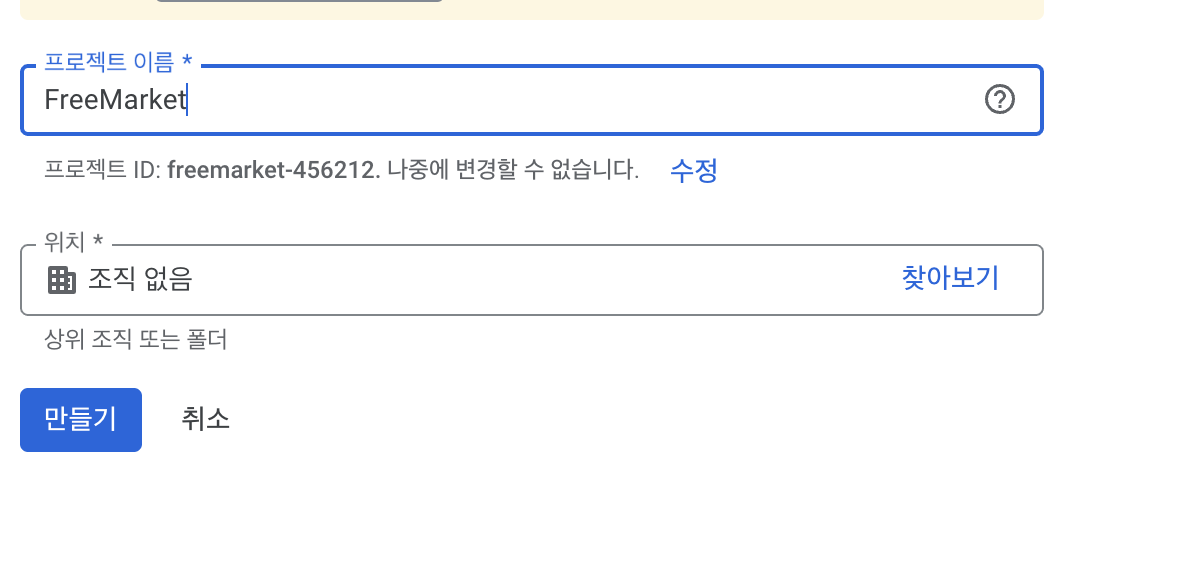
API 및 서비스 -> OAuth2 동의화면에 들어간다.
앱 이름, 이메일 등을 입력하여 준다.
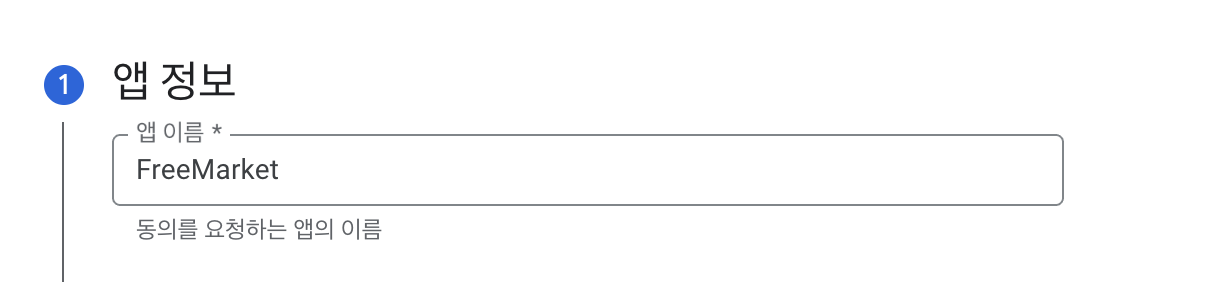
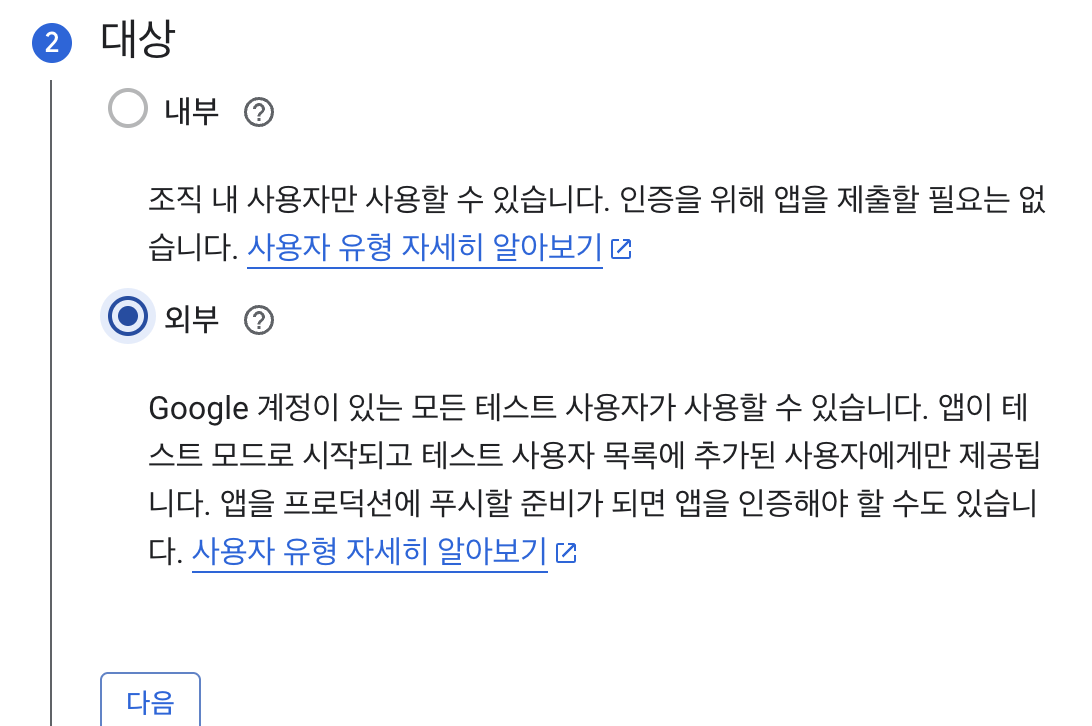
API 및 서비스 -> 사용자 인증 정보 -> 사용자 인증 정보 만들기 -> OAuth 클라이언트 ID를 클릭한다.
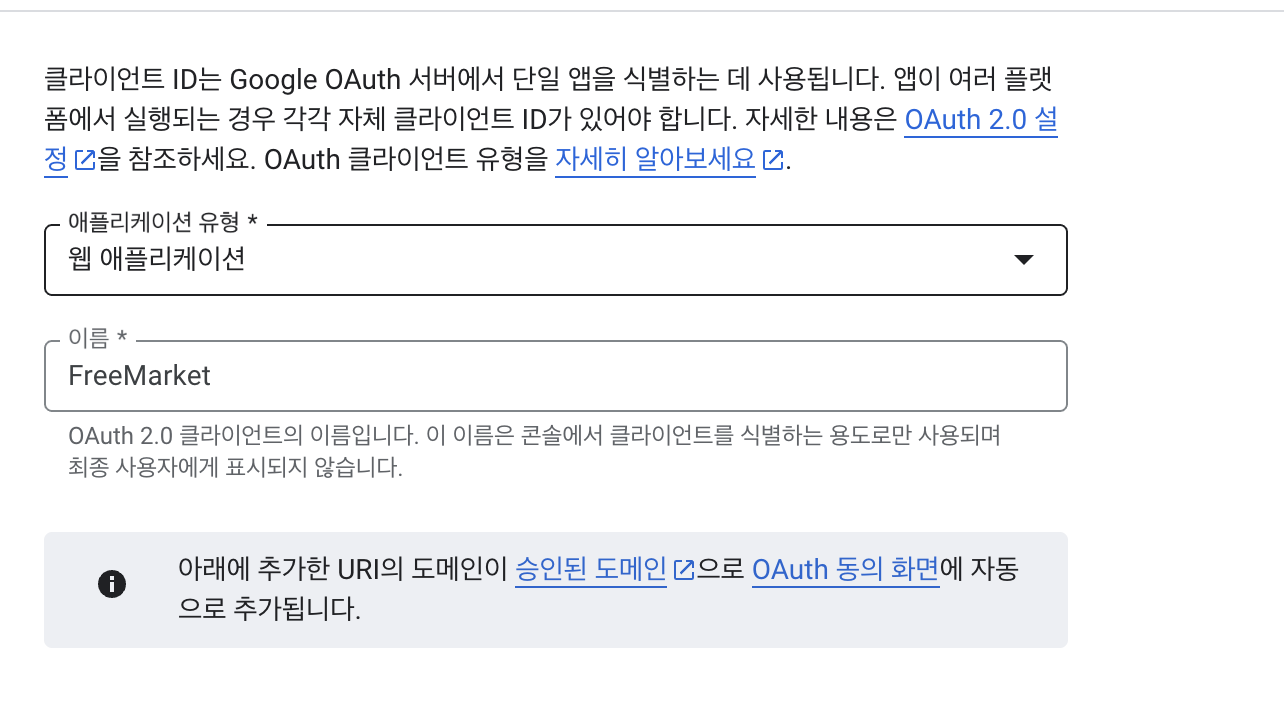
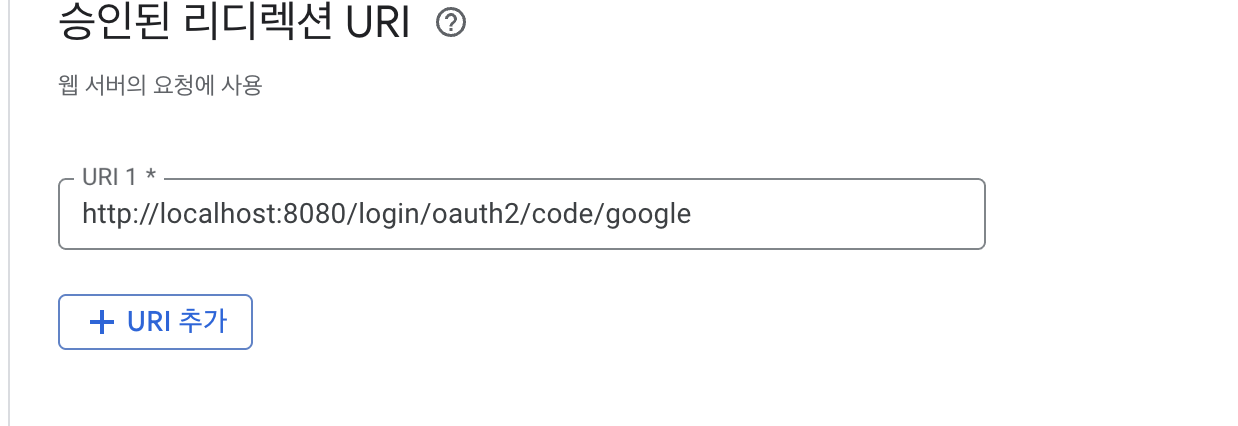
승인된 리디렉션 URI는 http://localhost:8080/login/oauth2/code/google로 작성해준다.
생성시 발급 받은 클라이언트 ID와, 비밀번호를 yml 파일에 저장해줄 것이다.
네이버 설정
Naver Developers에 접속하여 애플리케이션을 등록해준다.
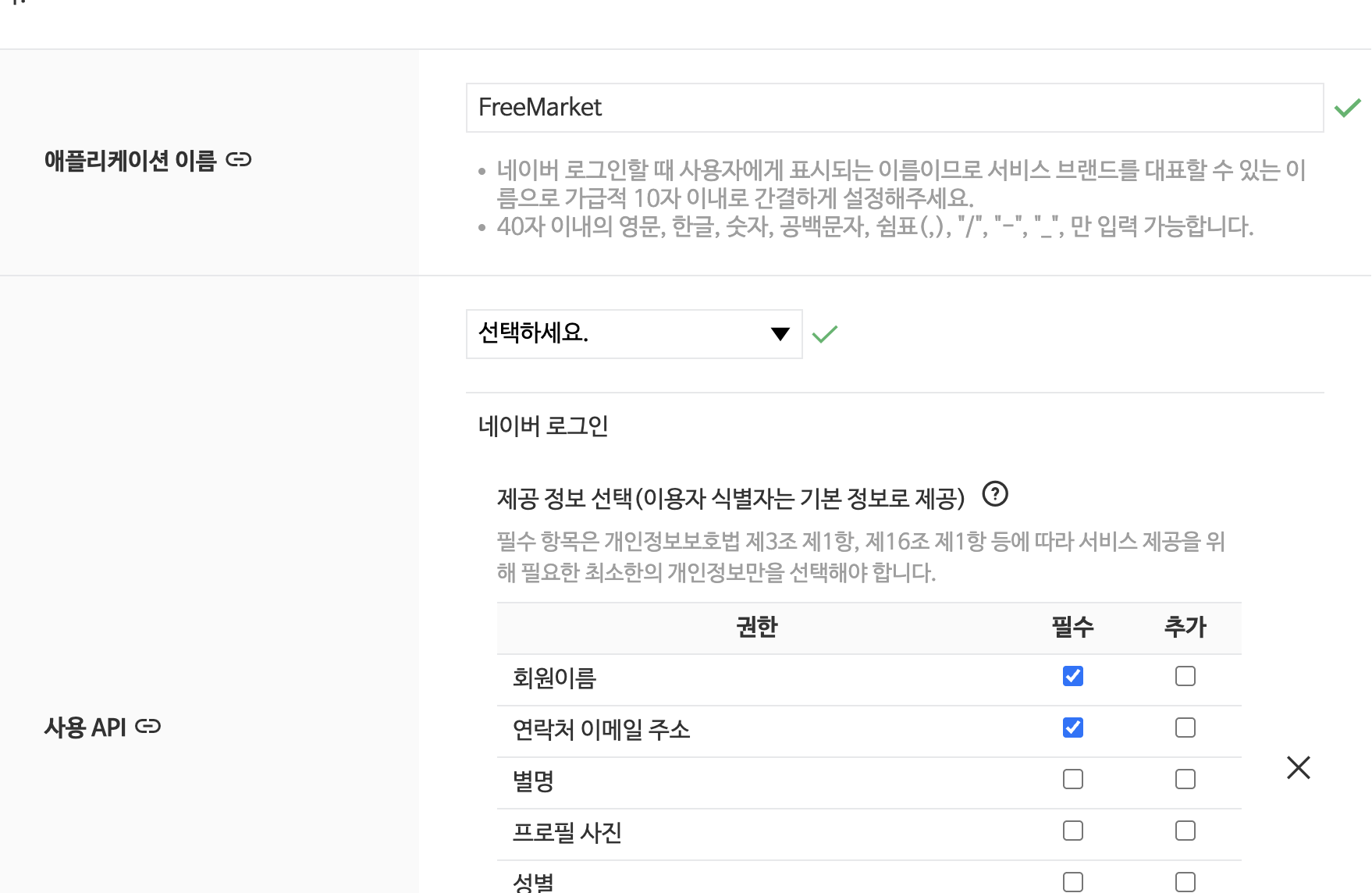
리다이렉션 URI: http://localhost:8080/login/oauth2/code/naver로 해준다.
개발자 외 다른 사람도 관리를 하거나 테스터 id가 필요할 경우 멤버 관리에서 추가해준다.
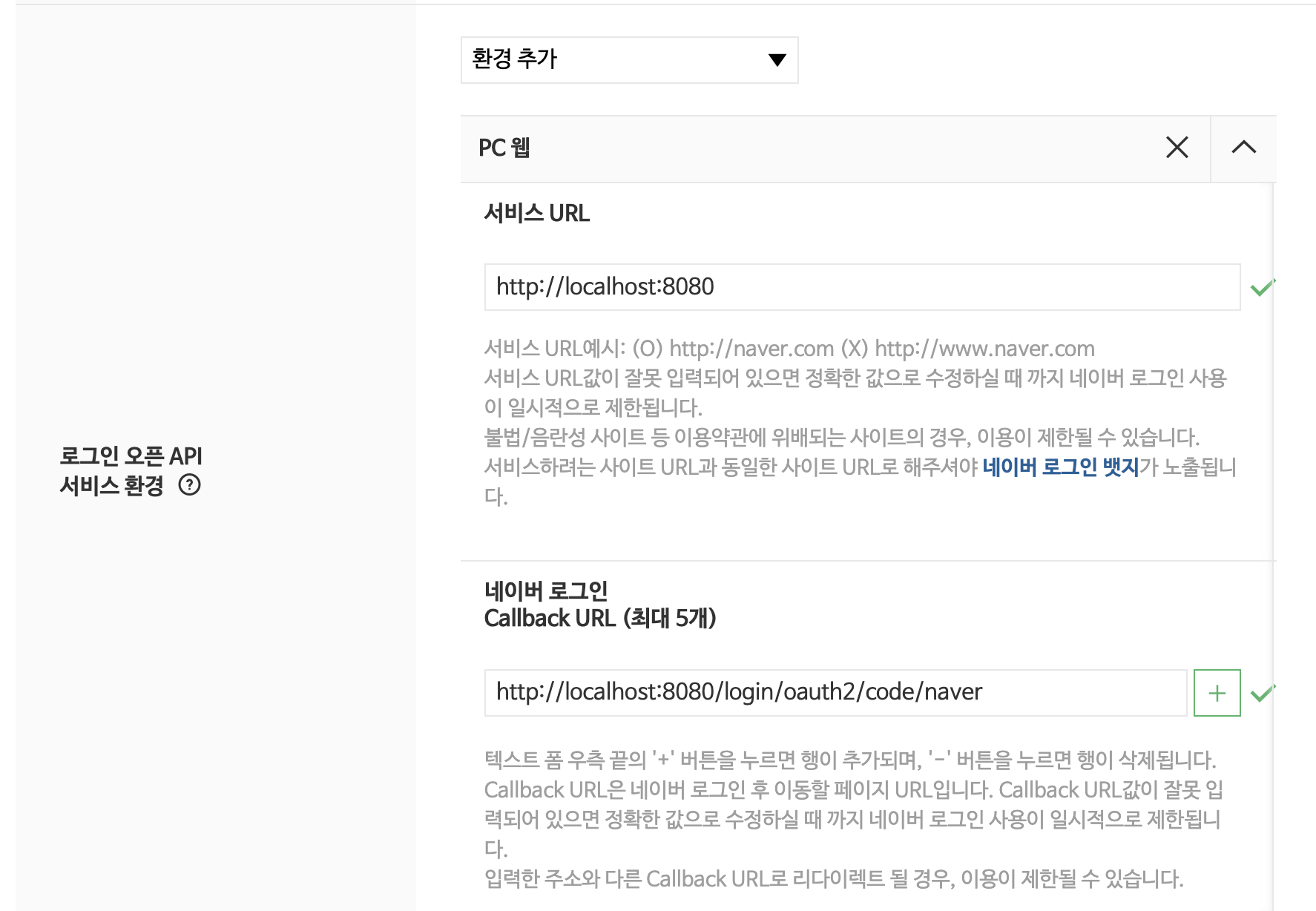
이후 추가적으로 검수 요청까지 끝내야 한다.
카카오 설정
Kakako Developers에 접속하여 애플리케이션을 등록해준다.
카카오 로그인을 활성화 해준 뒤에 http://localhost:8080/login/oauth2/code/kakao로 리다이렉션 URI를 설정한다.
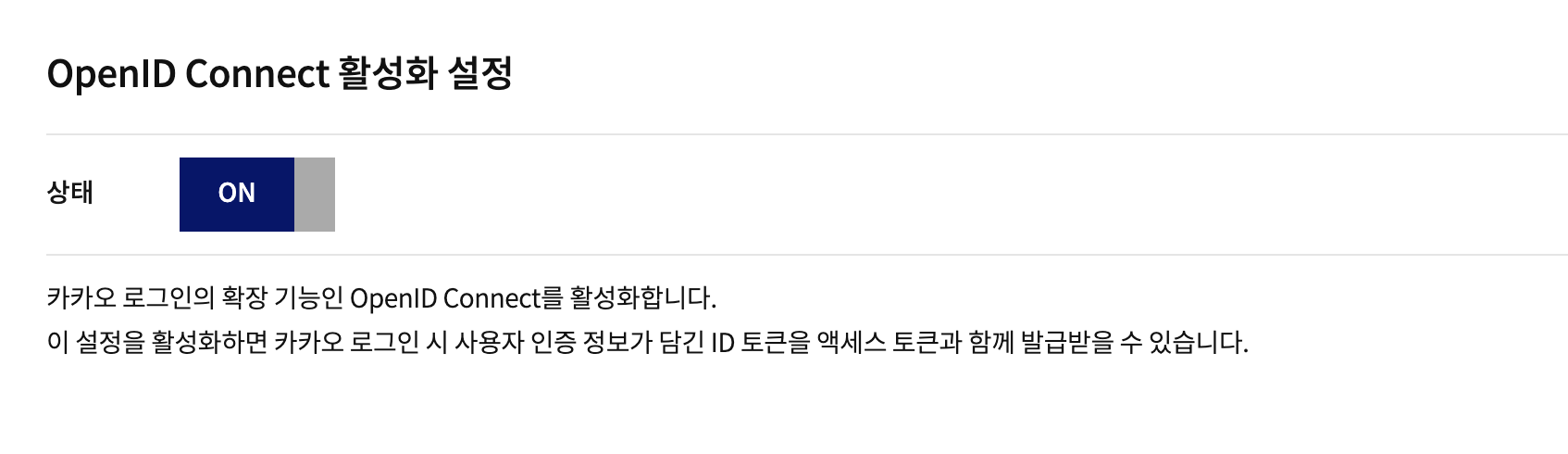
OIDC도 활성화한다.
OpenID Connect를 활성화하면 카카오 로그인 시 액세스 토큰과 ID 토큰을 함께 발급받을 수 있다.
이후 개인 개발자 비즈앱 설정을 해준다.
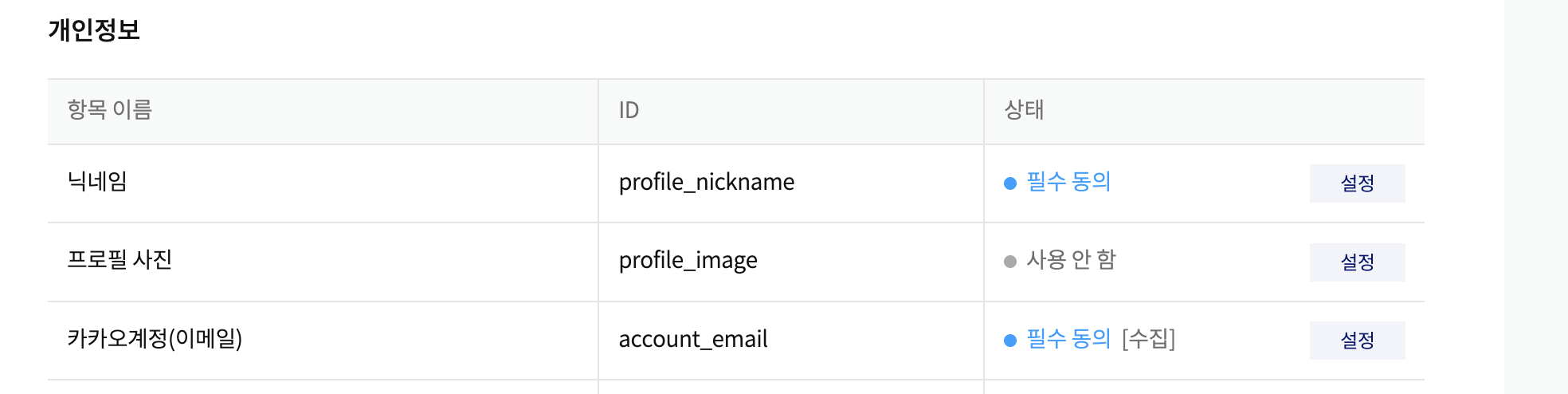
내 애플리케이션 -> 앱 키에 들어가서 rest api key를 client-id 값으로 사용한다.
이후 비즈니스 인증 -> 보안에서 client-secret을 발급 받아준다.
네이버나 카카오는 배포 전에 검수 요청을 한 뒤에 배포를 할 수 있다.
현재는 테스트 단계이기 때문에 그냥 진행한다.
Spring Security 설정
private final JwtProvider jwtProvider;
    // OAuth2 관련 빈 주입
    private final CustomOAuth2UserService customOAuth2UserService; // 네이버용
    private final CustomOidcUserService customOidcUserService;   // 카카오, 구글용 (OIDC)
    private final OAuth2LoginSuccessHandler oAuth2LoginSuccessHandler;
    private final OAuth2LoginFailureHandler oAuth2LoginFailureHandler;

    @Bean
    public SecurityFilterChain securityFilterChain(HttpSecurity http, JwtProvider jwtProvider) throws Exception {
        return http
                .csrf(AbstractHttpConfigurer::disable) // REST API이므로 CSRF 보안 비활성화
                .httpBasic(AbstractHttpConfigurer::disable)
                .formLogin(AbstractHttpConfigurer::disable)
                // 세션 관리: STATELESS (JWT 사용)
                .sessionManagement(session -> session
                        .sessionCreationPolicy(SessionCreationPolicy.STATELESS))
                // 요청별 인가 설정
                .authorizeHttpRequests(authorize -> authorize
                        // 공개 경로 설정
                        .requestMatchers("/api/auth/**").permitAll() // 일반 로그인/회원가입 API
                        .requestMatchers("/oauth2/**").permitAll()            // OAuth2 로그인 시작 URL (e.g., /oauth2/authorization/google)
                        .requestMatchers("/login/oauth2/code/**").permitAll() // OAuth2 리다이렉션 URI
                        .requestMatchers("/swagger-ui/**", "/v3/api-docs/**").permitAll() // Swagger 허용
                        .requestMatchers("/h2-console/**").permitAll() // H2 콘솔 허용
                        .anyRequest().authenticated() // 그 외 모든 요청은 인증 필요
                )
                .oauth2Login(oauth2 -> oauth2
                        // 사용자 정보 엔드포인트 설정
                        .userInfoEndpoint(userInfo -> userInfo
                                .userService(customOAuth2UserService) // OAuth2 (naver)
                                .oidcUserService(customOidcUserService) // OIDC (google, kakao)
                        )

                        // 로그인 성공 / 실패 핸들러
                        .successHandler(oAuth2LoginSuccessHandler) // 성공 시 JWT 발급 및 JSON 응답
                        .failureHandler(oAuth2LoginFailureHandler) // 실패 시 JSON 에러 응답

                        // .authorizationEndpoint(endpoint -> endpoint // 로그인 페이지 경로 커스텀 시
                        //         .baseUri("/oauth2/authorization") // 기본값: /oauth2/authorization/{registrationId}
                        // )
                        // .redirectionEndpoint(endpoint -> endpoint // 리다이렉션 URI 경로 커스텀 시
                        //         .baseUri("/login/oauth2/code/*")   // 기본값: /login/oauth2/code/{registrationId}
                        // )
                )
                .headers(headers -> headers.frameOptions(options -> options.sameOrigin())) // H2 콘솔 사용을 위한 설정
                .addFilterBefore(new JwtFilter(jwtProvider), UsernamePasswordAuthenticationFilter.class)
                .build();
    }
.httpBasic(AbstractHttpConfigurer::disable): HTTP Basic 인증 방식을 비활성화한다. (사용자 이름과 비밀번호를 Base64로 인코딩하여 헤더에 실어 보내는 방식).formLogin(AbstractHttpConfigurer::disable): Spring Security가 기본으로 제공하는 로그인 폼 페이지 및 관련 기능을 비활성화한다. (API 서버이므로 별도의 로그인 폼을 사용하지 않음)
OAuth2/OIDC 응답 처리
OAuthAttributes
@Slf4j
@Builder
public record OAuthAttributes(
        Map<String, Object> attributes, // 원본 사용자 정보 속성
        String nameAttributeKey,        // 사용자 이름 속성 키 (설정 파일의 user-name-attribute 값)
        String name,
        String email,
        String provider,                // 예: "google", "kakao", "naver"
        String providerId               // 소셜 플랫폼 고유 ID
) {

    // registrationId(provider)에 따라 분기하여 OAuthAttributes 객체 생성
    public static OAuthAttributes of(String registrationId, String userNameAttributeName, Map<String, Object> attributes) {
        log.debug("OAuthAttributes.of() called with registrationId: {}, userNameAttributeName: {}, attributes: {}",
                registrationId, userNameAttributeName, attributes);
        return switch (registrationId.toLowerCase()) {
            case "google" -> ofGoogle(userNameAttributeName, attributes);
            case "kakao" -> ofKakao(userNameAttributeName, attributes);
            case "naver" -> ofNaver("response", attributes); // 네이버는 user-name-attribute가 response 고정
            default -> throw new IllegalArgumentException("지원하지 않는 소셜 로그인입니다: " + registrationId);
        };
    }

    // Google 사용자 정보 추출
    private static OAuthAttributes ofGoogle(String userNameAttributeName, Map<String, Object> attributes) {
        return OAuthAttributes.builder()
                .name((String) attributes.get("name"))
                .email((String) attributes.get("email"))
                .provider("google")
                .providerId((String) attributes.get(userNameAttributeName)) // "sub"
                .attributes(attributes)
                .nameAttributeKey(userNameAttributeName)
                .build();
    }

    // Kakao 사용자 정보 추출
    @SuppressWarnings("unchecked") // Map 캐스팅 경고 무시
    private static OAuthAttributes ofKakao(String userNameAttributeName, Map<String, Object> attributes) {
        log.debug("카카오 응답 속성: {}", attributes);

        // OIDC 방식일 때는 다른 구조를 가질 수 있음
        String name = null;
        String email = null;
        String providerId = null;

        // ID 값 가져오기 (OIDC와 일반 OAuth2 모두 처리)
        if (attributes.containsKey(userNameAttributeName)) {
            providerId = String.valueOf(attributes.get(userNameAttributeName));
        }

        // 일반 OAuth2 응답 구조 처리
        if (attributes.containsKey("kakao_account")) {
            Map<String, Object> kakaoAccount = (Map<String, Object>) attributes.get("kakao_account");

            if (kakaoAccount != null) {
                email = (String) kakaoAccount.get("email");

                if (kakaoAccount.containsKey("profile")) {
                    Map<String, Object> profile = (Map<String, Object>) kakaoAccount.get("profile");
                    if (profile != null) {
                        name = (String) profile.get("nickname");
                    }
                }
            }
        }
        // OIDC 응답 구조 처리
        else if (attributes.containsKey("email")) {
            email = (String) attributes.get("email");

            // OIDC에서는 name이 다른 위치에 있을 수 있음
            if (attributes.containsKey("name")) {
                name = (String) attributes.get("name");
            } else if (attributes.containsKey("nickname")) {
                name = (String) attributes.get("nickname");
            }
        }

        // 이름이 여전히 null이면 기본값 설정
        if (name == null) {
            name = "카카오 사용자";
        }

        return OAuthAttributes.builder()
                .name(name)
                .email(email)
                .provider("kakao")
                .providerId(providerId)
                .attributes(attributes)
                .nameAttributeKey(userNameAttributeName)
                .build();
    }

    // Naver 사용자 정보 추출
    @SuppressWarnings("unchecked")
    private static OAuthAttributes ofNaver(String userNameAttributeName, Map<String, Object> attributes) {
        log.debug("네이버 속성: {}", attributes);

        // 응답에 'response' 객체가 있는지 확인
        Map<String, Object> responseData;
        if (attributes.containsKey("response")) {
            // 기존 구조: response 객체 내부에 데이터가 있는 경우
            responseData = (Map<String, Object>) attributes.get("response");
        } else {
            // 새로운 구조: 데이터가 최상위 레벨에 있는 경우
            responseData = attributes;
        }

        // 필수 필드 확인
        if (responseData == null || !responseData.containsKey("id")) {
            log.error("네이버 응답에서 사용자 정보를 찾을 수 없습니다. attributes: {}", attributes);
            throw new OAuth2AuthenticationException("네이버 응답에서 사용자 정보를 찾을 수 없습니다.");
        }

        String id = String.valueOf(responseData.get("id"));
        String name = (String) responseData.getOrDefault("name", "네이버 사용자");
        String email = (String) responseData.getOrDefault("email", id + "@naver.com");

        return OAuthAttributes.builder()
                .name(name)
                .email(email)
                .provider("naver")
                .providerId(id)
                .attributes(responseData)
                .nameAttributeKey("id")
                .build();
    }

    // OAuthAttributes 정보를 바탕으로 User 엔티티 생성 (최초 가입 시)
    public User toEntity() {
        return User.builder()
                .name(name)
                .email(email) // 이메일 동의 안 할 경우 null일 수 있으므로 예외처리 또는 대체값 필요
                .role(UserRole.ROLE_USER) // 기본 역할
                .enabled(true)
                .password(UUID.randomUUID().toString()) // 소셜 로그인은 비밀번호 불필요, 임의 값 설정
                .provider(provider)
                .providerId(providerId)
                .build();
    }
}
다양한 소셜 로그인 제공자(구글, 카카오, 네이버) 간의 데이터 구조 차이를 흡수하는 중요한 어댑터 역할을 한다. 각기 다른 형식으로 들어오는 사용자 정보를 파싱하여 일관되고 표준화된 형식(name, email, provider, providerId 등)으로 변환하고 담아둔다. 이를 통해 어떤 소셜 플랫폼으로 로그인했는지에 상관없이 동일한 방식으로 사용자 데이터를 다룰 수 있게 되어, 여러 소셜 로그인을 구현하고 관리하는 과정을 훨씬 단순하게 만들어 준다.
소셜 로그인 인증 처리 서비스
OIDC (Google, Kakao)
CustomOidcUserService
@Slf4j
@Service
@Transactional(readOnly = true)
@RequiredArgsConstructor
public class CustomOidcUserService extends OidcUserService { // OidcUserService 상속

    private final UserRepository userRepository;
    // google, kakao용
    @Override
    @Transactional
    public OidcUser loadUser(OidcUserRequest userRequest) throws OAuth2AuthenticationException {
        log.debug("CustomOidcUserService: Loading user for request: {}", userRequest.getClientRegistration().getRegistrationId());

        // 기본 OidcUserService를 통해 사용자 정보 가져오기 (ID Token 포함)
        OidcUser oidcUser = super.loadUser(userRequest);

        String registrationId = userRequest.getClientRegistration().getRegistrationId();
        // OIDC는 ID Token의 'sub' 또는 설정된 user-name-attribute 사용
        String userNameAttributeName = userRequest.getClientRegistration().getProviderDetails()
                .getUserInfoEndpoint().getUserNameAttributeName();

        Map<String, Object> attributesMap = oidcUser.getAttributes();
        OAuthAttributes attributes = OAuthAttributes.of(registrationId, userNameAttributeName, attributesMap);

        User user = saveOrUpdate(attributes);

        // OidcUser 구현체 반환
        return new DefaultOidcUser(
                Collections.singleton(new SimpleGrantedAuthority(user.getRole().name())),
                oidcUser.getIdToken(), // ID Token 포함
                oidcUser.getUserInfo(), // UserInfo Endpoint 정보 포함 (선택적)
                userNameAttributeName); // ID Token에서 사용자 이름으로 사용할 속성 키
    }

    // CustomOAuth2UserService와 동일한 로직 사용 가능 (중복 제거 고려)
    private User saveOrUpdate(OAuthAttributes attributes) {
        Optional<User> userOptional = userRepository.findByProviderAndProviderId(attributes.provider(), attributes.providerId());

        User user;
        if (userOptional.isPresent()) {
            user = userOptional.get();
            user.updateOAuthInfo(attributes.name());
            log.info("Existing user found via OIDC: provider={}, providerId={}, email={}",
                    attributes.provider(), attributes.providerId(), user.getEmail());
        } else {
            Optional<User> existingEmailUser = userRepository.findByEmail(attributes.email());
            if (existingEmailUser.isPresent()) {
                log.warn("Email already exists: {}", attributes.email());
                throw new OAuth2AuthenticationException("이미 가입된 이메일입니다: " + attributes.email());
            }
            user = attributes.toEntity();
            userRepository.save(user);
            log.info("New user registered via OIDC: provider={}, providerId={}, email={}",
                    attributes.provider(), attributes.providerId(), user.getEmail());
        }
        return user;
    }
}-
기본 사용자 정보 로드:
super.loadUser(userRequest)를 호출하여Spring Security의 기본 기능을 통해 소셜 로그인 제공자로부터 사용자 정보를 가져온다.OIDC의 경우, 이 정보에는 ID 토큰(IdToken)과 사용자 속성(Attributes)이 포함된다. -
제공자로부터 사용자 정보를 받아
OAuthAttributes로 표준화하고,saveOrUpdate로직을 통해 해당 사용자가 기존 사용자인지 신규 사용자인지 판단하여 DB에 반영한다.
OAuth2 (Naver)
CustomOAuth2UserService
@Slf4j
@Service
@Transactional(readOnly = true)
@RequiredArgsConstructor
public class CustomOAuth2UserService implements OAuth2UserService<OAuth2UserRequest, OAuth2User> {

    private final UserRepository userRepository;
    // naver용

    @Override
    @Transactional
    public OAuth2User loadUser(OAuth2UserRequest userRequest) throws OAuth2AuthenticationException {
        log.debug("CustomOAuth2UserService: Loading user for request: {}", userRequest.getClientRegistration().getRegistrationId());

        // 기본 OAuth2UserService를 통해 사용자 정보 가져오기
        OAuth2UserService<OAuth2UserRequest, OAuth2User> delegate = new DefaultOAuth2UserService();
        OAuth2User oAuth2User = delegate.loadUser(userRequest);

        // 현재 로그인 진행 중인 서비스 구분 (naver, google 등)
        String registrationId = userRequest.getClientRegistration().getRegistrationId();
        // OAuth2 로그인 시 키가 되는 필드값 (application.yml의 user-name-attribute)
        String userNameAttributeName = userRequest.getClientRegistration().getProviderDetails()
                .getUserInfoEndpoint().getUserNameAttributeName();

        // OAuth2UserService를 통해 가져온 OAuth2User의 attribute를 담을 DTO
        Map<String, Object> attributesMap = oAuth2User.getAttributes();
        OAuthAttributes attributes = OAuthAttributes.of(registrationId, userNameAttributeName, attributesMap);

        // 사용자 정보 저장 또는 업데이트
        User user = saveOrUpdate(attributes);

        // OAuth2User 구현체 반환 (세션 대신 SecurityContext에 저장되어 후속 처리됨)
        return new DefaultOAuth2User(
                Collections.singleton(new SimpleGrantedAuthority(user.getRole().name())), // 사용자 권한
                attributes.attributes(), // 사용자 정보 속성
                attributes.nameAttributeKey()); // 사용자 이름 속성 키
    }

    // 사용자 정보 기반으로 회원가입 또는 정보 업데이트
    private User saveOrUpdate(OAuthAttributes attributes) {
        Optional<User> userOptional = userRepository.findByProviderAndProviderId(attributes.provider(), attributes.providerId());

        if (userOptional.isPresent()) {
            User user = userOptional.get();
            user.updateOAuthInfo(attributes.name());
            log.info("기존 사용자 로그인: provider={}, providerId={}, email={}",
                    attributes.provider(), attributes.providerId(), user.getEmail());
            return user;
        } else {
            // 이메일로 사용자 찾기 시도
            Optional<User> emailUser = userRepository.findByEmail(attributes.email());
            if (emailUser.isPresent()) {
                User user = emailUser.get();
                // provider 정보 업데이트
                user.updateProvider(attributes.provider(), attributes.providerId());
                log.info("기존 이메일 사용자에 소셜 연결: provider={}, email={}",
                        attributes.provider(), user.getEmail());
                return user;
            }

            // 새 사용자 생성
            User newUser = attributes.toEntity();
            userRepository.save(newUser);
            log.info("새 사용자 가입: provider={}, email={}",
                    attributes.provider(), newUser.getEmail());
            return newUser;
        }
    }
}
네이버와 같은 표준 OAuth2 기반 소셜 로그인을 처리하는 서비스다. 로그인 성공 시, 네이버로부터 사용자 정보를 받아 OAuthAttributes로 표준화하고, saveOrUpdate 로직을 통해 사용자를 처리한다.
로그인 결과 처리
OAuth2LoginSuccessHandler
@Slf4j
@Component
@Transactional(readOnly = true)
@RequiredArgsConstructor
public class OAuth2LoginSuccessHandler extends SimpleUrlAuthenticationSuccessHandler {

    private final JwtProvider jwtProvider;
    private final RefreshTokenService refreshTokenService;
    private final UserRepository userRepository;
    private final ObjectMapper objectMapper;

    @Override
    @Transactional
    public void onAuthenticationSuccess(HttpServletRequest request, HttpServletResponse response, Authentication authentication) throws IOException, ServletException {
        log.info("OAuth2 Login Success Handler: Authentication successful.");
        clearAuthenticationAttributes(request);

        OAuth2User oAuth2User = (OAuth2User) authentication.getPrincipal();
        Map<String, Object> attributesMap = oAuth2User.getAttributes();
        String registrationId = ((OAuth2AuthenticationToken) authentication).getAuthorizedClientRegistrationId();

        log.debug("소셜 로그인 - provider: {}, attributes: {}", registrationId, attributesMap);

        // 네이버 로그인 처리
        if ("naver".equals(registrationId)) {
            try {
                // 응답 구조 확인
                Map<String, Object> userData;
                if (attributesMap.containsKey("response")) {
                    userData = (Map<String, Object>) attributesMap.get("response");
                } else {
                    userData = attributesMap; // 최상위 레벨에 데이터가 있는 경우
                }

                // 필수 정보 확인
                if (userData == null || !userData.containsKey("id")) {
                    log.error("네이버 응답에서 사용자 ID를 찾을 수 없습니다");
                    sendErrorResponse(response, "네이버 로그인 처리 중 오류가 발생했습니다");
                    return;
                }

                String providerId = String.valueOf(userData.get("id"));
                String email = (String) userData.get("email");
                String name = (String) userData.get("name");

                // providerId로 사용자 조회
                Optional<User> existingUser = userRepository.findByProviderAndProviderId("naver", providerId);

                User user;
                if (existingUser.isPresent()) {
                    // 기존 사용자 - 정보 업데이트
                    user = existingUser.get();
                    if (name != null) {
                        user.updateOAuthInfo(name);
                    }
                    log.info("기존 네이버 사용자 로그인: providerId={}", providerId);
                } else {
                    // 신규 사용자 - 회원가입
                    String userEmail = email != null ? email : providerId + "@naver.com";
                    user = User.builder()
                            .name(name != null ? name : "네이버 사용자")
                            .email(userEmail)
                            .password(UUID.randomUUID().toString())
                            .role(UserRole.ROLE_USER)
                            .enabled(true)
                            .provider("naver")
                            .providerId(providerId)
                            .build();
                    userRepository.save(user);
                    log.info("새 네이버 사용자 등록: providerId={}", providerId);
                }

                // JWT 토큰 발급 및 응답
                sendTokenResponse(user, response);
                return;
            } catch (Exception e) {
                log.error("네이버 로그인 처리 중 오류: {}", e.getMessage(), e);
                sendErrorResponse(response, "네이버 로그인 처리 중 오류가 발생했습니다");
                return;
            }
        }

        // 카카오, 구글 등 다른 소셜 로그인 처리
        String userNameAttributeName = getUserNameAttributeName(registrationId);
        OAuthAttributes attributes = OAuthAttributes.of(registrationId, userNameAttributeName, attributesMap);

        // 사용자 찾기 또는 생성
        User user = findOrCreateUser(attributes);

        // JWT 토큰 발급 및 응답
        sendTokenResponse(user, response);
    }

    // 사용자 찾기 또는 생성 메서드
    private User findOrCreateUser(OAuthAttributes attributes) {
        // providerId로 사용자 찾기
        Optional<User> existingUser = userRepository.findByProviderAndProviderId(
                attributes.provider(), attributes.providerId());

        if (existingUser.isPresent()) {
            // 기존 사용자 발견 - 정보 업데이트
            User user = existingUser.get();
            user.updateOAuthInfo(attributes.name());
            return user;
        }

        // 이메일로 사용자 찾기
        if (attributes.email() != null) {
            Optional<User> userByEmail = userRepository.findByEmail(attributes.email());
            if (userByEmail.isPresent()) {
                // 이메일로 사용자 발견 - 프로바이더 정보 업데이트
                User user = userByEmail.get();
                user.updateProvider(attributes.provider(), attributes.providerId());
                return user;
            }
        }

        // 신규 사용자 등록
        User newUser = attributes.toEntity();
        userRepository.save(newUser);
        return newUser;
    }

    // 오류 응답 전송
    private void sendErrorResponse(HttpServletResponse response, String message) throws IOException {
        response.setStatus(HttpServletResponse.SC_BAD_REQUEST);
        response.setContentType(MediaType.APPLICATION_JSON_VALUE);
        response.setCharacterEncoding(StandardCharsets.UTF_8.name());
        response.getWriter().write(objectMapper.writeValueAsString(ResponseDTO.error(HttpServletResponse.SC_BAD_REQUEST, message)));
        response.getWriter().flush();
    }

    // 토큰 응답 전송
    private void sendTokenResponse(User user, HttpServletResponse response) throws IOException {
        CustomUserDetails userDetails = new CustomUserDetails(
                user.getId(),
                user.getEmail(),
                user.getPassword(),
                user.getRole().name(),
                user.isEnabled()
        );
        Authentication jwtAuthentication = new UsernamePasswordAuthenticationToken(
                userDetails, null, userDetails.getAuthorities());

        String accessToken = jwtProvider.createAccessToken(jwtAuthentication);
        String refreshToken = jwtProvider.createRefreshToken(jwtAuthentication);

        refreshTokenService.saveRefreshToken(refreshToken, user.getId());

        AuthDto.TokenResponse tokenResponse = AuthDto.TokenResponse.builder()
                .accessToken(accessToken)
                .refreshToken(refreshToken)
                .tokenType("Bearer")
                .expiresIn(jwtProvider.getAccessTokenValidityInSeconds())
                .build();

        ResponseDTO<AuthDto.TokenResponse> responseDTO = ResponseDTO.success(
                tokenResponse, "소셜 로그인에 성공했습니다.");

        response.setStatus(HttpServletResponse.SC_OK);
        response.setContentType(MediaType.APPLICATION_JSON_VALUE);
        response.setCharacterEncoding(StandardCharsets.UTF_8.name());
        response.getWriter().write(objectMapper.writeValueAsString(responseDTO));
        response.getWriter().flush();
    }

    // registrationId 기반으로 userNameAttributeName 결정 (설정 파일 값과 일치해야 함)
    private String getUserNameAttributeName(String registrationId) {
        return switch (registrationId.toLowerCase()) {
            case "google" -> "sub";
            case "kakao" -> "id";
            case "naver" -> "response"; // OAuthAttributes.ofNaver에서 실제 키는 'id'로 처리함
            default -> throw new IllegalArgumentException("Unsupported provider: " + registrationId);
        };
    }
}-
onAuthenticationSuccess 메서드 (메인 로직)
clearAuthenticationAttributes(request)를 호출하여 로그인 과정 중 세션에 임시로 저장될 수 있는 데이터를 제거한다. (Stateless 방식이므로) -
소셜 로그인 성공 후 최종 처리를 담당하는 핸들러다. 네이버 로그인을 다른 소셜 로그인과 분리하여 특별히 처리하는 로직이 포함되어 있다. 어떤 소셜 로그인이든 성공적으로 사용자 정보를 확인하거나 새로 등록한 후에는, 해당 사용자를 위한
JWT(Access Token, Refresh Token)를 발급하고 이를 클라이언트에게JSON형태로 응답하는 것이 이 핸들러의 주된 역할이다.
OAuth2LoginFailureHandler
@Slf4j
@Component
@RequiredArgsConstructor
public class OAuth2LoginFailureHandler implements AuthenticationFailureHandler {

    private final ObjectMapper objectMapper;

    @Override
    public void onAuthenticationFailure(HttpServletRequest request, HttpServletResponse response, AuthenticationException exception) throws IOException, ServletException {
        log.error("OAuth2 Authentication Failed: {}", exception.getMessage(), exception);

        HttpStatus status = HttpStatus.UNAUTHORIZED; // 기본값: 인증 실패
        String message = "소셜 로그인에 실패했습니다. 다시 시도해주세요.";
        String errorCode = "OAUTH2_AUTH_FAILED";

        // 특정 예외에 따라 메시지나 상태 코드 변경 가능
        // 예: 이메일 중복 예외 (UserService에서 발생시킨 경우)
        // if (exception.getCause() instanceof YourCustomEmailDuplicateException) {
        //     status = HttpStatus.CONFLICT;
        //     message = exception.getMessage(); // 예외 메시지 사용
        //     errorCode = "EMAIL_DUPLICATE";
        // }

        ErrorResponse errorData = ErrorResponse.builder()
                .status(status.value())
                .message(message)
                .errorCode(errorCode)
                .timestamp(LocalDateTime.now())
                .errors(List.of()) // OAuth 실패는 특정 필드 에러가 아님
                .build();

        ResponseDTO<ErrorResponse> responseDTO = ResponseDTO.error(status.value(), message, errorData);

        // JSON 응답 전송
        response.setStatus(status.value());
        response.setContentType(MediaType.APPLICATION_JSON_VALUE);
        response.setCharacterEncoding(StandardCharsets.UTF_8.name());
        response.getWriter().write(objectMapper.writeValueAsString(responseDTO));
        response.getWriter().flush();
    }
}
소셜 로그인 과정에서 어떤 이유로든 오류가 발생하여 로그인이 실패했을 때 동작하는 컴포넌트다. 실패 원인을 서버 로그에 기록하고, 클라이언트(사용자)에게는 일관된 JSON 형식의 오류 메시지 (기본적으로 401 Unauthorized 상태 코드와 함께 "소셜 로그인 실패" 메시지)를 전달하여 로그인 시도가 실패했음을 알려주는 역
엔티티 및 토큰 처리
User
// 소셜 로그인 정보
    private String provider;    // 제공자 (google, kakao, naver)
    private String providerId;  // 제공자에서의 ID

    // 소셜 로그인 정보 업데이트
    public void updateOAuthInfo(String name) {
        this.name = name;
    }

    // 제공자 정보 업데이트
    public void updateProvider(String provider, String providerId) {
        this.provider = provider;
        this.providerId = providerId;
    }
RefreshToken
@Column(nullable = false, length = 1000) // 길이 제한 확장
    private String token;
테스트
http://localhost:8080/login
http://localhost:8080/oauth2/authorize/google
http://localhost:8080/oauth2/authorize/kakao
http://localhost:8080/oauth2/authorize/naver

네이버에서도 oidc 방식을 지원하는데 oauth2로 구현하신 이유가 있을까요?