domain
ViewCount
entity
@Entity
@Table(name = "product_view_counts")
@Getter
@NoArgsConstructor(access = AccessLevel.PROTECTED)
public class ProductViewCount extends BaseTimeEntity {

    @Id
    @GeneratedValue(strategy = GenerationType.IDENTITY)
    @Column(name = "view_count_id")
    private Long id;

    @OneToOne(fetch = FetchType.LAZY)
    @JoinColumn(name = "product_id", unique = true)
    private Product product;

    @Column(nullable = false)
    private Long count = 0L;

    @Builder
    public ProductViewCount(Product product, Long count) {
        this.product = product;
        this.count = 0L;
    }

    public void incrementCount() {
        this.count += 1;
    }
}- 조회수는 자주 업데이트되는 데이터다. 별도 테이블로 분리하면
Product테이블의 락(lock) 경합을 줄일 수 있어 성능상 이점이 있다. - 특히 조회수가 높은 인기 상품의 경우, 메인
Product테이블에 영향을 주지 않고 조회수만 업데이트할 수 있다.
Repository
public interface ProductViewCountRepository extends JpaRepository<ProductViewCount, Long> {
    Optional<ProductViewCount> findByProductId(Long productId);
}
Wishlist
entity
@Entity
@Table(name = "product_wishlists" ,uniqueConstraints = {
        @UniqueConstraint(columnNames = {"user_id", "product_id"})
})
@Getter
@NoArgsConstructor(access = AccessLevel.PROTECTED)
public class ProductWishlist extends BaseTimeEntity {

    @Id
    @GeneratedValue(strategy = GenerationType.IDENTITY)
    @Column(name = "wishlist_id")
    private Long id;

    @ManyToOne(fetch = FetchType.LAZY)
    @JoinColumn(name = "user_id", nullable = false)
    private User user;

    @ManyToOne(fetch = FetchType.LAZY)
    @JoinColumn(name = "product_id", nullable = false)
    private Product product;

    @Builder
    public ProductWishlist(User user, Product product) {
        this.user = user;
        this.product = product;
    }
}
ProductWishlist를 별도 엔티티로 만드는 이유
- 다대다(N) 관계:
사용자와 상품 간의 '관심 등록' 관계는 본질적으로 다대다 관계다.(한 사용자는 여러 상품에 관심을 가질 수 있고, 한 상품은 여러 사용자의 관심을 받을 수 있음)
JPA에서는 이런 다대다 관계를 연결 테이블(join table)을 통해 표현하며, 이것이ProductWishlist엔티티다.
-
추가 정보 저장 가능:
현재는 단순히 관계만 저장하지만, 나중에 "관심 등록한 날짜", "알림 설정 여부" 등의 추가 정보를 저장할 수 있다. -
비즈니스 로직 관리:
위시리스트 추가/제거, 조회 등의 비즈니스 로직을 별도 엔티티와 서비스에서 관리하면 코드가 더 명확해진다.
UniqueConstraint 사용 이유
- 복합 키 제약 조건: 두 개의 컬럼(
user_id와product_id)에 대한 복합 유니크 제약 조건이 필요하다. 즉, 한 사용자가 동일한 상품을 두 번 이상 위시리스트에 추가하지 못하도록 한다. - 테이블 수준 제약 조건: 여러 컬럼에 걸친 제약 조건은 테이블 수준에서 정의해야 한다.
@Table어노테이션의uniqueConstraints속성을 통해 이를 구현한다.
unique = true
일대일(1:1) 관계: 각 상품(Product)은 정확히 하나의 조회수 엔티티(ProductViewCount)만 가질 수 있다.
Repository
public interface ProductWishlistRepository extends JpaRepository<ProductWishlist, Long>, ProductWishlistRepositoryCustom {
    Optional<ProductWishlist> findByUserAndProduct(User user, Product product);
    List<ProductWishlist> findAllByUser(User user);
    boolean existsByUserAndProduct(User user, Product product);
    void deleteByUserAndProduct(User user, Product product);
}
public interface ProductWishlistRepositoryCustom {
Long countByProductId(Long productId);
}@RequiredArgsConstructor
public class ProductWishlistRepositoryImpl implements ProductWishlistRepositoryCustom {
private final JPAQueryFactory queryFactory;
@Override
public Long countByProductId(Long productId) {
return queryFactory
.select(productWishlist.count())
.from(productWishlist)
.where(productWishlist.product.id.eq(productId))
.fetchOne();
}
}- 특정 상품의 관심 등록 수를 카운트한다.
Product
Repository
public interface ProductRepositoryCustom {
    // 전체 상품 조회 (필터링 옵션 포함)
    Page<Product> findAllWithFilters(String keyword, ProductStatus status, Pageable pageable);

    // 카테고리별 상품 조회
    Page<Product> findByCategoryWithFilters(ProductCategory category, String keyword, ProductStatus status, Pageable pageable);

    // 통계 정보를 함께 조회
    Page<ProductWithStatsDto> findAllWithStatsAndWishlist(String keyword, ProductStatus status, Pageable pageable, Long userId);
    Page<ProductWithStatsDto> findByCategoryWithStatsAndWishlist(ProductCategory category, String keyword, ProductStatus status, Pageable pageable, Long userId);
}
findAllWithStatsAndWishlist
전체 상품을 조회하되, 각 상품의 통계 정보(조회수, 관심 등록 수, 관심 등록 여부)를 함께 가져온다.findByCategoryWithStatsAndWishlist
특정 카테고리의 상품을 조회하되, 각 상품의 통계 정보를 함께 가져온다.
@RequiredArgsConstructor
public class ProductRepositoryImpl implements ProductRepositoryCustom {

    private final JPAQueryFactory queryFactory;

    @Override
    public Page<Product> findAllWithFilters(String keyword, ProductStatus status, Pageable pageable) {
        // 공통 조건을 사용하여 BooleanBuilder 생성
        BooleanBuilder builder = createBasicCondition(keyword, status, null);

        // 페이지 조회 및 생성 공통 메서드 호출
        return fetchPagedProductsWithFetchJoin(builder, pageable);
    }

    @Override
    public Page<Product> findByCategoryWithFilters(ProductCategory category, String keyword, ProductStatus status, Pageable pageable) {
        // 공통 조건을 사용하여 BooleanBuilder 생성
        BooleanBuilder builder = createBasicCondition(keyword, status, category);

        // 페이지 조회 및 생성 공통 메서드 호출
        return fetchPagedProductsWithFetchJoin(builder, pageable);
    }

    @Override
    public Page<ProductWithStatsDto> findAllWithStatsAndWishlist(String keyword, ProductStatus status, Pageable pageable, Long userId) {
        BooleanBuilder builder = createBasicCondition(keyword, status, null);

        return fetchPagedProductsWithStats(builder, pageable, userId);
    }

    @Override
    public Page<ProductWithStatsDto> findByCategoryWithStatsAndWishlist(ProductCategory category, String keyword, ProductStatus status, Pageable pageable, Long userId) {
        // 공통 조건을 사용하여 BooleanBuilder 생성
        BooleanBuilder builder = createBasicCondition(keyword, status, category);

        // 통계 정보를 포함한 페이지 조회 및 생성 메서드 호출
        return fetchPagedProductsWithStats(builder, pageable, userId);
    }

    private Page<ProductWithStatsDto> fetchPagedProductsWithStats(BooleanBuilder builder, Pageable pageable, Long userId) {
        // 페이징된 ID 목록 조회
        List<Long> productIds = queryFactory
                .select(product.id)
                .from(product)
                .where(builder)
                .orderBy(product.createdDate.desc())
                .offset(pageable.getOffset())
                .limit(pageable.getPageSize())
                .fetch();

        if (productIds.isEmpty()) {
            return Page.empty(pageable);
        }

        // ID 목록으로 Product와 images를 Fetch Join하여 조회
        List<Product> products = queryFactory
                .select(product).distinct()
                .from(product)
                .leftJoin(product.images, productImage).fetchJoin()
                .where(product.id.in(productIds))
                .orderBy(product.createdDate.desc())
                .fetch();

        // 조회된 상품들의 조회수 쿼리
        Map<Long ,Long> viewCountMap = queryFactory
                .select(productViewCount.product.id, productViewCount.count)
                .from(productViewCount)
                .where(productViewCount.product.id.in(productIds))
                .fetch()
                .stream()
                .collect(Collectors.toMap(
                        tuple -> tuple.get(productViewCount.product.id),
                        tuple -> tuple.get(productViewCount.count),
                        (a, b) -> a // 중복 키 발생 시 첫 번째 값 유지
                ));

        // 조회된 상품들의 관심 등록 수 조회
        Map<Long, Long> wishlistCountMap = queryFactory
                .select(productWishlist.product.id, productWishlist.count())
                .from(productWishlist)
                .where(productWishlist.product.id.in(productIds))
                .groupBy(productWishlist.product.id)
                .fetch()
                .stream()
                .collect(Collectors.toMap(
                        tuple -> tuple.get(productWishlist.product.id),
                        tuple -> tuple.get(productWishlist.count()),
                        (a, b) -> a)); // 중복 키 발생 시 첫 번째 값 유지

        // 사용자가 관심 등록한 상품 ID 목록 조회
        Map<Long, Boolean> isWishlistedMap; // 기본값은 빈 맵
        if (userId != null) {
            isWishlistedMap = queryFactory
                    .select(productWishlist.product.id)
                    .from(productWishlist)
                    .where(productWishlist.product.id.in(productIds)
                            .and(productWishlist.user.id.eq(userId)))
                    .fetch()
                    .stream()
                    .collect(Collectors.toMap(
                            productId -> productId,
                            productId -> true,
                            (a, b) -> a)); // 중복 키 발생 시 첫 번째 값 유지
        } else {
            isWishlistedMap = Map.of();
        }

        // 조회된 상품을 productIds 순서에 맞게 정렬하고 DTO로 변환
        Map<Long, Product> productMap = products.stream()
                .collect(Collectors.toMap(Product::getId, p -> p));

        // 최종 DTO 리스트 생성
        List<ProductWithStatsDto> result = productIds.stream()
                .map(id -> {
                    Product p = productMap.get(id);
                    Long viewCount = viewCountMap.getOrDefault(id, 0L);
                    Long wishlistCount = wishlistCountMap.getOrDefault(id, 0L);
                    boolean isWishlisted = isWishlistedMap.getOrDefault(id, false);

                    return new ProductWithStatsDto(p, viewCount, wishlistCount, isWishlisted);
                })
                .collect(Collectors.toList());

        // 전체 개수 조회를 위한 쿼리
        JPAQuery<Long> countQuery = queryFactory
                .select(product.count())
                .from(product)
                .where(builder);

        // 페이지 객체 생성 (count 쿼리 최적화)
        return PageableExecutionUtils.getPage(result, pageable, countQuery::fetchOne);
    }

    // 상품명 또는 설명에 키워드가 포함된 조건
    private BooleanExpression nameOrDescriptionContains(String keyword) {
        return product.name.containsIgnoreCase(keyword)
                .or(product.description.containsIgnoreCase(keyword));
    }

    // 공통 조건을 사용하여 BooleanBuilder 생성하는 메서드
    private BooleanBuilder createBasicCondition(String keyword, ProductStatus status, ProductCategory category) {
        BooleanBuilder builder = new BooleanBuilder();

        // 카테고리 조건 (선택적)
        if (category != null) {
            builder.and(product.category.eq(category));
        }

        // 키워드 검색 조건 추가
        if (StringUtils.hasText(keyword)) {
            builder.and(nameOrDescriptionContains(keyword));
        }

        // 상품 상태 조건 추가
        if (status != null) {
            builder.and(product.status.eq(status));
        } else {
            // 기본적으로 활성 상품만 조회 (ACTIVE)
            builder.and(product.status.eq(ProductStatus.ACTIVE));
        }

        return builder;
    }

    private Page<Product> fetchPagedProductsWithFetchJoin(BooleanBuilder builder, Pageable pageable) {
        // 페이징된 ID 목록 조회
        List<Long> productIds = queryFactory
                .select(product.id)
                .from(product)
                .where(builder)
                .orderBy(product.createdDate.desc())
                .offset(pageable.getOffset())
                .limit(pageable.getPageSize())
                .fetch();

        if (productIds.isEmpty()) {
            return Page.empty(pageable);
        }

        // ID 목록으로 Product와 images를 Fetch join 하여 조회
        List<Product> content = queryFactory
                .select(product).distinct()
                .from(product)
                .leftJoin(product.images, productImage).fetchJoin()
                .where(product.id.in(productIds))
                .orderBy(product.createdDate.desc())
                .fetch();

        // content 리스트를 productIds 순서에 맞게 재정렬
        Map<Long, Product> productMap = content.stream()
                .collect(Collectors.toMap(Product::getId, p -> p));
        List<Product> sortedContent = productIds.stream()
                .map(productMap::get)
                .collect(Collectors.toList());

        // 전체 개수 조회를 위한 쿼리
        JPAQuery<Long> countQuery = queryFactory
                .select(product.count())
                .from(product)
                .where(builder);

        // 페이지 객체 생성 (count 쿼리 최적화)
        return PageableExecutionUtils.getPage(sortedContent, pageable, countQuery::fetchOne);
    }
}-
일반 상품 조회 메서드
findAllWithFilters: 전체 상품을 키워드와 상태로 필터링하여 조회findByCategoryWithFilters: 특정 카테고리 내에서 상품을 필터링하여 조회
-
통계 정보를 포함한 상품 조회 메서드
findAllWithStatsAndWishlist: 전체 상품과 해당 통계 정보(조회수, 관심 등록 수 등)를 함께 조회findByCategoryWithStatsAndWishlist: 카테고리별 상품과 통계 정보를 함께 조회
핵심 구현 메서드
-
fetchPagedProductsWithStats-
N+1문제를 해결하는 핵심 메서드로, 다음 단계로 진행- 필터 조건에 맞는 상품 ID 목록을 페이지네이션하여 먼저 조회
- 조회된 ID 목록으로 상품과 이미지를
Fetch Join으로 한 번에 조회 - 동일한 ID 목록을 사용해 조회수 정보를 한 번에 조회하여 Map으로 변환
- 관심 등록 수를 한 번에 조회하여 Map으로 변환
- 로그인 사용자의 경우, 해당 사용자가 관심 등록한 상품 ID 목록을 한 번에 조회
- 모든 정보를 조합하여 최종 DTO 리스트 생성
- 최적화된 카운트 쿼리 실행 후 페이지 객체 생성
-
-
fetchPagedProductsWithFetchJoin-
기본 정보만 필요한 경우의 페이징 처리 메서드:
- ID 목록 페이징 조회
- Fetch Join으로 상품과 이미지 조회
- 원본 순서대로 정렬
- 최적화된 카운트 쿼리 실행
-
-
헬퍼 메서드
createBasicCondition: 공통 필터 조건을 생성하는 메서드nameOrDescriptionContains: 상품명 또는 설명에 키워드가 포함된 조건 생성
기술적 특징
- ID 기반 페이징 최적화:
- 일반적인
offset/limit방식의 페이징 대신 ID 목록을 먼저 조회한 후, 이를 기반으로 데이터를 가져오는 최적화 기법을 사용한다. - 이 방식은 특히 대량의 데이터와 복잡한 Join이 있을 때 성능을 크게 향상시킨다.
- 일반적인
N+1문제 해결:Fetch Join을 사용하여 상품과 이미지를 한 번에 가져온다.- 통계 정보는 일괄 조회하여 메모리에서 매핑함으로써
N+1문제를 방지한다.
-
데이터 일관성:
- 조회된 ID 순서를 유지하기 위해 스트림 API와 Map을 활용하여 정렬한다.
- 이로써 페이지네이션의 정렬 순서가 유지된다.
-
쿼리 최적화:
PageableExecutionUtils.getPage를 사용하여 카운트 쿼리가 불필요한 경우 실행하지 않도록 최적화한다.
DTO
ProductDto
public class ProductDto {

    @Schema(description = "상품 생성 요청")
    public record CreateRequest(
            @Schema(description = "상품명", example = "새 노트북")
            @NotBlank(message = "상품명은 필수 입력값입니다.")
            String name,

            @Schema(description = "상품 설명", example = "거의 사용하지 않은 노트북입니다.")
            String description,

            @Schema(description = "가격", example = "1000000")
            @NotNull(message = "가격은 필수 입력값입니다.")
            @Min(value = 0)
            Long price,

            @Schema(description = "재고 수량", example = "1")
            @NotNull(message = "재고는 필수 입력값입니다.")
            @Min(value = 1, message = "재고는 최소 1개 이상이어야 합니다.")
            Integer stock,

            @Schema(description = "상품 카테고리", example = "ELECTRONICS")
            @NotNull(message = "카테고리는 필수 입력값입니다.")
            ProductCategory category
    ) {
    }

    @Schema(description = "상품 수정 요청")
    public record UpdateRequest(
            @Schema(description = "상품명", example = "새 노트북")
            @NotBlank(message = "상품명은 필수 입력값입니다.")
            String name,

            @Schema(description = "상품 설명", example = "거의 사용하지 않은 노트북입니다.")
            String description,

            @Schema(description = "가격", example = "900000")
            @NotNull(message = "가격은 필수 입력값입니다.")
            @Min(value = 100, message = "가격은 최소 100원 이상이어야 합니다.")
            Long price,

            @Schema(description = "재고 수량", example = "1")
            @NotNull(message = "재고는 필수 입력값입니다.")
            @Min(value = 1, message = "재고는 최소 1개 이상이어야 합니다.")
            Integer stock,

            @Schema(description = "상품 카테고리", example = "ELECTRONICS")
            @NotNull(message = "카테고리는 필수 입력값입니다.")
            ProductCategory category,

            @Schema(description = "상품 상태", example = "ACTIVE")
            ProductStatus status
    ) {
    }

    // 기본 상품 정보 (등록, 수정 결과용)
    @Builder
    @Schema(description = "기본 상품 정보 응답")
    public record ProductBaseResponse(
            @Schema(description = "상품 ID", example = "1")
            Long id,

            @Schema(description = "상품명", example = "새 노트북")
            String name,

            @Schema(description = "상품 설명", example = "거의 사용하지 않은 노트북입니다.")
            String description,

            @Schema(description = "가격", example = "1000000")
            Long price,

            @Schema(description = "재고 수량", example = "1")
            Integer stock,

            @Schema(description = "카테고리 표시명", example = "전자기기")
            String category,

            @Schema(description = "상품 상태", example = "판매중")
            String status,

            @Schema(description = "썸네일 이미지 URL", example = "https://example.com/thumbnail.jpg")
            String thumbnailUrl,

            @Schema(description = "이미지 URL 목록")
            List<String> imageUrls,

            @Schema(description = "판매자 ID", example = "123")
            Long sellerId,

            @Schema(description = "판매자 이름", example = "홍길동")
            String sellerName
    ) {
        public static ProductBaseResponse from(Product product) {
            return ProductBaseResponse.builder()
                    .id(product.getId())
                    .name(product.getName())
                    .description(product.getDescription())
                    .price(product.getPrice())
                    .stock(product.getStock())
                    .category(product.getCategory().getDisplayName())
                    .status(product.getStatus().getDisplayName())
                    .thumbnailUrl(product.getRepresentativeThumbnailUrl())
                    .imageUrls(product.getImages().stream()
                            .map(ProductImage::getImageUrl)
                            .collect(Collectors.toList()))
                    .sellerId(product.getSeller().getId())
                    .sellerName(product.getSeller().getName())
                    .build();
        }
    }

    // 상품 조회 응답 (통계 정보 포함)
    @Builder
    @Schema(description = "상품 상세 조회 응답")
    public record ProductDetailResponse(
            @Schema(description = "상품 기본 정보")
            ProductBaseResponse product,

            @Schema(description = "상품 통계 정보")
            ProductStatsResponse stats
    ) {
        public static ProductDetailResponse from(
                Product product,
                Long viewCount,
                Long wishlistCount,
                boolean isWishlisted) {

            return ProductDetailResponse.builder()
                    .product(ProductBaseResponse.from(product))
                    .stats(new ProductStatsResponse(viewCount, wishlistCount, isWishlisted))
                    .build();
        }
    }

    // 상품 통계 정보
    @Builder
    @Schema(description = "상품 통계 정보")
    public record ProductStatsResponse(
            @Schema(description = "조회수", example = "42")
            Long viewCount,

            @Schema(description = "관심 등록 수", example = "7")
            Long wishlistCount,

            @Schema(description = "현재 사용자의 관심 등록 여부", example = "true")
            boolean isWishlisted
    ) {}
}
기존 ResponseDto에서 상품 조회시 조회수와 관심 상품 등록 수를 확인하기 위한 DTO를 추가해준다. ProductDetailResponse에서 ProductStatsResponse의 정보를 받아서 반환해준다. ProductStatsResponse에는 조회수와 관심 등록 수, 현재 사용자의 관심 등록 여부가 들어간다.
ProductWithStatsDto
@Schema(description = "상품과 관련 통계 정보 포함 DTO")
public record ProductWithStatsDto(
        @Schema(description = "상품 정보", required = true)
        Product product,

        @Schema(description = "상품 조회수", example = "42")
        Long viewCount,

        @Schema(description = "관심 등록 수", example = "7")
        Long wishlistCount,

        @Schema(description = "현재 사용자의 관심 등록 여부", example = "true")
        boolean isWishlisted
) {

    public ProductWithStatsDto {
        // null 체크 및 기본값 설정
        viewCount = viewCount != null ? viewCount : 0L;
        wishlistCount = wishlistCount != null ? wishlistCount : 0L;
    }

    public ProductDto.ProductDetailResponse toProductDetailResponse() {
        return ProductDto.ProductDetailResponse.from(
                product,
                viewCount,
                wishlistCount,
                isWishlisted
        );
    }
}
이 DTO 사용 이유
N + 1문제 해결:
상품 목록 조회 시 상품마다 별도의 쿼리로 조회수와 관심등록 수를 가져오는 대신, 이 DTO를 통해 한 번의 쿼리로 효율적으로 모든 정보를 가져온다.
Service
ProductViewService
@Service
@Transactional(readOnly = true)
@RequiredArgsConstructor
public class ProductViewService {

    private final ProductRepository productRepository;
    private final ProductViewCountRepository viewCountRepository;

    @Transactional
    public void incrementViewCount(Long productId) {
        Product product = getProduct(productId);
        ProductViewCount viewCount = viewCountRepository.findByProductId(productId)
                .orElseGet(() -> {
                   ProductViewCount newViewCount = ProductViewCount.builder()
                           .product(product)
                           .build();
                   return viewCountRepository.save(newViewCount);
                });

        viewCount.incrementCount();
    }

    public Long getViewCount(Long productId) {
        return viewCountRepository.findByProductId(productId)
                .map(ProductViewCount::getCount)
                .orElse(0L);
    }

    private Product getProduct(Long productId) {
        return productRepository.findById(productId).orElseThrow(() -> new ProductException.ProductNotFoundException(productId));
    }
}incrementViewCount- 상품이 존재하는지 확인
- 해당 상품의 조회수 엔티티를 검색
- 조히수 엔티티가 없으면 새로 생성하고 저장
- 조회수 1증가
ProductWishlistService
@Service
@Transactional(readOnly = true)
@RequiredArgsConstructor
public class ProductWishlistService {

    private final ProductWishlistRepository productWishlistRepository;
    private final ProductRepository productRepository;
    private final UserRepository userRepository;

    @Transactional
    public boolean toggleWishlist(Long userId, Long productId) {
        User user = getUser(userId);
        Product product = getProduct(productId);

        boolean exists = productWishlistRepository.existsByUserAndProduct(user, product);

        if (exists) {
            productWishlistRepository.deleteByUserAndProduct(user, product);
            return false; // 관심 상품 취소
        } else {
            ProductWishlist wishlist = ProductWishlist.builder()
                    .user(user)
                    .product(product)
                    .build();
            productWishlistRepository.save(wishlist);
            return true; // 관심 상품 등록
        }
    }

    public List<Product> getUserWishlist(Long userId) {
        User user = getUser(userId);
        return productWishlistRepository.findAllByUser(user).stream()
                .map(ProductWishlist::getProduct)
                .collect(Collectors.toList());
    }

    public boolean isWishlisted(Long userId, Long productId) {
        if (userId == null) {
            return false;
        }

        User user = getUser(userId);
        Product product = getProduct(productId);

        return productWishlistRepository.existsByUserAndProduct(user, product);
    }

    public Long getWishlistCount(Long productId) {
        return productWishlistRepository.countByProductId(productId);
    }

    public List<ProductDto.ProductBaseResponse> getUserWishlistDto(Long userId) {
        User user = getUser(userId);
        return productWishlistRepository.findAllByUser(user).stream()
                .map(wishlist -> ProductDto.ProductBaseResponse.from(wishlist.getProduct()))
                .collect(Collectors.toList());
    }
    private Product getProduct(Long productId) {
        return productRepository.findById(productId).orElseThrow(() -> new ProductException.ProductNotFoundException(productId));
    }

    private User getUser(Long userId) {
        return userRepository.findById(userId).orElseThrow(() -> new UserException.UserNotFoundException(userId));
    }
}
사용자의 상품 관심 등록(찜하기) 기능을 관리하는 서비스다.
toggleWishlist
토글 방식으로 동작: 이미 관심 등록된 상품이면 취소하고, 아니면 관심 등록한다.getUserWishlist
특정 사용자의 모든 관심 등록 상품 목록을 조회한다.isWishlisted
특정 사용자가 특정 상품을 관심 등록했는지 확인한다.getWishlistCount- 특정 상품의 총 관심 등록 수를 반환한다.
QueryDSL을 활요한countByProductId메서드를 사용한다.
Controller
ProductWishlistController
@RestController
@RequestMapping("/api/products")
@RequiredArgsConstructor
@Tag(name = "상품 관심 등록 API", description = "상품 관심 등록(찜하기) 관련 API")
public class ProductWishlistController {

    private final ProductWishlistService wishlistService;

    @Operation(summary = "상품 관심 등록/취소", description = "상품을 관심 목록에 추가하거나 제거합니다. 이미 관심 등록된 상품은 취소됩니다.")
    @ApiResponses({
            @ApiResponse(
                    responseCode = "200",
                    description = "성공적으로 처리됨",
                    content = @Content(schema = @Schema(implementation = Map.class))
            ),
            @ApiResponse(responseCode = "401", description = "인증되지 않은 사용자"),
            @ApiResponse(responseCode = "404", description = "상품을 찾을 수 없음")
    })
    @PostMapping("/{productId}/wishlist")
    public ResponseEntity<Map<String, Object>> toggleWishlist(
            @Parameter(description = "관심 등록/취소할 상품 ID", required = true)
            @PathVariable Long productId,

            @Parameter(hidden = true) @AuthenticationPrincipal CustomUserDetails userDetails) {

        boolean isAdded = wishlistService.toggleWishlist(userDetails.getUserId(), productId);
        Long wishlistCount = wishlistService.getWishlistCount(productId);

        return ResponseEntity.ok(Map.of(
                "added", isAdded,
                "count", wishlistCount
        ));
    }

    @Operation(summary = "사용자의 관심 상품 목록 조회", description = "현재 로그인한 사용자가 관심 등록한 상품 목록을 조회합니다.")
    @ApiResponses({
            @ApiResponse(
                    responseCode = "200",
                    description = "성공적으로 조회됨",
                    content = @Content(schema = @Schema(implementation = List.class))
            ),
            @ApiResponse(responseCode = "401", description = "인증되지 않은 사용자")
    })
    @GetMapping("/wishlist")
    public ResponseEntity<ResponseDTO<List<ProductDto.ProductBaseResponse>>> getUserWishlist(
            @Parameter(hidden = true) @AuthenticationPrincipal CustomUserDetails userDetails) {

        List<ProductDto.ProductBaseResponse> wishlist = wishlistService.getUserWishlistDto(userDetails.getUserId());
        return ResponseEntity.ok(ResponseDTO.success(wishlist));
    }
}
@Slf4j
@RestController
@RequestMapping("/api/products")
@RequiredArgsConstructor
@Tag(name = "상품", description = "상품 관련 API")
public class ProductController {
private final ProductService productService;
private final ProductViewService viewService;
@Operation(summary = "상품 등록", description = "새로운 상품을 등록합니다. 상품명, 가격, 수량, 카테고리는 필수 입력 항목입니다.")
@ApiResponses(value = {
@ApiResponse(responseCode = "201", description = "상품 등록 성공"),
@ApiResponse(responseCode = "400", description = "잘못된 요청",
content = @Content(schema = @Schema(implementation = ResponseDTO.class))),
@ApiResponse(responseCode = "401", description = "인증 실패",
content = @Content(schema = @Schema(implementation = ResponseDTO.class))),
@ApiResponse(responseCode = "403", description = "권한 없음",
content = @Content(schema = @Schema(implementation = ResponseDTO.class)))
})
@PostMapping(consumes = MediaType.MULTIPART_FORM_DATA_VALUE)
public ResponseEntity<ResponseDTO<ProductDto.ProductBaseResponse>> createProduct(
@Parameter(hidden = true) @AuthenticationPrincipal CustomUserDetails userDetails,
@Parameter(description = "상품 등록 정보", required = true, content = @Content(mediaType = MediaType.APPLICATION_JSON_VALUE))
@Valid @RequestPart("request") ProductDto.CreateRequest request,
@Parameter(description = "이미지 파일") @RequestPart(value = "images", required = false)List<MultipartFile> images) throws BadRequestException {
log.info("상품 등록 요청: 사용자 ID {}", userDetails.getUserId());
ProductDto.ProductBaseResponse response = productService.createProduct(userDetails.getUserId(), request, images);
return ResponseEntity.status(HttpStatus.CREATED).body(ResponseDTO.success(response, "상품이 성공적으로 등록되었습니다."));
}
@Operation(summary = "상품 수정", description = "상품 ID로 기존 상품 정보를 수정합니다. 본인이 등록한 상품만 수정 가능합니다.")
@ApiResponses(value = {
@ApiResponse(responseCode = "200", description = "상품 수정 성공"),
@ApiResponse(responseCode = "400", description = "잘못된 요청"),
@ApiResponse(responseCode = "401", description = "인증 실패"),
@ApiResponse(responseCode = "403", description = "권한 없음"),
@ApiResponse(responseCode = "404", description = "상품을 찾을 수 없음")
})
@PatchMapping(value = "/{productId}", consumes = MediaType.MULTIPART_FORM_DATA_VALUE)
public ResponseEntity<ResponseDTO<ProductDto.ProductBaseResponse>> updateProduct(
@Parameter(hidden = true) @AuthenticationPrincipal CustomUserDetails userDetails,
@Parameter(description = "상품 ID", required = true) @PathVariable Long productId,
@Parameter(description = "상품 정보 (JSON)", required = true, content = @Content(mediaType = MediaType.APPLICATION_JSON_VALUE))
@Valid @RequestPart("request") ProductDto.UpdateRequest request,
@Parameter(description = "추가/교체할 이미지") @RequestPart(value = "newImages", required = false) List<MultipartFile> newImages,
@Parameter(description = "삭제할 이미지 ID") @RequestParam(value = "deleteImageIds", required = false) List<Long> deleteImageIds
) {
log.info("상품 수정 요청: 상품 ID {}, 사용자 ID {}", productId, userDetails.getUserId());
ProductDto.ProductBaseResponse response = productService.updateProduct(userDetails.getUserId(), productId, request, newImages, deleteImageIds);
return ResponseEntity.ok(ResponseDTO.success(response, "상품이 성공적으로 수정되었습니다."));
}
@Operation(summary = "상품 조회", description = "상품 ID로 상품 상세 정보를 조회합니다.")
@ApiResponses(value = {
@ApiResponse(responseCode = "200", description = "상품 조회 성공"),
@ApiResponse(responseCode = "404", description = "상품을 찾을 수 없음")
})
@GetMapping("/{productId}")
public ResponseEntity<ResponseDTO<ProductDto.ProductDetailResponse>> getProduct(
@Parameter(description = "상품 ID", required = true) @PathVariable Long productId,
@Parameter(hidden = true) @AuthenticationPrincipal CustomUserDetails userDetails) {
// 조회수 증가
viewService.incrementViewCount(productId);
log.info("상품 조회 요청: 상품 ID {}", productId);
ProductDto.ProductDetailResponse response = productService.getProduct(productId, userDetails.getUserId());
return ResponseEntity.ok(ResponseDTO.success(response));
}
@Operation(summary = "상품 목록 조회", description = "상품 목록을 필터링하여 조회합니다. 키워드 검색과 상태 필터링이 가능합니다.")
@ApiResponses(value = {
@ApiResponse(responseCode = "200", description = "상품 목록 조회 성공")
})
@GetMapping
public ResponseEntity<ResponseDTO<Page<ProductDto.ProductDetailResponse>>> getProducts(
@Parameter(description = "검색 키워드 (상품명, 설명에서 검색)")
@RequestParam(required = false) String keyword,
@Parameter(description = "상품 상태 (ACTIVE: 판매중, SOLD_OUT: 품절, DISCONTINUED: 판매중단, PENDING: 승인대기)")
@RequestParam(required = false) ProductStatus status,
@Parameter(description = "페이지네이션 정보 (기본값: 페이지 크기 10, 생성일 기준 내림차순 정렬)")
@PageableDefault(size = 10, sort = "createdDate") Pageable pageable,
@Parameter(hidden = true) @AuthenticationPrincipal CustomUserDetails userDetails) {
log.info("상품 목록 조회 요청: 키워드 {}, 상태 {}", keyword, status);
Page<ProductDto.ProductDetailResponse> response = productService.getProducts(keyword, status, pageable, userDetails.getUserId());
return ResponseEntity.ok(ResponseDTO.success(response));
}
@Operation(summary = "카테고리별 상품 조회", description = "특정 카테고리에 해당하는 상품 목록을 조회합니다.")
@ApiResponses(value = {
@ApiResponse(responseCode = "200", description = "카테고리별 상품 조회 성공"),
@ApiResponse(responseCode = "400", description = "잘못된 카테고리 요청")
})
@GetMapping("/category/{category}")
public ResponseEntity<ResponseDTO<Page<ProductDto.ProductDetailResponse>>> getProductsByCategory(
@Parameter(description = "상품 카테고리 (BOOKS, ELECTRONICS, FASHION 등)", required = true)
@PathVariable ProductCategory category,
@Parameter(description = "검색 키워드 (상품명, 설명에서 검색)")
@RequestParam(required = false) String keyword,
@Parameter(description = "상품 상태 (ACTIVE: 판매중, SOLD_OUT: 품절 등)")
@RequestParam(required = false) ProductStatus status,
@Parameter(description = "페이지네이션 정보")
@PageableDefault(size = 10, sort = "createdDate") Pageable pageable,
@Parameter(hidden = true) @AuthenticationPrincipal CustomUserDetails userDetails) {
log.info("카테고리별 상품 조회 요청: 카테고리 {}, 키워드 {}, 상태 {}", category, keyword, status);
Page<ProductDto.ProductDetailResponse> response = productService.getProductsByCategory(category, keyword, status, pageable, userDetails.getUserId());
return ResponseEntity.ok(ResponseDTO.success(response));
}
@Operation(summary = "상품 삭제", description = "상품 ID로 상품을 삭제합니다. 본인이 등록한 상품만 삭제 가능합니다.")
@ApiResponses(value = {
@ApiResponse(responseCode = "200", description = "상품 삭제 성공"),
@ApiResponse(responseCode = "401", description = "인증 실패"),
@ApiResponse(responseCode = "403", description = "권한 없음"),
@ApiResponse(responseCode = "404", description = "상품을 찾을 수 없음")
})
@DeleteMapping("/{productId}")
public ResponseEntity<ResponseDTO<Void>> deleteProduct(
@Parameter(hidden = true) @AuthenticationPrincipal CustomUserDetails userDetails,
@Parameter(description = "삭제할 상품 ID", required = true) @PathVariable Long productId) {
log.info("상품 삭제 요청: 상품 ID {}, 사용자 ID {}", productId, userDetails.getUserId());
productService.deleteProduct(userDetails.getUserId(), productId);
return ResponseEntity.ok(ResponseDTO.success(null, "상품이 성공적으로 삭제되었습니다."));
}
@Operation(summary = "상품 판매완료 처리", description = "상품을 판매완료 상태로 변경하고 구매자를 지정합니다.")
@ApiResponses(value = {
@ApiResponse(responseCode = "200", description = "판매완료 처리 성공"),
@ApiResponse(responseCode = "400", description = "잘못된 요청"),
@ApiResponse(responseCode = "401", description = "인증 실패"),
@ApiResponse(responseCode = "403", description = "권한 없음"),
@ApiResponse(responseCode = "404", description = "상품을 찾을 수 없음")
})
@PostMapping("/{productId}/sold")
public ResponseEntity<ResponseDTO<ProductDto.ProductBaseResponse>> markProductAsSold(
@Parameter(hidden = true) @AuthenticationPrincipal CustomUserDetails userDetails,
@Parameter(description = "상품 ID", required = true) @PathVariable Long productId,
@Parameter(description = "구매자 ID", required = true) @RequestParam Long buyerId) {
log.info("상품 판매완료 처리 요청: 상품 ID {}, 판매자 ID {}, 구매자 ID {}",
productId, userDetails.getUserId(), buyerId);
ProductDto.ProductBaseResponse response = productService.markProductAsSold(
userDetails.getUserId(), productId, buyerId);
return ResponseEntity.ok(ResponseDTO.success(response, "상품이 판매완료 처리되었습니다."));
}
@Operation(summary = "판매완료 취소", description = "판매완료 상태의 상품을 다시 판매중 상태로 변경합니다.")
@ApiResponses(value = {
@ApiResponse(responseCode = "200", description = "판매완료 취소 성공"),
@ApiResponse(responseCode = "400", description = "잘못된 요청"),
@ApiResponse(responseCode = "401", description = "인증 실패"),
@ApiResponse(responseCode = "403", description = "권한 없음"),
@ApiResponse(responseCode = "404", description = "상품을 찾을 수 없음")
})
@PostMapping("/{productId}/cancel-sold")
public ResponseEntity<ResponseDTO<ProductDto.ProductBaseResponse>> cancelProductSold(
@Parameter(hidden = true) @AuthenticationPrincipal CustomUserDetails userDetails,
@Parameter(description = "상품 ID", required = true) @PathVariable Long productId) {
log.info("판매완료 취소 요청: 상품 ID {}, 판매자 ID {}", productId, userDetails.getUserId());
ProductDto.ProductBaseResponse response = productService.cancelProductSold(
userDetails.getUserId(), productId);
return ResponseEntity.ok(ResponseDTO.success(response, "판매완료가 취소되었습니다."));
}
}기존 응답 DTO를 수정해주고 상품 조회 관련 엔드포인트는 상품의 조회수와 관심 상품 개수가 들어가는 detail dto로 변경해주었다.
테스트
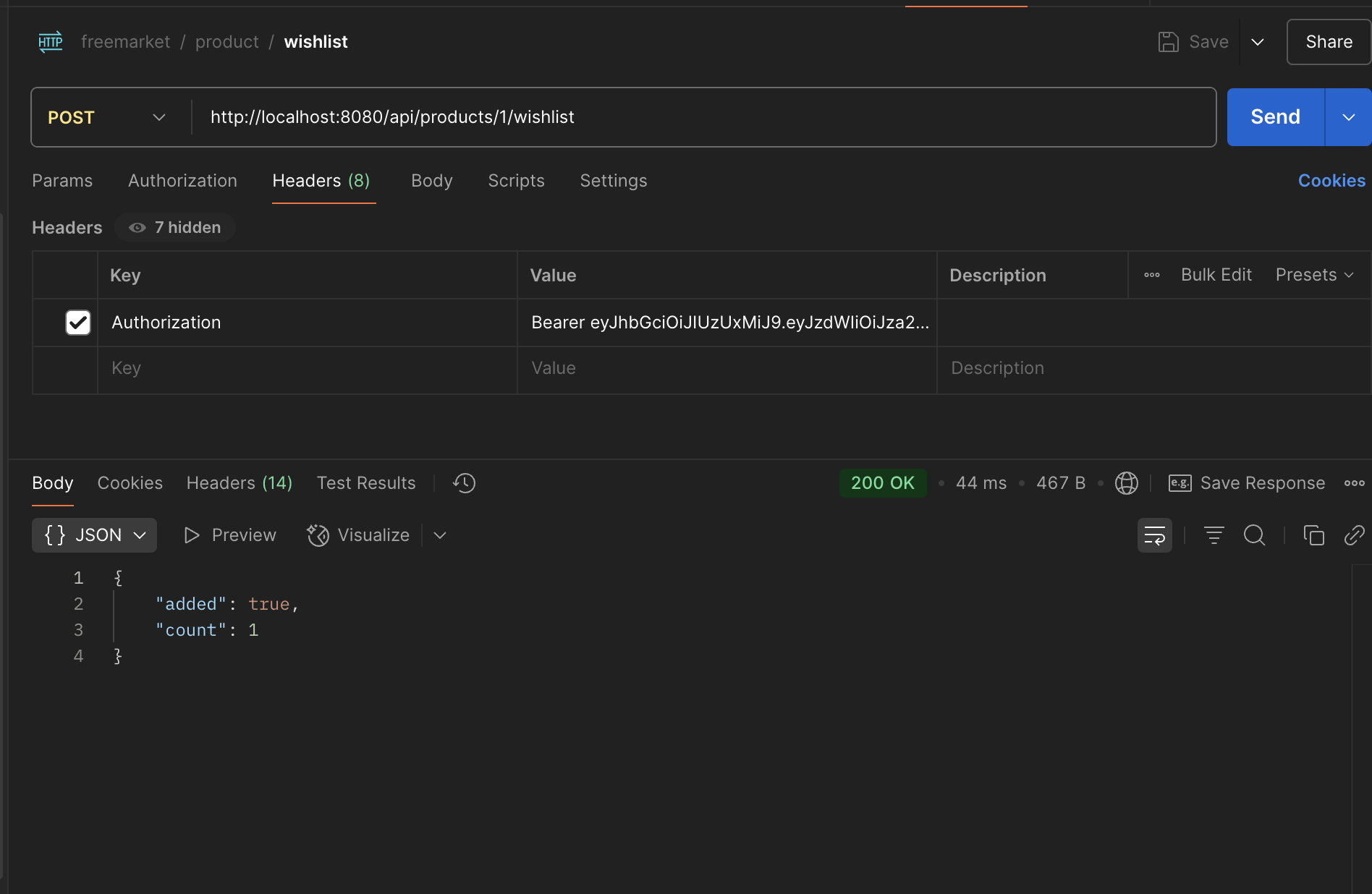
관심 상품 등록
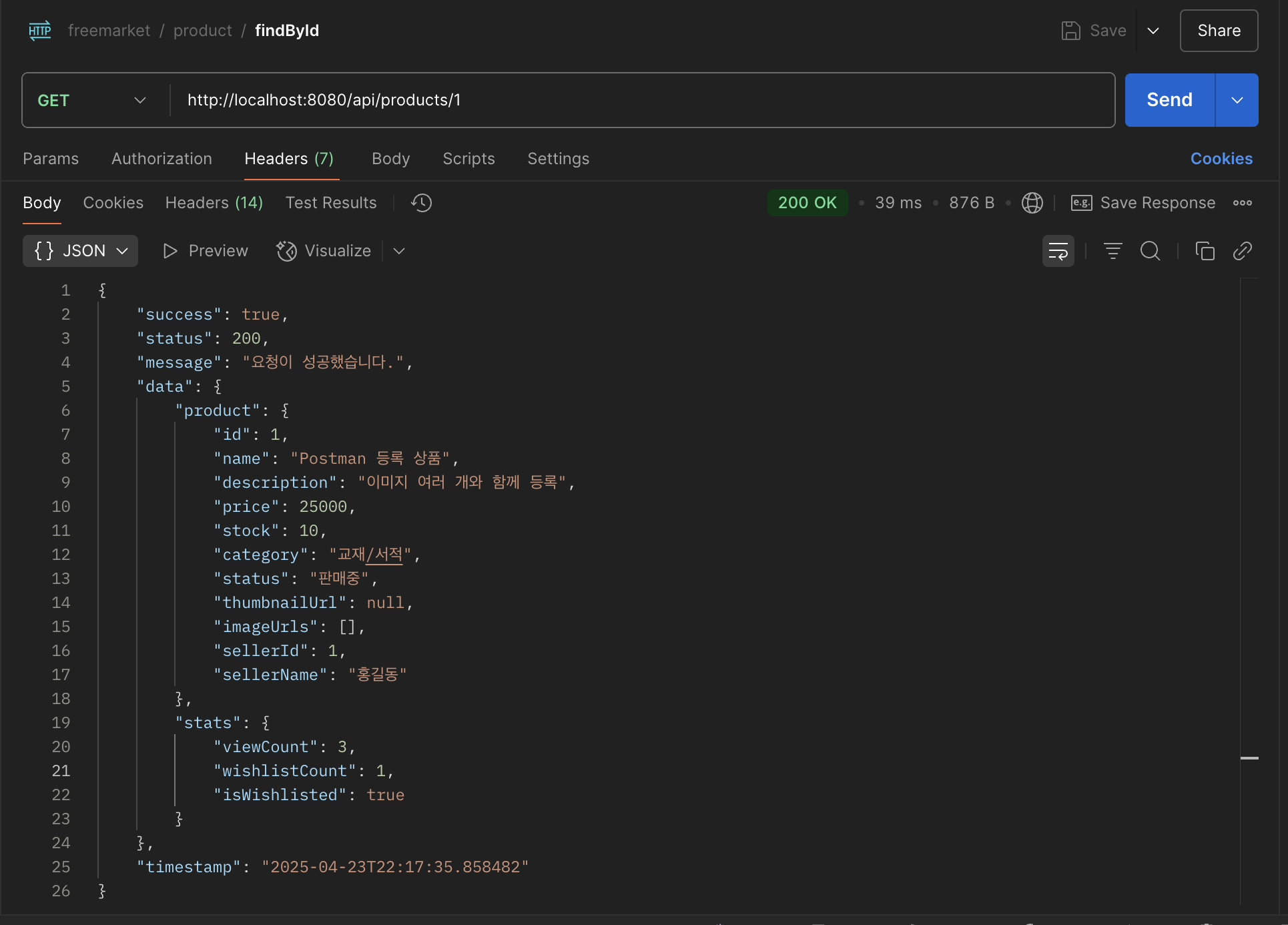
조회수 및 관심 등록 개수 확인
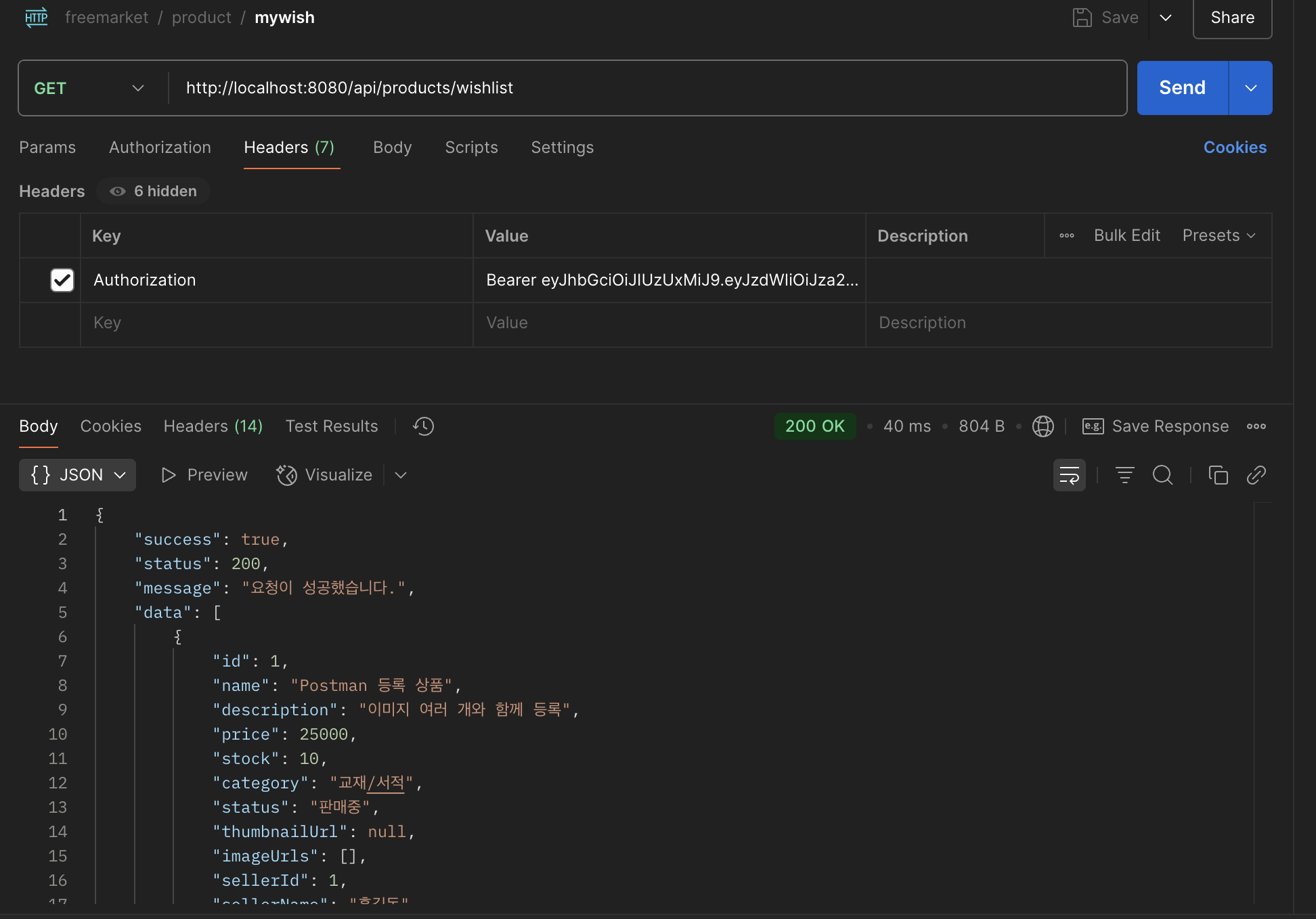
사용자의 관심 상품
관심 상품 취소