상품 등록
상품 카테고리 확장
교내 중고마켓에 적합한 카테고리로 확장 (예: 교재, 전자기기, 의류, 생활용품 등)
ProductCategory
public enum ProductCategory {
    BOOKS("교재/서적"),
    ELECTRONICS("전자기기"),
    FASHION("의류/패션"),
    BEAUTY("화장품/미용"),
    SPORTS("스포츠/레저"),
    HOUSEHOLD("생활용품"),
    HOBBY("취미/게임"),
    OTHERS("기타");

    private final String displayName;

    ProductCategory(String displayName) {
        this.displayName = displayName;
    }

    public String getDisplayName() {
        return displayName;
    }
}
Product
    // 상품 정보 업데이트
    public void update(String name, String description, long price, int stock, ProductCategory category, String imageUrl) {
        this.name = name;
        this.description = description;
        this.price = price;
        this.stock = stock;
        this.category = category;
        this.imageUrl = imageUrl;

        // 재고 상태에 따라 상품 상태 업데이트
        if (stock > 0 && this.status == ProductStatus.SOLD_OUT) {
            this.status = ProductStatus.ACTIVE;
        } else if (stock == 0 && this.status == ProductStatus.ACTIVE) {
            this.status = ProductStatus.SOLD_OUT;
        }
    }

    // 상품 상태 변경
    public void changeStatus(ProductStatus status) {
        this.status = status;
    }
}
dto
ProductDto
public class ProductDto {

    public record CreateRequest(
            @NotBlank(message = "상품명은 필수 입력값입니다.")
            String name,

            String description,

            @NotNull(message = "가격은 필수 입력값입니다.")
            Long price,

            @NotNull(message = "재고는 필수 입력값입니다.")
            @Min(value = 1, message = "재고는 최소 1개 이상이어야 합니다.")
            Integer stock,

            @NotNull(message = "카테고리는 필수 입력값입니다.")
            ProductCategory category,

            String imageUrl
    ) {}

    public record UpdateRequest(
            @NotBlank(message = "상품명은 필수 입력값입니다.")
            String name,

            String description,

            @NotNull(message = "가격은 필수 입력값입니다.")
            @Min(value = 100, message = "가격은 최소 100원 이상이어야 합니다.")
            Long price,

            @NotNull(message = "재고는 필수 입력값입니다.")
            @Min(value = 1, message = "재고는 최소 1개 이상이어야 합니다.")
            Integer stock,

            @NotNull(message = "카테고리는 필수 입력값입니다.")
            ProductCategory category,

            String imageUrl,

            ProductStatus status
    ){}

    @Builder
    public record ProductResponse(
            Long id,
            String name,
            String description,
            Long price,
            Integer stock,
            String category,
            String status,
            String imageUrl,
            Long sellerId,
            String sellerName
    ) {
        public static ProductResponse from(Product product) {
            return ProductResponse.builder()
                    .id(product.getId())
                    .name(product.getName())
                    .description(product.getDescription())
                    .price(product.getPrice())
                    .stock(product.getStock())
                    .category(product.getCategory().getDisplayName())
                    .status(product.getStatus().getDisplayName())
                    .imageUrl(product.getImageUrl())
                    .sellerId(product.getSeller().getId())
                    .sellerName(product.getSeller().getName())
                    .build();
        }
    }
}from(Entity -> DTO 변환)of(DTO 객체 생성)toEntity(DTO -> Entity 변환)
Controller
ProductController
@Slf4j
@RestController
@RequestMapping("/api/products")
@RequiredArgsConstructor
@Tag(name = "상품", description = "상품 관련 API")
public class ProductController {

    private final ProductService productService;

    @Operation(summary = "상품 등록", description = "새로운 상품을 등록합니다. 상품명, 가격, 수량, 카테고리는 필수 입력 항목입니다.")
    @ApiResponses(value = {
            @ApiResponse(responseCode = "201", description = "상품 등록 성공"),
            @ApiResponse(responseCode = "400", description = "잘못된 요청",
                    content = @Content(schema = @Schema(implementation = ResponseDTO.class))),
            @ApiResponse(responseCode = "401", description = "인증 실패",
                    content = @Content(schema = @Schema(implementation = ResponseDTO.class))),
            @ApiResponse(responseCode = "403", description = "권한 없음",
                    content = @Content(schema = @Schema(implementation = ResponseDTO.class)))
    })
    @PostMapping
    public ResponseEntity<ResponseDTO<ProductDto.ProductResponse>> createProduct(
            @Parameter(hidden = true) @AuthenticationPrincipal CustomUserDetails userDetails,
            @Parameter(description = "상품 등록 정보", required = true)
            @Valid @RequestBody ProductDto.CreateRequest request) {

        log.info("상품 등록 요청: 사용자 ID {}", userDetails.getUserId());
        ProductDto.ProductResponse response = productService.createProduct(userDetails.getUserId(), request);

        return ResponseEntity.status(HttpStatus.CREATED).body(ResponseDTO.success(response, "상품이 성공적으로 등록되었습니다."));
    }


    @Operation(summary = "상품 수정", description = "상품 ID로 기존 상품 정보를 수정합니다. 본인이 등록한 상품만 수정 가능합니다.")
    @ApiResponses(value = {
            @ApiResponse(responseCode = "200", description = "상품 수정 성공"),
            @ApiResponse(responseCode = "400", description = "잘못된 요청"),
            @ApiResponse(responseCode = "401", description = "인증 실패"),
            @ApiResponse(responseCode = "403", description = "권한 없음"),
            @ApiResponse(responseCode = "404", description = "상품을 찾을 수 없음")
    })
    @PatchMapping("/{productId}")
    public ResponseEntity<ResponseDTO<ProductDto.ProductResponse>> updateProduct(
            @Parameter(hidden = true) @AuthenticationPrincipal CustomUserDetails userDetails,
            @Parameter(description = "상품 ID", required = true) @PathVariable Long productId,
            @Parameter(description = "상품 수정 정보", required = true)
            @Valid @RequestBody ProductDto.UpdateRequest request) {

        log.info("상품 수정 요청: 상품 ID {}, 사용자 ID {}", productId, userDetails.getUserId());
        ProductDto.ProductResponse response = productService.updateProduct(userDetails.getUserId(), productId, request);

        return ResponseEntity.ok(ResponseDTO.success(response, "상품이 성공적으로 수정되었습니다."));
    }

    @Operation(summary = "상품 조회", description = "상품 ID로 상품 상세 정보를 조회합니다.")
    @ApiResponses(value = {
            @ApiResponse(responseCode = "200", description = "상품 조회 성공"),
            @ApiResponse(responseCode = "404", description = "상품을 찾을 수 없음")
    })
    @GetMapping("/{productId}")
    public ResponseEntity<ResponseDTO<ProductDto.ProductResponse>> getProduct(
        @Parameter(description = "상품 ID", required = true) @PathVariable Long productId) {

        log.info("상품 조회 요청: 상품 ID {}", productId);
        ProductDto.ProductResponse response = productService.getProduct(productId);

        return ResponseEntity.ok(ResponseDTO.success(response));
    }

    @Operation(summary = "상품 목록 조회", description = "상품 목록을 필터링하여 조회합니다. 키워드 검색과 상태 필터링이 가능합니다.")
    @ApiResponses(value = {
            @ApiResponse(responseCode = "200", description = "상품 목록 조회 성공")
    })
    @GetMapping
    public ResponseEntity<ResponseDTO<Page<ProductDto.ProductResponse>>> getProducts(
            @Parameter(description = "검색 키워드 (상품명, 설명에서 검색)")
            @RequestParam(required = false) String keyword,

            @Parameter(description = "상품 상태 (ACTIVE: 판매중, SOLD_OUT: 품절, DISCONTINUED: 판매중단, PENDING: 승인대기)")
            @RequestParam(required = false) ProductStatus status,

            @Parameter(description = "페이지네이션 정보 (기본값: 페이지 크기 10, 생성일 기준 내림차순 정렬)")
            @PageableDefault(size = 10, sort = "createdDate") Pageable pageable) {

        log.info("상품 목록 조회 요청: 키워드 {}, 상태 {}", keyword, status);
        Page<ProductDto.ProductResponse> response = productService.getProducts(keyword, status, pageable);

        return ResponseEntity.ok(ResponseDTO.success(response));
    }

    @Operation(summary = "카테고리별 상품 조회", description = "특정 카테고리에 해당하는 상품 목록을 조회합니다.")
    @ApiResponses(value = {
            @ApiResponse(responseCode = "200", description = "카테고리별 상품 조회 성공"),
            @ApiResponse(responseCode = "400", description = "잘못된 카테고리 요청")
    })
    @GetMapping("/category/{category}")
    public ResponseEntity<ResponseDTO<Page<ProductDto.ProductResponse>>> getProductsByCategory(
            @Parameter(description = "상품 카테고리 (BOOKS, ELECTRONICS, FASHION 등)", required = true)
            @PathVariable ProductCategory category,

            @Parameter(description = "검색 키워드 (상품명, 설명에서 검색)")
            @RequestParam(required = false) String keyword,

            @Parameter(description = "상품 상태 (ACTIVE: 판매중, SOLD_OUT: 품절 등)")
            @RequestParam(required = false) ProductStatus status,

            @Parameter(description = "페이지네이션 정보")
            @PageableDefault(size = 10, sort = "createdDate") Pageable pageable) {

        log.info("카테고리별 상품 조회 요청: 카테고리 {}, 키워드 {}, 상태 {}", category, keyword, status);
        Page<ProductDto.ProductResponse> response = productService.getProductsByCategory(category, keyword, status, pageable);

        return ResponseEntity.ok(ResponseDTO.success(response));
    }

    @Operation(summary = "상품 삭제", description = "상품 ID로 상품을 삭제합니다. 본인이 등록한 상품만 삭제 가능합니다.")
    @ApiResponses(value = {
            @ApiResponse(responseCode = "200", description = "상품 삭제 성공"),
            @ApiResponse(responseCode = "401", description = "인증 실패"),
            @ApiResponse(responseCode = "403", description = "권한 없음"),
            @ApiResponse(responseCode = "404", description = "상품을 찾을 수 없음")
    })
    @DeleteMapping("/{productId}")
    public ResponseEntity<ResponseDTO<Void>> deleteProduct(
            @Parameter(hidden = true) @AuthenticationPrincipal CustomUserDetails userDetails,
            @Parameter(description = "삭제할 상품 ID", required = true) @PathVariable Long productId) {

        log.info("상품 삭제 요청: 상품 ID {}, 사용자 ID {}", productId, userDetails.getUserId());
        productService.deleteProduct(userDetails.getUserId(), productId);

        return ResponseEntity.ok(ResponseDTO.success(null, "상품이 성공적으로 삭제되었습니다."));
    }
}-
상품 등록 (POST /api/products)
- 인증된 사용자만 상품을 등록할 수 있다.
- 상품 정보를 담은 요청 객체(CreateRequest)를 받아 처리한다.
-
상품 수정 (PATCH /api/products/{productId})
- 인증된 사용자가 자신이 등록한 상품만 수정할 수 있다.
- 상품 ID를 경로 변수로 받고, 수정할 정보를 요청 본문으로 받는다.
-
상품 상세 조회 (GET /api/products/{productId})
- 상품 ID를 통해 특정 상품의 상세 정보를 조회한다.
- 인증 없이 접근 가능한 API.
-
상품 목록 조회 (GET /api/products)
- 키워드, 상태 필터링, 페이징 기능을 제공한다.
- 기본적으로 한 페이지당 10개 항목을 보여주며, 생성일 기준으로 정렬한다.
- 인증 없이 접근 가능한 API.
-
카테고리별 상품 조회 (GET /api/products/category/{category})
- 특정 카테고리에 속한 상품 목록을 조회한다.
- 카테고리별로 키워드 검색, 상태 필터링, 페이징 기능을 제공한다.
- 인증 없이 접근 가능한 API.
-
상품 삭제 (DELETE /api/products/{productId})
- 인증된 사용자가 자신이 등록한 상품만 삭제할 수 있다.
- 상품 ID를 경로 변수로 받아 처리한다.
- 보안 처리:
@AuthenticationPrincipal CustomUserDetails어노테이션을 통해 인증된 사용자 정보를 활용한다.
Service
ProductService
@Slf4j
@Service
@Transactional(readOnly = true)
@RequiredArgsConstructor
public class ProductService {

    private final ProductRepository productRepository;
    private final UserRepository userRepository;

    // 상품 등록
    @Transactional
    public ProductDto.ProductResponse createProduct(Long userId, ProductDto.CreateRequest request) {
        User seller = userRepository.findById(userId)
                .orElseThrow(() -> new UserException.UserNotFoundException(userId));

        Product product = Product.builder()
                .name(request.name())
                .description(request.description())
                .price(request.price())
                .category(request.category())
                .imageUrl(request.imageUrl())
                .seller(seller)
                .build();

        productRepository.save(product);
        log.info("상품 등록 완료: 상품명 {}, 판매자 ID {}", request.name(), userId);

        return ProductDto.ProductResponse.from(product);
    }

    // 상품 수정
    @Transactional
    public ProductDto.ProductResponse updateProduct(Long userId, Long productId, ProductDto.UpdateRequest request) {
        Product product = getProductWithSellerCheck(productId, userId);

        product.update(
                request.name(),
                request.description(),
                request.price(),
                request.stock(),
                request.category(),
                request.imageUrl()
        );

        if (request.status() != null) {
            product.changeStatus(request.status());
        }

        log.info("상품 수정 완료: 상품 ID {}, 판매자 ID {}", productId, userId);
        return ProductDto.ProductResponse.from(product);
    }

    // 상품 단건 조회

    public ProductDto.ProductResponse getProduct(Long productId) {
        Product product = findProduct(productId);
        return ProductDto.ProductResponse.from(product);
    }
    // 상품 목록 조회

    public Page<ProductDto.ProductResponse> getProducts(String keyword, ProductStatus status, Pageable pageable) {
        return productRepository.findAllWithFilters(keyword, status, pageable)
                .map(ProductDto.ProductResponse::from);
    }
    // 카테고리별 상품 조회

    public Page<ProductDto.ProductResponse> getProductsByCategory(ProductCategory category, String keyword, ProductStatus status,
                                                                  Pageable pageable) {
        return productRepository.findByCategoryWithFilters(category, keyword, status, pageable)
                .map(ProductDto.ProductResponse::from);
    }
    // 상품 삭제

    @Transactional
    public void deleteProduct(Long userId, Long productId) {
        Product product = getProductWithSellerCheck(productId, userId);
        productRepository.delete(product);
        log.info("상품 삭제 완료: 상품 ID {}, 판매자 ID {}", productId, userId);
    }

    // 판매자 권한 확인 후 상품 조회
    private Product getProductWithSellerCheck(Long productId, Long userId) {
        Product product = findProduct(productId);

        if (!product.getSeller().getId().equals(userId)) {
            throw new RuntimeException("해당 상품의 판매자가 아닙니다.");
        }

        return product;
    }

    private Product findProduct(Long productId) {
        Product product = productRepository.findById(productId)
                .orElseThrow(() -> new RuntimeException("상품을 찾을 수 없습니다: " + productId));
        return product;
    }
}
- 상품 등록 (createProduct)
판매자 정보 확인 후 새 상품을 생성하고 저장
-
상품 수정 (updateProduct)
판매자 본인 확인 후 상품 정보(이름, 설명, 가격, 재고, 카테고리, 이미지) 및 상태 업데이트 -
상품 조회 (getProduct)
상품 ID로 단일 상품 상세 정보 조회
- 상품 목록 조회 (getProducts)
키워드 및 상태 기반 필터링과 페이징 기능을 통한 상품 목록 조회
-
카테고리별 조회 (getProductsByCategory)
특정 카테고리에 속한 상품들을 필터링 조건으로 조회 -
상품 삭제 (deleteProduct)
판매자 본인 확인 후 상품 삭제
Repository
ProductRepositoryCustom
public interface ProductRepositoryCustom {
    // 전체 상품 조회 (필터링 옵션 포함)
    Page<Product> findAllWithFilters(String keyword, ProductStatus status, Pageable pageable);

    // 카테고리별 상품 조회
    Page<Product> findByCategoryWithFilters(ProductCategory category, String keyword, ProductStatus status,
                                            Pageable pageable);
}
ProductRepository
public interface ProductRepository extends JpaRepository<Product, Long>, ProductRepositoryCustom {
}
ProductRepositoryImpl
@RequiredArgsConstructor
public class ProductRepositoryImpl implements ProductRepositoryCustom {

    private final JPAQueryFactory queryFactory;

    @Override
    public Page<Product> findAllWithFilters(String keyword, ProductStatus status, Pageable pageable) {
        // 공통 조건을 사용하여 BooleanBuilder 생성
        BooleanBuilder builder = createBasicCondition(keyword, status, null);

        // 페이지 조회 및 생성 공통 메서드 호출
        return fetchPagedProducts(builder, pageable);
    }

    @Override
    public Page<Product> findByCategoryWithFilters(ProductCategory category, String keyword, ProductStatus status, Pageable pageable) {
        // 공통 조건을 사용하여 BooleanBuilder 생성
        BooleanBuilder builder = createBasicCondition(keyword, status, category);

        // 페이지 조회 및 생성 공통 메서드 호출
        return fetchPagedProducts(builder, pageable);
    }

    // 상품명 또는 설명에 키워드가 포함된 조건
    private BooleanExpression nameOrDescriptionContains(String keyword) {
        return product.name.containsIgnoreCase(keyword)
                .or(product.description.containsIgnoreCase(keyword));
    }

    // 공통 조건을 사용하여 BooleanBuilder 생성하는 메서드
    private BooleanBuilder createBasicCondition(String keyword, ProductStatus status, ProductCategory category) {
        BooleanBuilder builder = new BooleanBuilder();

        // 카테고리 조건 (선택적)
        if (category != null) {
            builder.and(product.category.eq(category));
        }

        // 키워드 검색 조건 추가
        if (StringUtils.hasText(keyword)) {
            builder.and(nameOrDescriptionContains(keyword));
        }

        // 상품 상태 조건 추가
        if (status != null) {
            builder.and(product.status.eq(status));
        } else {
            // 기본적으로 활성 상품만 조회 (ACTIVE)
            builder.and(product.status.eq(ProductStatus.ACTIVE));
        }

        return builder;
    }

    private Page<Product> fetchPagedProducts(BooleanBuilder builder, Pageable pageable) {
        // 데이터 조회
        List<Product> content = queryFactory
                .selectFrom(product)
                .where(builder)
                .orderBy(product.createdDate.desc())
                .offset(pageable.getOffset())
                .limit(pageable.getPageSize())
                .fetch();

        // 전체 개수 조회를 위한 쿼리
        JPAQuery<Long> countQuery = queryFactory
                .select(product.count())
                .from(product)
                .where(builder);

        // 페이지 객체 생성 (count 쿼리 최적화)
        return PageableExecutionUtils.getPage(content, pageable, countQuery::fetchOne);
    }
}-
nameOrDescriptionContains- 상품명이나 설명에 키워드가 포함되어 있는지 확인하는 조건을 생성한다.
- 대소문자를 구분하지 않는
containsIgnoreCase메서드를 사용한다.
-
createBasicCondition- 기본 검색 조건을 생성하는 메서드다.
- 카테고리, 키워드, 상태를 조합하여 조건 빌더를 구성한다.
- 기본적으로 상태가 지정되지 않으면 ACTIVE 상태의 상품만 조회한다.
-
fetchPagedProducts- 조건과 페이징 정보를 받아 실제 데이터를 조회하고 Page 객체를 생성한다.
- 쿼리 최적화를 위해
PageableExecutionUtils.getPage를 사용하여 count 쿼리를 필요한 경우에만 실행한다.
File 등록
yml 설정
application-dev.yml
file:
  upload-dir: /Users/taeheon/Documents/school/capstone/images
  thumbnail-dir: /Users/taeheon/Documents/school/capstone/thumbnails
FileService
FileStorageService
public interface FileStorageService {
    record FileUploadResult(String originalFilePath, String thumbnailFilePath, String originalFileName) {}
    FileUploadResult storeFile(MultipartFile file) throws IOException;
    void deleteFile(String webFilePath);
}
파일 저장소에 대한 추상화를 제공한다. 실제 구현체는 다양한 저장 방식(로컬 디스크, 클라우드 스토리지 등)에 따라 달라질 수 있다.
LocalFileStorageService
@Slf4j
@Service
public class LocalFileStorageService implements FileStorageService {

    private final String uploadDir;
    private final String thumbnailDir;
    private final int thumbnailWidth = 200; // 썸네일 너비 고정값

    public LocalFileStorageService(@Value("${file.upload-dir}") String uploadDir,
                                   @Value("${file.thumbnail-dir}") String thumbnailDir) {
        this.uploadDir = uploadDir;
        this.thumbnailDir = thumbnailDir;
        createDirectoriesIfNotExists(Paths.get(uploadDir));
        createDirectoriesIfNotExists(Paths.get(thumbnailDir));
    }

    @Override
    public FileUploadResult storeFile(MultipartFile file) throws IOException {
        if (file == null || file.isEmpty()) {
            throw new IllegalArgumentException("업로드할 파일이 없습니다.");
        }

        String originalFileName = file.getOriginalFilename();
        String storeFileName = createStoreFileName(originalFileName);
        String thumbnailStoreFileName = "thumb_" + storeFileName;

        Path uploadPath = Paths.get(uploadDir);
        Path thumbnailPath = Paths.get(thumbnailDir);
        Path originalFilePath = uploadPath.resolve(storeFileName);
        Path thumbnailFilePath = thumbnailPath.resolve(thumbnailStoreFileName);

        File originalFile = null;
        File thumbnailFile = null;

        try {
            originalFile = originalFilePath.toFile();
            file.transferTo(originalFile);
            log.info("원본 파일 저장 완료: {}", originalFilePath);

            thumbnailFile = thumbnailFilePath.toFile();
            createThumbnail(originalFile, thumbnailFile, thumbnailWidth);
            log.info("썸네일 생성 완료: {}", thumbnailFilePath);

            String webOriginalPath = "/images/" + storeFileName;
            String webThumbnailPath = "/thumbnails/" + thumbnailStoreFileName;
            return new FileUploadResult(webOriginalPath, webThumbnailPath, originalFileName);
        } catch (IOException e) {
            log.error("파일 저장 또는 썸네일 생성 실패: {}", originalFileName, e);
            if (originalFile != null && originalFile.exists()) deleteFileIfExists(originalFilePath);
            if (thumbnailFile != null && thumbnailFile.exists()) deleteFileIfExists(thumbnailFilePath);
            throw new IOException("파일 저장 또는 썸네일 생성에 실패했습니다. 파일명: " + originalFileName, e);
        }
    }

    @Override
    public void deleteFile(String webFilePath) {
        if (webFilePath == null || webFilePath.isBlank()) return;
        Path filePath = null;
        try {
            if (webFilePath.startsWith("/images/")) filePath = Paths.get(uploadDir).resolve(webFilePath.substring("/images/".length()));
            else if (webFilePath.startsWith("/thumbnails/")) filePath = Paths.get(thumbnailDir).resolve(webFilePath.substring("/thumbnails/".length()));
            if (filePath != null) deleteFileIfExists(filePath);
            else log.warn("알 수 없거나 처리할 수 없는 파일 경로 형식입니다: {}", webFilePath);
        } catch (Exception e) {
            log.error("파일 경로 처리 또는 삭제 중 오류 발생: {}", webFilePath, e);
        }
    }

    private void createDirectoriesIfNotExists(Path path) {
        try {
            if (!Files.exists(path)) Files.createDirectories(path);
        } catch (IOException e) {
            log.error("디렉토리 생성 실패: {}", path, e);
            throw new RuntimeException("필수 디렉토리 생성에 실패했습니다: " + path, e);
        }
    }

    private String createStoreFileName(String originalFileName) {
        String ext = extractExt(originalFileName);
        String uuid = UUID.randomUUID().toString();
        return uuid + (ext.isEmpty() ? "" : "." + ext); // 확장자가 없는 경우 고려
    }

    private String extractExt(String originalFilename) {
        if (originalFilename == null) return "";
        int pos = originalFilename.lastIndexOf(".");
        return (pos == -1 || pos == originalFilename.length() - 1) ? "" : originalFilename.substring(pos + 1).toLowerCase();
    }

    private void createThumbnail(File inputFile, File outputFile, int width) throws IOException {
        if (!inputFile.exists()) throw new IOException("썸네일을 생성할 원본 파일이 존재하지 않습니다: " + inputFile.getPath());
        Thumbnails.of(inputFile).width(width).keepAspectRatio(true).toFile(outputFile);
    }

    private void deleteFileIfExists(Path filePath) {
        try {
            if (Files.exists(filePath)) Files.delete(filePath);
        } catch (IOException e) {
            log.error("파일 삭제 실패: {}", filePath, e);
        }
    }
}-
createDirectoriesIfNotExists
지정된 경로의 디렉토리가 없으면 생성 -
createStoreFileName
원본 파일명을 기반으로 UUID를 사용하여 고유한 저장 파일명을 생성 -
extractExt
파일명에서 확장자를 추출하고, 없는 경우를 고려하여 처리 -
createThumbnail
Thumbnails라이브러리를 사용하여 원본 이미지의 비율을 유지하면서 썸네일을 생성 -
deleteFileIfExists
파일이 존재하는 경우 삭제하고, 예외 발생 시 로깅 처리
Entity
ProductImage
@Entity
@Table(name = "product_images")
@Getter
@NoArgsConstructor(access = AccessLevel.PROTECTED)
public class ProductImage {

    @Id
    @GeneratedValue(strategy = GenerationType.IDENTITY)
    @Column(name = "product_image_id")
    private Long id;

    @ManyToOne(fetch = FetchType.LAZY)
    @JoinColumn(name = "product_id", nullable = false)
    private Product product;

    @Column(nullable = false)
    private String imageUrl;

    @Column(nullable = false)
    private String thumbnailUrl;

    @Column(nullable = false)
    private String originalFileName;

    @Column(nullable = false)
    private int displayOrder; // 표시 순서

    @Column(nullable = false)
    private boolean isThumbnail; // 대표 이미지 여부

    @Builder
    public ProductImage(Product product, String imageUrl, String thumbnailUrl, String originalFileName, int displayOrder, boolean isThumbnail) {
        this.product = product;
        this.imageUrl = imageUrl;
        this.thumbnailUrl = thumbnailUrl;
        this.originalFileName = originalFileName;
        this.displayOrder = displayOrder;
        this.isThumbnail = isThumbnail;
    }

    // 연관관계 편의 메서드
    public void setProduct(Product product) {
        if (this.product != null) {
            this.product.getImages().remove(this);
        }
        this.product = product;
        if (product != null && !product.getImages().contains(this)) {
            product.getImages().add(this);
        }
    }

    // 썸네일 상태 설정 메서드
    public void setThumbnail(boolean thumbnail) {
        isThumbnail = thumbnail;
    }
}-
Product에서 이미지 목록을 자주 조회한다면 양방향 관계가 유용하다. -
이미지 삭제 시
Product객체에서도 이미지 참조를 제거하는 편의 메소드를 제공하면 일관성 유지에 도움이 된다. -
Product와ProductImage같이 부모-자식 관계가 명확하고, 부모에서 자식 컬렉션 접근이 빈번하며, 생명주기를 같이 하는 경우에는 양방향 매핑이 주는 편리함이 커서 많이 사용된다. -
연관 관계 편의 메서드는 양방향 관계에서 일관성을 유지하기 위한 메서드
기존 상품과의 연관관계를 제거하고 새 상품과의 연관관계 설정한다.
Product
@Entity
@Table(name = "products")
@Getter
@NoArgsConstructor(access = AccessLevel.PROTECTED)
public class Product extends BaseEntity {

    @Id
    @GeneratedValue(strategy = GenerationType.IDENTITY)
    @Column(name = "product_id")
    private Long id;

    @Column(nullable = false)
    private String name;

    @Column(columnDefinition = "TEXT")
    private String description;

    @Column(nullable = false)
    private long price;

    @Column(nullable = false)
    private int stock;

    @Enumerated(EnumType.STRING)
    @Column(nullable = false)
    private ProductCategory category;

    @Enumerated(EnumType.STRING)
    @Column(nullable = false)
    private ProductStatus status = ProductStatus.ACTIVE;

    @ManyToOne(fetch = FetchType.LAZY)
    @JoinColumn(name = "seller_id")
    private User seller;

    @OneToMany(mappedBy = "product", cascade = CascadeType.ALL, orphanRemoval = true, fetch = FetchType.LAZY)
    private List<ProductImage> images = new ArrayList<>();

    @Builder
    public Product(String name, String description, long price, int stock, ProductCategory category, ProductStatus status, User seller) {
        this.name = name;
        this.description = description;
        this.price = price;
        this.stock = stock;
        this.category = category;
        this.status = status != null ? status : ProductStatus.ACTIVE;
        this.seller = seller;
    }

    // 재고 관리 메서드
    public void decreaseStock(int quantity) {
        if (this.stock < quantity) {
            throw new IllegalArgumentException("재고가 부족합니다.");
        }
        this.stock -= quantity;

        // 재고가 0이 되면 품절로 상태 변경
        if (this.stock == 0) {
            this.status = ProductStatus.SOLD_OUT;
        }
    }

    public void increaseStock(int quantity) {
        this.stock += quantity;

        // 재고가 0이 아니면 판매중으로 상태 변경
        if (this.stock > 0 && this.status == ProductStatus.SOLD_OUT) {
            this.status = ProductStatus.ACTIVE;
        }
    }

    // 상품 정보 업데이트
    public void update(String name, String description, long price, int stock, ProductCategory category) {
        this.name = name;
        this.description = description;
        this.price = price;
        this.stock = stock;
        this.category = category;

        // 재고 상태에 따라 상품 상태 업데이트
        if (stock > 0 && this.status == ProductStatus.SOLD_OUT) {
            this.status = ProductStatus.ACTIVE;
        } else if (stock == 0 && this.status == ProductStatus.ACTIVE) {
            this.status = ProductStatus.SOLD_OUT;
        }
    }

    // 상품 상태 변경
    public void changeStatus(ProductStatus status) {
        this.status = status;
    }

    // 이미지 추가 / 제거 편의 메서드
    public void addImage(ProductImage image) {
        this.images.add(image);
        image.setProduct(this);
    }

    public void removeImage(ProductImage image) {
        this.images.remove(image);
        image.setProduct(null);
    }

    // 대표 썸네일 URL 조회
    public String getRepresentativeThumbnailUrl() {
        return this.images.stream()
                .filter(ProductImage::isThumbnail)
                .findFirst()
                .map(ProductImage::getThumbnailUrl)
                .orElse(this.images.isEmpty() ? null : this.images.get(0).getThumbnailUrl());
    }
}
Repository
ProductRepositoryImpl
@RequiredArgsConstructor
public class ProductRepositoryImpl implements ProductRepositoryCustom {

    private final JPAQueryFactory queryFactory;

    @Override
    public Page<Product> findAllWithFilters(String keyword, ProductStatus status, Pageable pageable) {
        // 공통 조건을 사용하여 BooleanBuilder 생성
        BooleanBuilder builder = createBasicCondition(keyword, status, null);

        // 페이지 조회 및 생성 공통 메서드 호출
        return fetchPagedProductsWithFetchJoin(builder, pageable);
    }

    @Override
    public Page<Product> findByCategoryWithFilters(ProductCategory category, String keyword, ProductStatus status, Pageable pageable) {
        // 공통 조건을 사용하여 BooleanBuilder 생성
        BooleanBuilder builder = createBasicCondition(keyword, status, category);

        // 페이지 조회 및 생성 공통 메서드 호출
        return fetchPagedProductsWithFetchJoin(builder, pageable);
    }

    // 상품명 또는 설명에 키워드가 포함된 조건
    private BooleanExpression nameOrDescriptionContains(String keyword) {
        return product.name.containsIgnoreCase(keyword)
                .or(product.description.containsIgnoreCase(keyword));
    }

    // 공통 조건을 사용하여 BooleanBuilder 생성하는 메서드
    private BooleanBuilder createBasicCondition(String keyword, ProductStatus status, ProductCategory category) {
        BooleanBuilder builder = new BooleanBuilder();

        // 카테고리 조건 (선택적)
        if (category != null) {
            builder.and(product.category.eq(category));
        }

        // 키워드 검색 조건 추가
        if (StringUtils.hasText(keyword)) {
            builder.and(nameOrDescriptionContains(keyword));
        }

        // 상품 상태 조건 추가
        if (status != null) {
            builder.and(product.status.eq(status));
        } else {
            // 기본적으로 활성 상품만 조회 (ACTIVE)
            builder.and(product.status.eq(ProductStatus.ACTIVE));
        }

        return builder;
    }

    private Page<Product> fetchPagedProductsWithFetchJoin(BooleanBuilder builder, Pageable pageable) {
        // 페이징된 ID 목록 조회
        List<Long> productIds = queryFactory
                .select(product.id)
                .from(product)
                .where(builder)
                .orderBy(product.createdDate.desc())
                .offset(pageable.getOffset())
                .limit(pageable.getPageSize())
                .fetch();

        if (productIds.isEmpty()) {
            return Page.empty(pageable);
        }

        // ID 목록으로 Product와 images를 Fetch join 하여 조회
        List<Product> content = queryFactory
                .select(product).distinct()
                .from(product)
                .leftJoin(product.images, productImage).fetchJoin()
                .where(product.id.in(productIds))
                .orderBy(product.createdDate.desc())
                .fetch();

        // content 리스트를 productIds 순서에 맞게 재정렬
        Map<Long, Product> productMap = content.stream()
                .collect(Collectors.toMap(Product::getId, p -> p));
        List<Product> sortedContent = productIds.stream()
                .map(productMap::get)
                .collect(Collectors.toList());

        // 전체 개수 조회를 위한 쿼리
        JPAQuery<Long> countQuery = queryFactory
                .select(product.count())
                .from(product)
                .where(builder);

        // 페이지 객체 생성 (count 쿼리 최적화)
        return PageableExecutionUtils.getPage(sortedContent, pageable, countQuery::fetchOne);
    }
}
성능 최적화를 위한 핵심 메서드: fetchPagedProductsWithFetchJoin
이 메서드는 N+1 문제를 해결하기 위한 고급 최적화 기법을 사용한다.
-
ID 기반 페이징
- 먼저 조건에 맞는 상품 ID만 페이징하여 조회한다.
- 페이징된 ID 목록이 비어있으면 빈 페이지를 반환한다.
-
패치 조인(
Fetch Join)을 사용한 엔티티 조회- 조회된 ID 목록을 기반으로 상품과 이미지를
leftJoin().fetchJoin()으로 한 번에 조회한다.. distinct()를 사용하여 중복 제거한다.
- 조회된 ID 목록을 기반으로 상품과 이미지를
-
결과 정렬
- ID 조회 순서와 패치 조인 결과 순서가 다를 수 있으므로, 원래 ID 조회 순서에 맞게 결과를 재정렬한다.
- Map을 사용하여 ID와 상품 객체를 매핑하고, 원래 ID 순서대로 정렬된 목록을 생성한다.
-
카운트 쿼리 최적화
PageableExecutionUtils.getPage()를 사용하여 필요한 경우에만 count 쿼리를 실행한다.
DTO
ProductDto
public class ProductDto {

    public record CreateRequest(
            @NotBlank(message = "상품명은 필수 입력값입니다.")
            String name,

            String description,

            @NotNull(message = "가격은 필수 입력값입니다.")
            @Min(value = 0)
            Long price,

            @NotNull(message = "재고는 필수 입력값입니다.")
            @Min(value = 1, message = "재고는 최소 1개 이상이어야 합니다.")
            Integer stock,

            @NotNull(message = "카테고리는 필수 입력값입니다.")
            ProductCategory category
    ) {}

    public record UpdateRequest(
            @NotBlank(message = "상품명은 필수 입력값입니다.")
            String name,

            String description,

            @NotNull(message = "가격은 필수 입력값입니다.")
            @Min(value = 100, message = "가격은 최소 100원 이상이어야 합니다.")
            Long price,

            @NotNull(message = "재고는 필수 입력값입니다.")
            @Min(value = 1, message = "재고는 최소 1개 이상이어야 합니다.")
            Integer stock,

            @NotNull(message = "카테고리는 필수 입력값입니다.")
            ProductCategory category,

            ProductStatus status
    ){}

    @Builder
    public record ProductResponse(
            Long id,
            String name,
            String description,
            Long price,
            Integer stock,
            String category,
            String status,
            String thumbnailUrl,
            List<String> imageUrls,
            Long sellerId,
            String sellerName
    ) {
        public static ProductResponse from(Product product) {
            return ProductResponse.builder()
                    .id(product.getId())
                    .name(product.getName())
                    .description(product.getDescription())
                    .price(product.getPrice())
                    .stock(product.getStock())
                    .category(product.getCategory().getDisplayName())
                    .status(product.getStatus().getDisplayName())
                    .thumbnailUrl(product.getRepresentativeThumbnailUrl())
                    .imageUrls(product.getImages().stream()
                            .map(ProductImage::getImageUrl)
                            .collect(Collectors.toList()))
                    .sellerId(product.getSeller().getId())
                    .sellerName(product.getSeller().getName())
                    .build();
        }
    }
}
Service
ProductService
@Slf4j
@Service
@Transactional(readOnly = true)
@RequiredArgsConstructor
public class ProductService {

    private final ProductRepository productRepository;
    private final UserRepository userRepository;
    private final FileStorageService fileStorageService;

    // 상품 등록
    @Transactional
    public ProductDto.ProductResponse createProduct(Long userId, ProductDto.CreateRequest request, List<MultipartFile> images) {
        User seller = userRepository.findById(userId)
                .orElseThrow(() -> new UserException.UserNotFoundException(userId));

        Product product = Product.builder()
                .name(request.name())
                .description(request.description())
                .price(request.price())
                .stock(request.stock())
                .category(request.category())
                .seller(seller)
                .build();

        List<FileStorageService.FileUploadResult> uploadedFiles = new ArrayList<>();
        try {
            if (images != null && !images.isEmpty()) {
                for (int i = 0; i < images.size(); i++) {
                    MultipartFile imageFile = images.get(i);
                    FileStorageService.FileUploadResult result = fileStorageService.storeFile(imageFile);
                    uploadedFiles.add(result);
                    boolean isThumbnail = (i == 0); // 첫 번째 이미지 -> 썸네일
                    ProductImage productImage = ProductImage.builder()
                            .imageUrl(result.originalFilePath())
                            .thumbnailUrl(result.thumbnailFilePath())
                            .originalFileName(result.originalFileName())
                            .displayOrder(i)
                            .isThumbnail(isThumbnail)
                            .build();
                    product.addImage(productImage); // Product 와 ProductImage 연결
                }
            }
            Product savedProduct = productRepository.save(product);
            log.info("상품 등록 완료: 상품명 {}, 판매자 ID {}", request.name(), userId);
            return ProductDto.ProductResponse.from(savedProduct);
        } catch (Exception e) {
            log.error("상품 등록 중 오류 발생: 사용자 ID {}", userId, e);
            uploadedFiles.forEach(uploadedFile -> {
                fileStorageService.deleteFile(uploadedFile.originalFilePath());
                fileStorageService.deleteFile(uploadedFile.thumbnailFilePath());
            });
            throw new RuntimeException("상품 등록 중 오류가 발생했습니다.", e);
        }
    }

    // 상품 수정
    @Transactional
    public ProductDto.ProductResponse updateProduct(Long userId, Long productId, ProductDto.UpdateRequest request,
                                                    List<MultipartFile> newImages, List<Long> deleteImageIds) {
        Product product = getProductWithSellerCheck(productId, userId);
        product.update(request.name(), request.description(), request.price(), request.stock(), request.category());
        if (request.status() != null) product.changeStatus(request.status());

        boolean thumbnailDeleted = false; // 썸네일 삭제 여부 추적
        if (deleteImageIds != null && !deleteImageIds.isEmpty()) {
            List<ProductImage> imagesToDelete = product.getImages().stream().filter(img -> deleteImageIds.contains(img.getId())).toList();
            thumbnailDeleted = imagesToDelete.stream().anyMatch(ProductImage::isThumbnail);
            imagesToDelete.forEach(image -> {
                fileStorageService.deleteFile(image.getImageUrl());
                fileStorageService.deleteFile(image.getThumbnailUrl());
                product.removeImage(image);
                log.info("상품 ID {}의 이미지 삭제: {}", productId, image.getOriginalFileName());
            });
        }

        List<FileStorageService.FileUploadResult> newlyUploadedFiles = new ArrayList<>();
        try {
            if (newImages != null && !newImages.isEmpty()) {
                int currentImageCount = product.getImages().size();
                for (int i = 0; i < newImages.size(); i++) {
                    MultipartFile imageFile = newImages.get(i);
                    if (imageFile == null || imageFile.isEmpty()) continue;
                    FileStorageService.FileUploadResult result = fileStorageService.storeFile(imageFile);
                    newlyUploadedFiles.add(result);
                    // 썸네일 지정: (현재 이미지가 없고 추가하는 첫 이미지) OR (기존 썸네일 삭제되었고 추가하는 첫 이미지)
                    boolean isThumbnail = (product.getImages().isEmpty() && i == 0) || (thumbnailDeleted && i == 0);
                    ProductImage productImage = ProductImage.builder()
                            .imageUrl(result.originalFilePath()).thumbnailUrl(result.thumbnailFilePath())
                            .originalFileName(result.originalFileName()).displayOrder(currentImageCount + i).isThumbnail(isThumbnail)
                            .build();
                    product.addImage(productImage);
                    log.info("상품 ID {}에 새 이미지 추가: {}", productId, imageFile.getOriginalFilename());
                }
            }

            // 썸네일 재조정: 이미지가 있는데 썸네일이 없는 경우 -> 첫 번째 이미지 썸네일로
            if (!product.getImages().isEmpty() && product.getImages().stream().noneMatch(ProductImage::isThumbnail)) {
                product.getImages().forEach(img -> img.setThumbnail(false)); // 모두 false 초기화
                product.getImages().get(0).setThumbnail(true); // 첫 번째를 썸네일로
                log.info("상품 ID {}의 썸네일 재지정 완료 (업데이트 중)", productId);
            }

            log.info("상품 수정 완료: 상품 ID {}, 판매자 ID {}", productId, userId);
            return ProductDto.ProductResponse.from(product); // 변경 감지로 업데이트됨
        } catch (Exception e) { // 롤백 로직
            log.error("상품 수정 중 오류 발생: 상품 ID {}", productId, e);
            newlyUploadedFiles.forEach(uploadedFile -> {
                fileStorageService.deleteFile(uploadedFile.originalFilePath());
                fileStorageService.deleteFile(uploadedFile.thumbnailFilePath());
            });
            throw new RuntimeException("상품 수정 중 오류가 발생했습니다.", e);
        }
    }

    // 상품 단건 조회
    public ProductDto.ProductResponse getProduct(Long productId) {
        Product product = findProduct(productId);
        return ProductDto.ProductResponse.from(product);
    }

    // 상품 목록 조회
    public Page<ProductDto.ProductResponse> getProducts(String keyword, ProductStatus status, Pageable pageable) {
        return productRepository.findAllWithFilters(keyword, status, pageable)
                .map(ProductDto.ProductResponse::from);
    }

    // 카테고리별 상품 조회
    public Page<ProductDto.ProductResponse> getProductsByCategory(ProductCategory category, String keyword, ProductStatus status,
                                                                  Pageable pageable) {
        return productRepository.findByCategoryWithFilters(category, keyword, status, pageable)
                .map(ProductDto.ProductResponse::from);
    }

    // 상품 삭제
    @Transactional
    public void deleteProduct(Long userId, Long productId) {
        Product product = getProductWithSellerCheck(productId, userId);
        productRepository.delete(product);
        log.info("상품 삭제 완료: 상품 ID {}, 판매자 ID {}", productId, userId);
    }

    // 판매자 권한 확인 후 상품 조회
    private Product getProductWithSellerCheck(Long productId, Long userId) {
        Product product = findProduct(productId);

        if (!product.getSeller().getId().equals(userId)) {
            throw new RuntimeException("해당 상품의 판매자가 아닙니다.");
        }

        return product;
    }

    private Product findProduct(Long productId) {
        Product product = productRepository.findById(productId)
                .orElseThrow(() -> new RuntimeException("상품을 찾을 수 없습니다: " + productId));
        return product;
    }

}
기존 ProductService에 파일 업로드와 이미지 관리 기능이 추가된 확장 버전이다.
주요 기능
-
상품 등록 (createProduct)
- 파일 업로드 기능이 추가되어 상품 이미지를 함께 처리한다.
- 처리 과정:
- 판매자 정보 조회
- 상품 기본 정보로 Product 객체 생성
- 이미지 파일 처리 및 저장
- 상품과 이미지 연결 및 저장
- 예외 발생 시 업로드된 파일 삭제 (롤백)
-
상품 수정 (updateProduct)
- 상품 정보 업데이트와 함께 이미지 추가/삭제 기능 제공
- 처리 과정
- 상품 조회 및 판매자 권한 확인
- 기본 정보 업데이트
- 삭제할 이미지 처리
- 새 이미지 추가
- 대표 이미지가 삭제된 경우, 추가되는 첫 이미지를 대표 이미지로 설정
- 썸네일 재조정
- 예외 발생 시 새로 업로드된 파일 삭제 (롤백)
-
상품 조회 기능
- 단일 상품 조회 (getProduct)
- 조건부 상품 목록 조회 (getProducts)
- 카테고리별 상품 조회 (getProductsByCategory)
-
상품 삭제 (deleteProduct)
- 판매자 권한 확인 후 상품 삭제
-
예외 처리 및 파일 관리
- 트랜잭션 관리:
- 데이터 일관성을 위해 상품 생성, 수정, 삭제에
@Transactional적용 - 예외 발생 시 DB 변경사항 롤백
- 데이터 일관성을 위해 상품 생성, 수정, 삭제에
- 파일 관리:
- 파일 업로드 실패 시 이미 업로드된 파일 삭제 (리소스 정리)
- 이미지 삭제 시 원본과 썸네일 파일 모두 삭제
- 썸네일 관리:
- 이미지 추가/삭제 시 항상 하나의 대표 이미지(썸네일) 유지
- 대표 이미지가 삭제되면 다른 이미지를 대표 이미지로 설정
- 트랜잭션 관리:
Controller
ProductController
@Slf4j
@RestController
@RequestMapping("/api/products")
@RequiredArgsConstructor
@Tag(name = "상품", description = "상품 관련 API")
public class ProductController {

    private final ProductService productService;

    @Operation(summary = "상품 등록", description = "새로운 상품을 등록합니다. 상품명, 가격, 수량, 카테고리는 필수 입력 항목입니다.")
    @ApiResponses(value = {
            @ApiResponse(responseCode = "201", description = "상품 등록 성공"),
            @ApiResponse(responseCode = "400", description = "잘못된 요청",
                    content = @Content(schema = @Schema(implementation = ResponseDTO.class))),
            @ApiResponse(responseCode = "401", description = "인증 실패",
                    content = @Content(schema = @Schema(implementation = ResponseDTO.class))),
            @ApiResponse(responseCode = "403", description = "권한 없음",
                    content = @Content(schema = @Schema(implementation = ResponseDTO.class)))
    })
    @PostMapping(consumes = MediaType.MULTIPART_FORM_DATA_VALUE)
    public ResponseEntity<ResponseDTO<ProductDto.ProductResponse>> createProduct(
            @Parameter(hidden = true) @AuthenticationPrincipal CustomUserDetails userDetails,
            @Parameter(description = "상품 등록 정보", required = true, content = @Content(mediaType = MediaType.APPLICATION_JSON_VALUE))
            @Valid @RequestPart("request") ProductDto.CreateRequest request,
            @Parameter(description = "이미지 파일") @RequestPart(value = "images", required = false)List<MultipartFile> images) {


        log.info("상품 등록 요청: 사용자 ID {}", userDetails.getUserId());
        ProductDto.ProductResponse response = productService.createProduct(userDetails.getUserId(), request, images);

        return ResponseEntity.status(HttpStatus.CREATED).body(ResponseDTO.success(response, "상품이 성공적으로 등록되었습니다."));
    }


    @Operation(summary = "상품 수정", description = "상품 ID로 기존 상품 정보를 수정합니다. 본인이 등록한 상품만 수정 가능합니다.")
    @ApiResponses(value = {
            @ApiResponse(responseCode = "200", description = "상품 수정 성공"),
            @ApiResponse(responseCode = "400", description = "잘못된 요청"),
            @ApiResponse(responseCode = "401", description = "인증 실패"),
            @ApiResponse(responseCode = "403", description = "권한 없음"),
            @ApiResponse(responseCode = "404", description = "상품을 찾을 수 없음")
    })
    @PatchMapping(value = "/{productId}", consumes = MediaType.MULTIPART_FORM_DATA_VALUE)
    public ResponseEntity<ResponseDTO<ProductDto.ProductResponse>> updateProduct(
            @Parameter(hidden = true) @AuthenticationPrincipal CustomUserDetails userDetails,
            @Parameter(description = "상품 ID", required = true) @PathVariable Long productId,
            @Parameter(description = "상품 정보 (JSON)", required = true, content = @Content(mediaType = MediaType.APPLICATION_JSON_VALUE))
            @Valid @RequestPart("request") ProductDto.UpdateRequest request,
            @Parameter(description = "추가/교체할 이미지") @RequestPart(value = "newImages", required = false) List<MultipartFile> newImages,
            @Parameter(description = "삭제할 이미지 ID") @RequestParam(value = "deleteImageIds", required = false) List<Long> deleteImageIds
            ) {

        log.info("상품 수정 요청: 상품 ID {}, 사용자 ID {}", productId, userDetails.getUserId());
        ProductDto.ProductResponse response = productService.updateProduct(userDetails.getUserId(), productId, request, newImages, deleteImageIds);

        return ResponseEntity.ok(ResponseDTO.success(response, "상품이 성공적으로 수정되었습니다."));
    }

    @Operation(summary = "상품 조회", description = "상품 ID로 상품 상세 정보를 조회합니다.")
    @ApiResponses(value = {
            @ApiResponse(responseCode = "200", description = "상품 조회 성공"),
            @ApiResponse(responseCode = "404", description = "상품을 찾을 수 없음")
    })
    @GetMapping("/{productId}")
    public ResponseEntity<ResponseDTO<ProductDto.ProductResponse>> getProduct(
        @Parameter(description = "상품 ID", required = true) @PathVariable Long productId) {

        log.info("상품 조회 요청: 상품 ID {}", productId);
        ProductDto.ProductResponse response = productService.getProduct(productId);

        return ResponseEntity.ok(ResponseDTO.success(response));
    }

    @Operation(summary = "상품 목록 조회", description = "상품 목록을 필터링하여 조회합니다. 키워드 검색과 상태 필터링이 가능합니다.")
    @ApiResponses(value = {
            @ApiResponse(responseCode = "200", description = "상품 목록 조회 성공")
    })
    @GetMapping
    public ResponseEntity<ResponseDTO<Page<ProductDto.ProductResponse>>> getProducts(
            @Parameter(description = "검색 키워드 (상품명, 설명에서 검색)")
            @RequestParam(required = false) String keyword,

            @Parameter(description = "상품 상태 (ACTIVE: 판매중, SOLD_OUT: 품절, DISCONTINUED: 판매중단, PENDING: 승인대기)")
            @RequestParam(required = false) ProductStatus status,

            @Parameter(description = "페이지네이션 정보 (기본값: 페이지 크기 10, 생성일 기준 내림차순 정렬)")
            @PageableDefault(size = 10, sort = "createdDate") Pageable pageable) {

        log.info("상품 목록 조회 요청: 키워드 {}, 상태 {}", keyword, status);
        Page<ProductDto.ProductResponse> response = productService.getProducts(keyword, status, pageable);

        return ResponseEntity.ok(ResponseDTO.success(response));
    }

    @Operation(summary = "카테고리별 상품 조회", description = "특정 카테고리에 해당하는 상품 목록을 조회합니다.")
    @ApiResponses(value = {
            @ApiResponse(responseCode = "200", description = "카테고리별 상품 조회 성공"),
            @ApiResponse(responseCode = "400", description = "잘못된 카테고리 요청")
    })
    @GetMapping("/category/{category}")
    public ResponseEntity<ResponseDTO<Page<ProductDto.ProductResponse>>> getProductsByCategory(
            @Parameter(description = "상품 카테고리 (BOOKS, ELECTRONICS, FASHION 등)", required = true)
            @PathVariable ProductCategory category,

            @Parameter(description = "검색 키워드 (상품명, 설명에서 검색)")
            @RequestParam(required = false) String keyword,

            @Parameter(description = "상품 상태 (ACTIVE: 판매중, SOLD_OUT: 품절 등)")
            @RequestParam(required = false) ProductStatus status,

            @Parameter(description = "페이지네이션 정보")
            @PageableDefault(size = 10, sort = "createdDate") Pageable pageable) {

        log.info("카테고리별 상품 조회 요청: 카테고리 {}, 키워드 {}, 상태 {}", category, keyword, status);
        Page<ProductDto.ProductResponse> response = productService.getProductsByCategory(category, keyword, status, pageable);

        return ResponseEntity.ok(ResponseDTO.success(response));
    }

    @Operation(summary = "상품 삭제", description = "상품 ID로 상품을 삭제합니다. 본인이 등록한 상품만 삭제 가능합니다.")
    @ApiResponses(value = {
            @ApiResponse(responseCode = "200", description = "상품 삭제 성공"),
            @ApiResponse(responseCode = "401", description = "인증 실패"),
            @ApiResponse(responseCode = "403", description = "권한 없음"),
            @ApiResponse(responseCode = "404", description = "상품을 찾을 수 없음")
    })
    @DeleteMapping("/{productId}")
    public ResponseEntity<ResponseDTO<Void>> deleteProduct(
            @Parameter(hidden = true) @AuthenticationPrincipal CustomUserDetails userDetails,
            @Parameter(description = "삭제할 상품 ID", required = true) @PathVariable Long productId) {

        log.info("상품 삭제 요청: 상품 ID {}, 사용자 ID {}", productId, userDetails.getUserId());
        productService.deleteProduct(userDetails.getUserId(), productId);

        return ResponseEntity.ok(ResponseDTO.success(null, "상품이 성공적으로 삭제되었습니다."));
    }
}- 멀티파트 요청(파일 업로드)을 처리하기 위해
consumes속성 설정consumes속성은Spring MVC와Spring REST컨트롤러에서 사용되는 중요한 속성으로, 해당 API 엔드포인트가 처리할 수 있는 요청의 미디어 타입(Content-Type)을 지정한다.
- 요청 처리:
@RequestPart("request"): JSON 형식의 상품 정보@RequestPart("images"): 상품 이미지 파일 목록 (선택적)
- 상품 등록/수정 시 이미지 파일 업로드를 위해
MediaType.MULTIPART_FORM_DATA_VALUE설정- 파일 업로드를 포함한 멀티파트 데이터
MediaType.APPLICATION_JSON_VALUE
JSON 데이터
- 인증된 사용자만 접근 가능하며, 사용자 정보는
CustomUserDetails로 주입받는다.
테스트
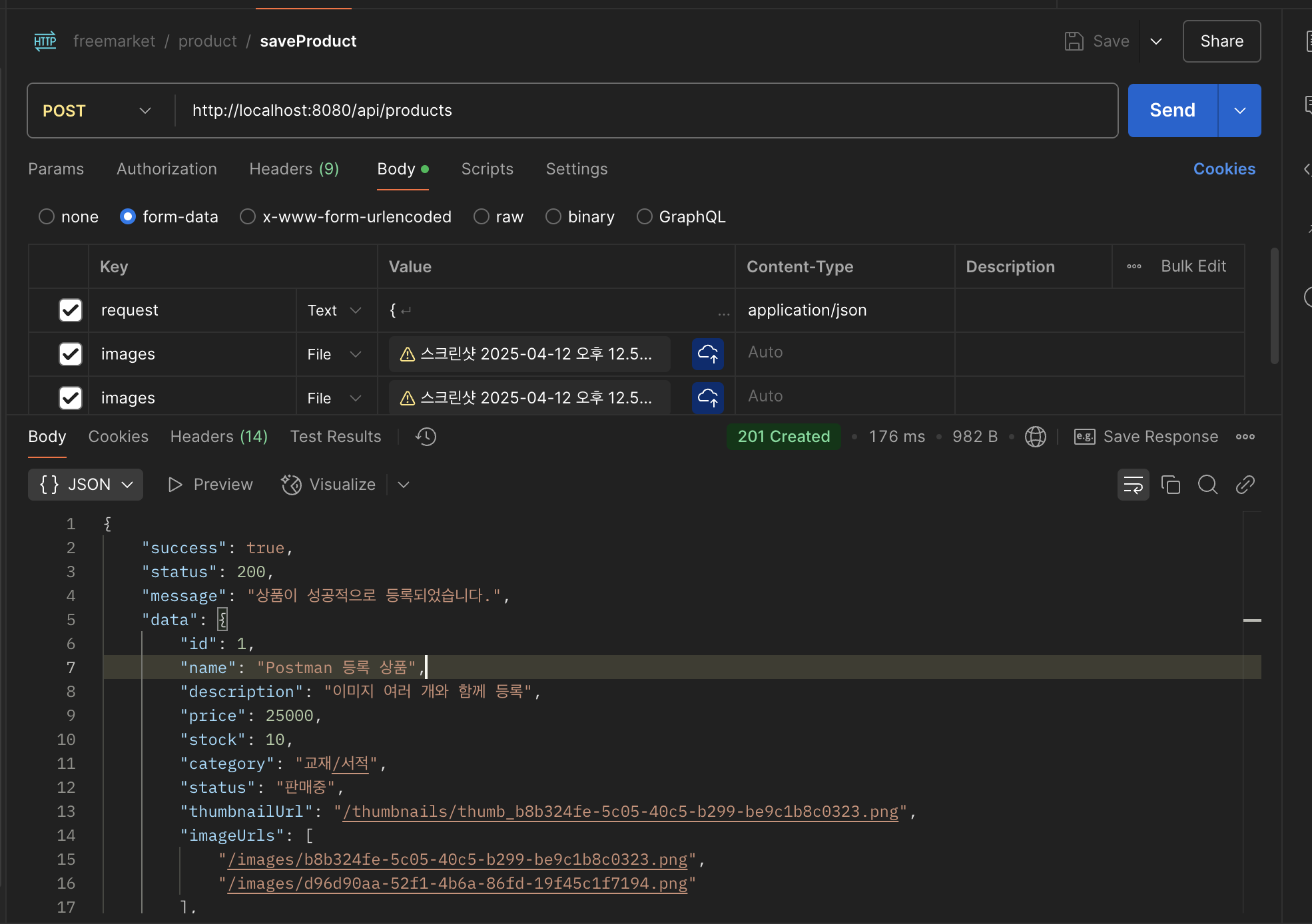
상품 등록
http://localhost:8080/api/products
@RequestPart를 사용했기 때문에 body - form-data 부분에 JSON 형태의 request와 File 형태의 이미지가 들어와야 된다.
상품 조회
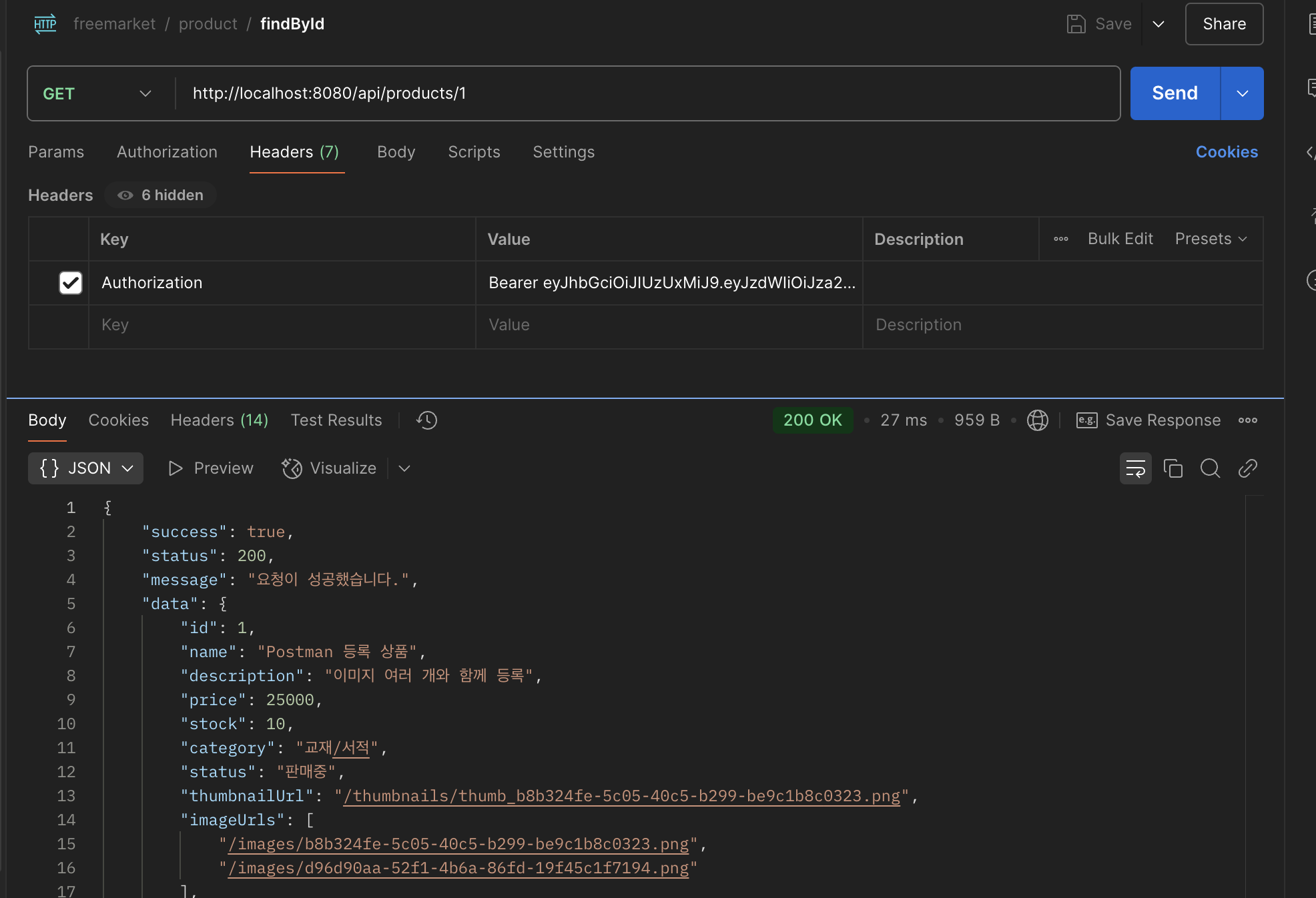
단일 조회
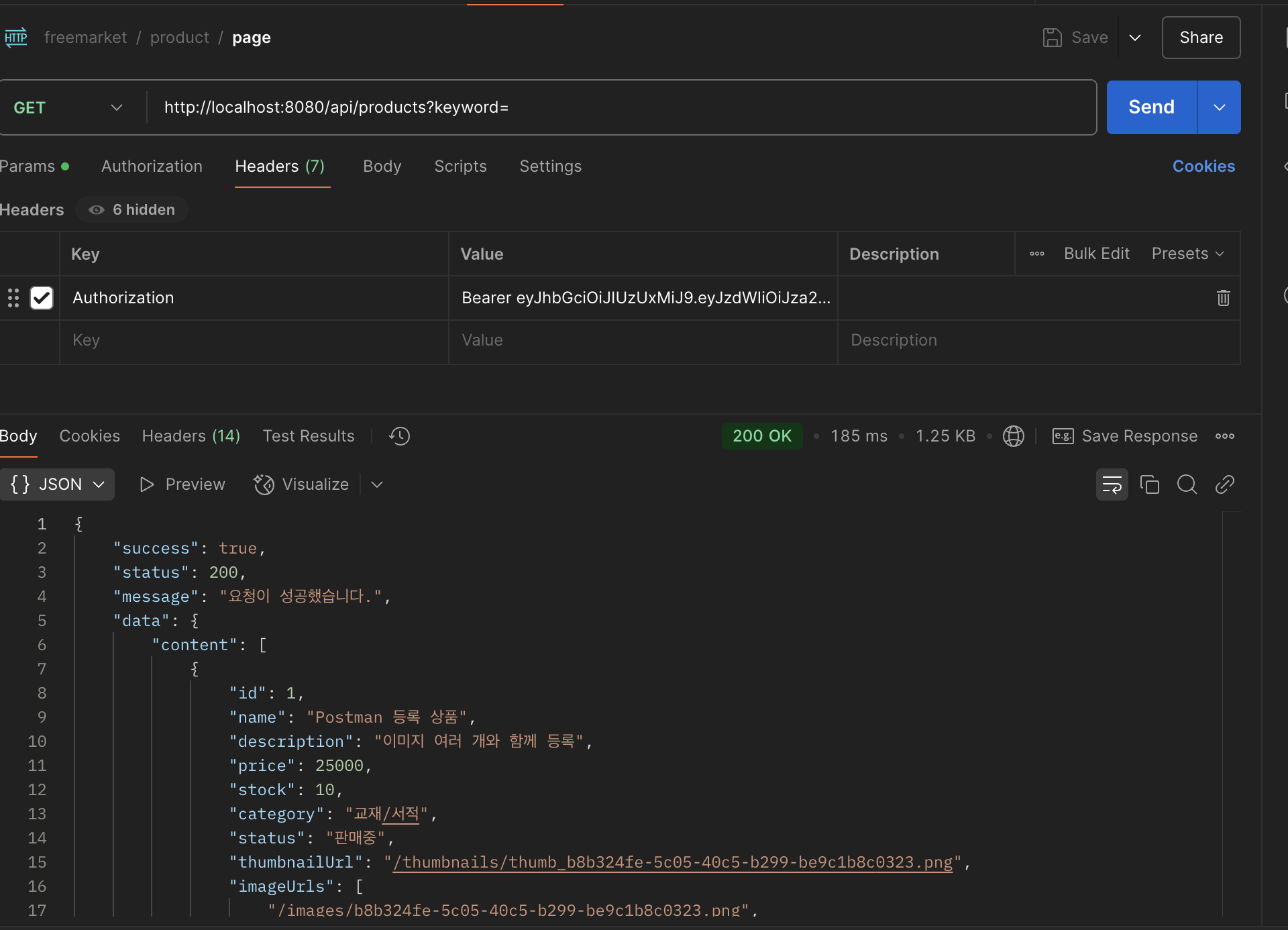
페이지 (keyword 검색도 가능)
RequestParam을 사용하여 url에 키워드로 검색이 가능하다.
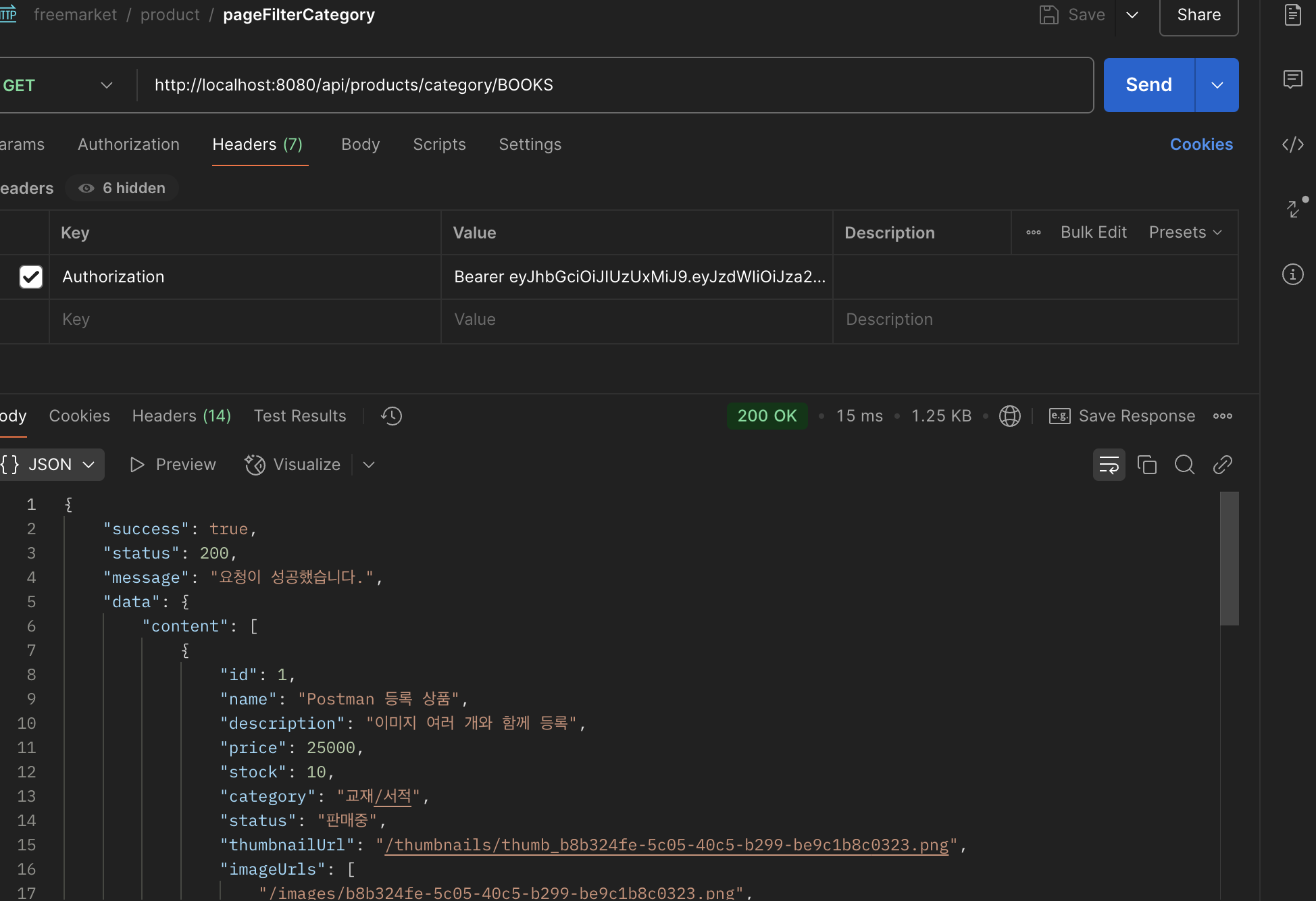
카테고리 페이지
해당하는 카테고리에 있는 상품 전체 조회
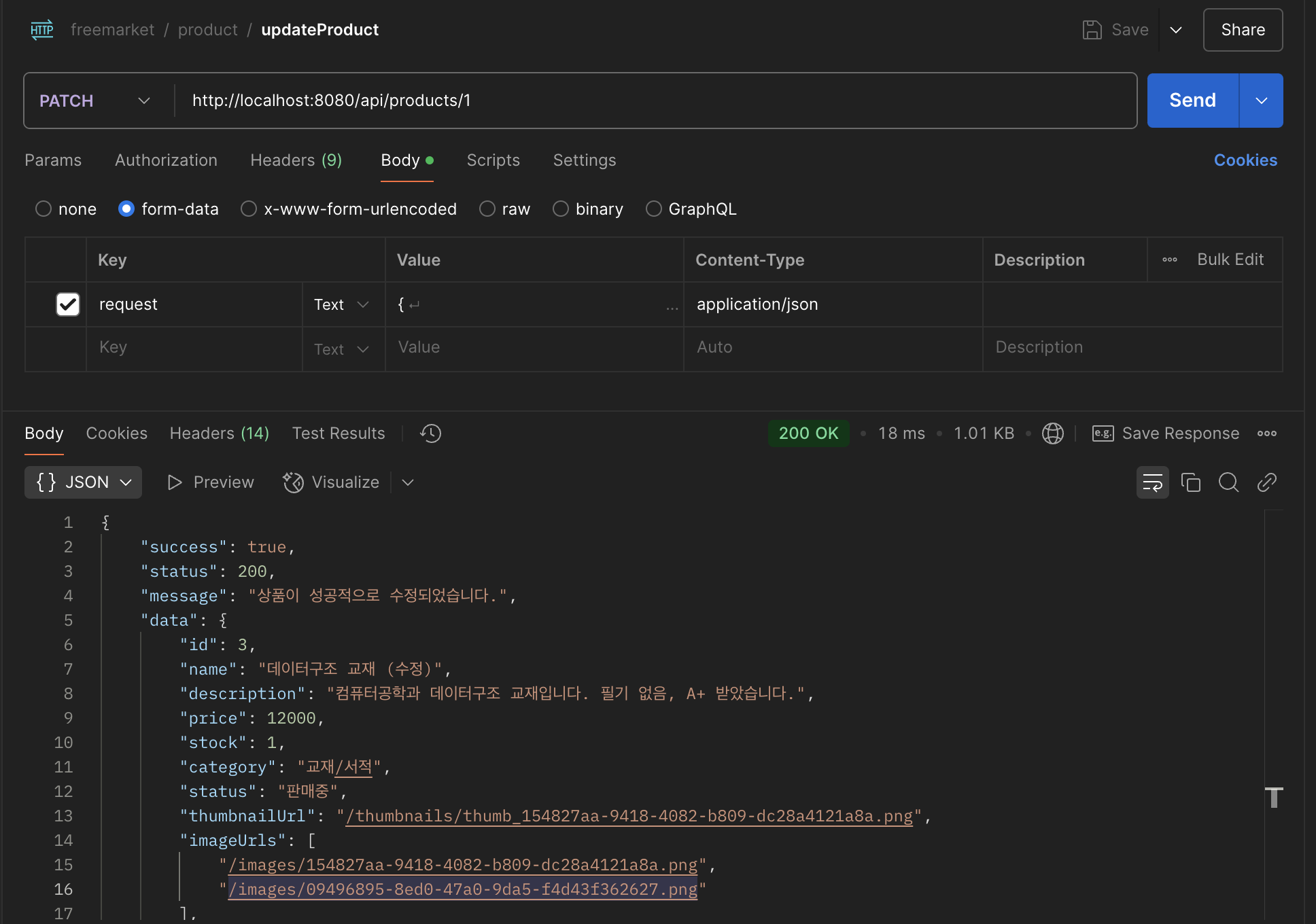
상품 업데이트
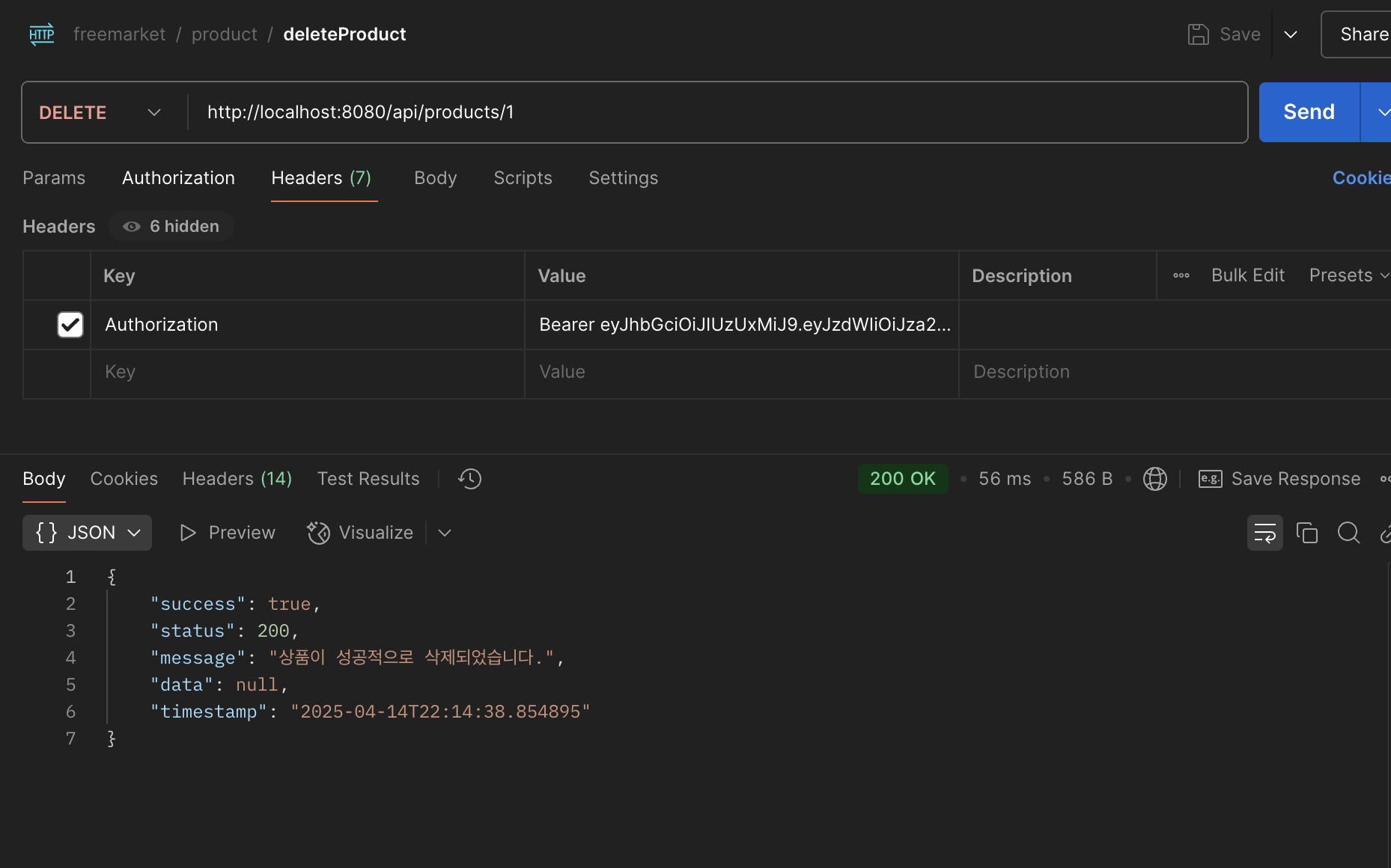
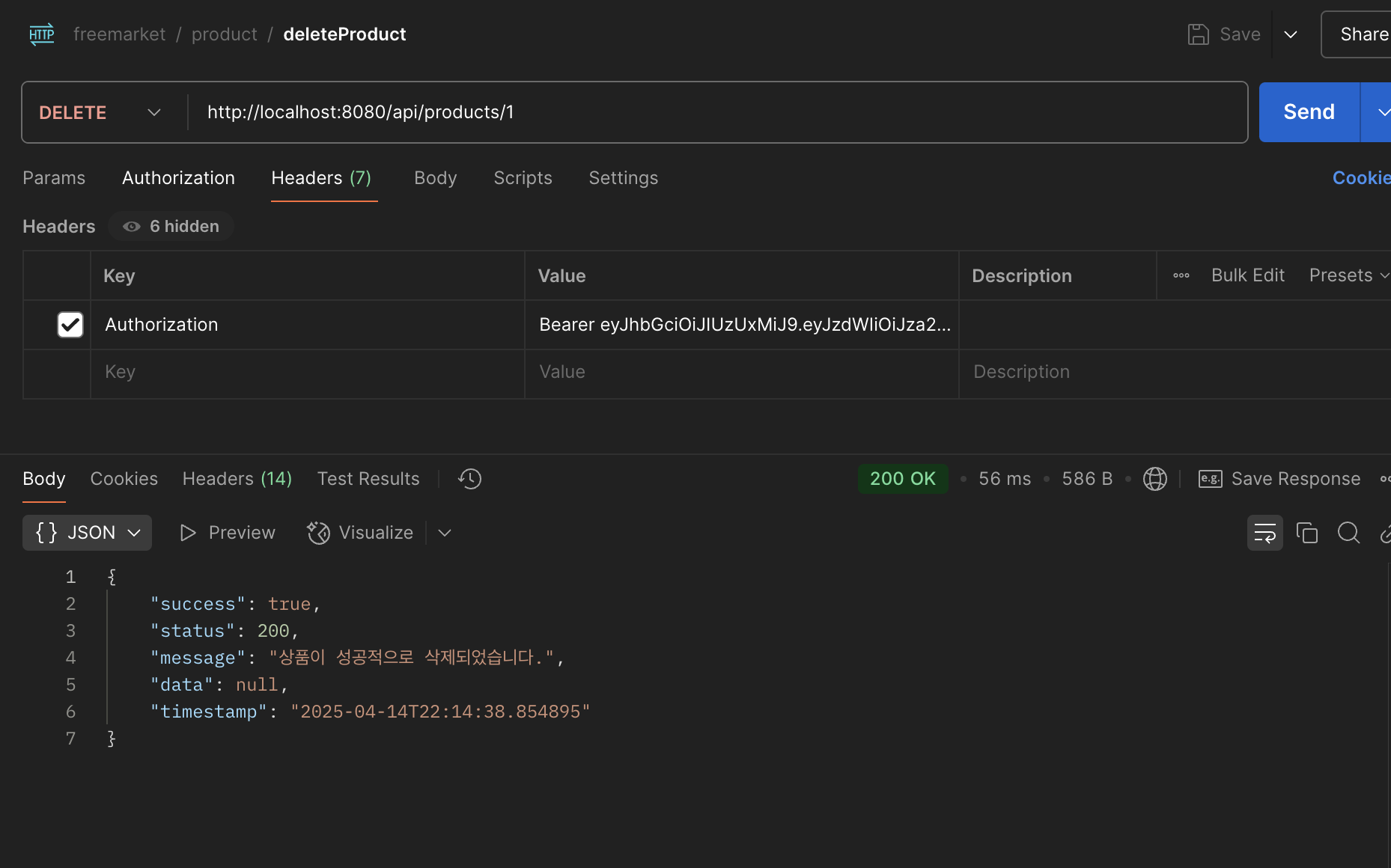
상품 삭제