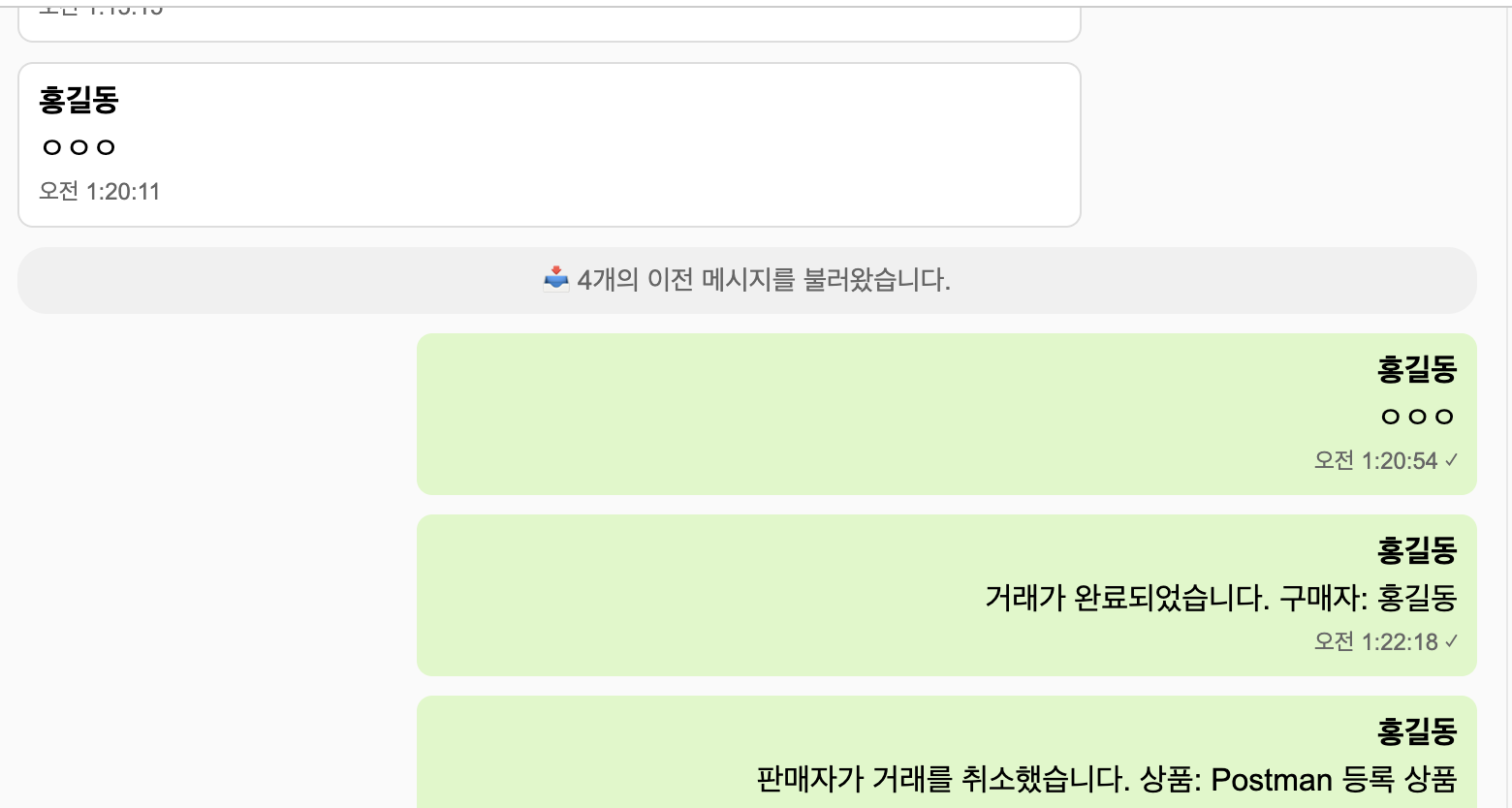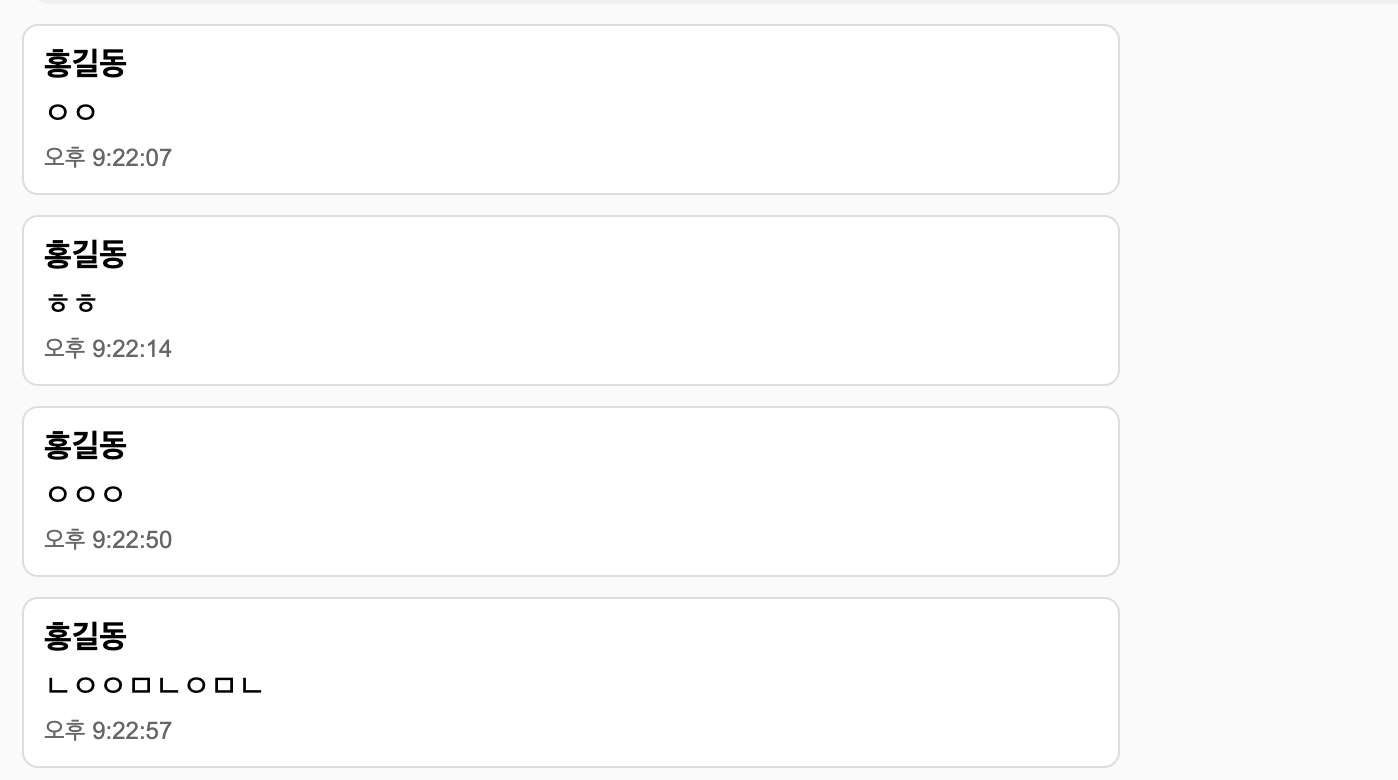
상품을 구매하고 싶은 경우 실시간 채팅을 통해 구매 의사를 밝힐 수 있도록 실시간 채팅 시스템을 구현한다.
의존성 추가
    // WebSocket
    implementation 'org.springframework.boot:spring-boot-starter-websocket'
WebSocket
WebSocket은 클라이언트와 서버가 한 번 연결되면, 지속적으로 연결을 유지하면서 양방향으로 자유롭게 데이터를 주고받을 수 있는 통신 방식이다.
=ebSocket은 연결이 유지된 상태에서 서버도 클라이언트에게 직접 데이터를 보낼 수 있기 때문에, 채팅이나 실시간 알림, 실시간 데이터 스트리밍 같은 기능에 적합하다.
Domain
ChatRoom
@Entity
@Table(name = "chat_rooms", uniqueConstraints = @UniqueConstraint(columnNames =  {"product_id", "buyer_id"}))
@Getter
@NoArgsConstructor
public class ChatRoom extends BaseTimeEntity {

    @Id
    @GeneratedValue(strategy = GenerationType.IDENTITY)
    @Column(name = "chat_room_id")
    private Long id;

    @ManyToOne(fetch = FetchType.LAZY)
    @JoinColumn(name = "product_id", nullable = false)
    private Product product;

    @ManyToOne(fetch = FetchType.LAZY)
    @JoinColumn(name = "seller_id", nullable = false)
    private User seller;

    @ManyToOne(fetch = FetchType.LAZY)
    @JoinColumn(name = "buyer_id", nullable = false)
    private User buyer;

    @Enumerated(EnumType.STRING)
    @Column(nullable = false)
    private ChatRoomStatus status = ChatRoomStatus.ACTIVE;

    @Column(name = "last_message")
    private String lastMessage;

    @Column(length = 500)
    private LocalDateTime lastMessageTime;

    @OneToMany(mappedBy = "chatRoom", cascade = CascadeType.ALL, orphanRemoval = true)
    private List<ChatMessage> messages = new ArrayList<>();

    @Builder
    public ChatRoom(Product product, User seller, User buyer, ChatRoomStatus status) {
        this.product = product;
        this.seller = seller;
        this.buyer = buyer;
        this.status = ChatRoomStatus.ACTIVE;
    }

    public void updateLastMessage(String content, LocalDateTime messageTime) {
        this.lastMessage = content;
        this.lastMessageTime = messageTime;
    }

    public void changeStatus(ChatRoomStatus status) {
        this.status = status;
    }

    public boolean isActive() {
        return this.status == ChatRoomStatus.ACTIVE;
    }

    // 사용자가 채팅방 참여자인지 확인
    public boolean isParticipant(Long userId) {
        return seller.getId().equals(userId) || buyer.getId().equals(userId);
    }

    // 상대방 정보 조회
    public User getOtherParticipant(Long userId) {
        if (seller.getId().equals(userId)) {
            return buyer;
        } else if (buyer.getId().equals(userId)) {
            return seller;
        }
        throw new IllegalArgumentException("사용자가 채팅방 참여자가 아닙니다.");
    }

    public void updateStatus(ChatRoomStatus status) {
        this.status = status;
    }
}
product_id + buyer_id조합은 유니크하게 제한돼서, 같은 상품에 대해 동일한 구매자가 여러 개의 채팅방을 만들 수 없다.- 1개의 상품에 대해 1명의 구매자만 채팅방을 가질 수 있도록 제한
- 판매자, 구매자, 상품 관계를 명확히 표현
- 마지막 메시지를 저장해서 목록에서 미리보기처럼 사용할 수 있다.
- 채팅방 참여자인지, 상대방이 누구인지 쉽게 확인 가능
- 상태를 관리해서 채팅 종료 처리 가능 (ACTIVE, CLOSED 등으로 확장 가능)
ChatMessage
@Entity
@Table(name = "chat_messages")
@Getter
@NoArgsConstructor(access = AccessLevel.PROTECTED)
public class ChatMessage extends BaseTimeEntity {

    @Id
    @GeneratedValue(strategy = GenerationType.IDENTITY)
    @Column(name = "chat_message_id")
    private Long id;

    @ManyToOne(fetch = FetchType.LAZY)
    @JoinColumn(name = "chat_room_id", nullable = false)
    private ChatRoom chatRoom;

    @ManyToOne(fetch = FetchType.LAZY)
    @JoinColumn(name = "sender_id", nullable = false)
    private User sender;

    @Column(nullable = false, columnDefinition = "TEXT")
    private String content;

    @Enumerated(EnumType.STRING)
    @Column(nullable = false)
    private MessageType messageType = MessageType.TEXT;

    @Column(nullable = false)
    private boolean isRead = false;

    @Builder
    public ChatMessage(ChatRoom chatRoom, User sender, String content, MessageType messageType) {
        this.chatRoom = chatRoom;
        this.sender = sender;
        this.content = content;
        this.messageType = messageType != null ? messageType : MessageType.TEXT;
    }

    // 메시지 읽음 처리
    public void markAsRead() {
        this.isRead = true;
    }
}- 메시지는 고유한 ID와 함께, 어떤 채팅방에서 누가 보냈는지, 어떤 내용인지, 읽혔는지를 저장한다.
- 하나의 채팅방에는 여러 개의 메시지가 있을 수 있고, 하나의 사용자가 여러 메시지를 보낼 수 있다.
ChatRoomStatus
public enum ChatRoomStatus {
    ACTIVE("활성"),
    CLOSED("종료"),
    BLOCKED("차단됨");

    private final String displayName;
    ChatRoomStatus(String displayName) {
        this.displayName = displayName;
    }

    public String getDisplayName() {
        return displayName;
    }
}
MessageType
public enum MessageType {
    TEXT("텍스트"),
    IMAGE("이미지"),
    SYSTEM("시스템");

    private final String displayName;

    MessageType(String displayName) {
        this.displayName = displayName;
    }

    public String getDisplayName() {
        return displayName;
    }
}
Repository
ChatMessageRepository
public interface ChatMessageRepository extends JpaRepository<ChatMessage, Long> {

    // 채팅방의 메시지 목록 조회 (시간순 역순)
    Page<ChatMessage> findByChatRoomOrderByCreatedDateDesc(ChatRoom chatRoom, Pageable pageable);

    // 채팅방의 읽지 않은 메시지 개수 조회
    @Query("SELECT COUNT(cm) FROM ChatMessage cm " +
            "WHERE cm.chatRoom.id = :chatRoomId " +
            "AND cm.sender.id != :userId " +
            "AND cm.isRead = false")
    long countUnreadMessages(@Param("chatRoomId") Long chatRoomId, @Param("userId") Long userId);

    // 메시지 읽음 처리 (특정 사용자가 받은 메시지들)
    @Modifying
    @Query("UPDATE ChatMessage cm SET cm.isRead = true " +
            "WHERE cm.chatRoom.id = :chatRoomId " +
            "AND cm.sender.id != :userId " +
            "AND cm.isRead = false")
    int markMessagesAsRead(@Param("chatRoomId") Long chatRoomId, @Param("userId") Long userId);
}-
findByChatRoomOrderByCreatedDateDesc- 메시지 목록 조회 (최신순)
- 특정 채팅방(chatRoom)의 메시지를 최신 순으로 정렬해서 페이징 처리하며 조회
Pageable페이징 구현할 때 사용- 예: 채팅방 입장 시 이전 메시지를 시간 역순으로 보여줄 때
-
countUnreadMessages- 현재 유저가 읽지 않은 메시지 개수를 조회
- 조건:
- 같은 채팅방의 메시지 중
- 상대방(
sender.id != userId)가 보낸 메시지 - 아직 안 읽힌 메시지 (
isRead = false)
-
markMessagesAsRead- 해당 채팅방에서 상대방이 보낸 안 읽은 메시지들을 모두 읽음으로 변경
@Modifying어노테이션은 쓰기 쿼리(UPDATE/DELETE)임을 명시해야 작동한다.- 반환값은 실제로 읽음 처리된 메시지 개수
ChatRoomRepository
public interface ChatRoomRepository extends JpaRepository<ChatRoom, Long> {

    // 상품과 사용자 기준으로 채팅방 조회
    @Query("SELECT cr FROM ChatRoom cr WHERE cr.product.id = :productId " +
            "AND ((cr.seller.id = :userId) OR (cr.buyer.id = :userId))")
    Optional<ChatRoom> findByProductIdAndUserId(@Param("productId") Long productId,
                                                @Param("userId") Long userId);

    // 사용자가 참여한 채팅방 목록 조회
    @Query("SELECT cr FROM ChatRoom cr " +
            "WHERE (cr.seller.id = :userId OR cr.buyer.id = :userId) " +
            "AND cr.status = :status " +
            "ORDER BY cr.lastMessageTime DESC, cr.createdDate DESC")
    Page<ChatRoom> findByUserIdAndStatus(@Param("userId") Long userId,
                                         @Param("status") ChatRoomStatus status,
                                         Pageable pageable);

    // 사용자가 참여한 모든 채팅방 목록 조회
    @Query("SELECT cr FROM ChatRoom cr " +
            "WHERE (cr.seller.id = :userId OR cr.buyer.id = :userId) " +
            "ORDER BY cr.lastMessageTime DESC, cr.createdDate DESC")
    Page<ChatRoom> findByUserId(@Param("userId") Long userId, Pageable pageable);

    // 상품별 채팅방 개수 조회
    long countByProductId(Long productId);
}findByProductIdAndUserId- 상품과 사용자 기준으로 채팅방 조회
- 특정 상품에 대해 특정 사용자가 참여한 채팅방을 찾는다.
- 사용자는 판매자일 수도 있고, 구매자일 수도 있다.
Optional로 감싸서 존재하지 않으면 빈 값 반환
findByUserIdAndStatus- 사용자의 채팅방 목록 조회 (상태 기준)
- 특정 상태(ACTIVE 등) 인 채팅방만 필터링
- 참여자가 판매자든 구매자든 상관없이 모두 포함
- 최근 대화 기준으로 정렬 (
lastMessageTime → createdDate)
findByUserId- 사용자의 전체 채팅방 목록 조회 (상태 제한 없음)
- 위와 거의 동일하지만, 상태 조건 없음
- 진행 중, 종료된 채팅방까지 전체 조회
countByProductId- 특정 상품에 대해 몇 개의 채팅방이 생성되었는지 카운트
예외처리
ChatException
public class ChatException extends BaseException {

    public static class ChatRoomNotFoundException extends ChatException {
        public ChatRoomNotFoundException(Long chatRoomId) {
            super("해당 채팅방을 찾을 수 없습니다: " + chatRoomId, HttpStatus.NOT_FOUND, "CHAT_ROOM_NOT_FOUND");
        }
    }

    public static class ChatRoomAccessDeniedException extends ChatException {
        public ChatRoomAccessDeniedException() {
            super("채팅방에 접근할 권한이 없습니다.", HttpStatus.FORBIDDEN, "CHAT_ROOM_ACCESS_DENIED");
        }
    }

    public static class ChatRoomAlreadyExistsException extends ChatException {
        public ChatRoomAlreadyExistsException() {
            super("이미 해당 상품에 대한 채팅방이 존재합니다.", HttpStatus.CONFLICT, "CHAT_ROOM_ALREADY_EXISTS");
        }
    }

    public static class SelfChatNotAllowedException extends ChatException {
        public SelfChatNotAllowedException() {
            super("자신의 상품에 대해서는 채팅을 할 수 없습니다.", HttpStatus.BAD_REQUEST, "SELF_CHAT_NOT_ALLOWED");
        }
    }

    public static class ChatRoomInactiveException extends ChatException {
        public ChatRoomInactiveException() {
            super("비활성화된 채팅방입니다.", HttpStatus.BAD_REQUEST, "CHAT_ROOM_INACTIVE");
        }
    }

    public static class MessageNotFoundException extends ChatException {
        public MessageNotFoundException(Long messageId) {
            super("해당 메시지를 찾을 수 없습니다: " + messageId, HttpStatus.NOT_FOUND, "MESSAGE_NOT_FOUND");
        }
    }

    public ChatException(String message, HttpStatus status, String errorCode) {
        super(message, status, errorCode);
    }
}
GolbalExceptionHandler
    // 채팅 관련 예외 처리 추가
    @ExceptionHandler(ChatException.class)
    public ResponseEntity<ResponseDTO<ErrorResponse>> handleChatException(ChatException e) {
        log.error("ChatException: {}", e.getMessage(), e);

        ErrorResponse errorResponse = new ErrorResponse(
                e.getStatus().value(),
                e.getMessage(),
                e.getErrorCode(),
                LocalDateTime.now(),
                List.of()
        );

        return ResponseEntity.status(e.getStatus())
                .body(ResponseDTO.error(e.getStatus().value(), e.getMessage(), errorResponse));
    }
Application
ChatRoomService
@Slf4j
@Service
@RequiredArgsConstructor
@Transactional(readOnly = true)
public class ChatRoomService {

    private final ChatRoomRepository chatRoomRepository;
    private final ProductRepository productRepository;
    private final UserRepository userRepository;
    private final ChatMessageRepository chatMessageRepository;  // ChatMessageService 대신 직접 Repository 사용
    private final SimpMessagingTemplate messagingTemplate;

    /**
     * 채팅방 생성 또는 기존 채팅방 반환
     * - 구매자만 채팅방을 생성할 수 있음
     * - 이미 존재하는 채팅방이 있으면 기존 채팅방 반환
     * - 자신의 상품에 대해서는 채팅방 생성 불가
     */
    @Transactional
    public ChatResponseDto.ChatRoomResponse createOrGetChatRoom(Long userId, ChatRequestDto.ChatRoomCreateRequest request) {
        User buyer = getUser(userId);
        Product product = getProduct(request.productId());
        User seller = product.getSeller();

        // 자신의 상품에 대해 채팅방 생성 불가
        if (seller.getId().equals(userId)) {
            throw new ChatException.SelfChatNotAllowedException();
        }

        // 기존 채팅방 확인
        Optional<ChatRoom> existingChatRoom = chatRoomRepository.findByProductIdAndUserId(request.productId(), userId);

        if (existingChatRoom.isPresent()) {
            ChatRoom chatRoom = existingChatRoom.get();

            // 비활성화된 채팅방이면 다시 활성화
            if (chatRoom.getStatus() != ChatRoomStatus.ACTIVE) {
                chatRoom.changeStatus(ChatRoomStatus.ACTIVE);
                log.info("기존 채팅방 재활성화: 채팅방 ID {}", chatRoom.getId());
            }

            log.info("기존 채팅방 반환: 상품 ID {}, 구매자 ID {}, 채팅방 ID {}",
                    request.productId(), userId, chatRoom.getId());
            return ChatResponseDto.ChatRoomResponse.from(chatRoom);
        }

        // 새 채팅방 생성
        ChatRoom chatRoom = ChatRoom.builder()
                .product(product)
                .seller(seller)
                .buyer(buyer)
                .status(ChatRoomStatus.ACTIVE)
                .build();

        ChatRoom savedChatRoom = chatRoomRepository.save(chatRoom);

        // 판매자에게 새 채팅방 알림 전송
        sendNewChatRoomNotification(seller, savedChatRoom);

        log.info("새 채팅방 생성 완료: 상품 ID {}, 구매자 ID {}, 채팅방 ID {}",
                request.productId(), userId, savedChatRoom.getId());

        return ChatResponseDto.ChatRoomResponse.from(savedChatRoom);
    }

    /**
     * 기존 createChatRoom 메서드는 호환성을 위해 유지하되, 내부적으로 새 메서드 호출
     */
    @Transactional
    public ChatResponseDto.ChatRoomResponse createChatRoom(Long userId, ChatRequestDto.ChatRoomCreateRequest request) {
        return createOrGetChatRoom(userId, request);
    }

    public ChatResponseDto.ChatRoomResponse getChatRoom(Long chatRoomId, Long userId) {
        ChatRoom chatRoom = getChatRoomWithAccessCheck(chatRoomId, userId);
        return ChatResponseDto.ChatRoomResponse.from(chatRoom);
    }

    /**
     * 사용자의 채팅방 목록 조회 (구매자, 판매자 모두)
     */
    public ChatResponseDto.ChatRoomListResponse getUserChatRooms(Long userId, Pageable pageable) {
        Page<ChatRoom> chatRoomsPage = chatRoomRepository.findByUserIdAndStatus(
                userId, ChatRoomStatus.ACTIVE, pageable);

        return ChatResponseDto.ChatRoomListResponse.builder()
                .chatRooms(chatRoomsPage.getContent().stream()
                        .map(ChatResponseDto.ChatRoomResponse::from)
                        .toList())
                .totalCount((int) chatRoomsPage.getTotalElements())
                .build();
    }

    /**
     * 모든 채팅방 목록 조회 (상태 무관)
     */
    public ChatResponseDto.ChatRoomListResponse getAllUserChatRooms(Long userId, Pageable pageable) {
        Page<ChatRoom> chatRoomsPage = chatRoomRepository.findByUserId(userId, pageable);

        return ChatResponseDto.ChatRoomListResponse.builder()
                .chatRooms(chatRoomsPage.getContent().stream()
                        .map(ChatResponseDto.ChatRoomResponse::from)
                        .toList())
                .totalCount((int) chatRoomsPage.getTotalElements())
                .build();
    }

    @Transactional
    public void updateChatRoomStatus(Long chatRoomId, Long userId, ChatRoomStatus status) {
        ChatRoom chatRoom = getChatRoomWithAccessCheck(chatRoomId, userId);
        chatRoom.updateStatus(status);
        log.info("채팅방 상태 변경: 채팅방 ID {}, 사용자 ID {}, 새 상태 {}",
                chatRoomId, userId, status);
    }

    /**
     * 상품별 채팅방 목록 조회 (판매자 전용)
     */
    public ChatResponseDto.ChatRoomListResponse getProductChatRooms(Long productId, Long sellerId) {
        Product product = getProduct(productId);

        // 판매자 권한 확인
        if (!product.getSeller().getId().equals(sellerId)) {
            throw new ProductException.ProductAccessDeniedException();
        }

        List<ChatRoom> chatRooms = chatRoomRepository.findByProductId(productId);

        return ChatResponseDto.ChatRoomListResponse.builder()
                .chatRooms(chatRooms.stream()
                        .map(ChatResponseDto.ChatRoomResponse::from)
                        .toList())
                .totalCount(chatRooms.size())
                .build();
    }

    /**
     * 상품별 채팅 요약 정보 조회 (판매자 전용)
     */
    public ChatResponseDto.ProductChatSummaryResponse getProductChatSummary(Long productId, Long sellerId) {
        Product product = getProduct(productId);

        // 판매자 권한 확인
        if (!product.getSeller().getId().equals(sellerId)) {
            throw new ProductException.ProductAccessDeniedException();
        }

        List<ChatRoom> chatRooms = chatRoomRepository.findByProductId(productId);

        List<ChatResponseDto.ChatRoomSummary> chatRoomSummaries = chatRooms.stream()
                .map(chatRoom -> {
                    // 각 채팅방의 읽지 않은 메시지 수 조회 (Repository 직접 사용)
                    long unreadCount = chatMessageRepository.countUnreadMessages(chatRoom.getId(), sellerId);

                    return ChatResponseDto.ChatRoomSummary.builder()
                            .chatRoomId(chatRoom.getId())
                            .buyerName(chatRoom.getBuyer().getName())
                            .lastMessage(chatRoom.getLastMessage())
                            .lastMessageTime(chatRoom.getLastMessageTime())
                            .unreadCount(unreadCount)
                            .build();
                })
                .toList();

        // 통계 계산
        int totalChatRooms = chatRooms.size();
        int unreadChatRooms = (int) chatRoomSummaries.stream()
                .filter(summary -> summary.unreadCount() > 0)
                .count();
        long totalUnreadMessages = chatRoomSummaries.stream()
                .mapToLong(ChatResponseDto.ChatRoomSummary::unreadCount)
                .sum();

        return ChatResponseDto.ProductChatSummaryResponse.builder()
                .productId(productId)
                .productName(product.getName())
                .totalChatRooms(totalChatRooms)
                .unreadChatRooms(unreadChatRooms)
                .totalUnreadMessages(totalUnreadMessages)
                .chatRooms(chatRoomSummaries)
                .build();
    }

    /**
     * 채팅방 접근 권한 확인 후 조회
     */
    public ChatRoom getChatRoomWithAccessCheck(Long chatRoomId, Long userId) {
        ChatRoom chatRoom = chatRoomRepository.findById(chatRoomId)
                .orElseThrow(() -> new ChatException.ChatRoomNotFoundException(chatRoomId));

        if (!chatRoom.isParticipant(userId)) {
            throw new ChatException.ChatRoomAccessDeniedException();
        }

        return chatRoom;
    }

    /**
     * 판매자에게 새 채팅방 생성 알림
     */
    private void sendNewChatRoomNotification(User seller, ChatRoom chatRoom) {
        try {
            // 판매자 개인 알림 전송
            ChatResponseDto.ChatNotificationDto notification = ChatResponseDto.ChatNotificationDto.builder()
                    .type("NEW_CHAT_ROOM")
                    .chatRoomId(chatRoom.getId())
                    .productName(chatRoom.getProduct().getName())
                    .buyerName(chatRoom.getBuyer().getName())
                    .message(chatRoom.getBuyer().getName() + "님이 '" +
                           chatRoom.getProduct().getName() + "' 상품에 관심을 보이며 채팅을 시작했습니다.")
                    .build();

            messagingTemplate.convertAndSendToUser(
                    seller.getId().toString(),
                    "/queue/notifications",
                    notification
            );

            log.info("판매자 알림 전송 완료: 판매자 ID {}, 채팅방 ID {}",
                    seller.getId(), chatRoom.getId());
        } catch (Exception e) {
            log.error("판매자 알림 전송 실패: 판매자 ID {}, 채팅방 ID {}, 오류: {}",
                    seller.getId(), chatRoom.getId(), e.getMessage());
        }
    }

    private Product getProduct(Long productId) {
        return productRepository.findById(productId)
                .orElseThrow(() -> new ProductException.ProductNotFoundException(productId));
    }

    private User getUser(Long userId) {
        return userRepository.findById(userId)
                .orElseThrow(() -> new UserException.UserNotFoundException(userId));
    }
}-
주로 채팅방 생성, 조회, 상태 변경, 목록 조회 등의 기능을 담당하고 있고, 서비스 레이어에서 권한 체크 및 예외 처리를 한다.
-
createOrGetChatRoom- 채팅방 생성 또는 반환
- 자가 채팅 금지
- 구매자와 판매자가 동일하면 SelfChatNotAllowedException 발생.
- 기존 채팅방 확인
- 비활성화(INACTIVE) 상태면 changeStatus(ACTIVE)로 재활성화
- 존재하면
DTO로 변환해 반환
- 신규 채팅방 생성
- 엔티티 빌더로 ChatRoom 생성 후 저장
• sendNewChatRoomNotification 호출해 판매자에게 WebSocket 알림 전송
• 생성된 방을 DTO로 반환
- 엔티티 빌더로 ChatRoom 생성 후 저장
-
getChatRoom- 단일 채팅방 조회
- 해당 사용자가 참여자인지 확인 후 응답
-
getUserChatRooms- 사용자가 참여 중인 채팅방 목록을 페이징 처리하여 조회
-
updateChatRoomStatus- 채팅방 상태 변경 (예: ACTIVE → CLOSED)
- 변경 권한이 있는 사용자만 가능 (판매자 or 구매자)
-
getAllUserChatRooms- 전체 상태 조회
- 모든 채팅방 조회
-
getProductChatRooms- 판매자 전용: 상품별 채팅방 목록 요약
- 상품 조회 후 판매자 권한 확인
- 해당 상품에 속한 채팅방 리스트 조회
ChatMessageService
@Slf4j
@Service
@RequiredArgsConstructor
@Transactional(readOnly = true)
public class ChatMessageService {

    private final ChatMessageRepository chatMessageRepository;
    private final ChatRoomRepository chatRoomRepository;
    private final UserRepository userRepository;

    @Transactional
    public ChatResponseDto.MessageResponse sendMessage(Long chatRoomId, Long senderId, ChatRequestDto.MessageSendRequest request) {
        // 채팅방 접근 권한 확인
        ChatRoom chatRoom = getChatRoomWithAccessCheck(chatRoomId, senderId);

        // 채팅방이 활성 상태인지 확인
        if (chatRoom.getStatus() != ChatRoomStatus.ACTIVE) {
            throw new ChatException.ChatRoomInactiveException();
        }

        User sender = getUser(senderId);

        MessageType messageType = request.messageType() != null ? request.messageType() : MessageType.TEXT;

        ChatMessage message = ChatMessage.builder()
                .chatRoom(chatRoom)
                .sender(sender)
                .content(request.content())
                .messageType(messageType)
                .build();

        ChatMessage savedMessage = chatMessageRepository.save(message);

        // 채팅방의 마지막 메시지 정보 업데이트
        chatRoom.updateLastMessage(request.content(), LocalDateTime.now());

        log.info("메시지 전송 완료: 채팅방 ID {}, 발신자 ID {}", chatRoomId, senderId);

        return ChatResponseDto.MessageResponse.from(savedMessage);
    }

    public ChatResponseDto.MessageListResponse getChatMessages(Long chatRoomId, Long userId, Pageable pageable) {
        // 채팅방 접근 권한 확인
        ChatRoom chatRoom = getChatRoomWithAccessCheck(chatRoomId, userId);

        Page<ChatMessage> messagesPage = chatMessageRepository.findByChatRoomOrderByCreatedDateDesc(chatRoom, pageable);

        return ChatResponseDto.MessageListResponse.builder()
                .messages(messagesPage.getContent().stream()
                        .map(ChatResponseDto.MessageResponse::from)
                        .toList())
                .hasNext(messagesPage.hasNext())
                .totalCount(messagesPage.getTotalElements())
                .build();
    }

    @Transactional
    public void markMessagesAsRead(Long chatRoomId, Long userId) {
        // 채팅방 접근 권한 확인
        getChatRoomWithAccessCheck(chatRoomId, userId);

        int updatedCount = chatMessageRepository.markMessagesAsRead(chatRoomId, userId);
        log.info("메시지 읽음 처리 완료: 채팅방 ID {}, 사용자 ID {}, 처리된 메시지 수 {}",
                chatRoomId, userId, updatedCount);
    }

    public long getUnreadMessageCount(Long chatRoomId, Long userId) {
        // 채팅방 접근 권한 확인
        getChatRoomWithAccessCheck(chatRoomId, userId);

        return chatMessageRepository.countUnreadMessages(chatRoomId, userId);
    }

    // 채팅방 접근 권한 확인
    private ChatRoom getChatRoomWithAccessCheck(Long chatRoomId, Long userId) {
        ChatRoom chatRoom = chatRoomRepository.findById(chatRoomId)
                .orElseThrow(() -> new ChatException.ChatRoomNotFoundException(chatRoomId));

        if (!chatRoom.isParticipant(userId)) {
            throw new ChatException.ChatRoomAccessDeniedException();
        }

        return chatRoom;
    }

    private User getUser(Long userId) {
        return userRepository.findById(userId)
                .orElseThrow(() -> new UserException.UserNotFoundException(userId));
    }
}-
채팅 메시지 전송 및 조회, 읽음 처리를 담당하는 핵심 서비스 클래스다.
-
sendMessage- 접근 권한 확인
- 채팅방 활성 상태 확인
- 발신자 조회
- 메시지 타입 결정
- 메시지 엔티티 생성·저장
- 메시지 저장
- 채팅방의 마지막 메시지 및 시간 업데이트
- 저장된 메시지를 DTO로 변환해 반환
-
getChatMessages- 접근 권한 확인
- 메시지 목록 조회
- 접근 권한 확인
- 채팅방 메시지를 생성일 역순으로 페이징 조회
- 응답 DTO로 변환 후 반환
-
markMessagesAsRead- 메시지 읽음 처리
- 접근 권한 확인
- 상대방이 보낸 메시지 중 안 읽은 메시지를 모두 읽음 처리
-
getUnreadMessageCount- 안 읽은 메시지 수 조회
Controller
ChatController
@Slf4j
@RestController
@RequestMapping("/api/chat")
@RequiredArgsConstructor
@Tag(name = "채팅", description = "실시간 채팅 관련 API")
public class ChatController {

    private final ChatRoomService chatRoomService;
    private final ChatMessageService chatMessageService;

    @Operation(summary = "채팅방 생성 또는 조회",
               description = "상품에 대한 채팅방을 처리합니다.\n" +
                            "- 구매자: 기존 채팅방 조회 또는 새 채팅방 생성\n" +
                            "- 판매자: 해당 상품의 기존 채팅방 조회 (생성 불가)")
    @ApiResponses(value = {
            @ApiResponse(responseCode = "200", description = "채팅방 조회/생성 성공"),
            @ApiResponse(responseCode = "400", description = "잘못된 요청"),
            @ApiResponse(responseCode = "401", description = "인증 실패"),
            @ApiResponse(responseCode = "404", description = "상품 또는 채팅방을 찾을 수 없음")
    })
    @PostMapping("/rooms")
    public ResponseEntity<ResponseDTO<ChatResponseDto.ChatRoomResponse>> createOrGetChatRoom(
            @Parameter(hidden = true) @AuthenticationPrincipal CustomUserDetails userDetails,
            @Parameter(description = "채팅방 생성 정보", required = true)
            @Valid @RequestBody ChatRequestDto.ChatRoomCreateRequest request) {

        log.info("채팅방 생성/조회 요청: 사용자 ID {}, 상품 ID {}", userDetails.getUserId(), request.productId());

        ChatResponseDto.ChatRoomResponse response = chatRoomService.createOrGetChatRoom(userDetails.getUserId(), request);

        return ResponseEntity.ok(ResponseDTO.success(response, "채팅방 준비 완료"));
    }

    @Operation(summary = "채팅방 조회", description = "특정 채팅방의 정보를 조회합니다.")
    @ApiResponses(value = {
            @ApiResponse(responseCode = "200", description = "채팅방 조회 성공"),
            @ApiResponse(responseCode = "401", description = "인증 실패"),
            @ApiResponse(responseCode = "403", description = "접근 권한 없음"),
            @ApiResponse(responseCode = "404", description = "채팅방을 찾을 수 없음")
    })
    @GetMapping("/rooms/{chatRoomId}")
    public ResponseEntity<ResponseDTO<ChatResponseDto.ChatRoomResponse>> getChatRoom(
            @Parameter(description = "채팅방 ID", required = true) @PathVariable Long chatRoomId,
            @Parameter(hidden = true) @AuthenticationPrincipal CustomUserDetails userDetails) {

        log.info("채팅방 조회 요청: 채팅방 ID {}, 사용자 ID {}", chatRoomId, userDetails.getUserId());
        ChatResponseDto.ChatRoomResponse response = chatRoomService.getChatRoom(chatRoomId, userDetails.getUserId());

        return ResponseEntity.ok(ResponseDTO.success(response));
    }

    @Operation(summary = "내 채팅방 목록 조회", description = "현재 사용자가 참여한 채팅방 목록을 조회합니다.")
    @ApiResponses(value = {
            @ApiResponse(responseCode = "200", description = "채팅방 목록 조회 성공"),
            @ApiResponse(responseCode = "401", description = "인증 실패")
    })
    @GetMapping("/rooms")
    public ResponseEntity<ResponseDTO<ChatResponseDto.ChatRoomListResponse>> getMyChatRooms(
            @Parameter(hidden = true) @AuthenticationPrincipal CustomUserDetails userDetails,
            @Parameter(description = "페이지네이션 정보")
            @PageableDefault(size = 20) Pageable pageable) {

        log.info("내 채팅방 목록 조회 요청: 사용자 ID {}", userDetails.getUserId());
        ChatResponseDto.ChatRoomListResponse response = chatRoomService.getUserChatRooms(userDetails.getUserId(), pageable);

        return ResponseEntity.ok(ResponseDTO.success(response));
    }

    @Operation(summary = "채팅방 메시지 목록 조회", description = "특정 채팅방의 메시지 목록을 조회합니다.")
    @ApiResponses(value = {
            @ApiResponse(responseCode = "200", description = "메시지 목록 조회 성공"),
            @ApiResponse(responseCode = "401", description = "인증 실패"),
            @ApiResponse(responseCode = "403", description = "접근 권한 없음"),
            @ApiResponse(responseCode = "404", description = "채팅방을 찾을 수 없음")
    })
    @GetMapping("/rooms/{chatRoomId}/messages")
    public ResponseEntity<ResponseDTO<ChatResponseDto.MessageListResponse>> getChatMessages(
            @Parameter(description = "채팅방 ID", required = true) @PathVariable Long chatRoomId,
            @Parameter(hidden = true) @AuthenticationPrincipal CustomUserDetails userDetails,
            @Parameter(description = "페이지네이션 정보")
            @PageableDefault(size = 20) Pageable pageable) {

        log.info("채팅 메시지 목록 조회 요청: 채팅방 ID {}, 사용자 ID {}", chatRoomId, userDetails.getUserId());
        ChatResponseDto.MessageListResponse response = chatMessageService.getChatMessages(chatRoomId, userDetails.getUserId(), pageable);

        return ResponseEntity.ok(ResponseDTO.success(response));
    }

    @Operation(summary = "메시지 읽음 처리", description = "채팅방의 읽지 않은 메시지들을 읽음 처리합니다.")
    @ApiResponses(value = {
            @ApiResponse(responseCode = "200", description = "읽음 처리 성공"),
            @ApiResponse(responseCode = "401", description = "인증 실패"),
            @ApiResponse(responseCode = "403", description = "접근 권한 없음"),
            @ApiResponse(responseCode = "404", description = "채팅방을 찾을 수 없음")
    })
    @PostMapping("/rooms/{chatRoomId}/read")
    public ResponseEntity<ResponseDTO<Void>> markMessagesAsRead(
            @Parameter(description = "채팅방 ID", required = true) @PathVariable Long chatRoomId,
            @Parameter(hidden = true) @AuthenticationPrincipal CustomUserDetails userDetails) {

        log.info("메시지 읽음 처리 요청: 채팅방 ID {}, 사용자 ID {}", chatRoomId, userDetails.getUserId());
        chatMessageService.markMessagesAsRead(chatRoomId, userDetails.getUserId());

        return ResponseEntity.ok(ResponseDTO.success(null, "메시지가 읽음 처리되었습니다."));
    }

    @Operation(summary = "읽지 않은 메시지 개수 조회", description = "특정 채팅방의 읽지 않은 메시지 개수를 조회합니다.")
    @ApiResponses(value = {
            @ApiResponse(responseCode = "200", description = "조회 성공"),
            @ApiResponse(responseCode = "401", description = "인증 실패"),
            @ApiResponse(responseCode = "403", description = "접근 권한 없음"),
            @ApiResponse(responseCode = "404", description = "채팅방을 찾을 수 없음")
    })
    @GetMapping("/rooms/{chatRoomId}/unread-count")
    public ResponseEntity<ResponseDTO<Long>> getUnreadMessageCount(
            @Parameter(description = "채팅방 ID", required = true) @PathVariable Long chatRoomId,
            @Parameter(hidden = true) @AuthenticationPrincipal CustomUserDetails userDetails) {

        log.info("읽지 않은 메시지 개수 조회 요청: 채팅방 ID {}, 사용자 ID {}", chatRoomId, userDetails.getUserId());
        long unreadCount = chatMessageService.getUnreadMessageCount(chatRoomId, userDetails.getUserId());

        return ResponseEntity.ok(ResponseDTO.success(unreadCount));
    }

    @Operation(summary = "채팅방 상태 변경", description = "채팅방의 상태를 변경합니다. (활성화/비활성화)")
    @ApiResponses(value = {
            @ApiResponse(responseCode = "200", description = "상태 변경 성공"),
            @ApiResponse(responseCode = "401", description = "인증 실패"),
            @ApiResponse(responseCode = "403", description = "접근 권한 없음"),
            @ApiResponse(responseCode = "404", description = "채팅방을 찾을 수 없음")
    })
    @PatchMapping("/rooms/{chatRoomId}/status")
    public ResponseEntity<ResponseDTO<Void>> updateChatRoomStatus(
            @Parameter(description = "채팅방 ID", required = true) @PathVariable Long chatRoomId,
            @Parameter(description = "변경할 상태", required = true) @RequestParam ChatRoomStatus status,
            @Parameter(hidden = true) @AuthenticationPrincipal CustomUserDetails userDetails) {

        log.info("채팅방 상태 변경 요청: 채팅방 ID {}, 사용자 ID {}, 새 상태 {}",
                chatRoomId, userDetails.getUserId(), status);
        chatRoomService.updateChatRoomStatus(chatRoomId, userDetails.getUserId(), status);

        return ResponseEntity.ok(ResponseDTO.success(null, "채팅방 상태가 변경되었습니다."));
    }

    @Operation(summary = "상품별 채팅방 목록 조회", description = "특정 상품에 대한 모든 채팅방 목록을 조회합니다.")
    @ApiResponses(value = {
            @ApiResponse(responseCode = "200", description = "채팅방 목록 조회 성공"),
            @ApiResponse(responseCode = "401", description = "인증 실패"),
            @ApiResponse(responseCode = "403", description = "접근 권한 없음"),
            @ApiResponse(responseCode = "404", description = "상품을 찾을 수 없음")
    })
    @GetMapping("/products/{productId}/chat-rooms")
    public ResponseEntity<ResponseDTO<ChatResponseDto.ChatRoomListResponse>> getProductChatRooms(
            @Parameter(description = "상품 ID", required = true) @PathVariable Long productId,
            @Parameter(hidden = true) @AuthenticationPrincipal CustomUserDetails userDetails) {

        log.info("상품별 채팅방 목록 조회 요청: 상품 ID {}, 사용자 ID {}", productId, userDetails.getUserId());
        ChatResponseDto.ChatRoomListResponse response = chatRoomService.getProductChatRooms(productId, userDetails.getUserId());

        return ResponseEntity.ok(ResponseDTO.success(response, "상품 채팅방 목록을 성공적으로 조회했습니다."));
    }

    @Operation(summary = "판매자 상품별 채팅방 요약 조회",
               description = "판매자가 자신의 특정 상품에 대한 모든 채팅방과 읽지 않은 메시지 수를 조회합니다.")
    @ApiResponses(value = {
            @ApiResponse(responseCode = "200", description = "채팅방 요약 조회 성공"),
            @ApiResponse(responseCode = "401", description = "인증 실패"),
            @ApiResponse(responseCode = "403", description = "접근 권한 없음"),
            @ApiResponse(responseCode = "404", description = "상품을 찾을 수 없음")
    })
    @GetMapping("/products/{productId}/chat-summary")
    public ResponseEntity<ResponseDTO<ChatResponseDto.ProductChatSummaryResponse>> getProductChatSummary(
            @Parameter(description = "상품 ID", required = true) @PathVariable Long productId,
            @Parameter(hidden = true) @AuthenticationPrincipal CustomUserDetails userDetails) {

        log.info("상품별 채팅 요약 조회 요청: 상품 ID {}, 사용자 ID {}", productId, userDetails.getUserId());
        ChatResponseDto.ProductChatSummaryResponse response = chatRoomService.getProductChatSummary(productId, userDetails.getUserId());

        return ResponseEntity.ok(ResponseDTO.success(response, "상품 채팅 요약을 성공적으로 조회했습니다."));
    }
}createChatRoom- 사용자가 상품에 대해 새 채팅방을 생성
- 유효성 검사 후 중복 방지
- 반환: 생성된 채팅방 정보
-
getChatRoom- 채팅방 ID로 단일 채팅방 상세 조회
- 접근 권한 검사 포함 (본인만 조회 가능)
-
getMyChatRooms- 현재 로그인한 사용자가 참여한 채팅방 목록을 조회
- 상태: ACTIVE인 채팅방만 반환
- 페이징 지원 (
PageableDefault(size = 20))
-
getChatMessages- 특정 채팅방의 메시지들을 최신순으로 페이징 조회
- 사용자가 채팅방 참여자인지 검증
-
markMessagesAsRead- 사용자가 상대방이 보낸 안 읽은 메시지를 읽음 처리
- 메시지 수만큼 DB에서
is_read = true로 변경
-
getUnreadMessageCount- 현재 사용자가 아직 읽지 않은 메시지 개수를 반환
-
updateChatRoomStatus- 채팅방 상태를 변경 (ACTIVE, CLOSED, BLOCKED)
RequestParam을 통해?status=CLOSED형식으로 전달받음
ChatWebSocketController
@Slf4j
@Controller
@RequiredArgsConstructor
public class ChatWebSocketController {

    private final ChatMessageService chatMessageService;
    private final SimpMessagingTemplate messagingTemplate;

    @MessageMapping("/chat/{chatRoomId}/send")
    public void sendMessage(
            @DestinationVariable Long chatRoomId,
            @Payload ChatRequestDto.MessageSendRequest request,
            Principal principal) {

        log.info("WebSocket 메시지 전송 요청 - 채팅방 ID: {}, Principal: {}",
                chatRoomId, principal != null ? principal.getName() : "null");

        try {
            if (principal == null) {
                log.error("인증되지 않은 사용자의 메시지 전송 시도");
                messagingTemplate.convertAndSend(
                        "/topic/chat/" + chatRoomId + "/error",
                        "인증 오류: 로그인이 필요합니다.");
                return;
            }

            // Principal에서 Authentication 추출
            Authentication authentication = (Authentication) principal;
            CustomUserDetails userDetails = (CustomUserDetails) authentication.getPrincipal();

            log.info("인증된 사용자: ID={}, Email={}",
                    userDetails.getUserId(), userDetails.getUsername());

            // 메시지 저장
            ChatResponseDto.MessageResponse response = chatMessageService.sendMessage(
                    chatRoomId, userDetails.getUserId(), request);

            // 채팅방 참여자에게 메시지 전송
            messagingTemplate.convertAndSend(
                    "/topic/chat/" + chatRoomId, response);

            log.info("WebSocket 메시지 전송 완료: 채팅방 ID {}, 발신자 ID {}",
                    chatRoomId, userDetails.getUserId());

        } catch (Exception e) {
            log.error("WebSocket 메시지 전송 실패: 채팅방 ID {}, 오류: {}",
                    chatRoomId, e.getMessage());

            // 채팅방 전체에 에러 알림
            messagingTemplate.convertAndSend(
                    "/topic/chat/" + chatRoomId + "/error",
                    "메시지 전송 실패: " + e.getMessage());
        }
    }

    @MessageMapping("/chat/{chatRoomId}/read")
    public void markAsRead(
            @DestinationVariable Long chatRoomId,
            Principal principal) {

        log.info("WebSocket 읽음 처리 요청 - 채팅방 ID: {}, Principal: {}",
                chatRoomId, principal != null ? principal.getName() : "null");

        try {
            if (principal == null) {
                log.error("인증되지 않은 사용자의 읽음 처리 시도");
                return;
            }

            // Principal에서 Authentication 추출
            Authentication authentication = (Authentication) principal;
            CustomUserDetails userDetails = (CustomUserDetails) authentication.getPrincipal();

            chatMessageService.markMessagesAsRead(chatRoomId, userDetails.getUserId());

            // 읽음 처리 알림을 채팅방에 전송
            messagingTemplate.convertAndSend(
                    "/topic/chat/" + chatRoomId + "/read",
                    userDetails.getUserId());

            log.info("메시지 읽음 처리 완료: 채팅방 ID {}, 사용자 ID {}",
                    chatRoomId, userDetails.getUserId());

        } catch (Exception e) {
            log.error("메시지 읽음 처리 실패: 채팅방 ID {}, 오류: {}",
                    chatRoomId, e.getMessage());
        }
    }
}@Controller:WebSocket메시지를 처리하는 컨트롤러@MessageMapping:WebSocket엔드포인트에 대한 매핑 (HTTP의@PostMapping같은 역할)SimpMessagingTemplate: 서버에서 클라이언트에게 메시지를 보낼 때 사용하는 유틸@DestinationVariable:STOMP메시지의 경로(URL)에서 값을 추출할 때 사용하는 어노테이션REST API의@PathVariable와 비슷한 개념
@Payload:WebSocket클라이언트가 보낸 메시지의 바디(body) 를 자바 객체로 자동 변환해주는 역할이다.REST API의@RequestBody와 비슷한 개념
SimpMessagingTemplateSpring에서WebSocket(STOMP)을 사용할 때
서버가 특정 채널(destination)에 메시지를 전송하기 위한 유틸리티 클래스
simpMessagingTemplate.convertAndSend("/topic/chat/123", messageDto);이렇게 호출하면, /topic/chat/123을 구독하고 있는 모든 클라이언트에게 messageDto가 전송된다.
-
서버가 클라이언트에게 실시간 메시지, 알림, 읽음 처리 등 이벤트를 전파하고 싶을 때 사용한다.
-
메서드 종류
convertAndSend(destination, payload): 지정한 채널에 메시지 전송convertAndSendToUser(user, destination, payload): 특정 사용자에게 메시지 전송(1:1 DM)send(): 헤더나 메시지를 직접 구성할 때 사용 (저수준)
목적 - 클라이언트가 보내는 주소 - 서버가 메시지를 보내는 주소
메시지 전송 - /app/chat/{chatRoomId}/send - /topic/chat/{chatRoomId}
읽음 처리 - /app/chat/{chatRoomId}/read - /topic/chat/{chatRoomId}/read
-
sendMessage- 메시지 전송
- 클라이언트가
WebSocket으로/app/chat/{chatRoomId}/send로 메시지 전송 Principal에서 현재 로그인 사용자 정보 확인- 사용자 인증 실패 시
/topic/chat/{chatRoomId}/error채널로 에러 전송 - 인증 성공 시:
- DB에 메시지 저장
- 구독 중인 사용자들에게
/topic/chat/{chatRoomId}로 메시지push
-
markAsRead- 클라이언트가 읽음 처리 요청을
/app/chat/{chatRoomId}/read로 보냄 Principal로 로그인 사용자 확인- 메시지 읽음 처리
- 읽은 사용자
ID를/topic/chat/{chatRoomId}/read로broadcast
- 클라이언트가 읽음 처리 요청을
WebSocket 통신이 필요한 이유
REST API로도 채팅은 구현할 수 있지만, 실시간성이 부족WebSocket을 사용하면 사용자가 메시지를 보낼 때마다 양방향 통신을 통해 즉시 전달- 읽음 처리나 알림 기능도 즉각 반영할 수 있다.
@AuthenticationPrincipal 대신 Principal을 쓰는 이유
WebSocket핸들러에는@AuthenticationPrincipal이 동작하지 않기 때문이다.
WebSocket
WebSocketConfig
@Configuration
@EnableWebSocketMessageBroker
@RequiredArgsConstructor
public class WebSocketConfig implements WebSocketMessageBrokerConfigurer {

    private final WebSocketAuthInterceptor webSocketAuthInterceptor;

    @Override
    public void configureMessageBroker(MessageBrokerRegistry config) {
        // 클라이언트에게 메시지를 전달할 때 사용할 prefix
        config.enableSimpleBroker("/topic", "/queue");

        // 클라이언트에서 서버로 메시지를 보낼 때 사용할 prefix
        config.setApplicationDestinationPrefixes("/app");

        // 사용자별 개인 메시지 전송을 위한 prefix
        config.setUserDestinationPrefix("/user");
    }

    @Override
    public void registerStompEndpoints(StompEndpointRegistry registry) {
        // WebSocket 연결 엔드포인트 - 채팅용
        registry.addEndpoint("/ws/chat")
                .setAllowedOriginPatterns("http://localhost:8081", "http://127.0.0.1:8081", "https://freemarket.duckdns.org,", "http://localhost:8080")
                .withSockJS()
                .setSessionCookieNeeded(false); // CORS 문제 방지

        // 일반 WebSocket 엔드포인트 (SockJS 없이)
        registry.addEndpoint("/ws/chat")
                .setAllowedOriginPatterns("http://localhost:8081", "http://127.0.0.1:8081", "https://freemarket.duckdns.org", "http://localhost:8080");
    }

    @Override
    public void configureClientInboundChannel(ChannelRegistration registration) {
        // WebSocket 인증 인터셉터 등록
        registration.interceptors(webSocketAuthInterceptor);
    }
}-
@EnableWebSocketMessageBroker:STOMP(WebSocket 메시지 브로커)를 활성화하는 핵심 어노테이션 -
WebSocketMessageBrokerConfigurer:WebSocket동작을 커스터마이징하기 위해 구현해야 할 인터페이스 -
configureMessageBrokerWebSocket메시지 라우팅 규칙을 정의 (어디로 보내고, 어디서 받을지)
-
registerStompEndpoints- 클라이언트가
WebSocket을 연결할 때 사용할 엔드포인트를 정의 - 클라이언트는
/ws/chat으로WebSocket연결 시도 withSockJS()를 붙이면WebSocket을 지원하지 않는 브라우저에서도 자동으로fallback처리 (XHR등으로 대체)
- 클라이언트가
-
configureClientInboundChannel- 클라이언트 → 서버로 들어오는 메시지에 대해 인증 또는 필터링을 적용할 수 있다.
webSocketAuthInterceptor:WebSocket메시지를 가로채서 토큰 인증, 사용자 정보 주입 등을 수행하는 인터셉터HTTP의OncePerRequestFilter처럼 동작한다고 생각하면 된다.
전체 흐름
- 프론트가
/ws/chat으로WebSocket연결 시도 (SockJS로) - 연결되면 클라이언트는
/topic/chat/123을subscribe - 메시지를 보낼 때는
/app/chat/123/send로send - 서버에서는
@MessageMapping("/chat/{chatRoomId}/send")로 처리 - 서버가 응답 메시지를
SimpMessagingTemplate.convertAndSend("/topic/chat/123", message)로 전송
WebSocketAuthInterceptor
@Slf4j
@Component
@RequiredArgsConstructor
public class WebSocketAuthInterceptor implements ChannelInterceptor {

    private final JwtProvider jwtProvider;

    @Override
    public Message<?> preSend(Message<?> message, MessageChannel channel) {
        StompHeaderAccessor accessor = MessageHeaderAccessor.getAccessor(message, StompHeaderAccessor.class);

        if (accessor != null) {
            log.debug("WebSocket 메시지 처리 - Command: {}, User: {}",
                    accessor.getCommand(), accessor.getUser());

            if (StompCommand.CONNECT.equals(accessor.getCommand())) {
                String token = accessor.getFirstNativeHeader("Authorization");

                log.info("WebSocket CONNECT 시도 - Authorization 헤더: {}",
                        token != null ? token.substring(0, Math.min(20, token.length())) + "..." : "없음");

                if (StringUtils.hasText(token) && token.startsWith("Bearer ")) {
                    token = token.substring(7);

                    if (jwtProvider.validateToken(token)) {
                        Authentication authentication = jwtProvider.getAuthentication(token);
                        accessor.setUser(authentication);
                        log.info("WebSocket 인증 성공: 사용자={}, ID={}",
                                authentication.getName(),
                                authentication.getPrincipal());
                    } else {
                        log.warn("유효하지 않은 WebSocket JWT 토큰");
                        throw new IllegalArgumentException("유효하지 않은 JWT 토큰입니다.");
                    }
                } else {
                    log.warn("WebSocket Authorization 헤더 형식 오류: {}", token);
                    throw new IllegalArgumentException("Authorization 헤더 형식이 올바르지 않습니다.");
                }
            }

            // SEND, SUBSCRIBE 등의 다른 명령어에서도 사용자 정보 전파
            if (StompCommand.SEND.equals(accessor.getCommand()) ||
                    StompCommand.SUBSCRIBE.equals(accessor.getCommand())) {

                if (accessor.getUser() == null) {
                    log.warn("WebSocket {} 명령에서 사용자 정보 없음", accessor.getCommand());
                }
            }
        }

        return message;
    }
}-
Spring WebSocket에서JWT기반 인증을 처리하는 인터셉터 -
클라이언트가
WebSocket연결을 시도할 때 토큰을 검사하고 인증 객체를 등록하는 역할 -
preSend- 클라이언트가 보낸 모든
WebSocket메시지를 서버가 처리하기 전에 이 메서드가 호출된다. - 메시지를 보고 사용자 인증 처리, 로깅, 차단 등을 할 수 있다.
- 클라이언트가 보낸 모든
-
MessageChannel:Spring Messaging에서 사용되는 메시지 전송 경로(interface)
동작 흐름
1. 메시지에서 STOMP 헤더 꺼내기
StompHeaderAccessor accessor = MessageHeaderAccessor.getAccessor(message, StompHeaderAccessor.class);STOMP명령 (CONNECT, SEND, SUBSCRIBE 등)과 헤더를 꺼낼 수 있는 도구
CONNECT요청 처리 (핸드셰이크 시)
if (StompCommand.CONNECT.equals(accessor.getCommand()))- 토큰 추출
- 유효성 검증 후 인증
SEND또는SUBSCRIBE요청
if (StompCommand.SEND.equals(accessor.getCommand()) ||
StompCommand.SUBSCRIBE.equals(accessor.getCommand())) {CONNECT때 인증한 사용자 정보가 있어야 하며- 없으면 경고 로그만 찍고, 거부는 하지 않는다.
필요한 이유
- 기본적으로
WebSocket은 HTTP처럼@AuthenticationPrincipal을 자동 지원하지 않음 - 이 인터셉터를 통해
WebSocket연결 시점에 JWT 인증을 수행 - 인증된 사용자 정보를
Principal로 주입함 -> 이후 컨트롤러에서 사용 가능
WebConfig
        // WebSocket 연결 엔드포인트
        registry.addMapping("/ws/**")
                .allowedOrigins("http://localhost:8080", "http://localhost:8081", "https://freemarket.duckdns.org")
                .allowedMethods("GET", "POST", "OPTIONS")
                .allowedHeaders("*")
                .allowCredentials(true)
                .maxAge(3600);
테스트
<!DOCTYPE html>
<html>
<head>
<title>FreeMarket 채팅 테스트 (개선됨)</title>
<script src="https://cdn.jsdelivr.net/npm/sockjs-client@1/dist/sockjs.min.js"></script>
<script src="https://cdn.jsdelivr.net/npm/stompjs@2.3.3/lib/stomp.min.js"></script>
<style>
body { font-family: Arial, sans-serif; margin: 20px; }
.chat-container { max-width: 800px; border: 1px solid #ddd; padding: 20px; border-radius: 10px; }
.messages { height: 400px; overflow-y: scroll; border: 1px solid #ccc; padding: 15px; margin: 15px 0; background: #fafafa; }
.message { margin: 10px 0; padding: 10px; border-radius: 8px; max-width: 70%; }
.my-message { background-color: #dcf8c6; margin-left: auto; text-align: right; }
.other-message { background-color: #ffffff; border: 1px solid #ddd; }
.message-info { font-size: 12px; color: #666; margin-top: 5px; }
input, button { margin: 5px; padding: 10px; border-radius: 5px; border: 1px solid #ddd; }
input[type="text"], input[type="email"], input[type="password"] { width: 400px; }
input[type="number"] { width: 100px; }
button { background: #4CAF50; color: white; border: none; cursor: pointer; }
button:hover { background: #45a049; }
.status { padding: 15px; margin: 10px 0; border-radius: 5px; font-weight: bold; }
.connected { background-color: #d4edda; color: #155724; }
.disconnected { background-color: #f8d7da; color: #721c24; }
.config { background: #e9ecef; padding: 15px; border-radius: 5px; margin-bottom: 20px; }
.warning { background: #fff3cd; border: 1px solid #ffeaa7; color: #856404; }
.success { background: #d1edff; border: 1px solid #74b9ff; color: #0c4a6e; }
</style>
</head>
<body>
<div class="chat-container">
<h2>🗨️ FreeMarket 실시간 채팅 테스트 (개선됨)</h2>
<!-- 연결 상태 -->
<div id="status" class="status disconnected">🔴 연결 안됨</div>
<!-- 사용자 정보 -->
<div id="userInfo" class="config warning">
<h4>👤 현재 로그인 정보</h4>
<p>로그인을 먼저 해주세요.</p>
</div>
<!-- 로그인 -->
<div class="config">
<h4>🚀 1단계: 로그인</h4>
<!-- 직접 입력 로그인 -->
<div style="margin-bottom: 15px;">
<div style="margin-bottom: 10px;">
<label><strong>이메일:</strong></label><br>
<input type="email" id="loginEmail" placeholder="user@office.skhu.ac.kr" style="width: 300px;">
</div>
<div style="margin-bottom: 10px;">
<label><strong>비밀번호:</strong></label><br>
<input type="password" id="loginPassword" placeholder="password123" style="width: 300px;">
</div>
<button onclick="loginWithInput()" style="background: #0056b3;">🔑 로그인</button>
</div>
<!-- 빠른 로그인 버튼들 -->
<div style="border-top: 1px solid #ddd; padding-top: 15px;">
<p><small>또는 빠른 로그인:</small></p>
<button onclick="quickLogin('buyer')">구매자로 로그인</button>
<button onclick="quickLogin('seller')">판매자로 로그인</button>
</div>
<div id="loginResult" style="margin-top: 10px; font-size: 12px;"></div>
</div>
<!-- 채팅방 생성/조회 -->
<div class="config">
<h4>💬 2단계: 채팅방 설정</h4>
<label><strong>상품 ID:</strong></label>
<input type="number" id="productId" value="1" style="width: 100px;">
<button onclick="createOrGetChatRoom()">채팅방 참여/생성</button>
<div style="margin-top: 10px;">
<label><strong>채팅방 ID:</strong></label>
<input type="number" id="chatRoomId" value="" style="width: 100px;" readonly>
</div>
<div id="chatRoomInfo" style="margin-top: 10px; font-size: 12px;"></div>
</div>
<!-- WebSocket 연결 -->
<div class="config">
<h4>🔗 3단계: WebSocket 연결</h4>
<button onclick="connect()">WebSocket 연결</button>
<button onclick="disconnect()">연결 해제</button>
<button onclick="loadMessages()">이전 메시지 불러오기</button>
</div>
<!-- 판매자용 채팅방 확인 -->
<div class="config">
<h4>🏪 판매자 전용: 상품별 채팅방 확인</h4>
<label><strong>상품 ID:</strong></label>
<input type="number" id="sellerProductId" value="1" style="width: 100px;">
<button onclick="showProductChatRooms()">상품별 채팅방 목록</button>
<button onclick="showProductChatSummary()">상품별 채팅 요약</button>
<button onclick="startSellerNotifications()">📢 실시간 알림 시작</button>
<button onclick="stopSellerNotifications()">🔇 알림 중지</button>
<div id="sellerChatInfo" style="margin-top: 10px; font-size: 12px;"></div>
<!-- 실시간 알림 영역 -->
<div id="notificationArea" style="margin-top: 15px; padding: 10px; background: #f8f9fa; border-radius: 5px; display: none;">
<h5>🔔 실시간 알림</h5>
<div id="notifications" style="max-height: 200px; overflow-y: auto; font-size: 12px;"></div>
</div>
</div>
<!-- 추가 테스트 기능 -->
<div class="config">
<h4>🔧 추가 기능</h4>
<button onclick="showUserProfile()">내 프로필 조회</button>
<button onclick="showChatRooms()">내 채팅방 목록</button>
<button onclick="clearAll()">전체 초기화</button>
</div>
<!-- 디버그 정보 -->
<div class="config" style="background: #f8f9fa;">
<h4>🔧 디버그 정보</h4>
<div id="debugInfo" style="font-size: 11px; font-family: monospace;">
<div>JWT 토큰: <span id="tokenStatus">없음</span></div>
<div>사용자 ID: <span id="userIdStatus">없음</span></div>
<div>채팅방 ID: <span id="roomIdStatus">없음</span></div>
<div>WebSocket: <span id="wsStatus">연결 안됨</span></div>
</div>
</div>
<!-- 메시지 목록 -->
<div id="messages" class="messages">
<div style="text-align: center; color: #666;">
💬 위의 단계를 순서대로 진행해주세요!
</div>
</div>
<!-- 메시지 입력 -->
<div>
<input type="text" id="messageInput" placeholder="메시지를 입력하세요..."
onkeypress="if(event.key==='Enter') sendMessage()" disabled>
<button onclick="sendMessage()" id="sendBtn" disabled>📤 전송</button>
<button onclick="markAsRead()" id="readBtn" disabled>✅읽음처리</button>
</div>
</div>
<script>
let stompClient = null;
let chatRoomId = null;
let currentUserId = null;
let jwtToken = null;
let notificationClient = null;
let isNotificationActive = false;
const BASE_URL = 'http://localhost:8080';
// 디버그 정보 업데이트
function updateDebugInfo() {
document.getElementById('tokenStatus').textContent = jwtToken ? '있음 (' + jwtToken.substring(0, 20) + '...)' : '없음';
document.getElementById('userIdStatus').textContent = currentUserId || '없음';
document.getElementById('roomIdStatus').textContent = chatRoomId || '없음';
document.getElementById('wsStatus').textContent = stompClient && stompClient.connected ? '연결됨' : '연결 안됨';
}
// 직접 입력 로그인
async function loginWithInput() {
const email = document.getElementById('loginEmail').value.trim();
const password = document.getElementById('loginPassword').value.trim();
if (!email || !password) {
document.getElementById('loginResult').innerHTML = '❌ 이메일과 비밀번호를 입력해주세요.';
document.getElementById('loginResult').style.color = 'red';
return;
}
await performLogin(email, password);
}
// 빠른 로그인
async function quickLogin(type) {
const credentials = {
buyer: {
email: "buyer@office.skhu.ac.kr",
password: "password123"
},
seller: {
email: "seller@office.skhu.ac.kr",
password: "password123"
}
};
if (credentials[type]) {
document.getElementById('loginEmail').value = credentials[type].email;
document.getElementById('loginPassword').value = credentials[type].password;
await performLogin(credentials[type].email, credentials[type].password);
}
}
// 실제 로그인 수행
async function performLogin(email, password) {
try {
document.getElementById('loginResult').innerHTML = '⏳ 로그인 중...';
document.getElementById('loginResult').style.color = '#666';
const response = await fetch(`${BASE_URL}/api/auth/login`, {
method: 'POST',
headers: { 'Content-Type': 'application/json' },
body: JSON.stringify({ email, password })
});
const data = await response.json();
if (data.success) {
jwtToken = 'Bearer ' + data.data.accessToken;
// JWT 토큰에서 실제 사용자 정보 추출 (간단한 방법)
const tokenPayload = JSON.parse(atob(data.data.accessToken.split('.')[1]));
currentUserId = tokenPayload.userId;
const userRole = tokenPayload.auth || 'USER';
document.getElementById('loginResult').innerHTML = '✅ 로그인 성공!';
document.getElementById('loginResult').style.color = 'green';
document.getElementById('userInfo').innerHTML =
`<h4>👤 현재 사용자</h4>
<p><strong>이메일:</strong> ${email}</p>
<p><strong>사용자 ID:</strong> ${currentUserId}</p>
<p><strong>역할:</strong> ${userRole}</p>`;
document.getElementById('userInfo').className = 'config success';
updateDebugInfo();
} else {
document.getElementById('loginResult').innerHTML = '❌ 로그인 실패: ' + data.message;
document.getElementById('loginResult').style.color = 'red';
}
} catch (error) {
console.error('로그인 에러:', error);
document.getElementById('loginResult').innerHTML = '❌ 로그인 에러: ' + error.message;
document.getElementById('loginResult').style.color = 'red';
}
}
// 채팅방 생성/조회
async function createOrGetChatRoom() {
if (!jwtToken) {
alert('먼저 로그인을 해주세요!');
return;
}
const productId = document.getElementById('productId').value;
if (!productId) {
alert('상품 ID를 입력해주세요!');
return;
}
try {
const response = await fetch(`${BASE_URL}/api/chat/rooms`, {
method: 'POST',
headers: {
'Authorization': jwtToken,
'Content-Type': 'application/json'
},
body: JSON.stringify({
productId: parseInt(productId)
})
});
const data = await response.json();
if (data.success) {
chatRoomId = data.data.chatRoomId;
document.getElementById('chatRoomId').value = chatRoomId;
document.getElementById('chatRoomInfo').innerHTML =
`✅ 채팅방 참여 완료!<br>
채팅방 ID: ${chatRoomId}<br>
상품: ${data.data.productName}<br>
판매자: ${data.data.sellerName}<br>
구매자: ${data.data.buyerName}`;
document.getElementById('chatRoomInfo').style.color = 'green';
updateDebugInfo();
} else {
document.getElementById('chatRoomInfo').innerHTML = '❌ 채팅방 참여 실패: ' + data.message;
document.getElementById('chatRoomInfo').style.color = 'red';
}
} catch (error) {
document.getElementById('chatRoomInfo').innerHTML = '❌ 채팅방 참여 에러: ' + error;
document.getElementById('chatRoomInfo').style.color = 'red';
}
}
// WebSocket 연결
function connect() {
if (!jwtToken) {
alert('먼저 로그인을 해주세요!');
return;
}
if (!chatRoomId) {
alert('먼저 채팅방을 생성해주세요!');
return;
}
console.log('WebSocket 연결 시도...');
// 올바른 엔드포인트 사용 (/ws/chat)
const socket = new SockJS(`${BASE_URL}/ws/chat`);
stompClient = Stomp.over(socket);
stompClient.debug = function(str) {
console.log('STOMP: ' + str);
};
stompClient.connect(
{
'Authorization': jwtToken,
'Accept-Version': '1.0,1.1,2.0',
'Heart-beat': '10000,10000'
},
function(frame) {
console.log('✅ WebSocket 연결 성공: ' + frame);
setConnected(true);
// 채팅방 메시지 구독
stompClient.subscribe('/topic/chat/' + chatRoomId, function(message) {
const messageData = JSON.parse(message.body);
showMessage(messageData, messageData.senderId === currentUserId);
});
// 에러 구독
stompClient.subscribe('/topic/chat/' + chatRoomId + '/error', function(error) {
showSystemMessage('❌ 에러: ' + error.body);
});
// 읽음 상태 구독
stompClient.subscribe('/topic/chat/' + chatRoomId + '/read', function(message) {
console.log('읽음 처리:', message.body);
showSystemMessage('📖 상대방이 메시지를 읽었습니다.');
updateReadStatus();
});
showSystemMessage('🎉 채팅방에 연결되었습니다!');
updateDebugInfo();
// 자동으로 이전 메시지 로드
setTimeout(() => {
loadMessages();
}, 500);
},
function(error) {
console.log('❌ WebSocket 연결 실패: ' + error);
setConnected(false);
showSystemMessage('❌ WebSocket 연결 실패: ' + error);
updateDebugInfo();
}
);
}
function disconnect() {
if (stompClient !== null) {
stompClient.disconnect();
}
setConnected(false);
showSystemMessage('👋 연결이 해제되었습니다.');
updateDebugInfo();
}
function sendMessage() {
const messageInput = document.getElementById('messageInput');
const content = messageInput.value.trim();
if (content && stompClient && stompClient.connected) {
stompClient.send('/app/chat/' + chatRoomId + '/send', {}, JSON.stringify({
'content': content,
'messageType': 'TEXT'
}));
messageInput.value = '';
}
}
function markAsRead() {
if (stompClient && stompClient.connected) {
stompClient.send('/app/chat/' + chatRoomId + '/read', {}, '{}');
}
}
async function loadMessages() {
if (!chatRoomId) {
alert('먼저 채팅방을 설정해주세요!');
return;
}
try {
const response = await fetch(`${BASE_URL}/api/chat/rooms/${chatRoomId}/messages`, {
method: 'GET',
headers: {
'Authorization': jwtToken,
'Content-Type': 'application/json'
}
});
const data = await response.json();
if (data.success) {
const messages = document.getElementById('messages');
messages.innerHTML = '';
data.data.messages.reverse().forEach(msg => {
showMessage(msg, msg.senderId === currentUserId);
});
showSystemMessage(`📥 ${data.data.messages.length}개의 이전 메시지를 불러왔습니다.`);
} else {
showSystemMessage('❌ 메시지 로딩 실패: ' + data.message);
}
} catch (error) {
showSystemMessage('❌ 메시지 로딩 실패: ' + error);
}
}
function setConnected(connected) {
const status = document.getElementById('status');
const messageInput = document.getElementById('messageInput');
const sendBtn = document.getElementById('sendBtn');
const readBtn = document.getElementById('readBtn');
if (connected) {
status.innerHTML = '🟢 연결됨 - 채팅방 ' + chatRoomId;
status.className = 'status connected';
messageInput.disabled = false;
sendBtn.disabled = false;
readBtn.disabled = false;
} else {
status.innerHTML = '🔴 연결 안됨';
status.className = 'status disconnected';
messageInput.disabled = true;
sendBtn.disabled = true;
readBtn.disabled = true;
}
}
function showMessage(messageData, isMine) {
const messages = document.getElementById('messages');
const messageElement = document.createElement('div');
messageElement.className = isMine ? 'message my-message' : 'message other-message';
const time = new Date(messageData.sentTime).toLocaleTimeString();
const readStatus = messageData.isRead ? '✓✓' : '✓';
messageElement.innerHTML = `
<div><strong>${messageData.senderName}</strong></div>
<div style="font-size: 16px; margin: 5px 0;">${messageData.content}</div>
<div class="message-info">${time} ${isMine ? readStatus : ''}</div>
`;
messages.appendChild(messageElement);
messages.scrollTop = messages.scrollHeight;
}
function showSystemMessage(message) {
const messages = document.getElementById('messages');
const messageElement = document.createElement('div');
messageElement.style.textAlign = 'center';
messageElement.style.color = '#666';
messageElement.style.fontSize = '14px';
messageElement.style.margin = '10px 0';
messageElement.style.padding = '8px';
messageElement.style.background = '#f0f0f0';
messageElement.style.borderRadius = '15px';
messageElement.textContent = message;
messages.appendChild(messageElement);
messages.scrollTop = messages.scrollHeight;
}
function updateReadStatus() {
const myMessages = document.querySelectorAll('.my-message .message-info');
myMessages.forEach(info => {
if (info.textContent.includes('✓') && !info.textContent.includes('✓✓')) {
info.textContent = info.textContent.replace('✓', '✓✓');
}
});
}
// 추가 테스트 함수들
async function showUserProfile() {
if (!jwtToken) {
alert('먼저 로그인을 해주세요!');
return;
}
try {
const response = await fetch(`${BASE_URL}/api/users/me`, {
method: 'GET',
headers: {
'Authorization': jwtToken,
'Content-Type': 'application/json'
}
});
const data = await response.json();
if (data.success) {
const profile = data.data;
showSystemMessage(`👤 프로필 정보: ${profile.name} (${profile.email}), 판매: ${profile.totalSellingCount}개, 구매: ${profile.totalPurchaseCount}개`);
} else {
showSystemMessage('❌ 프로필 조회 실패: ' + data.message);
}
} catch (error) {
showSystemMessage('❌ 프로필 조회 에러: ' + error);
}
}
async function showChatRooms() {
if (!jwtToken) {
alert('먼저 로그인을 해주세요!');
return;
}
try {
const response = await fetch(`${BASE_URL}/api/chat/rooms`, {
method: 'GET',
headers: {
'Authorization': jwtToken,
'Content-Type': 'application/json'
}
});
const data = await response.json();
if (data.success) {
if (data.data.chatRooms.length > 0) {
showSystemMessage(`💬 내 채팅방 ${data.data.totalCount}개: ${data.data.chatRooms.map(room =>
`[${room.chatRoomId}] ${room.productName}`).join(', ')}`);
} else {
showSystemMessage('💬 참여 중인 채팅방이 없습니다.');
}
} else {
showSystemMessage('❌ 채팅방 목록 조회 실패: ' + data.message);
}
} catch (error) {
showSystemMessage('❌ 채팅방 목록 조회 에러: ' + error);
}
}
// 판매자용 상품별 채팅방 목록 조회
async function showProductChatRooms() {
if (!jwtToken) {
alert('먼저 로그인을 해주세요!');
return;
}
const productId = document.getElementById('sellerProductId').value;
if (!productId) {
alert('상품 ID를 입력해주세요!');
return;
}
try {
const response = await fetch(`${BASE_URL}/api/chat/products/${productId}/chat-rooms`, {
method: 'GET',
headers: {
'Authorization': jwtToken,
'Content-Type': 'application/json'
}
});
const data = await response.json();
if (data.success) {
const chatRooms = data.data.chatRooms;
if (chatRooms.length > 0) {
let infoHtml = `✅ 상품 ${productId}번의 채팅방 ${data.data.totalCount}개:<br>`;
chatRooms.forEach(room => {
infoHtml += `- <buttontoken interpolation">${room.chatRoomId})" style="background: #007bff; color: white; border: none; padding: 5px 10px; border-radius: 3px; cursor: pointer; margin: 2px;">[${room.chatRoomId}] ${room.buyerName}님과의 채팅</button> (${room.status})<br>`;
});
document.getElementById('sellerChatInfo').innerHTML = infoHtml;
document.getElementById('sellerChatInfo').style.color = 'green';
showSystemMessage(`🏪 상품 ${productId}번: ${chatRooms.length}개의 채팅방이 있습니다. 채팅방을 클릭하여 참여하세요.`);
} else {
document.getElementById('sellerChatInfo').innerHTML = `ℹ️ 상품 ${productId}번에 대한 채팅방이 없습니다.`;
document.getElementById('sellerChatInfo').style.color = '#666';
showSystemMessage(`🏪 상품 ${productId}번: 채팅방이 없습니다.`);
}
} else {
document.getElementById('sellerChatInfo').innerHTML = '❌ 조회 실패: ' + data.message;
document.getElementById('sellerChatInfo').style.color = 'red';
showSystemMessage('❌ 상품별 채팅방 조회 실패: ' + data.message);
}
} catch (error) {
document.getElementById('sellerChatInfo').innerHTML = '❌ 조회 에러: ' + error;
document.getElementById('sellerChatInfo').style.color = 'red';
showSystemMessage('❌ 상품별 채팅방 조회 에러: ' + error);
}
}
// 판매자용 상품별 채팅 요약 조회
async function showProductChatSummary() {
if (!jwtToken) {
alert('먼저 로그인을 해주세요!');
return;
}
const productId = document.getElementById('sellerProductId').value;
if (!productId) {
alert('상품 ID를 입력해주세요!');
return;
}
try {
const response = await fetch(`${BASE_URL}/api/chat/products/${productId}/chat-summary`, {
method: 'GET',
headers: {
'Authorization': jwtToken,
'Content-Type': 'application/json'
}
});
const data = await response.json();
if (data.success) {
const summary = data.data;
let infoHtml = `
<strong>📊 ${summary.productName} 채팅 요약</strong><br>
• 총 채팅방: ${summary.totalChatRooms}개<br>
• 읽지 않은 채팅방: ${summary.unreadChatRooms}개<br>
• 총 읽지 않은 메시지: ${summary.totalUnreadMessages}개<br><br>
`;
if (summary.chatRooms.length > 0) {
infoHtml += '<strong>채팅방 상세:</strong><br>';
summary.chatRooms.forEach(room => {
const unreadBadge = room.unreadCount > 0 ? ` 🔴(${room.unreadCount})` : '';
const lastMsg = room.lastMessage ? `"${room.lastMessage.substring(0, 20)}..."` : '메시지 없음';
const lastTime = room.lastMessageTime ? new Date(room.lastMessageTime).toLocaleString() : '-';
infoHtml += `• <buttontoken interpolation">${room.chatRoomId})" style="background: #28a745; color: white; border: none; padding: 3px 8px; border-radius: 3px; cursor: pointer; font-size: 12px;">[${room.chatRoomId}] ${room.buyerName}님${unreadBadge}</button><br>`;
infoHtml += ` └ 마지막: ${lastMsg} (${lastTime})<br>`;
});
}
document.getElementById('sellerChatInfo').innerHTML = infoHtml;
document.getElementById('sellerChatInfo').style.color = 'green';
showSystemMessage(`📊 상품 ${productId}번 요약: 총 ${summary.totalChatRooms}개 채팅방, ${summary.totalUnreadMessages}개 읽지 않은 메시지`);
} else {
document.getElementById('sellerChatInfo').innerHTML = '❌ 요약 조회 실패: ' + data.message;
document.getElementById('sellerChatInfo').style.color = 'red';
showSystemMessage('❌ 상품별 채팅 요약 조회 실패: ' + data.message);
}
} catch (error) {
document.getElementById('sellerChatInfo').innerHTML = '❌ 요약 조회 에러: ' + error;
document.getElementById('sellerChatInfo').style.color = 'red';
showSystemMessage('❌ 상품별 채팅 요약 조회 에러: ' + error);
}
}
// 특정 채팅방에 참여하기
async function joinChatRoom(roomId) {
if (!jwtToken) {
alert('먼저 로그인을 해주세요!');
return;
}
try {
// 기존 WebSocket 연결이 있으면 해제
if (stompClient && stompClient.connected) {
disconnect();
await new Promise(resolve => setTimeout(resolve, 500)); // 연결 해제 대기
}
// 채팅방 ID 설정
chatRoomId = roomId;
document.getElementById('chatRoomId').value = chatRoomId;
// 채팅방 정보 조회
const response = await fetch(`${BASE_URL}/api/chat/rooms/${chatRoomId}`, {
method: 'GET',
headers: {
'Authorization': jwtToken,
'Content-Type': 'application/json'
}
});
const data = await response.json();
if (data.success) {
document.getElementById('chatRoomInfo').innerHTML =
`✅ 채팅방 ${chatRoomId}에 참여!<br>
상품: ${data.data.productName}<br>
판매자: ${data.data.sellerName}<br>
구매자: ${data.data.buyerName}`;
document.getElementById('chatRoomInfo').style.color = 'green';
updateDebugInfo();
showSystemMessage(`📱 채팅방 ${chatRoomId}에 참여했습니다. WebSocket에 연결하세요!`);
// 자동으로 WebSocket 연결
setTimeout(() => {
connect();
}, 1000);
} else {
showSystemMessage('❌ 채팅방 정보 조회 실패: ' + data.message);
}
} catch (error) {
showSystemMessage('❌ 채팅방 참여 에러: ' + error);
}
}
// 판매자용 실시간 알림 시작
function startSellerNotifications() {
if (!jwtToken) {
alert('먼저 로그인을 해주세요!');
return;
}
if (isNotificationActive) {
showNotification('🔔 이미 알림이 활성화되어 있습니다.');
return;
}
try {
console.log('판매자 알림 WebSocket 연결 시도...');
const socket = new SockJS(`${BASE_URL}/ws/chat`);
notificationClient = Stomp.over(socket);
notificationClient.debug = function(str) {
console.log('알림 STOMP:', str);
};
notificationClient.connect(
{
'Authorization': jwtToken,
'Accept-Version': '1.0,1.1,2.0',
'Heart-beat': '10000,10000'
},
function(frame) {
console.log('✅ 알림 WebSocket 연결 성공:', frame);
isNotificationActive = true;
// 판매자 개인 알림 채널 구독
notificationClient.subscribe(`/user/${currentUserId}/queue/notifications`, function(message) {
const notification = JSON.parse(message.body);
console.log('📢 새 알림 수신:', notification);
showNotification(`🆕 ${notification.message}`);
// 자동으로 채팅 요약 새로고침
setTimeout(() => {
refreshChatSummary();
}, 1000);
});
// 모든 채팅방의 새 메시지 구독 (판매자가 참여한 채팅방들)
subscribeToAllChatRooms();
document.getElementById('notificationArea').style.display = 'block';
showNotification('🔔 실시간 알림이 시작되었습니다!');
},
function(error) {
console.log('❌ 알림 WebSocket 연결 실패:', error);
showNotification('❌ 알림 연결 실패: ' + error);
}
);
} catch (error) {
console.error('알림 시작 오류:', error);
showNotification('❌ 알림 시작 오류: ' + error);
}
}
// 판매자용 실시간 알림 중지
function stopSellerNotifications() {
if (notificationClient && notificationClient.connected) {
notificationClient.disconnect();
isNotificationActive = false;
document.getElementById('notificationArea').style.display = 'none';
showNotification('🔇 실시간 알림이 중지되었습니다.');
}
}
// 알림 메시지 표시
function showNotification(message) {
const notifications = document.getElementById('notifications');
const notificationElement = document.createElement('div');
const time = new Date().toLocaleTimeString();
notificationElement.innerHTML = `
<div style="padding: 5px; margin: 2px 0; background: white; border-left: 3px solid #007bff; border-radius: 3px;">
<strong>${time}</strong> - ${message}
</div>
`;
notifications.appendChild(notificationElement);
notifications.scrollTop = notifications.scrollHeight;
}
// 모든 채팅방 구독 (판매자가 참여한 채팅방들)
async function subscribeToAllChatRooms() {
try {
const response = await fetch(`${BASE_URL}/api/chat/rooms`, {
method: 'GET',
headers: {
'Authorization': jwtToken,
'Content-Type': 'application/json'
}
});
const data = await response.json();
if (data.success && data.data.chatRooms) {
data.data.chatRooms.forEach(room => {
// 각 채팅방의 메시지 구독
notificationClient.subscribe(`/topic/chat/${room.chatRoomId}`, function(message) {
const messageData = JSON.parse(message.body);
if (messageData.senderId !== currentUserId) {
showNotification(`💬 [채팅방 ${room.chatRoomId}] ${messageData.senderName}: ${messageData.content}`);
// 채팅 요약 자동 새로고침
setTimeout(() => {
refreshChatSummary();
}, 500);
}
});
});
showNotification(`📡 ${data.data.chatRooms.length}개 채팅방 모니터링 시작`);
}
} catch (error) {
console.error('채팅방 구독 오류:', error);
showNotification('❌ 채팅방 구독 오류: ' + error);
}
}
// 채팅 요약 자동 새로고침
function refreshChatSummary() {
const productId = document.getElementById('sellerProductId').value;
if (productId) {
showProductChatSummary();
}
}
function clearAll() {
// 연결 해제
if (stompClient) {
stompClient.disconnect();
}
if (notificationClient) {
notificationClient.disconnect();
}
// 변수 초기화
stompClient = null;
notificationClient = null;
chatRoomId = null;
currentUserId = null;
jwtToken = null;
isNotificationActive = false;
// UI 초기화
document.getElementById('loginEmail').value = '';
document.getElementById('loginPassword').value = '';
document.getElementById('productId').value = '1';
document.getElementById('sellerProductId').value = '1';
document.getElementById('chatRoomId').value = '';
document.getElementById('messageInput').value = '';
document.getElementById('loginResult').innerHTML = '';
document.getElementById('chatRoomInfo').innerHTML = '';
document.getElementById('sellerChatInfo').innerHTML = '';
document.getElementById('notifications').innerHTML = '';
document.getElementById('notificationArea').style.display = 'none';
document.getElementById('userInfo').innerHTML = '<h4>👤 현재 로그인 정보</h4><p>로그인을 먼저 해주세요.</p>';
document.getElementById('userInfo').className = 'config warning';
document.getElementById('messages').innerHTML = '<div style="text-align: center; color: #666;">💬 위의 단계를 순서대로 진행해주세요!</div>';
setConnected(false);
updateDebugInfo();
showSystemMessage('🔄 전체 초기화 완료!');
}
// 초기 디버그 정보 표시
updateDebugInfo();
</script>
</body>
</html>