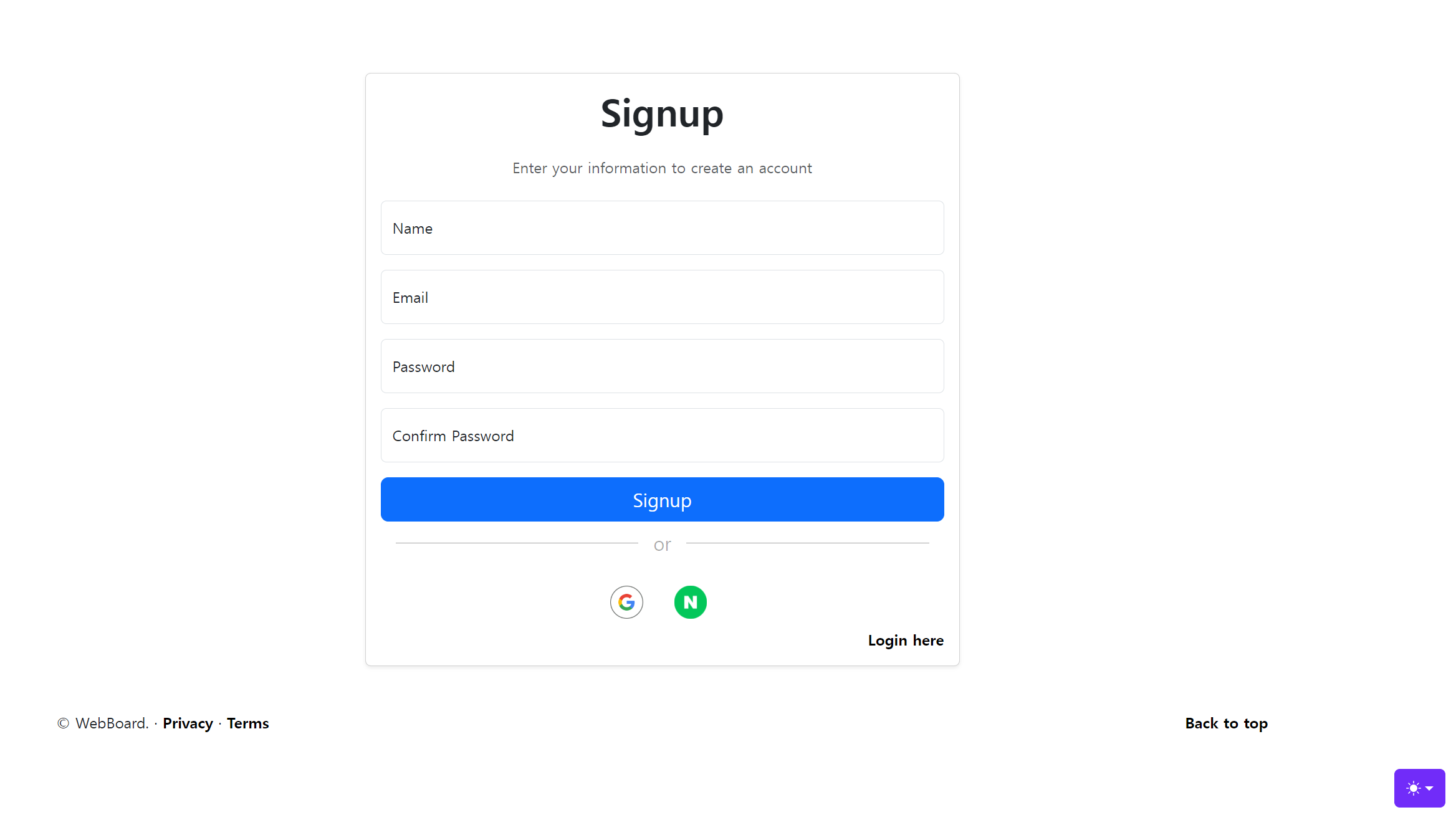
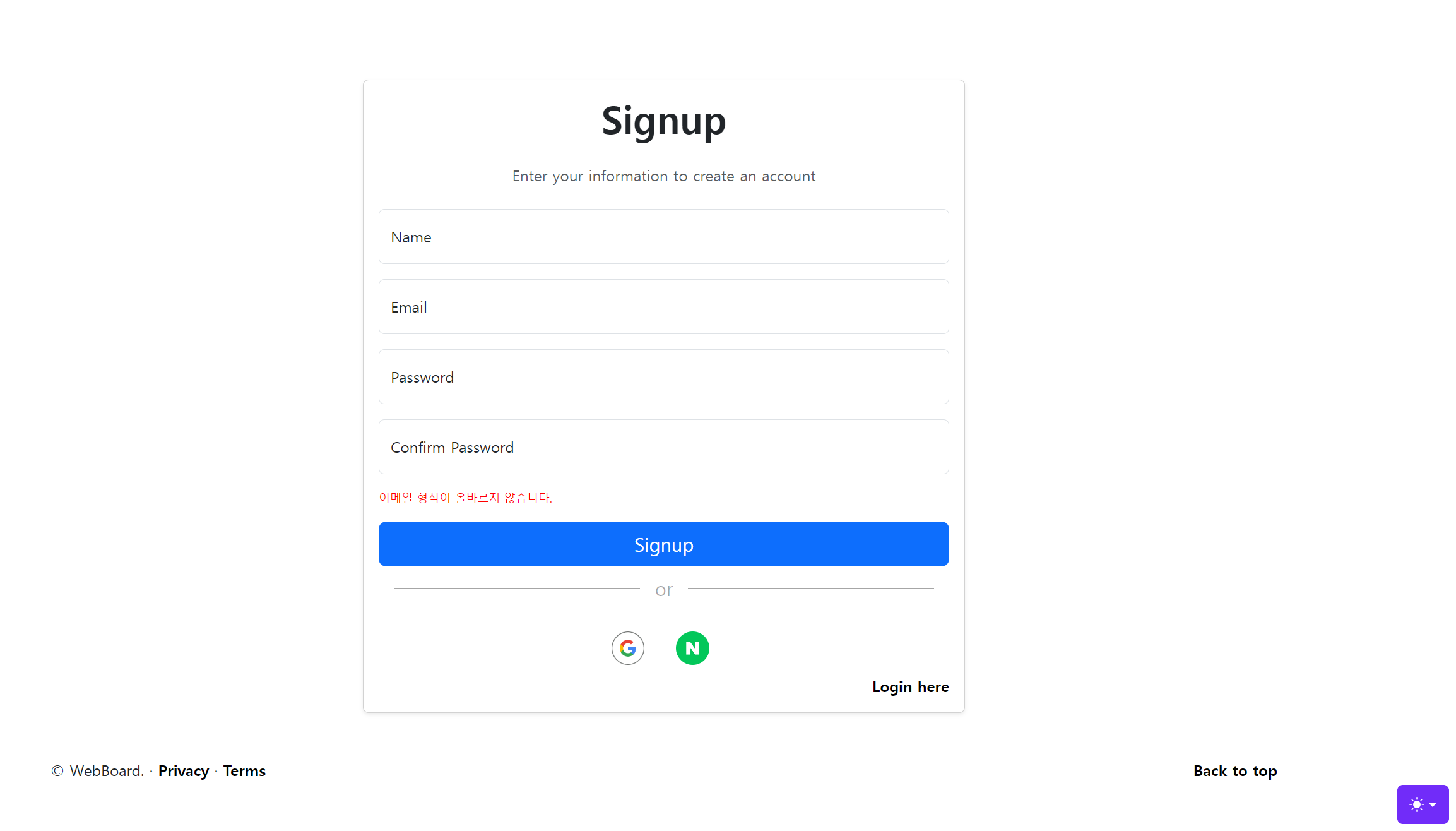
컨트롤러
package toyproject.springmvcboard.domain.auth2;

import jakarta.servlet.http.HttpSession;
import jakarta.validation.ConstraintViolation;
import jakarta.validation.ConstraintViolationException;
import lombok.extern.slf4j.Slf4j;
import org.springframework.security.crypto.bcrypt.BCryptPasswordEncoder;
import org.springframework.stereotype.Controller;
import org.springframework.ui.Model;
import org.springframework.web.bind.annotation.GetMapping;
import org.springframework.web.bind.annotation.PostMapping;
import org.springframework.web.bind.annotation.RequestMapping;
import org.springframework.web.bind.annotation.RequestParam;
import org.springframework.web.servlet.mvc.support.RedirectAttributes;
import toyproject.springmvcboard.domain.user.User;
import toyproject.springmvcboard.domain.user.UserRepository;
import toyproject.springmvcboard.domain.user.UserService;

import java.sql.Timestamp;
import java.util.Set;

@Controller
@RequestMapping("/account")
@Slf4j
public class LoginController {
    private final UserService userService;
    private final BCryptPasswordEncoder passwordEncoder;
    private final UserRepository userRepository;

    public LoginController(UserService userService, BCryptPasswordEncoder passwordEncoder, UserRepository userRepository) {
        this.userService = userService;
        this.passwordEncoder = passwordEncoder;
        this.userRepository = userRepository;
    }

    @GetMapping("/login")
    public String login(@RequestParam(value = "error", required = false) String error,
                        @RequestParam(value = "exception", required = false) String exception,
                        Model model) {

        model.addAttribute("error", error);
        model.addAttribute("exception", exception);
        return "/account/login";
    }

    @GetMapping("/signup")
    public String singup(){
        return "/account/signup";
    }

    @PostMapping("/signup")
    public String processSignup(@RequestParam String name, @RequestParam String username,
                                @RequestParam String password, @RequestParam String confirmPassword,
                                RedirectAttributes redirectAttributes) {


        try {// 비밀번호 형식 검증
            String passwordPattern = "(?=.*[0-9])(?=.*[a-zA-Z])(?=.*\\W)(?=\\S+$).{8,16}";
            if (!password.matches(passwordPattern)) {
                redirectAttributes.addFlashAttribute("signupError", "비밀번호는 8~16자 영문 대 소문자, 숫자, 특수문자를 사용하세요.");
                log.error("password error = {}", password);
                return "redirect:/account/signup";
            }

            if (!password.equals(confirmPassword)) {
                redirectAttributes.addFlashAttribute("signupError", "Password and Confirm Password do not match");
                log.error("not match = {}", password);
                return "redirect:/account/signup";
            }

            // 비밀번호 암호화
            String encodedPassword = passwordEncoder.encode(password);

            // 현재 시간 정보
            Timestamp registrationTime = new Timestamp(System.currentTimeMillis());

            User user = User.builder()
                    .username(name)
                    .email(username)
                    .password(encodedPassword)
                    .enabled(1)
                    .role("ROLE_USER")
                    .provider("custom")
                    .providerId("custom")
                    .createDate(registrationTime)
                    .build();
            // 사용자 정보 저장
            userRepository.save(user);
        } catch (ConstraintViolationException e) {
            Set<ConstraintViolation<?>> violations = e.getConstraintViolations();
            for (ConstraintViolation<?> violation : violations) {
                String message = violation.getMessage();
                redirectAttributes.addFlashAttribute("signupError", message);
            }
            return "redirect:/account/signup";
        }
        log.debug("signup = {}", username);
        return "/account/login";
    }
}
try catch를 사용해서 예외처리를 해줍니다.
entity에서 pattern을 사용해 비밀번호를 검증하게 되면 인코딩을 하고 저장되게 됩니다. 이 과정에서 유효성 검사에서 에러가 발생하게 되어 회원가입을 실패하게 됩니다. 그렇기 때문에 비밀번호 검사는 컨트롤러에서 해야 합니다.
catch문에서는 아래와 같이 동작합니다.
-
catch (ConstraintViolationException e) {...}: 이 부분은 ConstraintViolationException이 발생했을 때, 해당 예외를 처리하기 위한 코드 블록입니다. ConstraintViolationException은 Bean Validation API를 사용하고 있을 때, 데이터 유효성 검사에서 실패하면 발생합니다. -
Set<ConstraintViolation<?>> violations = e.getConstraintViolations();: 예외 객체 'e'에서 발생한 제약 조건 위반들을 가져와 'violations'라는 Set에 저장합니다. -
for (ConstraintViolation<?> violation : violations) {...}: 위반된 각 제약 조건에 대해 반복문을 실행합니다. -
String message = violation.getMessage();: 각 위반에 대한 메시지를 문자열 'message'에 저장합니다. -
redirectAttributes.addFlashAttribute("signupError", message);: 'signupError'라는 이름으로 위반 메시지를 flash attribute에 추가합니다. Flash attribute는 한 번 사용된 후에 자동으로 제거되는 속성이며, 주로 리다이렉트 시에 일회성 데이터를 전달하는데 사용됩니다. -
return "redirect:/account/signup";: 마지막으로 '/account/signup' 페이지로 리다이렉트합니다. 이 때, 위에서 추가한 flash attribute가 함께 전달됩니다.
따라서 이 코드는 유효성 검사에서 실패하면, 해당 오류 메시지를 사용자에게 보여주고 다시 회원가입 페이지('/account/signup')로 리다이렉트하는 역할을 합니다.
로그인 조건 설정
^[A-Za-z0-9._%+-]+@[A-Za-z0-9.-]+.[A-Za-z]{2,6}$
1. ^ : 문자열이나 줄의 시작을 나타냅니다.
2. [A-Za-z0-9._%+-]+ : 이메일 주소의 사용자 이름 부분을 나타냅니다. 이 부분은 알파벳 대문자 및 소문자, 숫자, 그리고 . _ % + - 문자를 포함할 수 있습니다. + 기호는 이들 중 하나 이상의 문자가 있어야 함을 의미합니다.
3. @ : @ 기호입니다. 이 기호는 이메일 주소에서 사용자 이름과 도메인 이름을 구분하는데 사용됩니다.
4. [A-Za-z0-9.-]+ : 이메일 주소의 도메인 이름을 나타냅니다. 이 부분은 알파벳 대문자 및 소문자, 숫자, 그리고 . - 문자를 포함할 수 있습니다. + 기호는 이들 중 하나 이상의 문자가 있어야 함을 의미합니다.
5. . : 이메일 주소에서 도메인 이름과 최상위 도메인을 구분하는 . 기호입니다.
6. [A-Za-z]{2,6} : 이메일 주소의 최상위 도메인을 나타냅니다. 이 부분은 알파벳 대문자 및 소문자만 포함할 수 있으며, 문자의 개수는 2개에서 6개 사이여야 합니다.
7. $ : 문자열이나 줄의 끝을 나타냅니다.
(?=.*[0-9])(?=.*[a-zA-Z])(?=.*\W)(?=\S+$).{8,16}
1. (?=.[0-9]): 적어도 하나 이상의 숫자가 포함되어야 합니다.
2. (?=.[a-zA-Z]): 적어도 하나 이상의 알파벳(대소문자 모두)이 포함되어야 합니다.
3. (?=.*\W): 적어도 하나 이상의 특수 문자가 포함되어야 합니다 (\W는 문자, 숫자가 아닌 모든 문자를 나타냅니다).
4. (?=\S+$): 공백 문자를 포함해서는 안 됩니다 (\S는 공백 문자가 아닌 모든 문자를 나타냅니다).
5. .{8,16}: 총 길이는 8자 이상, 16자 이하여야 합니다.
html
<!DOCTYPE html>
<html data-bs-theme="auto" lang="ko" xmlns:th="http://www.thymeleaf.org">
<head>
    <div th:insert="~{/fragments/header.html :: fragment-temp(로그인)}"></div>
    <style>
        .hr-sect {
            display: flex;
            flex-basis: 100%;
            align-items: center;
            color: rgba(0, 0, 0, 0.35);
            font-size: 20px;
            margin: 8px 0px;
        }
        .hr-sect::before,
        .hr-sect::after {
            content: "";
            flex-grow: 1;
            background: rgba(0, 0, 0, 0.35);
            height: 1px;
            font-size: 0px;
            line-height: 0px;
            margin: 0px 16px;
        }
    </style>
    <!--다크 모드 설정 이미지-->
    <svg th:replace="~{/fragments/darkmode.html :: fragment-image}"></svg>

    <!--다크 모드 버튼-->
    <div th:replace="~{/fragments/darkmode.html :: fragment-button}"></div>
</head>
<body>
<div class="container py-5">
    <div class="row justify-content-center">
        <div class="col-md-6">
            <div class="card shadow-sm">
                <div class="card-body">
                    <h1 class="card-title text-center mb-4 font-weight-bold" style="font-weight: bold">Signup</h1>
                    <p class="text-muted text-center">
                        Enter your information to create an account
                    </p>
                    <form th:action="@{/account/signup}" method="post" class="mt-4">
                        <!-- name input -->
                        <div class="form-floating mb-3">
                            <input type="name" class="form-control" id="name" name="name" placeholder="m@example.com" required>
                            <label for="name">Name</label>
                        </div>
                        <!-- Email input -->
                        <div class="form-floating mb-3">
                            <input type="email" class="form-control" id="username" name="username" placeholder="m@example.com" required>
                            <label for="username">Email</label>
                        </div>
                        <!-- Password input -->
                        <div class="form-floating mb-3">
                            <input type="password" class="form-control" id="password" name="password" placeholder="Password" required>
                            <label for="password">Password</label>
                        </div>
                        <!-- Password Confirmation input -->
                        <div class="form-floating mb-3">
                            <input type="password" class="form-control" id="confirmPassword" name="confirmPassword" placeholder="Confirm Password" required>
                            <label for="confirmPassword">Confirm Password</label>
                        </div>
                        <div th:if="${signupError}">
                            <p style="color: red; font-size:12px;" th:text="${signupError}"></p>
                        </div>
                        <!-- Submit button -->
                        <button type="submit" class="btn btn-primary btn-lg w-100">Signup</button>
                        <div class="hr-sect">or</div>
                        <div class="form-group d-flex justify-content-center">
                            <a th:href="@{/oauth2/authorization/google}" class="btn btn-libtn-lg mt-3">
                                <img class="bi me-2" width="35" height="35" src="/images/web_light_rd_na@2x.png" alt="Google Logo">
                            </a>
                            <a th:href="@{/oauth2/authorization/naver}" class="btn btn-libtn-lg mt-3">
                                <img class="bi me-2" width="35" height="35" src="/images/btnG_아이콘원형.png" alt="Naver Logo">
                            </a>
                        </div>
                        <div style="float: right">
                            <a th:href="@{/account/login}" style="float: right">Login here</a>
                        </div>
                    </form>
                </div>
            </div>
        </div>
    </div>
</div>
<footer th:insert="~{/fragments/footer.html :: fragment-footer}"></footer>
</body>
</html>