
(이-글을 보십시오)
Lombok 어노테이션에 대한 정보를 정리했습니다.
다른 코드를 보다가 모르는 어노테이션을 정리했기 때문에 생각보다 정리가 잘 안되어 있을 수도 있습니다.
@Data
Data 어노테이션 여러 기능을 묶은 것이다.
- @Getter
- @Setter
- @RequiredArgsConstructor
- @EqualsAndHashCode
- @ToString
@Data는 위의 어노테이션을 전부 쓴 효과를 가진다.
그럼으로, 하나씩 살펴보며 무슨 기능이 있는지 알아보자.
@Getter, @Setter
레퍼런스 : https://projectlombok.org/features/GetterSetter
먼저 단어의 뜻을 알아보자.
- Get이란 받다, 얻다 라는 뜻이다.
- Set이란 (특정한 상태에 있게·어떤 일이 일어나게) 하다
라는 뜻을 가지고 있다.
이것을 좀 더 기능적으로 말을 써보자면
- Get이란 값을 리턴하는것
- Set이란 값을 저장하는것
이라고 볼 수 있다.
객체에서 값을 받아오기 때문에 return 인 것이고,
객체에 값을 변화시키기 때문에 저장하는 것이다.(this.parameter = A;)
따라서, Getter, Setter는 다음과 같은 로직을 가진다.
//Lombok annotation
@Getter @Setter private int age = 10;


//Vanilla Java

public int getAge() {
  return age;
}

public void setAge(int age) {
  this.age = age;
}
어찌보면 당연한 것일 수도 있고 많은 사람들이 Lombok을 조심하는게 이 Setter에 있다.
무심코 Lombok 어노테이션 중 하나를 썼는데, 그중 Setter가 있고, 그 Setter가 정말 중요한 데이터에 묶여버린다면
심각한 보안상의 문제가 될 수 있기 때문이다.
자나깨나 조심하자
@ArgsConstructor
레퍼런스1 : https://projectlombok.org/features/constructor
레퍼런스2 : https://velog.io/@code-10/%EB%A1%AC%EB%B3%B5-AllNoArgsConstructor-제대로-알고-사용해보자
- @NoArgsConstructor는 parameter가 없는 constructor를 생성한다.
- 제약조건이 잇는 필드의 경우(@NonNull) 검사를 발생시키지 않는다.
- 다른 생성자(Required/All)과 함께 사용할때 유용하다.
- @AllArgsConstructor 는 각 필드에 대해 1개의 parameter를 갖는 constructor를 만든다.
- @NonNull로 표시된 필드는 해당 parameter에 대해 null 검사를 수행
- @RequiredArgsConstructor는 특수 처리가 필요한 각 field에 대해 1개의 parameter를 갖는 constructor를 만든다.
- 초기화 되지 않은 final필드와, 초기화 되지 않은 @NonNull 필드가 매개변수를 받는다.
예제를 보자.
//with Lombok
@RequiredArgsConstructor(staticName = "of")
@AllArgsConstructor(access = AccessLevel.PROTECTED)
public class ConstructorExample<T> {
  private int x, y;
  @NonNull private T description;

  @NoArgsConstructor
  public static class NoArgsExample {
    @NonNull private String field;
  }
}


// Vanilla Java

public class ConstructorExample<T> {
  private int x, y;
  @NonNull private T description;

  private ConstructorExample(T description) {
    if (description == null) throw new NullPointerException("description");
    this.description = description;
  }

  public static <T> ConstructorExample<T> of(T description) {
    return new ConstructorExample<T>(description);
  }

  @java.beans.ConstructorProperties({"x", "y", "description"})
  protected ConstructorExample(int x, int y, T description) {
    if (description == null) throw new NullPointerException("description");
    this.x = x;
    this.y = y;
    this.description = description;
  }

  public static class NoArgsExample {
    @NonNull private String field;

    public NoArgsExample() {
    }
  }
}
코드를 하나하나 분석해 보자.
Lombok
@RequiredArgsConstructor(staticName = "of")


//Code

//첫번째
  private ConstructorExample(T description) {
    if (description == null) throw new NullPointerException("description");
    this.description = description;
  }
//두번째
  pubic static <T> ConstructorExample<T> of(T description) {
    return new ConstructorExample<T>(description);
  }
//세번째
  @java.beans.ConstructorProperties({"x", "y", "description"})
  protected ConstructorExample(int x, int y, T description) {
    if (description == null) throw new NullPointerException("description");
    this.x = x;
    this.y = y;
    this.description = description;
  }
@RequiredArgsConstructor 관련 코드이다.
순서를 정리하면
-
첫번째 코드는 @RequiredArgsConstructor로 인해 @NonNull을 초기화 하는 코드이다.
-
두번째 코드는 (staticName = "of")로 인해 만들어졌으며 of를 활요하여 쉽게 인스턴스를 생성할 수 있다.
public static void main(String[] args) {
    // String 타입을 사용하는 ConstructorExample 객체 생성
    ConstructorExample<String> example = ConstructorExample.of("Example description");
    System.out.println(example.getDescription()); // 출력: Example description
}
- 세번째 코드는 @AllArgsConstructor 에 의해 만들어졌으며, 모든 인수를 초기화 하는 코드이다.
다음 코드를 보자.
//네번째 코드
  public static class NoArgsExample {
    @NonNull private String field;

    public NoArgsExample() {
    }
}- 네번째 코드는 그저 @AllArgsConstructor로 만들어진 코드이다.
- @NoArgsConstructor로 인해서 기본 생성자가 추가되었다.
@EqualsAndHashCode
레퍼런스 : https://projectlombok.org/features/EqualsAndHashCode
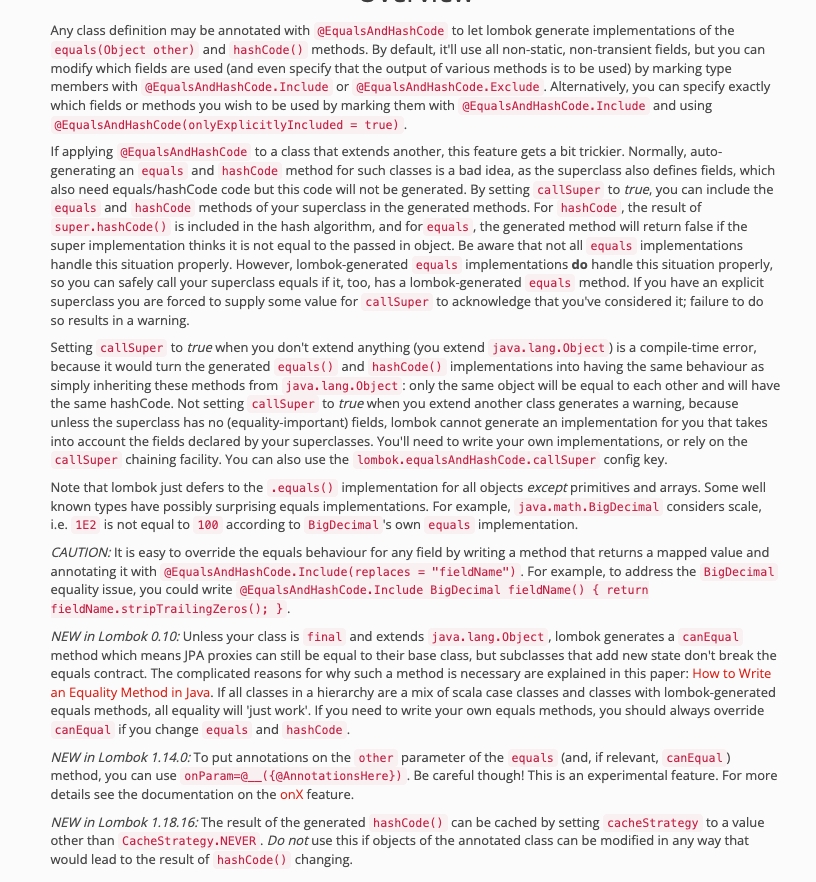
고봉밥에 정신을 못차리겠다.
일단 인터넷 서칭으로 간단하게 요약하자면
- 동등성과 동일성을 확인하는 annotation
이라고 한다.
그러니까 두 객체를 들고와서 이놈들의 내용이 같은지, 같은놈인지 확인한다는 것이다.
딱봐도 hash가 들어있어서 같은값이 되면 다른 객체라도 같은 hash값을 가질 수 있으니
같은놈인지도 확인하는것 같다.
이정도 알아보고 위의 내용을 해석해 보자면
- @EqualsAndHashCode를 적용하면 Lombok이 equals와 hashCode 메서드 구현을 생성한다.
- 추가적인 코드의 추가로 원하는 기능을 넣을수도 있다.(.Include, .Exclude...)
- 다른 클래스를 확장하는 클래스에 @EqualsAndHashCode를 적용하는건 좋은 생각이 아니다.
- 확장하지 않는 경우, CallSuper를 true로 설정하면 컴파일 에러가 발생한다.
예제 코드를 보면서 이해해 보자.
//Lombok 코드
import lombok.EqualsAndHashCode;

@EqualsAndHashCode
public class EqualsAndHashCodeExample {
  private transient int transientVar = 10;
  private String name;
  private double score;
  @EqualsAndHashCode.Exclude private Shape shape = new Square(5, 10);
  private String[] tags;
  @EqualsAndHashCode.Exclude private int id;

  public String getName() {
    return this.name;
  }

  @EqualsAndHashCode(callSuper=true)
  public static class Square extends Shape {
    private final int width, height;

    public Square(int width, int height) {
      this.width = width;
      this.height = height;
    }
  }
}

//Vanilla Java

import java.util.Arrays;

public class EqualsAndHashCodeExample {
  private transient int transientVar = 10;
  private String name;
  private double score;
  private Shape shape = new Square(5, 10);
  private String[] tags;
  private int id;

  public String getName() {
    return this.name;
  }

  @Override public boolean equals(Object o) {
    if (o == this) return true;
    if (!(o instanceof EqualsAndHashCodeExample)) return false;
    EqualsAndHashCodeExample other = (EqualsAndHashCodeExample) o;
    if (!other.canEqual((Object)this)) return false;
    if (this.getName() == null ? other.getName() != null : !this.getName().equals(other.getName())) return false;
    if (Double.compare(this.score, other.score) != 0) return false;
    if (!Arrays.deepEquals(this.tags, other.tags)) return false;
    return true;
  }

  @Override public int hashCode() {
    final int PRIME = 59;
    int result = 1;
    final long temp1 = Double.doubleToLongBits(this.score);
    result = (result*PRIME) + (this.name == null ? 43 : this.name.hashCode());
    result = (result*PRIME) + (int)(temp1 ^ (temp1 >>> 32));
    result = (result*PRIME) + Arrays.deepHashCode(this.tags);
    return result;
  }

  protected boolean canEqual(Object other) {
    return other instanceof EqualsAndHashCodeExample;
  }

  public static class Square extends Shape {
    private final int width, height;

    public Square(int width, int height) {
      this.width = width;
      this.height = height;
    }

    @Override public boolean equals(Object o) {
      if (o == this) return true;
      if (!(o instanceof Square)) return false;
      Square other = (Square) o;
      if (!other.canEqual((Object)this)) return false;
      if (!super.equals(o)) return false;
      if (this.width != other.width) return false;
      if (this.height != other.height) return false;
      return true;
    }

    @Override public int hashCode() {
      final int PRIME = 59;
      int result = 1;
      result = (result*PRIME) + super.hashCode();
      result = (result*PRIME) + this.width;
      result = (result*PRIME) + this.height;
      return result;
    }

    protected boolean canEqual(Object other) {
      return other instanceof Square;
    }
  }
}
이번에도 고봉밥이다.
그래도 하나하나 살펴보자..
//Lombok
@EqualsAndHashCode
public class EqualsAndHashCodeExample {
  private transient int transientVar = 10;
  private String name;
  private double score;
  @EqualsAndHashCode.Exclude private Shape shape = new Square(5, 10);
  private String[] tags;
  @EqualsAndHashCode.Exclude private int id;

  public String getName() {
    return this.name;
  }


  //Vanilla
  public class EqualsAndHashCodeExample {
  private transient int transientVar = 10;
  private String name;
  private double score;
  private Shape shape = new Square(5, 10);
  private String[] tags;
  private int id;

  public String getName() {
    return this.name;
  }

  @Override public boolean equals(Object o) {
    if (o == this) return true;
    if (!(o instanceof EqualsAndHashCodeExample)) return false;
    EqualsAndHashCodeExample other = (EqualsAndHashCodeExample) o;
    if (!other.canEqual((Object)this)) return false;
    if (this.getName() == null ? other.getName() != null : !this.getName().equals(other.getName())) return false;
    if (Double.compare(this.score, other.score) != 0) return false;
    if (!Arrays.deepEquals(this.tags, other.tags)) return false;
    return true;
  }

  @Override public int hashCode() {
    final int PRIME = 59;
    int result = 1;
    final long temp1 = Double.doubleToLongBits(this.score);
    result = (result*PRIME) + (this.name == null ? 43 : this.name.hashCode());
    result = (result*PRIME) + (int)(temp1 ^ (temp1 >>> 32));
    result = (result*PRIME) + Arrays.deepHashCode(this.tags);
    return result;
  }
일단 우리가 봐야 할 것은 @EqualsAndHashCode를 사용했을때 equals와 hashCode가 나온다는 것이다.
Vanilla 코드에서도 보면, 변수를 선언하고 바로 equals와 hashCode를 만드는걸 볼 수 있다
  @Override public boolean equals(Object o) {
    if (o == this) return true;
    if (!(o instanceof EqualsAndHashCodeExample)) return false;
    EqualsAndHashCodeExample other = (EqualsAndHashCodeExample) o;
    if (!other.canEqual((Object)this)) return false;
    if (this.getName() == null ? other.getName() != null : !this.getName().equals(other.getName())) return false;
    if (Double.compare(this.score, other.score) != 0) return false;
    if (!Arrays.deepEquals(this.tags, other.tags)) return false;
    return true;
  }
우선 equals 코드이다.
뭔가 엄청나게 적었는데 하나하나 살펴보면 이 두놈의 값이 같습니까? 를 물어보고 있다.
- this와 o가같나?
- o가 EqualsAndHashCodeExample의 instance인가?
- Object로 타입 캐스팅된 this가 other이랑 같은가?
- this.getName()이 null인가?
- null이라면, other의 getName()이 null인가?
- null이 아니라면, other의 getName()이 null이 아닌가?
- this와 other의 score가 같은가?
- this와 other의 tags가 같은가?
그냥 두 비교대상의 값이 같은지 계에에에에속 물어보고 있는것이다.
  @Override public int hashCode() {
    final int PRIME = 59;
    int result = 1;
    final long temp1 = Double.doubleToLongBits(this.score);
    result = (result*PRIME) + (this.name == null ? 43 : this.name.hashCode());
    result = (result*PRIME) + (int)(temp1 ^ (temp1 >>> 32));
    result = (result*PRIME) + Arrays.deepHashCode(this.tags);
    return result;
  }
처음에는 이게 뭔가 싶었다.
하지만 잘 살펴보니, 이건 hash값을 만드는 장치였다.
어려워 보이지만 하나하나 따라가 보겠다.
- PRIME에 59를, result에 1을 넣는다. 이때, 소수를 써야 한다.
- result = result*PRIME + (만약 name이 null이면 43, 아니라면 name의 hash값)
- result = result*PRIME + temp1의 상위/하위 32비트XOR연산
- result = result*PRIME + tag의 deepHashCode
정확한 값은 몰라도, 특정한 값을 곱하고 더하며 hash값을 만드는걸 알 수 있다.
여기서는 정확한 팩트는 아니고 , 내가 아는걸로는
- 고유값을 만들때 key값을 소수로 넣는다.
그렇기 때문에 PRIME에 59를 넣었고, 이는 소수이다.
hash값이 겹치지 않는 고유값을 써야하니, 소수로 했으리라 추측한다.
이후 다시 반복되는 Square class가 오는걸 확인할 수 있다.
@EqualsAndHashCode(callSuper=true)의 callSuper를 설명하기 위해서 추가로 적었는데,
상위 메서드의 인자를 받아오는 역할을 한다.
@ToString
레퍼런스 : https://projectlombok.org/features/ToString
많이 쓰여있지만 간단하게 정리하자면
- 인스턴스를 String값으로 쉽게 출력하게 도와준다.
//Lombok
import lombok.ToString;

@ToString
public class ToStringExample {
  private static final int STATIC_VAR = 10;
  private String name;
  private Shape shape = new Square(5, 10);
  private String[] tags;
  @ToString.Exclude private int id;

  public String getName() {
    return this.name;
  }

  @ToString(callSuper=true, includeFieldNames=true)
  public static class Square extends Shape {
    private final int width, height;

    public Square(int width, int height) {
      this.width = width;
      this.height = height;
    }
  }
}

//VanillaJava
import java.util.Arrays;

public class ToStringExample {
  private static final int STATIC_VAR = 10;
  private String name;
  private Shape shape = new Square(5, 10);
  private String[] tags;
  private int id;

  public String getName() {
    return this.name;
  }

  public static class Square extends Shape {
    private final int width, height;

    public Square(int width, int height) {
      this.width = width;
      this.height = height;
    }

    @Override public String toString() {
      return "Square(super=" + super.toString() + ", width=" + this.width + ", height=" + this.height + ")";
    }
  }

  @Override public String toString() {
    return "ToStringExample(" + this.getName() + ", " + this.shape + ", " + Arrays.deepToString(this.tags) + ")";
  }
}
코드도 간단하다.
단순히 @Override를 활용해 toString()을 붙였다.
활용하려면 new ToStringExample(Name,shape, ..) 로 인스턴스를 만들고,
그대로 System.out 등을 활용하면 된다.