객체 속성 설정
1. setAttribute(name,value)
- 객체의 속성을 지정
- 원래 만들어져있지 않은 자신만의 속성을 만들어서 저장 가능
2. getAttribute(name)
- 객체의 속성의 value를 가져옴
//html
<div id="divtag">123</div>
//-----------
//js
const idValue = document.getElementById("hello");
const attribute = idValue.getAttribute('id');    //idValue 객체의 id값을 가져옴
console.log(attribute); //divtag
특정요소 선택하기(태그 선택)
1. getElementById(id)
const element = document.getElementById('hello'); // hello라는 id값을 가지고 있는 태그 선택
console.log(element);
//<button id="hello">123</button> 해당 element를 통째로 들고옴
2. getElementByClassName(class-name)
- 해당하는 클래스를 모두 가져옴
- HTMLCollection을 반환함
const elements = document.getElementByClassName('hello');
console.log(elements);- class가 hello인 button 2개를 가져온 결과값:


3. getElementsByTagName(tag-name)
- 특정 태그 이름을 가진 모든 요소를 선택할때 사용.
- 이 메서드도 HTMLCollection을 반환함
const elements = document.getElementsByTagName('p'); // 모든 <p> 요소
console.log(elements); // HTMLCollection
4. getElementsByName(name)
- name속성이 매개변수로 받은 name과 일치하는 배열 얻기
5. querySelector(selector)
- CSS 선택자를 사용하여 단일 요소를 선택 가능
- 선택자에 해당하는 첫번째 요소를 반환
const divtag = document.querySelector('div');  //div태그중 가장 첫번째 div 선택
console.log(divtag); // <div>123</div> - 결과값

6. querySelectorAll(selector)
- CSS 선택자를 사용하여 모든 요소를 선택
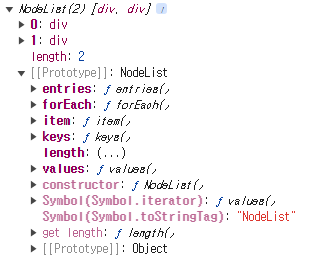
- NodeList 반환
const divtag = document.querySelectorAll('div');          //모든 div태그 선택
console.log(divtag); //NodeList 출력- 결과값(html에 div가 2개있을 경우)

화면속에서 더 나은 경험을 제공하는 프론트엔드 개발자 김윤배 입니다