1.답변 수정
댓글 수정 버튼
댓글 목록이 출력되는 부분에 답변 수정 버튼을 추가
templates\boards\post_detail.html
  <!-- 댓글목록 -->
  <h5 class="border-bottom my-3 py-2">{{post.comment_set.count}}개의 댓글이 있습니다.</h5>
  {% for comment in post.comment_set.all %}
    <div class="card my-3">
      <div class="card-body">
        <div class="card-text" style="white-space: pre-line;">{{ comment.content }}</div>
        <div class="d-flex justify-content-end">
          <div class="badge bg-light text-dark p-2 text-start">
            <div class="mb-2">{{ comment.user.username }}</div>
             <div>{{comment.created_at}}</div>
          </div>
        </div>
        <div class="my-3">
          {% if request.user == comment.user %}
          <a href="{% url 'boards:comment_modify' comment.id  %}"
             class="btn btn-sm btn-outline-secondary">수정</a>
          {% endif %}
        </div>
boards\urls.py
path('reply/modify/<int:comment_id>/', views.comment_modify, name='comment_modify'),views.py
@login_required(login_url='boards:login')
def comment_modify(request, comment_id):
    comment = get_object_or_404(Comment, pk=comment_id)

    if request.user != comment.user:
        messages.error(request, '수정권한이 없습니다')
        return redirect('boares:detail', comment_id=comment.post.id)

    if request.method == "POST":
        form = CommentForm(request.POST, instance=comment)
        if form.is_valid():
            comment = form.save(commit=False)
            #answer.modify_date = timezone.now()
            comment.save()
            return redirect('boards:detail', question_id=comment.post.id)
    else:
        form = CommentForm(instance=comment)
    context = {'comment': comment, 'form': form}
    return render(request, 'boards/comment_form.html', context)
댓글 수정 폼
댓글 수정을 위한 템플릿 comment_form.html 파일은 다음처럼 신규로 작성해야 한다.
templates\boards\comment_form.html
{% extends 'layout/base.html' %}
{% block content %}
  <!-- 답변 수정-->
  <div class="container my-3">
    <form method="post">
      {% csrf_token %}
      {% include "layout/form_errors.html" %}
      <div class="mb-3">
        <label for="content" class="form-label">답변내용</label>
        <textarea class="form-control" name="content" id="content" rows="10">{{ form.content.value|default_if_none:'' }}</textarea>
      </div>
      <button type="submit" class="btn btn-primary">저장하기</button>
    </form>
  </div>
{% endblock %}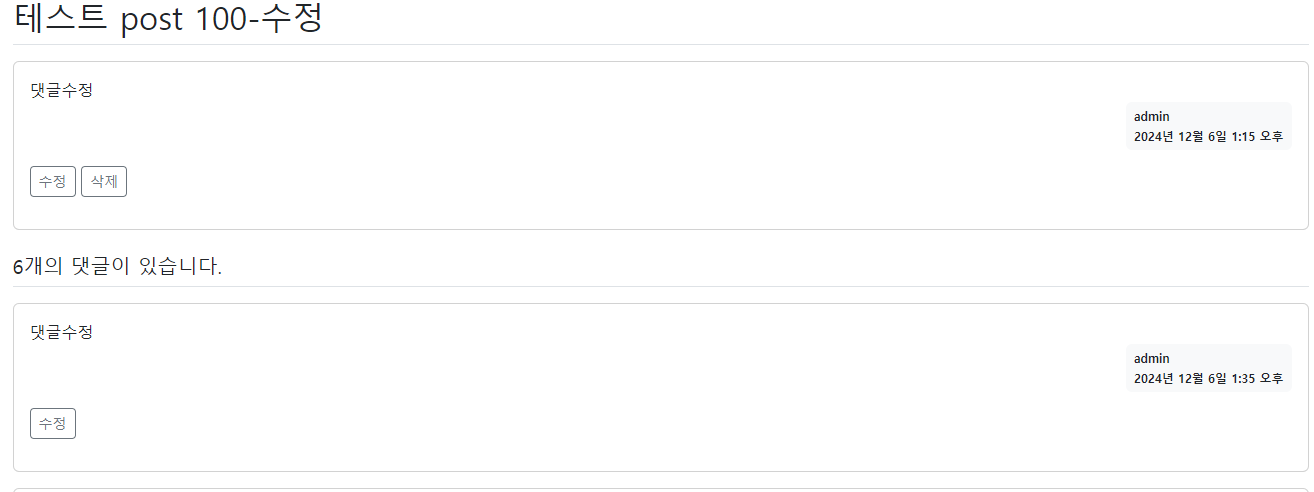
댓글 수정후 수정이 되는지 확인
댓글 삭제 구현
댓글 삭제 버튼
게시판 상세 화면에서 댓글을 삭제할 수 있는 버튼을 다음과 같이 추가하자.
templates\boards\post_detail.html
        <div class="my-3">
          {% if request.user == comment.user %}
          <a href="{% url 'boards:comment_modify' comment.id  %}"
             class="btn btn-sm btn-outline-secondary">수정</a>
          <a href="#" class="delete btn btn-sm btn-outline-secondary "
             data-uri="{% url 'boards:comment_delete' comment.id  %}">삭제</a>
          {% endif %}
boards\urls.py
urlpatterns = [
    (... 생략 ...)
   path('reply/delete/<int:comment_id>/', views.comment_delete, name='comment_delete'),
]
boards\views.py
 (... 생략 ...)
@login_required(login_url='accounts:login')
def comment_delete(request, comment_id):
    comment = get_object_or_404(Comment, pk=comment_id)
    if request.user != comment.user:
        messages.error(request, '삭제권한이 없습니다')
        return redirect('boards:detail', post_id=comment.post.id)
    comment.delete()
    return redirect('boards:detail', post_id=comment.post.id)
댓글 삭제가 잘되는지 확인
수정일시 표시하기
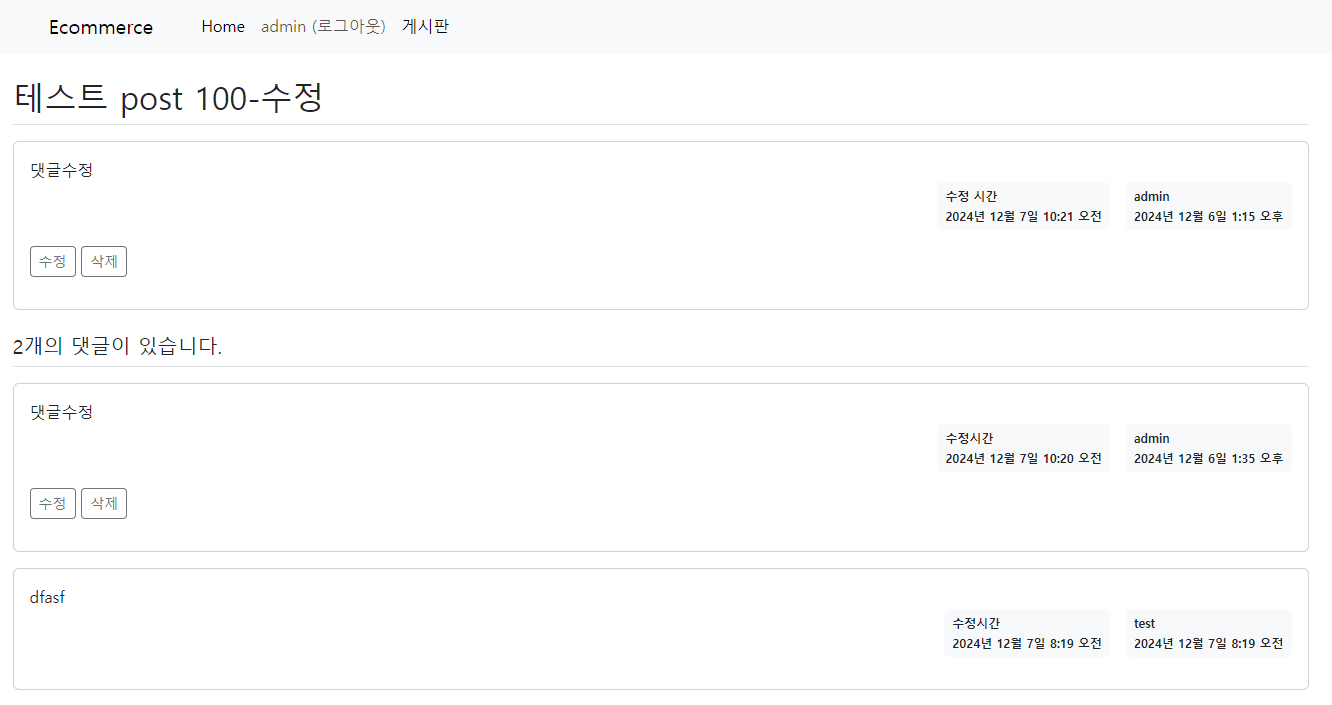
게시글 상세 화면에서 수정일시를 확인할 수 있도록 템플릿을 수정해 보자. 질문과 답변에는 이미 작성일시를 표시하고 있다. 작성일시 바로 왼쪽에 수정일시를 추가하자.
templates\boards\post_detail.html
(... 생략 ...)
        <div class="d-flex justify-content-end">
          {% if comment.updated_at %}
          <div class="badge bg-light text-dark p-2 text-start mx-3">
              <div class="mb-2">수정시간</div>
              <div>{{ comment.updated_at }}</div>
          </div>
          {% endif %}
              (... 생략 ...)
      <div class="d-flex justify-content-end">
        {% if post.updated_at %}
        <div class="badge bg-light text-dark p-2 text-start mx-3">
            <div class="mb-2">수정 시간</div>
            <div>{{ post.updated_at }}</div>
        </div>
        {% endif %}
        <div class="badge bg-light text-dark p-2 text-start">
          <div class="mb-2">{{ post.user.username }}</div>
          <div>{{ post.created_at }}</div>
        </div>
      </div>

                  (... 생략 ...)

쿵스보이(얼짱뮤지션)