Vue3에서 Composition API를 사용하여 코드를 작성
Reactive에서 설정
<template>
  <div class="app">
    {{ state.msg }}
  </div>
</template>

<script lang="ts">
import { defineComponent, reactive } from 'vue';

export default defineComponent({
  name: 'App',
  components: {},
  setup() {
    const state = reactive({
      msg: 'Hello TypeScript',
    });
    return {
      state,
    };
  },
});
</script>- setup 함수를 추가하고 그 안에서 reactive 함수를 활용하여 반응형 변수를 정의
const state = reactive({
  msg: 'Hello TypeScript' as string,
});- 위와 같이 형태를 명시적으로 지정하고 싶은 경우는 as를 이용해 타입 선언
<template>
  <div class="app">
    {{ msg }}
  </div>
</template>

<script lang="ts">
import { defineComponent, reactive, toRefs } from 'vue';

export default defineComponent({
  name: 'App',
  components: {},
  setup() {
    const state = reactive({
      msg: 'Hello TypeScript' as string,
    });
    return {
      ...toRefs(state),
    };
  },
});
</script>- 위와같이 reactive 함수를 사용하는 경우 toRefs를 사용하여 state를 ref로 변환 할 수 있음. ref로 변환하여 state.msg를 msg로 변경할 수 있음
setup() {
  const state = reactive({
    msg: 'Hello TypeScript' as string,
  });

  state.msg = 25;```
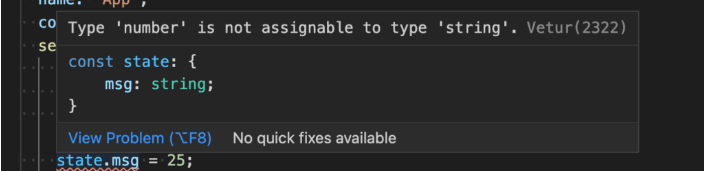
- 위와 같이 state.msg에 숫자를 설정하면 오류가 나타남
  const state = reactive<{ msg: string }>({
    msg: 'Hello TypeScript',
  });
- 위와 같이 reactive 함수는 제네릭을 사용하여 유형을 설정할 수 있습
interface State {
  msg: string;
}

const state = reactive<State>({
	msg: 'Hello TypeScript',
});- 위와같이 interface를 이용해 형태를 따로 정의해 그 형태를 reactive 함수의 형태에 이용할수 있음
ref에서 설정
<template>
  <div class="app">
    {{ msg }}
  </div>
</template>

<script lang="ts">
import { defineComponent, ref } from 'vue';

export default defineComponent({
  name: 'App',
  components: {},
  setup() {
    const msg = ref('Hello TypeScript');
    return {
      msg,
    };
  },
});
</script>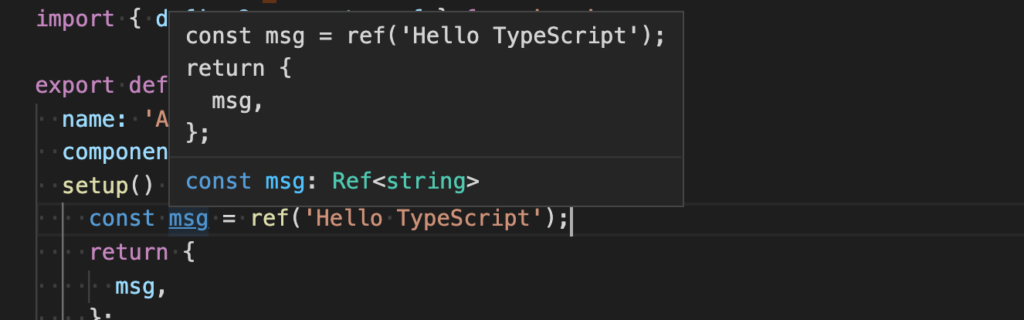
- 위와 같이 설정하면 형추론에 의해 문자열이 설정
const msg = ref<string>('Hello TypeScript');ref 의 경우에 형태를 설정하는 경우, 제네릭으로 형태를 설정
msg.value="Hello Vue 3";ref로 정의한 데이터에 액세스하려면 .value
ref로 객체 설정
객체를 설정하는 경우는 interface를 이용
interface Book {
  title: string;
  author: string;
  year: number;
}


const book = ref<Book>({
  title: 'Vue 3 Guide',
  author: 'Vue Team',
  year: 2020,
});- 아래와 같이 다른 유형을 설정하면 에러가 남
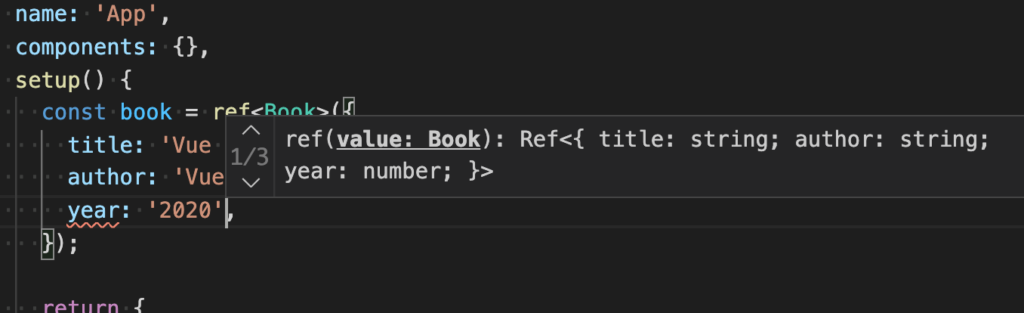
- 배열의 경우는 아래와 같이 정의
const books = ref<Book[]>([
  {
    title: 'Vue 3 Guide',
    author: 'Vue Team',
    year: 2020,
  },
  {
    title: 'Vite Guide',
    author: 'Vue Team',
    year: 2021,
  },
]);
props의 경우
<template>
  <h1>{{ msg }}</h1>
</template>

<script lang="ts">
import { defineComponent, PropType } from 'vue';

export default defineComponent({
  name: 'HelloWorld',
  props: {
    msg: {
      type: String as PropType<string>, //이부분이 타입 설정
    },
  },
});
</script><template>
<div class="app">
<hello-world :msg="msg" />
</div>
</template>
<script lang="ts">
import { defineComponent, ref } from 'vue';
import HelloWorld from './components/HelloWorld.vue';
export default defineComponent({
name: 'App',
components: {
HelloWorld,
},
setup() {
const msg = ref('Hello TypeScript');
return {
msg,
};
},
});
</script>-
ref에서 정의한 msg 속성을 props로 HelloWorld 구성 요소에 전달
메소드(함수)의 경우

쿵스보이(얼짱뮤지션)