Activity 의 종류 -1 Activity
1. Activity 란?
안드로이드 프로젝트를 처음만들때 가장 먼저 보는 것이 Activity 일 것 이다.
그렇다면 이 Activity 는 무엇이고 무슨 역할을 할까?
개발자 페이지에서 말하는 Activity 의 정의는 다음과 같다
An activity is a single, focused thing that the user can do. Almost all activities interact with the user, so the Activity class takes care of creating a window for you in which you can place your UI with setContentView(View).
다시 말해 Activity 는 사용자와 상호작용하기 위한 진입점, 즉 화면을 setContentView() 라는 함수를 호출하여 생성하는 역할을 하는 class 이다.
그렇다면 Activity 는 어떻게 화면을 그리고 어떻게 작동할까?
2. Activity LifeCycle
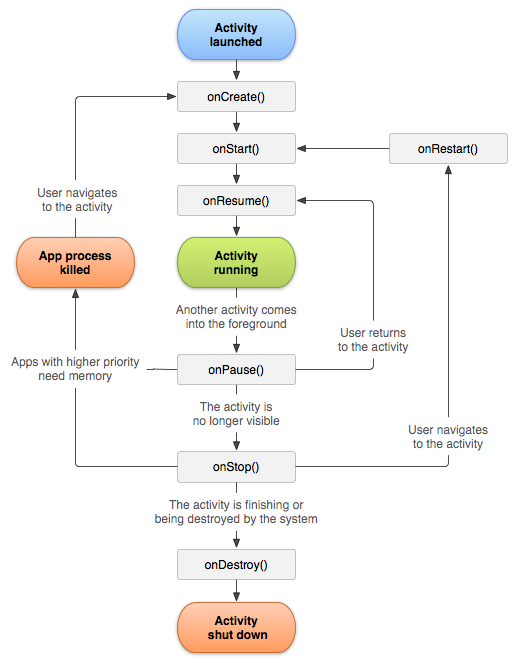
위 그림은 개발자페이지에서 제공하는 Activity LifeCycle 의 그림이다 .
개발자 페이지에서는 액티비티의 상태를 4가지로 설명한다
-
If an activity is in the foreground of the screen (at the highest position of the topmost stack), it is active or running. This is usually the activity that the user is currently interacting with.
-
If an activity has lost focus but is still presented to the user, it is visible. It is possible if a new non-full-sized or transparent activity has focus on top of your activity, another activity has higher position in multi-window mode, or the activity itself is not focusable in current windowing mode. Such activity is completely alive (it maintains all state and member information and remains attached to the window manager).
-
If an activity is completely obscured by another activity, it is stopped or hidden. It still retains all state and member information, however, it is no longer visible to the user so its window is hidden and it will often be killed by the system when memory is needed elsewhere.
-
The system can drop the activity from memory by either asking it to finish, or simply killing its process, making it destroyed. When it is displayed again to the user, it must be completely restarted and restored to its previous state.
쉽게 설명하면 다음과 같다
- Activity 가 foreground 상태이며 사용자와 상호작용 할수 있는 상태
- Activity 가 보이지만 사용자와 상호작용 할수 없는 상태
- Activity 가 다른 Activity 에 의해 완전히 가려진 상태
- Activity 시스템을 종료하거나 프로세스를 종료해서 메모리에서 완전히 사라진 상태
이와 같이 Activity 는 상태를 같고 이 상태를 변화하기 위해 몇가지 함수를 갖는데, 그 함수들이 위의 그림이다
-
onCreate()
Activity 가 생성될때 가장 먼저 호출된다. 반드시 부모 클래스의 onCreate() 함수를 호출해야 한다. Bundle 객체를 인자로 받는다. -
onRestart()
Activity 가 stopped 상태 일 때, 사용자가 activity 를 다시 실행하면 호출된다. 반드시 부모클래스의 onRestart() 함수를 호출해야 한다 -
onStart()
Activity 가 visivle 한 상태로 들어가기 시작할 때 호출 된다. 그러나 제일 처음 Activity 를 시작할 때 이함수를 지난 직후에 안보이는데, 이는 Activity 마다 갖고 있는 Window 가 앱의 Window 들을 관리하는 WindowManger 에 추가되지 않았기 때문이다. 반드시 부모 클래스의 onStart() 함수를 호출해야 한다. -
onResume()
사용자와 상호작용하기 위해 호출되는 함수이다. onStart() 함수에서와 같은 이유로 onResume() 함수가 지나도 디자인한 레이아웃이 보이지 않을 수 있다. View 의 디자인에 관한 변동 사항을 적용하려면 onWindowFocusChanged() 함수에 해주는 것이 확실한 방법이다. 실질적으로 상호작용이 가능한 것도 Window 가 Focus 를 얻고난 후이다. 받드시 부모 클래스의 onResume() 함수를 호출해야 한다. -
onPause()
Activity 가 foreground 상태에서 벗어나거나, focus 를 잃었을 때 호출 된다. 사용자에세 보이는 상태이기 때문에 UI 를 신경써주는 것이 좋다. 반드시 부모 클래스의 onPause() 함수를 호출해야 한다. -
onStop()
Activity 가 사용자에게 더이상 보이지 않을때 호출된다. 새로운 Activity 가 실행되어 running 상태가 되거나, 존재하던 Activity 가 running 상태가 되거나, 본 Activity 가 destroyed 되기 전에 이런 경우가 발생한다. animation 을 멈출 때, UI 를 새롭게 할 때 등의 경우에 사용되기도 한다. 반드시 부모클래스의 onStop() 함수를 호출해야 한다. -
onDestroy()
Activity 가 destroyed 되기 전 호출되는 마지막 함수이다. Activity 를 종료하거나, 시스템이 메모리가 부족할 때 강제로 종료하면 호출된다. 반드시 부모 클래스의 onDestroy() 함수를 호출해야 한다.
3. Activity 의 종류 및 상속
Activity 는 다음과 같은 종류가 있다.
- Activity
- ComponentActivity
- FragmentActivity
- AppCompatActivity
그리고 Activity 들은 다음과 같은 상속 순서를 가진다
Context > ContextWrapper > ContextThemeWrapper >
Activity > androidx.core.app.ComponentActivity >
CompnentActivity > FragmentActivity > AppCompatActivity
다음 포스트에서는 각 Activity 에 대한 설명과 차이점을 설명하겠다.
출처 : https://developer.android.com/reference/android/app/ActivityGroup
