세션의 사용 구조
사용자가 스프링 어플리케이션에 진입하면 기본적으로 Authentication 객체가 SecurityContextHolder에 저장됩니다. 이 때 로그인을 진행하지 않으면 Authentication객체는 anonymous상태로 저장되어 있으며
사용자가 Spring Security를 통하여 로그인을 진행하면 사용자의 정보는 SecurityContextHolder라는 내부 서버 세션에 저장되고, 이 세션에 대한 ID는 사용자에게 쿠키로 반환됩니다.
JWT는 세션에 머무는 것이 아닌 Stateless상태로 관리되지만, [Spring Security] 연습 프로젝트에서는 JWT를 사용하지 않고 구현하고자 합니다.세션 현재 사용자 아이디 가져오기
SecurityContextHolder.getContext().getAuthentication().getName();세션 현재 사용자 role 가져오기
Authentication authentication = SecurityContextHolder.getContext().getAuthentication();
Collection<? extends GrantedAuthority> authorities = authentication.getAuthorities();
Iterator<? extends GrantedAuthority> iter = authorities.iterator();
GrantedAuthority auth = iter.next();
String role = auth.getAuthority();
Spring Security 세션 설정하기
세션 소멸 시간 설정하기
세션 타임아웃을 설정하여 로그인 이후 세션이 유지되고 소멸하는 시간을 설정할 수 있다.
즉, 서버에 마지막 특정 요청을 수행한 뒤 특정 시간만큼 세션이 유지된다.(default: 1800초)
예를 들어, 세션 타임아웃이 디폴트값인 30분인 경우 글을 1시간동안 작성하면 로그아웃 된 상태로 POST요청이 가기 때문에 글 저장이 되지 않을 수 있다.
application.ymlserver: servlet: session: timeout: 90m //1800과 같다.다중 로그인 설정
동일한 아이디로 여러 브라우저에서 로그인을 진행하는 것을 다중 로그인이라고 한다. 스프링 공식 문서
http
                .sessionManagement((auth)->auth
                        .maximumSessions(1)
                        .maxSessionsPreventsLogin(true));
maximumSession(정수) : 동일 아이디에 대한 다중 로그인 허용 갯수
maxSessionPreventsLogin(bool) : 설정한 다중 로그인 허용 갯수를 초과하였을 시 처리 방법 true(초과시 새로운 로그인 차단), false(초과시 기존 세션 한개 삭제)세션 고정 보호
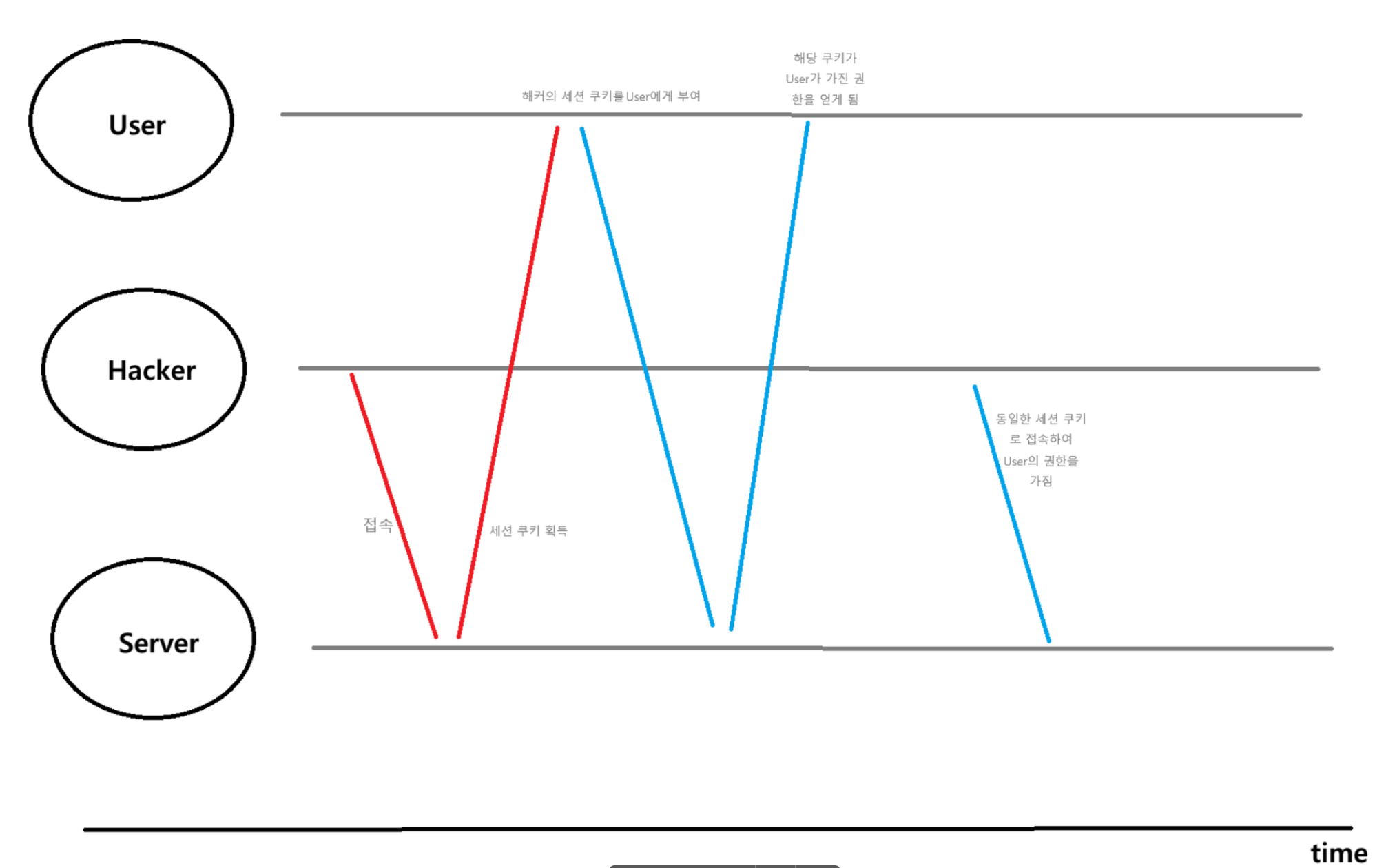
해커가 서버에 접속하여 세션 쿠키를 획득 후, 유저에게 부여하여 가진 권한으로 해당 유저를 빙자하여 쿼리를 수행하는 문제 상황을 방지하기 위하여 작업합니다.
- sessionManagement().sessionFixation().none() : 로그인 시 세션 정보 변경 안함 -> 보안에 취약
- sessionManagement().sessionFixation().newSession() : 로그인 시 세션 새로 생성 -> 사용자가 로그인하여 어나니머스 세션에서 로그인 세션으로 바뀔 때 새로운 세션을 부여
- sessionManagement().sessionFixation().changeSessionId() : 로그인 시 동일한 세션에 대한 id 변경 -> 로그인하면 기존의 세션은 동일하지만 유저가 발급받는 세션ID가 변경되어 해커가 가지고 있는 세션ID와 달라지게 한다.
Reference