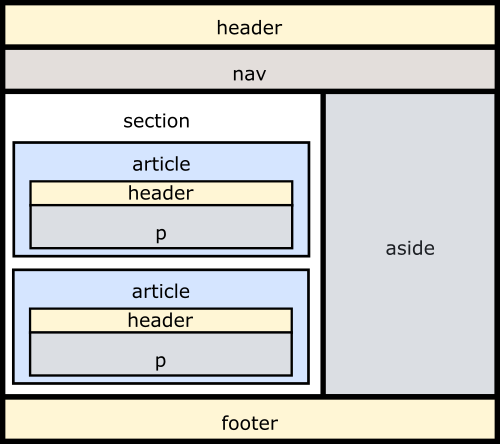
출처: w3Schools
시맨틱 요소(Semantic Element)란?
Semantic elements = elements with a meaning.
시맨틱 요소란, 브라우저와 개발자 모두에게 각 HTML 요소의 '의미'를 설명한다.
<b>시맨틱 마크업</b> | <strong>시맨틱 마크업</strong>위의 두 요소를 살펴보자.
'b' 태그는 단지 '굵은 글씨' 를 뜻하지만, 'strong'태그는 '중요하다' 라는 의미를 가진 태그이다.
브라우저에 렌더링 되어 소비자(클라이언트) 들이 보게 되는 결과는 같지만, 코드에 직접적으로 접근할 수 있는 개발자, 검색엔진은 두번째 요소를 더 중요하다고 판단할 수 있게 된다.
결과적으로 의미에 맞는 태그를 사용하는 것 만으로도 유저가 웹 페이지에 접근하는 것을 도와주는 검색 엔진에 최적화된 웹 페이지를 만들 수 있다!
하지만, HTML5를 지원하지 않는 브라우저 에서는 모든 시맨틱 태그를 인라인 영역 태그로 인식한다.
따라서 브라우저에 따라 웹페이지가 깨질 수 있는데, 이를 방지하기 위한 폴리필 도구 사용이 필요하다.
시맨틱 태그의 종류
Tag	        Description

<article>	Defines independent, self-contained content
<aside>	        Defines content aside from the page content
<details>	Defines additional details that the user can view or hide
<figcaption>	Defines a caption for a <figure> element
<figure>	Specifies self-contained content, like illustrations, diagrams, photos, code listings, etc.
<footer>	Defines a footer for a document or section
<header>	Specifies a header for a document or section
<main>	        Specifies the main content of a document
<mark>	        Defines marked/highlighted text
<nav>	        Defines navigation links
<section>	Defines a section in a document
<summary>	Defines a visible heading for a <details> element
<time>	        Defines a date/time
위의 설명을 보면, 결국 시맨틱 태그란 내용물에 대한 라벨을 붙이는 일이기 때문에 개발자의 주관이 들어간다는 것을 알 수 있다.
깔끔한 변수 명을 짓는것이 개발자의 역량 중에 하나이듯이, 내용물에 맞는 라벨을 붙이는 것 또한 개발자의 역량이기에 이를 익혀서 실무에 적용해 봐야겠다는 생각을 한다.

모듈깎는 장인이 되고싶다