서론
쇼핑몰을 구현하고 사용하다 보니 구매자/판매자 관리를 계속해서 DB에서 설정해줘야하는 불편한 점이 생겼다..
그래서 이번에는 관리자 화면을 구현하여
관리자 -> 회원관리 를 구현하도록한다.
UserPageController.java
유저관리
@GetMapping("/user/{id}/admin")
    public String adminPage(@PathVariable("id") Integer id, Model model, @AuthenticationPrincipal PrincipalDetails principalDetails){
        User admin = userPageService.findUser(id);
        // User == Admin.Role 일 경우
        if(admin.getRole().equals("ROLE_ADMIN")){
            List<User> userList = userPageService.userList();
            model.addAttribute("user",admin);
            model.addAttribute("userList",userList);
            return "/user/adminpage";
        }else{
            return "redirect:/main";
        }
    }
유저관리 처리
@PostMapping("/user/change/{id}")
    public String userChange(@PathVariable("id") Integer id, User user){
        userPageService.userUpdate(id,user);

        return "redirect:/main";
}- 다음과 같이 User의 Role이 ADMIN일 경우, 즉 쇼핑몰의 관리자일 경우 페이지를 조회할수 있도록 하였다.
전체 회원리스트를 확인하고 업데이트를 할수 있도록 하였다.
adminpage.html
<!DOCTYPE html>
<html lang="en" xmlns:th="http://www.thymeleaf.org" xmlns="http://www.w3.org/1999/html" xmlns:sec="http://www.thymeleaf.org/extras/spring-security">
<head>
    <meta charset="utf-8" />
    <meta name="viewport" content="width=device-width, initial-scale=1, shrink-to-fit=no" />
    <meta name="description" content="" />
    <meta name="author" content="" />
    <title>회원관리</title>
    <!-- Bootstrap icons-->
    <link href="https://cdn.jsdelivr.net/npm/bootstrap-icons@1.5.0/font/bootstrap-icons.css" rel="stylesheet" />
    <!-- Core theme CSS (includes Bootstrap)-->
    <link href="/css/styles2.css" rel="stylesheet" />

    <style>
        .bd-placeholder-img {
            font-size: 1.125rem;
            text-anchor: middle;
            -webkit-user-select: none;
            -moz-user-select: none;
            user-select: none;
        }

        @media (min-width: 768px) {
            .bd-placeholder-img-lg {
                font-size: 3.5rem;
            }
        }
    </style>
</head>
<body>
<!-- Navigation-->
<nav class="navbar navbar-expand-lg navbar-light bg-light" th:replace="/fragment/navigation :: menu(${user})">

</nav>

<div class="container-fluid mt-3">
    <div class="row">

        <!-- SIDE BAR -->
        <nav id="sidebarMenu" class="col-md-3 col-lg-2 d-md-block bg-light sidebar collapse" th:replace="/fragment/navigation :: side(${user})">

        </nav>

        <main class="col-md-9 ms-sm-auto col-lg-10 px-md-4">
            <div class="d-flex justify-content-between flex-wrap flex-md-nowrap align-items-center pt-3 pb-2 mb-3 border-bottom">
                <h1 class="h2">회원관리</h1>
            </div>
            <div class="table-responsive">
                <table class="table table-striped table-sm">
                    <thead>
                    <tr>
                        <th scope="col">#</th>
                        <th scope="col">Name</th>
                        <th scope="col">UserName</th>
                        <th scope="col">UserRole</th>
                        <th scope="col">UpdateRole</th>
                        <th scope="col">UserEmail</th>
                        <th scope="col">UserMoney</th>
                        <th scope="col">CreateDate</th>
                        <th scope="col">Update</th>
                    </tr>
                    </thead>
                    <tbody>
                    <tr th:each="users : ${userList}">
                        <form th:action="@{/user/change/{id}(id=${users.id})}" method="post" class="d-flex">
                            <td th:text="${users.getId()}">1</td>
                            <td th:text="${users.getName()}">name</td>
                            <td th:text="${users.getUsername()}">username</td>
                            <td th:text="${users.getRole()}">role</td>
                            <td>
                                <select name="role">
                                    <option value="ROLE_SELLER">ROLE_SELLER</option>
                                    <option value="ROLE_USER">ROLE_USER</option>
                                </select>
                            </td>
                            <td th:text="${users.getEmail()}">email</td>
                            <td th:text="${users.getMoney()}">money</td>
                            <td th:text="${users.getCreateDate()}">createdate</td>
                            <td>
                                <button class="btn btn-outline-dark flex-shrink-0" type="submit">
                                    업데이트
                                </button>
                            </td>
                        </form>
                    </tr>
                    </tbody>
                </table>
            </div>
        </main>
    </div>
</div>
<!-- Bootstrap core JS-->
<script src="https://cdn.jsdelivr.net/npm/bootstrap@5.1.3/dist/js/bootstrap.bundle.min.js"></script>
<!-- Core theme JS-->
<script src="/js/scripts.js"></script>
</body>
</html>
View
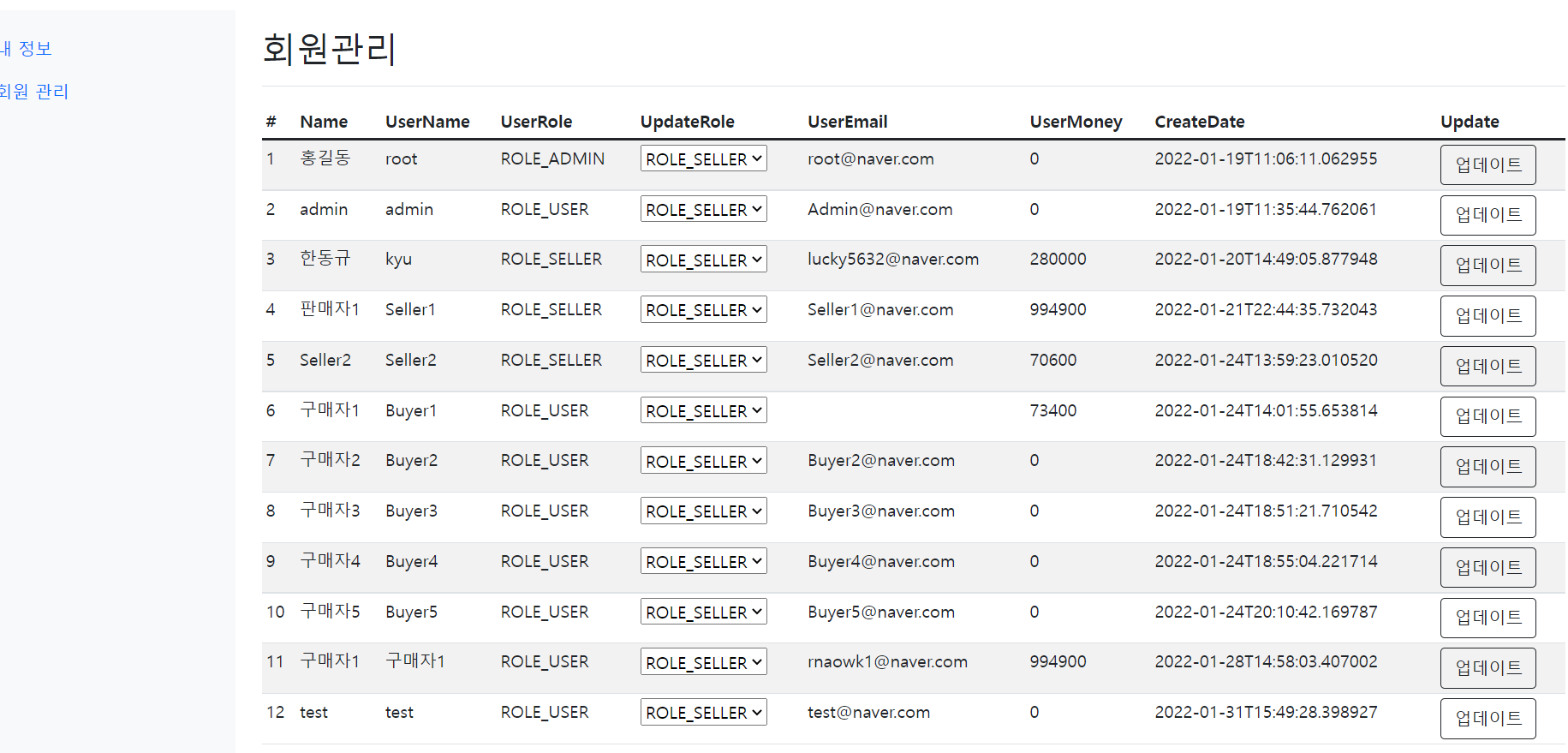
View 화면은 다음과 같이 구성하였다.
회원의 다른부분도 수정할 수 있지만, 일단은 ROLE 부분만 업데이트 하도록한다.
여기서 test 회원은 현재 구매자이지만 이것을 판매자로 바꾸어 업데이트를 해보았다.

UpdataRole 부분에서 판매자로 바꾸고 업데이트 버튼을 누르니
판매자로 바뀌는것을 확인할수 있었다!