이번에는 판매자의 판매내역을 관리하는 기능을 구현해보려한다.
먼저 판매자의 판매내역을 관리하기 위해서는
<구매자> 아이템 -> 장바구니 -> 주문 순으로 이뤄진것을
<판매자> 구매자의 주문-> 아이템이 판매자의 아이템인지 -> 판매관리
이런 순으로 생각하여 설계하였다.
판매현황 조회
UserPageController.java
@Transactional
    @GetMapping("/user/{id}/sale")
    public String mySalePage(@PathVariable("id")Integer id,Model model,@AuthenticationPrincipal PrincipalDetails principalDetails){
        if(principalDetails.getUser().getId() == id){
            // 판매자 정보를 받아온다.
            User seller = userPageService.findUser(id);

            List<Order> orderList = orderService.orderList();
            List<Order> mySaleList = new ArrayList<>();

            for(Order order : orderList){
                List<Order_item> orderItemList = order.getOrder_items();

                for(Order_item order_item : orderItemList){
                    if(seller == order_item.getItem().getUser()){
                        mySaleList.add(order);
                        break;
                    }
                }
            }

            model.addAttribute("saleList",mySaleList);
            model.addAttribute("user",seller);

            return "user/sale";
        }else{
            return "redirect:/main";
        }
}- 판매내역은 기존의 존재하는 Entity를 이용하여 구현할수 있다고 생각하여 구현해보았다.
-
판매자의 정보 받아오기
-
전체 주문내역 받아오기
-
전체 주문내역중 자신이 올린 아이템이 포함된 주문을 받아오기
sale.html
<!DOCTYPE html>
<html lang="en" xmlns:th="http://www.thymeleaf.org" xmlns="http://www.w3.org/1999/html" xmlns:sec="http://www.thymeleaf.org/extras/spring-security">
<head>
    <meta charset="utf-8" />
    <meta name="viewport" content="width=device-width, initial-scale=1, shrink-to-fit=no" />
    <meta name="description" content="" />
    <meta name="author" content="" />
    <title>주문내역</title>
    <!-- Bootstrap icons-->
    <link href="https://cdn.jsdelivr.net/npm/bootstrap-icons@1.5.0/font/bootstrap-icons.css" rel="stylesheet" />
    <!-- Core theme CSS (includes Bootstrap)-->
    <link href="/css/styles2.css" rel="stylesheet" />

    <style>
        .bd-placeholder-img {
            font-size: 1.125rem;
            text-anchor: middle;
            -webkit-user-select: none;
            -moz-user-select: none;
            user-select: none;
        }

        @media (min-width: 768px) {
            .bd-placeholder-img-lg {
                font-size: 3.5rem;
            }
        }
    </style>
</head>
<body>
<!-- Navigation-->
<nav class="navbar navbar-expand-lg navbar-light bg-light" th:replace="/fragment/navigation :: menu(${user})">

</nav>

<div class="container-fluid mt-3">
    <div class="row">

        <!-- SIDE BAR -->
        <nav id="sidebarMenu" class="col-md-3 col-lg-2 d-md-block bg-light sidebar collapse" th:replace="/fragment/navigation :: side(${user})">

        </nav>

        <main class="col-md-9 ms-sm-auto col-lg-10 px-md-4">
            <div class="d-flex justify-content-between flex-wrap flex-md-nowrap align-items-center pt-3 pb-2 mb-3 border-bottom">
                <h1 class="h2">판매 현황</h1>
            </div>

            <div class="table-responsive" th:each="sale : ${saleList}" style="padding: 20px;">
                <h4>
                    <span th:text="'주문날짜 : ' + ${sale.getCreateDate()}"></span>
                </h4>
                <h3>
                    <span th:text="'주문번호 : ' + ${sale.id}"></span>
                    <span class="badge bg-secondary" th:text="${sale.status}" th:if="${sale.status == '주문 완료'}">주문 완료</span>
                    <span class="badge bg-success" th:text="${sale.status}" th:if="${sale.status == '배송 대기'}">주문 완료</span>
                    <span class="badge bg-info" th:text="${sale.status}" th:if="${sale.status == '배송중'}">주문 완료</span>
                    <span class="badge bg-primary" th:text="${sale.status}" th:if="${sale.status == '배송 완료'}">주문 완료</span>
                    <span class="badge bg-danger" th:text="${sale.status}" th:if="${sale.status == '환불중'}">주문 완료</span>
                </h3>
                <h5>
                    <span th:text="'구매자 : ' + ${sale.user.username}"></span>
                </h5>
                <table class="table">
                    <thead class="bg-light">
                    <tr>
                        <th scope="col">#</th>
                        <th scope="col">상품명</th>
                        <th scope="col">수량</th>
                        <th scope="col">가격</th>
                        <th scope="col">합계</th>
                    </tr>

                    </thead>
                    <tbody>
                    <tr th:each="item : ${sale.order_items}" th:if="${item.item.user} == ${user}">
                        <td th:text="${item.id}">아이템번호</td>
                        <td>
                            <a th:href="@{/item/view/{id}(id=${item.item.id})}"
                               th:text="${item.item.name}"></a>
                        </td>
                        <td th:text="${item.getCount()}">수량</td>
                        <td th:text="${item.price}">가격</td>
                        <td th:text="${item.price * item.count}">합계</td>
                    </tr>
                    </tbody>
                    <tfoot>
                    <tr>
                        <td  colspan="4"></td>
                        <td th:text="${sale.price}"> 총 가격</td>
                    </tr>
                    </tfoot>
                </table>
                <form th:action="@{/order/update/{id}(id=${sale.id})}" method="post" class="d-flex">
                    <div class = "container">
                        <select name="status">
                            <option value="주문 완료">주문 완료</option>
                            <option value="배송 대기">배송 대기</option>
                            <option value="배송중">배송중</option>
                            <option value="배송 완료">배송 완료</option>
                            <option value="환불중">환불중</option>
                        </select>
                    </div>
                    <div class = "col-auto">
                        <button class="btn btn-outline-dark flex-shrink-0" type="submit">
                            업데이트
                        </button>
                    </div>
                </form>
            </div>
            <hr>
        </main>
    </div>
</div>
<!-- Bootstrap core JS-->
<script src="https://cdn.jsdelivr.net/npm/bootstrap@5.1.3/dist/js/bootstrap.bundle.min.js"></script>
<!-- Core theme JS-->
<script src="/js/scripts.js"></script>
</body>
</html>-
다음과 같이 HTML 파일을 만들어 프론트엔드를 구상하였다.
-
또한 판매자가 주문의 상태를 수정할수 있도록 업데이트 버튼을 구성하였다.
판매자의 주문상태 수정
OrderService.java
    public void orderUpdate(Integer id, Order order){
        Order tempOrder = orderRepository.findById(id).get();
        tempOrder.setStatus(order.getStatus());

        orderRepository.save(tempOrder);
    }
OrderController.java
@PostMapping("/order/update/{id}")
    public String orderUpdate(@PathVariable("id") Integer id, Order order){
        orderService.orderUpdate(id,order);

        return "redirect:/main";
}- 다음과 같은 내용을 추가하여 주문상태를 변경하면 바뀌도록 설계하였다.
View
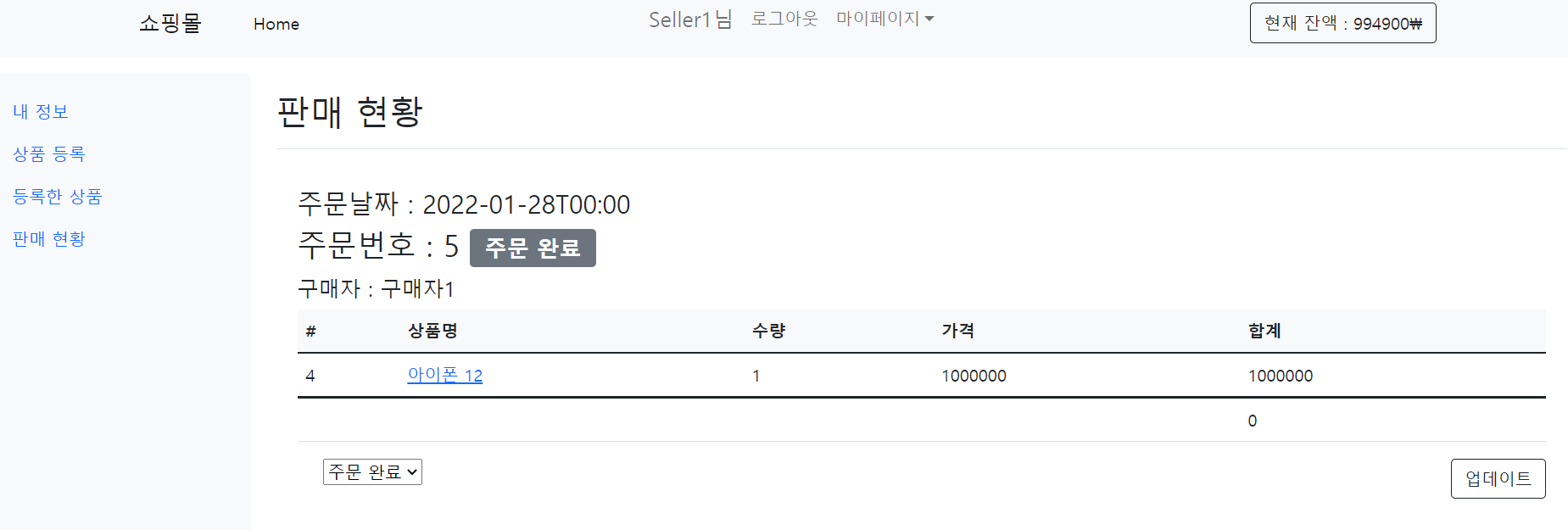
- 판매 현황 조회
상태를 수정하며 업데이트 버튼을 누르면 다음과 같이 변경된다.
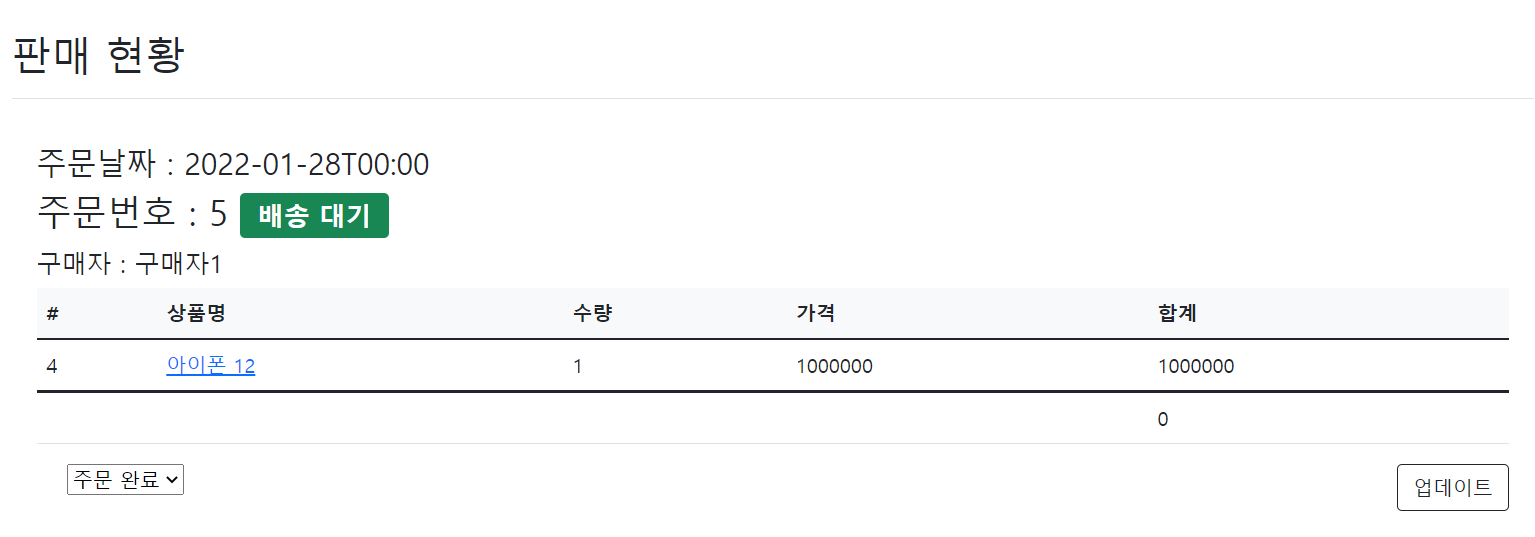
- 주문완료 -> 배송대기로 바뀐것을 볼수 있다.
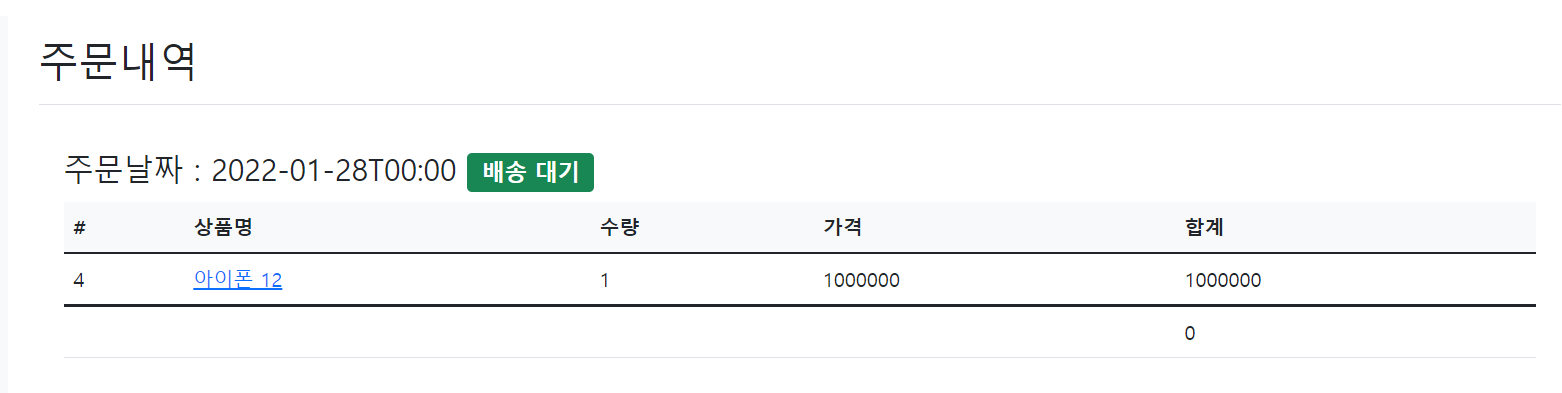
구매자의 화면을 보면 다음과 같이 바뀌는것을 볼수있다.