AI가 AI를 리뷰하게 만드는 법: Codex·Claude·Cursor 오케스트라 연결하기
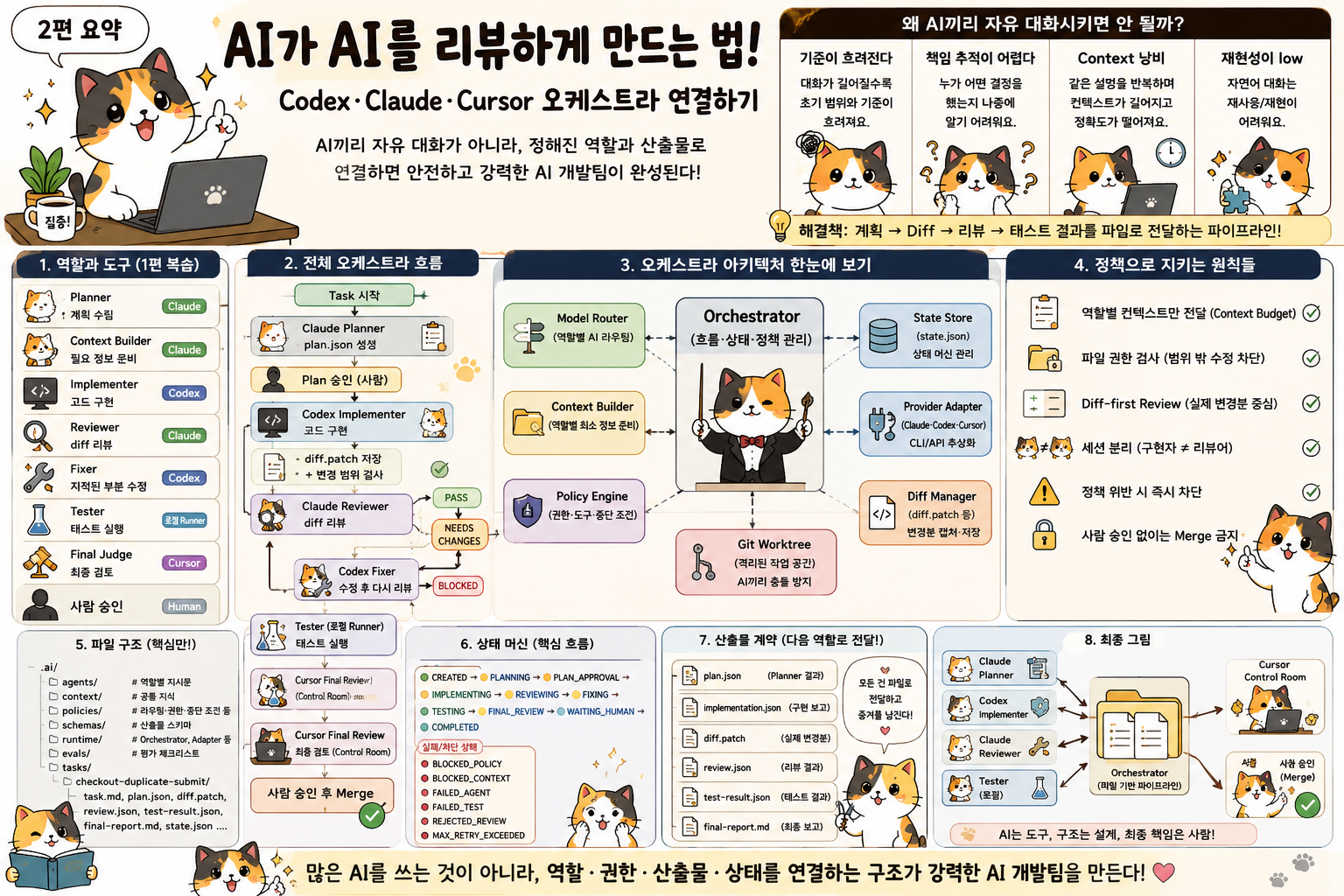
1편에서는 AI 코딩 에이전트를 하나의 만능 작업자로 쓰지 않고 역할별로 나눴다.
Planner
Context Builder
Implementer
Reviewer
Security Reviewer
Tester
Final Judge
Claude Code에는 계획과 독립 리뷰를 맡기고, Codex에는 구현과 제한된 수정을 맡겼다. Cursor는 개발자가 최종 diff와 보고서를 확인하는 Control Room으로 두었다.
구조를 그리는 것까지는 어렵지 않다.
진짜 문제는 그다음이다.
Claude가 만든 계획을 Codex에 어떻게 넘길까?

Codex가 수정한 diff를 새로운 Claude 세션에 어떻게 전달할까?

리뷰에서 문제가 발견되면 어디까지 다시 수정하게 할까?

각 AI가 같은 working tree를 건드리지 않게 하려면 어떻게 해야 할까?

작업이 중간에 끊기면 어디서 다시 시작해야 할까?
AI 오케스트라는 모델을 여러 개 실행한다고 완성되지 않는다.
각 에이전트의 결과를 다음 역할이 읽을 수 있는 형태로 저장하고, 작업 상태와 권한을 중앙에서 관리해야 한다.
이번 글에서는 1편에서 만든 조직도를 실제 파이프라인으로 연결한다.
최종 목표는 다음과 같다.
Task
→ Claude Planner
→ Codex Implementer
→ Claude Reviewer
→ Codex Fixer
→ Tester
→ Cursor Final Review
→ Human Approval
여기서 가장 중요한 원칙은 하나다.
AI끼리 자유롭게 대화하게 하지 않는다.

계획, diff, 리뷰 결과, 테스트 결과를
정해진 파일과 스키마로 다음 역할에 전달한다.
AI 개발 오케스트라는 단체 채팅방이 아니다.
증거가 남는 작업 파이프라인이다.
1. AI끼리 직접 대화시키지 말아야 하는 이유
멀티 에이전트 데모를 보면 AI끼리 토론하는 장면이 자주 나온다.
Claude:
이 문제는 ViewModel에서 처리하는 것이 맞습니다.

Codex:
Repository에서 중복 요청을 차단하는 편이 더 안전합니다.

Claude:
두 접근을 결합하는 것이 좋겠습니다.
보기에는 그럴듯하다.
하지만 실제 프로젝트에서는 이런 자유 대화 방식이 금방 복잡해진다.
대화가 길어질수록 기준이 흐려진다
Planner가 처음에 정한 작업 범위가 있었다고 해보자.
Allowed to Edit:
- CheckoutViewModel.swift
- CheckoutViewModelTests.swift

Do Not Edit:
- PaymentAPI.swift
- PaymentRepository.swift
- NetworkClient.swift
그런데 Implementer와 Reviewer가 긴 대화를 이어가다 보면 이런 이야기가 나온다.
서버 idempotency도 같이 넣는 편이 좋다.
PaymentRepository도 구조를 바꾸자.
공통 버튼 컴포넌트도 개선할 수 있다.
Analytics 이벤트도 추가하자.
각 의견은 틀리지 않을 수 있다.
하지만 현재 작업의 완료 기준과 변경 범위가 흐려진다.
누가 최종 결정을 내렸는지 추적하기 어렵다
AI끼리 자연어로 의견을 주고받으면 마지막 결과는 남아도 결정 과정은 모호해진다.
누가 파일 범위를 늘렸는가
왜 public API를 바꿨는가
어떤 테스트를 근거로 승인했는가
누가 보안 위험을 받아들였는가
나중에 문제가 생겼을 때 이 질문에 답하기 어렵다.
같은 설명이 반복되며 Context Budget을 낭비한다
에이전트마다 전체 대화 기록을 넘기면 이미 끝난 논의도 계속 따라간다.
초기 요구사항
첫 번째 계획
구현 설명
첫 번째 실패 로그
첫 번째 리뷰
수정 설명
두 번째 실패 로그
두 번째 리뷰
컨텍스트가 길어진다고 판단이 반드시 좋아지는 것은 아니다.
오래된 정보와 현재 상태가 섞이면 오히려 정확도가 떨어질 수 있다.
파일 기반 전달은 재현 가능하다
자유 대화 대신 역할별 산출물을 파일로 저장하면 흐름이 명확해진다.
Planner
→ plan.json

Implementer
→ diff.patch
→ implementation.json

Reviewer
→ review.json

Tester
→ test-result.json

Final Judge
→ final-report.md
이 구조에서는 다음을 바로 확인할 수 있다.
승인된 계획은 무엇이었는가
실제로 어떤 파일이 바뀌었는가
Reviewer가 어떤 문제를 발견했는가
어떤 테스트가 실행됐는가
아직 남아 있는 위험은 무엇인가
AI끼리 대화하는 것처럼 보이지만, 실제로는 Orchestrator가 파일을 다음 담당자에게 넘긴다.
Claude
   │
   │ plan.json
   ▼
Orchestrator
   │
   │ approved task package
   ▼
Codex
   │
   │ diff.patch + implementation.json
   ▼
Orchestrator
   │
   │ review package
   ▼
Claude
이 방식이 훨씬 단순하고 안전하다.
2. 중앙 Orchestrator가 담당해야 할 일
Orchestrator는 AI 모델이 아니다.
더 똑똑한 판단을 내리는 상위 에이전트도 아니다.
Orchestrator는 각 역할의 실행 순서와 상태를 관리하는 런타임이다.
Developer
    │
    ▼
Orchestrator
    │
    ├── Planner 호출
    ├── 계획 스키마 검사
    ├── Implementer 호출
    ├── diff 저장
    ├── Reviewer 호출
    ├── 리뷰 결과 분기
    ├── 테스트 실행
    ├── 최종 보고서 생성
    └── Human Approval 대기
Orchestrator가 담당해야 할 책임은 다음과 같다.
작업 상태 관리
현재 작업이 어느 단계인지 기록한다.
계획 중인지
구현 중인지
리뷰 중인지
수정 중인지
테스트 중인지
사람 승인을 기다리는지
역할별 AI 호출
planner 역할에는 Claude Adapter를, implementer 역할에는 Codex Adapter를 연결한다.
제품명은 정책 파일에서 바꿀 수 있어야 한다.
필요한 컨텍스트만 전달
각 역할에 같은 정보를 전부 주지 않는다.
Planner에게는 요구사항과 아키텍처를 주고, Reviewer에게는 계획과 diff를 준다.
권한 확인
에이전트가 수정 가능한 파일, 실행 가능한 명령, 읽으면 안 되는 파일을 검사한다.
출력 스키마 검증
Planner가 반드시 plan.json 형식으로 응답했는지, Reviewer가 verdict를 포함했는지 검사한다.
diff와 로그 저장
AI가 무엇을 수정했는지, 어떤 명령을 실행했는지 증거를 남긴다.
다음 역할로 라우팅
Reviewer가 needs_changes를 반환하면 Fixer로 보내고, blocked를 반환하면 사람에게 올린다.
재시도 횟수 관리
에이전트가 같은 문제를 무한히 고치지 못하게 한다.
사람 승인 요청
위험도가 높거나 정책에 걸린 작업은 자동 완료하지 않는다.
반대로 Orchestrator가 하면 안 되는 일도 있다.
직접 코드 수정
설계 판단
코드 품질 최종 판정
보안 위험 임의 승인
테스트 성공 추정
자동 머지
Orchestrator는 판단자가 아니라 흐름 관리자다.
3. 전체 프로젝트 구조
1편의 .ai 폴더에 실제 실행 코드를 추가한다.
.ai/
├── agents/
│   ├── planner.md
│   ├── implementer.md
│   ├── reviewer.md
│   ├── fixer.md
│   ├── tester.md
│   └── final-judge.md
│
├── context/
│   ├── architecture.md
│   ├── coding-rules.md
│   ├── security-rules.md
│   └── test-commands.md
│
├── policies/
│   ├── routing.yaml
│   ├── protected-files.yaml
│   ├── tool-allowlist.yaml
│   ├── stop-conditions.yaml
│   └── context-budget.yaml
│
├── schemas/
│   ├── plan.schema.json
│   ├── implementation.schema.json
│   ├── review.schema.json
│   └── test-result.schema.json
│
├── runtime/
│   ├── adapters/
│   │   ├── base.py
│   │   ├── claude_adapter.py
│   │   ├── codex_adapter.py
│   │   └── cursor_adapter.py
│   ├── orchestrator.py
│   ├── policy_engine.py
│   ├── context_builder.py
│   ├── diff_manager.py
│   └── state_store.py
│
├── evals/
│   └── pr-review.checklist.md
│
└── tasks/
    └── checkout-duplicate-submit/
        ├── task.md
        ├── files.md
        ├── tests.md
        ├── done.md
        ├── state.json
        ├── plan.json
        ├── diff.patch
        ├── implementation.json
        ├── review.json
        ├── test-result.json
        └── final-report.md
폴더별 역할을 다시 정리하면 이렇다.
agents/
- 각 역할의 행동 규칙

context/
- 프로젝트 공통 지식

policies/
- 라우팅, 파일 권한, 도구 권한, 중단 조건

schemas/
- AI 산출물의 필수 구조

runtime/
- 실제 연결 코드

tasks/
- 개별 작업의 상태와 산출물
4. 상태 머신으로 작업 흐름 관리하기
AI 작업을 순서대로 실행하는 스크립트만 만들어도 동작은 한다.
하지만 작업이 중간에 실패하거나 프로세스가 종료되면 어디서 다시 시작할지 알기 어렵다.
그래서 상태 머신이 필요하다.
정상 상태는 다음처럼 구성한다.
CREATED
   ↓
PLANNING
   ↓
PLAN_APPROVAL
   ↓
IMPLEMENTING
   ↓
REVIEWING
   ↓
FIXING
   ↓
TESTING
   ↓
FINAL_REVIEW
   ↓
WAITING_HUMAN
   ↓
COMPLETED
실패와 차단 상태도 별도로 둔다.
BLOCKED_POLICY
BLOCKED_CONTEXT
FAILED_AGENT
FAILED_TEST
REJECTED_REVIEW
MAX_RETRY_EXCEEDED
Python에서는 StrEnum으로 단순하게 시작할 수 있다.
from enum import StrEnum


class RunState(StrEnum):
    CREATED = "created"
    PLANNING = "planning"
    PLAN_APPROVAL = "plan_approval"
    IMPLEMENTING = "implementing"
    REVIEWING = "reviewing"
    FIXING = "fixing"
    TESTING = "testing"
    FINAL_REVIEW = "final_review"
    WAITING_HUMAN = "waiting_human"
    COMPLETED = "completed"

    BLOCKED_POLICY = "blocked_policy"
    BLOCKED_CONTEXT = "blocked_context"
    FAILED_AGENT = "failed_agent"
    FAILED_TEST = "failed_test"
    REJECTED_REVIEW = "rejected_review"
    MAX_RETRY_EXCEEDED = "max_retry_exceeded"
현재 상태는 작업 폴더의 state.json에 저장한다.
{
  "run_id": "run-20260711-001",
  "task_id": "checkout-duplicate-submit",
  "state": "reviewing",
  "current_role": "reviewer",
  "provider": "claude",
  "attempt": 1,
  "fix_attempts": 0,
  "started_at": "2026-07-11T09:00:00+09:00",
  "updated_at": "2026-07-11T09:18:41+09:00",
  "artifacts": {
    "plan": "plan.json",
    "implementation": "implementation.json",
    "diff": "diff.patch"
  }
}
상태를 파일에 남기면 장점이 있다.
CLI가 중간에 종료돼도 이어갈 수 있다.
현재 담당 에이전트를 확인할 수 있다.
재시도 횟수를 제한할 수 있다.
어떤 단계에서 실패했는지 추적할 수 있다.
5. State Store 구현하기
상태 파일을 직접 여기저기서 수정하면 실수가 생긴다.
작은 클래스로 감싼다.
import json
from datetime import datetime
from pathlib import Path
from typing import Any


class StateStore:
    def __init__(self, path: Path) -> None:
        self.path = path

    def load(self) -> dict[str, Any]:
        if not self.path.exists():
            raise FileNotFoundError(f"State file not found: {self.path}")

        return json.loads(self.path.read_text(encoding="utf-8"))

    def save(self, state: dict[str, Any]) -> None:
        state["updated_at"] = datetime.now().astimezone().isoformat()

        self.path.write_text(
            json.dumps(state, ensure_ascii=False, indent=2),
            encoding="utf-8",
        )

    def move_to(
        self,
        next_state: RunState,
        *,
        current_role: str | None = None,
        provider: str | None = None,
    ) -> None:
        state = self.load()
        state["state"] = next_state.value

        if current_role is not None:
            state["current_role"] = current_role

        if provider is not None:
            state["provider"] = provider

        self.save(state)

    def increment_fix_attempts(self) -> int:
        state = self.load()
        attempts = int(state.get("fix_attempts", 0)) + 1
        state["fix_attempts"] = attempts
        self.save(state)

        return attempts

    def block(self, reason: RunState) -> None:
        if not reason.value.startswith("blocked") and reason not in {
            RunState.FAILED_AGENT,
            RunState.FAILED_TEST,
            RunState.REJECTED_REVIEW,
            RunState.MAX_RETRY_EXCEEDED,
        }:
            raise ValueError(f"Invalid blocking state: {reason}")

        self.move_to(reason)
상태 변경은 항상 StateStore를 통해 수행한다.
6. Provider Adapter로 제품 차이를 숨긴다
Claude Code, Codex, Cursor는 호출 방식이 다르다.
CLI 인자도 다르고, API 응답 형식도 다르고, 세션 관리 방식도 다르다.
Orchestrator 안에서 제품별 코드를 직접 분기하면 금방 복잡해진다.
if provider == "claude":
    ...
elif provider == "codex":
    ...
elif provider == "cursor":
    ...
대신 공통 Adapter 인터페이스를 만든다.
from dataclasses import dataclass
from pathlib import Path
from typing import Protocol


@dataclass(frozen=True)
class AgentRequest:
    role: str
    task_directory: Path
    instruction_file: Path
    output_file: Path
    context_files: tuple[Path, ...]
    read_only: bool
    timeout_seconds: int
    fresh_session: bool = False


@dataclass(frozen=True)
class AgentResult:
    success: bool
    output_file: Path
    raw_log_file: Path
    exit_code: int
    provider: str
    session_id: str | None = None
    error: str | None = None


class AgentAdapter(Protocol):
    async def run(self, request: AgentRequest) -> AgentResult:
        ...
Orchestrator는 제품별 명령을 알 필요가 없다.
result = await adapter.run(request)Adapter 내부에서 다음을 처리한다.
CLI 또는 API 호출
입력 파일 전달
timeout 처리
종료 코드 확인
raw log 저장
응답 파일 생성
세션 ID 저장
7. 공통 CLI Adapter 예시
실제 제품별 명령은 사용 환경과 버전에 맞춰 Adapter 안에서 구성하면 된다.
먼저 공통 subprocess 실행 기반을 만든다.
import asyncio
from pathlib import Path


class CLIAdapterBase:
    provider_name = "unknown"

    async def run_command(
        self,
        command: list[str],
        *,
        working_directory: Path,
        timeout_seconds: int,
        log_file: Path,
    ) -> tuple[int, str]:
        process = await asyncio.create_subprocess_exec(
            *command,
            cwd=working_directory,
            stdout=asyncio.subprocess.PIPE,
            stderr=asyncio.subprocess.STDOUT,
        )

        try:
            stdout, _ = await asyncio.wait_for(
                process.communicate(),
                timeout=timeout_seconds,
            )
        except TimeoutError:
            process.kill()
            await process.wait()

            log_file.write_text(
                f"Timed out after {timeout_seconds} seconds.",
                encoding="utf-8",
            )

            return 124, "Command timed out."

        output = stdout.decode("utf-8", errors="replace")
        log_file.write_text(output, encoding="utf-8")

        return process.returncode or 0, output
각 Adapter는 build_command()만 다르게 구현할 수 있다.
class ClaudeAdapter(CLIAdapterBase):
    provider_name = "claude"

    def build_command(self, request: AgentRequest) -> list[str]:
        return [
            "claude",
            "--print",
            "--output-format",
            "json",
            self.build_prompt(request),
        ]

    def build_prompt(self, request: AgentRequest) -> str:
        context = "\n".join(
            f"- {path.as_posix()}" for path in request.context_files
        )

        return f"""
Read the role instruction:
{request.instruction_file.as_posix()}

Read the task context:
{context}

Write the required structured result to:
{request.output_file.as_posix()}

Do not edit source files.
"""
Codex Adapter는 구현 역할에 맞게 write 권한과 작업 지시를 구성한다.
class CodexAdapter(CLIAdapterBase):
    provider_name = "codex"

    def build_command(self, request: AgentRequest) -> list[str]:
        return [
            "codex",
            "exec",
            "--cwd",
            request.task_directory.parent.parent.parent.as_posix(),
            self.build_prompt(request),
        ]

    def build_prompt(self, request: AgentRequest) -> str:
        context = "\n".join(
            f"- {path.as_posix()}" for path in request.context_files
        )

        return f"""
Follow the role instruction:
{request.instruction_file.as_posix()}

Read these files:
{context}

Work only inside the approved scope.

Write the final implementation report to:
{request.output_file.as_posix()}
"""
이 코드는 Adapter 구조를 설명하기 위한 예시다. 실제 CLI 옵션은 설치된 버전과 팀 정책에 맞춰 조정해야 한다.
중요한 것은 호출 명령 자체가 아니다.
제품별 차이를 Adapter 안에 격리하는 구조다.
8. Adapter 실행 결과를 표준화한다
제품마다 출력 방식이 달라도 Orchestrator는 같은 형태의 결과를 받아야 한다.
class ClaudeAdapter(CLIAdapterBase):
    provider_name = "claude"

    async def run(self, request: AgentRequest) -> AgentResult:
        log_file = (
            request.task_directory
            / f"{request.role}-{self.provider_name}.log"
        )

        command = self.build_command(request)

        exit_code, output = await self.run_command(
            command,
            working_directory=request.task_directory.parent.parent.parent,
            timeout_seconds=request.timeout_seconds,
            log_file=log_file,
        )

        if exit_code != 0:
            return AgentResult(
                success=False,
                output_file=request.output_file,
                raw_log_file=log_file,
                exit_code=exit_code,
                provider=self.provider_name,
                error=output[-2_000:],
            )

        if not request.output_file.exists():
            return AgentResult(
                success=False,
                output_file=request.output_file,
                raw_log_file=log_file,
                exit_code=exit_code,
                provider=self.provider_name,
                error="Expected output file was not created.",
            )

        return AgentResult(
            success=True,
            output_file=request.output_file,
            raw_log_file=log_file,
            exit_code=exit_code,
            provider=self.provider_name,
        )
이제 Orchestrator는 Claude와 Codex의 세부 차이를 신경 쓰지 않는다.
9. Model Router 구성하기
1편에서 역할과 제품을 분리해야 한다고 했다.
이제 정책 파일로 구현한다.
.ai/policies/routing.yaml
version: 1

roles:
  planner:
    provider: claude
    fallback: codex
    mode: read_only
    timeout_seconds: 600
    fresh_session: true

  implementer:
    provider: codex
    fallback: claude
    mode: workspace_write
    timeout_seconds: 1800
    fresh_session: true

  reviewer:
    provider: claude
    fallback: codex
    mode: read_only
    timeout_seconds: 900
    fresh_session: true

  fixer:
    provider: codex
    fallback: claude
    mode: workspace_write
    timeout_seconds: 1200
    fresh_session: false

  tester:
    provider: local
    fallback: human
    mode: command_only
    timeout_seconds: 1800

  final_judge:
    provider: cursor
    fallback: human
    mode: review_only
    timeout_seconds: 900
    fresh_session: true

risk_overrides:
  low:
    require_plan_approval: false
    require_human_approval: false
    max_fix_rounds: 2

  medium:
    require_plan_approval: true
    require_human_approval: true
    max_fix_rounds: 2

  high:
    require_plan_approval: true
    require_human_approval: true
    max_fix_rounds: 1
이 파일의 핵심은 역할을 기준으로 라우팅한다는 점이다.
planner
implementer
reviewer
fixer
tester
final_judge
현재 planner 공급자가 Claude일 뿐이다.
나중에 모델이 바뀌면 정책 파일만 수정하면 된다.
planner:
  provider: codex
  fallback: claude
Orchestrator 코드는 바뀌지 않는다.
10. Model Router 구현하기
from dataclasses import dataclass
from pathlib import Path

import yaml


@dataclass(frozen=True)
class Route:
    role: str
    provider: str
    fallback: str | None
    mode: str
    timeout_seconds: int
    fresh_session: bool


class ModelRouter:
    def __init__(self, policy_file: Path) -> None:
        self.policy = yaml.safe_load(
            policy_file.read_text(encoding="utf-8")
        )

    def route(self, role: str) -> Route:
        roles = self.policy.get("roles", {})

        if role not in roles:
            raise KeyError(f"No route configured for role: {role}")

        config = roles[role]

        return Route(
            role=role,
            provider=config["provider"],
            fallback=config.get("fallback"),
            mode=config["mode"],
            timeout_seconds=int(config["timeout_seconds"]),
            fresh_session=bool(config.get("fresh_session", False)),
        )

    def max_fix_rounds(self, risk: str) -> int:
        overrides = self.policy.get("risk_overrides", {})
        config = overrides.get(risk)

        if config is None:
            raise KeyError(f"No risk policy configured for: {risk}")

        return int(config["max_fix_rounds"])
Orchestrator는 이렇게 사용한다.
route = router.route("planner")
adapter = adapters[route.provider]
11. Provider 장애 시 fallback
CLI가 종료되거나 API가 일시적으로 실패할 수 있다.
이때 모든 실패를 다른 모델로 넘기면 안 된다.
Provider 장애일 때만 fallback을 사용한다.
async def run_with_fallback(
    *,
    route: Route,
    request: AgentRequest,
    adapters: dict[str, AgentAdapter],
) -> AgentResult:
    primary = adapters[route.provider]
    result = await primary.run(request)

    if result.success:
        return result

    if route.fallback is None or route.fallback == "human":
        return result

    fallback_request = AgentRequest(
        role=request.role,
        task_directory=request.task_directory,
        instruction_file=request.instruction_file,
        output_file=request.output_file,
        context_files=request.context_files,
        read_only=request.read_only,
        timeout_seconds=request.timeout_seconds,
        fresh_session=True,
    )

    fallback = adapters[route.fallback]
    return await fallback.run(fallback_request)
중요한 점은 다음이다.
Provider가 실행되지 않음
→ fallback 가능

계획이 잘못됨
→ fallback으로 덮지 않음

정책에 의해 차단됨
→ fallback 금지

요구사항이 모호함
→ 사람에게 전달
다른 모델을 부른다고 모든 문제가 해결되지는 않는다.
12. Context Builder: 역할마다 다른 작업 패킷을 만든다
모든 에이전트에게 같은 파일을 주면 역할 분리의 효과가 줄어든다.
각 역할에 필요한 정보만 모은다.
Planner 패킷
task.md
files.md
architecture.md
coding-rules.md
protected-files.yaml
관련 소스 파일
Planner는 문제와 구조를 이해해야 하지만 이전 구현 로그는 필요 없다.
Implementer 패킷
task.md
approved plan.json
files.md
tests.md
coding-rules.md
수정 대상 파일
읽기 전용 참고 파일
Implementer는 승인된 계획을 따라야 한다.
Reviewer 패킷
task.md
plan.json
diff.patch
tests.md
architecture.md
protected-files.yaml
pr-review.checklist.md
Reviewer에게 구현자의 긴 설명은 주지 않는다.
Tester 패킷
test-commands.md
tests.md
변경된 테스트 파일
현재 diff stat
Tester에게 전체 프로젝트 문서를 다시 줄 필요는 없다.
13. Context Builder 구현 예시
from pathlib import Path


class ContextBuilder:
    def __init__(self, root: Path) -> None:
        self.root = root

    def build(
        self,
        *,
        role: str,
        task_dir: Path,
    ) -> tuple[Path, ...]:
        builders = {
            "planner": self._planner_context,
            "implementer": self._implementer_context,
            "reviewer": self._reviewer_context,
            "fixer": self._fixer_context,
            "tester": self._tester_context,
            "final_judge": self._final_judge_context,
        }

        if role not in builders:
            raise KeyError(f"Unsupported context role: {role}")

        files = builders[role](task_dir)

        missing = [path for path in files if not path.exists()]

        if missing:
            joined = "\n".join(path.as_posix() for path in missing)
            raise FileNotFoundError(
                f"Required context files are missing:\n{joined}"
            )

        return tuple(files)

    def _planner_context(self, task_dir: Path) -> list[Path]:
        return [
            task_dir / "task.md",
            task_dir / "files.md",
            self.root / ".ai/context/architecture.md",
            self.root / ".ai/context/coding-rules.md",
            self.root / ".ai/policies/protected-files.yaml",
        ]

    def _implementer_context(self, task_dir: Path) -> list[Path]:
        return [
            task_dir / "task.md",
            task_dir / "files.md",
            task_dir / "tests.md",
            task_dir / "plan.json",
            self.root / ".ai/context/coding-rules.md",
            self.root / ".ai/context/test-commands.md",
        ]

    def _reviewer_context(self, task_dir: Path) -> list[Path]:
        return [
            task_dir / "task.md",
            task_dir / "plan.json",
            task_dir / "diff.patch",
            task_dir / "tests.md",
            self.root / ".ai/context/architecture.md",
            self.root / ".ai/policies/protected-files.yaml",
            self.root / ".ai/evals/pr-review.checklist.md",
        ]

    def _fixer_context(self, task_dir: Path) -> list[Path]:
        return [
            task_dir / "task.md",
            task_dir / "plan.json",
            task_dir / "review.json",
            task_dir / "diff.patch",
            task_dir / "tests.md",
        ]

    def _tester_context(self, task_dir: Path) -> list[Path]:
        return [
            task_dir / "tests.md",
            self.root / ".ai/context/test-commands.md",
            task_dir / "diff-stat.txt",
        ]

    def _final_judge_context(self, task_dir: Path) -> list[Path]:
        return [
            task_dir / "task.md",
            task_dir / "plan.json",
            task_dir / "diff.patch",
            task_dir / "review.json",
            task_dir / "test-result.json",
        ]
14. Context Budget을 정책으로 관리한다
긴 컨텍스트를 지원한다고 모든 기록을 계속 넘겨서는 안 된다.
.ai/policies/context-budget.yaml
version: 1

keep:
  - current_task
  - approved_plan
  - current_diff
  - current_tests
  - latest_review
  - latest_test_failure

summarize:
  - previous_fix_attempts
  - long_build_logs
  - previous_diffs
  - repeated_compiler_errors

drop:
  - old_success_logs
  - rejected_suggestions
  - unrelated_source_files
  - duplicated_explanations
  - implementation_chat_history

limits:
  raw_log_max_characters: 12000
  previous_attempt_summary_max_characters: 2000
  reviewer_context_file_count: 12
이 정책의 핵심은 세 단계다.
Keep
- 현재 판단에 직접 필요한 정보

Summarize
- 기록은 필요하지만 원문 전체는 필요 없는 정보

Drop
- 더 이상 현재 판단에 도움 되지 않는 정보
특히 Reviewer에게 구현 대화 전체를 넘기지 않는 것이 중요하다.
15. Diff-first Review 구현하기
Reviewer에게 전체 저장소를 다시 읽히지 않는다.
실제 변경분부터 본다.
git diff --stat > .ai/tasks/checkout-duplicate-submit/diff-stat.txt
git diff --binary > .ai/tasks/checkout-duplicate-submit/diff.patch
--binary를 사용하는 이유는 이미지나 바이너리 변경도 patch에 표시하기 위해서다.
Diff Manager를 만들면 다음처럼 된다.
import asyncio
from pathlib import Path


class DiffManager:
    def __init__(self, repository: Path) -> None:
        self.repository = repository

    async def capture(self, task_dir: Path) -> None:
        await self._write_git_output(
            ["git", "diff", "--stat"],
            task_dir / "diff-stat.txt",
        )

        await self._write_git_output(
            ["git", "diff", "--binary"],
            task_dir / "diff.patch",
        )

        await self._write_git_output(
            ["git", "diff", "--name-only"],
            task_dir / "changed-files.txt",
        )

    async def _write_git_output(
        self,
        command: list[str],
        output_file: Path,
    ) -> None:
        process = await asyncio.create_subprocess_exec(
            *command,
            cwd=self.repository,
            stdout=asyncio.subprocess.PIPE,
            stderr=asyncio.subprocess.PIPE,
        )

        stdout, stderr = await process.communicate()

        if process.returncode != 0:
            message = stderr.decode("utf-8", errors="replace")
            raise RuntimeError(
                f"Git command failed: {' '.join(command)}\n{message}"
            )

        output_file.write_bytes(stdout)
Reviewer에게 전달하는 핵심 입력은 이것이다.
task.md
plan.json
diff.patch
tests.md
protected-files.yaml
pr-review.checklist.md
16. 변경 파일 범위를 자동 검사한다
AI 리뷰 전에 코드로 먼저 잡을 수 있는 것은 코드로 검사한다.
plan.json의 files_to_edit와 실제 변경 파일을 비교한다.
import fnmatch
import json
from pathlib import Path


class ScopeValidator:
    def validate(
        self,
        *,
        plan_file: Path,
        changed_files_file: Path,
    ) -> list[str]:
        plan = json.loads(plan_file.read_text(encoding="utf-8"))
        allowed_patterns = plan["files_to_edit"]

        changed_files = [
            line.strip()
            for line in changed_files_file.read_text(
                encoding="utf-8"
            ).splitlines()
            if line.strip()
        ]

        violations: list[str] = []

        for changed in changed_files:
            if not any(
                fnmatch.fnmatch(changed, pattern)
                for pattern in allowed_patterns
            ):
                violations.append(changed)

        return violations
위반이 있으면 Reviewer까지 보내기 전에 차단한다.
BLOCKED_POLICY

Changed files outside approved scope:
- Sources/Network/NetworkClient.swift
- Sources/DesignSystem/PrimaryButton.swift
AI에게 판단시킬 필요가 없는 명확한 정책 위반이다.
17. 구현자와 리뷰어 세션은 반드시 분리한다
같은 AI가 구현과 리뷰를 맡더라도 세션은 분리하는 편이 좋다.
나쁜 구조는 이렇다.
한 세션에서 구현
→ 구현 이유 설명
→ 같은 대화에서 자기 리뷰
AI는 이미 자신의 접근을 정당화한 맥락을 갖고 있다.
좋은 구조는 이렇다.
Implementer Session
- plan.json
- 수정 대상 파일
- 테스트 기준

Reviewer Session
- task.md
- plan.json
- diff.patch
- 정책 파일
Reviewer에게 다음은 주지 않는다.
구현자의 중간 추론
구현 과정에서 한 변명
폐기한 접근
실패했던 전체 로그
같은 모델을 쓰더라도 새 세션을 만든다.
Codex 구현
→ 새로운 Codex 세션 리뷰

또는

Codex 구현
→ Claude 새 세션 리뷰
핵심 원칙은 이것이다.
구현자의 설명보다
실제 diff와 테스트 결과를 믿는다.
18. Reviewer 지시문
.ai/agents/reviewer.md
# Reviewer Agent

## Role

Review the current implementation against the approved task and plan.

## Restrictions

- Do not edit code.
- Do not expand the task scope.
- Do not propose unrelated refactoring.
- Review only the current diff and supplied evidence.
- Do not trust the implementation report without checking the diff.

## Inputs

- task.md
- plan.json
- diff.patch
- tests.md
- protected-files.yaml
- pr-review.checklist.md

## Check

1. Does the diff satisfy the expected behavior?
2. Are all changed files inside the approved scope?
3. Were protected files modified?
4. Does the implementation follow the architecture rules?
5. Are failure and retry states handled?
6. Were relevant tests added?
7. Were tests actually executed?
8. Were dependencies or public APIs changed?
9. Is sensitive data exposed?
10. Does implementation.json match the actual diff?

## Output

Write JSON only:

{
  "verdict": "pass | needs_changes | blocked",
  "confidence": 0.0,
  "issues": [],
  "missing_tests": [],
  "policy_violations": [],
  "human_review_focus": []
}
Reviewer는 수정 방법을 제안할 수 있지만 직접 수정하지 않는다.
19. Git worktree로 작업 공간을 분리한다
여러 AI가 같은 working tree를 건드리면 문제가 생긴다.
개발자가 수정 중인 파일을 AI가 덮어쓴다.
Reviewer가 실수로 코드를 수정한다.
두 구현 에이전트의 변경이 섞인다.
실패한 시도를 되돌리기 어렵다.
Git worktree를 사용하면 같은 저장소에서 독립된 작업 공간을 만들 수 있다.
mkdir -p ../agent-worktrees

git worktree add \
  ../agent-worktrees/run-001 \
  -b ai/run-001

git worktree add \
  ../agent-worktrees/review-001 \
  -b ai/review-001
구조는 다음처럼 된다.
my-app/
agent-worktrees/
├── run-001/
├── run-002/
└── review-001/
Implementer 전용 worktree
Codex는 run-001에서만 수정한다.
Reviewer는 읽기 전용
Claude Reviewer는 patch 파일만 받거나 별도의 읽기 전용 worktree를 사용한다.
개발자의 현재 작업 보호
개발자가 쓰는 원래 working tree에는 AI 변경이 바로 들어오지 않는다.
20. Worktree Manager 예시
import asyncio
from dataclasses import dataclass
from pathlib import Path


@dataclass(frozen=True)
class Worktree:
    path: Path
    branch: str


class WorktreeManager:
    def __init__(
        self,
        repository: Path,
        worktree_root: Path,
    ) -> None:
        self.repository = repository
        self.worktree_root = worktree_root

    async def create(
        self,
        *,
        run_id: str,
        base_branch: str = "main",
    ) -> Worktree:
        self.worktree_root.mkdir(parents=True, exist_ok=True)

        path = self.worktree_root / run_id
        branch = f"ai/{run_id}"

        process = await asyncio.create_subprocess_exec(
            "git",
            "worktree",
            "add",
            "-b",
            branch,
            path.as_posix(),
            base_branch,
            cwd=self.repository,
            stdout=asyncio.subprocess.PIPE,
            stderr=asyncio.subprocess.PIPE,
        )

        _, stderr = await process.communicate()

        if process.returncode != 0:
            message = stderr.decode("utf-8", errors="replace")
            raise RuntimeError(f"Failed to create worktree: {message}")

        return Worktree(path=path, branch=branch)

    async def remove(self, worktree: Worktree) -> None:
        process = await asyncio.create_subprocess_exec(
            "git",
            "worktree",
            "remove",
            "--force",
            worktree.path.as_posix(),
            cwd=self.repository,
        )

        exit_code = await process.wait()

        if exit_code != 0:
            raise RuntimeError(
                f"Failed to remove worktree: {worktree.path}"
            )
실패한 시도는 worktree 단위로 폐기할 수 있다.
21. 여러 구현안을 병렬로 돌려도 될까
가능하다.
Codex 구현안 A
→ run-001

Claude 구현안 B
→ run-002

Reviewer
→ 두 diff 비교

Human
→ 더 작은 변경 선택
하지만 모든 작업에 병렬 구현을 쓰는 것은 낭비다.
병렬 시도가 어울리는 경우는 제한적이다.
설계 선택지가 명확히 둘 이상인 경우
한 접근이 맞는지 확신하기 어려운 경우
성능이나 안정성 비교가 필요한 경우
대규모 리팩토링 계획을 비교하는 경우
일반 버그 수정에 두세 개 모델을 동시에 돌리면 코드보다 리뷰할 결과가 더 많아진다.
기본은 하나의 구현과 독립 리뷰다.
22. 테스트 실행은 AI 채팅이 아니라 로컬 Runner가 맡는다
Tester 역할을 꼭 별도 LLM으로 만들 필요는 없다.
테스트 명령 실행은 결정론적인 로컬 코드가 더 적합하다.
.ai/context/test-commands.md
# Allowed Test Commands

## Unit Tests

xcodebuild test \
  -scheme MyApp \
  -destination 'platform=iOS Simulator,name=iPhone 16' \
  -only-testing:MyAppTests/CheckoutViewModelTests

## Lint

swiftlint --strict

## Format Check

swiftformat --lint Sources Tests
테스트 Runner는 허용된 명령만 실행한다.
import asyncio
import json
from pathlib import Path


class TestRunner:
    def __init__(self, repository: Path) -> None:
        self.repository = repository

    async def run(
        self,
        *,
        command: list[str],
        output_file: Path,
    ) -> dict:
        process = await asyncio.create_subprocess_exec(
            *command,
            cwd=self.repository,
            stdout=asyncio.subprocess.PIPE,
            stderr=asyncio.subprocess.STDOUT,
        )

        stdout, _ = await process.communicate()
        output = stdout.decode("utf-8", errors="replace")

        result = {
            "status": (
                "passed" if process.returncode == 0 else "failed"
            ),
            "command": command,
            "exit_code": process.returncode,
            "log_tail": output[-8_000:],
        }

        output_file.write_text(
            json.dumps(result, ensure_ascii=False, indent=2),
            encoding="utf-8",
        )

        return result
AI는 실패 로그를 해석할 수 있지만 테스트 실행 자체는 정책이 적용된 Runner가 수행한다.
23. Cursor를 Control Room으로 구성한다
Claude와 Codex를 자동 파이프라인으로 묶어도 개발자는 최종적으로 결과를 봐야 한다.
Cursor는 이 단계에서 유용하다.
현재 diff를 시각적으로 확인
계획과 실제 변경 비교
리뷰 이슈 확인
테스트 결과 확인
남은 위험 확인
개발자가 직접 수정
최종 승인 또는 거절
Cursor Rules에 최종 검토 기준을 둔다.
.cursor/rules/final-review.mdc
---
description: Final review for AI-orchestrated changes
alwaysApply: true
---

Before recommending a merge:

1. Read the current task.md.
2. Read plan.json.
3. Read review.json.
4. Read test-result.json.
5. Review the actual diff.patch.
6. Compare implementation.json with the actual diff.

Reject the change if:

- Files outside the approved scope were modified.
- Protected files changed without approval.
- Medium or high-risk tests were not executed.
- review.json contains unresolved high-severity issues.
- A new dependency or public API change is not documented.
- The implementation report does not match the diff.

Do not edit code during final review.

Return:

## Verdict

## Unresolved Risks

## Human Inspection Targets

## Merge Recommendation
개발자는 Cursor에서 다음처럼 요청한다.
.ai/tasks/checkout-duplicate-submit/의 산출물을 읽고
final-review rule에 따라 현재 diff를 검토해줘.

코드는 수정하지 말고 다음만 출력해줘.

- Verdict
- Unresolved Risks
- Human Inspection Targets
- Merge Recommendation
Cursor는 자동 머지 도구가 아니라 사람이 판단하기 위한 Control Room이다.
24. 최종 연결 흐름
이제 전체 파이프라인을 하나로 연결해보자.
Developer
   │
   │ task.md
   ▼
Orchestrator
   │
   ▼
Claude Planner
   │
   │ plan.json
   ▼
Plan Approval
   │
   ▼
Worktree 생성
   │
   ▼
Codex Implementer
   │
   │ implementation.json
   │ diff.patch
   ▼
Scope Validator
   │
   ▼
Claude Reviewer
   │
   ├── PASS
   │      │
   │      ▼
   │    Tester
   │
   ├── NEEDS_CHANGES
   │      │
   │      ▼
   │   Codex Fixer
   │      │
   │      └── 다시 Reviewer
   │
   └── BLOCKED
          │
          ▼
        Human
테스트까지 통과하면 Cursor로 넘어간다.
Tester
   │
   │ test-result.json
   ▼
Cursor Final Review
   │
   │ final-report.md
   ▼
Human Approval
25. Orchestrator 핵심 코드
전체 흐름을 간단히 구현하면 다음과 같다.
import json
from pathlib import Path


class Orchestra:
    def __init__(
        self,
        *,
        repository: Path,
        task_dir: Path,
        adapters: dict[str, AgentAdapter],
    ) -> None:
        self.repository = repository
        self.task_dir = task_dir
        self.adapters = adapters

        self.state = StateStore(task_dir / "state.json")
        self.router = ModelRouter(
            repository / ".ai/policies/routing.yaml"
        )
        self.context_builder = ContextBuilder(repository)
        self.diff_manager = DiffManager(repository)
        self.scope_validator = ScopeValidator()

    async def run(self) -> None:
        await self.plan()
        await self.wait_for_plan_approval()
        await self.implement()

        await self.diff_manager.capture(self.task_dir)
        self.validate_scope()

        review = await self.review()

        if review["verdict"] == "needs_changes":
            await self.fix()
            await self.diff_manager.capture(self.task_dir)
            self.validate_scope()
            review = await self.review()

        if review["verdict"] != "pass":
            self.state.block(RunState.REJECTED_REVIEW)
            return

        test_result = await self.test()

        if test_result["status"] != "passed":
            self.state.block(RunState.FAILED_TEST)
            return

        await self.final_review()
        self.state.move_to(RunState.WAITING_HUMAN)

    async def plan(self) -> None:
        self.state.move_to(
            RunState.PLANNING,
            current_role="planner",
        )

        await self.run_role(
            role="planner",
            output_file=self.task_dir / "plan.json",
        )

    async def implement(self) -> None:
        self.state.move_to(
            RunState.IMPLEMENTING,
            current_role="implementer",
        )

        await self.run_role(
            role="implementer",
            output_file=self.task_dir / "implementation.json",
        )

    async def review(self) -> dict:
        self.state.move_to(
            RunState.REVIEWING,
            current_role="reviewer",
        )

        output = self.task_dir / "review.json"

        await self.run_role(
            role="reviewer",
            output_file=output,
        )

        return json.loads(output.read_text(encoding="utf-8"))

    async def fix(self) -> None:
        self.state.move_to(
            RunState.FIXING,
            current_role="fixer",
        )

        await self.run_role(
            role="fixer",
            output_file=self.task_dir / "fix-report.json",
        )

        self.state.increment_fix_attempts()

    async def test(self) -> dict:
        self.state.move_to(
            RunState.TESTING,
            current_role="tester",
        )

        runner = TestRunner(self.repository)

        return await runner.run(
            command=[
                "xcodebuild",
                "test",
                "-scheme",
                "MyApp",
                "-destination",
                "platform=iOS Simulator,name=iPhone 16",
                "-only-testing:MyAppTests/CheckoutViewModelTests",
            ],
            output_file=self.task_dir / "test-result.json",
        )

    async def final_review(self) -> None:
        self.state.move_to(
            RunState.FINAL_REVIEW,
            current_role="final_judge",
        )

        await self.run_role(
            role="final_judge",
            output_file=self.task_dir / "final-report.md",
        )

    async def run_role(
        self,
        *,
        role: str,
        output_file: Path,
    ) -> None:
        route = self.router.route(role)
        context_files = self.context_builder.build(
            role=role,
            task_dir=self.task_dir,
        )

        request = AgentRequest(
            role=role,
            task_directory=self.task_dir,
            instruction_file=(
                self.repository / f".ai/agents/{role}.md"
            ),
            output_file=output_file,
            context_files=context_files,
            read_only=route.mode in {
                "read_only",
                "review_only",
            },
            timeout_seconds=route.timeout_seconds,
            fresh_session=route.fresh_session,
        )

        result = await run_with_fallback(
            route=route,
            request=request,
            adapters=self.adapters,
        )

        if not result.success:
            self.state.block(RunState.FAILED_AGENT)
            raise RuntimeError(
                result.error or f"{role} execution failed."
            )

    def validate_scope(self) -> None:
        violations = self.scope_validator.validate(
            plan_file=self.task_dir / "plan.json",
            changed_files_file=self.task_dir / "changed-files.txt",
        )

        if violations:
            self.state.block(RunState.BLOCKED_POLICY)

            joined = "\n".join(f"- {path}" for path in violations)

            raise RuntimeError(
                f"Files changed outside approved scope:\n{joined}"
            )

    async def wait_for_plan_approval(self) -> None:
        self.state.move_to(RunState.PLAN_APPROVAL)

        approval_file = self.task_dir / "plan-approved"

        if not approval_file.exists():
            raise RuntimeError(
                "Plan approval is required. "
                "Create the plan-approved file after review."
            )
이 코드는 최소 골격이다.
3편에서는 여기에 실패 분류, 제한된 재시도, Consensus, Eval Gate, Human Approval 정책을 추가한다.
26. 수동 방식부터 시작하는 것이 낫다
처음부터 위 Orchestrator를 모두 만들 필요는 없다.
오히려 수동 연결을 먼저 해보는 편이 좋다.
1단계: Claude로 계획 작성
.ai/tasks/checkout-duplicate-submit/task.md와
프로젝트 규칙을 읽고 plan.json을 작성해줘.

코드는 수정하지 마.
2단계: 사람이 계획 승인
files_to_edit, 위험도, 테스트를 확인한다.
3단계: Codex로 구현
승인된 plan.json을 기준으로 구현해줘.
files_to_edit에 없는 파일은 수정하지 마.
4단계: diff 저장
git diff --stat > diff-stat.txt
git diff --binary > diff.patch
5단계: 새로운 Claude 세션으로 리뷰
task.md, plan.json, diff.patch를 읽고 리뷰해줘.
코드는 수정하지 마.
6단계: Codex로 제한 수정
review.json의 medium 이상 이슈만 수정해줘.
범위를 넓히지 마.
7단계: 테스트 실행
실제 명령과 결과를 test-result.json에 저장한다.
8단계: Cursor에서 최종 확인
계획, diff, 리뷰, 테스트 결과를 함께 본다.
이 과정을 반복해본 뒤 자주 반복되는 부분만 자동화하는 것이 좋다.
27. 이 구조에서 흔히 하는 실수
Orchestrator에게 판단까지 맡긴다
Orchestrator는 라우팅과 상태 관리만 해야 한다.
Reviewer가 코드를 직접 수정한다
리뷰와 수정이 다시 한 역할로 합쳐진다.
모든 에이전트에게 같은 컨텍스트를 준다
역할마다 필요한 정보가 다르다.
구현자와 Reviewer에게 같은 세션을 쓴다
자기합리화와 컨텍스트 편향이 생길 수 있다.
모든 작업에 worktree를 여러 개 만든다
작은 작업에는 오히려 관리 비용이 커진다.
AI 보고서만 믿고 실제 diff를 확인하지 않는다
최종 기준은 설명이 아니라 변경분과 테스트 결과다.
Provider fallback을 품질 문제 해결에 쓴다
실행 장애와 잘못된 판단은 다른 문제다.
28. 개발자가 왜 이 구조를 알아야 할까
AI 코딩 에이전트가 강해질수록 개발자가 직접 작성하는 코드량은 줄어들 수 있다.
하지만 누가 무엇을 맡고, 어떤 결과를 다음 단계로 전달할지 설계하는 일은 더 중요해진다.
앞으로 개발자는 이런 질문을 하게 된다.
Planner가 반드시 생성해야 하는 산출물은 무엇인가?

Implementer가 수정할 수 있는 파일은 어디까지인가?

Reviewer는 어떤 정보만 봐야 독립적일 수 있는가?

Provider가 실패하면 누구에게 넘길 것인가?

작업이 끊겼을 때 어느 상태에서 재개할 것인가?

여러 AI가 같은 파일을 건드리지 않게 하려면 어떻게 할 것인가?

최종적으로 사람이 무엇만 확인하면 되는가?
이건 프롬프트를 잘 쓰는 능력과 다르다.
작은 분산 시스템을 설계하는 일에 가깝다.
에이전트
→ 작업자

산출물 파일
→ 메시지

Provider Adapter
→ 인터페이스

State Store
→ 작업 상태

Model Router
→ 라우팅 정책

Git worktree
→ 격리된 실행 환경

Cursor
→ 운영 콘솔
AI 오케스트라가 기술적으로 흥미로운 이유도 여기에 있다.
29. 마무리
AI가 AI를 리뷰하게 만든다고 해서 여러 모델을 한 대화방에 넣고 토론시키는 것은 아니다.
실제 운영 가능한 구조는 훨씬 단순하고 건조하다.
Planner가 plan.json을 만든다.

Implementer가 승인된 범위 안에서 코드를 수정한다.

Orchestrator가 실제 diff를 저장한다.

새 Reviewer 세션이 계획과 diff를 비교한다.

문제가 있으면 Fixer가 지적된 부분만 수정한다.

로컬 Runner가 테스트를 실행한다.

Cursor에서 사람이 전체 증거를 확인한다.
이 방식에서는 AI의 말보다 산출물이 중요하다.
계획
diff
리뷰 결과
테스트 로그
최종 보고서
각 단계의 결과가 파일로 남아야 다음 역할이 검증할 수 있다.
그리고 역할과 제품은 분리돼야 한다.
Planner는 역할이다.
Claude는 현재 그 역할을 맡은 공급자다.

Implementer는 역할이다.
Codex는 현재 그 역할을 맡은 공급자다.

Control Room은 역할이다.
Cursor는 현재 그 역할에 적합한 작업 환경이다.
도구는 바뀔 수 있다.
하지만 다음 흐름은 쉽게 바뀌지 않는다.
계획
→ 구현
→ 독립 리뷰
→ 제한 수정
→ 테스트
→ 사람 승인
한 줄로 정리하면 이렇다.
AI끼리 리뷰시킨다는 것은
에이전트들이 자유롭게 수다를 떨게 하는 것이 아니다.

계획, diff, 리뷰 결과, 테스트 결과를
정해진 형식으로 다음 역할에 전달하는 것이다.
다음 편에서는 연결된 오케스트라가 실패했을 때의 운영을 다룬다.
Reviewer와 Planner의 의견이 다르면 어떻게 할까?

테스트가 계속 실패하면 누구에게 넘길까?

다른 모델로 몇 번까지 재시도할까?

정책 위반과 코드 오류를 어떻게 구분할까?

언제 자동화를 멈추고 사람에게 넘길까?
Consensus Workflow, Self-Healing, Eval Gate, Tool Hook, Human Approval Gate를 이용해 AI 개발팀을 실제 운영 가능한 수준으로 완성한다.