
Foremost, we have to know Data Pipelines.
Data Pipelines
A data pipeline is a method in which raw data is ingested from various data sources—APIs, SQL and NoSQL databases, files, et cetera, and then ported to data store, like a data lake or data warehouse, for analysis. Before data flows into a data repository, it usually undergoes some data processing. This is inclusive of data transformations, such as filtering, masking, and aggregations, which ensure appropriate data integration and standardization.
There are two main types of data pipeline, which are batch processing and streaming data.
- Batch Processing: Load “batches” of data into a repository during set time intervals, which are typically scheduled during off-peak business hours
- Streaming data: Be required for data to be continuously updated
(Click if you want to know more about streaming data)
ETL pipeline
ETL pipeline is a subcategory of data pipelines.
• ETL pipelines follow a specific sequence. As the abbreviation implies, they Extract data, Transform data, and then Load and store data in a data repository. All data pipelines do not need to follow this sequence. In fact, ELT pipelines have become more popular with the advent of cloud-native tools. While data ingestion still occurs first with this type of pipeline, any transformations are applied after the data has been loaded into the cloud data warehouse.
• ETL pipelines also tend to imply the use of batch processing, but as we noted above, the scope of data pipelines is broader. They can also be inclusive of stream processing.
Then,
What is the Apache Airflow?
Apache Airflow™ is an open-source platform for developing, scheduling, and monitoring batch-oriented workflows. Airflow’s extensible Python framework enables you to build workflows connecting with virtually any technology. A web interface helps manage the state of your workflows. Airflow is deployable in many ways, varying from a single process on your laptop to a distributed setup to support even the biggest workflows.
That is, Apache Airflow is a tool which can help develop, schedule, and monitor batch processing with Python.
Airflow Components
Core Components
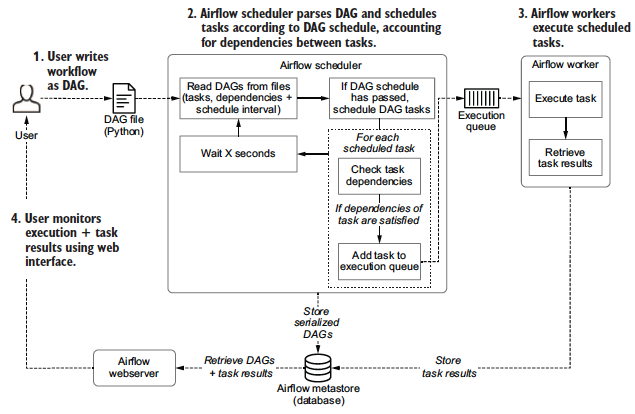
- A folder of DAG files is read by the scheduler to figure out what tasks to run and when and to run them.
- A scheduler handles both triggering scheduled workflows, and submitting Tasks to the executor to run
(1) Read DAGs from files and parses DAGs,
(2) check their schedule interval and start date,
(3) (if the DAGs’ schedule has passed) starts scheduling the DAGs’ tasks for execution by passing them to the Airflow workers.
(The executor is a configuration property of the scheduler and runs within the scheduler process. Executors are the mechanism by which task instances get run)
- A metadata database is use to store state of workflows (DAGs) and their tasks. It stores crucial information such as the configuration of your Airflow environment's roles and permissions, as well as all metadata for past and present DAG and task runs.
- A webserver presents a handy user interface to inspect, trigger and debug the behaviour of DAGs and tasks.
Situational Components
- A worker executes the tasks given to it by the scheduler. (In the basic installation worker might be part of the scheduler not a separate component.) It is the process that executes tasks, as defined by the executor of Scheduler)
- A triggerer executes deferred tasks in an asyncio event loop. In basic installation where deferred tasks are not used, a triggerer is not necessary. (Need to be updated)
- A dag processor parses DAG files and serializes them into the metadata database. By default, the dag processor process is part of the scheduler, but it can be run as a separate component for scalability and security reasons. If dag processor is present scheduler does not need to read the DAG files directly.
- Plugins are a way to extend Airflow’s functionality (similar to installed packages). Plugins are read by the scheduler, dag processor, triggerer and webserver.
