📝Problem - File-Download-1
flag.py 파일을 다운로드 받으면 FLAG를 획득할 수 있는 문제.
@APP.route('/upload', methods=['GET', 'POST'])
def upload_memo():
    if request.method == 'POST':
        filename = request.form.get('filename')
        content = request.form.get('content').encode('utf-8')

        if filename.find('..') != -1:
            return render_template('upload_result.html', data='bad characters,,')

        with open(f'{UPLOAD_DIR}/{filename}', 'wb') as f:
            f.write(content)

        return redirect('/')

    return render_template('upload.html')
/upload 페이지는 파일 제목과 내용을 입력받아 /uploads/{filename}로 파일을 업로드한다.
이 과정에서 파일 제목에 ..이 있는지 확인하기 때문에 상위 디렉토리로 넘어가서 파일을 검색하기는 힘들어 보인다.
@APP.route('/read')
def read_memo():
    error = False
    data = b''

    filename = request.args.get('name', '')

    try:
        with open(f'{UPLOAD_DIR}/{filename}', 'rb') as f:
            data = f.read()
    except (IsADirectoryError, FileNotFoundError):
        error = True


    return render_template('read.html',
                           filename=filename,
                           content=data.decode('utf-8'),
                           error=error)
업로드한 파일중, 사용자가 요청한 파일을 열어서 그 내용을 읽고, 내용을 표시한다.
upload 페이지와는 다르게 다운로드 되는 파일에 대해 어떠한 검사도 하지 않으므로,
파일 다운로드 공격에 취약하다고 볼 수 있다.
📌Solution
/upload 페이지에서는 ..이 필터링 되기 때문에 파일 내용을 확인할 수 없다.
/read 페이지에서는 따로 필터링을 하지 않으므로 파라미터를 수정하여 파일을 읽도록 할 수 있다.
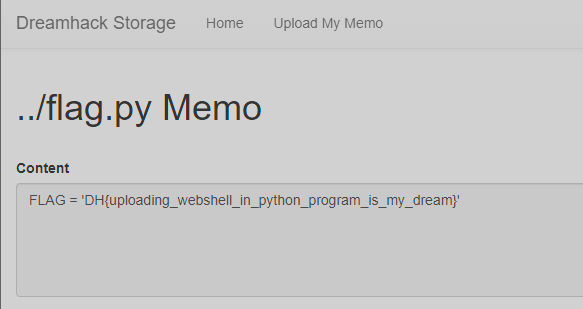
/read 페이지의 filename 파라미터를 ../flag.py로 수정하면 파일 내용을 읽어올 수 있다.