서론
앞서 작성된 Unveiling the Underground World of Anti-Cheats 요약의 후속 포스트이다.
해당 발표에서 학습한 내용을 실제 코드로 보면서 이해하는 시간을 가질 것이다.
전체 코드는 여기서 확인할 수 있다.
해당 리포지토리는 총 10개의 모듈로 구성되어 있고, LuaHook 이라는 sig pattern scanning 모듈이 링크되어 있지만 발표 내용과는 무관하여 제외하였다. 모듈을 소개하는 순서는 발표 순서와 같다.
예전의 자료이기도 하고 발표 당시에도 Unknowncheats 포럼의 코드들을 짜깁기 한 수준에 불과하다는 지적이 있고, 최신 안티치트에는 해당하지 않는게 많다. 그래도 저자의 의도인 교육용으로는 충분한 것 같다.
CheatHelper
WINAPI Functions
먼저 Suspend와 Resume 함수이다.
NtSuspendProcess와 NtResumeProcess의 wrapper이다.
//WINAPI Functions
typedef LONG(NTAPI *NtSuspendProcess)(IN HANDLE ProcessHandle);
void CheatHelper::Suspend(DWORD processId)
{
	HANDLE processHandle = OpenProcess(PROCESS_ALL_ACCESS, FALSE, processId);

	NtSuspendProcess pfnNtSuspendProcess = (NtSuspendProcess)GetProcAddress(GetModuleHandle("ntdll"), "NtSuspendProcess");

	pfnNtSuspendProcess(processHandle);
	CloseHandle(processHandle);
}

typedef LONG(NTAPI *NtResumeProcess)(IN HANDLE ProcessHandle);
void CheatHelper::Resume(DWORD processId)
{
	HANDLE processHandle = OpenProcess(PROCESS_ALL_ACCESS, FALSE, processId);

	NtResumeProcess pfnNtResumeProcess = (NtResumeProcess)GetProcAddress(GetModuleHandle("ntdll"), "NtResumeProcess");

	pfnNtResumeProcess(processHandle);
	CloseHandle(processHandle);
}
위 코드에서 사용한 것은 함수 포인터를 정의하는 typedef 구문이다.
함수 포인터는 함수의 주소를 저장하는 변수로, 함수의 시그니처(인자와 반환 타입)에 따라 다르다. 함수 포인터를 정의할 때 typedef는 함수 시그니처와 포인터 변수를 합쳐 새로운 타입을 정의한다.
typedef LONG(NTAPI *NtSuspendProcess)(IN HANDLE ProcessHandle);해당 구문은 아래와 같은 함수를 정의한다.
LONG NtSuspendProcess(HANDLE ProcessHandle);NTAPI는 WINDOW API들이 일반적으로 따르는 함수 호출 규약이다.
이 함수의 주소를 담을 수 있는 함수 포인터 타입을 NtSuspendProcess라는 이름으로 정의한 것이다.
Process Functions
// Process Functions
DWORD CheatHelper::GetProcId(char* procName)
{
	DWORD procId = 0;
	HANDLE hSnap = CreateToolhelp32Snapshot(TH32CS_SNAPPROCESS, 0);
	if (hSnap != INVALID_HANDLE_VALUE)
	{
		PROCESSENTRY32 procEntry;
		procEntry.dwSize = sizeof(procEntry);

		if (Process32First(hSnap, &procEntry))
		{
			do
			{
				if (!_stricmp(procEntry.szExeFile, procName))
				{
					procId = procEntry.th32ProcessID;
					std::cout << "[+] Process Found!\n";
					break;
				}
			} while (Process32Next(hSnap, &procEntry));

		}
	}
	CloseHandle(hSnap);
	return procId;
}
procName을 받아 pid를 반환하는 간단한 함수.
// DEBUGING functions
void CheatHelper::ConsoleSetup(const char * title)
{
	// With this trick we'll be able to print content to the console, and if we have luck we could get information printed by the game.
	AllocConsole();
	SetConsoleTitle(title);
	freopen("CONOUT$", "w", stdout);
	freopen("CONOUT$", "w", stderr);
	freopen("CONIN$", "r", stdin);
}
새 콘솔 창을 열어서 stdout stderr stdin을 리다이렉션한다.
운이 좋다면 정보를 얻을 수 있다.
Memory functions
RPM과 WPM은 ReadProcessMemory와 WriteProcessMemory의 Wrapper이다. 간단하니 생략.
int CheatHelper::NtRVM(HANDLE ProcessHandle, PVOID BaseAddress, PVOID Buffer, ULONG NumberOfBytesToRead, PULONG NumberOfBytesReaded)
{
	TNtReadVirtualMemory pfnNtReadVirtualMemory = (TNtReadVirtualMemory)GetProcAddress(GetModuleHandle(_T("ntdll.dll")), "NtReadVirtualMemory");

	auto status = pfnNtReadVirtualMemory(ProcessHandle, BaseAddress, Buffer, NumberOfBytesToRead, NumberOfBytesReaded);
	if (status != 0)
	{
		std::cout << "[-] NtReadVirtualMemory failed: " << std::dec << GetLastError() << std::endl;
		return 1;
	}
	//std::cout << "[+] NtReadVirtualMemory: " << &Buffer << std::endl;
	std::cout << "[+] NtReadVirtualMemory: \n\t";
	CheatHelper::PrintBytes((PVOID)Buffer, NumberOfBytesToRead);
	return 0;

}

int CheatHelper::NtWVM(HANDLE ProcessHandle, PVOID BaseAddress, PVOID Buffer, ULONG NumberOfBytesToWrite, PULONG  NumberOfBytesWritten)
{
	TNtWriteVirtualMemory pfnNtWriteVirtualMemory = (TNtWriteVirtualMemory)GetProcAddress(GetModuleHandle(_T("ntdll.dll")), "NtWriteVirtualMemory");
	SIZE_T stWrite = 0;

	int status = pfnNtWriteVirtualMemory(ProcessHandle, BaseAddress, Buffer, NumberOfBytesToWrite, NumberOfBytesWritten);
	if (status != 0)
	{
		std::cout << "[-] NtWriteVirtualMemory Failed: " << std::dec << GetLastError() << std::endl;
		return 1;
	}
	//std::cout << "[+] NtWriteVirtualMemory: " << &Buffer << std::endl;
	std::cout << "[+] NtWriteVirtualMemory: \n\t";
	CheatHelper::PrintBytes((PVOID)Buffer, NumberOfBytesToWrite);
	return 0;
}
NtRVM과 NtWVM은 유저 모드 WINAPI 대신 Windows Native API를 사용한다. 탐지 가능성을 낮출 수 있다.
// CheatHelper.h
typedef LONG(WINAPI *TNtReadVirtualMemory)(HANDLE ProcessHandle, PVOID BaseAddress, PVOID Buffer, ULONG NumberOfBytesToRead, PULONG NumberOfBytesReaded);
typedef LONG(WINAPI *TNtWriteVirtualMemory)(HANDLE ProcessHandle, PVOID BaseAddress, PVOID Buffer, ULONG NumberOfBytesToWrite, PULONG  NumberOfBytesWritten);
앞서 살펴본 함수포인터를 정의하는 typedef를 통해 Native API를 호출한다.
extern "C" NTSTATUS ZwWriteVM(HANDLE hProc, PVOID pBaseAddress, PVOID pBuffer, ULONG NumberOfBytesToWrite, PULONG NumberOfBytesWritten);
extern "C" NTSTATUS ZwReadVM(HANDLE hProc, PVOID pBaseAddress, PVOID pBuffer, ULONG NumberOfBytesToRead, PULONG NumberOfBytesReaded);

int CheatHelper::ZwRVM(HANDLE hProc, PVOID pBaseAddress, PVOID pBuffer, ULONG NumberOfBytesToRead, PULONG NumberOfBytesReaded = NULL)
{
	auto status = ZwReadVM(hProc, pBaseAddress, pBuffer, NumberOfBytesToRead, NumberOfBytesReaded);
	if (status != 0)
	{
		std::cout << "[-] ZwReadVirtualMemory failed: " << std::dec << GetLastError() << std::endl;
		return 1;
	}
	//std::cout << "[+] NtReadVirtualMemory: " << &Buffer << std::endl;
	std::cout << "[+] ZwReadVirtualMemory: \n\t";
	CheatHelper::PrintBytes((PVOID)pBuffer, NumberOfBytesToRead);
	return 0;

}

int CheatHelper::ZwWVM(HANDLE hProc, PVOID pBaseAddress, PVOID pBuffer, ULONG NumberOfBytesToWrite, PULONG NumberOfBytesWritten = NULL)
{
	//SIZE_T stWrite = 0;

	int status = ZwWriteVM(hProc, pBaseAddress, pBuffer, NumberOfBytesToWrite, NumberOfBytesWritten);
	if (status != 0)
	{
		std::cout << "[-] ZwWriteVirtualMemory Failed: " << std::dec << GetLastError() << std::endl;
		return 1;
	}
	//std::cout << "[+] NtWriteVirtualMemory: " << &Buffer << std::endl;
	std::cout << "[+] ZwWriteVirtualMemory: \n\t";
	CheatHelper::PrintBytes((PVOID)pBuffer, NumberOfBytesToWrite);
	return 0;
}
.code
ZwWriteVM proc
mov r10, rcx ; 첫 번째 매개변수 전달
mov eax, 3Ah ; EAX에 syscall 번호 3Ah(58) 저장
syscall
ret
ZwWriteVM endp
ZwReadVM proc
mov r10, rcx ; 첫 번째 매개변수 전달
mov eax, 3Fh ; EAX에 syscall 번호 3Fh(63) 저장
syscall
ret
ZwReadVM endp
end먼저 extern "C" 구문으로 .asm 파일의 ZwWriteVM ZwReadVM 함수를 불러온다.
어셈블리를 간단히 분석해보면
-
mov r10, rcx: Windows의 x64 ABI에 따라 첫 번째 매개변수는 rcx 레지스터에 저장된다. 하지만 syscall 명령은 첫 번째 인자를 r10 레지스터에서 읽는다. -
mov eax, 3Ah: NtWriteVirtualMemory의 syscall 번호를 EAX에 저장한다.
즉, Native WIN API를 직접 실행한다.
FileMapping
bool CheatHelper::checkSpinLockByte(LPVOID pFileMapMem, byte value)
{
	//Read last byte to validate if the pivot connected to the shared memory
	//We will use the last byte of the FILEMAP (FILEMAPSIZE-1)
	int n;
	BYTE init = value;
	void * dest = (void *)((intptr_t)pFileMapMem + FILEMAPSIZE - 1);
	std::cout << "[+] Waiting for pivot." << std::endl;
	while (1)
	{
		n = memcmp(dest, &init, sizeof(BYTE));
		if (n == 0)
		{
			std::cout << "[+] Pivot Ready." << std::endl;
			break;
		}
		else
		{
			Sleep(500);
			continue;
		}
	}
	return 0;
}

bool CheatHelper::setSpinLockByte(LPVOID pFileMapMem, byte value)
{
	BYTE init = value;
	void * dest = (void *)((intptr_t)pFileMapMem + FILEMAPSIZE - 1);
	CopyMemory(dest, &init, sizeof(BYTE));
	std::cout << "[+] Ready." << std::endl;
	return 1;
}
checkSpinLockByte() : pFileMapMem의 마지막 바이트가 value가 될 때 까지 무한 루프를 돈다.
setSpinLockByte : pFileMapMem의 마지막 바이트 값을 value로 변경
void CheatHelper::prepareRequest(PipeMessageRequest &PMRequest)
{
	switch (PMRequest.action) {
	case 0: //Ping
	{
		...
	}
	...
	case 7: //ZwWriteVirtualMemory
	{
		...
	}
	}
}
struct PipeMessageRequest {
int action = 0;
HANDLE handle = 0;
intptr_t address = 0;
int size = BUFSIZE;
char buffer[BUFSIZE] = { "" };
};위와 같은 구조체를 인자로 전달받아 앞서 RPM등의 함수를 실행한다.
DriverDisabler
bool DriverBypass(int pID)
{
	HANDLE hProcess = OpenProcess(PROCESS_ALL_ACCESS, false, pID);
	if (!hProcess) {
		std::cout << "Error1" << std::endl;
		return false;
	}


	HMODULE hMod = GetModuleHandle("advapi32.dll");
	if (!hMod) {
		std::cout << "Error2" << std::endl;
		return false;
	}


	std::cout << std::hex << hMod << std::endl;
	LPVOID dwSSA = (LPVOID)GetProcAddress(hMod, "StartServiceA");
	LPVOID dwOSW = (LPVOID)GetProcAddress(hMod, "OpenServiceW");
	if (!dwSSA || !dwOSW) {
		std::cout << "Error3" << std::endl;
		return false;
	}
	std::cout << std::hex << dwSSA << std::endl;
	std::cout << std::hex << dwOSW << std::endl;
	byte wByte[] = { 0xC2, 0x0C, 0x00 };
	if (!WriteProcessMemory(hProcess, dwSSA, &wByte, sizeof(wByte), NULL)) {
		std::cout << "Error4" << std::endl;
		return false;
	}
	if (!WriteProcessMemory(hProcess, dwOSW, &wByte, sizeof(wByte), NULL)) {
		std::cout << "Error5" << std::endl;
		return false;
	}

	return true;
}
안티 치트가 드라이버를 로드하는 것을 방지하기 위해 StartServiceA 및 OpenServiceW 메서드에 return을 삽입한다.
일부 안티 치트는 게임 내에서 서비스/드라이버를 로드하는데 이 경우 유효하다. 다른 메서드를 사용한다면 코드를 살짝 바꿔서 대응할 수 있다.
byte wByte[] = { 0xC2, 0x0C, 0x00 }; 는 어셈블리로 {ret 0x0C} 를 의미한다.
StartServiceA 와 OpenServiceW 는 4바이트 인자를 3개 받으므로 함수가 호출될 때 전달밭은 총 12바이트 인자를 스택에서 제거하려는 것 같다.
물론 32비트 환경에서야 의미가 있고 64비트에서는 의미가 없다. 그냥 return을 삽입한다는 것에 의의를 두는 듯 하다.
해당 코드는 타겟 프로세스에 로드된 advapi32.dll의 베이스 주소가 랜덤하지 않을 것이라 가정하고 만들어진 것 같다.
해당 값이 진짜 랜덤인지 아닌지 테스트 해봐야 할 것 같다.
만약 랜덤하다면 CreateToolhelp32Snapshot을 통해서 타겟의 advapi32.dll 베이스 주소를 찾고 오프셋을 더해주는 방식으로 수정한다면 해당 문제를 해결할 수 있을 것 같다.

확인해보니 놀랍게도 베이스 주소는 같다.
좀 옛날 글이지만 여기에 따르면 kernel32 ntdll user32같은 특정 DLL은 ASLR이 비활성화 된다고 한다.
advapi32.dll로 같은 맥락으로 받아들였다.
DriverHelper
memmem
int DriverHelper::memmem(PBYTE haystack, DWORD haystack_size, PBYTE needle, DWORD needle_size)
{
	int haystack_offset = 0;
	int needle_offset = 0;

	haystack_size -= needle_size;

	for (haystack_offset = 0; haystack_offset <= haystack_size; haystack_offset++) {
		for (needle_offset = 0; needle_offset < needle_size; needle_offset++)
			if (haystack[haystack_offset + needle_offset] != needle[needle_offset])
				break; // Next character in haystack.

		if (needle_offset == needle_size)
			return haystack_offset;
	}

	return -1;
}
이 함수는 needle이라는 작은 데이터 블록이 haystack이라는 큰 데이터 블록 내에서 처음으로 등장하는 위치를 찾아 해당 인덱스를 반환한다. 만약 needle이 haystack 내에 없다면 -1을 반환한다.
getDeviceHandle
int DriverHelper::getDeviceHandle(LPTSTR name)
{
	DriverHelper::hDeviceDrv = CreateFile(name, GENERIC_READ | GENERIC_WRITE, FILE_SHARE_READ | FILE_SHARE_WRITE, 0, OPEN_EXISTING, FILE_ATTRIBUTE_NORMAL, NULL);
	if (DriverHelper::hDeviceDrv == INVALID_HANDLE_VALUE)
	{
		std::cout << "[-] Handle failed: " << std::dec << GetLastError() << std::endl;
		return 1;
	}
	std::cout << "[+] HANDLE obtained" << std::endl;
	return 0;
}
간단한 드라이버의 디바이스 핸들을 가져오는 함수이다. 드라이버가 클래스라면 디바이스는 인스턴스라고 보면 된다.
ExpLookupHandleTableEntryW10
unsigned __int64 __fastcall DriverHelper::ExpLookupHandleTableEntryW10(__int64 HandleTable, __int64 handle)
{
	unsigned __int64 v2; // rdx@1
	__int64 v3; // r8@2
	signed __int64 v4; // rax@2
	ULONGLONG v5; // rax@3
	unsigned __int64 result; // rax@4

	v2 = handle & 0xFFFFFFFFFFFFFFFCui64;
	if (v2 >= *(DWORD *)HandleTable)
	{
		result = 0i64;
	}
	else
	{
		v3 = *(__int64 *)(HandleTable + 8);
		v4 = *(__int64 *)(HandleTable + 8) & 3i64;
		if ((DWORD)v4 == 1)
		{
			DriverHelper::fn_memcpy((ULONGLONG)&v5, (v3 + 8 * (v2 >> 10) - 1), sizeof(ULONGLONG));
			return v5 + 4 * (v2 & 0x3FF);
		}
		if ((DWORD)v4)
		{
			ULONGLONG tmp = DriverHelper::fn_mapPhysical((v3 + 8 * (v2 >> 19) - 2), sizeof(ULONGLONG));
			v5 = DriverHelper::fn_mapPhysical(tmp + 8 * ((v2 >> 10) & 0x1FF), sizeof(ULONGLONG));
			return v5 + 4 * (v2 & 0x3FF);
		}
		result = v3 + 4 * v2;
	}
	return result;
}
WIN10기준 HandleTable이라는 구조체에서 특정 핸들 값을 검색하여 핸들 테이블 항목을 반환한다. WIN7은 요새 사용하지 않기 때문에 생략했다.
이 함수는 중요한 로직을 담고 있어 자세히 분석했다.
먼저 인자부터 분석해보면 아래와 같다.
HandleTable: 핸들 테이블의 시작 주소.
handle: 검색하고자 하는 핸들의 값.
- 핸들 값 정규화 및 크기 비교
v2 = handle & 0xFFFFFFFFFFFFFFFCui64;
if (v2 >= *(DWORD *)HandleTable)
{
    result = 0i64;
}
v2 = handle & 0xFFFFFFFFFFFFFFFCui64;로 핸들의 하위 2비트를 제거하여 4바이트 정렬된 값을 만듦.
이는 핸들이 4바이트 단위로 정렬되어 있다는 가정 하에 수행된다.v2가HandleTable에 저장된 값보다 큰 경우, 유효한 핸들이 아니므로 0을 반환.
- 테이블 루트 포인터와 구조 확인
v3 = *(__int64 *)(HandleTable + 8);
v4 = *(__int64 *)(HandleTable + 8) & 3i64;v3: 핸들 테이블의 루트 포인터로, 다단계 테이블의 시작 주소를 나타낸다.v4:v3값의 하위 2비트(& 3)를 추출하여 테이블의 구조를 확인한다.
v4 == 1: 2단계 테이블
v4 == 2: 3단계 테이블
v4 == 0: 단순 배열
- 2단계 테이블 처리
if ((DWORD)v4 == 1)
{
    DriverHelper::fn_memcpy((ULONGLONG)&v5, (v3 + 8 * (v2 >> 10) - 1), sizeof(ULONGLONG));
    return v5 + 4 * (v2 & 0x3FF);
}
v3 + 8 * (v2 >> 10) - 1은 2단계 테이블에서v2의 상위 54비트(v2 >> 10)를 사용하여 첫 번째 테이블 항목의 주소를 계산하여v5에 매핑- 첫 번째 테이블 항목의 주소인
v5에 핸들의 하위 10비트(v2 & 0x3FF)에 4를 곱한 값을 더하여 최종 핸들 테이블 항목의 주소를 반환한다.
- 3단계 테이블 처리
if ((DWORD)v4)
{
    ULONGLONG tmp = DriverHelper::fn_mapPhysical((v3 + 8 * (v2 >> 19) - 2), sizeof(ULONGLONG));
    v5 = DriverHelper::fn_mapPhysical(tmp + 8 * ((v2 >> 10) & 0x1FF), sizeof(ULONGLONG));
    return v5 + 4 * (v2 & 0x3FF);
}
(v3 + 8 * (v2 >> 19) - 2)으로 첫 번째 레벨 테이블의 해당 항목 오프셋을 계산하여 tmp에 매핑tmp + 8 * ((v2 >> 10) & 0x1FF)으로 첫 번째 레벨의 항목을 기준으로 두 번째 레벨의 오프셋을 계산하여 v5에 매핑- 전 단계와 마찬가지로 최종 계산을 한다.
- 단순 배열 처리
result = v3 + 4 * v2;단순 배열의 경우 v3를 바로 사용하면 된다.
핸들 테이블 구조가 어떻게 되어 있는지 이해하기 위해 해당 포스트를 참고하였다.
findPhisical
DWORDLONG DriverHelper::findPhisical(DWORDLONG startAddress,
	DWORDLONG stopAddress,
	DWORD searchSpace,
	PBYTE  searchBuffer,
	DWORD bufferSize)
{
	DWORDLONG matchAddress = 0;

	// Check if space search is bigger than maximum.
	if ((startAddress + searchSpace) > stopAddress)
		return matchAddress;

	// Map Physical into buffer
	ULONG64 buffer = DriverHelper::fn_mapPhysical(startAddress, searchSpace);

	int offset = DriverHelper::memmem((PBYTE)buffer, searchSpace, searchBuffer, bufferSize);

	//free
	DriverHelper::fn_unmapPhysical(buffer);

	if (offset >= 0)
		matchAddress = startAddress + offset;

	return matchAddress;

}
드라이버 함수인 fn_mapPhysical과 앞서 소개한 memmem을 사용해 물리 주소를 찾는 함수이다.
특정 물리주소를 버퍼에 할당한 후 버퍼에서 바이트 패턴 스캔을 통해 해당 주소를 반환하는 형식이다.
findPhisical_ObjectTable
ULONG64 DriverHelper::findPhisical_ObjectTable(DWORDLONG startAddress,
	DWORDLONG stopAddress,
	DWORD searchSpace,
	PBYTE  searchBuffer,
	DWORD bufferSize)
{
	DWORDLONG matchAddress = NULL;
	DWORDLONG pObjectTableOffset = 0;

	DWORDLONG searchAddress = startAddress;


	while (TRUE)
	{
		if ((startAddress + searchSpace) >= stopAddress)
		{
			//free(ppivotProcess);
			return matchAddress;
		}

		if (searchAddress % 0x100000 == 0)
		{
			printf("Searching from address: 0x%016I64X.\r", searchAddress);
			fflush(stdout);
		}

		// Let's get
		Sleep(0.5);
		matchAddress = findPhisical(searchAddress, _UI64_MAX, searchSpace, searchBuffer, bufferSize);

		if (searchAddress % 0x10000000 == 0)
		{
			Sleep(1000);
			fflush(stdout);
		}

		if (searchAddress == 0xffffffff)
		{
			exit(0);
		}

		if (matchAddress > searchAddress)
		{
			// Calculating the offset of ObjectTable inside the section
			// This is done due to compatibility, MmMapIoSpace allows to map not multiples of 0x1000, but MapSection doesn't, we can change the RW exploit and this will still work
			pObjectTableOffset = matchAddress - searchAddress - (OFFSET_IMAGEFILENAME - OFFSET_OBJECTTABLE);

			PBYTE pObjectTableAddr = (PBYTE)malloc(sizeof(DWORDLONG));

			ULONG64 buf = DriverHelper::fn_mapPhysical(searchAddress, searchSpace);
			memcpy(pObjectTableAddr, ((void*)(buf + pObjectTableOffset)), sizeof(DWORDLONG));
			DriverHelper::fn_unmapPhysical(buf);
			// here ^
			//((void**)pObjectTableAddr) deref pointer to pointer

			ULONG64 result = (ULONG64)(pObjectTableAddr);
			return result;
		}

		searchAddress += searchSpace;

	}
}pObjectTableOffset는matchAddress - searchAddress - (OFFSET_IMAGEFILENAME - OFFSET_OBJECTTABLE)로 계산되며, 이는 Object Table의 정확한 위치를 찾기 위해 사용됨DriverHelper::fn_mapPhysical()를 호출하여searchAddress의 물리 메모리를 가상 메모리에 매핑- 매핑된 메모리 영역에서 오프셋을 더하여 Object Table의 주소를 구하고
pObjectTableAddr에 복사
커널 영역에서 핸들 테이블을 찾기 위해 Object Table의 주소를 찾는 함수이다.
LeakKernelPointers
bool DriverHelper::LeakKernelPointers(std::vector<uintptr_t> &pKernelPointers)
{

	SYSTEM_HANDLE_INFORMATION_EX* pHandleInfo = NULL;

	// Initial size of the buffer, we are going to make it bigger if it is necesary later
	DWORD lBuffer = 0x10000;

	// This option will allow us to get the list of kernel pointers
	const unsigned long SystemExtendedHandleInformation = 0x40;

	DWORD retSize = 0;
	NTSTATUS status;

	do {
        if (pHandleInfo != NULL) {
			// Cleaning the buffer if this is not the first execution of the DO
            HeapFree(GetProcessHeap(), 0, pHandleInfo);
            pHandleInfo = NULL;
        }

		// Expanding the buffer *2
        lBuffer *= 2;

		// Dynamically allocate memory on the Heap for the buffer. I tried to use VirtualAlloc but it didn't work.
        pHandleInfo = (SYSTEM_HANDLE_INFORMATION_EX*) HeapAlloc(GetProcessHeap(), HEAP_ZERO_MEMORY, lBuffer);

        if (pHandleInfo == NULL)
		{
			std::cout << "[-] LeakKernelPointer pHandleInfo NULL" << std::endl;
			return false;
        }
    } while ((status = NtQuerySystemInformation(static_cast<SYSTEM_INFORMATION_CLASS>(SystemExtendedHandleInformation), pHandleInfo, lBuffer, &retSize)) == STATUS_INFO_LENGTH_MISMATCH);

	/*
	The returned structure will have the following definition
	typedef struct SYSTEM_HANDLE_INFORMATION_EX
	{
		ULONG_PTR NumberOfHandles;
		ULONG_PTR Reserved;
		SYSTEM_HANDLE_TABLE_ENTRY_INFO_EX Handles[1];
	};
	*/

	std::cout << "[+] LeakKernelPointer NUmberOfHandles: " << pHandleInfo->NumberOfHandles << std::endl;
	// NumberOfHandles will tell us how many times we need to iterate the array.
	for (unsigned int i = 0; i < pHandleInfo->NumberOfHandles; i++ )
	{
		// Lets get all the handles from the process with PID 4 (system)
		ULONG SystemPID = 4;
		// Atribbute value for Process HANDLEs
		ULONG ProcessHandleAttribute = 0x102A;

		// Is this the best option? Maybe there is a better one
		if (pHandleInfo->Handles[i].UniqueProcessId == SystemPID && pHandleInfo->Handles[i].HandleAttributes == ProcessHandleAttribute)
		{
			pKernelPointers.push_back(reinterpret_cast<uintptr_t>(pHandleInfo->Handles[i].Object));
		}

	}
	return true;
}- 핸들 정보 요청 및 버퍼 확장:
NtQuerySystemInformation에SystemExtendedHandleInformation을 넘겨 모든 프로세스에서 열린 핸들에 대한 정보를 반환. - 핸들 필터링:
시스템 프로세스(PID 4)인 핸들,HandleAttributes값이0x102A(프로세스 핸들 속성)인 핸들 필터링. - 커널 포인터 수집:
조건에 맞는 핸들의 Object 필드(커널 객체의 주소)를pKernelPointers벡터에 저장.
FindDirectoryBase
uintptr_t DriverHelper::FindDirectoryBase()
{
	printf("[+] Attempting to find Dirbase.\n");

	for (int i = 0; i < 10; i++)
	{
		uintptr_t lpBuffer = DriverHelper::fn_mapPhysical(i * 0x10000, 0x10000);

		for (int uOffset = 0; uOffset < 0x10000; uOffset += 0x1000)
		{

			if (0x00000001000600E9 ^ (0xffffffffffff00ff & *reinterpret_cast<uintptr_t*>(lpBuffer + uOffset)))
				continue;
			if (0xfffff80000000000 ^ (0xfffff80000000000 & *reinterpret_cast<uintptr_t*>(lpBuffer + uOffset + 0x70)))
				continue;
			if (0xffffff0000000fff & *reinterpret_cast<uintptr_t*>(lpBuffer + uOffset + 0xa0))
				continue;

			return *reinterpret_cast<uintptr_t*>(lpBuffer + uOffset + 0xa0);
		}

		DriverHelper::fn_unmapPhysical((lpBuffer));
	}

	return NULL;
}- 물리 메모리 매핑: 10개의 64KB 물리 메모리 블록을 매핑
- 조건 탐색: 각 메모리 블록 내에서 4KB 간격으로 탐색하며, 특정 패턴을 만족하는지 확인
- DirBase 반환: 조건을 만족하는 위치에서 DirBase를 찾아 반환.
https://learn.microsoft.com/ko-kr/windows-hardware/drivers/debuggercmds/-ptov
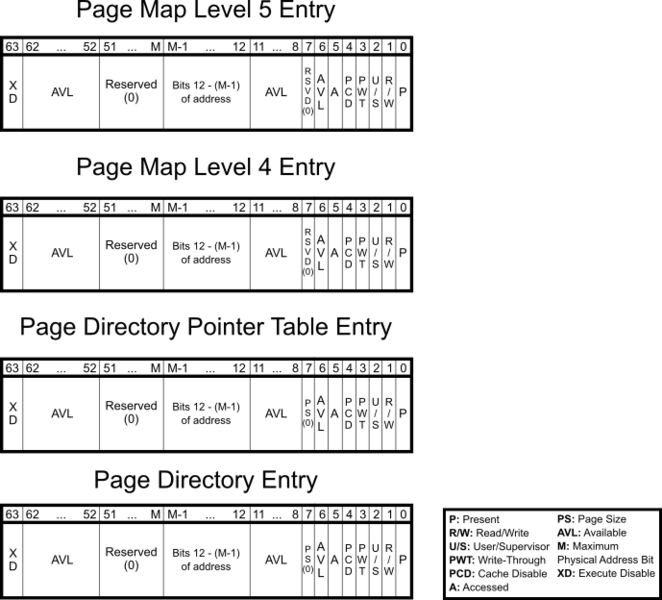
디렉터리 베이스는 가상 주소 변환에 사용되는 첫 번째 테이블의 실제 주소입니다. 64비트 Windows의 경우 디렉터리 베이스는 PML4(페이지 맵 수준 4) 테이블의 실제 주소입니다.
이 값은 가상주소를 물리 주소로 변환할 때 사용된다.
https://velog.io/@ladins9/%EC%9C%88%EB%8F%84%EC%9A%B0-%ED%8E%98%EC%9D%B4%EC%A7%80-%EA%B4%80%EB%A6%AC
ObtainKProcessPointer
uintptr_t DriverHelper::ObtainKProcessPointer(uintptr_t directoryTableBase, std::vector<uintptr_t> pKernelPointers)
{
	//The header of a KPROCESS has the value 00b60003
	unsigned int KProcessHeader = 0x00b60003;

	unsigned int bHeader = 0;

	for (uintptr_t pointer : pKernelPointers)
	{
		// read header
		DriverHelper::ReadVirtualMemory(directoryTableBase, pointer, &bHeader, sizeof(unsigned int), NULL);


		// Compare Header with value
		if (bHeader == KProcessHeader)
		{
			std::cout << "[+] ObtainKProcessPointer found." << std::endl;
			return pointer;
		}

		std::cout << "[-] ObtainKProcessPointer not found." << std::endl;
	}

	return 0;

}
인자로 인자로 directoryTableBase과 pKernelPointers를 받는다.
directoryTableBase은 메모리 접근을 위한 기준 주소로 사용된다.
pKernelPointers은 커널 메모리에 있는 여러 포인터들이 저장된 벡터이다.
- 포인터 탐색:
pKernelPointers벡터에 저장된 각 커널 포인터를 하나씩 가져온다. - 헤더 비교:
각 커널 포인터에서 4바이트 크기의 헤더 값을 읽어 KPROCESS 헤더 값(0x00b60003)과 일치하는지 확인
