문제
advent S12 3년간 들어온 소장품 집계하기
(자세한 문제는 생략)
풀이 과정
문제 난이도가 2라고 적혀있는 것에 비하면 꽤나 시간과 고민이 많이 필요했던 문제였다.
풀이 단계를 나누자면 아래의 4개 단계로 정리할 수 있겠다.
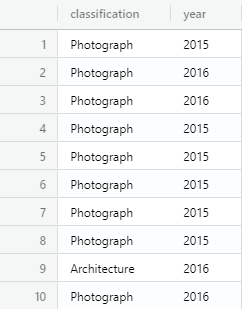
(1) 필요한 컬럼 추출
일단 문제에서 요구하는 데이터는 굉장히 적다.
artworks 테이블에 있는 classficiation과 acquisition_date (중 year).
SELECT
  classification
  , strftime('%Y', acquisition_date) as "year"
FROM
  artworks
WHERE
  year in ('2014', '2015', '2016')
limit 20
;
SQLite라서 strftime()을 사용했지만, mysql이라면 간단하게 year() 함수를 활용할 수 있었을 것이다.
(2) one-hot encoding
바로 group by를 쓴다면
사실 일반적인 경우라면 단순히 group by로 묶어서 문제를 풀고 아래와 같은 결과가 나왔을 것이다.
SELECT
  classification
  , strftime('%Y', acquisition_date) as "acqusition_year"
  , count(*) as "cnt"
FROM
  artworks
WHERE
  acqusition_year in ('2014', '2015', '2016')
GROUP BY
  classification
  , acqusition_year
;
다만 이렇게 하면 연도별로 가로로 정리해야 하는 문제의 취지를 충족시키기 어려워진다
다른 방법이 있는지, 적어도 나는 떠올리지 못했으므로...
대안: 연도별 True/False
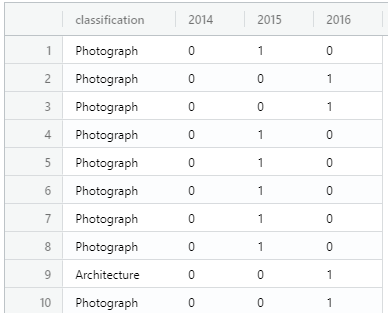
대신 생각한 것이, 최근에 머신러닝을 할 때 사용했던 원핫 인코딩이었다
어차피 하나의 row가 속할 수 있는 연도는 1개이기에, 2014~2016년 중 자신이 속한 연도에만 1(True), 나머지는 0(False)로 값을 변환하는 것이다
WITH preprocessing AS (
  SELECT
    classification
    , strftime('%Y', acquisition_date) as "acquisition_year"
  FROM
    artworks
  WHERE
    acquisition_year in ('2014', '2015', '2016')
)
SELECT
  classification
  , case when acquisition_year = '2014' then 1 else 0 end as "2014"
  , case when acquisition_year = '2015' then 1 else 0 end as "2015"
  , case when acquisition_year = '2016' then 1 else 0 end as "2016"
FROM
  preprocessing
;
(3) group by & sum()
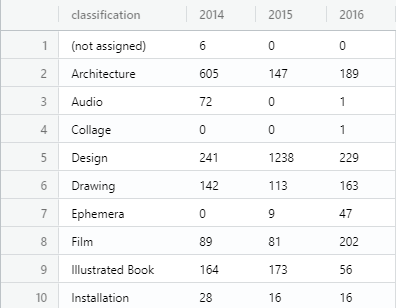
위의 단계까지 진행했다면, 이제는 아기다리 고기다리 던 group by를 사용할 차례다
동시에 2014, 2015, 2016의 3개 컬럼에 대해서는 sum()을 사용해준다면, 자연스럽게 "classification별, 연도별 카운트 집계"를 구할 수 있다
WITH preprocessing AS (
  SELECT
    classification
    , strftime('%Y', acquisition_date) as "acquisition_year"
  FROM
    artworks
  WHERE
    acquisition_year in ('2014', '2015', '2016')
),
oh_encoding AS (
SELECT
  classification
  , case when acquisition_year = '2014' then 1 else 0 end as "a2014"
  , case when acquisition_year = '2015' then 1 else 0 end as "a2015"
  , case when acquisition_year = '2016' then 1 else 0 end as "a2016"
FROM
  preprocessing
)
SELECT
  classification
  , sum(a2014) as "2014"
  , sum(a2015) as "2015"
  , sum(a2016) as "2016"
FROM
  oh_encoding
group BY
  classification
ORDER BY
  classification
;
(4) dim_classification & left_join
위 단계까지 진행했다면 아래와 같은 오류 메시지를 만날 수 있을 것이다
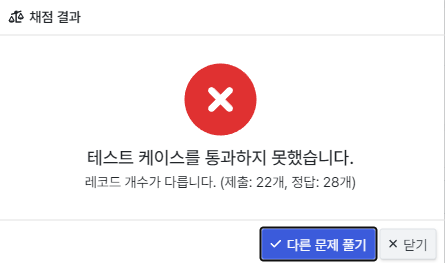
데이터의 row가 정답보다 짧다는 이유인데,
이는 위의 코드가 '2014 ~ 2016년'의 데이터만 추출하고 있기 때문이다
원본 raw data에는 1996년의 데이터부터 있는데, 이 때는 총 28개의 classification이 존재한다
SELECT
  classification
FROM
  artworks
GROUP BY
  classification
;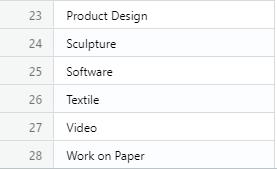
다만 2014~2016년에는 22개의 classficiation만 존재하기 때문에 row수에 차이가 나는 것이다
즉 '원본 데이터에는 존재했지만 추출된 데이터에는 존재하지 않는' 데이터를 0으로 조회할 필요가 있다
이 때 활용할 수 있는 것이 LEFT JOIN이다
(과거 dim_years를 알지 못해 고생했던 문제)
위에서 구해두었던 '전체 데이터의 classification'을 LEFT table로 두고, LEFT JOIN을 하면 되는 것!
최종 코드
WITH dim_classification AS (
  SELECT
    classification
  FROM
    artworks
  GROUP BY
    classification
),
preprocessing AS (
  SELECT
    classification
    , strftime('%Y', acquisition_date) as "acquisition_year"
  FROM
    artworks
  WHERE
    acquisition_year in ('2014', '2015', '2016')
),
oh_encoding AS (
SELECT
  classification
  , case when acquisition_year = '2014' then 1 else 0 end as "a2014"
  , case when acquisition_year = '2015' then 1 else 0 end as "a2015"
  , case when acquisition_year = '2016' then 1 else 0 end as "a2016"
FROM
  preprocessing
)
SELECT
  dc.classification
  , coalesce(sum(oh.a2014),0) as "2014"
  , coalesce(sum(oh.a2015),0) as "2015"
  , coalesce(sum(oh.a2016),0) as "2016"
FROM
  dim_classification dc
  LEFT JOIN oh_encoding oh
    ON dc.classification = oh.classification
group BY
  dc.classification
ORDER BY
  dc.classification
;
코드는 길지만 앞서 진행했던 과정을 하나로 합해놓은 것에 불구하다
주의할 점은, classification은 반드시 dim_classification을 기준으로 지정해주어야 한다는 것이다
ON절과 별개로, select와 group by 등에서도 기준을 해당 테이블로 정확하게 별칭을 붙여줘야 한다
그 외 하나 추가된 것이 있다면, coalesce(sum(oh.a2014),0) as "2014"처럼 coalesce 함수를 사용했다는 것
LEFT JOIN을 하면 2014~2016년에는 존재하지 않는 값이라 null로 나올 것이니, 이를 0으로 변환해주는 과정이 필요하다