앞선 두 포스트에서 디프만 프로젝트인 “Critix”에서 사용된 TanStack Query에서 제공하는 기능들과 사용법에 대해 알아보았습니다.
이번 포스트에서는 TanStack Query에서 대표적으로 제공하고 가장 많이 사용되는 useQuery의 동작원리에 대해 알아보겠습니다.
queryClient, useQuery 간단하게 동작 원리 파악해보기
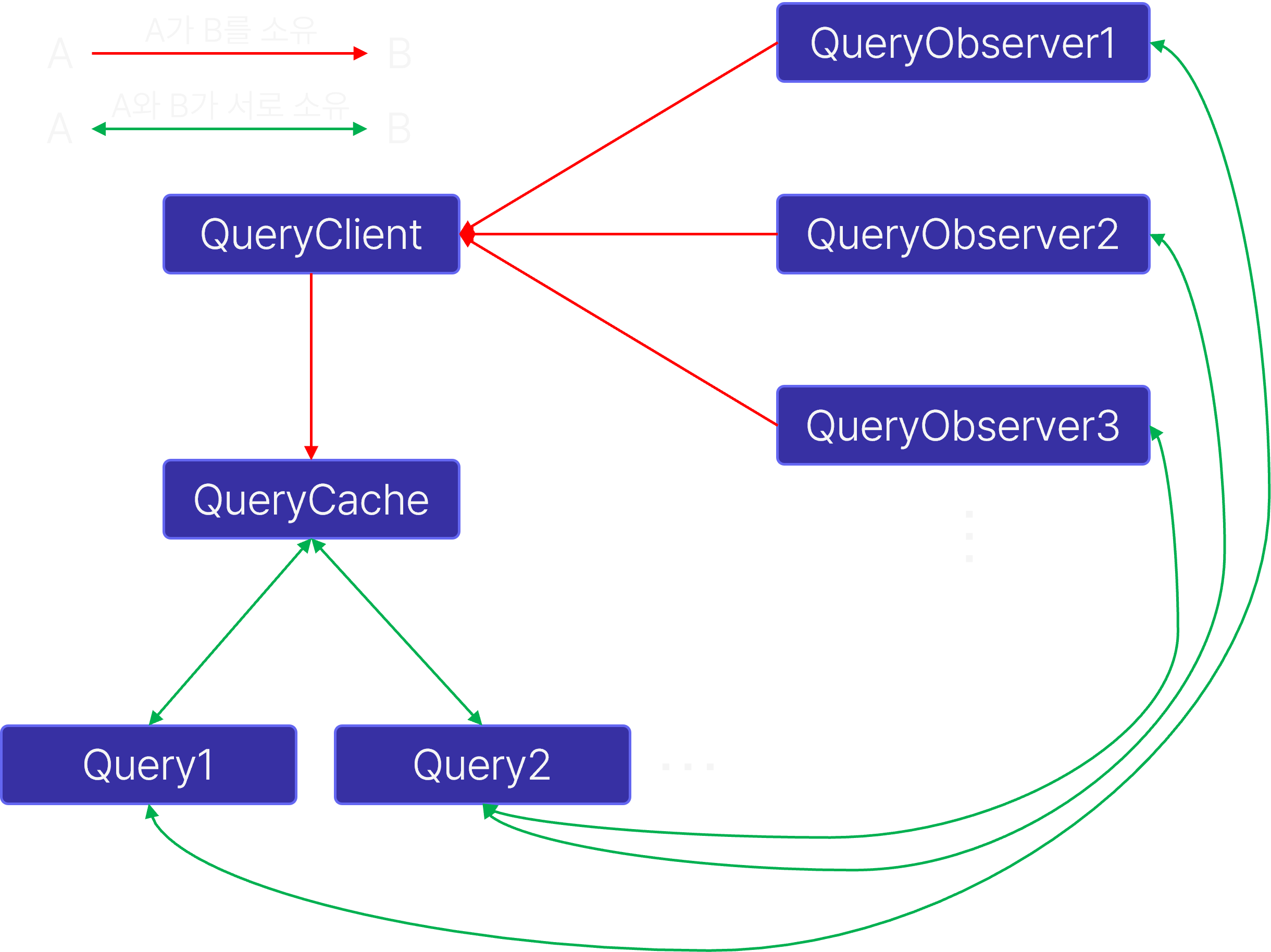
TanStack Query의 내부 구조
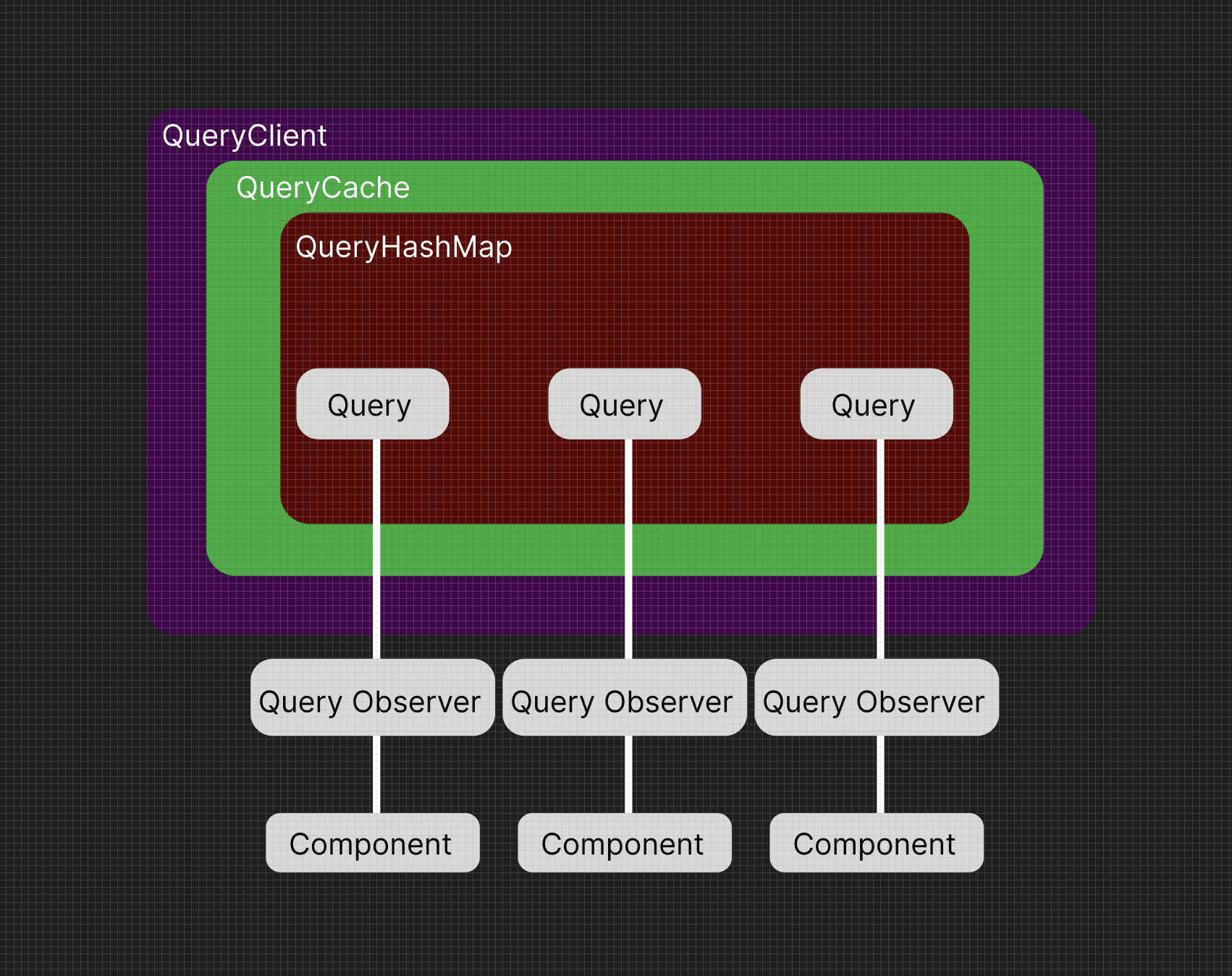
TanStack Query의 내부구조는 위의 사진과 같습니다.
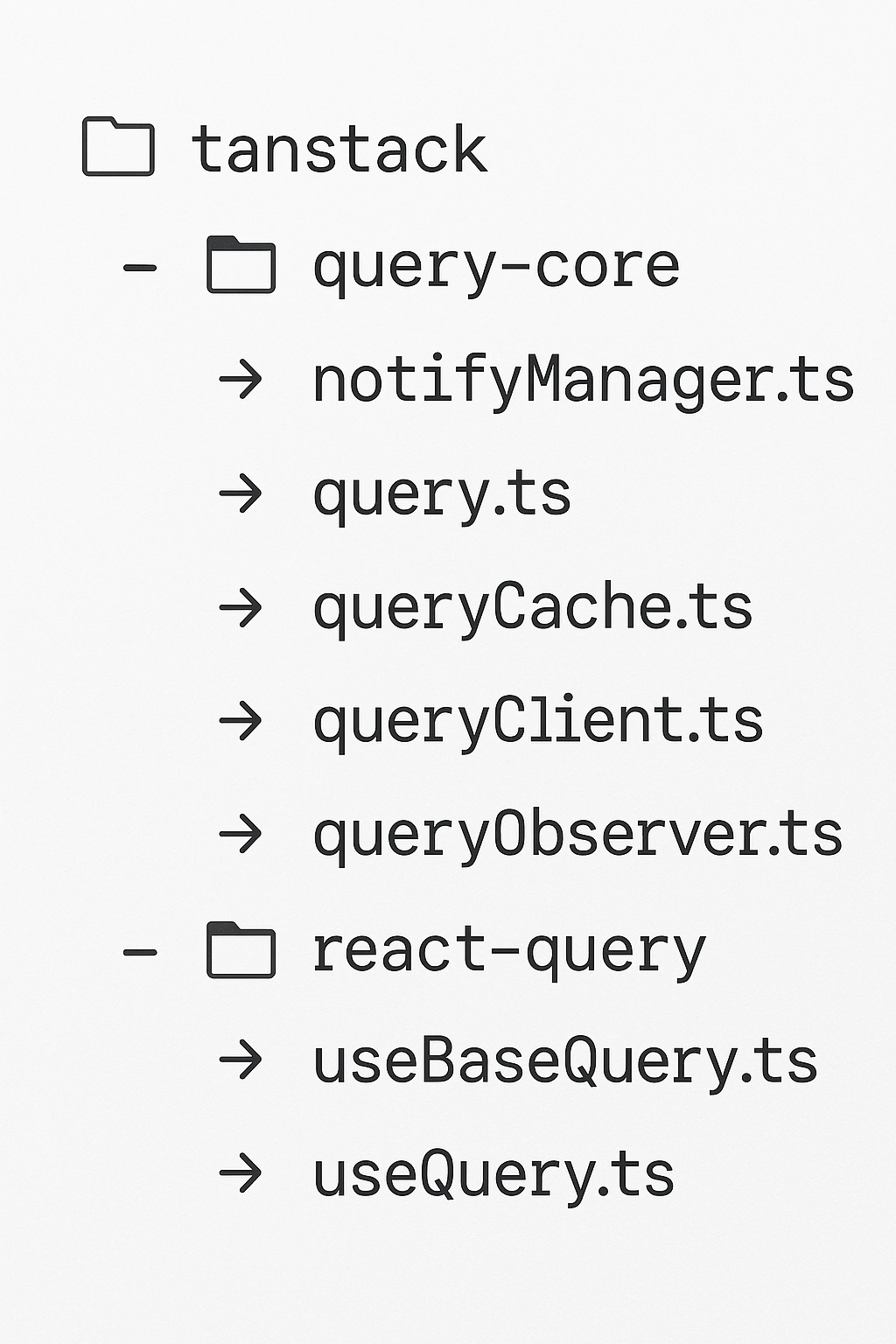
이때 QueryClient, QueryCache, Query, Query Observer는 tanstack query 라이브러리 중 query-core 에 들어있습니다.
위의 4가지 주요 객체를 활용하여 useQuery를 사용할 수 있게 됩니다.
또한 tanstack query 라이브러리 중 react-query 에 useQuery와 useQuery를 추상화한 useBaseQuery가 들어있습니다.
QueryClient
https://github.com/TanStack/query/blob/main/packages/react-query/src/QueryClientProvider.tsx
export const QueryClientContext = React.createContext<QueryClient | undefined>(
  undefined,
)

export const QueryClientProvider = ({
  client,
  children,
}: QueryClientProviderProps): React.JSX.Element => {
  React.useEffect(() => {
    client.mount()
    return () => {
      client.unmount()
    }
  }, [client])

  return (
    <QueryClientContext.Provider value={client}>
      {children}
    </QueryClientContext.Provider>
  )
}
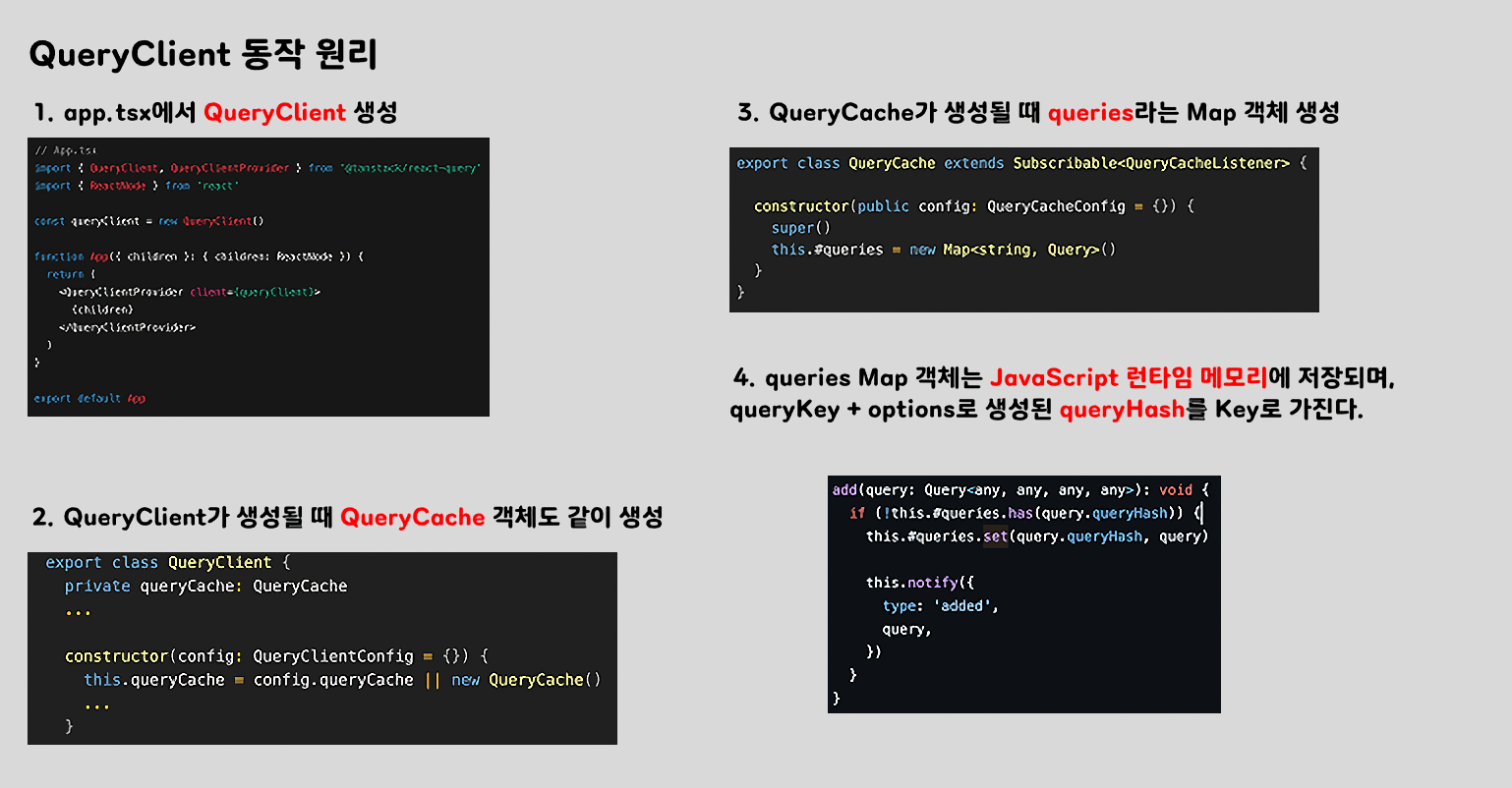
위에 코드에서 볼 수 있듯이 queryClient 는 context api 를 통해 client를 제공하는 것을 볼 수 있습니다.
즉 queryClient를 app.tsx에서 사용한다면 전역적으로 사용할 수 있게 되며 1개만 존재하게 됩니다.
export class QueryClient {
  private queryCache: QueryCache
  ...

  constructor(config: QueryClientConfig = {}) {
    this.queryCache = config.queryCache || new QueryCache()
    ...
  }

  setQueryData() {}
  getQueryData() {}
  invalidateQueries() {}
  getQueryCache() {}
 }
또한 QueryClient는 class 로서 생성될 때 QueryCache 객체를 가지게 되며 저번 포스트에서 봤던 다양한 메소드를 제공해줍니다.
QueryCache
https://github.com/TanStack/query/blob/main/packages/query-core/src/queryCache.ts
export class QueryCache extends Subscribable<QueryCacheListener> {

	constructor(public config: QueryCacheConfig = {}) {
    super()
    this.#queries = new Map<string, Query>()
  }
}
QueryClient에 의해 생성된 queryCache객체는 “queries”는 Map 객체를 새로 만들게 됩니다.
이 때부터 개발자는 QueryClient 인스턴스에 접근하여 “queries” 객체를 통해 캐시와 상호작용하게 됩니다.
build(client, options, state?) {
    const queryKey = options.queryKey
    const queryHash =
      options.queryHash ?? hashQueryKeyByOptions(queryKey, options)
    let query = this.get<TQueryFnData, TError, TData, TQueryKey>(queryHash)

    if (!query) {
      query = new Query({
        client,
        queryKey,
        queryHash,
        options: client.defaultQueryOptions(options),
        state,
        defaultOptions: client.getQueryDefaults(queryKey),
      })
      this.add(query)
    }

    return query
}queryCache의 build는 아주 중요한 원리가 들어있습니다.
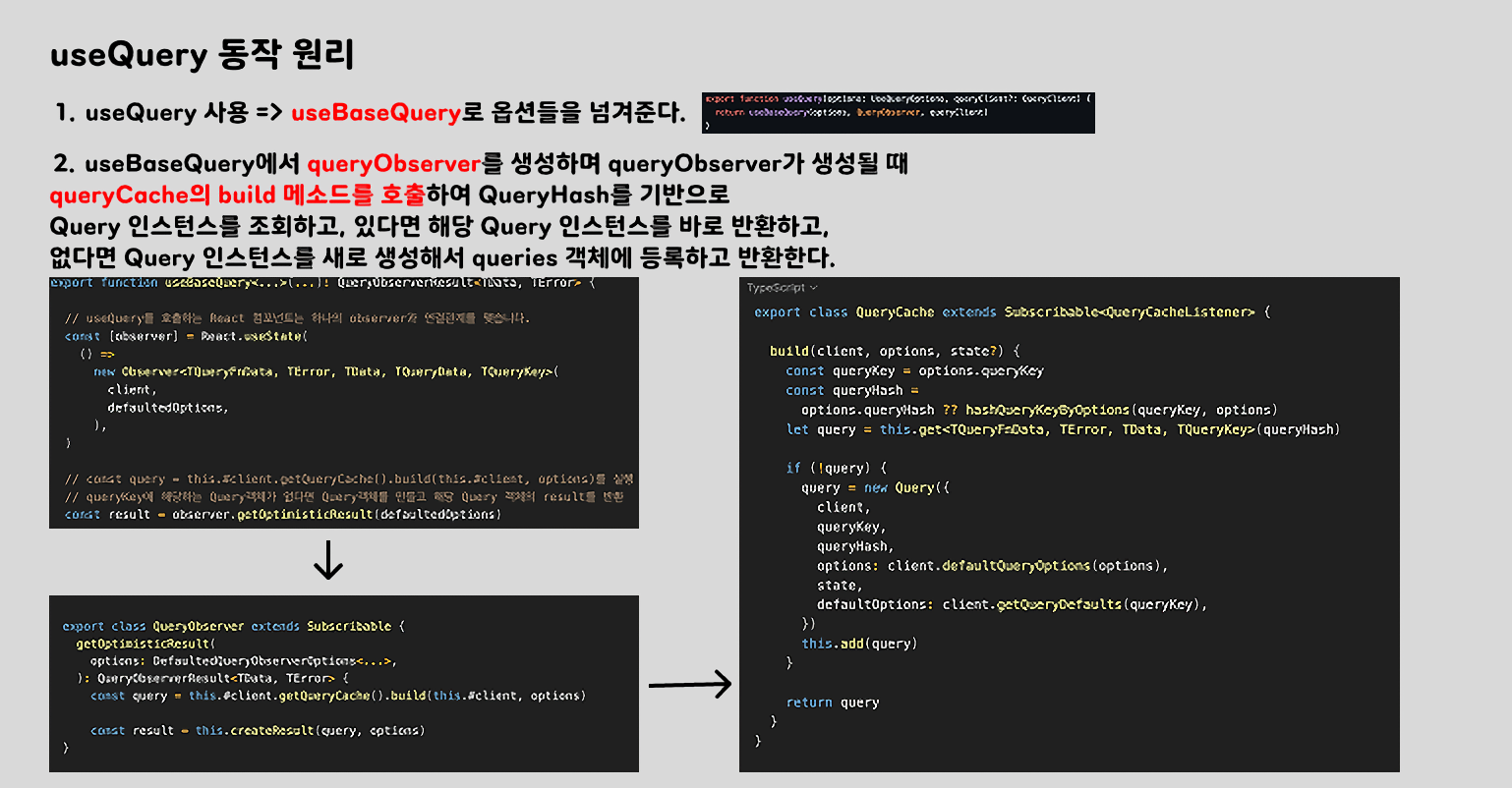
options객체에 주어진queryKey데이터를 꺼내고 queryKey + options로 queryHash를 만듭니다.queryHash를 키로 활용하여queries에 저장된Query인스턴스를 조회해봅니다.Query인스턴스가 존재한다면 바로 반환하고 존재하지 않는다면 새로 생성해서 캐시에 등록 후 반환합니다.
이 과정에서 queryKey를 기반으로 생성된 queryHash를 식별자로 사용하고, 동일한 queryHash가 이미 존재하면 해당 Query 인스턴스를 재사용합니다. 이렇게 함으로써 동일한 쿼리에 대해 중복 fetch를 방지하고, 효율적인 캐싱과 데이터 공유가 가능합니다. ⇒ TanStack Query가 캐싱 기능을 제공하는 원리
Query
https://github.com/TanStack/query/blob/main/packages/query-core/src/query.ts
export class Query<...> extends Removable {
  queryKey: TQueryKey
  queryHash: string
  options!: QueryOptions<TQueryFnData, TError, TData, TQueryKey>
  state: QueryState<TData, TError>

  #initialState: QueryState<TData, TError>
  #cache: QueryCache
  #client: QueryClient
  #retryer?: Retryer<TData>
  observers: Array<QueryObserver<any, any, any, any, any>>
  #defaultOptions?: QueryOptions<TQueryFnData, TError, TData, TQueryKey>

  constructor(config: QueryConfig<TQueryFnData, TError, TData, TQueryKey>) {
    super()

    this.#defaultOptions = config.defaultOptions
    this.setOptions(config.options)
    this.observers = []
    this.#client = config.client
    this.#cache = this.#client.getQueryCache()
    this.queryKey = config.queryKey
    this.queryHash = config.queryHash
    this.#initialState = getDefaultState(this.options)
    this.state = config.state ?? this.#initialState
}Query클래스는 QueryCache가 가진 Map<queryHash, Query>에 저장되는 인스턴스이며, 여러 정보들을 가지고 있습니다.
아래의 표는 제가 생각한 중요도 순으로 정리한 Query가 가지고 있는 속성입니다.
| 속성 | 설명 |
|---|---|
| queryKey | 사용자가 정의한 쿼리 식별 키 ([’user’]) |
| queryHash | queryKey + options 의 조합으로 생성된 고유 문자열 Map<queryHash, Query> 의 key로 사용 |
| options | queryFn, staleTime, gcTime, enabled 등 useQuery에 들어가는 핵심 옵션들로 쿼리 실행을 제어 |
| state | 현재 쿼리의 데이터 상태, loading, error 등을 포함한 핵심 상태 객체 |
| observers | 이 쿼리를 구독하고 있는 QueryObserver 의 인스턴스 배열. observers로 컴포넌트 간 상태 공유 가능 |
이 외에도 #client(소속된 queryClient 인스턴스), #cache(소속된 queryCache 인스턴스), #defaultOptions(기본 쿼리 옵션), #initialState(쿼리 초기 상태), #retryer(쿼리 실패 시 재시도 로직 관리 객체) 등등이 존재합니다.
Query가 가진 QueryState의 업데이트가 발생하는 경우
export class Query extends Removable {
  constructor() {}

  dispatch(action: Action): void {
    const reducer = (state: QueryState): QueryState => {
	    ...
    }

    this.state = reducer(this.state)

    notifyManager.batch(() => {
      this.observers.forEach((observer) => {
        observer.onQueryUpdate(action)
      })

      this.cache.notify({ query: this, type: 'updated', action })
    })
  }
}
QueryState 업데이트가 발생하는 경우 QueryObserver에게 지속해서 알림을 주기 위해 Dispatch, Reducer, Action 개념을 사용합니다. 액션의 타입에 따라 리듀서를 통해 QueryState를 새롭게 업데이트한 후, 현재 Query 인스턴스를 구독하고 있는 QueryObserver 인스턴스의 메소드를 실행하는 것을 확인할 수 있습니다.
QueryObserver
https://github.com/TanStack/query/blob/main/packages/query-core/src/queryObserver.ts
export class QueryObserver extends Subscribable {
	 constructor() {
    super()

    this.#client = client
    this.#selectError = null
    this.#currentThenable = pendingThenable()
    if (!this.options.experimental_prefetchInRender) {
      this.#currentThenable.reject(
        new Error('experimental_prefetchInRender feature flag is not enabled'),
      )
    }

    this.bindMethods()
    this.setOptions(options)
  }

  // useBaseQuery에서 사용되는 훅
  // queryCache의 build 메소드를 통해 queryKey + options로 생성된 queryHash Key를 기반으로
  // queries 객체에서 query를 찾고 query가 있다면 해당 query 인스턴스를 반환
  // 만약 query가 없다면 생성 후 해당 query 인스턴스를 반환
  getOptimisticResult(
    options: DefaultedQueryObserverOptions<...>,
  ): QueryObserverResult<TData, TError> {
    const query = this.#client.getQueryCache().build(this.#client, options)

    const result = this.createResult(query, options)
}
QueryObserver 클래스는 Query의 변화를 관찰하고, 리스너에게 알리는 역할을 합니다. 변화가 관찰되면, 내부의 최적화 과정을 거쳐 최종적으로 변화가 발생했음을 React 컴포넌트(listener)에게 알릴 필요가 있다면 알려줍니다.
updateResult(): void {

		// 이전에 가지고 있던 쿼리 결과(캐시된 QueryObserverResult)를 가져옵니다.
    const prevResult = this.#currentResult as
      | QueryObserverResult<TData, TError>
      | undefined

		// query의 state, options를 바탕으로 loading/error/data 등의 값을 포함한 새로운 result 객체를 만듭니다.
    const nextResult = this.createResult(this.#currentQuery, this.options)

    this.#currentResultState = this.#currentQuery.state
    this.#currentResultOptions = this.options

		// 현재 결과에 데이터가 있다면 가장 최근 데이터가 정의된 쿼리로 갱신합니다.
    if (this.#currentResultState.data !== undefined) {
      this.#lastQueryWithDefinedData = this.#currentQuery
    }

    // 이전 결과와 현재 결과를 비교하는 로직으로 결과가 바뀌지 않으면 listeners를 호출할 필요없이 바로 리턴합니다.
    if (shallowEqualObjects(nextResult, prevResult)) {
      return
    }

		// 내부 상태를 새 결과로 업데이트합니다.
    this.#currentResult = nextResult

		// 리스너한테 알릴지 여부를 결정합니다.
    const shouldNotifyListeners = (): boolean => {
      if (!prevResult) {
        return true // 초기 상태이므로 알림
      }

      const { notifyOnChangeProps } = this.options
      const notifyOnChangePropsValue =
        typeof notifyOnChangeProps === 'function'
          ? notifyOnChangeProps()
          : notifyOnChangeProps

			// 트래킹된 prop이 없거나 notifyOnChangePropsValue가 all이면 알림
      if (
        notifyOnChangePropsValue === 'all' ||
        (!notifyOnChangePropsValue && !this.#trackedProps.size)
      ) {
        return true
      }

      const includedProps = new Set(
        notifyOnChangePropsValue ?? this.#trackedProps,
      )

      if (this.options.throwOnError) {
        includedProps.add('error')
      }

			// 현재 결과와 이전 결과를 비교하면서 변경된 key가 includedProps에 있으면 알림
      return Object.keys(this.#currentResult).some((key) => {
        const typedKey = key as keyof QueryObserverResult
        const changed = this.#currentResult[typedKey] !== prevResult[typedKey]

        return changed && includedProps.has(typedKey)
      })
    }

		// 실제로 컴포넌트에 변경사항을 반영하기 위해 등록된 callback 함수를 호출(렌더링 되게 만드는 로직)
    this.#notify({ listeners: shouldNotifyListeners() })
  }
}


  #notify(notifyOptions: { listeners: boolean }): void {
	  // 여러 listener() 호출을 React의 batching 범위 안에서 묶음 (리렌더링 1번만 되게 하는 목적)
    notifyManager.batch(() => {
      if (notifyOptions.listeners) {
	      // useSyncExternalStore()에서 등록한 onStoreChange() 같은 콜백들이 여기에 들어있음
				// 아래의 useBaseQuery에서 다루는 내용
        this.listeners.forEach((listener) => {
          listener(this.#currentResult)
        })
      }

      // 쿼리 캐시 수준의 구독자에게도 알림 전달 (예 : Devtools)
      this.#client.getQueryCache().notify({
        query: this.#currentQuery,
        type: 'observerResultsUpdated',
      })
    })
  }
자세한 설명은 주석으로 달았습니다..!
QueryObserver가 컴포넌트(리스너)에 알리는 경우
-
초기 구독 시
prevResult가 없을 때 (컴포넌트가 처음useQuery()를 호출한 시점)
-
옵션에 따라 항상 알림이 필요한 경우
- useQuery의 옵션 중 notifyOnChangeProps === 'all’인 경우
-
옵션이 undefined이고 trackedProps가 비어 있을 때
- 어떤 prop이 변경될지 알 수 없으므로 기본적으로 notify
const result = useQuery({ queryKey: ['product'], queryFn: fetchProduct, // notifyOnChangeProps 생략 }); // 구조 분해 없이 바로 접근하므로 trackedProps가 비어있기 때문에 바로 알림 console.log(result); -
trackedProps중 하나라도 값이 변경된 경우- 예:
data,error,isFetching,status등
// 여기서 data, isPending, isError 등 컴포넌트가 실제로 읽어간 값들을 trackedProps에 등록함 // 따라서 status, isFetching 등 다른 필드가 변경되면 알리지 않지만, trackedProps에 등록된 값 중 하나라도 변경되면 리스너에게 알림 const { data, isPending, isError } = useQuery({ queryKey: ['comment'], queryFn: fetchComment }); - 예:
-
options.throwOnError가 true일 경우- 에러 발생 시
errorprop도 포함해서 추적
// 에러가 발생하면 error 필드의 변경이 무조건 리스터에게 알림 const { error } = useQuery({ queryKey: ['failCase'], queryFn: () => Promise.reject('error'), throwOnError: true, }); - 에러 발생 시
useQuery
https://github.com/TanStack/query/blob/main/packages/react-query/src/useQuery.ts
export function useQuery(options: UseQueryOptions, queryClient?: QueryClient) {
  return useBaseQuery(options, QueryObserver, queryClient)
}
useQuery의 역할은 크지 않습니다.
options, QueryObserver, queryClient3가지의 parameter를 공통 로직을 가진 useBaseQuery에게 전달해줍니다.
관심사 분리, 재사용성 확보(useInfiniteQuery도 동일한 로직), 타입 오버로드 지원 등의 이유로 나눠준거 같습니다.
useBaseQuery
https://github.com/TanStack/query/blob/main/packages/react-query/src/useBaseQuery.ts
// useBaseQuery의 동작원리를 파악하기 위한 코드로 suspense, errorBoundary 관련 코드는 제거했습니다.
export function useBaseQuery<...>(...): QueryObserverResult<TData, TError> {

	// useQuery를 호출하는 React 컴포넌트는 하나의 observer과 연결관계를 맺습니다.
  const [observer] = React.useState(
    () =>
      new Observer<TQueryFnData, TError, TData, TQueryData, TQueryKey>(
        client,
        defaultedOptions,
      ),
  )

  // 현재 결과를 가져옵니다.
  // 캐시된 결과가 없다면 fetching 상태의 "가짜 결과"를 반환합니다. (로딩 표시)
  // getOptimisticResult가 실행될 때 const query = this.#client.getQueryCache().build(this.#client, options)를 실행하면서
  // queryKey에 해당하는 Query객체가 없다면 Query객체를 만들고 nextResult(새로운 result) 를 반환합니다.
  const result = observer.getOptimisticResult(defaultedOptions)


  const shouldSubscribe = !isRestoring && options.subscribed !== false

  // useSyncExternalStore()로 React와 연결합니다.
  React.useSyncExternalStore(
    React.useCallback(
      (onStoreChange) => {
        const unsubscribe = shouldSubscribe
          ? observer.subscribe(notifyManager.batchCalls(onStoreChange)) // 상태 변경 감지
          : noop

        // observer.updateResult()를 강제로 한 번 호출하여 누락된 상태 업데이트를 방지합니다.
        observer.updateResult()

        return unsubscribe
      },
      [observer, shouldSubscribe],
    ),
    () => observer.getCurrentResult(), // 현재 상태 반환
    () => observer.getCurrentResult(), // SSR fallback
  )

  React.useEffect(() => {
    observer.setOptions(defaultedOptions)
  }, [defaultedOptions, observer])

	// suspense 상태일때 즉 데이터가 아직 없을때
	// observer.fetchOptimistic() 내부에서 실제 queryFn()이 실행됨 (실제 fetch 트리거)
	if (shouldSuspend(defaultedOptions, result)) {
    throw fetchOptimistic(defaultedOptions, observer, errorResetBoundary)
  }


  // 추척된 props들을 반환해줍니다.
  // notifyOnChangeProps가 없으면 result를 추적해 trackedProps에 자동으로 등록합니다.
  // notifyOnChangeProps가 있으면 명시된 props만 변경을 감지합니다.
  return !defaultedOptions.notifyOnChangeProps
    ? observer.trackResult(result)
    : result
}
각 코드의 역할은 주석으로 달아두었습니다.
그럼 이 중에서도 가장 중요한 부분에 대해 더 살펴보겠습니다.
React.useSyncExternalStore(
    React.useCallback(
      (onStoreChange) => {
        const unsubscribe = shouldSubscribe
          ? observer.subscribe(notifyManager.batchCalls(onStoreChange)) // 상태 변경 감지
          : noop

        // observer.updateResult()를 강제로 한 번 호출하여 누락된 상태 업데이트를 방지합니다.
        observer.updateResult()

        return unsubscribe
      },
      [observer, shouldSubscribe],
    ),
    () => observer.getCurrentResult(), // 현재 상태 반환
    () => observer.getCurrentResult(), // SSR fallback
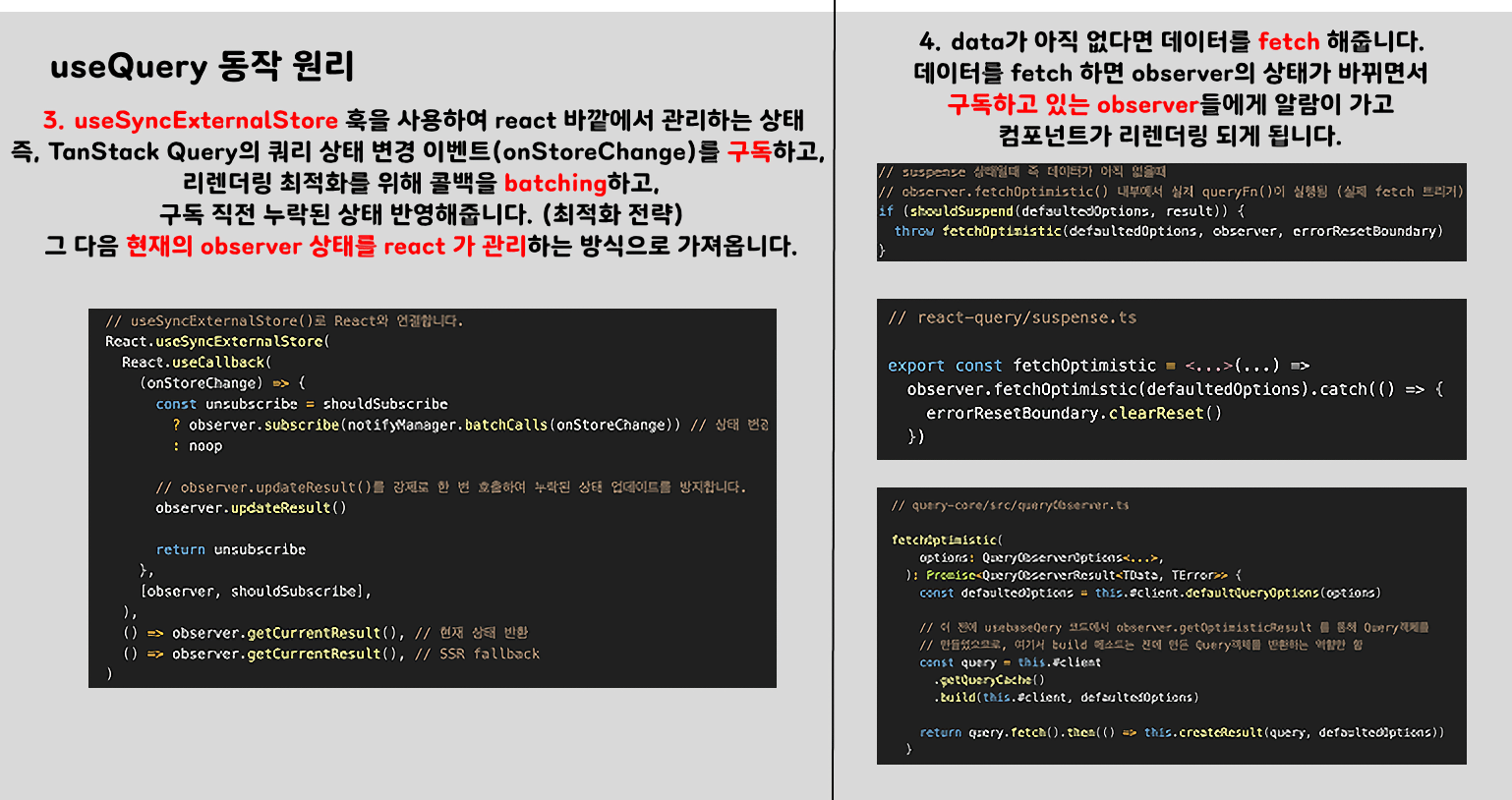
)useSyncExternalStore: 외부 스토어(observer)의 변경을 구독하고, 변화가 있을때 컴포넌트를 리렌더링해줘 라는 것을 알려주는 훅입니다.observer.subscribe⇒ Set 자료형인 listeners에 추가시켜주는 역할을 합니다 https://github.com/TanStack/query/blob/main/packages/query-core/src/subscribable.ts#L11-L21export class Subscribable<TListener extends Function> { protected listeners = new Set<TListener>() constructor() { this.subscribe = this.subscribe.bind(this) } subscribe(listener: TListener): () => void { this.listeners.add(listener) this.onSubscribe() return () => { this.listeners.delete(listener) this.onUnsubscribe() } }notifyManager.batchCalls(onStoreChange)⇒ 리렌더링을 batching 처리해줍니다 (여러 번 발생하는 리렌더링을 한 번에 모아서 해주면서 성능 최적화)
useQuery 전체 동작 흐름
1. React 컴포넌트가 useQuery() 호출
const { data, isPending } = useQuery({
  queryKey: ['user'],
  queryFn: fetchUser,
  suspense: true,
})
- 이때
useQuery()는 내부적으로useBaseQuery()를 호출하고,QueryObserver를 기반으로 서버 상태를 관리합니다.
2. QueryObserver 인스턴스 생성
const [observer] = useState(() => new QueryObserver(client, defaultedOptions))- useBaseQuery() 내부에서
QueryObserver인스턴스를 생성하면서Query객체를 추적/구독합니다.
3. React 상태 연결 (useSyncExternalStore)
React.useSyncExternalStore(
  (onStoreChange) => {
    const unsubscribe = observer.subscribe(notifyManager.batchCalls(onStoreChange))
    observer.updateResult()
    return unsubscribe
  },
  () => observer.getCurrentResult(),
  () => observer.getCurrentResult(),
)observer.subscribe(...):onStoreChange()를Subscribable의 리스너로 등록합니다.notifyManager.batchCalls(...): 리렌더를 batching 처리합니다.- 이후 상태 변경 발생 시 →
onStoreChange()→ React가getSnapshot()호출 → 리렌더 여부 판단
의 순서로 진행됩니다.
4. 실제 상태 변경 시 흐름
4-1. 데이터 fetch → Query 객체 상태 변경
query.setState({ data, isFetching: false })4-2. QueryObserver 감지 → updateResult() 호출
observer.updateResult()- 내부에서
createResult()로 새로운 result를 생성합니다. - 이전 result와
shallowEqualObjects()를 통해 비교합니다. - 변경된 prop이 trackedProps 또는 notifyOnChangeProps에 포함돼 있다면 ⇒ 4.3으로 이동
4-3. 리스너에게 알림 (notify() → listener())
this.listeners.forEach(listener => listener())- 여기서 호출되는
listener()가 바로onStoreChange()입니다. - 이 함수는
useSyncExternalStore에 의해 React에게 “상태 바뀌었어요” 라는 것을 알립니다.
최종 반환값
return !defaultedOptions.notifyOnChangeProps
    ? observer.trackResult(result)
: resulttrackResult()는 어떤 prop을 읽었는지 추적하여trackedProps에 등록합니다.- 다음 render에서 result가 변경되었을 때만 notify가 발생합니다.
저의 글에서 틀린 부분이나 이해가 가지 않는 분들은 댓글 남겨주시면 감사하겠습니다!!
참고자료
https://github.com/TanStack/query
https://www.timegambit.com/blog/digging/react-query/01#usebasequery