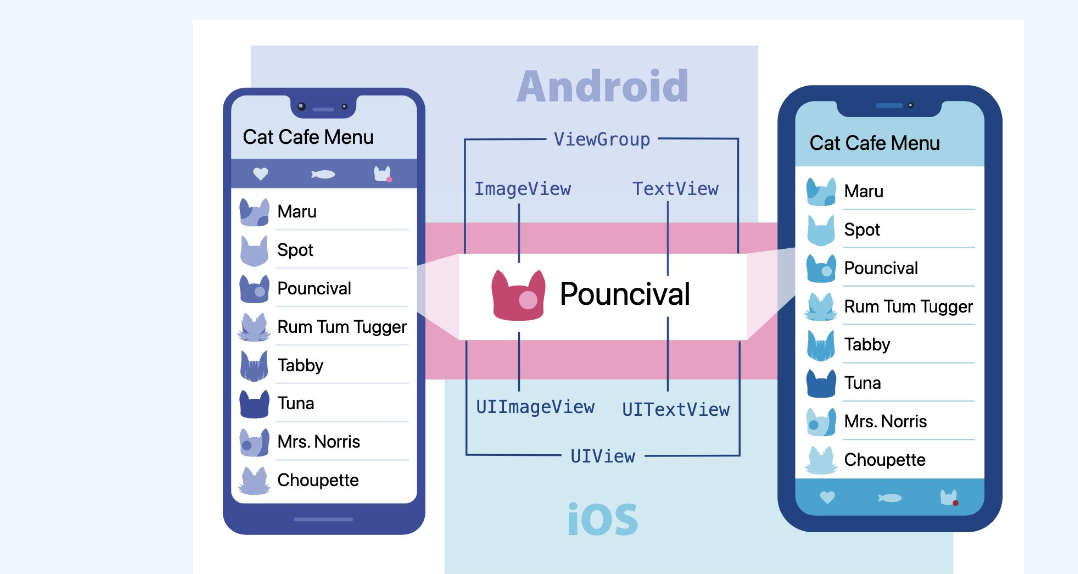
Component의 의미
- 재사용 가능한 개별적인 여러 조각
Component 종류
- 클래스형 컴포넌트: class 키워드 필요 ,component로 상속 받아야함,render()메소드 필요, state ,lifecycle 관련 기능 사용가능, 함수형 보다 메모리를 더 많이 사용한다.
- 함수형 컴포넌트: state , lifeCycle 관련기능 사용 못함, 메모리 자원을 덜 사용 한다. 컴포넌트 선언이 편리함, 공식문서에서도 함수형 컴포넌트 + hook 사용을 권장함
class Profile extends React.Component{
render(){
return(
<View style= {{flexDirection: "row"}}>
<Image source={{uri:this.props.uri}}
style={{width:this.props.size,height:this.props.size}}></Image>
<Text>{this.props.name}</Text>
</View>);
}
}
클래스 컴퍼넌트 예제 코드
     const Profile = (props) =>{
         return(
       <View style={{flexDirection: "row"}}>
             <Image source={{uri:props.uri}}
             style={{width:props.size,height:props.size}}></Image>
             <Text>{props.name}</Text>
       </View>);
}
함수형 컴퍼넌트 예제 코드 props를 사용하여 개별 component의 요소 관리
<Profile name="도광"uri="https://cdn.eyesmag.com/content/uploads/posts/2022/08/08/main-ad65ae47-5a50-456d-a41f-528b63071b7b.jpg"size={30}/>
import React from "react";
import { View, Text, Button } from "react-native";
class Component extends React.Component {
constructor(props) {
super(props);
this.state = {
count: 0, name:"시작전"
};
}
render() {
return (
<View>
<Text>You clicked {this.state.count} times{this.state.name}</Text>
<Button
title="Click me"
onPress={() => this.setState({ count: this.state.count + 1 ,name: this.state.name = "시작!"})}
/>
</View>
);
}
}
export default Component;
Hook이란
Hook을 이용하여 기존 Class 바탕의 코드를 작성할 필요 없이 상태 값과 여러 React의 기능을 사용 할 수 있다. 즉 Hook은 함수 컴포넌트에서 React state와 생명주기 기능(lifecycle features)을 “연동(hook into)“할 수 있게 해주는 함수이다.
State Hook
import React, { useState } from 'react';
function Example() {
const [count, setCount] = useState(0);
return (
<div>
<p>You clicked {count} times</p>
<button onClick={() => setCount(count + 1)}>
Click me
</button>
</div>
);
}
useState가 hook이다. useState는 현재의 state값과 이 값을 업데이트하는 함수를 쌍으로 제공합니다
Use Effect With Class compoent
처음 시작시 과정 constructor -> render ->didMount
이벤트 발생시 과정 render -> componentDidUpdate
Component를 반환 하지않게 만들면 componentWillUnmount
Use Effect With Functional component
const Component = () => {
const [count, setCount] = useState(0);
const [isOn, setIsOn] = useState(true);
useEffect(() => {
console.log("didMount");
}, []);
useEffect(() => {
console.log("didUpdate - count", count);
}, [count]);
useEffect(() => {
console.log("didUpdate - isOn", isOn);
}, [isOn]);
useEffect(() => {
if (isRefresh) {
setTimeout(() => {
setIsRefresh(false);
}, 2000);
}
}, [isRefresh]);
return (
<View style={{ alignItems: "center" }}>
<Text>You clicked {count} times</Text>
<Button title="Click me" onPress={() => setCount(count + 1)} />
<Text style={{ marginVertical: 15 }}>
-------------------------------------------------
</Text>
<Switch value={isOn} onValueChange={setIsOn} />
<Text style={{ marginVertical: 15 }}>
export default Component;
Custom hook
import React, { useState } from "react";
import { Button, TextInput, View } from "react-native";
const InputBox = (props) => {
return (
<View style={{ flexDirection: "row" }}>
<TextInput
value={props.value}
onChangeText={props.onChangeText}
style={{ borderBottomWidth: 1, width: 200 }}
placeholder={props.placeholder}
/>
<Button title="초기화" onPress={props.onReset} />
</View>
);
};
const useInput = (initialValue) => {
const [value, setValue] = useState(initialValue);
const resetValue = () => setValue(initialValue);
return {
value,
setValue,
resetValue,
};
};
const CustomHook = () => {
const {
value: name,
setValue: setName,
resetValue: resetName,
} = useInput("");
const { value: age, setValue: setAge, resetValue: resetAge } = useInput("");
const {
value: city,
setValue: setCity,
resetValue: resetCity,
} = useInput("");
return (
<View>
<InputBox
value={name}
onChangeText={setName}
placeholder="이름을 입력해 주세요"
onReset={resetName}
/>
<InputBox
value={age}
onChangeText={setAge}
placeholder="나이를 입력해 주세요"
onReset={resetAge}
/>
<InputBox
value={city}
onChangeText={setCity}
placeholder="사는 곳을 입력해 주세요"
onReset={resetCity}
/>
</View>
);
};
export default CustomHook;
