문제
스프링 개발 환경을 도커 컴포즈로 설정하니 스프링 실행 시간이 아주 느린 문제가 있었다. (호스트 윈도우에서는 8초, 도커에서는 60+초)
원인
실행 로그를 확인하니 클래스 스캔을 하는 부분이 매우 오래 걸린다는 점을 알았다. (여기서는 14배)
INFO --- [ main] .s.d.r.c.RepositoryConfigurationDelegate : Finished Spring Data repository scanning in 2898 ms. Found * JPA repository interfaces.빌드 경로를 Windows 상의 build 폴더에 bind mount로 설정해 두어 클래스 스캔 시 모든 .class 파일에 접근하는 과정이 오래 걸리는 문제였다. 빌드 폴더를 volume mount로 변경하니 실행 시간이 11초 정도로 정상화되었다.
나중에 찾은거지만 도커 문서에 아래와 같이 명시되어 있었다.
Volumes on Docker Desktop have much higher performance than bind mounts from Mac and Windows hosts.
그래서 얼마나 느린데
파일을 각각 Windows, WSL2, 컨테이너, 볼륨 마운트, 바인드 마운트에 저장하고 읽기 속도를 측정해보았다. 실행 환경은 아래와 같다.
CPU: Core i7-12700K
RAM: 64GB
SSD: Samsung 980 PRO 1TB
OS: Windows 11 (NTFS)
Docker: 27.3.1
모든 시간 측정은 (손으로) 5회 정도 웜업 후 측정했다. 아래 방식은 정확한 측정 방법은 아니므로 참고만 하길 바란다.
Windows
파일 생성 (609ms)
Measure-Command {
	For ($i = 0; $i -le 1000; $i++) {
    	"test" > "test$i.txt"
    }
}
파일 읽기 (450ms)
Measure-Command {
	For ($i = 0; $i -le 1000; $i++) {
		Get-Content "test$i.txt" | Out-Null
	}
}
Ubuntu (WSL2)
파일 생성 (15ms)
time for i in {0..1000}; do echo 'test' > "test${i}.txt"; done파일 읽기 (660ms)
time for i in {0..1000}; do cat "test${i}.txt" > /dev/null; done(compose.yml)
services:
  app:
    image: ubuntu
    command: tail -f /dev/null
    volumes:
      - ./test:/root/test-bind
      - test-volume:/root/test-volume
volumes:
  test-volume:
컨테이너
파일 생성 (22ms)
mkdir test
cd test
time for i in {0..1000}; do echo 'test' > "test${i}.txt"; done
파일 읽기 (589ms)
time for i in {0..1000}; do cat "test${i}.txt" > /dev/null; done볼륨 마운트
파일 생성 (20ms)
mkdir test-volume
cd test-volume
time for i in {0..1000}; do echo 'test' > "test${i}.txt"; done
파일 읽기 (594ms)
time for i in {0..1000}; do cat "test${i}.txt" > /dev/null; done바인드 마운트
파일 생성 (1634ms)
mkdir test-bind
cd test-bind
time for i in {0..1000}; do echo 'test' > "test${i}.txt"; done
파일 읽기 (2408ms)
time for i in {0..1000}; do cat "test${i}.txt" > /dev/null; done결과
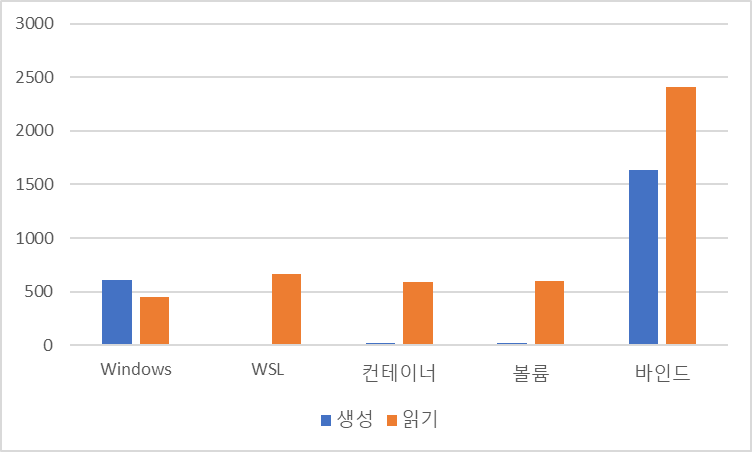
네... 앞으로는 바인드 마운트는 조심히 쓰자.
참고
- Docker Docs, Volumes, https://docs.docker.com/engine/storage/volumes/ (2024-11-23)
- GitLab Documentation, File system performance benchmarking, https://docs.gitlab.com/ee/administration/operations/filesystem_benchmarking.html (2024-11-23)

피지컬 이슈가 좀 크지 않을까요? 반응속도 테스트 한번 하시죠