1.application.properties을 이용한 설정
springboot에서는 application.properties을 이용해서 프로젝트에 대한 설정을 한다.
아래는 필자의 프로젝트에서의 application.propperties이다.
server.port=8090


#about postgresql.
spring.datasource.url=jdbc:postgresql://localhost:5432/ROADs
spring.datasource.username=postgres
spring.datasource.password=""
spring.datasource.driver-class-name=org.postgresql.Driver
#데이터베이스에 대한 방언을 결정할 수 없어서 발생.
spring.jpa.properties.hibernate.dialect=org.hibernate.dialect.PostgreSQLDialect

#about thymeleaf
spring.thymeleaf.prefix=classpath:/templates/
spring.thymeleaf.suffix=.html

#자원 재배치(정적 파일들은 어떻게 인식할 것인가)
spring.mvc.static-path-pattern=/static/**
spring.resources.static-locations=classpath:/static/

#error-handling
spring.mvc.throw-exception-if-no-handler-found=true
spring.resources.add-mappings=false

# JPA 설정
spring.jpa.show-sql=true
#변경이 있을 때만 ddl을 적용하고 싶다면 이렇게 설정하자. 그리고, 이 코드가 있어야 없던 테이블,디비 등을 자동으로 생성한다.
spring.jpa.hibernate.ddl-auto=update

#aws 액세스 키
aws.accessKey=엑세스 키
aws.secretKey=시크릿 키
aws.region=ap-northeast-2
s3.bucketName=playdataroads

#스프링부트가 aws s3에 직접 액세스하지 않고, 단순히 디비에서 url만을 가져온다면, aws sdk를 사용하는 추가적인 설정은 필요하지 않다.


# SMTP 서버 호스트
spring.mail.host=smtp.gmail.com

# SMTP 서버 포트 (일반적으로 587 또는 465)
spring.mail.port=587

# 계정 정보
spring.mail.username=이메일
spring.mail.password=tsyc zqzl aenu pxqx

# SMTP 연결 보안 설정 (tls 또는 ssl)
spring.mail.properties.mail.smtp.starttls.enable=true
spring.mail.properties.mail.smtp.starttls.required=true

# 발신자 이름
spring.mail.properties.mail.smtp.from=your-email@example.com

# 메일 발송자 주소 (디폴트 발신자로 사용될 주소)
spring.mail.properties.mail.smtp.auth=true
위의 코드를 보면, 뭔가 설정할 것들이 매우 많지만, 중요한 것들을 위주로 설명을 먼저 하고자 한다. 설정할 것들은 크게 5가지가 있다.
url을 호출할때 필요한 context-path
port
Logging Level
Database 연결
MyBatis 설정
1.1.context-path
url 호출 시에는 주소가 'http://localhost:8080/****/'
이런 식으로 설정이 되는데, 이 '****'부분에 관한 것을 설정하는 것이다.
1.2.port
springboot의 기본 포트는 8080인데, 이를 바꾸고 싶다면
server.port=8090이런 식으로 쓰면 된다.
1.3.Logging Level
루트 레벨 전체를 Logging Level로 지정하고자 하면
logging.level.root = info원하는 패키지별로 Logging Level을 지정하고자 하면
logging.level.com.ex = debug와 같이 적는다.
1.4.myBatis 설정
필자는 이 프로젝트에서는 myBatis를 사용하지 않았지만,
myBatis를 알아두는 것이 좋기 때문에 내용을 적는다.
(필자는 myBatis 대신 jpa를 사용했다.)
myBatis를 사용하면 db를 쉽게 다룰 수 있다. 쿼리문을 복잡하게 입력하지 않고 더 간단하게 작성하게 해준다.
myBatis 관련 설정을 하는 코드의 예시는 다음과 같다.
mybatis.configuration.cache-enabled=false
mybatis.configuration.use-generated-keys=true
mybatis.configuration.lazy-load-trigger-methods=false
mybatis.configuration.default-executor-type=reuse
mybatis.configuration.jdbc-type-for-null=null
mybatis.configuration.call-setters-on-nulls=true
2.이렇게 5가지 중 4가지를 알아보았다.
자, 이제부터는 database 부분을 따로 안내하고자 한다.
따로 안내하는 이유는,
이 부분만 5가지 중 거의 유일하게 다른 소프트웨어와 연동하는 부분이기 때문이다.
그렇기에 설명이 길어질 것이기 때문에, 따로 목차를 할당했다.
2.1.사용할 데이터베이스 선택
먼저, 사용할 데이터베이스를 선택한다.
필자는 postgresql을 선택했다.
https://www.postgresql.org/ (postgresql 홈페이지)
2.2.데이터베이스를 깔고, pgadmin4을 켠다.
참고로, 다른 데이터베이스들도 데이터베이스를 쉽게 핸들링 할 수 있는
pgadmin4 같은 GUI 클라이언트 어플리케이션이 있을 것이다. 다른 데이터
베이스를 쓴다면 그 데이터베이스에 해당하는 GUI 클라이언트 어플리케이션
을 사용하자.
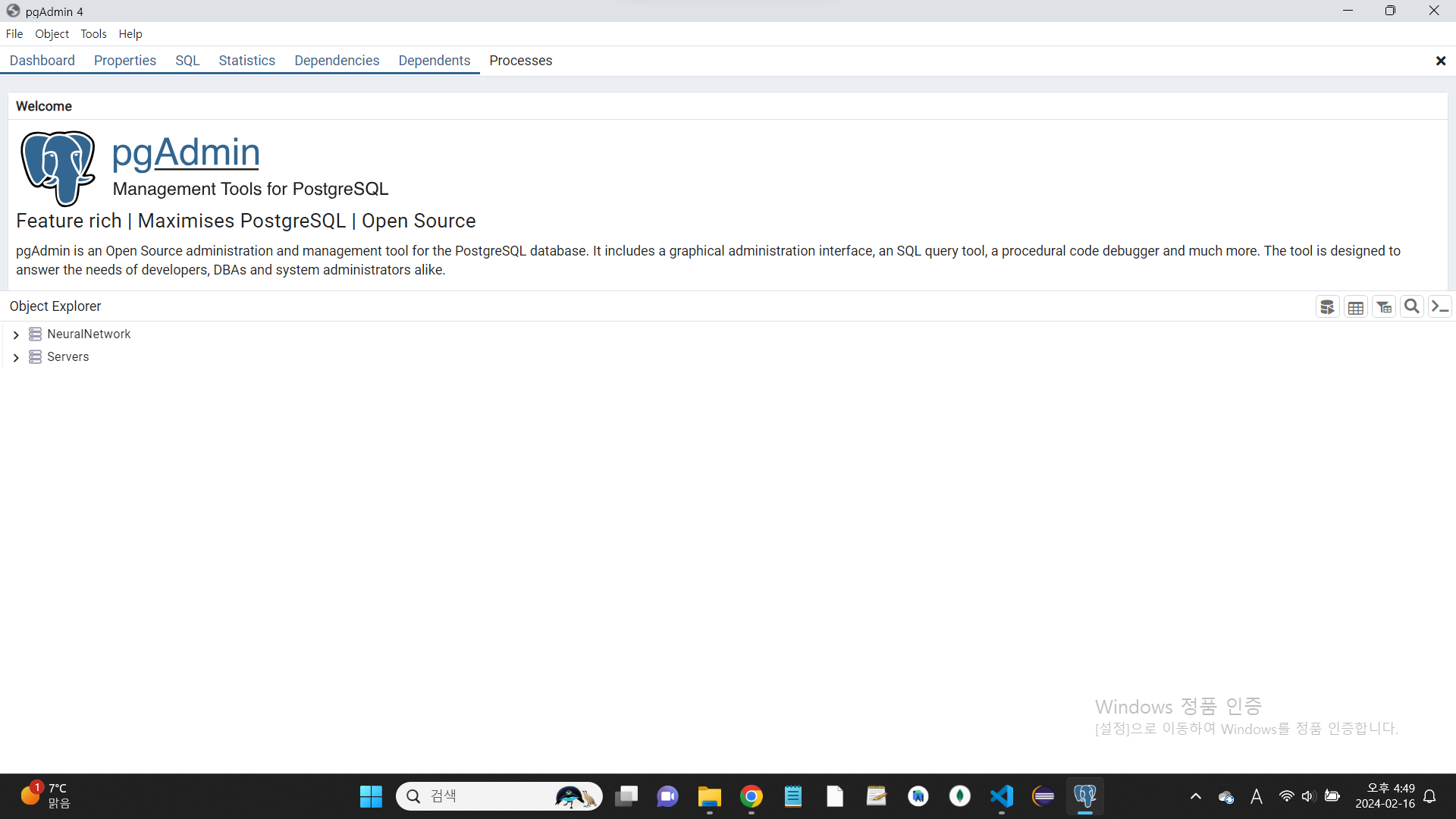
2.3.pgadmin을 통해 데이터베이스 이름, username,password를 알아내자.
참고로, username은 데이터베이스를 우클릭해서 나오는 properties에 들어가면 알 수 있다. (owners)
password는 postgresql을 설치하면서 설정한 password를 설정하면 된다.
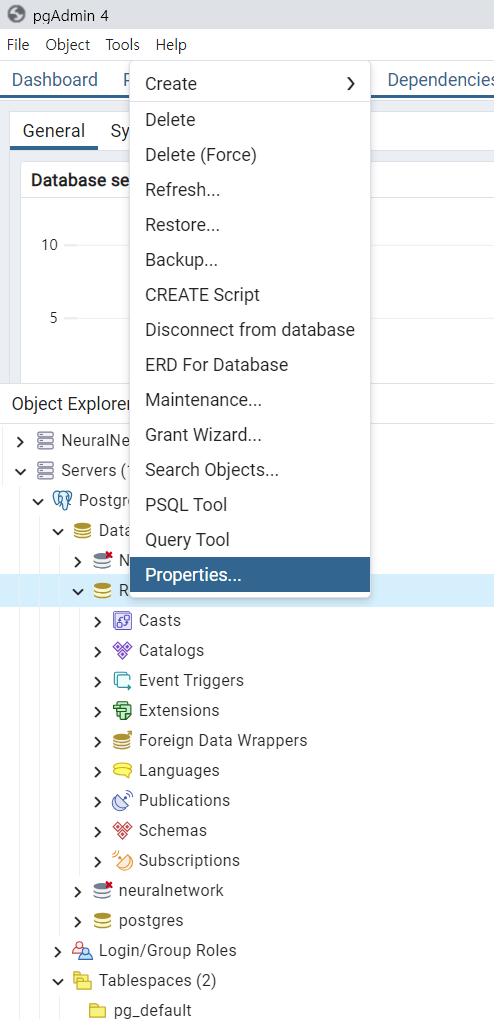
2.4.알아낸 데이터베이스 이름, username,password를 토대로 application.properties에 다음 코드를 작성한다.
#about postgresql.
spring.datasource.url=jdbc:postgresql://localhost:5432/데이터베이스 이름
spring.datasource.username=이름
spring.datasource.password=비밀번호
spring.datasource.driver-class-name=org.postgresql.Driver
#데이터베이스에 대한 방언을 결정할 수 없어서 발생.
spring.jpa.properties.hibernate.dialect=org.hibernate.dialect.PostgreSQLDialect
'데이터베이스 이름','이름','비밀번호'에는 자신의 데이터베이스 이름, 이름, 비밀번호를 적으면 된다.
이 과정을 거치면 데이터베이스가 프로젝트에 무사히 연결이 될 것이다.
3.부연설명
localhost:5432에서 5432는 postgresql의 고유한 포트 번호이다.
spring.jpa.properties.hibernate.dialect=org.hibernate.dialect.PostgreSQLDialect는
데이터베이스에 대한 방언을 결정할 수 없어서 발생하는 오류를 방지하기 위한 코드이다.
이렇게 코드를 짜고, build.gradle에서도
runtimeOnly 'org.postgresql:postgresql'를 입력해서 postgresql을 확실하게 연결시키도록 하자.