[Attiwell] basecontroller , MultipartHttpServletRequest와 httpservletrequest의 차이
코드 리뷰
package com.attiWell.common.base;

import java.io.File;
import java.io.IOException;
import java.text.DecimalFormat;
import java.util.ArrayList;
import java.util.Calendar;
import java.util.HashMap;
import java.util.Iterator;
import java.util.List;

import javax.servlet.http.HttpServletRequest;
import javax.servlet.http.HttpServletResponse;

import org.apache.commons.fileupload.FileItem;
import org.apache.commons.fileupload.disk.DiskFileItemFactory;
import org.apache.commons.fileupload.servlet.ServletFileUpload;
import org.springframework.web.bind.annotation.RequestMapping;
import org.springframework.web.bind.annotation.RequestMethod;
import org.springframework.web.multipart.MultipartFile;
import org.springframework.web.multipart.MultipartHttpServletRequest;
import org.springframework.web.servlet.ModelAndView;
import org.springframework.web.servlet.mvc.multiaction.MultiActionController;

import com.attiWell.goods.vo.ImageFileVO;

public abstract class BaseController  {
	private static final String CURR_IMAGE_REPO_PATH = "C:\\shopping\\file_repo";

	protected List<ImageFileVO> upload(MultipartHttpServletRequest multipartRequest) throws Exception{

		//리스트로 이미지파일 vo를 받는다. 업로드 된 파일들의 정보를 리스트에 담는다.
		List<ImageFileVO> fileList= new ArrayList<ImageFileVO>();
		// list에 있는 요소들 순회
        //Iterator는 자바에서 컬렉션의 요소들을 순회하는 데 사용되는 반복자
		Iterator<String> fileNames = multipartRequest.getFileNames();

		//파일 이름을 반복하면서 각 파일에 대해 처리
		while(fileNames.hasNext()){
        	//폼필드 이름 설정
			ImageFileVO imageFileVO =new ImageFileVO();
			String fileName = fileNames.next();
			imageFileVO.setFileType(fileName);

			//원본 파일 이름을 설정합니다.
			MultipartFile mFile = multipartRequest.getFile(fileName);
			String originalFileName=mFile.getOriginalFilename();
			imageFileVO.setFileName(originalFileName);
			fileList.add(imageFileVO);

			//파일 저장
			File file = new File(CURR_IMAGE_REPO_PATH +"\\"+ fileName);
			if(mFile.getSize()!=0){ //File Null Check
				if(! file.exists()){ //경로상에 파일이 존재하지 않을 경우
					if(file.getParentFile().mkdirs()){ //경로에 해당하는 디렉토리들을 생성
							file.createNewFile(); //이후 파일 생성
					}
				}
				mFile.transferTo(new File(CURR_IMAGE_REPO_PATH +"\\"+"temp"+ "\\"+originalFileName)); //임시로 저장된 multipartFile을 실제 파일로 전송
			}
		}
		return fileList;
	}

	// 파일 삭제 메서드(내부에서만 호출)
	private void deleteFile(String fileName) {

		//파일이름을 포함한 전체경로를 설정후 삭제
		File file =new File(CURR_IMAGE_REPO_PATH+"\\"+fileName);
		try{
			file.delete();
		}catch(Exception e){
			e.printStackTrace(); //콘솔에 예외 표시
		}
	}

	// 뷰이름 가져와서 반환
	@RequestMapping(value="/*.do" ,method={RequestMethod.POST,RequestMethod.GET})
	protected  ModelAndView viewForm(HttpServletRequest request, HttpServletResponse response) throws Exception {
		String viewName=(String)request.getAttribute("viewName");
		ModelAndView mav = new ModelAndView(viewName);
		return mav;
	}

	// protected -> 같은 패키지나 하위 클래에서 접근 가능
	protected String calcSearchPeriod(String fixedSearchPeriod){
		String beginDate=null;
		String endDate=null;
		String endYear=null;
		String endMonth=null;
		String endDay=null;
		String beginYear=null;
		String beginMonth=null;
		String beginDay=null;

		//날짜 포맷 설정
		DecimalFormat df = new DecimalFormat("00");
		//현재 날짜와 시간을 가져오기 위해 Calendar 객체를 생성
		Calendar cal=Calendar.getInstance();

		//현재 날짜,시간을 가져와서 종료날짜 설정
		endYear   = Integer.toString(cal.get(Calendar.YEAR));
		endMonth  = df.format(cal.get(Calendar.MONTH) + 1);
		endDay   = df.format(cal.get(Calendar.DATE));
		endDate = endYear +"-"+ endMonth +"-"+endDay;

		if(fixedSearchPeriod == null) {
			cal.add(cal.MONTH,-4);
		}else if(fixedSearchPeriod.equals("one_week")) {
			cal.add(Calendar.DAY_OF_YEAR, -7);
		}else if(fixedSearchPeriod.equals("two_week")) {
			cal.add(Calendar.DAY_OF_YEAR, -14);
		}else if(fixedSearchPeriod.equals("one_month")) {
			cal.add(cal.MONTH,-1);
		}else if(fixedSearchPeriod.equals("two_month")) {
			cal.add(cal.MONTH,-2);
		}else if(fixedSearchPeriod.equals("three_month")) {
			cal.add(cal.MONTH,-3);
		}else if(fixedSearchPeriod.equals("four_month")) {
			cal.add(cal.MONTH,-4);
		}

		//시간 날짜 생성
		beginYear   = Integer.toString(cal.get(Calendar.YEAR));
		beginMonth  = df.format(cal.get(Calendar.MONTH) + 1);
		beginDay   = df.format(cal.get(Calendar.DATE));
		beginDate = beginYear +"-"+ beginMonth +"-"+beginDay;

		// calender 객체에서 현재 날짜 가져와서 end 에넣고 기간에 따라 빼준다음 begin에 넣어준다

		return beginDate+","+endDate;
	}

}
1 원본파일과 폼필드 이름 두가지를 설정하는 이유
폼 필드 이름: HTML 폼에서 파일 입력 필드의 이름으로, 서버가 여러 파일 입력 필드를 구분할 수 있게 해줍니다.
원본 파일 이름: 사용자가 파일을 업로드할 때 사용한 실제 파일 이름으로, 파일의 원래 이름을 저장하여 나중에 파일을 식별하거나 사용자에게 원래 이름을 표시할 수 있게 해줍니다.
아래는 addNewGoods.jsp 파일 중 폼필드 입력으로 main_image로 입력하고 있다.
<script type="text/javascript">
  var cnt = 0;
  function fn_addFile() {
     if (cnt == 0) {
        $("#d_file").append("<br>" + "<input type='file' name='main_image' id='f_main_image' />");
     } else {
        $("#d_file").append("<br>" + "<input type='file' name='detail_image" + cnt + "' />");
     }
     cnt++;
  }
</script>
정리
폼필드 이름 은 사용자가 원하는 이름 입력후 jsp에서 받아서 넘어오는거고 실제 이미지 이름은 multipartrequest에서 확인할 수 있다.
2 ImageFileVO
attiwell.goods.vo 옆에 있음
3 MultipartHttpServletRequest와 httpservletrequest의 차이
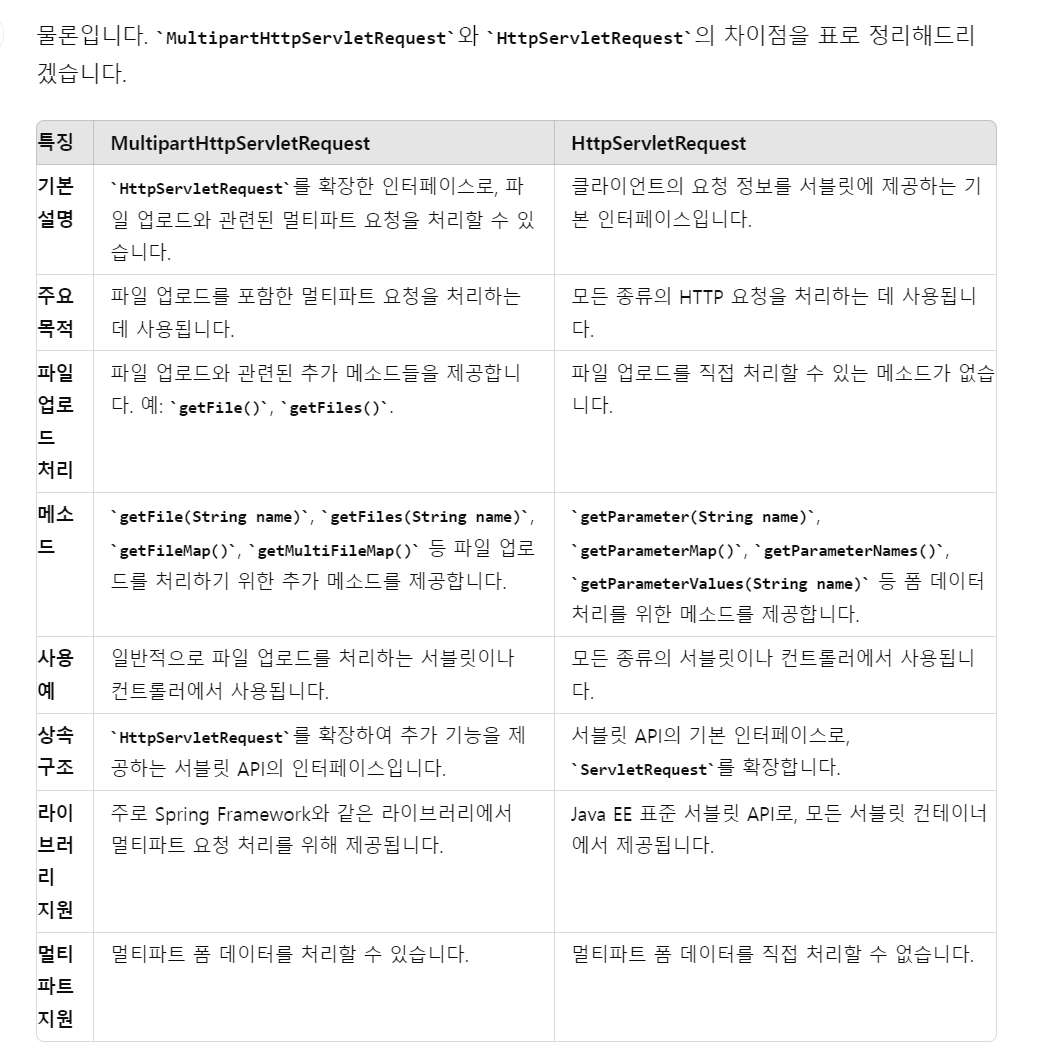
정리 )
MultipartHttpServletRequest는 HttpServletRequest를 확장하여 파일 업로드와 같은 멀티파트 요청을 처리할 수 있는 기능을 추가한 인터페이스이다.

웜벳