[왕초보] 쉽게 배우는 웹개발 1주차
[수업 목표]
- 웹의 작동 원리와 웹을 개발하기 위해 배워야 할 것을 알 수 있다.
- 웹의 뼈대인 HTML과 꾸미기인 CSS를 이해하고 사용할 수 있다.
- 부트스트랩을 활용하여 웹을 다양하게 구현할 수 있다.
1. 웹의 작동 원리와 웹을 개발하기 위해 배워야 할 것을 알 수 있다.
-
HTML과 CSS : 브라우저의 뼈대를 만들 수 있다.
-
웹의 동작 개념
-
브라우저의 역할은 1. 역할을 보내고, 2. 받은 HTML 파일을 그려주는 것
-
요청은 서버가 만들어 놓은 API로 보냄
-
클라이언트(브라우저) : 요청하는 쪽 / 서버 : 주는쪽
-
2. 웹의 뼈대인 HTML과 꾸미기인 CSS를 이해하고 사용할 수 있다.
-
HTML : 웹의 뼈대를 잡아주는 구역을 나타내는 코드(줄맞춤 중요 →
alt+shift+F)<!DOCTYPE html> <html lang="en"> <head> <meta charset="UTF-8"> <meta name="viewport" content="width=device-width, initial-scale=1.0"> <title>스파르타코딩클럽 | HTML 기초</title> </head> <body> <!-- 구역을 나누는 태그들 --> <div>나는 구역을 나누죠</div> <p>나는 문단이에요</p> <ul> <li> bullet point!1 </li> <li> bullet point!2 </li> </ul> <!-- 구역 내 콘텐츠 태그들 --> <h1>h1은 제목을 나타내는 태그입니다. 페이지마다 하나씩 꼭 써주는 게 좋아요. 그래야 구글 검색이 잘 되거든요.</h1> <h2>h2는 소제목입니다.</h2> <h3>h3~h6도 각자의 역할이 있죠. 비중은 작지만..</h3> <hr> span 태그입니다: 특정 <span style="color:red">글자</span>를 꾸밀 때 써요 <hr> a 태그입니다: <a href="http://naver.com/"> 하이퍼링크 </a> <hr> img 태그입니다: <img src="https://www.google.com/images/branding/googlelogo/1x/googlelogo_color_272x92dp.png" /> <hr> input 태그입니다: <input type="text" /> <hr> button 태그입니다: <button> 버튼입니다</button> <hr> textarea 태그입니다: <textarea>나는 무엇일까요?</textarea> </body> </html> -
HTML은
<head>영역과<body>영역으로 이루어져 있다.<head>영역은 속성 정보를<body>안에는 페이지의 내용을 담는다.
기본코드 → html : 5 = ! tap
-
로그인 페이지(login.html)
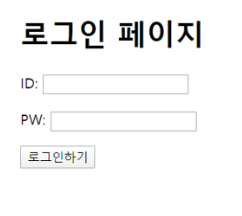
<!DOCTYPE html>
<html lang="en">
	<head>
		<meta charset="UTF-8">
		<title>로그인페이지</title>
	</head>
	<body>
		<h1>로그인 페이지</h1>
		<p>ID: <input type="text"/></p>
		<p>PW: <input type="text"/></p>
		<button>로그인하기</button>
	</body>
</html>-
CSS : HTML 뼈대를 예쁘게 꾸며주는 코드 (사용할 줄 만 알기 →
'예쁘게'는 디자이너 의존)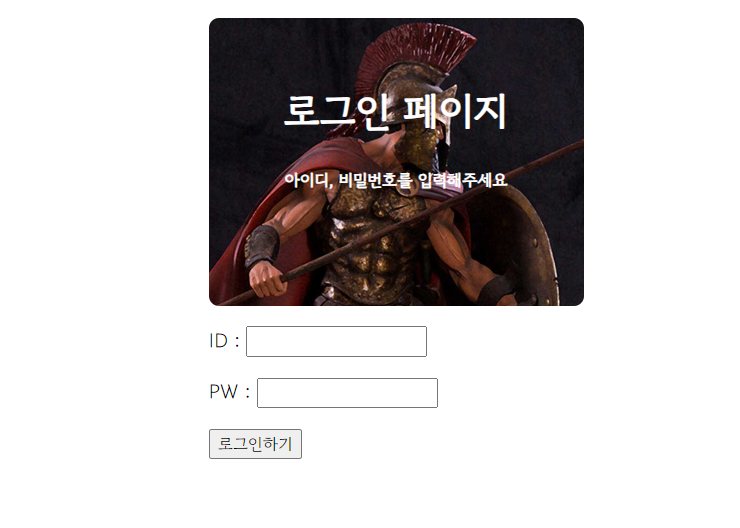
<!DOCTYPE html>
<html lang="en">

<head>
    <meta charset="UTF-8">
    <meta name="viewport" content="width=device-width, initial-scale=1.0">
    <title>Document</title>
    <style>
        @import url('https://fonts.googleapis.com/css2?family=Gowun+Dodum&display=swap');

        *{
            font-family: "Gowun Dodum", sans-serif;
        }

        .mytitle {
            width: 300px;
            height: 200px;

            color: white;
            text-align: center;

            padding-top: 30px;
            border-radius: 8px;

            background-image: url('https://www.ancient-origins.net/sites/default/files/field/image/Agesilaus-II-cover.jpg');
            background-position: center;
            background-size: cover;
        }
        .wrap{
            width: 300px;
            margin: 20px auto 0px auto;
        }
    </style>
</head>

<body>
    <div class="wrap">
        <div class="mytitle">
            <h1>로그인 페이지</h1>
            <h5>아이디, 비밀번호를 입력해주세요</h5>
        </div>
        <p>ID : <input type="text" /></p>
        <p>PW : <input type="text" /></p>
        <P><button> 로그인하기 </button></P>
    </div>

</body>

</html>
class : 명찰 같은 역할 → head에
<style> .class이름{}
-
div : 구역(박스) → style에 background-color로 구역 확인하기!
배경관련 background-color background-image background-size 사이즈 width height 폰트 font-size font-weight font-family color 간격 margin(위, 오른쪽, 아래, 왼쪽) : 바깥 여백 padding : 안쪽 여백 -
div안의 내용을 정렬할 때 :
display: flex; flex-direction: column; / row; align-items: center; justify-content: center; -
그림 넣기 :
background-image: url('');

background-position: center;

background-size: cover;
3. 부트스트랩을 활용하여 웹을 다양하게 구현할 수 있다.
부트스트랩 : 예쁜 CSS를 미리 모아둔 것!
- 추억 앨범 만들기
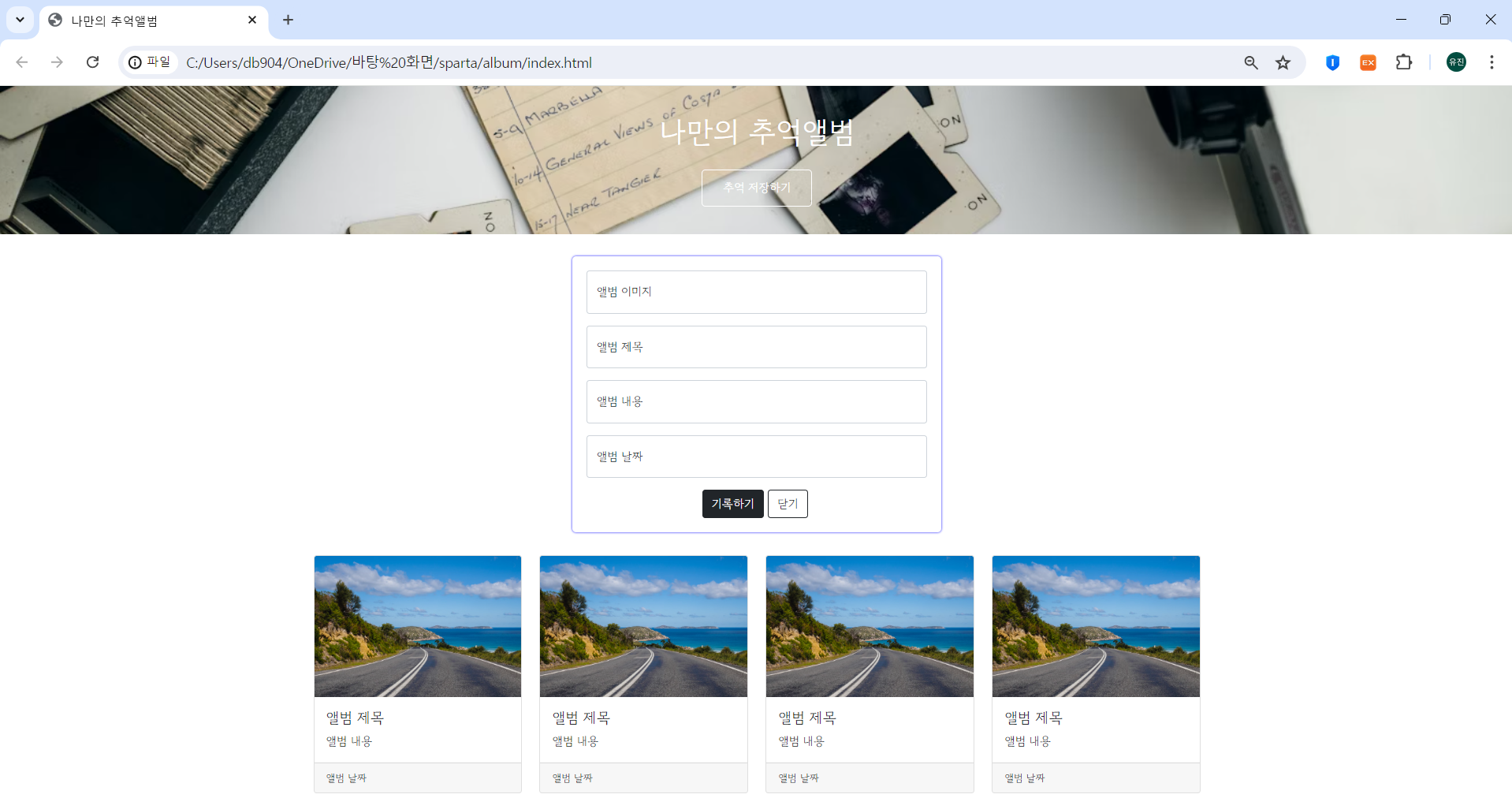
<!doctype html>
<html lang="en">

<head>
    <meta charset="utf-8">
    <meta name="viewport" content="width=device-width, initial-scale=1, shrink-to-fit=no">

    <link href="https://cdn.jsdelivr.net/npm/bootstrap@5.0.2/dist/css/bootstrap.min.css" rel="stylesheet"
        integrity="sha384-EVSTQN3/azprG1Anm3QDgpJLIm9Nao0Yz1ztcQTwFspd3yD65VohhpuuCOmLASjC" crossorigin="anonymous">
    <script src="https://ajax.googleapis.com/ajax/libs/jquery/3.5.1/jquery.min.js"></script>
    <script src="https://cdn.jsdelivr.net/npm/bootstrap@5.0.2/dist/js/bootstrap.bundle.min.js"
        integrity="sha384-MrcW6ZMFYlzcLA8Nl+NtUVF0sA7MsXsP1UyJoMp4YLEuNSfAP+JcXn/tWtIaxVXM"
        crossorigin="anonymous"></script>

    <script src="https://code.jquery.com/jquery-3.2.1.slim.min.js"></script>
    <script src="https://cdnjs.cloudflare.com/ajax/libs/popper.js/1.12.9/umd/popper.min.js"></script>
    <script src="https://maxcdn.bootstrapcdn.com/bootstrap/4.0.0/js/bootstrap.min.js"></script>


    <title>My Album</title>
    <style>
        @import url('https://fonts.googleapis.com/css2?family=Gowun+Dodum&display=swap');

        * {
            font-family: 'Gowun Dodum', sans-serif;
        }

        .mytitle {
            background-color: green;
            color: white;

            height: 250px;

            /* 내용물을 정렬 */
            display: flex;
            flex-direction: column;
            align-items: center;
            justify-content: center;

            background-image: url('https://images.unsplash.com/photo-1511992243105-2992b3fd0410?ixlib=rb-4.0.3&ixid=M3wxMjA3fDB8MHxwaG90by1wYWdlfHx8fGVufDB8fHx8fA%3D%3D&auto=format&fit=crop&w=1470&q=80');
            background-position: center;
            background-size: cover;
        }

        .mytitle > button {
            width: 150px;
            height: 50px;
            background-color: transparent;
            border: none;
            color: white;
            font-size: 18px;
            font-weight: bold;
            border-radius: 5px;

            border: 1px solid white;
            margin-top: 20px;
        }

        .mycards {
            margin: 20px auto 20px auto;
            width: 1200px;
        }

        .mypostingbox {
            width: 500px;
            margin: 20px auto 20px auto;
            padding: 20px 20px 20px 20px;
            border-radius: 5px;
            box-shadow: 0px 0px 3px 0px blue;
        }

        .mybtn {
            display: flex;
            flex-direction: row;
            align-items: center;
            justify-content: center;

            margin-top: 10px;
        }

        .mybtn>button {
            margin-right: 10px;
        }
    </style>
</head>

<body>
    <div class="mytitle">
        <h1>나만의 추억 앨범</h1>
        <button>추억 저장하기</button>
    </div>

    <div class="mypostingbox">

        <div class="form-floating mb-3">
            <input type="email" class="form-control" id="floatingInput" placeholder="name@example.com">
            <label for="floatingInput">앨범 이미지</label>
        </div>

        <div class="form-floating mb-3">
            <input type="email" class="form-control" id="floatingInput" placeholder="name@example.com">
            <label for="floatingInput">앨범 제목</label>
        </div>

        <div class="form-floating mb-3">
            <input type="email" class="form-control" id="floatingInput" placeholder="name@example.com">
            <label for="floatingInput">앨범 날짜</label>
        </div>

        <div class="form-floating">
            <textarea class="form-control" placeholder="Leave a comment here" id="floatingTextarea"></textarea>
            <label for="floatingTextarea">앨범 내용</label>
        </div>

        <div class="mybtn">
            <button type="button" class="btn btn-dark">기록하기</button>
            <button type="button" class="btn btn-outline-dark">닫기</button>
        </div>
    </div>

    <div class="mycards">
        <div class="row row-cols-1 row-cols-md-4 g-4">
            <div class="col">
                <div class="card h-100">
                    <img src="https://images.unsplash.com/photo-1446768500601-ac47e5ec3719?ixlib=rb-4.0.3&ixid=M3wxMjA3fDB8MHxwaG90by1wYWdlfHx8fGVufDB8fHx8fA%3D%3D&auto=format&fit=crop&w=1446&q=80"
                        class="card-img-top" alt="...">
                    <div class="card-body">
                        <h5 class="card-title">앨범 제목</h5>
                        <p class="card-text">앨범 내용</p>
                    </div>
                    <div class="card-footer">
                        <small class="text-muted">앨범 날짜</small>
                    </div>
                </div>
            </div>
            <div class="col">
                <div class="card h-100">
                    <img src="https://images.unsplash.com/photo-1446768500601-ac47e5ec3719?ixlib=rb-4.0.3&ixid=M3wxMjA3fDB8MHxwaG90by1wYWdlfHx8fGVufDB8fHx8fA%3D%3D&auto=format&fit=crop&w=1446&q=80"
                        class="card-img-top" alt="...">
                    <div class="card-body">
                        <h5 class="card-title">앨범 제목</h5>
                        <p class="card-text">앨범 내용</p>
                    </div>
                    <div class="card-footer">
                        <small class="text-muted">앨범 날짜</small>
                    </div>
                </div>
            </div>
            <div class="col">
                <div class="card h-100">
                    <img src="https://images.unsplash.com/photo-1446768500601-ac47e5ec3719?ixlib=rb-4.0.3&ixid=M3wxMjA3fDB8MHxwaG90by1wYWdlfHx8fGVufDB8fHx8fA%3D%3D&auto=format&fit=crop&w=1446&q=80"
                        class="card-img-top" alt="...">
                    <div class="card-body">
                        <h5 class="card-title">앨범 제목</h5>
                        <p class="card-text">앨범 내용</p>
                    </div>
                    <div class="card-footer">
                        <small class="text-muted">앨범 날짜</small>
                    </div>
                </div>
            </div>
            <div class="col">
                <div class="card h-100">
                    <img src="https://images.unsplash.com/photo-1446768500601-ac47e5ec3719?ixlib=rb-4.0.3&ixid=M3wxMjA3fDB8MHxwaG90by1wYWdlfHx8fGVufDB8fHx8fA%3D%3D&auto=format&fit=crop&w=1446&q=80"
                        class="card-img-top" alt="...">
                    <div class="card-body">
                        <h5 class="card-title">앨범 제목</h5>
                        <p class="card-text">앨범 내용</p>
                    </div>
                    <div class="card-footer">
                        <small class="text-muted">앨범 날짜</small>
                    </div>
                </div>
            </div>
        </div>
    </div>


</body>

</html>
🙌중요한건 꺾였는데도 그냥 하는 마음