문제 발생
팀원이 tfstate s3 버킷을 지정하면서 오류가 생겨서 이거때문에 terraform apply가 안되는 오류가 발생했다.
팀원이 보내준 사유는 다음과 같다
현재 pposiraegi-ecommerce repo에서 Terraform/EKS 접근 문제가 있습니다.
중요:
파일 수정하지 말고 먼저 진단만 해주세요.
terraform apply 금지.
terraform import 금지.
destructive command 금지.
현재 확인된 상태:
AWS_PROFILE=goorm 계정: 779846782353
EKS cluster: pposiraegi-cluster, ACTIVE, version 1.32
NodeGroup: pposiraegi-node-group, ACTIVE, t3.medium 2대 healthy
Terraform backend:
bucket = pposiraegi-tf-state-779846782353
key = ecommerce/terraform.tfstate
해당 backend key에 state object가 없는 것으로 보임
terraform plan 실행 시 기존 리소스를 인식하지 못하고 86 to add
따라서 현재 apply하면 중복 생성/충돌 위험
kubectl은 kubeconfig 생성은 되지만 Kubernetes API 접근 실패:"the server has asked for the client to provide credentials"
EKS authenticationMode는 CONFIG_MAP
현재 IAM user arn:aws:iam::779846782353:user/jihoon이 aws-auth에 매핑되지 않은 것으로 추정
해야 할 일:
실제 Terraform state 위치를 찾기
backend.tf와 실제 state 위치 불일치 여부 확인
state 유실이면 import 대상 목록 정리만 하기
aws-auth 또는 EKS access 권한 복구 방안 제안
팀원이 공통으로 사용할 AWS_PROFILE/backend/tfvars 절차 문서화 제안
진단하기
이거에 대한 해결방법은 사실 아직까지 잘 모르겠다.
차근차근 진단해보기로 했다.
1. Terraform state 위치 찾기
# S3 버킷 목록 전체 확인
aws s3 ls --profile goorm

# 팀원이 말한 버킷 확인
aws s3 ls s3://pposiraegi-tf-state-779846782353 --profile goorm

# 버킷 안에 뭐가 있는지
aws s3 ls s3://pposiraegi-tf-state-779846782353 --recursive --profile goorm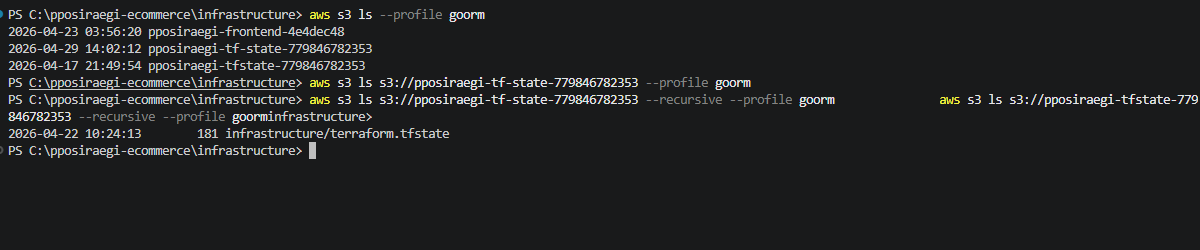
이렇게 가장 최근에 만든 프로필인 pposiraegi-tf-state-779846782353에는 아무것도 없고
pposiraegi-tfstate-779846782353에 infrastructure/terraform.tfstate 파일이 들어있는 것을 확인할 수 있다.
2. 원인 파악
S3 버킷이 두 개 존재하는 것을 확인했다.
| 버킷 이름 | 생성일 | 상태 |
|---|---|---|
| pposiraegi-tf-state-779846782353 | 2026-04-29 | 비어있음 ❌ |
| pposiraegi-tfstate-779846782353 | 2026-04-17 | state 파일 존재 ✅ |
팀원이 설정한 backend 버킷 이름은 pposiraegi-tf-state-779846782353이었는데,
실제 state 파일은 pposiraegi-tfstate-779846782353에 있었다.
버킷 이름이 미묘하게 달랐던 것이 원인이었다.
팀원 backend 설정:
bucket = "pposiraegi-tf-state-779846782353" ← 없는 버킷 (tf-state)
key = "ecommerce/terraform.tfstate" ← 경로도 다름
실제 state 위치:
bucket = "pposiraegi-tfstate-779846782353" ← 진짜 버킷 (tfstate)
key = "infrastructure/terraform.tfstate" ← 실제 경로
3. backend.tf 파일 없는 것 확인
팀원 backend 설정:
bucket = "pposiraegi-tf-state-779846782353" ← 없는 버킷 (tf-state)
key = "ecommerce/terraform.tfstate" ← 경로도 다름
실제 state 위치:
bucket = "pposiraegi-tfstate-779846782353" ← 진짜 버킷 (tfstate)
key = "infrastructure/terraform.tfstate" ← 실제 경로
따라서, 중복생성과 충돌이 발생할 위험이 있었다.
4. 해결 방법: backend.tf 생성
infrastructure/backend.tf 파일을 새로 만들어서 S3 backend를 명시적으로 설정했다.
terraform {
  backend "s3" {
    bucket  = "pposiraegi-tfstate-779846782353"
    key     = "infrastructure/terraform.tfstate"
    region  = "ap-northeast-2"
    profile = "goorm"
  }
}
이렇게 하면 뭐가 좋아지냐면:
| 항목 | backend.tf 없을 때 | backend.tf 있을 때 |
|---|---|---|
| state 저장 위치 | 로컬 파일 | S3 버킷 |
| 팀원 공유 | 불가능 | 가능 ✅ |
| 충돌 위험 | 높음 | 낮음 ✅ |
| 분실 위험 | 높음 (로컬 삭제 시) | 낮음 ✅ |
5. terraform init 재실행
backend.tf 생성 후 terraform init을 다시 실행해서 S3 backend를 인식시켜줬다.
terraform init -reconfigure-reconfigure 옵션은 기존 backend 설정을 무시하고 새로운 backend로 다시 초기화하는 옵션이다.
이후 terraform plan을 실행하면 기존 리소스를 정상적으로 인식하고
No changes 또는 실제 변경사항만 표시되어야 한다.
정리
이번 문제의 핵심은 두 가지였다.
- 버킷 이름 불일치: 팀원이 설정한 버킷 이름과 실제 state가 있는 버킷 이름이 달랐다.
- backend.tf 파일 부재: 팀 전체가 공유해야 하는 backend 설정이 코드로 관리되지 않고 있었다.
앞으로는 backend.tf를 Git에 포함해서 팀원 모두가 동일한 S3 backend를 바라보도록 관리하도록 변경하였다.