타임리프란
- 타임리프란 Java 템플릿 엔진이다.
- 브라우저에서 올바르게 표시될 수 있고 정적 프로토타입으로도 바로 열어볼 수 있는 HTML을 제공 한다.
- 타임리프로 작성된 HTML은 브러우저로 열었을 때에도 보이고, 서버에서 랜더링해도 동작하는 자연 템플릿(Natural Templates)을 지향한다.
템플릿 엔진이란
Template engine
템플릿 엔진은 여러 구성 요소로 분할된 웹 애플리케이션을 빠르게 구축할 때 사용되며, 템플릿을 통해 파일의 변수를 실제 값으로 대체하여 클라이언트에 표시한다.
즉, 스프링 서버에서 데이터를 받아 우리가 보는 웹페이지(HTML)상에 데이터를 넣어서 빠르게 렌더링할 수 있도록 한다.
개발자가 웹사이트를 만들 때, 템플릿을 정의하면, HTML페이지를 동적으로 생성할 수 있으며 코드 재사용성을 증가시킬 수 있다.
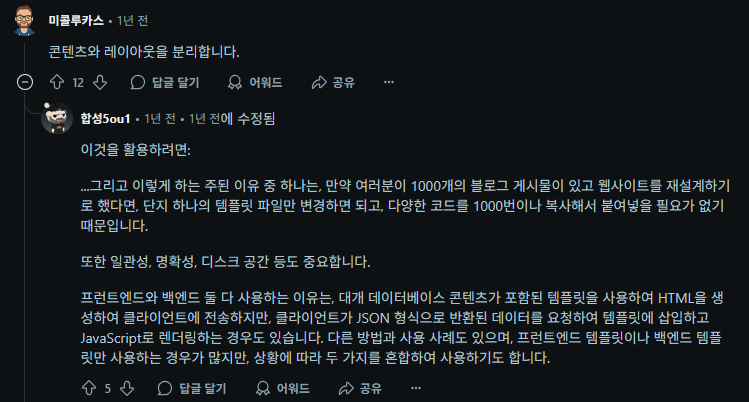
위 예시처럼 템플릿엔진을 사용하면 유지보수성이 뛰어나다.
블로그 글이 1000개 있을 때, HTML을 글마다 따로 만들면 디자인이 바뀔 경우 전부 수정해야 한다.
그러나 템플릿 엔진은 레이아웃(헤더, 글 구조 등)을 하나의 템플릿에 담아두고, DB 데이터만 바꾸는 방식이라 템플릿만 수정하면 전체 반영할 수 있다.
사진 출처: Reddit-"Why do we need template engine exactly ?"게시글 댓글
참고 : reddit "Why do we need template engine exactly ?"
참고 : What are template engines?
참고 : Top HTML Template Engines
타임리프 표현식
${...}: 변수(Variable) 표현식
*{...}: 선택(Selection) 표현식
#{...}: 메시지(i18n) 표현식
@{...}: 링크(URL) 표현식
~{...}: 조각(Fragment) 표현식
참고: Thymeleaf 공식사이트 "Getting started with the Standard dialects in 5 minutes"
타임리프 문법
th:text : 텍스트를 표현할 때 사용
th:each : 컬렉션 반복에 사용
th:if	: 조건이 true인 경우에만 표시
타임리프 코드 예시
<table>
  <thead>
    <tr>
      <th th:text="#{msgs.headers.name}">Name</th>
      <th th:text="#{msgs.headers.price}">Price</th>
    </tr>
  </thead>
  <tbody>
    <tr th:each="prod: ${allProducts}">
      <td th:text="${prod.name}">Oranges</td>
      <td th:text="${#numbers.formatDecimal(prod.price, 1, 2)}">0.99</td>
    </tr>
  </tbody>
</table>- 위와 같이 타임리프로 작성된 html템플릿은 html처럼 보이고 작동할 수 있다.
th:text는 렌더링 시 내부 텍스트를 실제 값으로 교체한다.
@Controller
public class ProductController {
  @GetMapping("/products")
  String list(Model model) {
    model.addAttribute("allProducts", service.findAll());
    return "products/list";
  }
}
-> 템플릿에서 ${allProducts}이 주입되는 코드 예시
| Name | Price |
|---|---|
| Oranges | 0.99 |
이 표는 위의 타임리프 코드를 실행한 것이다. 위에서 말했듯, 타임리프는 자연 템플릿을 지향하기 때문에 이 HTML이 그대로 보일 수 있게된다.
또한 여기에서 Oranges와 0.99는 가이드처럼 보이는 것이며, 서버에서 렌더링하고 ${prod.name}이 "Apple"이면, 최종 HTML은 Apple이 되며 Oranges는 덮어씌워진다.
참고: Thymeleaf 공식사이트 "Spring MVC and Thymeleaf: how to access data from templates"