쿠버네티스 상태탐사(Probe)란 무엇일까? (startupProbe, livenessProbe, readinessProbe)
🖥️제로부터 시작하는 Docker & 쿠버네티스
상태 탐사(Probe)란 무엇일까
쿠버네티스에서는 컨테이너가 단순히 “running”이라는 상태만으로는 충분히 완벽하게 서비스가 실행된다고 생각하지 않는다.
그래서 다음과 같은 세 가지 탐사(probe) 를 사용한다:
- startupProbe: 컨테이너가 ‘정상적으로 시작했는가’를 검사한다.
- livenessProbe: 실행 중인 컨테이너가 ‘응답 가능하고 살아 있는가’를 검사한다.
- readinessProbe: 컨테이너가 ‘트래픽을 받아도 되는 준비
livenessProbe - 살아있는가?
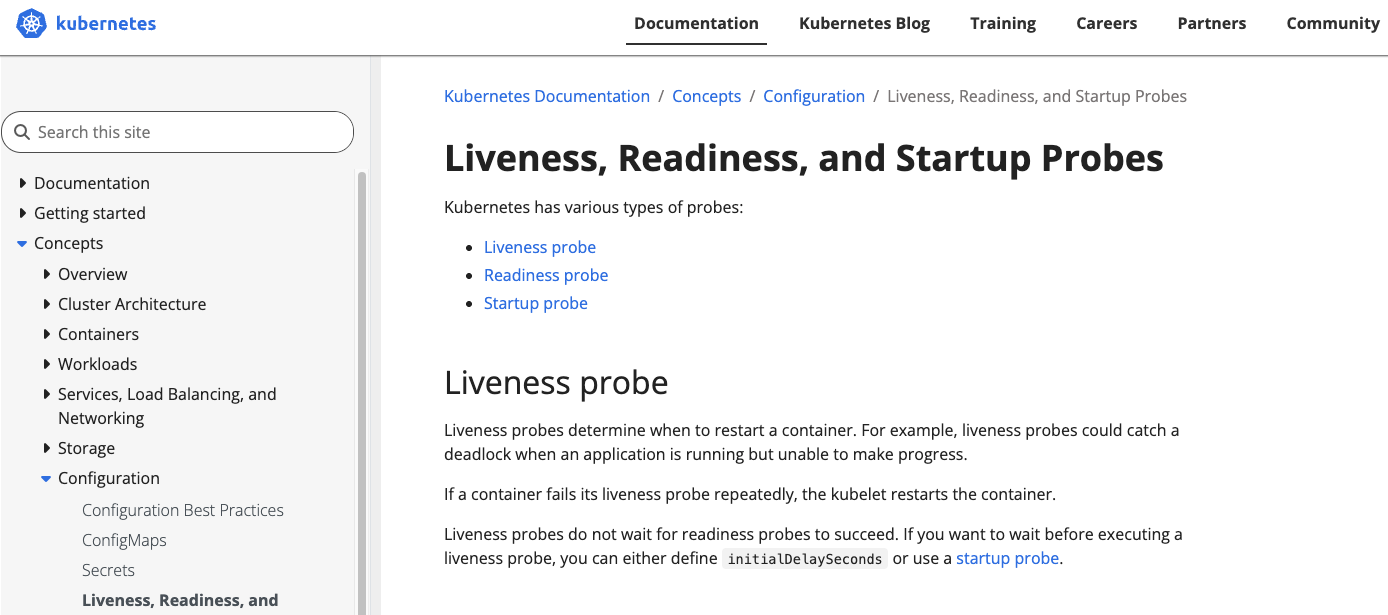
공식 문서에서는 “Liveness probes determine when to restart a container.”
라고 설명이 되어있다.
livenessProbe의 역할은 다음과 같다.
- 컨테이너가 살아있긴 한데 진행이 안 되는 상태(데드락 등) 인지 확인한다.
- 계속 실패하면 kubelet이 컨테이너를 재시작한다
즉, “이 컨테이너는 이제 죽었다고 보고 다시 켜야겠다”를 판단하는 장치이다.
Readiness probe – 트래픽을 받아도 되나?
공식문서에서는 “Readiness probes determine when a container is ready to accept traffic.” 라고 나와있다.
readinessProbe의 역할은 다음과 같다.
- readinessProbe는 컨테이너가 요청을 받을 준비가 되었는지 확인한다.
- 실패하면 쿠버네티스가 이 Pod를 Service 엔드포인트에서 제외한다.
→ 공식 문서에 “readiness probe가 실패 상태를 반환하면, Kubernetes가 해당 Pod를 모든 매칭되는 Service 엔드포인트에서 제거한다”고 나와 있다.
즉, “이 Pod로 요청을 보내도 되는지”에만 관심이 있고, 컨테이너 자체를 재시작하지는 않는다.
Startup probe – 완전히 켜졌는가? (초기 전용)
공식문서에는 StrartupProbe에 대해 다음과 같이 나와있다.
“A startup probe verifies whether the application within a container is started.”
startupProbe의 역할은 다음과 같다.
- 기동이 느린 애플리케이션에서, 완전히 올라오기 전에 liveness probe가 계속 실패해서 컨테이너를 죽이는 걸 막는다.
- 공식 문서에, startupProbe가 설정되어 있으면 성공할 때까지 liveness / readiness 체크를 비활성화한다고 되어 있다.
즉, “느릿하게 부팅하는 앱을 위한 안전장치”이다.
프로브를 체크하는 방법.
세 가지 프로브 모두 아래 4가지 방식 중 하나로 컨테이너를 검사할 수 있다.
- exec: 컨테이너 안에서 명령을 실행해서 exit code 0인지 확인
- httpGet: Pod IP + 포트 + 경로로 HTTP GET 요청을 보내서 상태 코드 200–399인지 확인
- tcpSocket: 지정한 포트로 TCP 연결이 열리는지 확인
- grpc: gRPC health check를 호출해서 상태가 SERVING인지 확인
예시코드
livenessProbe yaml
파일명 : liveness-probe-pod.yaml
# 파일명: liveness-probe-pod.yaml
apiVersion: v1
kind: Pod
metadata:
  name: liveness-probe-pod
spec:
  containers:
    - name: app
      image: nginx:1.27
      ports:
        - containerPort: 80
      livenessProbe:
        httpGet:
          path: /healthz         # 이 경로를 앱에서 200으로 응답하도록 구현한다고 가정
          port: 80
        initialDelaySeconds: 10  # 컨테이너 뜨고 10초 뒤부터 체크 시작
        periodSeconds: 10        # 10초마다 한 번씩 체크
        timeoutSeconds: 2        # 2초 내에 응답 없으면 실패로 간주
        failureThreshold: 3      # 3번 연속 실패하면 컨테이너 재시작
  restartPolicy: Always
실행 & 확인 명령어
kubectl apply -f liveness-probe-pod.yaml
kubectl get pods -o wide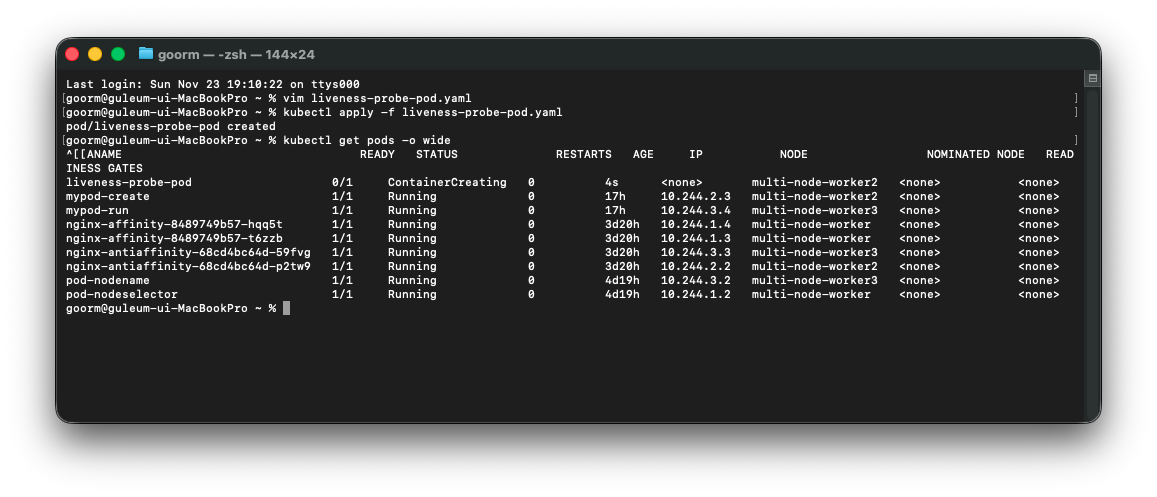
이렇게 running이 실패한 것을 볼 수 있다.
그래서 계속하여 컨테이너를 재시작할 것이다
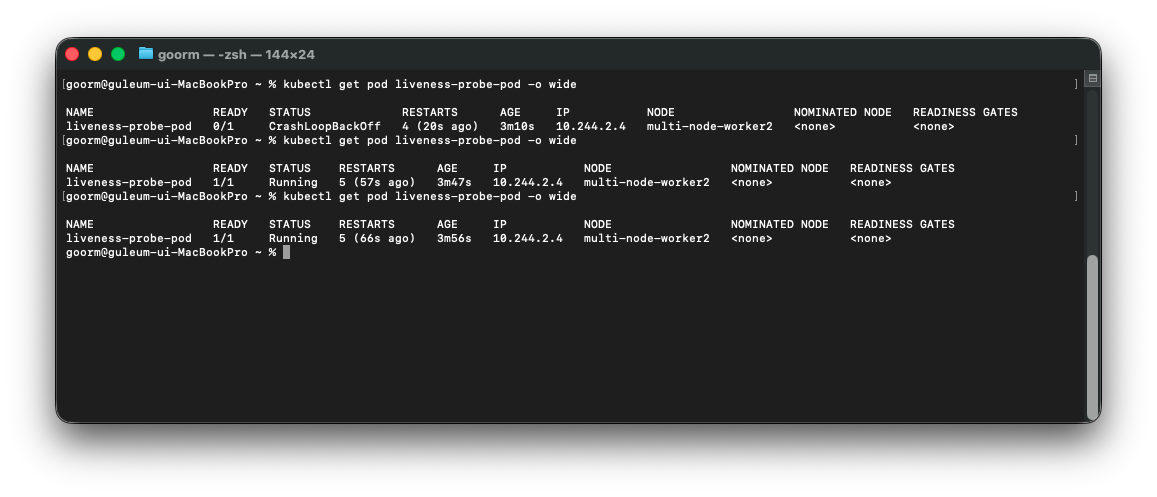
이렇게 restart 값이 계속 증가하는 것을 확인할 수 있다.
조금 더 자세히 보고싶어서 describe를 사용해서 로그를 확인해보았다.
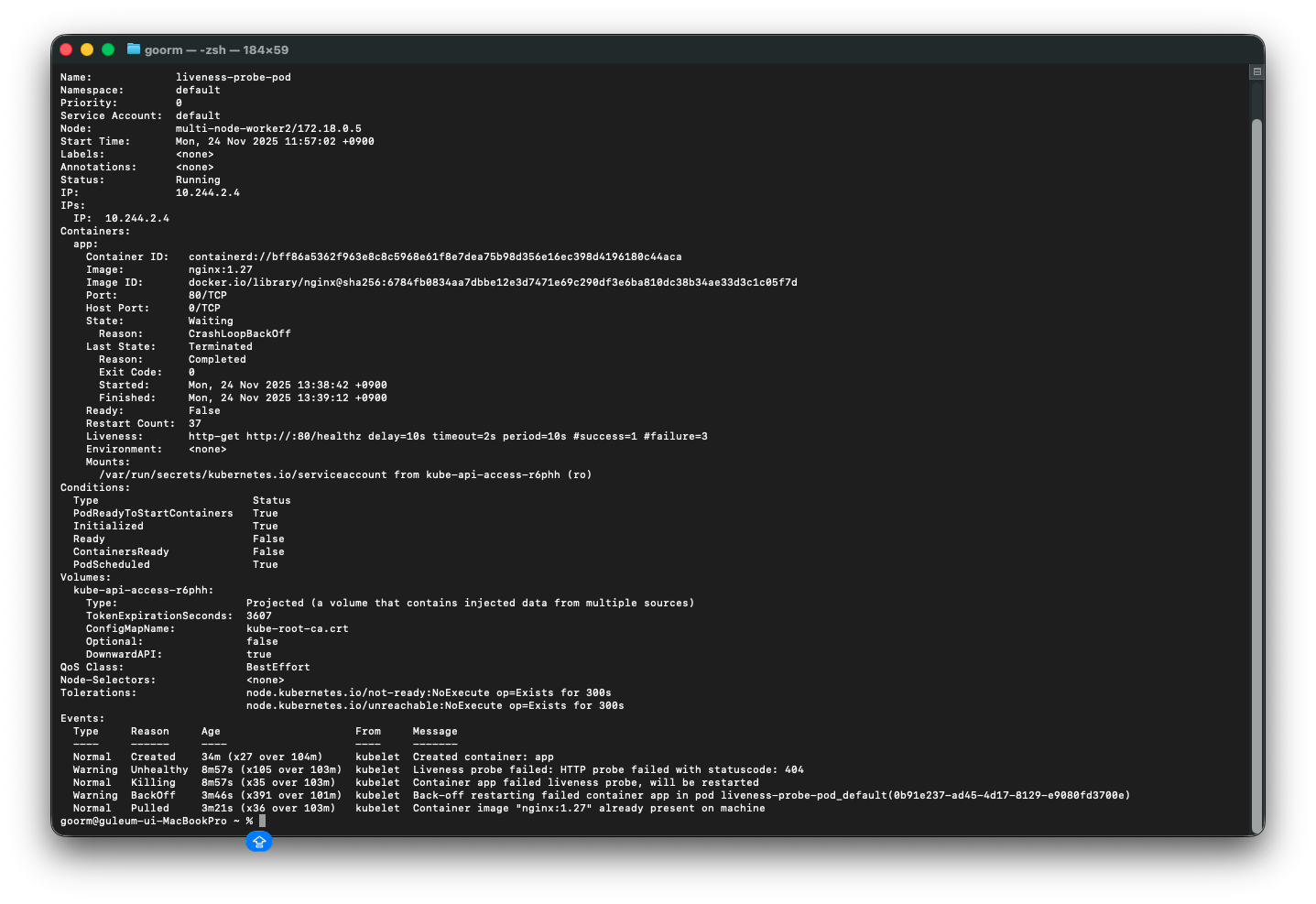
조금 시간이 지나서 확인해보니
Containers:
  app:
    Container ID:   containerd://bff86a5362f963e8c8c5968e61f8e7dea75b98d356e16ec398d4196180c44aca
    Image:          nginx:1.27
    Image ID:       docker.io/library/nginx@sha256:6784fb0834aa7dbbe12e3d7471e69c290df3e6ba810dc38b34ae33d3c1c05f7d
    Port:           80/TCP
    Host Port:      0/TCP
    State:          Waiting
      Reason:       CrashLoopBackOff
    Last State:     Terminated
      Reason:       Completed
      Exit Code:    0
      Started:      Mon, 24 Nov 2025 13:38:42 +0900
      Finished:     Mon, 24 Nov 2025 13:39:12 +0900
    Ready:          False
    Restart Count:  37 #이 부분
이렇게 restart한 횟수가 37번이며,
Events:
  Type     Reason     Age                     From     Message
  ----     ------     ----                    ----     -------
  Normal   Created    34m (x27 over 104m)     kubelet  Created container: app
  Warning  Unhealthy  8m57s (x105 over 103m)  kubelet  Liveness probe failed: HTTP probe failed with statuscode: 404
  Normal   Killing    8m57s (x35 over 103m)   kubelet  Container app failed liveness probe, will be restarted
  Warning  BackOff    3m46s (x391 over 101m)  kubelet  Back-off restarting failed container app in pod liveness-probe-pod_default(0b91e237-ad45-4d17-8129-e9080fd3700e)
  Normal   Pulled     3m21s (x36 over 103m)   kubelet  Container image "nginx:1.27" already present on machine
맨 아래 Events: 부분에 이런 로그들이 찍힌 것을 확인할 수 있다.
livenessProbe 실패 → 컨테이너 Kill → 다시 Start 가 반복되고 있다는 뜻이다.
정리하면,
livenessProbe는 실행 중인 컨테이너가 ‘응답 가능하고 살아 있는가’를 검사하고
"성공할때까지" 재시작하는 프로브임을 확인할 수 있다.
readinessProbe yaml
파일명 : readiness-probe-pod.yaml
# 파일명: readiness-probe-pod.yaml
apiVersion: v1
kind: Pod
metadata:
  name: readiness-probe-pod
  labels:
    app: readiness-probe-app
spec:
  containers:
    - name: app
      image: nginx:1.27
      ports:
        - containerPort: 80
      readinessProbe:
        httpGet:
          path: /ready           # 이 경로가 준비 완료일 때만 200을 응답한다고 가정
          port: 80
        initialDelaySeconds: 5   # 컨테이너가 뜨고 5초 뒤부터 체크 시작
        periodSeconds: 5         # 5초마다 한 번씩 체크
        timeoutSeconds: 2        # 2초 내 응답 없으면 실패로 간주
        failureThreshold: 3      # 3번 연속 실패하면 '준비 안 됨' 상태로 판단
  restartPolicy: Always
실행 & 확인 명령어
kubectl apply -f readiness-probe-pod.yaml
kubectl get pods -o wide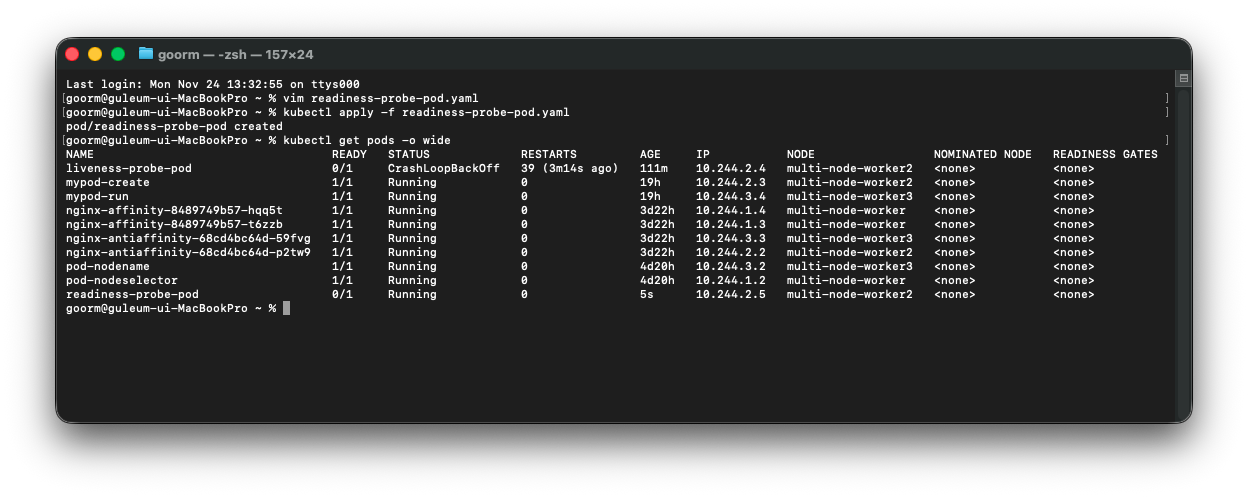
이렇게 READY 값이 0/1 인 것을 볼 수 있다.
그리고 describe를 봤을 때,
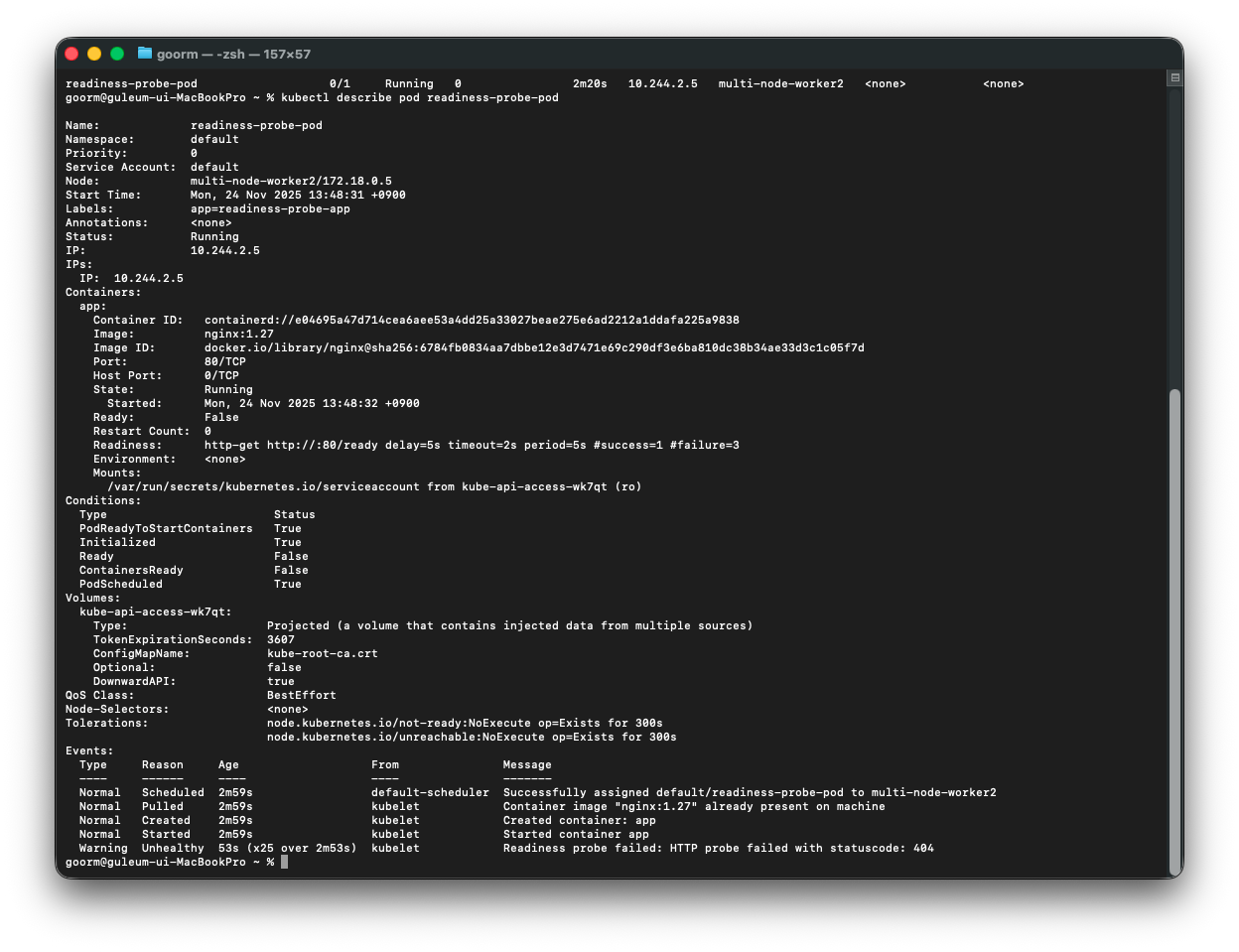
livenessProbe와 달리 restartCount 횟수가 0번임을 확인할 수 있다. 또한
Event 부분에서 livenessProbe처럼 Type이 Warning 및 실패한 기록이 보이지만 다시 시작하지 않고
이 것을 통해,
readinessProbe는 “이 Pod에 트래픽을 보내도 되는지” 만 판단하고,
컨테이너 자체를 재시작하지는 않는다는 것을 알 수 있다.
startupProbe yaml
파일명 : startup-probe-pod.yaml
# 파일명: startup-probe-pod.yaml
apiVersion: v1
kind: Pod
metadata:
  name: startup-probe-pod
spec:
  containers:
    - name: app
      image: nginx:1.27
      ports:
        - containerPort: 80
      # 1) startupProbe: "완전히 켜졌는지" 확인
      startupProbe:
        httpGet:
          path: /healthz
          port: 80
        periodSeconds: 10        # 10초마다 한 번씩 체크
        failureThreshold: 30     # 최대 5분(10초 * 30)까지 기다려줌

      # 2) livenessProbe: 이후부터 상시 헬스 체크
      livenessProbe:
        httpGet:
          path: /healthz
          port: 80
        periodSeconds: 10

      # 3) readinessProbe: 준비 상태 확인
      readinessProbe:
        httpGet:
          path: /ready
          port: 80
        periodSeconds: 5
  restartPolicy: Always
실행 & 확인 명령어
kubectl apply -f startup-probe-pod.yaml
kubectl get pods -o wide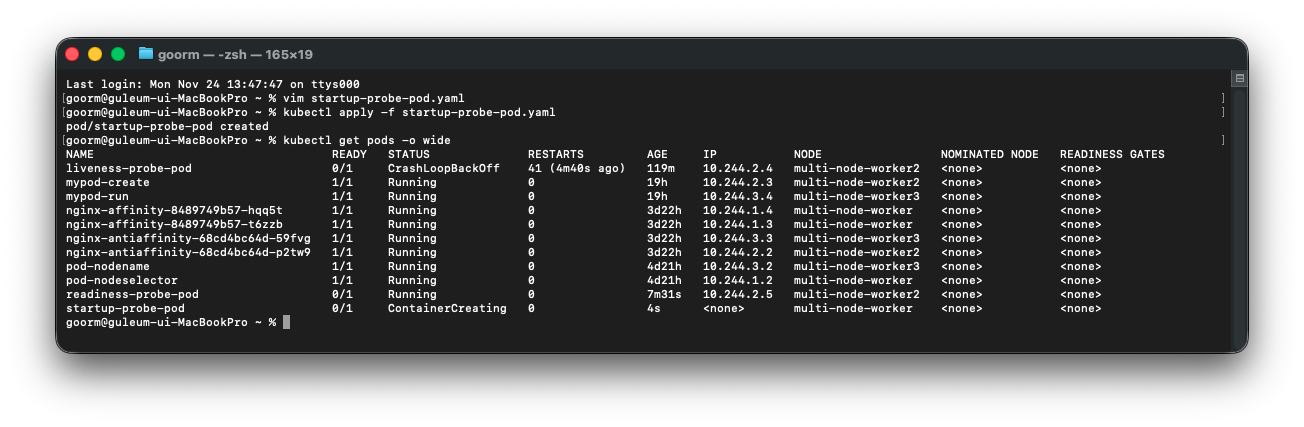
공식 문서 내용대로, startupProbe가 설정되어 있으면
startupProbe가 성공하기 전까지는 liveness / readinessProbe는 비활성화된 상태로 취급된다.
그래서 원래라면 livenessProbe가 계속 실패해서
CrashLoopBackOff가 났을 애플리케이션이라도,
startupProbe 덕분에 “초기 기동 시간 동안은”
먼저 충분히 기다려주고, 그 이후에 liveness / readiness를 적용하게 된다.
만약 /healthz가 끝까지 정상 응답(200)을 못 해서
startupProbe가 계속 실패한다면,
→ 결국 liveness 실패 때와 마찬가지로
restartPolicy 에 따라 컨테이너를 재시작하게 된다.
그래서 describe를 통해서 로그를 확인해보면,
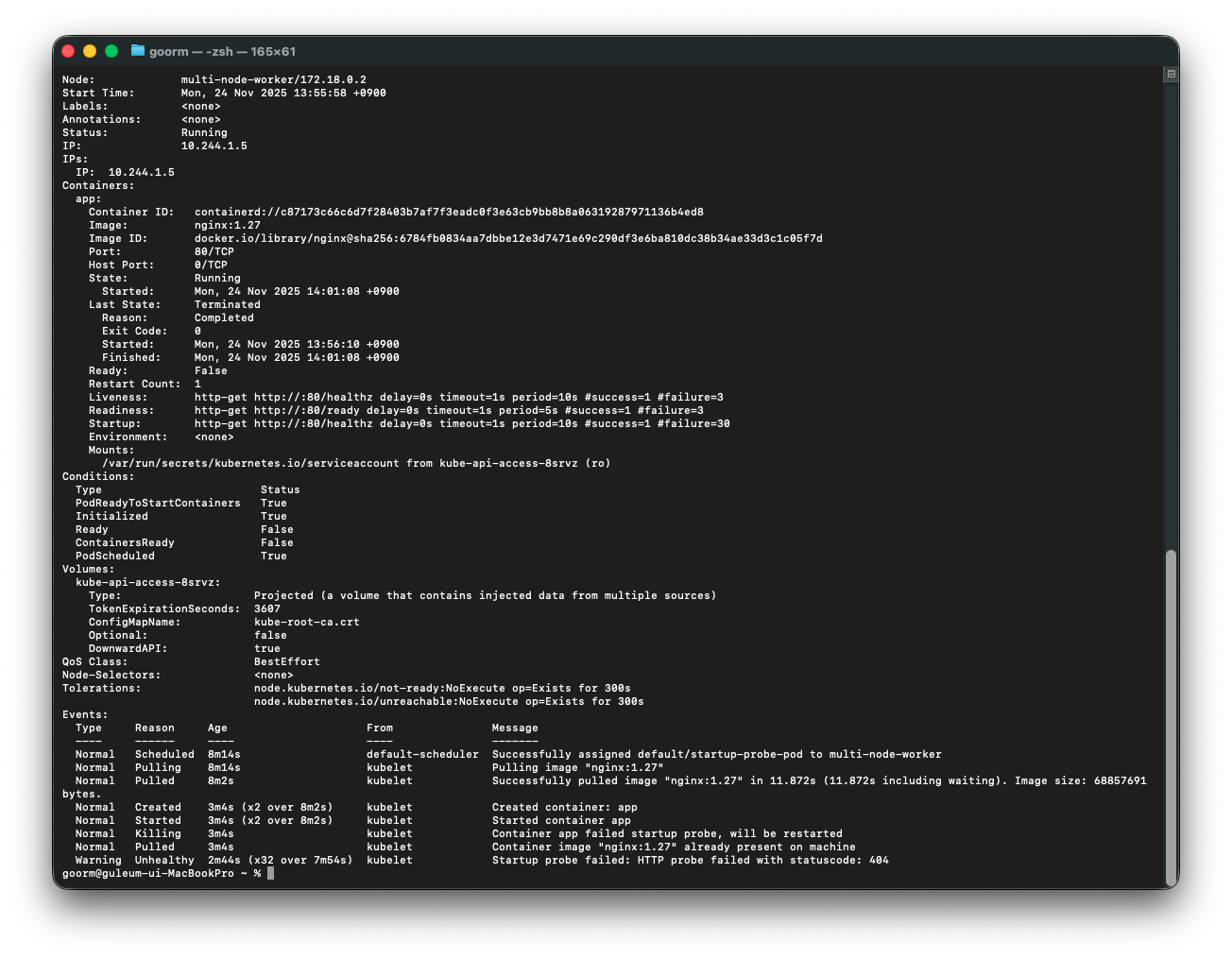
1) Containers 섹션에서 볼 수 있는 것
Containers:
  app:
    Container ID:   ...
    Image:          nginx:1.27
    ...
    State:          Running
      Started:      Mon, 24 Nov 2025 14:01:08 +0900
    Last State:     Terminated
      Reason:       Completed
      Exit Code:    0
      Started:      Mon, 24 Nov 2025 13:56:10 +0900
      Finished:     Mon, 24 Nov 2025 14:01:08 +0900
    Ready:          False
    Restart Count:  1
    Liveness:       http-get http://:80/healthz ...
    Readiness:      http-get http://:80/ready   ...
Startup: http-get http://:80/healthz ...-
State: Running
→ 현재 컨테이너는 일단 실행 중인 상태이다. -
Last State: Terminated / Reason: Completed / Exit Code: 0
→ 이전에 한 번 컨테이너가 정상 종료(Exit Code 0) 된 적이 있다.
즉, 에러로 죽은 게 아니라 정상적으로 종료된 뒤 다시 시작된 것이다. -
Restart Count: 1
→ kubelet이 이 컨테이너를 한 번 재시작했다는 의미다.
이 재시작이 바로 아래 Events에 나오는 “startupProbe 실패 → 컨테이너 재시작” 때문이다. -
Ready: False
→ Pod가 아직 트래픽을 받을 준비가 안 된 상태라는 뜻이다.
startupProbe / readinessProbe가 성공하지 못해서 READY 0/1 로 보이는 상황이라고 이해할 수 있다. -
Liveness / Readiness / Startup
→ 이 컨테이너에 세 가지 프로브가 모두 설정되어 있고,
liveness / readiness / startup이 각각 어떤 방식(http-get), 어떤 주기(periodSeconds), 어떤 실패 허용 횟수(failureThreshold)로 동작하는지 한눈에 볼 수 있다.
즉,
컨테이너는 현재 Running이지만,
한 번 재시작된 적이 있고( Restart Count 1 ),
아직 Ready 상태가 아니라는 것(Ready False)을 알 수 있다.
2) Conditions 섹션
Conditions:
  Type                        Status
  PodReadyToStartContainers   True
  Initialized                 True
  Ready                       False
  ContainersReady             False
  PodScheduled                True
여기서는 Pod 레벨 상태를 볼 수 있다.
-
PodScheduled: True
→ 해당 Pod가 어떤 노드에 스케줄링되었는지 여부. 지금은 정상적으로 노드에 할당된 상태이다. -
PodReadyToStartContainers: True
→ 파드 네트워크, 샌드박스 등이 준비되어 컨테이너를 시작할 수 있는 상태라는 뜻이다. -
Initialized: True
→ initContainer가 있다면 모두 끝났다는 의미인데, 지금은 initContainer가 없으므로 이미 초기화가 완료된 상태이다. -
Ready: False, ContainersReady: False
→ 컨테이너는 떠 있지만, 전체 Pod는 아직 “준비 완료(Ready)” 상태가 아니다라는 뜻이다.
즉, Service 입장에서는 이 Pod를 정상 엔드포인트로 보지 않는다.
요약하면,
startupProbe / readinessProbe가 아직 성공하지 못했기 때문에
Pod 전체 Ready 상태가 False 라고 볼 수 있다.
Events 섹션
Events:
  Type     Reason     Age                     From               Message
  ----     ------     ----                    ----               -------
  Normal   Scheduled  8m14s                   default-scheduler  Successfully assigned default/startup-probe-pod to multi-node-worker
  Normal   Pulling    8m14s                   kubelet            Pulling image "nginx:1.27"
  Normal   Pulled     8m2s                    kubelet            Successfully pulled image "nginx:1.27" ...
  Normal   Created    3m4s (x2 over 8m2s)     kubelet            Created container: app
  Normal   Started    3m4s (x2 over 8m2s)     kubelet            Started container app
  Normal   Killing    3m4s                    kubelet            Container app failed startup probe, will be restarted
  Normal   Pulled     3m4s                    kubelet            Container image "nginx:1.27" already present on machine
Warning Unhealthy 2m44s (x32 over 7m54s) kubelet Startup probe failed: HTTP probe failed with statuscode: 404-
Scheduled / Pulling / Pulled / Created / Started
→ Pod가 노드에 스케줄링되고, nginx 이미지를 받아와서 컨테이너가 정상적으로 한 번 시작되었다. -
Normal Killing ... Container app failed startup probe, will be restarted
→ startupProbe가 실패해서, kubelet이 컨테이너를 한 번 죽이고 재시작했다는 의미다.
이 로그가 Restart Count: 1과 연결된다. -
Warning Unhealthy ... Startup probe failed: HTTP probe failed with statuscode: 404
→ 이후에도 startupProbe가 계속 실패하고 있다는 메시지다.
/healthz 엔드포인트가 아직 200을 반환하지 못하고, 404가 떨어지고 있는 상황이다.
즉, 이 로그들은
컨테이너는 한 번 뜬 뒤,
startupProbe 실패 때문에 한 번 재시작되었고,
여전히 /healthz가 404를 반환하고 있어서 startupProbe 실패 이벤트가 계속 쌓이는 중이다.
라고 해석될 수 있다.
startupProbe describe 결과로 알 수 있는 것 정리
이 describe 로그만으로도 startupProbe 흐름을 이렇게 정리할 수 있다.
- startupProbe가 /healthz를 계속 체크하고 있다.
- /healthz가 정상 200을 반환하지 못하고 404라서
→ Warning Unhealthy: Startup probe failed 이벤트가 계속 발생한다. - 설정된 failureThreshold를 한 번 초과했을 때
→ Container app failed startup probe, will be restarted 메세지와 함께
컨테이너가 한 번 재시작되었고(Restart Count: 1), - 아직 Ready가 False라서
→ Pod는 Running이지만 트래픽을 받을 준비는 안 된 상태이다.
결국,
startupProbe를 넣어두면 “앱이 완전히 켜졌는지”를 판단해서
기동에 실패하는 경우 재시작 + CrashLoop 탐지까지 해준다는 걸
describe 로그를 통해 직접 확인할 수 있다.
참고자료:
[쿠버네티스 공식 홈페이지 - Liveness, Readiness, and Startup Probes]
https://kubernetes.io/docs/concepts/configuration/liveness-readiness-startup-probes/?utm_source=chatgpt.com
[쿠버네티스 공식 홈페이지 - Configure Liveness, Readiness and Startup Probes]
https://kubernetes.io/docs/tasks/configure-pod-container/configure-liveness-readiness-startup-probes/?utm_source=chatgpt.com