안녕하세요! 어찌하다보니 TIL을 작성하는 시간이 많이 늦었네요... 저번 포스트에서는 TIL을 영어로 작성해봤습니다! 본디 모국어가 아닌 언어에 대한 장문의 글을 읽는 것은 솔직히 말해서,,, 정말 관심 있는 분야가 아니면 쉽지 않습니다. 그치만, 매우 중요하고 근간이 될 수 있는 개발 기법들에 관한 것이니 해당 부분을 감안하고 매일 읽는 습관을 들여야겠어요!!
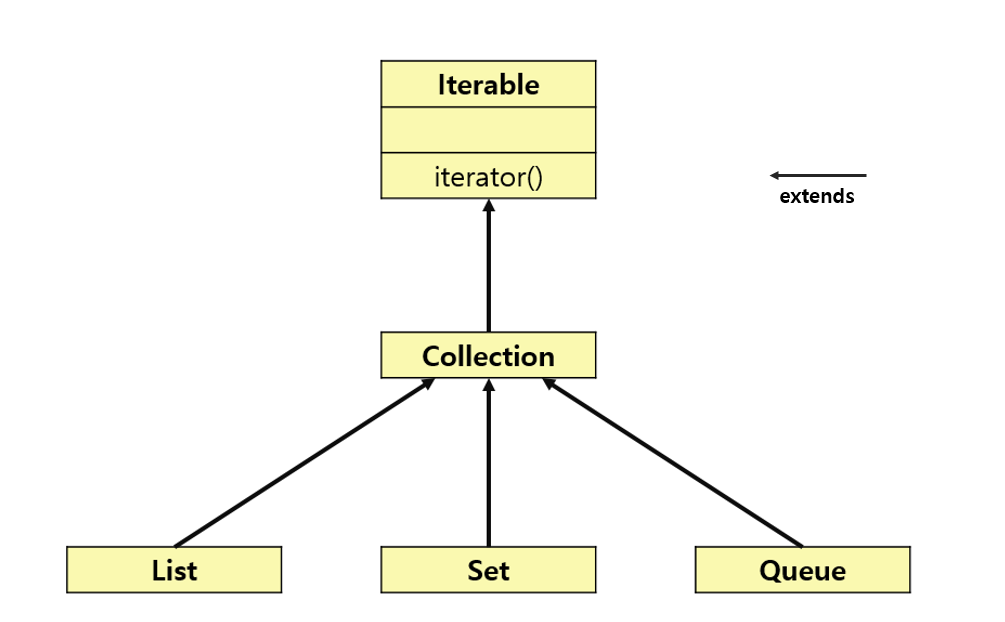
우선 Comparator를 사용하기 전에 우리는 데이터를 다양한 자료구조에 담아 사용을 합니다. 그중에서 알아볼 것은 Collection입니다.
Collections
(출처 : https://girawhale.tistory.com/17)
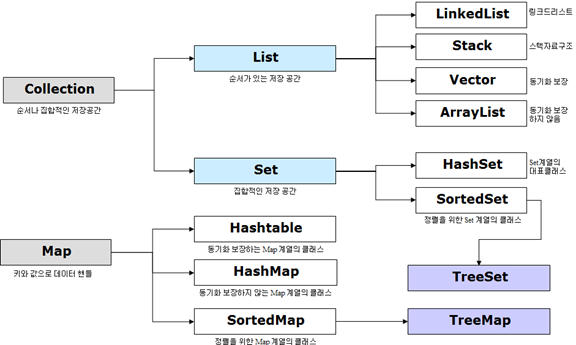
위 사진에서 확인하실 수 있듯이,,,, 아주 방대한 내용을 담고 있습니다. 간단히 말하면, 데이터의 집합, 그룹을 의미한다.라고 생각할 수 있습니다. 조금 더 자세히 알아볼까요?
Iterable & Iterator
Iterable
Iterable은 컬렉션 인터페이스들의 가장 최상위 인터페이스입니다. Collection interface는 이를 상속받아서 사용이 됩니다. 해당 인터페이스의 주된 기능은 iterator를 Collections로 전달해주는 역할을 합니다.
public interface Iterable<T>
{
  Iterator<T>    iterator();

  Spliterator<T> spliterator();

  void           forEach(Consumer<? super T> action);
}
위의 Code block을 보게 되면 아래에 forEach()문을 확인할 수 있습니다. 이를 통해서 내부의 요소를 간단한 반복문을 작성하여 출력할 수 있습니다.
List<Integer> nums = new ArrayList<>();

nums.add(1);
nums.add(2);
nums.add(3);
nums.add(4);

System.out.println("Element in list : ");
nums.forEach(element -> System.out.println(element + " " ));
단! 디버깅 과정에서 오류가 발생할 시 오류 메세지의 형태가 기존 오류 형태와 다르고, 너무 간단한 프로세스를 사용할 경우 시간 복잡도가 더 커지게 됩니다.
Java Cursor
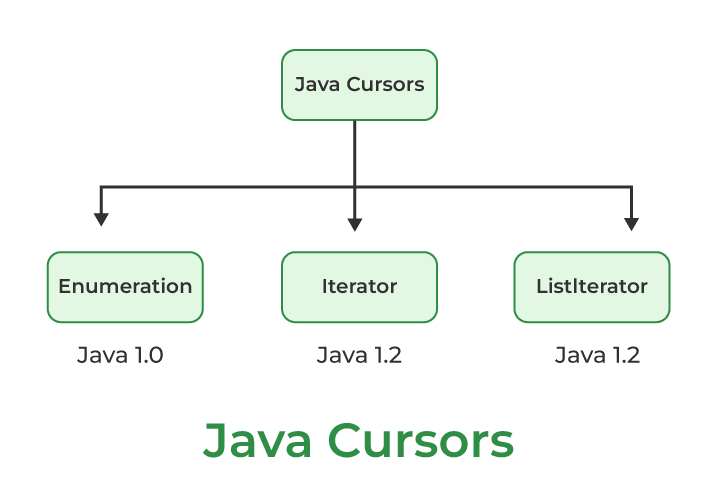
자바에서의 커서는 Iterator, Enumeration, ListIterator가 있습니다.
Note: SplitIterator can also be considered as a cursor as it is a type of Iterator only.
- Iterator : Java Cursor는 컬렉션 또는 스트림 객체의 요소를 하나씩 반복하거나 탐색하거나 검색하는 데 사용되는 Iterator입니다. 이를 이용해서 우리는 Collections 내부의 요소를 읽어와 지우기도 추가할 수도 있습니다. 해당 자료구조는 Enumeration의 요소를 지우는 기능에서 한층 발전된 형태라고 할 수 있습니다.
List<String> cities = new LinkedList<>();
cities.add("G-1");
cities.add("G-2");
cities.add("G-3");
.
.
.
cities.add("G-n");

Iterator<String> citiesIterator = cities.iterator();
System.out.println(citiesIterator.hasNext());
Iterator의 Methods
1. public boolean hasNext()
2. public Object next()
3. public void remove()
Iterator의 Example
// Java program to Demonstrate Iterator

// Importing ArrayList and Iterator classes
// from java.util package
import java.util.ArrayList;
import java.util.Iterator;

// Main class
public class Test {
    // Main driver method
    public static void main(String[] args)
    {
        // Creating an ArrayList class object
        // Declaring object of integer type
        ArrayList<Integer> al = new ArrayList<Integer>();

        // Iterating over the List
        for (int i = 0; i < 10; i++)
            al.add(i);

        // Printing the elements in the List
        System.out.println(al);

        // At the beginning itr(cursor) will point to
        // index just before the first element in al
        Iterator<Integer> itr = al.iterator();

        // Checking the next element  where
        // condition holds true till there is single element
        // in the List using hasnext() method
        while (itr.hasNext()) {
            //  Moving cursor to next element
            int i = itr.next();

            // Getting elements one by one
            System.out.print(i + " ");

            // Removing odd elements
            if (i % 2 != 0)
                itr.remove();
        }

        // Command for next line
        System.out.println();

        // Printing the elements inside the object
        System.out.println(al);
    }
}-
SplitIterator : 다른 Iterators와 마찬가지로
Spliterator는 소스의 요소를 탐색하기 위한 것입니다. Java Spliterator 인터페이스는 스트림을 더 작은 부분으로 나누는 내부 반복기입니다. 이러한 작은 부품은 병렬로 처리될 수 있습니다. 하지만, 실제 코딩을 할때 해당 기능은 절대 사용하지 않습니다! -
Enumeration : Enumeration은 Vector, HashTable과 같은 자료구조에서 요소를 얻기 위해서 사용합니다. 그리고,
SequenceInputStream으로 input streams를 특정할 수 있습니다.
// Here "v" is an Vector class object. e is of
// type Enumeration interface and refers to "v"
Enumeration e = v.elements();
Enumeration의 Methods
1. public boolean hasMoreElements()
2. public Object nextElement()
Enumeration의 Example
// Java program to demonstrate Enumeration

// Importing Enumeration and Vector classes
// from java.util package
import java.util.Enumeration;
import java.util.Vector;

// Main class
public class Test {
    // Main driver method
    public static void main(String[] args)
    {
        // Creating a vector object
        Vector v = new Vector();

        // Iterating over vector object
        for (int i = 0; i < 10; i++)
            v.addElement(i);

        // Printing elements in vector object
        System.out.println(v);

        // At beginning e(cursor) will point to
        // index just before the first element in v
        Enumeration e = v.elements();

        // Checking the next element availability where
        // condition holds true till there is a single
        // element
        // remaining in the List
        while (e.hasMoreElements()) {
            // Moving cursor to next element
            int i = (Integer)e.nextElement();

            // Print above elements in object
            System.out.print(i + " ");
        }
    }
}- ListIterator : ArrayList, LinkedList 등과 같은 List 컬렉션 구현 클래스에만 적용됩니다. 그리고, 양방향 반복을 제공합니다. ListIterator 는 List 의 요소를 열거할 때 사용해야 합니다. 이 커서는 반복기보다 더 많은 기능(방법)을 가지고 있습니다.
// Java program to demonstrate ListIterator

// Importing ArrayList and List iterator classes
// from java.util package
import java.util.ArrayList;
import java.util.ListIterator;

// Main class
public class Test {
    // Main driver method
    public static void main(String[] args)
    {
        // Creating an object of ArrayList class
        ArrayList al = new ArrayList();

        // Iterating over Arraylist object
        for (int i = 0; i < 10; i++)

            // Adding elements to the Arraylist object
            al.add(i);

        // Print and display all elements inside object
        // created above
        System.out.println(al);

        // At beginning ltr(cursor) will point to
        // index just before the first element in al
        ListIterator ltr = al.listIterator();

        // Checking the next element availability
        while (ltr.hasNext()) {
            //  Moving cursor to next element
            int i = (Integer)ltr.next();

            // Getting even elements one by one
            System.out.print(i + " ");

            // Changing even numbers to odd and
            // adding modified number again in
            // iterator
            if (i % 2 == 0) {
                // Change to odd
                i++;
                // Set method to change value
                ltr.set(i);
                // To add
                ltr.add(i);
            }
        }

        // Print and display statements
        System.out.println();
        System.out.println(al);
    }
}
Collection의 특징 ✅
컬렉션 클래스들이 데이터를 다룰 때 그 데이터는 기본적으로 객체만 가능합니다. 따라서, char / int / float 같은 primitive type은 사용할 수 없고 wrapper class인 Reference type 을 사용할 수 있습니다.
public interface List<E> extends Collection<E> { ... }위는 List가 구현되어 있는 Code-block 입니다. 이렇게 Generic으로 구현되어 있는 것을 확인 하실 수 있습니다. 이러한 Collection에서 주로 쓰이는 메서드는 아래의 사진에 확인 하실 수 있습니다.
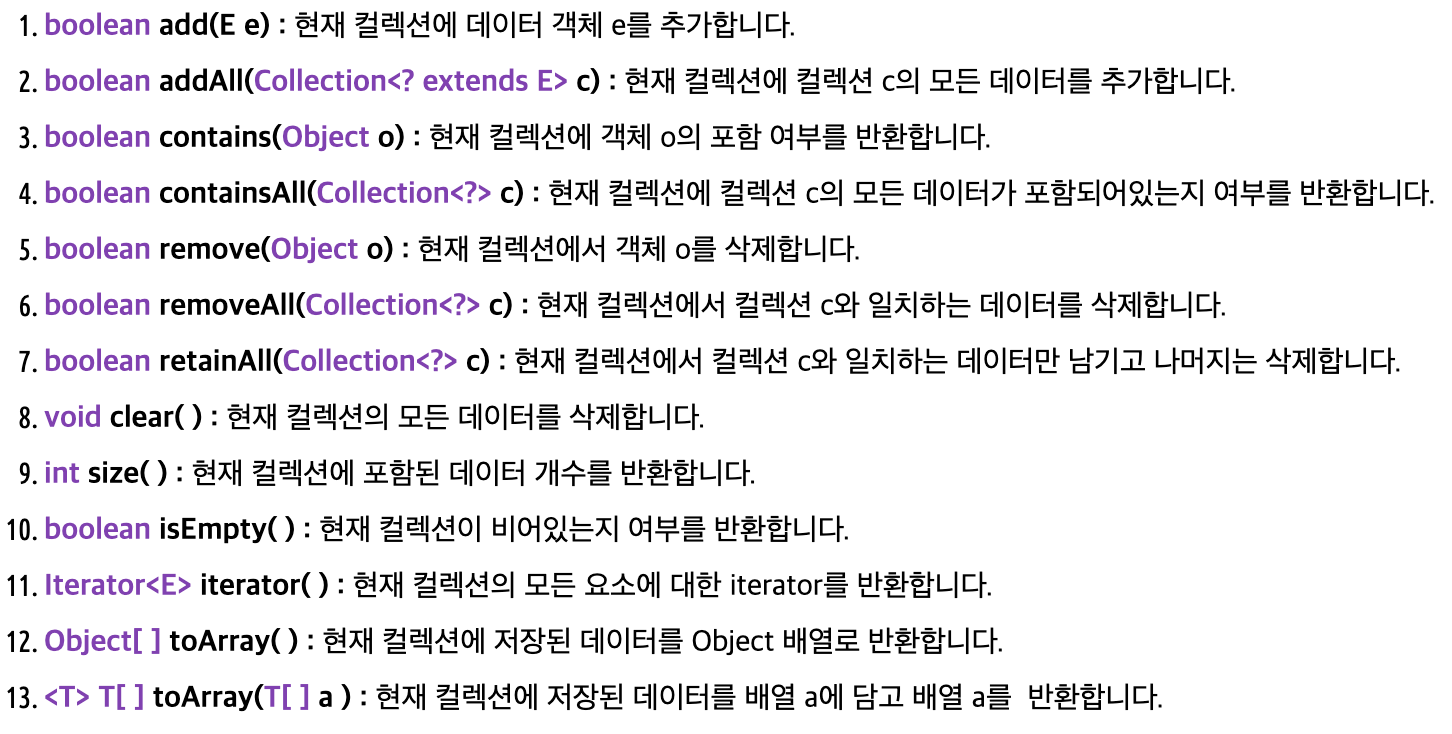
Generic은 뭐죠?
Generic은 한 번의 정의로 여러 종류의 데이터의 타입을 다룰 수 있도록 하는 방법을 말합니다. 예를들어 아래와 같이ArrayList<E>형태로 클래스가 정의되어 있다면, 사용자는 데이터로 String을 사용할때Array<String>으로 자동으로 지정이 되어 사용이 됩니다.public class ArrayList<E> extends AbstractList<E> implements List<E>, RandomAccess, Cloneable, java.io.Serializable { ... }위의 코드처럼 컴파일 단계에서 데이터 타입을 미리 체크할 수 있는 장점이 있습니다.
Collection의 종류
- Set Interface
순서를 유지하지 않은 데이터의 집합으로 데이터의 중복을 허용하지 않습니다.
- HashSet : 가장 빠른 임의 접근 속도를 가지며, 순서를 예측할 수 없다는 단점이 있습니다.
- TreeSet : 정렬 방법을 지정할 수 있습니다.
Set<T> hs = new HashSet<> ();
Set<T> lhs = new LinkedHashSet<> ();
Set<T> ts = new TreeSet<> ();
Where T is the type of the object. - Queus Interface
간단하게 말하면 FIFO로 정리할 수 있을 것 같습니다.
Queue <T> pq = new PriorityQueue<> ();
Queue <T> ad = new ArrayDeque<> ();
Where T is the type of the object. -
Priority Queue
PriorityQueue는 우선순위에 따라 개체를 처리해야 할 때 사용됩니다. 대기열은 First-In-First-Out 알고리즘을 따르는 것으로 알려져 있습니다, 그러나 때로는 큐의 요소가 우선 순위에 따라 처리되어야하며이 클래스가 이러한 경우에 사용됩니다. PriorityQueue는 우선순위 힙을 기반으로 합니다. 우선순위 대기열의 요소는 자연 순서에 따라 정렬되거나 사용되는 생성자에 따라 대기열 구성 시간에 제공되는 비교기에 의해 정렬됩니다. -
Deque Interface
이는 대기열 데이터 구조의 매우 약간의 변형을 발생시킵니다.double-ended queue라고도 알려진 Deque는 큐의 양쪽 끝에서 요소를 추가하고 제거할 수 있는 데이터 구조입니다. 이 인터페이스는 큐 인터페이스를 확장합니다. 이 인터페이스를 구현하는 클래스는 ArrayDeque 입니다. ArrayDeque 클래스는 Deque 인터페이스를 구현하므로 이 클래스로 deque 객체를 인스턴스화할 수 있습니다.
// Java program to demonstrate the
// ArrayDeque class in Java

import java.util.*;
public class ArrayDequeDemo {
	public static void main(String[] args)
	{
		// Initializing an deque
		ArrayDeque<Integer> de_que
			= new ArrayDeque<Integer>(10);

		// add() method to insert
		de_que.add(10);
		de_que.add(20);
		de_que.add(30);
		de_que.add(40);
		de_que.add(50);

		System.out.println(de_que);

		// clear() method
		de_que.clear();

		// addFirst() method to insert the
		// elements at the head
		de_que.addFirst(564);
		de_que.addFirst(291);

		// addLast() method to insert the
		// elements at the tail
		de_que.addLast(24);
		de_que.addLast(14);

		System.out.println(de_que);
	}
}- List Interface
순서가 있는 데이터의 집합으로 데이터의 중복을 허용합니다.
- LinkedList : 양방향 포인터 구조로 데이터의 삽입, 삭제가 빈번할 경우 데이터의 위치정보만 수정하면 되기에 유용합니다. 주로, 스택/큐/양방향 큐 등을 구현하기 위한 용도로 사용됩니다.
- Vector : 과거에 대용량 처리를 위해 사용했으며, 내부에서 자동으로 동기화 처리가 일어나 비교적 성능이 좋지 않고 무거워 잘 쓰이지 않습니다.
- ArrayList : 단방향 포인터 구조로 각 데이터에 대한 인덱스를 가지고 있어 조회 기능에 성능이 뛰어납니다.
List <T> al = new ArrayList<> ();
List <T> ll = new LinkedList<> ();
List <T> v = new Vector<> ();
Where T is the type of the object - Map Interface
Key, Value의 쌍으로 이뤄진 데이터의 집합으로 순서를 유지되지 않으며 키의 중복을 허용하지 않으나 값의 중복은 허용합니다.
- HashTable : 해쉬맵보다는 느리지만 동기화 지원
- HashMap : 중복과 순서가 허용되지 않으며 null 값이 올 수 있습니다.
- Treemap : 정렬된 순서대로 키와 값을 저장하여 검색이 빠릅니다.
Map<T> hm = new HashMap<> ();
Map<T> tm = new TreeMap<> ();

Where T is the type of the object.
Comparator
Comparator와 Comparable은 Java에서 objects를 정렬하기 위해서 제공하는 메서드입니다.
Comparable
comparable은 자기자신과 다른 객체를 비교하는 것을 가능하게 하는 메서드입니다. 해당 클래스는 java.lang.Comparable 에 인터페이스의 형태로 제공이 되어 만약에 우리가 수정해서 다른 기준으로 정렬을 하고 싶은 경우 @Overriding을 하여 수정할 수 있습니다.
정렬 예제 (Comparable)
1️⃣
// A Java program to demonstrate use of Comparable
import java.io.*;
import java.util.*;

// A class 'Movie' that implements Comparable
class Movie implements Comparable<Movie>
{
	private double rating;
	private String name;
	private int year;

	// Used to sort movies by year
	public int compareTo(Movie m)
	{
		return this.year - m.year;
	}

	// Constructor
	public Movie(String nm, double rt, int yr)
	{
		this.name = nm;
		this.rating = rt;
		this.year = yr;
	}

	// Getter methods for accessing private data
	public double getRating() { return rating; }
	public String getName() { return name; }
	public int getYear()	 { return year; }
}

// Driver class
class Main
{
	public static void main(String[] args)
	{
		ArrayList<Movie> list = new ArrayList<Movie>();
		list.add(new Movie("Force Awakens", 8.3, 2015));
		list.add(new Movie("Star Wars", 8.7, 1977));
		list.add(new Movie("Empire Strikes Back", 8.8, 1980));
		list.add(new Movie("Return of the Jedi", 8.4, 1983));

		Collections.sort(list);

		System.out.println("Movies after sorting : ");
		for (Movie movie: list)
		{
			System.out.println(movie.getName() + " " +
							movie.getRating() + " " +
							movie.getYear());
		}
	}
}
2️⃣
import java.io.*;
import java.util.*;

class Pair implements Comparable<Pair> {
	String x;
	int y;

	public Pair(String x, int y)
	{
		this.x = x;
		this.y = y;
	}

	public String toString()
	{
		return "(" + x + "," + y + ")";
	}

	@Override public int compareTo(Pair a)
	{
		// if the string are not equal
		if (this.x.compareTo(a.x) != 0) {
			return this.x.compareTo(a.x);
		}
		else {
			// we compare int values
			// if the strings are equal
			return this.y - a.y;
		}
	}
}

public class GFG {
	public static void main(String[] args)
	{

		int n = 4;
		Pair arr[] = new Pair[n];

		arr[0] = new Pair("abc", 3);
		arr[1] = new Pair("a", 4);
		arr[2] = new Pair("bc", 5);
		arr[3] = new Pair("a", 2);

		// Sorting the array
		Arrays.sort(arr);

		// printing the
		// Pair array
		print(arr);
	}

	public static void print(Pair[] arr)
	{
		for (int i = 0; i < arr.length; i++) {
			System.out.println(arr[i]);
		}
	}
}
3️⃣
import java.io.*;
import java.util.*;

class Pair implements Comparable<Pair> {
	String firstName;
	String lastName;

	public Pair(String x, String y)
	{
		this.firstName = x;
		this.lastName = y;
	}

	public String toString()
	{
		return "( " + firstName + " , " + lastName + " )";
	}

	@Override public int compareTo(Pair a)
	{
		// if the string are not equal
		if (this.firstName.compareTo(a.firstName) != 0) {
			return this.firstName.compareTo(a.firstName);
		}
		else {
			// we compare lastName if firstNames are equal
			return this.lastName.compareTo(a.lastName);
		}
	}
}

public class GFG {
	public static void main(String[] args)
	{

		int n = 4;
		Pair arr[] = new Pair[n];
		arr[0] = new Pair("raj", "kashup");
		arr[1] = new Pair("rahul", "singh");
		arr[2] = new Pair("reshmi", "dubey");
		arr[3] = new Pair("rahul", "jetli");

		// Sorting the array
		Arrays.sort(arr);

		// printing the
		// Pair array
		print(arr);
	}

	public static void print(Pair[] arr)
	{
		for (int i = 0; i < arr.length; i++) {
			System.out.println(arr[i]);
		}
	}
}
Comparator
- Comparator는
Comparable과는 다르게 우리가 비교하는 요소 유형 외부에 있습니다. 각각은 분리되어 있는 다른 클래스로 우리는 각각의 다른 요소에 대하여 다르게 분류하는 코드를 구현할 수 있습니다.
기본적인 구현 형태는 다음과 같습니다. public int compare(Object obj1, Object obj2): 이러한 기본적인 compare 메서드는 일반적인 Array에서의 sort()에서도 사용이 됩니다.
정렬 예제 (Comparator)
1️⃣
// Java Program to Demonstrate Working of
// Comparator Interface

// Importing required classes
import java.io.*;
import java.lang.*;
import java.util.*;

// Class 1
// A class to represent a Student
class Student {

	// Attributes of a student
	int rollno;
	String name, address;

	// Constructor
	public Student(int rollno, String name, String address)
	{

		// This keyword refers to current instance itself
		this.rollno = rollno;
		this.name = name;
		this.address = address;
	}

	// Method of Student class
	// To print student details in main()
	public String toString()
	{

		// Returning attributes of Student
		return this.rollno + " " + this.name + " "
			+ this.address;
	}
}

// Class 2
// Helper class implementing Comparator interface
class Sortbyroll implements Comparator<Student> {

	// Method
	// Sorting in ascending order of roll number
	public int compare(Student a, Student b)
	{

		return a.rollno - b.rollno;
	}
}

// Class 3
// Helper class implementing Comparator interface
class Sortbyname implements Comparator<Student> {

	// Method
	// Sorting in ascending order of name
	public int compare(Student a, Student b)
	{

		return a.name.compareTo(b.name);
	}
}

// Class 4
// Main class
class GFG {

	// Main driver method
	public static void main(String[] args)
	{

		// Creating an empty ArrayList of Student type
		ArrayList<Student> ar = new ArrayList<Student>();

		// Adding entries in above List
		// using add() method
		ar.add(new Student(111, "Mayank", "london"));
		ar.add(new Student(131, "Anshul", "nyc"));
		ar.add(new Student(121, "Solanki", "jaipur"));
		ar.add(new Student(101, "Aggarwal", "Hongkong"));

		// Display message on console for better readability
		System.out.println("Unsorted");

		// Iterating over entries to print them
		for (int i = 0; i < ar.size(); i++)
			System.out.println(ar.get(i));

		// Sorting student entries by roll number
		Collections.sort(ar, new Sortbyroll());

		// Display message on console for better readability
		System.out.println("\nSorted by rollno");

		// Again iterating over entries to print them
		for (int i = 0; i < ar.size(); i++)
			System.out.println(ar.get(i));

		// Sorting student entries by name
		Collections.sort(ar, new Sortbyname());

		// Display message on console for better readability
		System.out.println("\nSorted by name");

		// // Again iterating over entries to print them
		for (int i = 0; i < ar.size(); i++)
			System.out.println(ar.get(i));
	}
}
2️⃣
// Java Program to Demonstrate Working of
// Comparator Interface Via More than One Field

// Importing required classes
import java.util.ArrayList;
import java.util.Collections;
import java.util.Comparator;
import java.util.Iterator;
import java.util.List;

// Class 1
// Helper class representing a Student
class Student {

	// Attributes of student
	String Name;
	int Age;

	// Parameterized constructor
	public Student(String Name, Integer Age)
	{

		// This keyword refers to current instance itself
		this.Name = Name;
		this.Age = Age;
	}

	// Getter setter methods
	public String getName() { return Name; }

	public void setName(String Name) { this.Name = Name; }

	public Integer getAge() { return Age; }

	public void setAge(Integer Age) { this.Age = Age; }

	// Method
	// Overriding toString() method
	@Override public String toString()
	{
		return "Customer{"
			+ "Name=" + Name + ", Age=" + Age + '}';
	}
}

// Class 2
// Helper class implementing Comparator interface
class CustomerSortingComparator
	implements Comparator<Student> {

	// Method 1
	// To compare customers
	@Override
	public int compare(Student customer1, Student customer2)
	{

		// Comparing customers
		int NameCompare = customer1.getName().compareTo(
			customer2.getName());

		int AgeCompare = customer1.getAge().compareTo(
			customer2.getAge());

		// 2nd level comparison
		return (NameCompare == 0) ? AgeCompare
								: NameCompare;
	}
}

// Method 2
// Main driver method
class GFG {
	public static void main(String[] args)
	{

		// Create an empty ArrayList
		// to store Student
		List<Student> al = new ArrayList<>();

		// Create customer objects
		// using constructor initialization
		Student obj1 = new Student("Ajay", 27);
		Student obj2 = new Student("Sneha", 23);
		Student obj3 = new Student("Simran", 37);
		Student obj4 = new Student("Ajay", 22);
		Student obj5 = new Student("Ajay", 29);
		Student obj6 = new Student("Sneha", 22);

		// Adding customer objects to ArrayList
		// using add() method
		al.add(obj1);
		al.add(obj2);
		al.add(obj3);
		al.add(obj4);
		al.add(obj5);
		al.add(obj6);

		// Iterating using Iterator
		// before Sorting ArrayList
		Iterator<Student> custIterator = al.iterator();

		// Display message
		System.out.println("Before Sorting:\n");

		// Holds true till there is single element
		// remaining in List
		while (custIterator.hasNext()) {

			// Iterating using next() method
			System.out.println(custIterator.next());
		}

		// Sorting using sort method of Collections class
		Collections.sort(al,
						new CustomerSortingComparator());

		// Display message only
		System.out.println("\n\nAfter Sorting:\n");

		// Iterating using enhanced for-loop
		// after Sorting ArrayList
		for (Student customer : al) {
			System.out.println(customer);
		}
	}
}
3️⃣
// A Java program to demonstrate Comparator interface
import java.io.*;
import java.util.*;

// A class 'Movie' that implements Comparable
class Movie implements Comparable<Movie> {
	private double rating;
	private String name;
	private int year;

	// Used to sort movies by year
	public int compareTo(Movie m)
	{
		return this.year - m.year;
	}

	// Constructor
	public Movie(String nm, double rt, int yr)
	{
		this.name = nm;
		this.rating = rt;
		this.year = yr;
	}

	// Getter methods for accessing private data
	public double getRating() { return rating; }
	public String getName() { return name; }
	public int getYear() { return year; }
}

// Class to compare Movies by ratings
class RatingCompare implements Comparator<Movie> {
	public int compare(Movie m1, Movie m2)
	{
		if (m1.getRating() < m2.getRating())
			return -1;
		if (m1.getRating() > m2.getRating())
			return 1;
		else
			return 0;
	}
}

// Class to compare Movies by name
class NameCompare implements Comparator<Movie> {
	public int compare(Movie m1, Movie m2)
	{
		return m1.getName().compareTo(m2.getName());
	}
}

// Driver class
class Main {
	public static void main(String[] args)
	{
		ArrayList<Movie> list = new ArrayList<Movie>();
		list.add(new Movie("Force Awakens", 8.3, 2015));
		list.add(new Movie("Star Wars", 8.7, 1977));
		list.add(
			new Movie("Empire Strikes Back", 8.8, 1980));
		list.add(
			new Movie("Return of the Jedi", 8.4, 1983));

		// Sort by rating : (1) Create an object of
		// ratingCompare
		//				 (2) Call Collections.sort
		//				 (3) Print Sorted list
		System.out.println("Sorted by rating");
		RatingCompare ratingCompare = new RatingCompare();
		Collections.sort(list, ratingCompare);
		for (Movie movie : list)
			System.out.println(movie.getRating() + " "
							+ movie.getName() + " "
							+ movie.getYear());

		// Call overloaded sort method with RatingCompare
		// (Same three steps as above)
		System.out.println("\nSorted by name");
		NameCompare nameCompare = new NameCompare();
		Collections.sort(list, nameCompare);
		for (Movie movie : list)
			System.out.println(movie.getName() + " "
							+ movie.getRating() + " "
							+ movie.getYear());

		// Uses Comparable to sort by year
		System.out.println("\nSorted by year");
		Collections.sort(list);
		for (Movie movie : list)
			System.out.println(movie.getYear() + " "
							+ movie.getRating() + " "
							+ movie.getName() + " ");
	}
}
References
1. Basic definitions and pics
2. Collection methods
3. Java Cursor
4. More details in Collections