
StatelessWidget
버튼을 누르면 컬러가 바뀌는 Container 예제
- 코드
void main() {
  runApp(MaterialApp(home: HomeScreen()));
}

class HomeScreen extends StatelessWidget {
  Color color = Colors.blue;
  @override
  Widget build(BuildContext context) {
    return Scaffold(
      body: Container(
        width: double.infinity,
        child: Column(
          mainAxisAlignment: MainAxisAlignment.center,
          children: [
            ElevatedButton(
              onPressed: () {
                if (color == Colors.blue) {
                  color = Colors.red;
                } else {
                  color = Colors.blue;
                }
                print('색상 변경 : color : $color');
              },
              child: Text('색상변경!'),
            ),
            SizedBox(height: 32),
            Container(width: 50, height: 50, color: color)
          ],
        ),
      ),
    );
  }
}- 결과
버튼을 눌러도 Container컬러가 바뀌지 않는다. 하지만 콘솔에는 버튼을 눌렀을 때 컬러가 바뀌는 것이 보인다.
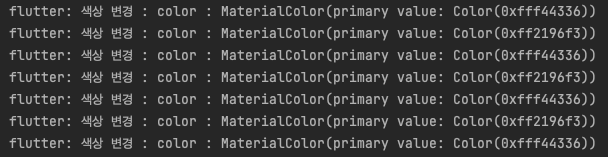
❗️ Widget Immutability _ 모든 위젯은 불변하여 변경 불가하다. 이런 특성을 가지고 있는 StatelessWidget은 재생성이 불가능하여 다른 형태로 바뀌지 않는다.

한별잉