무슨 작은 서비스들을 만들어볼까 하다가 재미있는 것을 만들어보려고 한다.
나는 아이디어가 짱 많기 때문에 이런 것들을 종종해보려고 한다.
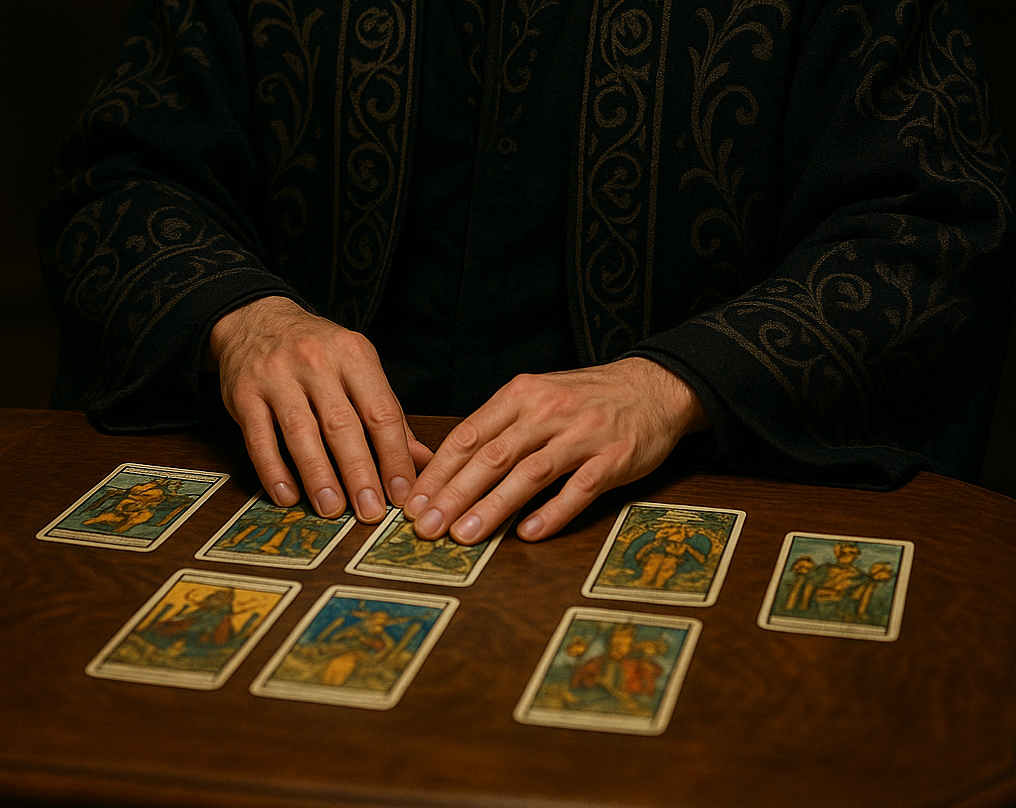
일단 가장 먼저 내가 좋아하는 타로 카드를 활용한 서비스로 시작해보기로 했다.
타로카드를 직접 펼치고 뽑고 해석을 할 수 있는 서비스를 꿈꾼다.
근데 gpt 연동해서 해석받을라면 내 토큰을 써야하는데 비용은 어찌할지.. 나중에 생각해보기로 한다.
내가 원하는 기능은 아래 기능들이다
구현 예정 기능
- 타로카드 펼치기
- 펼친 카드 중에서 3장 순서대로 고르기
- 카드를 누를 시 뒤집히는 효과
- 질문을 입력하고 카드를 모두 뒤집은 후 해석하기를 누르면 gpt 연동
- 지피티에서 실시간 stream으로 답변 받아오기
- 예쁜 ui와 효과 넣기
- 마우스 포인터를 손모양, 마법봉 모양으로 만들기
사용 기술
- next.js
- 스타일링 : taliwind css , framer motion, classnames
- 상태관리 : zustand
(추가될 수 있음)
폴더구조
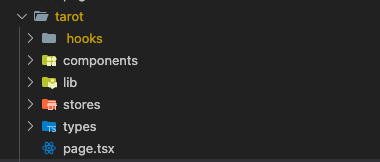
폴더구조는 이렇게 잡았다.
page.tsx -> 페이지 렌더링 하는 파일
compoenents -> 필요한 컴포넌트들
hooks -> 커스텀 훅
stores -> 전역 상태 관리
lib -> 유틸리티 함수
types -> 타입
요새 팀에서 클린 아키텍쳐에 대한 이야기가 나오고 있기 때문에 최대한 ui와 비지니스 로직을 분리하여 ui는 ui만 신경쓸 수 있도록 신경써서 코드를 작성하는 것이 또 하나의 목적이었다.
먼저 1차로 만든 화면부터 보여주자면 이렇게 구성했다.
기능
1. 카드 생성, 셔플
lib/tarotGenerator.ts
먼저 타로 카드 78장을 생성해야한다. count는 범용적으로 쓰기 위해서 밖에서 받는 것으로 만들었는데 78로 고정해도 될 것 같다. id, name, color, img, korName 은 지금은 대충 테스트를 위해서 아무 값이나 넣었는데 나중에 번호에 맞는 카드 이름을 넣을 것이다. 예를 들면 컵을 든 왕카드 이런식으로 말이다.
카드를 또 순서대로 나열하는 것은 타로가 아니므로 셔플 기능을 추가했다.
쓰는 곳에서는 셔플된 카드만 가져다 쓸 수 있도록 shuffle(cards)를 리턴했다.
셔플 알고리즘은 Fisher-Yates 셔플 알고리즘 이라는데 이건 나중에 알아보자.
import { Card } from '../types/types';

// 카드 생성
export const generateTarotCards = (count: number): Card[] => {
  const cards = Array.from({ length: count }, (_, i) => ({
    id: i + 1,
    name: `${i + 1}`,
    color: `hsl(${Math.random() * 360}, ${50 + Math.random() * 30}%, ${40 + Math.random() * 30}%)`,
    img: `/images/tarot_${i + 1}.png`,
    korName: `타로 카드 ${i + 1}`,
  }));
  return shuffle(cards);
};

// 카드 섞기
export const shuffle = <T>(array: T[]): T[] => {
  const newArray = [...array];
  for (let i = newArray.length - 1; i > 0; i--) {
    const j = Math.floor(Math.random() * (i + 1));
    [newArray[i], newArray[j]] = [newArray[j], newArray[i]];
  }
  return newArray;
};
2. 카드 펼치기
hooks/useTarotInteraction.ts
카드를 생성하고 마우스 이벤트에 따라서 카드를 펼치는 기능을 추가했다.
전역 상태관리가 필요한 값들은 zustand store를 사용했다.
mousedown을 하면 거기서 부터 path가 시작하여 mousemove에 따라서 path를 설정하고 mouseup을 하면 끝나도록 설정했다.
spread하는 중과 드래그 하는 중에는 카드가 잘 못 선택되면 안되므로 해당 상태값을 store로 설정해주었다.
'use client';

import { useEffect, useState } from 'react';
import { generateTarotCards } from '../lib/tarotGenerator';
import { useTarotStore } from '../stores/tarotStore';

export default function useTarotInteraction() {
  const [cards] = useState(generateTarotCards(78));
  const [path, setPath] = useState<{ x: number; y: number }[]>([]);

  const { resetSelectedCards, isDragging, isSpread, setIsDragging, setIsSpread } = useTarotStore();

  const handleMouseDown = (e: MouseEvent) => {
    if (isSpread) return;
    setPath([{ x: e.clientX, y: e.clientY }]);
    setIsDragging(true);
    resetSelectedCards();
  };

  const handleMouseMove = (e: MouseEvent) => {
    if (!isDragging) return;
    setPath((prev) => [...prev, { x: e.clientX, y: e.clientY }]);
  };

  const handleMouseUp = () => {
    setIsDragging(false);
    setIsSpread(true);
  };

  useEffect(() => {
    document.addEventListener('mousedown', handleMouseDown);
    document.addEventListener('mousemove', handleMouseMove);
    document.addEventListener('mouseup', handleMouseUp);

    return () => {
      document.removeEventListener('mousedown', handleMouseDown);
      document.removeEventListener('mousemove', handleMouseMove);
      document.removeEventListener('mouseup', handleMouseUp);
    };
  }, [isDragging, isSpread]);

  const handleReset = () => {
    setPath([]);
    setIsSpread(false);
    resetSelectedCards();
  };

  return {
    cards,
    path,
    handleReset,
    handleMouseEvents: {},
  };
}
3. ui 컴포넌트 구성
page.tsx
'use client';
import useTarotInteraction from './hooks/useTarotInteraction';
import TarotBoard from './components/TarotBoard';
import './tarot.css';

export default function TarotPage() {
  const { cards, path, handleReset, handleMouseEvents } = useTarotInteraction();

  return (
    <div {...handleMouseEvents}>
      <TarotBoard cards={cards} path={path} />
      <button onClick={handleReset} className="text-white">
        다시하기
      </button>
    </div>
  );
}
TarotBoard.tsx
import React, { FC } from 'react';
import TarotCard from './TarotCard';
import { Card, Position } from '../types/types';

interface TarotBoardProps {
  cards: Card[];
  path: Position[];
}

const TarotBoard: FC<TarotBoardProps> = ({ cards, path }) => {
  return (
    <div className="tarot-container">
      {cards.map((card, i) => {
        const pos = path[i] ||
          path[path.length - 1] || { x: window.innerWidth / 2, y: window.innerHeight / 2 };

        return <TarotCard key={i} index={i} card={card} pos={pos} />;
      })}
    </div>
  );
};

export default TarotBoard;
TarotCard.tsx
import React, { FC } from 'react';
import { useTarotStore } from '../stores/tarotStore';
import { Card, Position } from '../types/types';

interface TarotCardProps {
  index: number;
  card: Card;
  pos: Position;
}

const TarotCard: FC<TarotCardProps> = ({ index, card, pos }) => {
  const { selectCard, isSpread, isDragging, selectedCards } = useTarotStore();

  const handleCardClick = () => {
    if (selectedCards?.length && selectedCards.length >= 3) return;

    if (isSpread && !isDragging) {
      selectCard(card);
    }
  };

  const isSelectedCard = selectedCards.some((selectedCard) => selectedCard.name === card.name);
  const findIndexInSelected = selectedCards?.findIndex(
    (selectedCard) => selectedCard.name === card.name
  );
  return (
    <div
      className={`tarot-card ${isSelectedCard ? 'front' : ''}`}
      style={{
        left: isSelectedCard ? `${20 + (findIndexInSelected || 0) * 20}%` : pos.x,
        top: isSelectedCard ? '40%' : pos.y,
        transform: isSelectedCard
          ? 'translate(-50%, -50%) scale(1.2)'
          : `translate(-50%, -50%) rotate(${Math.random() * 10 - 5}deg)`,
        zIndex: isSelectedCard ? 999 : index,
        backgroundColor: isSelectedCard ? card.color : '',
        backgroundImage: isSelectedCard
          ? `url('/images/cat_body.png')`
          : `url('/images/tarot_back.png')`,
        backgroundSize: 'cover', // 또는 'contain', '100% 100%'
        backgroundPosition: 'center',
        backgroundRepeat: 'no-repeat',
      }}
      onClick={handleCardClick}
    >
      {card.name}
    </div>
  );
};

export default TarotCard;
카드 > 보드 > 페이지 이렇게 컴포넌트를 구성했다.
카드 클릭 시 카드를 선택하는 onClick 이벤트를 넣었고 뒤집어져 보이는 css, 펼쳐졌을 때 position 등 모든 스타일링은 TarotCar.tsx 컴포넌트에서 하도록 했다. 일단은 style로 객체로 넣었는데 2차에서 tailwind와 classnames를 사용해서 수정하는 것으로 해야겠다.
다음번에는 카드를 클릭 했을 시 뒷면이 클릭이 되고
그 카드를 클릭하면 flip 효과를 넣을 수 있도록 해봐야지.