1. 소개
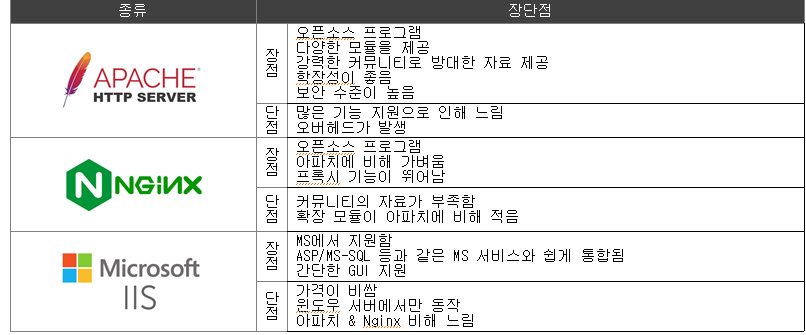
2. WEB Server 설정 절차
1. 패키지 설치
# yum -y install httpd mod_ssl
2. 서버 설정
/etc/httpd/conf/httpd.conf -> 주 설정 파일
/etc/httpd/conf.d/*.conf -> 하위 설정 파일
/var/www/html/*
3. 서비스 기동
# systemctl enable --now httpd
4.방화벽 등록
# firewall-cmd --premanent --add-service={http,https}
5. SELinux(?)
3. WEB Server 설정 + 실습
- 패키지: httpd, mod_ssl
- 데몬 & 포트 & 프로토콜: httpd(80/tcp, 443/tcp)
- 주 설정 파일: /etc/httpd/conf/httpd.conf
- 하위 설정 파일: /etc/httpd/conf.d/*.conf
- 서비스: httpd.service
[EX] WEB 기본 설정 점검
- 패키지: httpd, mod_ssl
# rpm -ql httpd
# rpm -ql mod_ssl - 데몬 & 포트 & 프로토콜: httpd(80/tcp, 443/tcp)
# cat /etc/services | grep '^http' - 주 설정 파일: /etc/httpd/conf/httpd.conf
# tree /etc/httpd - 하위 설정 파일: /etc/httpd/conf.d/*.conf
- 서비스: httpd.service
/# systemctl status httpd
[EX] WEB 클라이언트 프로그램
- firefox CMD
# firefox http://www.example.com & - curl CMD
# curl -k http://www.example.com - telnet CMD
# telnet www.example.com 80
GET / HTTP/1.0
Host: www.example.com
[EX] WEB 관리자 웹페이지 설정
# vi /etc/httpd/conf/httpd.conf
ServerAdmin webmaster@example.com
ServerName www.example.com:80
# systemctl enable --now httpd
[EX] WEB 사용자 웹페이지 설정
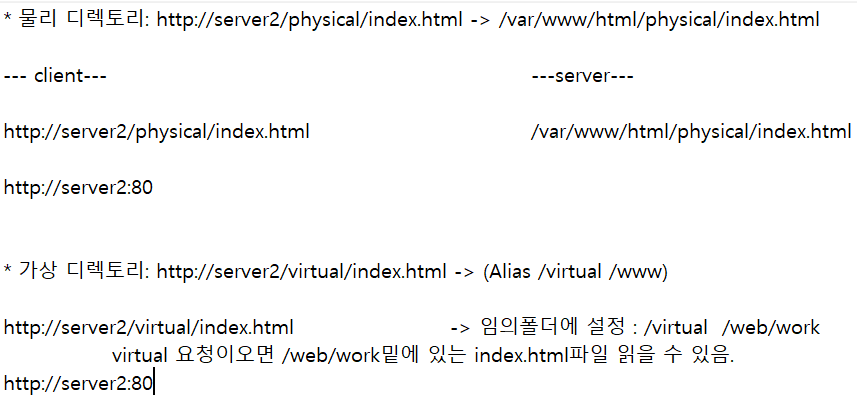
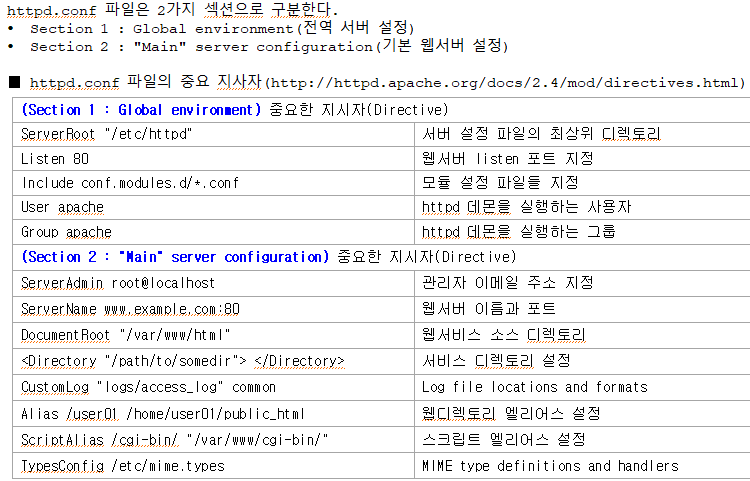
# vi /etc/httpd/conf.d/userdir.conf
UserDir public_html -> 위에 뭐 주석처리해줘야댐
Alias /user01 /home/user01/public_html
# systemctl restart httpd
# su - user01
$ chmod 711 .
$ mkdir public_html
$ banner hello > public_html/index.html
[EX] CGI 구성
- CGI: 웹서버(정보 제공)와 클라이언트(정보 이용)간에 필요한 정보 교환을 가능하게 해주는 일종의 웹인터페이스
CGI는 가장 오래된 인터페이스이고 거의 모든 웹서버에서 지원한다. - CGI vs WAS
공통점: 클라이언트에게 동적 페이지 제공
차이점: WAS는 웹 서버가 아님
(WAS 사용) Client(요청) ---> 웹서버(요청) ---> WAS --> 외부 프로그램 실행(WAS에서 동작)
(CGI 사용) Client(요청) ---> 웹서버/CGI -> 외부 프로그램 실행(웹서버에서 동작) - [실습]
1) bash 사용
2) perl 사용
3) python 사용
4) php 사용
[EX] CGI 구성 -bash 사용
[EX] CGI 구성 -perl 사용
[EX] WSGI 구성 - python
[EX] 웹언어 - php 사용
[EX] .htaccess 파일을 이용한 웹페이지 보호
1) 웹서버 설정
2) .htaccess 파일 생성
3) 사용자 ID/PASS 생성
-> 위치상관없이 보안 설정만 잘해줘라(아파치사용자에게 리드권한 최소한)
-> # chown apache:apache /etc/httpd/conf/mypasswd
-> # chmod 400 /etc/httpd/conf/mypasswd
[EX] 가상호스트 설정 - Name-based Virtual Hosting
하나의 웹서버에 여러 웹서버 구성 가능
[EX] 가상호스트 설정 - IP-based Virtual Hosting
[EX] 가상호스트 설정 - Port-based Virtual Hosting
[EX] 웹서버 정보/상태 확인 웹페이지 구성 ->.htaccess로 보호 필요
http://www.example.com/server-info
http://www.example.com/server-status
[EX] 웹서버 통계 정보 확인 웹페이지 구성 ->.htaccess로 보호 필요
- webalizer
http://www.example.com/usage
[EX] 아파치 버전과 운영체제 정보 숨기기
# vi /etc/httpd/conf.d/default.conf
ServerTokens FULL -> ServerTokens Pord
# curl --head http://www.example.com
=> Server: Apache
4. 보안
Firewall -> IPS -> IDS -> WAF(Web Application Firewall) -> web
ACL 종류: F/W, Anti-DDoS, IPS/IDS, WAF
-
용어: 오탐(오인탐지), 과탐 -> 규칙을 조장할 수 있어야한다.
-
WAF: 웹 방화벽
- webknight
- modsecurity -
무료 웹 취약점 진단 서비스
https://www.boho.or.kr/kr/apply/list.do?menuNo=205003 -
실습
5. Apache + Tomcat + MariaDB
1) DB (mariadb)
웹 3-tier 아키텍처
- Presentation tier(ex: WEB Server)
- Application tier(ex: WAS Server)
- Data tier(ex: DB, Srotage)
2) Nginx

[참고] 웹 프록시(Proxy)
- Forward Proxy: ??
- Reverse Proxy: ??
