스토리지(Storage)
- 스토리지 종류(연결방식)
DAS(Block Storage)
SAN(Block Storage)
NAS(File Storage) - NFS, SMB/CIFS - 스토리지 종류(서비스방식)
File-based Storage: 파일로 받아봄 - NFS, CIFS
Block-based Storage: 디스크로 받아봄 - DAS, SAN
Object-based Storage: 외관상 하나인것 처럼 여러 저장공간을 리소스를 파일로 보냄. 빅데이터..?
NFS
1. 소개
- 분산 파일 시스템
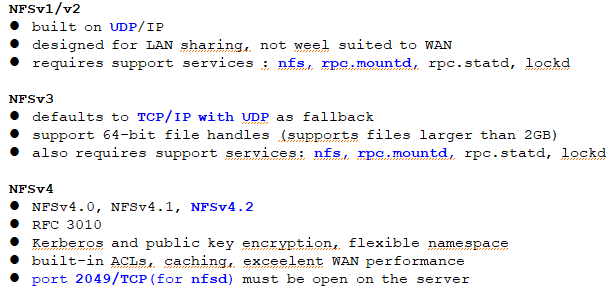
1) NFS(Network File System):
NFSv2: UDP
VFSv3: UDP, (=> TCP)
VFSv4: TCP, (=> UDP), v4, v4.1, v4.2
2) CIFS(Common Internet File System)
[nfs] 데몬
- (server) nfsd, rpc.mountd
[nfs] 파일들 - (server) /etc/exports
- (client) /etc/fstab
[nfs] 명령들 - (server)exportfs CMD: 공유자원 확인 명령어
- (client)showmount CMD(공유할 자원 확인), mount CMD(공유된 자원 마운트)
2.
3. NFSv4 Server 설정 + 실습
-
패키지 설치
# yum -y install nfs-utils -
서버 설정
/etc/exports, /etc/exports.d/* .exports -
서비스 기동
# systemctl enable --now nfs-server
4.방화벽 등록
# firewall-cmd --premanent --add-service=nfs
- SELinux(?)
---------------------------------------------------------
패키지: nfs-utils
데몬 & 포트 & 프로토콜: nfsd(2049/tcp)
주 설정 파일: /etc/nfs.conf
하위 설정 파일: /etc/exports, /etc/exports.d/* .exports
서비스: nfs-server.service
[ex] 기본 설정 확인
[ex] NFS 접근 클라이언트 지정, 서버 공유 옵션
# vi /etc/exports (/etc/exports.d/* .exports)
/share 192.168.20.0/24(ro)
[ex] NFS 서버 자원 공유/마운트
- UID/GID check
- root_squash: root 인정 x
[ex] NFS 서버 옵션 - no_root_squash: root 인정
[ex] Man Page Server 구축
[ex] 원격 CD/DVD 공유 서버 구축
[ex] 원격 백업 구축
[ex] NFSv4-only 서버 구축
# vi /etc/nfs.conf
vers3=n
#systemctl mask --now rpc-statd.service rpcbind.service rpcbind.socket
# systemctl restart nfs-server
# firewall-cmd --permanent --add-service=nfs
# firewall-cmd --reload
[ex] DNS/LB(load balence) + WEB + NFS (p.34~)
1) DNS
www.example.com 도메인으로 요청을 하면 192.168.10.10(LB IP) 나와야한다.
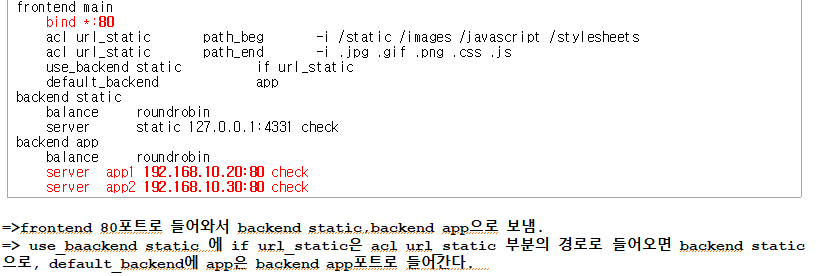
2) LB(haproxy)
www.example.com:80 웹 요청을 하면 WEB1:80, WEB2:80 요청을 넘겨야 한다.
[vi haproxy.cfg]
3) WEB1/WEB2
WEB1/WEB2 웹 서버로 세팅되어야 한고,
NFS에 공유된 자원(/www1)을 마운트 해서 사용한다.
4) NFS
/www1 공유해야 한다.
