객체(object)
- 여러 데이터로 구성된 하나의 데이터를 의미한다.
- 중괄호 {}를 이용해서 객체의 데이터를 묶는다.
- 객체 형식
{
	속성: 값,
	'속성': 값
}- 객체 속성
1) 객체.속성
2) 객체['속성'] - JavaScript 객체 표기법을 이용한 데이터 교환 형식을 "JSON"이라고 한다.
    // 객체 만들기
    var person = {
      name: '홍길동',
      age: 30,
      isAlive: true,
      hobbies: [
        '여행',
        '운동',
        '요리'
      ],
      bef: {
        name: '고길동',
        age: 30
      },
      info: function(){
        console.log('이름: ' + this.name + ', 나이: ' + this.age);  // 현재 객체(person === this)
      }
    }

    // 객체 속성 확인
    console.log('name: ' + person.name);
    console.log('age:' + person.age);
    console.log('isAlive:' + person.isAlive);
    for(let i = 0; i < person.hobbies.length; i++){
      console.log('hobbies:' + person.hobbies[i]);
    }
    console.log("bef's name:" + person.bef.name);
    console.log("bef's age:" + person.bef.age);
    (person.info)();
생성자 함수
- 객체를 만드는 함수이다.
- new 키워드를 이용해서 객체를 만들 수 있다.
- 관례상 첫 글자를 대문자로 작성한다.
- 생성자 함수 형식
        function 함수명(매개변수, 매개변수, ...){
          this.속성 = 매개변수;
          this.속성 = 매개변수;
          ...
        }
// 생성자 함수 정의
function Product(code, name, price){
this.code = code;
this.name = name;
this.price = price;
}
// 생성자 함수 호출(객체 생성)
var product = new Product('A123', '청소기', 10000);
// 객체 속성 확인
console.log(product['code']);
console.log(product['name']);
console.log(product['price']);객체 순회 (for in)
// 객체는 for-in문으로 각 속성을 순회할 수 있다.

    // 객체 생성
    var book = {
      title: '어린왕자',
      author: '생택쥐베리',
      price: 10000
    };

    // 객체 속성 순회
    for(let p in book){  // 객체 book의 속성(property)들이 변수 p로 하나씩 전달된다.
                         // 이 때 변수 p의 타입은 string 이므로, book.p는 동작하지 않고 book[p]만 동작한다.

      console.log(book.p);  // 안 됨
      console.log(book[p]); // 됨

    }
내장 객체
JSON 내장 객체
-
JavaScript 객체 -> 문자열 형식의 JSON 데이터
var 문자열 = JSON.stringify(객체) -
문자열 형식의 JSON 데이터 -> JavaScript 객체
var 객체 = JSON.parse(문자열)
    // 객체 생성
    var person = {
      name: '홍길동',
      age: 30
    };

    // 객체 -> 문자열
    var str = JSON.stringify(person);
    console.log(typeof str, str);

    // 문자열 -> 객체
    var person = JSON.parse(str);
    console.log(typeof person, person);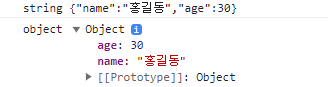
Date 내장 객체
- 타임스탬프 기반으로 날짜와 시간을 나타낸다.
(타임스탬프 : 1970년 1월 1일 자정 UTC 기준으로 증가하고 있는 밀리초) - 타임스탬프, 년, 월, 일, 시, 분, 초 등 원하는 값을 얻을 수 있다.
    // 타임스탬프
    var timestamp = Date.now();
    console.log(timestamp);

    // 문자열 형식의 현재 날짜와 시간
    var strNow = Date();  // new Data().toString()
    console.log(typeof strNow, strNow);

    // 객체 형식의 현재 날짜와 시간
    var now = new Date();
    console.log(typeof now, now);

    // 년,월,일,시,분,초,타임스탬프
    var year = now.getFullYear();
    var month = now.getMonth();  // 주의! 0 ~ 11
    var day = now.getDate();
    var hour = now.getHours();
    var minute = now.getMinutes();
    var second = now.getSeconds();
    var timestamp = now.getTime();
    console.log(year, month, day, hour, minute, second, timestamp);

    // 특정 날짜와 시간을 가진 객체 생성
    var someday = new Date(2023, 8, 30, 16, 30, 30);  // 2023-09-30 16:30:30 (8월이 아님 주의!)
    console.log(someday);
