
1.미디어 쿼리 ?
= 어떤 스타일을 선택적으로 적용하고 싶을 때 사용 // if문과 비슷한 개념
- @media(조건) {실행내용} : 좁은 화면에서만 특정 스타일을 적용하고 싶을 때는 화면의 최대 너비를 조건으로 지정
[code]
<!DOCTYPE html>
<html>
  <head>
    <meta charset="utf-8">
    <title> WEB - CSS </title>
    <style>
      div{
        border: 10px solid green;
        font-size: 50px;
      }
      @media (max-width:800px) {	//800px 이하의 좁은 화면에서 특정 HTML 요소를 아래 내용으로 지정
        div{
          display: none;
        }
      }
    </style>
  </head>
  <body>
    <div> Responsive </div>
  </body>
</html>
[show]

2. 미디어 쿼리 활용
[code]
<!doctype html>
<html>
<head>
  <title>WEB - CSS</title>
  <meta charset="utf-8">
  <style>
    body{
      margin:0;
    }
    a {
      color:black;
      text-decoration: none;
    }
    h1 {
      font-size:45px;
      text-align: center;
      border-bottom:1px solid gray;
      margin:0;
      padding:20px;
    }
    ol{
      border-right:1px solid gray;
      width:100px;
      margin:0;
      padding:20px;
    }
    #grid{
      display: grid;
      grid-template-columns: 150px 1fr;
    }
    #grid ol{
      padding-left:33px;
    }
    #grid #article{
      padding-left:25px;
    }
    @media(max-width:800px){
      #grid{
        display: block;
      }
      ol{
        border-right:none;
      }
      h1 {
        border-bottom:none;
      }
    }
  </style>
</head>
<body>
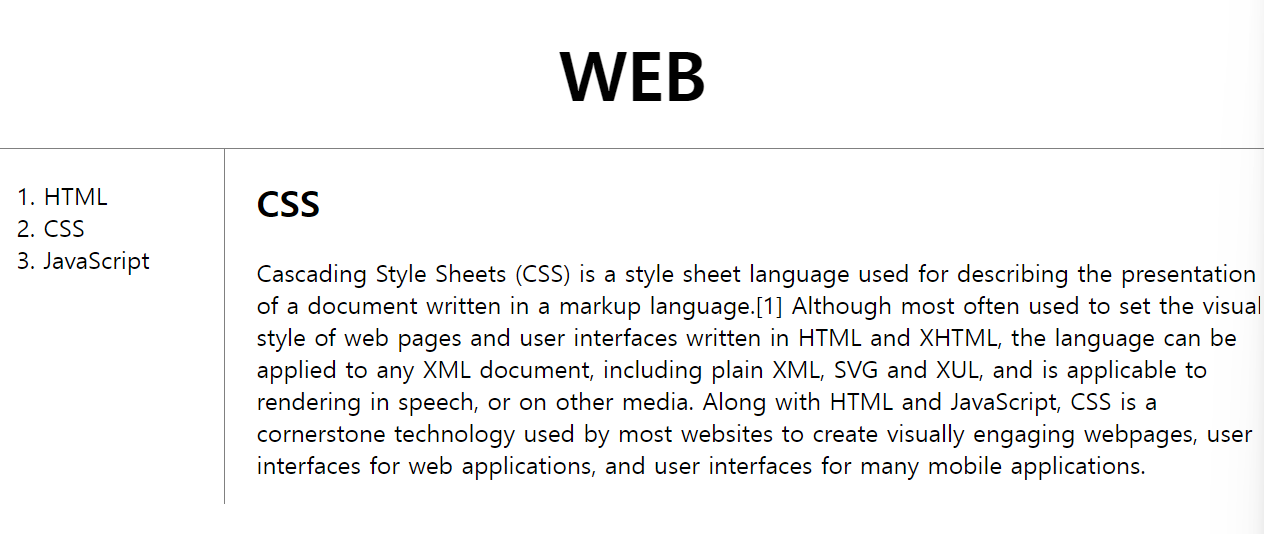
  <h1><a href="index.html">WEB</a></h1>
  <div id="grid">
    <ol>
      <li><a href="1.html">HTML</a></li>
      <li><a href="2.html">CSS</a></li>
      <li><a href="3.html">JavaScript</a></li>
    </ol>
    <div id="article">
        <h2>CSS</h2>
        <p>
          Cascading Style Sheets (CSS) is a style sheet language used for describing the presentation of a document written in a markup language.[1] Although most often used to set the visual style of web pages and user interfaces written in HTML and XHTML, the language can be applied to any XML document, including plain XML, SVG and XUL, and is applicable to rendering in speech, or on other media. Along with HTML and JavaScript, CSS is a cornerstone technology used by most websites to create visually engaging webpages, user interfaces for web applications, and user interfaces for many mobile applications.
        </p>
      </div>
  </div>
  </body>
  </html>
[show]

자라나라 개발개발 ~..₩