
++ 사이드 플젝하면서 겪은 삽질 시리즈
문제 상황
새로운 팝송을 등록하는 과정에서 이미지와 객체 데이터를 모두 서버에 전송해야하는 상황. JS를 사용했으면 enctype = multipart/form-data 속성을 추가해주면 될 일이었으나,,
리액트에서 useFetch 커스텀 훅을 만들어 fetch 요청을 보내봤다. 하지만 이미지 파일은 전송이 안됨. 바로 삽질과 구글링의 연속이 시작됐다.ㅎㅎㅎ
Form-Data를 사용해 여러 타입의 데이터를 보낼 수 있다는 글을 보고 실마리를 찾을 수 있었다.
Form-Data
The FormData interface provides a way to construct a set of key/value pairs representing form fields and their values, which can be sent using the fetch(), XMLHttpRequest.send() or navigator.sendBeacon() methods. It uses the same format a form would use if the encoding type were set to "multipart/form-data".
https://developer.mozilla.org/en-US/docs/Web/API/FormData
- Form-data를 사용하면 key-value 쌍으로 데이터를 생성하고 fetch로 전송할 수 있다.
multipart/form-data형식으로 인코딩과 동일하게 쓸 수 있다.
Form-data는 append, delete, get, getAll, entries 등 다양한 메서드를 지원한다.
이미지 파일 등록하기
먼저 form-data를 생성하고 데이터를 등록하려면 아래 코드처럼 FormData를 생성하고 append 매서드에 인자에 필드명, 필드값 순으로 넣어준다.
const formdata = new FormData();
formdata.append("image", img);
전체코드
const [img, setImg] = useState<HTMLInputElement | null>(null);

const onChange = (e: React.ChangeEvent<HTMLInputElement>) => {
  setImg(e.target); // input 태그 자체를 img 상태변수로 넣기
}

// 폼 제출 이벤트
function onSubmit(e: React.FormEvent) {
  e.preventDefault();

  console.log(img?.files); // filelist 배열 첫번째 요소에 원하는 이미지 데이터가 있음

  const formdata = new FormData();
  formdata.append("image", img.files[0]);
}
// 이미지 파일 등록하는 폼
<div className="input-group">
<input onChange={onChange} accept="image/*" type="file" className="form-control" name="image" id="album" />
</div>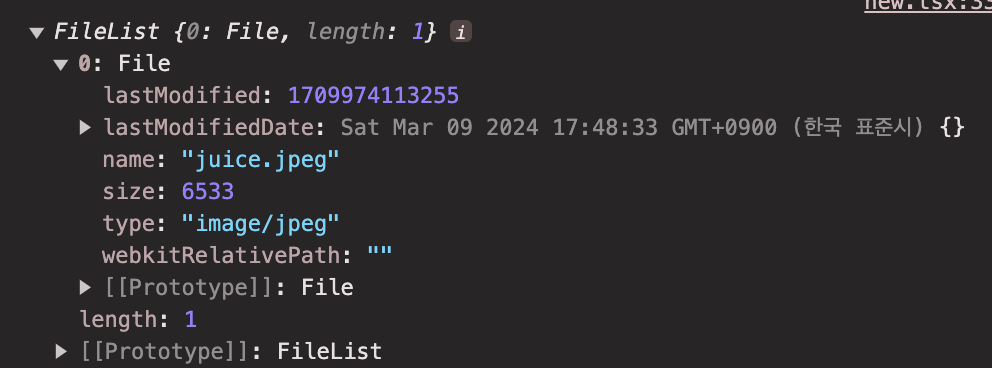
json 데이터 등록하기
처음에 object 데이터를 form-data에 등록하려고 보니, append 매서드의 value 값에는
value: The field's value. This can be a string or Blob (including subclasses such as File). If none of these are specified the value is converted to a string.
문자열 타입과 파일같은 Blob 타입 데이터만 넣을 수 있는 것을 알 수 있다.
객체 값이 필요하다면 JSON.stringify로 바꿔 등록할 수 있다.
const objectData = {
  name: "joo"
  age: 10
}

const formdata = new FormData();
formdata.append("objectData", JSON.stringify(objectData));
다양한 데이터 동시에 보내기
위 코드들처럼 Form-Data 생성하고 append 매서드로 원하는 값들을 모두 등록해 fetch로 전송하면 끝이다!
그러나 Form 태그를 사용하고 있다면 굳이 하나씩 등록하지 않아도 된다.
const formRef = useRef<HTMLFormElement>(null);

function onSubmit(e: React.FormEvent) {
  e.preventDefault();
  const formdata = new FormData(formRef.current!);
  if (!isLoading) useFetch(formdata);
}

return (
  <form ref={formRef} id="form" onSubmit={onSubmit}
      <input type="file" name="image" />
      <input type="text" name="reqData" />
  </form>
)
form 태그를 useRef 훅으로 가져와 FormData를 생성할 때 등록해주면 서버에 reqData, image 값으로 전송이 된다.

코드 & 글 피드백 모두 환영합니다!