1. 들어가기에 앞서
1.1. OAuth
OAuth 2.0(Open Authorization 2.0, OAuth2)은 인증을 위한 개방형 표준 프로토콜입니다.
이 프로토콜에서는 Third-Party 프로그램에게 리소스 소유자를 대신하여 리소스 서버에서 제공하는 자원에 대한 접근 권한을 위임하는 방식을 제공합니다.
구글, 페이스북, 카카오, 네이버 등에서 제공하는 간편 로그인 기능도 OAuth2 프로토콜 기반의 사용자 인증 기능을 제공하고 있습니다.
1.2. OAuth의 내부 정의
Client
- OAuth 2.0을 사용해 서드파티 로그인 기능을 구현할 자사 또는 개인 애플리케이션 서버입니다.
Resource Owner
- 서드파티 애플리케이션 (Google, Facebook, Kakao 등)에 이미 개인정보를 저장(회원가입)하고 있으며 Client가 제공하는 서비스를 이용하려는 사용자를 뜻합니다.
Resource Server
- 사용자의 개인정보를 가지고있는 애플리케이션 (Google, Facebook, Kakao 등) 서버입니다. Client는 Token을 이 서버로 넘겨 개인정보를 응답 받을 수 있습니다.
Authorization Server
- 권한을 부여(인증에 사용할 아이템을 제공주는)해주는 서버 입니다. 사용자는 이 서버로 ID, PW를 넘겨 Authorization Code를 발급 받을 수 있습니다.
- Client는 Authorization Server로 Authorization Code을 넘겨 토큰을 발급 받을 수 있으며,
Authorization endpoint와Token endpoint를 가집니다.
1.2. OAuth2의 프로토콜
-
Authorization Code Grant│ 권한 부여 승인 코드 방식
권한 부여 승인을 위해 자체 생성한 Authorization Code를 전달하는 방식으로 많이 쓰이고 기본이 되는 방식입니다. -
Implicit Grant│ 암묵적 승인 방식
자격증명을 안전하게 저장하기 힘든 클라이언트(ex: JavaScript등의 스크립트 언어를 사용한 브라우저)에게 최적화된 방식입니다.
암시적 승인 방식에서는 권한 부여 승인 코드 없이 바로 Access Token이 발급 됩니다. Access Token이 바로 전달되므로 만료기간을 짧게 설정하여 누출의 위험을 줄일 필요가 있습니다.
Refresh Token 사용이 불가능한 방식이며, 이 방식에서 권한 서버는 client_secret를 사용해 클라이언트를 인증하지 않습니다. Access Token을 획득하기 위한 절차가 간소화되기에 응답성과 효율성은 높아지지만 Access Token이 URL로 전달된다는 단점이 있습니다.
-
Resource Owner Password Credentials Grant│ 자원 소유자 자격증명 승인 방식
간단하게 username, password로 Access Token을 받는 방식입니다.
클라이언트가 타사의 외부 프로그램일 경우에는 이 방식을 적용하면 안됩니다. 자신의 서비스에서 제공하는 어플리케이션일 경우에만 사용되는 인증 방식입니다. Refresh Token의 사용도 가능합니다. -
Client Credentials Grant│클라이언트 자격증명 승인 방식
클라이언트의 자격증명만으로 Access Token을 획득하는 방식입니다.
OAuth2의 권한 부여 방식 중 가장 간단한 방식으로 클라이언트 자신이 관리하는 리소스 혹은 권한 서버에 해당 클라이언트를 위한 제한된 리소스 접근 권한이 설정되어 있는 경우 사용됩니다.
이 방식은 자격증명을 안전하게 보관할 수 있는 클라이언트에서만 사용되어야 하며, Refresh Token은 사용할 수 없습니다.
2. 카카오 OAuth2 등록하기
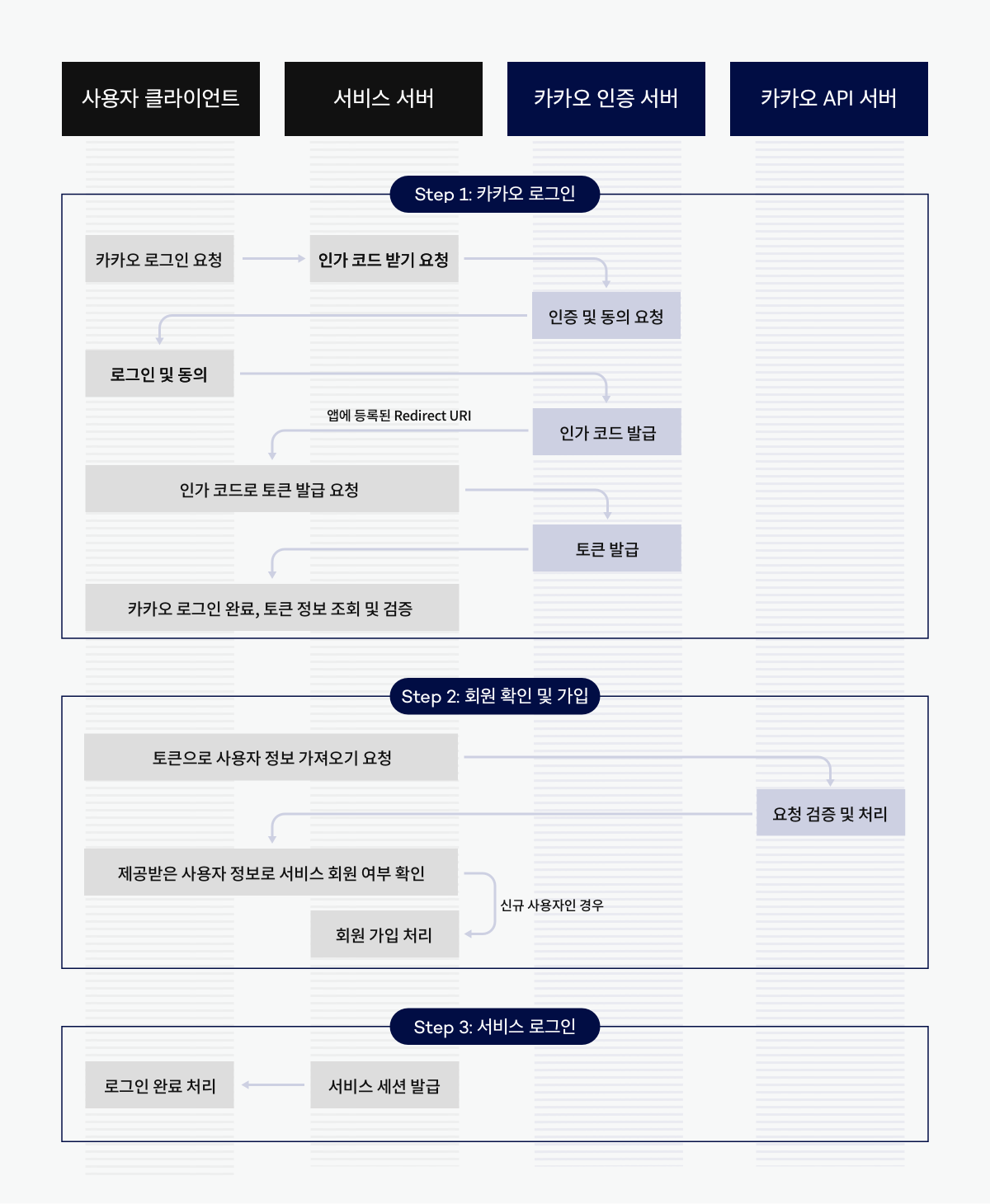
2.1. 사전 환경 설정
- kakao developers에 내 애플리케이션 등록하고 key 확인하기
- 내 애플리케이션 > 앱 설정 > 요약 정보에서 확인 가능
- REST API를 사용하니 해당하는 key를 확인하면 된다.
- 내 애플리케이션 > 제품 설정 > 카카오 로그인에서 카카오 로그인 활성화
- 내 애플리케이션 > 제품 설정 > 카카오 로그인에서 redirect URI 등록
- 해당 URL로 엔드 포인트를 만들어서 코드를 작성한다.
3. 기능 구현
3.1. application.yml
카카오 디벨롭스에서 발급 받은 여러 key값들을 아래와 같이 새로 추가합니다.
  security:
    oauth2:
      client:
        registration:
          kakao:
            client-name: kakao
            client-id: f66ad78db368781970e4086debb56661
            client-secret: y4Rv3gbKYIJdcyLZbtY6VGVnLdlhnkY7
            client-authentication-method: POST
            redirect-uri: "http://localhost:8080/api/v1/oauth2/code/kakao"
            authorization-grant-type: authorization_code
            scope: account_email, profile_nickname, profile_image, openid
            provider : kakao
        provider:
          kakao:
            authorization-uri: https://kauth.kakao.com/oauth/authorize
            token-uri: https://kauth.kakao.com/oauth/token
            user-info-uri: https://kapi.kakao.com/v2/user/me
            user-name-attribute: id
3.2. SecurityConfiguration.java
    public SecurityFilterChain securityFilterChain(HttpSecurity http) throws Exception {
        http.csrf().disable();

        http.authorizeHttpRequests()
                .requestMatchers("/api/v1/auth/**").permitAll()
					...
    			.oauth2Login(login -> login
                        .clientRegistrationRepository(clientRegistrationRepository())
                        .authorizedClientRepository(authorizedClientRepository())
                        .userInfoEndpoint()
                        .userService(customOAuth2UserService));

        return http.build();
    }

    ...

    @Bean
    public ClientRegistrationRepository clientRegistrationRepository(){
        return new InMemoryClientRegistrationRepository(this.kakaoClientRegistration());
    }

    @Bean
    public OAuth2AuthorizedClientRepository authorizedClientRepository() {
        return new HttpSessionOAuth2AuthorizedClientRepository();
    }

    private ClientRegistration kakaoClientRegistration(){
        return ClientRegistration.withRegistrationId("kakao")
            .clientId("f66ad78db368781970e4086debb56661")
            .clientSecret("y4Rv3gbKYIJdcyLZbtY6VGVnLdlhnkY7")
            .clientAuthenticationMethod(ClientAuthenticationMethod.CLIENT_SECRET_JWT)
            .authorizationGrantType(AuthorizationGrantType.AUTHORIZATION_CODE)
            .redirectUri("{baseUrl}/api/v1/oauth2/code/{registrationId}")
            .scope("account_email", "profile_nickname", "profile_image", "openid")
            .authorizationUri("https://kauth.kakao.com/oauth/authorize")
            .tokenUri("https://kauth.kakao.com/oauth/token")
            .userInfoUri("https://kapi.kakao.com/v2/user/me")
            .userNameAttributeName("id")
            .clientName("kakao")
            .build();
    }
    ...
해당 클래스에 kakaoClient에서 부여 받은 값들을 설정합니다.
3.2. CustomOAuth2UserService.java
@Service
@Slf4j
@RequiredArgsConstructor
public class CustomOAuth2UserService implements OAuth2UserService<OAuth2UserRequest, OAuth2User> {
    private final UserRepository userRepository;
    private final HttpSession httpSession;

    @Value("${spring.security.oauth2.client.registration.kakao.client-id}")
    private String kakaoClientId;

    @Value("${spring.security.oauth2.client.registration.kakao.client-secret}")
    private String kakaoClientSecret;

    private String codeVerifier = "YOUR_CODE_VERIFIER";
    private String codeChallenge = "YOUR_CODE_CHALLENGE";

    @Override
    public OAuth2User loadUser(OAuth2UserRequest userRequest) throws OAuth2AuthenticationException {
        throw new UnsupportedOperationException("Unimplemented method 'loadUser'");
    }

    public OAuth2UserInfoResponse kakaoCallback(String code) throws OAuth2AuthenticationException {
        RestTemplate restTemplate = new RestTemplate();

        HttpHeaders headers = requestHeaders(new HttpHeaders());
        MultiValueMap parameters = requestParameters(code, new LinkedMultiValueMap());

        HttpEntity<MultiValueMap<String, String>> request = new HttpEntity<>(parameters, headers);
        ResponseEntity<String> response = restTemplate.postForEntity("https://kauth.kakao.com/oauth/token", request, String.class);

        if (response.getStatusCode() == HttpStatus.OK) {
            Gson gson = new Gson();
            Map<String, Object> responseMap = gson.fromJson(response.getBody(), Map.class);

            for(Object obj : responseMap.keySet()){
                log.info(" obj : {} ", obj + " " + responseMap.get(obj));
            }

            String accessToken = (String) responseMap.get("access_token");
            log.info("Access Token: {}", accessToken);

            OAuth2UserInfoResponse userInfoResponse = kakaoCall(responseMap);

            return userInfoResponse;
        } else {
            log.error("Error occurred while fetching access token: {}", response.getStatusCode());
            throw new UnsupportedOperationException("Unimplemented method 'loadUser'");
        }
    }

    public HttpHeaders requestHeaders(HttpHeaders headers){
        String credentials = kakaoClientId + ":" + kakaoClientSecret;
        String encodedCredentials = new String(Base64.getEncoder().encode(credentials.getBytes()));

        headers.add("Content-type", "application/x-www-form-urlencoded;charset=utf-8");
        headers.add("Authorization", "Basic " + encodedCredentials);

        return headers;
    }

    public MultiValueMap<String, String> requestParameters(String code, LinkedMultiValueMap linkedMultiValueMap){
        MultiValueMap<String,String> parameters = linkedMultiValueMap;

        parameters.add("grant_type", "authorization_code");
        parameters.add("client_id", kakaoClientId);
        parameters.add("client_secret", kakaoClientSecret); // Add client_secret
        parameters.add("redirect_uri", "http://localhost:8080/api/v1/oauth2/code/kakao");
        parameters.add("code", code);
        parameters.add("code_verifier", codeVerifier);
//        parameters.add("code_challenge", codeChallenge);


        return parameters;
    }

    public OAuth2UserInfoResponse kakaoCall(Map<String, Object> parameters) {
        return OAuth2UserInfoResponse.builder()
            .accessToken((String)parameters.get("access_token"))
            .refreshToken((String)parameters.get("refresh_token"))
            .idToken((String)parameters.get("id_token"))
        .build();
    }
}
3.3. OAuth2Controller.java
@RestController
@RequestMapping("api/v1/oauth2")
@Slf4j
public class OAuth2Controller {
    @Autowired
    private CustomOAuth2UserService oAuth2UserService;

    @GetMapping("/code/kakao")
    public ResponseEntity<OAuth2UserInfoResponse> kakaoCallback(@RequestParam String code) {
        log.info("code {} =", code);
        return ResponseEntity.ok(oAuth2UserService.kakaoCallback(code));
    }
}
3.4. 테스트
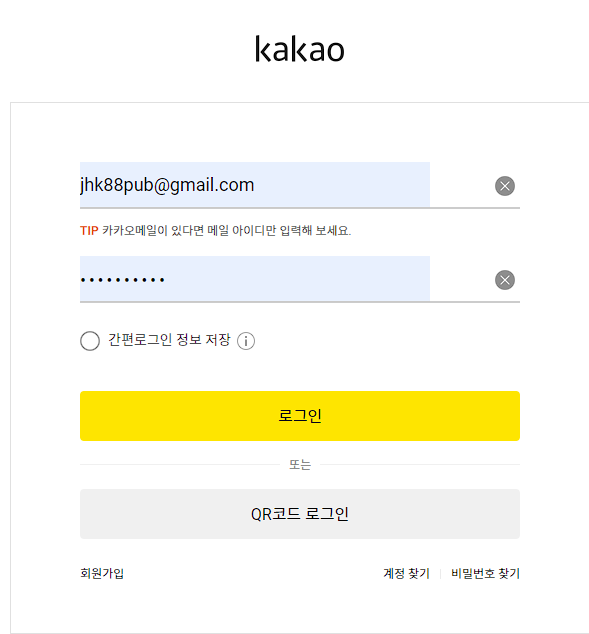 Postman이 아닌, 웹 브라우저로 KakaoCallback의 URL를 요청하면 카카오 로그인으로 리다이렉트 됩니다. 카카오에 가입된 회원정보를 입력하고 로그인 합니다.
 일반적으로는 OAuth2.0을 통해 외부 코드를 받아와서 클라이언트 내에서 자체적으로 처리하지만, 제 경우에는 직접 DTO로 받아서 처리했습니다.
3.5. 후기
- 가능한 SpringSecurity 내에서 자체적인 컴포넌트를 통해 OAuth를 구현하려고 했는데, 부득이하게 비즈니스 로직에서 헤더의 key-value 값을 일일히 설정하여 가져오게 됐습니다. 그 때문에 이전까지의 코드와 일관성이 사라진게 스스로도 눈에 보이네요.
OAuth2User.loadUser()를 통해서 리소스 서버와 연결해야 할텐데, 일단은 서버에서 토큰을 발급 받았다는 것만으로 의의를 두고자 합니다. 추후에 반드시 수정해야겠죠.- 위 코드는 구글링을 통해 참고하여 작성했는데, 작업 중에 원 출처를 잊었습니다. 추후 문제 시 삭제하겠습니다.
- 지적 및 보충 설명, 질문은 언제나 환영합니다.
4. 레퍼런스
- https://blog.naver.com/mds_datasecurity/222182943542
- https://hudi.blog/oauth-2.0/
- https://wildeveloperetrain.tistory.com/247
- https://velog.io/@dldmswjd322/기본-개념-Oauth-2.0의-완전-기초에-대해-알아보자
비문, 오탈자와 코드 오류 및 잘못된 지식에 대한 지적 및 질문은 언제나 환영합니다.