📘 TIL - 코드카타 “둘만의 암호" 문제 풀이
✅ 문제 요약
문자열 s의 각 문자를 skip에 포함된 문자를 건너뛰면서 index칸 뒤로 민다.
z를 넘으면 a로 순환한다.
skip의 알파벳은 “카운트에서 제외”해야 한다.
예)
s="aukks", skip="wbqd", index=5
a에서 5칸 이동할 때 b, d는 skip이라 카운트하지 않음 → 결과 h
최종 "happy"
1) 내가 처음 생각한 방식(원래 코드)
🔍 원래 코드 아이디어
s[i]에서 index만큼 더하기 전에,
skip 문자가 index 범위 안에 있으면 그만큼 더 보정(+1)해서 “한 번에” 점프하려고 함.
for(int j=0; j<skip.length(); j++){
    int sub = skip[j] - s[i];
    if(sub<=index && sub>0){
        s[i]+=1;
    }
}
s[i]+=index;
if (s[i] > 'z') s[i] -= 26;
❌ 문제점 (핵심 버그)
이 방식은 “skip 문자를 한 번에 보정”하려고 하는데, 실제로는 이동 도중에:
+1로 보정해서 문자가 바뀌면,
그 뒤에 새로 들어온 범위 안에 또 다른 skip이 생길 수 있음
심지어 z를 넘어 순환(a)하면 skip 판단 자체가 완전히 달라짐
즉, skip은 정적 범위 체크로 해결이 안 되고,
이동 과정에서 계속 영향을 주는 동적 조건이라서 “한 번 계산”이 깨짐.
2) 정답 접근(수정 코드) – “한 칸씩 이동 + moved 카운트”
✅ 고친 핵심 아이디어
목표는 “문자를 index번 세는 것”
하지만 skip 문자를 만나면 “세지 말아야” 함
그래서 한 칸 이동 → skip이면 카운트 유지 → 아니면 카운트 증가 를 반복
sort(skip.begin(), skip.end());

for (int i = 0; i < (int)s.length(); i++) {
    int moved = 0;

    while (moved < index) {
        s[i] += 1;

        if (s[i] > 'z') {
            s[i] -= ('z' - 'a' + 1); // == 26
        }

        if (binary_search(skip.begin(), skip.end(), s[i])) {
            continue; // skip이면 moved 증가 X
        }

        moved++;
    }
}
return s;
✅ 이 방식이 안전한 이유
이동을 “진짜로” 한 칸씩 진행하므로
중간에 skip을 여러 번 만나도 정확히 처리됨
z → a 순환도 이동 루프 안에서 매번 체크하니 문제 없음
3) 디버깅 포인트 정리 (TIL 핵심)
🧠 배운 점 1: “건너뛰기(skip)”가 있으면 보통 시뮬레이션이 안전
“범위 안에 skip이 몇 개냐”는 방식은
중간에 문자가 바뀌는 순간부터 조건이 달라져서 위험함
특히 z → a 같은 순환 규칙이 있으면 더더욱 “한 번에 계산”이 깨지기 쉬움
🧠 배운 점 2: skip 체크는 빠르게 하는 게 좋다
binary_search 쓰려면 반드시 sort(skip) 필요
지금 제한이 작아서 사실 선형 탐색도 되지만,
TIL로는 “정렬 + 이분탐색” 패턴을 기억해두기 좋았음
4) 예시로 로직이 어떻게 돌아가는지 (a → h)
시작: a, index=5, skip={b,d,w,q}
1칸 이동: b(skip) → 카운트 안 함
다음: c(ok) → 1
다음: d(skip) → 그대로 1
다음: e(ok) → 2
다음: f(ok) → 3
다음: g(ok) → 4
다음: h(ok) → 5 도달 ✅
🔎 추가 정리 – 수정 버전 알고리즘은 어떤 유형에서 쓰는가?
이번 문제에서 최종적으로 사용한 방식은 한 줄로 요약하면 이거다.
“조건을 만족하는 횟수를 정확히 N번 세야 할 때, 한 번에 계산하지 말고 한 단계씩 시뮬레이션한다.”
이 패턴이 등장하는 문제 유형들을 정리해보면 명확해진다.
1️⃣ “건너뛰기(skip) + 카운트” 유형
🔹 특징
단순히 +index로 이동하면 안 됨
특정 조건을 만족하는 경우에만 카운트를 증가
조건에 걸리면 “이동은 했지만 센 건 아님”
🔹 이번 문제와의 연결
이동은 매번 +1
skip 문자를 만나면 → 카운트 X
목표는 “문자를 index번 세는 것”
🔹 이 유형의 정석 패턴
int count = 0;
while (count < target) {
move_one_step();
if (조건에 걸리면) continue;
count++;
}
📌 핵심 신호
문제 설명에 “~은 제외한다”, “세지 않는다”, “건너뛴다”라는 말이 있으면
거의 무조건 이 패턴을 의심해야 한다
2️⃣ 순환 구조(circular) + 조건 필터 문제
🔹 특징
범위가 끝나면 다시 처음으로 돌아감 (z → a, % n)
순환 도중 조건이 계속 영향을 줌
“범위 계산”이 아니라 “상태 변화”가 중요
🔹 이번 문제 포인트
if (s[i] > 'z') {
s[i] -= 26;
}
순환이 중간 과정에 끼어 있음
skip 판단도 순환 이후 문자 기준으로 다시 해야 함
📌 이런 경우 주의
“몇 칸 뒤”를 수식으로 한 번에 계산하려는 순간
순환 + 조건 때문에 예외가 터지기 쉬움
3️⃣ “동적 조건”이 있는 문제
🔹 핵심 개념
조건이 처음 상태 기준이 아니라, 이동하면서 계속 바뀌는 경우
❌ 잘못된 접근
처음 기준으로 범위를 계산
skip이 “고정된 장애물”이라고 착각
✅ 올바른 접근
매 이동마다 조건 재검사
현재 상태 기준으로 판단
이번 문제에서:
s[i]는 계속 바뀜
skip[j] - s[i] 같은 계산은 기준이 흔들리는 순간 무너짐
📌 이 유형의 힌트
“중간에 값이 바뀌고, 그 바뀐 값이 다시 조건에 영향을 준다”
→ 시뮬레이션이 답이다
4️⃣ “범위 계산이 떠오르는데 찝찝한 문제”
이건 경험적으로 굉장히 중요한 체크 포인트다.
❗ 이런 생각이 들면 위험 신호
“skip 개수만큼 보정하면 되지 않나?”
“index에 skip 수만 더하면 될 것 같은데…?”
👉 이런 생각이 한 번이라도 들면,
테스트 케이스 어딘가에
연속 skip
순환 직전/직후
경계값
이 숨어 있을 확률이 높다
그래서:
index 최대 20
문자열 길이 최대 50
이 제한은 사실상:
“한 칸씩 돌려도 충분하니까 정확하게 구현해라”
라는 신호였다.
5️⃣ 비슷한 문제들에서 바로 써먹는 판단 기준
🧠 문제 읽을 때 체크리스트
“제외”, “건너뜀”, “세지 않음”이 있다
순환 구조가 있다 (%, a~z, 배열 끝 → 처음)
이동 도중 조건이 계속 변한다
한 번에 계산하면 예외가 생길 것 같은 느낌이 든다
👉 3개 이상 체크되면
✔️ while + step-by-step 시뮬레이션 확정
📘 챌린지반 3일차 TIL
GAS(Gameplay Ability System) 구성요소 & AttributeSet 실습
🎯 오늘의 목표
GAS(Gameplay Ability System)의 전체 구조 이해
AttributeSet을 이용한 체력 / 스태미나 수치 관리 구현
네트워크 복제 기반 Attribute 변경 흐름 체험
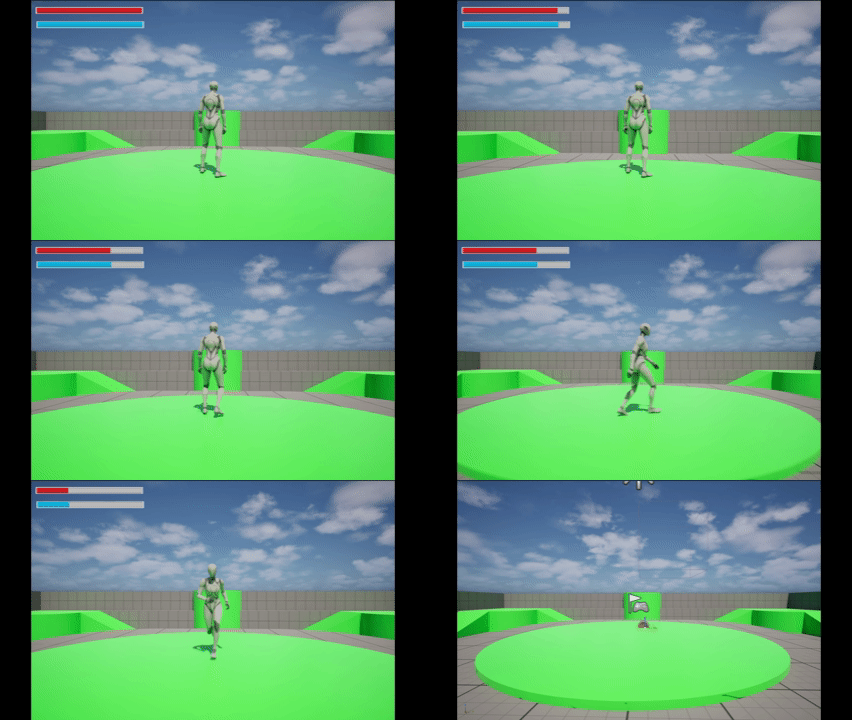
UI(Health Bar)와 실제 플레이 연동 확인
🧠 GAS(Gameplay Ability System)
에픽 게임즈 앞에 붙는 접두사 Gameplay는 큰 의미는 없고,
GAS는 Gameplay Ability System 자체가 핵심이다.
GAS는 기본적으로 네트워크 복제가 전제된 시스템이기 때문에
일부 기능만 선택적으로 적용하기보다는
게임 전반의 캐릭터 구조와 함께 설계하는 것이 중요하다.
RPG에서 체력, 마나, 스태미나 같은 수치를 관리하기 위해 설계되었지만,
FPS, TPS, 액션 등 다양한 장르에서도 충분히 응용 가능한 시스템이다.
🧩 GAS의 핵심 구성 요소
🔹 Ability System Component (ASC)
GAS의 중앙 처리 장치
하나의 액터당 하나의 ASC만 부착
ASC가 부착된 액터끼리만 GAS 기반 상호작용 가능
🔹 Gameplay Tag
문자열 기반 태그 시스템
상태, 조건, 분기 처리의 중심
if문 기반 로직을 대체하는 핵심 요소
🔹 Gameplay Ability
캐릭터가 수행하는 “행동”
예시
점프
약공격
강공격
회복 스킬
🔹 AttributeSet
수치 관리 전용 클래스
체력, 최대 체력, 스태미나 같은 “값”만 관리
계산 로직이나 상태 판단은 담당하지 않음
🔹 Gameplay Effect
Attribute를 어떻게 변경할지 정의
데미지, 회복, 버프, 디버프 처리 담당
🔹 Gameplay Cue
사운드, 이펙트 같은 연출 요소
메인 로직과 분리된 로컬 이벤트 처리용
🤔 GAS 없이 수치 시스템을 구현한다면?
float Health = 100.f;
float MaxHealth = 100.f;
문제점
네트워크 복제를 직접 구현해야 함
UPROPERTY(Replicated, OnRep=...)
float Health;
버프 / 디버프 Timer 직접 구현
UI 직접 연동 필요
데미지 계산과 조건 분기를 if문으로 직접 처리
GAS는 이런 문제들을
이벤트 기반 + 네트워크 자동 처리 구조로 해결한다.
🔁 GAS 데이터 흐름 구조
Gameplay Ability
→ Gameplay Effect
→ AttributeSet
→ Feedback(UI / Cue)
→ Gameplay Ability
이 구조가 반복된다.
🧪 AttributeSet 구현 (체력 / 스태미나)
📁 MyAttributeSet.h
// Fill out your copyright notice in the Description page of Project Settings.

#pragma once

#include "CoreMinimal.h"
#include "AttributeSet.h"
#include "AbilitySystemComponent.h"
#include "MyAttributeSet.generated.h"

#define ATTRIBUTE_ACCESSORS(ClassName,PropertyName)\
GAMEPLAYATTRIBUTE_PROPERTY_GETTER(ClassName,PropertyName)\
GAMEPLAYATTRIBUTE_VALUE_GETTER(PropertyName)\
GAMEPLAYATTRIBUTE_VALUE_SETTER(PropertyName)\
GAMEPLAYATTRIBUTE_VALUE_INITTER(PropertyName)

UCLASS()
class CHALLENGEPROJECT_API UMyAttributeSet : public UAttributeSet
{
	GENERATED_BODY()
public:
	UMyAttributeSet();

    virtual void GetLifetimeReplicatedProps(TArray<FLifetimeProperty>& OutLifetimeProps) const override;

    UPROPERTY(BlueprintReadOnly, Category = "Attributes", ReplicatedUsing = OnRep_Health)
    FGameplayAttributeData Health;
    ATTRIBUTE_ACCESSORS(UMyAttributeSet, Health)

    UPROPERTY(BlueprintReadOnly, Category = "Attributes", ReplicatedUsing = OnRep_MaxHealth)
    FGameplayAttributeData MaxHealth;
    ATTRIBUTE_ACCESSORS(UMyAttributeSet, MaxHealth)

    UPROPERTY(BlueprintReadOnly, Category = "Attributes", ReplicatedUsing = OnRep_Stamina)
    FGameplayAttributeData Stamina;
    ATTRIBUTE_ACCESSORS(UMyAttributeSet, Stamina)

    UPROPERTY(BlueprintReadOnly, Category = "Attributes", ReplicatedUsing = OnRep_MaxStamina)
    FGameplayAttributeData MaxStamina;
    ATTRIBUTE_ACCESSORS(UMyAttributeSet, MaxStamina)

    UFUNCTION()
    virtual void OnRep_Health(const FGameplayAttributeData& OldHealth);

    UFUNCTION()
    virtual void OnRep_MaxHealth(const FGameplayAttributeData& OldMaxHealth);

    UFUNCTION()
    virtual void OnRep_Stamina(const FGameplayAttributeData& OldStamina);

    UFUNCTION()
    virtual void OnRep_MaxStamina(const FGameplayAttributeData& OldMaxStamina);

    virtual void PreAttributeChange(const FGameplayAttribute& Attribute, float& NewValue) override;
    virtual void PostGameplayEffectExecute(const FGameplayEffectModCallbackData& Data) override;
};
📁 MyAttributeSet.cpp
// MyAttributeSet.cpp

#include"GAS/MyAttributeSet.h"
#include"Net/UnrealNetwork.h"
#include"GameplayEffect.h"
#include"GameplayEffectExtension.h"

UMyAttributeSet::UMyAttributeSet()
{
    InitHealth(100.0f);
    InitMaxHealth(100.0f);
    InitStamina(100.0f);
    InitMaxStamina(100.0f);
}

void UMyAttributeSet::GetLifetimeReplicatedProps(TArray<FLifetimeProperty>& OutLifetimeProps) const
{
    Super::GetLifetimeReplicatedProps(OutLifetimeProps);

    DOREPLIFETIME(UMyAttributeSet, Health);
    DOREPLIFETIME(UMyAttributeSet, MaxHealth);
    DOREPLIFETIME(UMyAttributeSet, Stamina);
    DOREPLIFETIME(UMyAttributeSet, MaxStamina);
}

void UMyAttributeSet::OnRep_Health(const FGameplayAttributeData& OldHealth)
{
    GAMEPLAYATTRIBUTE_REPNOTIFY(UMyAttributeSet, Health, OldHealth);
}

void UMyAttributeSet::OnRep_MaxHealth(const FGameplayAttributeData& OldMaxHealth)
{
    GAMEPLAYATTRIBUTE_REPNOTIFY(UMyAttributeSet, MaxHealth, OldMaxHealth);
}

void UMyAttributeSet::OnRep_Stamina(const FGameplayAttributeData& OldStamina)
{
    GAMEPLAYATTRIBUTE_REPNOTIFY(UMyAttributeSet, Stamina, OldStamina);
}

void UMyAttributeSet::OnRep_MaxStamina(const FGameplayAttributeData& OldMaxStamina)
{
    GAMEPLAYATTRIBUTE_REPNOTIFY(UMyAttributeSet, MaxStamina, OldMaxStamina);
}

void UMyAttributeSet::PreAttributeChange(const FGameplayAttribute& Attribute, float& NewValue)
{
    Super::PreAttributeChange(Attribute, NewValue);

    if (Attribute == GetHealthAttribute())
    {
        NewValue = FMath::Clamp(NewValue, 0.0f, GetMaxHealth());
    }
}

void UMyAttributeSet::PostGameplayEffectExecute(const FGameplayEffectModCallbackData& Data)
{
    Super::PostGameplayEffectExecute(Data);

    if (Data.EvaluatedData.Attribute == GetHealthAttribute())
    {
        SetHealth(FMath::Clamp(GetHealth(), 0.0f, GetMaxHealth()));
    }
}🧑🚀 GAS 캐릭터 베이스 클래스
📁 MyCharacterBase.h
// Fill out your copyright notice in the Description page of Project Settings.

#pragma once

#include "CoreMinimal.h"
#include "GameFramework/Character.h"
#include "AbilitySystemComponent.h"
#include "AbilitySystemInterface.h"
#include "MyCharacterBase.generated.h"

class UAbilitySystemComponent;
class UMyAttributeSet;

UCLASS()
class CHALLENGEPROJECT_API AMyCharacterBase : public ACharacter, public IAbilitySystemInterface
{
	GENERATED_BODY()

public:
    AMyCharacterBase();

    virtual UAbilitySystemComponent* GetAbilitySystemComponent() const override;

    UFUNCTION(BlueprintCallable, Category = "Attributes")
    UMyAttributeSet* GetAttributeSet() const { return AttributeSet; }

    UFUNCTION(BlueprintCallable, Category = "Attributes")
    float GetHealth() const;

    UFUNCTION(BlueprintCallable, Category = "Attributes")
    float GetMaxHealth() const;

    UFUNCTION(BlueprintCallable, Category = "Attributes")
    float GetStamina() const;

    UFUNCTION(BlueprintCallable, Category = "Attributes")
    float GetMaxStamina() const;

    UFUNCTION(BlueprintCallable, Category = "Attributes")
    void ApplyDamage(float DamageAmount);

protected:
    virtual void BeginPlay() override;

    UPROPERTY(VisibleAnywhere, BlueprintReadOnly, Category = "Abilities")
    TObjectPtr<UAbilitySystemComponent> AbilitySystemComponent;

    UPROPERTY()
    TObjectPtr<UMyAttributeSet> AttributeSet;

    virtual void InitializeAbilitySystem();
};
📁 MyCharacterBase.cpp
// MyCharacterBase.cpp

#include "MyCharacterBase.h"
#include "AbilitySystemComponent.h"
#include "GAS/MyAttributeSet.h"

AMyCharacterBase::AMyCharacterBase()
{
    AbilitySystemComponent = CreateDefaultSubobject<UAbilitySystemComponent>(
        TEXT("AbilitySystemComponent"));
    AbilitySystemComponent->SetIsReplicated(true);
    AbilitySystemComponent->SetReplicationMode(EGameplayEffectReplicationMode::Minimal);

    AttributeSet = CreateDefaultSubobject<UMyAttributeSet>(TEXT("AttributeSet"));
}

UAbilitySystemComponent* AMyCharacterBase::GetAbilitySystemComponent() const
{
    return AbilitySystemComponent;
}

void AMyCharacterBase::BeginPlay()
{
    Super::BeginPlay();

    InitializeAbilitySystem();
}

void AMyCharacterBase::InitializeAbilitySystem()
{
    if (AbilitySystemComponent)
    {
        AbilitySystemComponent->InitAbilityActorInfo(this, this);

        UE_LOG(LogTemp, Log, TEXT("ASC Initialized for%s"), *GetName());
    }
}
🧪 실제 적용 과정 & 디버깅
🔹 기본 프로젝트 Character에 MyCharacterBase를 Parent로 설정
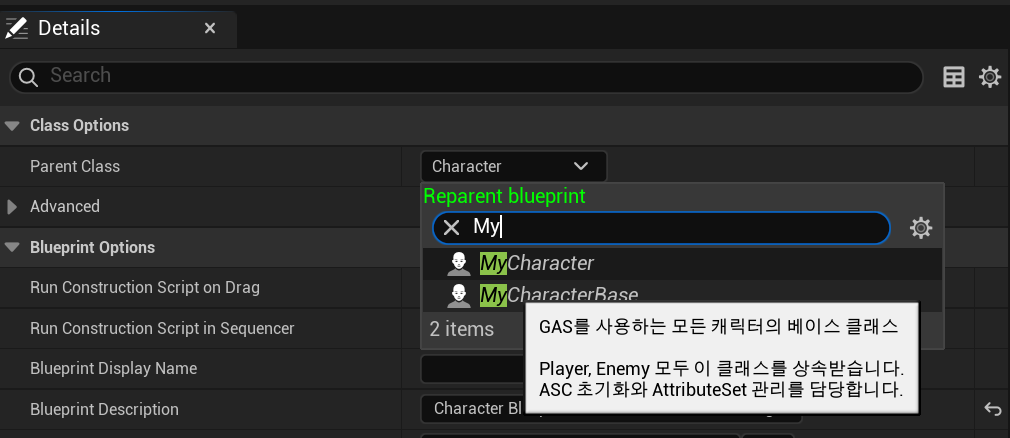
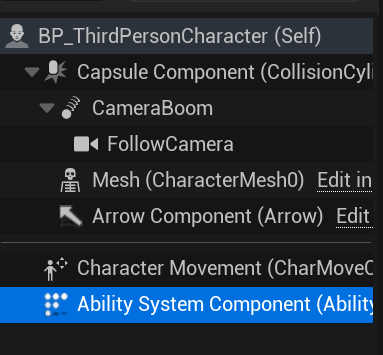
🔹 GAS 디버그
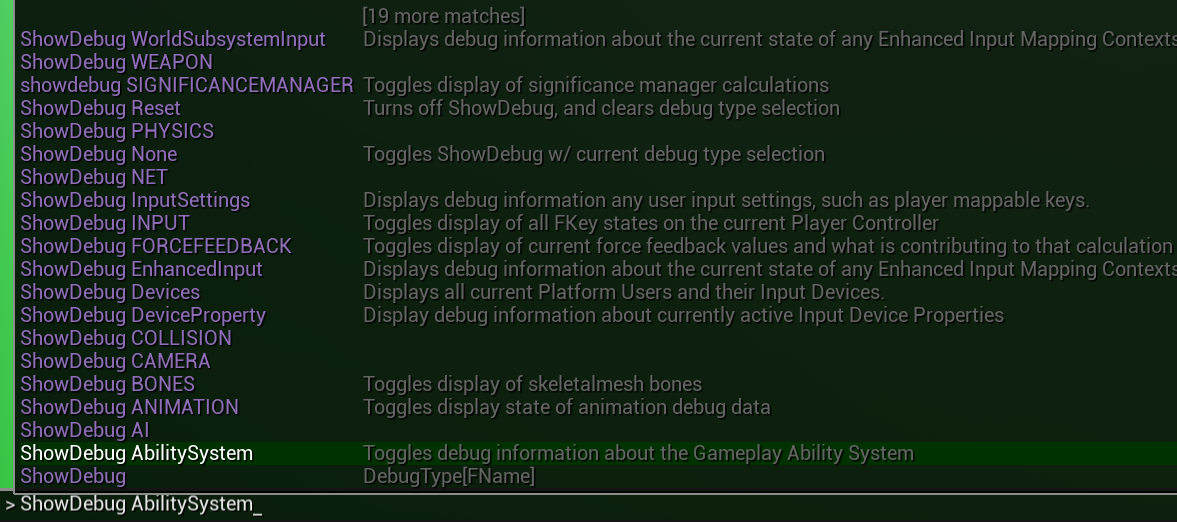
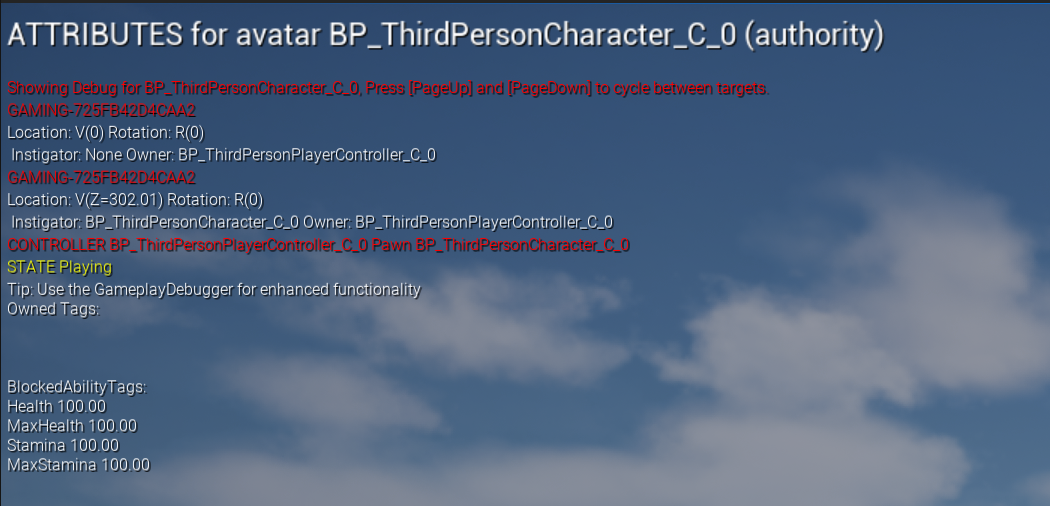
콘솔() → ShowDebugAbilitySystem`
🔹 데미지 존 구현 (Trigger Box)
오버랩 이벤트에서 ApplyDamage 호출
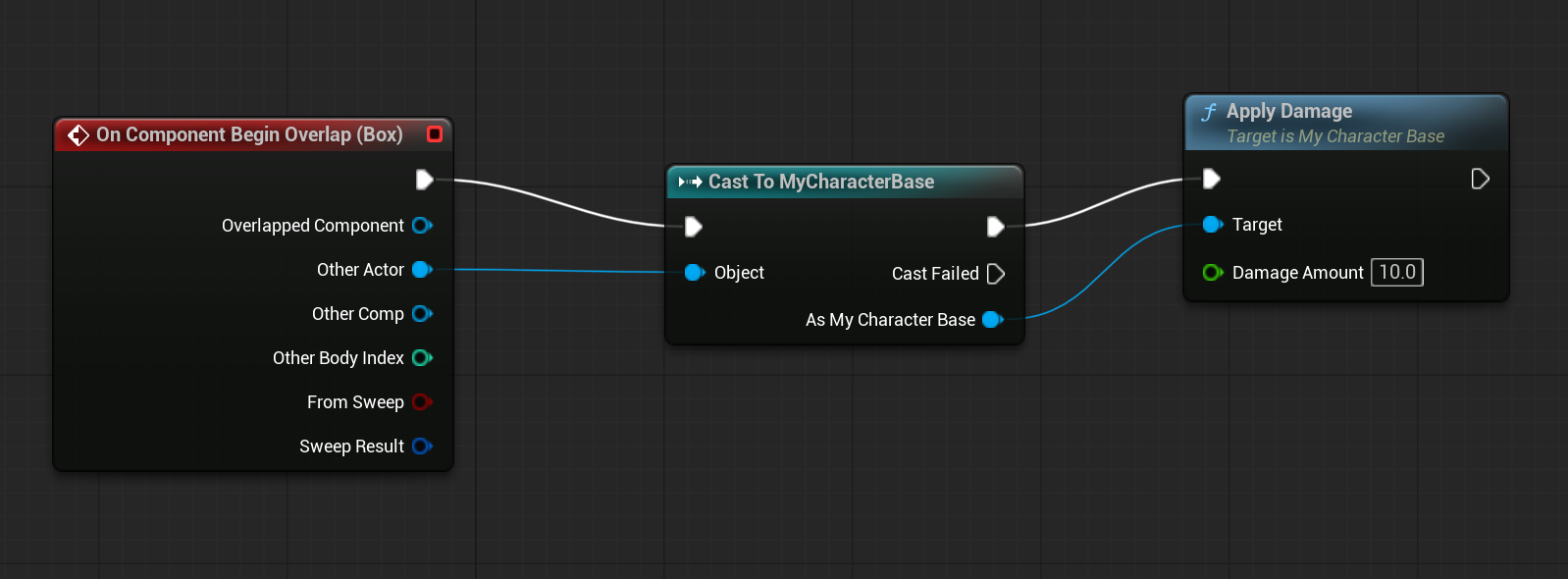
수치 변화 직접 확인
🖥 UI – Health / Stamina Bar
Widget Blueprint 생성
Progress Bar 사용
Character 함수(GetHealth, GetMaxHealth) 기반으로 Percent 계산
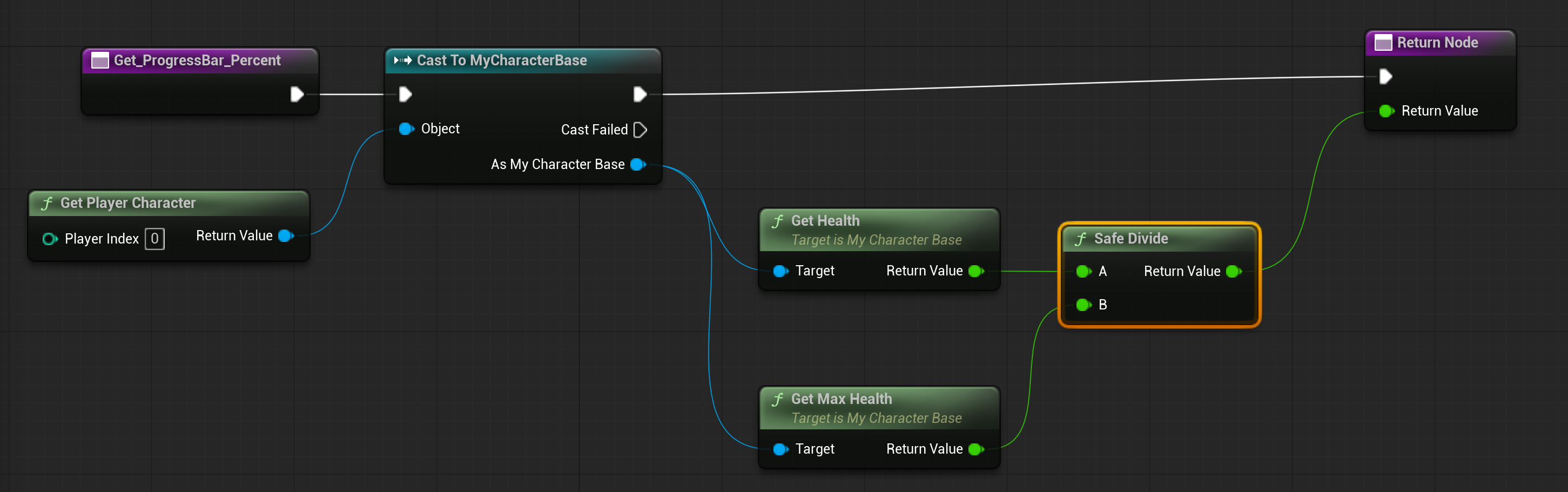
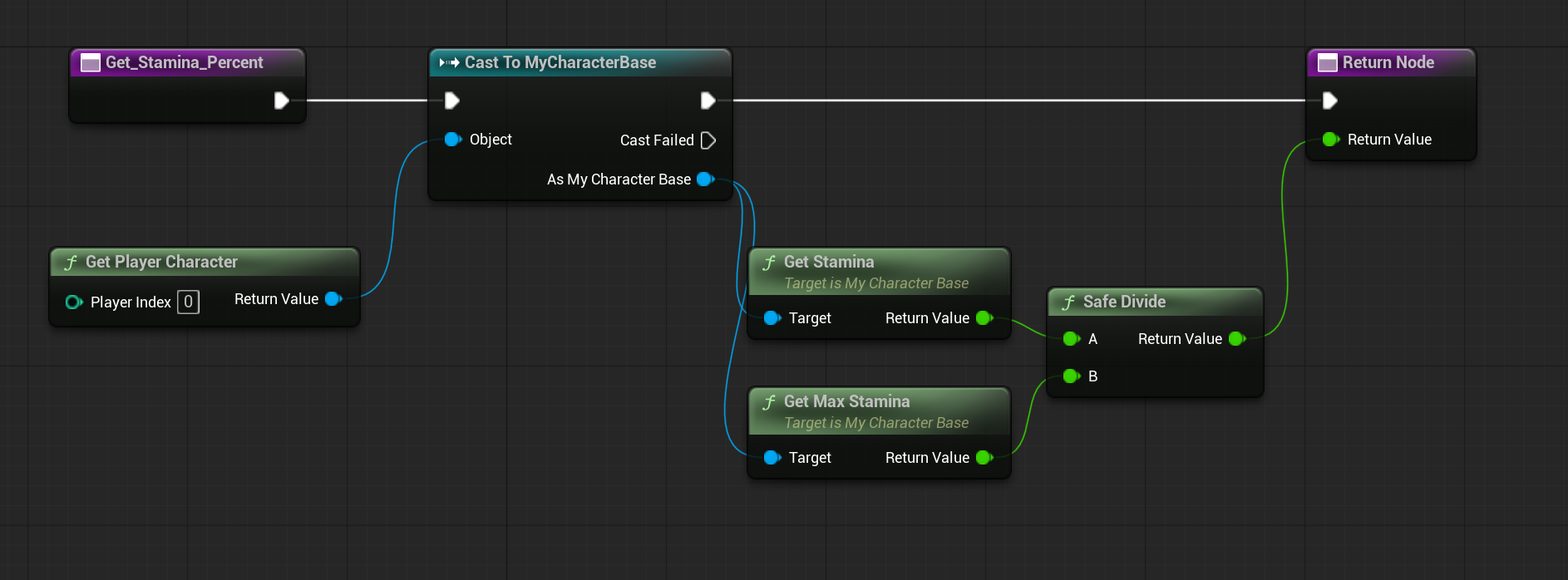
✅ 구현 결과
✍️ 회고
GAS는 부분 적용보다 전체 구조 설계가 중요
ASC 중심 사고방식이 필수
AttributeSet은 “값만 관리”해야 구조가 깔끔해짐
다음 단계는 Gameplay Effect 기반 Attribute 수정