오늘은 유용한 Unity Asset을 소개해보는 시간을 가지겠습니다.
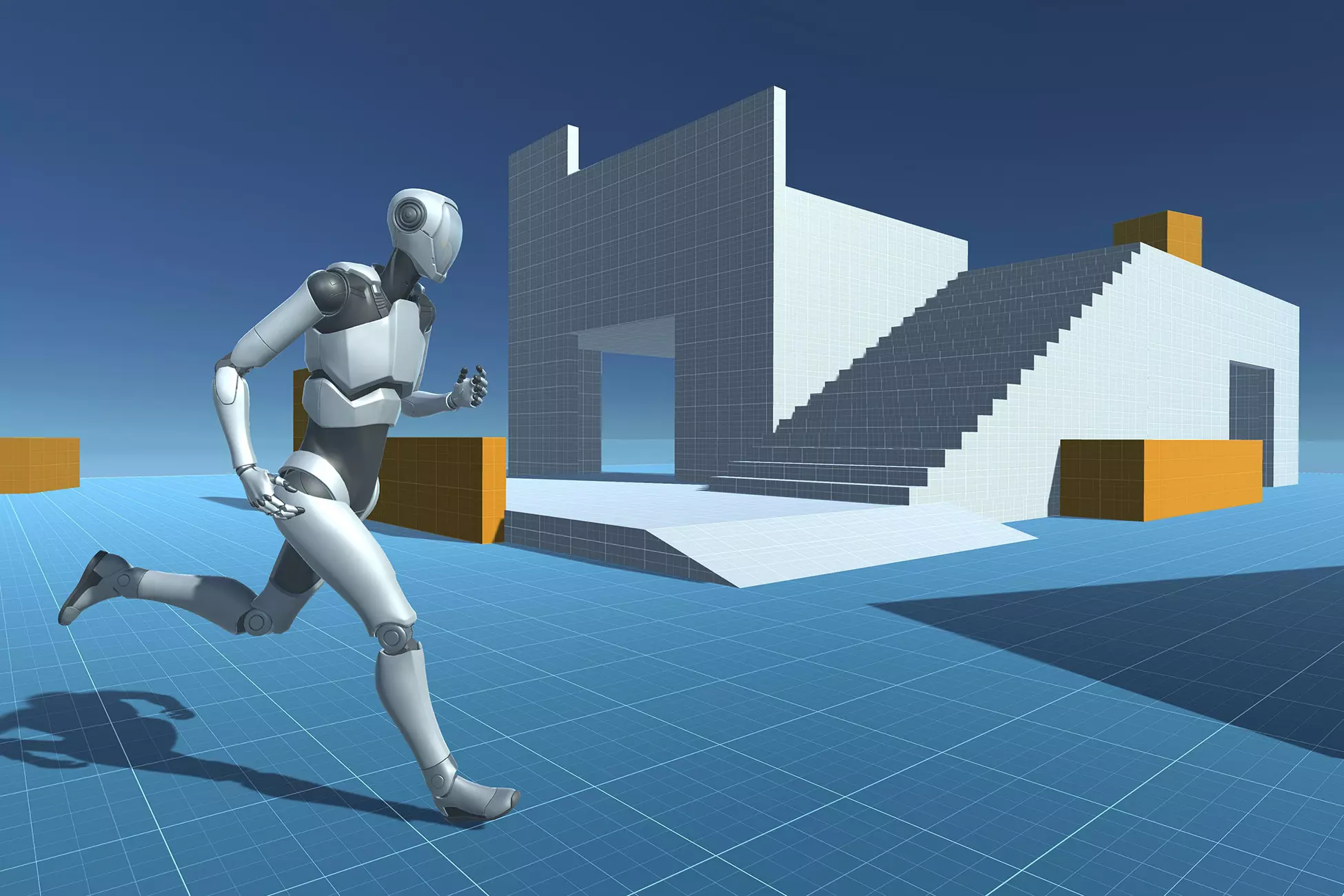
- Asset Name : Third Person
- Asset Store : Link
- In Short : Unity Technologies 에서 제공하는 무료 에셋이며 3인칭 게임 컨트롤러 입니다.
다양한 게임 장르의 프로토타이핑과 개발을 빠르게 시작할 수 있도록
움직임과 시네머신 카메라의 기능이 구현되어 있습니다.
특징
- 캐릭터 컨트롤러 : 3인칭 시점의 캐릭터 컨트롤러를 제공하여,
플레이어 캐릭터의 움직임과 카메라 제어를 손쉽게 구현할 수 있습니다.- Input System 통합 : New Input System을 사용하여 키보드, 마우스, 게임패드 등
다양한 입력 장치를 지원하며, 모바일 터치스크린 입력도 처리할 수 있습니다.- Cinemachine 지원 : Cinemachine을 통해 카메라 설정을 커스터마이즈할 수 있어,
프로젝트의 요구에 맞게 카메라 동작을 조정할 수 있습니다.- 시각 자산 : 휴머노이드 리그로 리깅된 캐릭터 모델과 기본적인 애니메이션, 테스트 환경,
모바일 터치 조이스틱 UI 등을 포함하고 있습니다.- URP : URP와 호환됩니다.
- Unity Version : Unity 6도 사용이 가능하며 사용 가능한 최소 버전은 Unity 2020 LTS 입니다.
에셋 분석
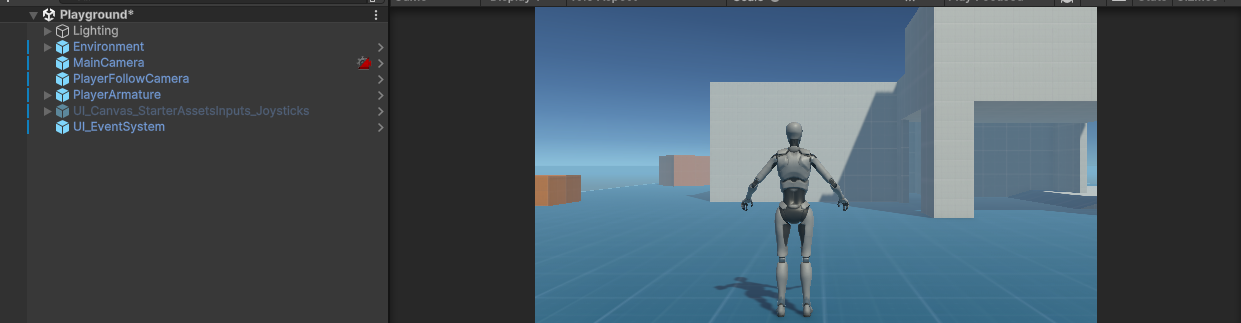
- Asset Store에서 해당 Asset을 다운받고 임포트 한 뒤 PlayGround Scene을 열어줍니다.
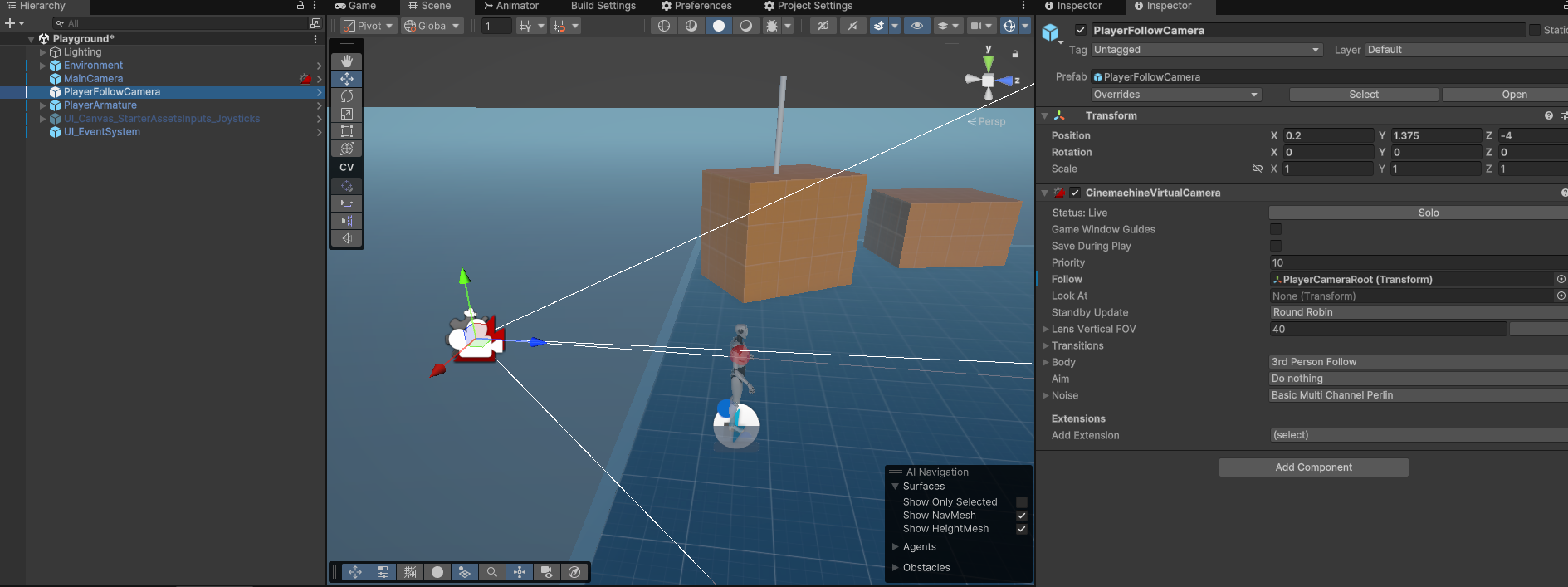
- Camera들은 모두 Cinemachine 컴포넌트를 사용하고 있습니다.
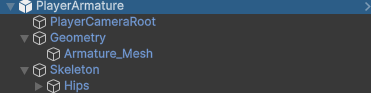
- PlayerArmature의 경우 Mesh를 가지고 있는 Geometry,
Camera를 Follow 시키기 위한 PlayerCameraRoot,
Animation을 위한 Skeleton으로 구분되어 있습니다.
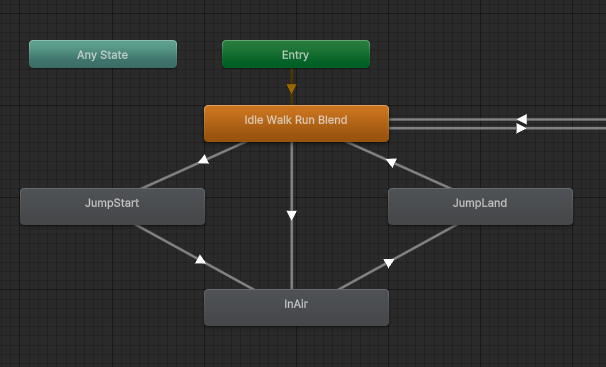
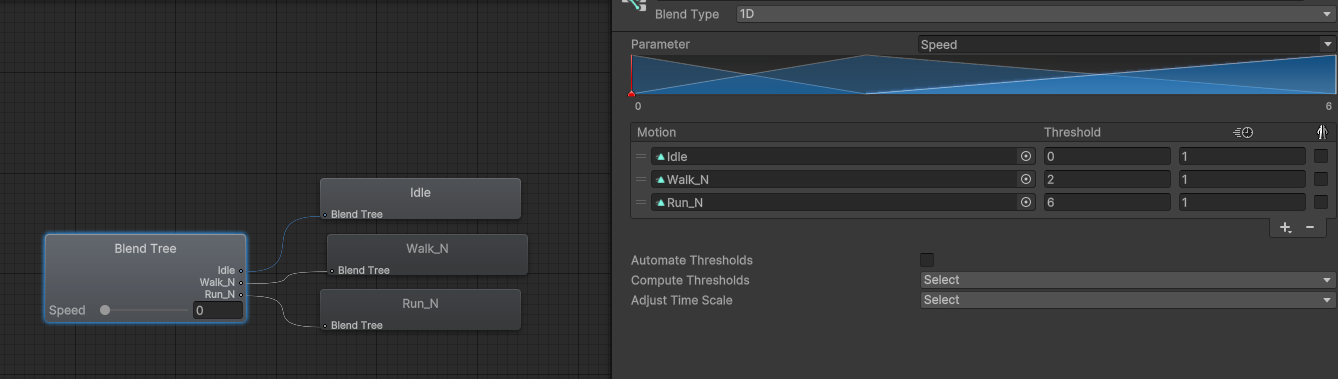
- Animator의 대한 정보이며 Idle Walk Run Blend 의 경우에는
이름 처럼 Blend를 사용하고 있으며 Parameters 로는 Speed를 사용하고 있습니다.
Character Controller
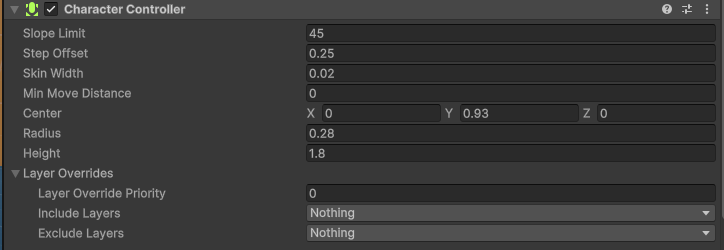
- 컴포넌트 변수에 대한 설명입니다.
- Slope Limit : 캐릭터가 올라갈 수 있는 최대 경사각 입니다.
- Step Offset : 캐릭터가 걸어 올라갈 수 있는 최대 계단 높이입니다.
- Skin Width : 캐릭터 콜라이더의 외부에 설정되는 추가적인 버퍼 공간입니다. 충돌 감지의 정확성과 캐릭터의 안정성을 보장하는 데 사용됩니다.
- Min Move Distance : 캐릭터가 이동하기 위해 필요한 최소 거리입니다. 이 값보다 작은 이동은 무시됩니다.
- Center : 캐릭터 콜라이더의 중심 위치를 지정해줍니다.
- Radius : 캡슐형 콜라이더의 반지름입니다.
- Height : 캡슐형 콜라이더의 높이입니다.
- Layer Overrides
- Layer Override Property : 레이어 우선 순위의 설정을 제어합니다.
- Include Layers : 캐릭터 콜라이더가 충돌을 포함해야 할 레이어를 선택합니다.
- Exclude Layers : 캐릭터 콜라이더가 충돌을 무시해야 할 레이어을 선택합니다.
Third Person Controller
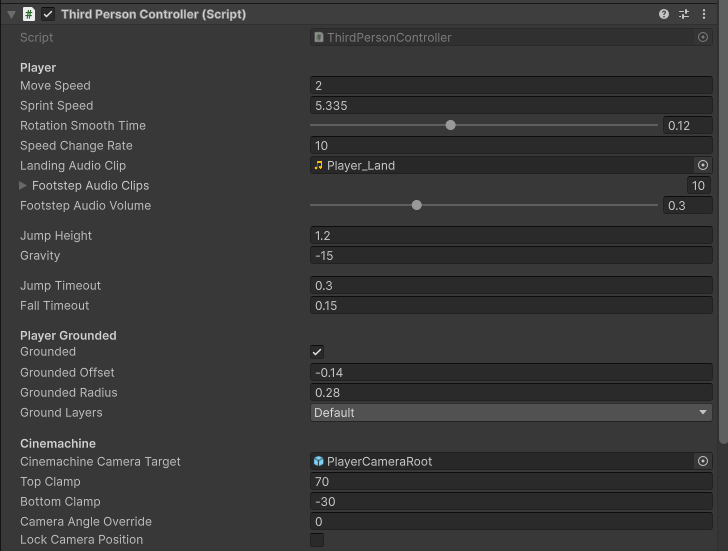
- 3인칭 캐릭터의 움직임, 점프, 중력, 지면 체크, 카메라 회전, 애니메이션 등을
통합적으로 관리하는 이 에셋의 핵심 클래스 입니다.
변수 설명
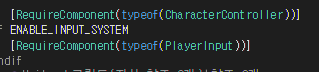
RequireComponent 로 요구되는 컴포넌트를 자동으로 추가해줍니다.
       [Header("Player")]
       [Tooltip("캐릭터의 기본 이동 속도 m/s")]
       public float MoveSpeed = 2.0f;

       [Tooltip("캐릭터가 달릴 때 속도 m/s")]
       public float SprintSpeed = 5.335f;

       [Tooltip("캐릭터가 회전할 때의 부드러움 정도")]
       [Range(0.0f, 0.3f)]
       public float RotationSmoothTime = 0.12f;

       [Tooltip("캐릭터 속도의 가감속 속도")]
       public float SpeedChangeRate = 10.0f;

       [Tooltip("캐릭터가 착지할 때 재생될 오디오 클립")]
       public AudioClip LandingAudioClip;
       [Tooltip("캐릭터가 걸을 때 발소리로 재생될 오디오 클립 배열")]
       public AudioClip[] FootstepAudioClips;
       [Tooltip("발소리의 볼륨")]
       [Range(0, 1)] public float FootstepAudioVolume = 0.5f;

       [Space(10)]
       [Tooltip("점프 높이")]
       public float JumpHeight = 1.2f;

       [Tooltip("캐릭터에 적용되는 중력 값")]
       public float Gravity = -15.0f;

       [Space(10)]
       [Tooltip("점프 상태로 전환되는 데 걸리는 시간")]
       public float JumpTimeout = 0.50f;

       [Tooltip("낙하 상태로 전환되는 데 걸리는 시간")]
       public float FallTimeout = 0.15f;

       [Header("Player Grounded")]
       [Tooltip("캐릭터가 현재 지면에 닿아있는지 여부")]
       public bool Grounded = true;

       [Tooltip("지면 체크를 위한 위치 오프셋")]
       public float GroundedOffset = -0.14f;

       [Tooltip("지면 체크를 위한 반경")]
       public float GroundedRadius = 0.28f;

       [Tooltip("어떤 레이어를 지면으로 간주할지 설정")]
       public LayerMask GroundLayers;

       [Header("Cinemachine")]
       [Tooltip("Cinemachine 카메라가 따라다니는 대상")]
       public GameObject CinemachineCameraTarget;

       [Tooltip("카메라가 위로 회전 가능한 최대/최소 각도")]
       public float TopClamp = 70.0f;

       [Tooltip("카메라가 아래로 회전 가능한 최대/최소 각도")]
       public float BottomClamp = -30.0f;

       [Tooltip("카메라의 기본 각도를 강제로 설정")]
       public float CameraAngleOverride = 0.0f;

       [Tooltip("카메라 위치를 고정할지 여부")]
public bool LockCameraPosition = false; 입력하세요- 각 변수가 뜻하는 내용입니다.
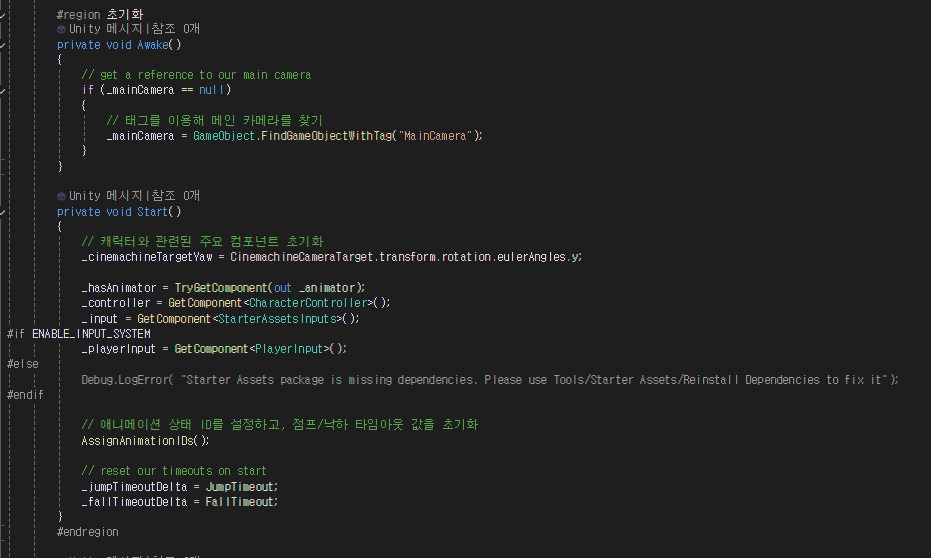
- 초기화 부분을 보면 Awake() 에서는 Tag를 이용하여 메인 카메라를 찾습니다.
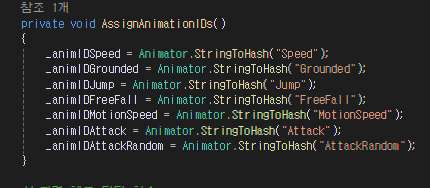
- Start() 부분에서는 그 외 필요한 정보들을 초기화 시키며 애니메이션의 상태 ID를 설정해줍니다.
지면 체크 담당 함수
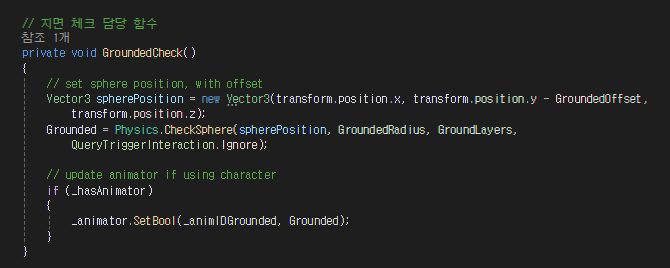
- 지면 충돌 감지를 Physics.CheckSphere를 사용해 특정 위치에 Sphere를 생성하고 이 공간이 GroundLayers 레이어에 속하는 지면과 충돌하는지 확인합니다.
- Animator를 사용중이라면 _animIDGrounded 를 통해 애니메이터로 전달합니다.
카메라 조작 담당 함수
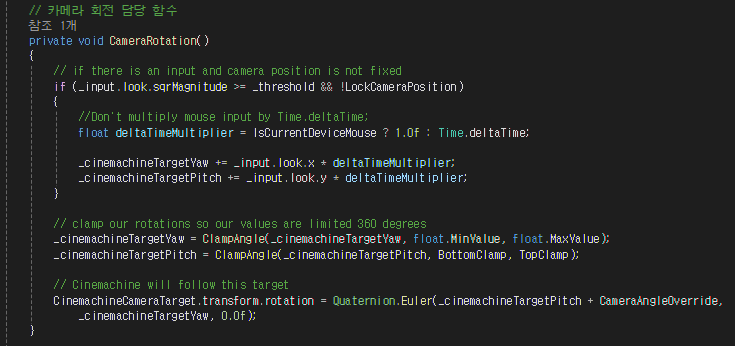
- Update() 에서 호출하는 CameraRotation() 함수입니다.
if (_input.look.sqrMagnitude >= _threshold && !LockCameraPosition)
{
    //Don't multiply mouse input by Time.deltaTime;
    float deltaTimeMultiplier = IsCurrentDeviceMouse ? 1.0f : Time.deltaTime;

    _cinemachineTargetYaw += _input.look.x * deltaTimeMultiplier;
    _cinemachineTargetPitch += _input.look.y * deltaTimeMultiplier;
}
- 입력 값을 확인하고 입력이 존재하면 카메라의 회전각도를 계산합니다.
- _threshold : 입력이 너무 작을 경우에 무시하기 위한 최소값 입니다.
- LockCameraPosition (카메라 위치 고정) : 이 변수가 활성화 되어있다면 입력을 무시합니다.
- deltaTimeMultiplier : 마우스와 컨트롤러의 입력의 속도 차이를 보완하기 위해 사용합니다.
- 마우스 입력 (IsCurrentDeviceMouse == true) : 시간에 따라 변하지 않도록 곱하지 않습니다.
- 컨트롤러 입력 (Time.deltaTime) : Time.deltaTime을 곱하여 부드러운 회전을 구현합니다.
_cinemachineTargetYaw = ClampAngle(_cinemachineTargetYaw, float.MinValue, float.MaxValue);
_cinemachineTargetPitch = ClampAngle(_cinemachineTargetPitch, BottomClamp, TopClamp);
- 계산된 카메라의 회전 값을 제한하여 지나친 회전이 발생하지 않도록 합니다.
- _cinemachineTargetPitch: 카메라의 상하 회전을 제한
- BottomClamp: 아래로 회전할 수 있는 최소 각도
- TopClamp: 위로 회전할 수 있는 최대 각도
- ClampAngle( ) : 주어진 값을 지정된 범위(Min, Max)로 제한하는 역할을 합니다.
CinemachineCameraTarget.transform.rotation = Quaternion.Euler(
    _cinemachineTargetPitch + CameraAngleOverride,
    _cinemachineTargetYaw,
    0.0f
);
- Cinemachine 카메라가 따라다니는 타겟의 회전을 업데이트합니다
- _cinemachineTargetPitch: 상하(Pitch) 회전 각도
- _cinemachineTargetYaw: 좌우(Yaw) 회전 각도
- CameraAngleOverride: 추가적으로 설정된 고정 각도
- 코드 흐름
- 입력 확인 - > 회전 계산 -> 회전 각도 제한 -> Cinemachine 연동
이동 및 회전 담당 함수
        // 이동 및 회전 담당 함수
        private void Move()
        {
            // set target speed based on move speed, sprint speed and if sprint is pressed
            float targetSpeed = _input.sprint ? SprintSpeed : MoveSpeed;

            // a simplistic acceleration and deceleration designed to be easy to remove, replace, or iterate upon

            // note: Vector2's == operator uses approximation so is not floating point error prone, and is cheaper than magnitude
            // if there is no input, set the target speed to 0
            if (_input.move == Vector2.zero) targetSpeed = 0.0f;

            // a reference to the players current horizontal velocity
            float currentHorizontalSpeed = new Vector3(_controller.velocity.x, 0.0f, _controller.velocity.z).magnitude;

            float speedOffset = 0.1f;
            float inputMagnitude = _input.analogMovement ? _input.move.magnitude : 1f;

            // accelerate or decelerate to target speed
            if (currentHorizontalSpeed < targetSpeed - speedOffset ||
                currentHorizontalSpeed > targetSpeed + speedOffset)
            {
                // creates curved result rather than a linear one giving a more organic speed change
                // note T in Lerp is clamped, so we don't need to clamp our speed
                _speed = Mathf.Lerp(currentHorizontalSpeed, targetSpeed * inputMagnitude,
                    Time.deltaTime * SpeedChangeRate);

                // round speed to 3 decimal places
                _speed = Mathf.Round(_speed * 1000f) / 1000f;
            }
            else
            {
                _speed = targetSpeed;
            }

            _animationBlend = Mathf.Lerp(_animationBlend, targetSpeed, Time.deltaTime * SpeedChangeRate);
            if (_animationBlend < 0.01f) _animationBlend = 0f;

            // normalise input direction
            Vector3 inputDirection = new Vector3(_input.move.x, 0.0f, _input.move.y).normalized;

            // note: Vector2's != operator uses approximation so is not floating point error prone, and is cheaper than magnitude
            // if there is a move input rotate player when the player is moving
            if (_input.move != Vector2.zero)
            {
                _targetRotation = Mathf.Atan2(inputDirection.x, inputDirection.z) * Mathf.Rad2Deg +
                                  _mainCamera.transform.eulerAngles.y;
                float rotation = Mathf.SmoothDampAngle(transform.eulerAngles.y, _targetRotation, ref _rotationVelocity,
                    RotationSmoothTime);

                // rotate to face input direction relative to camera position
                transform.rotation = Quaternion.Euler(0.0f, rotation, 0.0f);
            }


            Vector3 targetDirection = Quaternion.Euler(0.0f, _targetRotation, 0.0f) * Vector3.forward;

            // move the player
            _controller.Move(targetDirection.normalized * (_speed * Time.deltaTime) +
                             new Vector3(0.0f, _verticalVelocity, 0.0f) * Time.deltaTime);

            // update animator if using character
            if (_hasAnimator)
            {
                _animator.SetFloat(_animIDSpeed, _animationBlend);
                _animator.SetFloat(_animIDMotionSpeed, inputMagnitude);
            }
        }
- 캐릭터의 이동과 회전을 담당하는 함수입니다.
float targetSpeed = _input.sprint ? SprintSpeed : MoveSpeed;

if (_input.move == Vector2.zero) targetSpeed = 0.0f;
- 이동속도 계산 부분입니다.
- _input.sprint가 true이면 달리기 속도를 아니면 기본 이동속도를 사용하며
입력값이 없는 경우에는 속도를 0으로 설정해줍니다.
float currentHorizontalSpeed = new Vector3(_controller.velocity.x, 0.0f, _controller.velocity.z).magnitude;

float speedOffset = 0.1f;
float inputMagnitude = _input.analogMovement ? _input.move.magnitude : 1f;

if (currentHorizontalSpeed < targetSpeed - speedOffset ||
    currentHorizontalSpeed > targetSpeed + speedOffset)
{
    _speed = Mathf.Lerp(currentHorizontalSpeed, targetSpeed * inputMagnitude,
        Time.deltaTime * SpeedChangeRate);

    _speed = Mathf.Round(_speed * 1000f) / 1000f;
}
else
{
    _speed = targetSpeed;
}
- 현재 속도와 목표 속도를 비교하는 부분입니다.
- currentHorizontalSpeed : 현재 캐릭터의 수평 속도를 계산합니다.
- speedOffset : 오차 값
- inputMegnitube : 입력 강도를 나타냅니다. 게임 컨트롤러의 입력의 경우에만 입력 값의 크기를 반영하며 키보드의 경우에는 항상 1.0f를 사용합니다.
- Mathf.Lerp를 사용하여 가속/감속 처리를 합니다.
_animationBlend = Mathf.Lerp(_animationBlend, targetSpeed, Time.deltaTime * SpeedChangeRate);
if (_animationBlend < 0.01f) _animationBlend = 0f;
- 애니메이션의 속도를 목표 속도에 맞춰 보간해주는 부분입니다.
위에 올리셔서 Blend의 Speed 값이 어떻게 설정되었는지 확인하시면 됩니다.
Idle : 0 Walk : 2 Run : 6
Vector3 inputDirection = new Vector3(_input.move.x, 0.0f, _input.move.y).normalized;

if (_input.move != Vector2.zero)
{
    _targetRotation = Mathf.Atan2(inputDirection.x, inputDirection.z) * Mathf.Rad2Deg +
                      _mainCamera.transform.eulerAngles.y;
    float rotation = Mathf.SmoothDampAngle(transform.eulerAngles.y, _targetRotation, ref _rotationVelocity,
        RotationSmoothTime);

    transform.rotation = Quaternion.Euler(0.0f, rotation, 0.0f);
}
- 이동 방향을 계산해주는 부분입니다.
- _input.move의 값을 기반으로 방향 벡터를 정규화하여 일정하게 만들어줍니다.
- 입력 방향과 카메라의 현재 방향을 기반으로 회전각도를 계산합니다.
- Mathf.SmootDampAngle()을 사용하여 부드러운 회전을 구현합니다.
Vector3 targetDirection = Quaternion.Euler(0.0f, _targetRotation, 0.0f) * Vector3.forward;

_controller.Move(targetDirection.normalized * (_speed * Time.deltaTime) +
                 new Vector3(0.0f, _verticalVelocity, 0.0f) * Time.deltaTime);
- 이동을 처리해주는 부분입니다.
- 이동 방향을 계산하고 속도를 곱해주어 최종 이동 거리를 결정합니다.
if (_hasAnimator)
{
    _animator.SetFloat(_animIDSpeed, _animationBlend);
    _animator.SetFloat(_animIDMotionSpeed, inputMagnitude);
}
- 애니메이터 업데이트
- 애니메이터에 현재 속도와 입력 강도를 전달해줍니다.
점프 및 중력 담당 함수
   // 점프 및 중력 담당 함수
   private void JumpAndGravity()
   {
       if (Grounded)
       {
           // reset the fall timeout timer
           _fallTimeoutDelta = FallTimeout;

           // update animator if using character
           if (_hasAnimator)
           {
               _animator.SetBool(_animIDJump, false);
               _animator.SetBool(_animIDFreeFall, false);
           }

           // stop our velocity dropping infinitely when grounded
           if (_verticalVelocity < 0.0f)
           {
               _verticalVelocity = -2f;
           }

           // Jump
           if (_input.jump && _jumpTimeoutDelta <= 0.0f)
           {
               // the square root of H * -2 * G = how much velocity needed to reach desired height
               _verticalVelocity = Mathf.Sqrt(JumpHeight * -2f * Gravity);

               // update animator if using character
               if (_hasAnimator)
               {
                   _animator.SetBool(_animIDJump, true);
               }
           }

           // jump timeout
           if (_jumpTimeoutDelta >= 0.0f)
           {
               _jumpTimeoutDelta -= Time.deltaTime;
           }
       }
       else
       {
           // reset the jump timeout timer
           _jumpTimeoutDelta = JumpTimeout;

           // fall timeout
           if (_fallTimeoutDelta >= 0.0f)
           {
               _fallTimeoutDelta -= Time.deltaTime;
           }
           else
           {
               // update animator if using character
               if (_hasAnimator)
               {
                   _animator.SetBool(_animIDFreeFall, true);
               }
           }

           // if we are not grounded, do not jump
           _input.jump = false;
       }

       // apply gravity over time if under terminal (multiply by delta time twice to linearly speed up over time)
       if (_verticalVelocity < _terminalVelocity)
       {
           _verticalVelocity += Gravity * Time.deltaTime;
       }
   }
- 점프와 중력을 처리하는 함수입니다.
if (Grounded)
{
    // reset the fall timeout timer
    _fallTimeoutDelta = FallTimeout;

    // update animator if using character
    if (_hasAnimator)
    {
        _animator.SetBool(_animIDJump, false);
        _animator.SetBool(_animIDFreeFall, false);
    }

    // stop our velocity dropping infinitely when grounded
    if (_verticalVelocity < 0.0f)
    {
        _verticalVelocity = -2f;
    }
}
- 캐릭터가 찾기 상태인 경우에 낙하 타임아웃 초기화, 애니메이션 업데이트, 수직 속도 초기화를 해줍니다.
if (_input.jump && _jumpTimeoutDelta <= 0.0f)
{
    // the square root of H * -2 * G = how much velocity needed to reach desired height
    _verticalVelocity = Mathf.Sqrt(JumpHeight * -2f * Gravity);

    // update animator if using character
    if (_hasAnimator)
    {
        _animator.SetBool(_animIDJump, true);
    }
}
- 점프 입력이 활성화되고 점프 타이머가 0이하인 경우에 점프를 실행하여 줍니다.
- 점프 속도 계산으로는 Mathf.Sqrt(JumpHeight -2f Gravity)를 사용하여 점프 초기 속도를 계산하고 애니메이션 상태를 활성화 합니다.
if (_jumpTimeoutDelta >= 0.0f)
{
    _jumpTimeoutDelta -= Time.deltaTime;
}
- 점프 후 다음 점프를 수행하기까지 대기하는 시간입니다. 프레임마다 Time.deltaTime 만큼 빼줍니다.
else
{
    // reset the jump timeout timer
    _jumpTimeoutDelta = JumpTimeout;

    // fall timeout
    if (_fallTimeoutDelta >= 0.0f)
    {
        _fallTimeoutDelta -= Time.deltaTime;
    }
    else
    {
        // update animator if using character
        if (_hasAnimator)
        {
            _animator.SetBool(_animIDFreeFall, true);
        }
    }

    // if we are not grounded, do not jump
    _input.jump = false;
}
- 캐릭터가 착지 상태가 아닌 경우에 점프 타이머를 초기화, 낙하 상태 처리, 점프 입력 초기화를 해주며 애니메이션을 업데이트 해줍니다.
if (_verticalVelocity < _terminalVelocity)
{
    _verticalVelocity += Gravity * Time.deltaTime;
}
- 중력을 지속적으로 적용시켜 캐릭터가 자연스럽게 낙하하도록 합니다.
애니메이션 이벤트 함수
        // 애니메이션 이벤트 함수
        private void OnFootstep(AnimationEvent animationEvent)
        {
            if (animationEvent.animatorClipInfo.weight > 0.5f)
            {
                if (FootstepAudioClips.Length > 0)
                {
                    var index = Random.Range(0, FootstepAudioClips.Length);
                    AudioSource.PlayClipAtPoint(FootstepAudioClips[index], transform.TransformPoint(_controller.center), FootstepAudioVolume);
                }
            }
        }

        private void OnLand(AnimationEvent animationEvent)
        {
            if (animationEvent.animatorClipInfo.weight > 0.5f)
            {
                AudioSource.PlayClipAtPoint(LandingAudioClip, transform.TransformPoint(_controller.center), FootstepAudioVolume);
            }
        }
- 애니메이션 이벤트에 걸릴 함수로 사운드를 재생시키는 역할을 합니다.
- FootStep의 경우 Random.Range를 통해 랜덤 footStepSound를 재생시켜줍니다.
Basic Rigid Body Push

- CharacterController가 움직이는 동안, 특정 레이어에 속하는 Rigidbody를
밀 수 있도록 처리하는 클래스 입니다.
public class BasicRigidBodyPush : MonoBehaviour
{
	public LayerMask pushLayers;
	public bool canPush;
	[Range(0.5f, 5f)] public float strength = 1.1f;

	private void OnControllerColliderHit(ControllerColliderHit hit)
	{
		if (canPush) PushRigidBodies(hit);
	}

	private void PushRigidBodies(ControllerColliderHit hit)
	{
		// https://docs.unity3d.com/ScriptReference/CharacterController.OnControllerColliderHit.html

		// make sure we hit a non kinematic rigidbody
		Rigidbody body = hit.collider.attachedRigidbody;
		if (body == null || body.isKinematic) return;

		// make sure we only push desired layer(s)
		var bodyLayerMask = 1 << body.gameObject.layer;
		if ((bodyLayerMask & pushLayers.value) == 0) return;

		// We dont want to push objects below us
		if (hit.moveDirection.y < -0.3f) return;

		// Calculate push direction from move direction, horizontal motion only
		Vector3 pushDir = new Vector3(hit.moveDirection.x, 0.0f, hit.moveDirection.z);

		// Apply the push and take strength into account
		body.AddForce(pushDir * strength, ForceMode.Impulse);
	}
}
- pushLayers : Rigidbody를 밀 수 있는 대상의 레이어를 설정합니다
- canPush : 밀기 동작을 활성화/비활성화하는 플래그입니다.
- strength : 힘의 크기를 조정하는 변수로, 충돌 시 Rigidbody에 적용되는 힘의 강도를 설정합니다.
private void OnControllerColliderHit(ControllerColliderHit hit)
{
    if (canPush) PushRigidBodies(hit);
}
- CharacterController가 다른 Collider와 충돌할 때 호출되는 Unity의 이벤트 메서드입니다.
private void PushRigidBodies(ControllerColliderHit hit)
{
    // https://docs.unity3d.com/ScriptReference/CharacterController.OnControllerColliderHit.html

    // make sure we hit a non kinematic rigidbody
    Rigidbody body = hit.collider.attachedRigidbody;
    if (body == null || body.isKinematic) return;
- hit.collider.attachedRigidbody : 충돌한 Collider에 연결된 RigidBody를 가져옵니다.
// 레이어 필터링
var bodyLayerMask = 1 << body.gameObject.layer;
if ((bodyLayerMask & pushLayers.value) == 0) return;

// 충돌 방향 제한
if (hit.moveDirection.y < -0.3f) return;

// 밀기 방향 및 힘 적용
Vector3 pushDir = new Vector3(hit.moveDirection.x, 0.0f, hit.moveDirection.z);
body.AddForce(pushDir * strength, ForceMode.Impulse);
Starter Assets Inputs
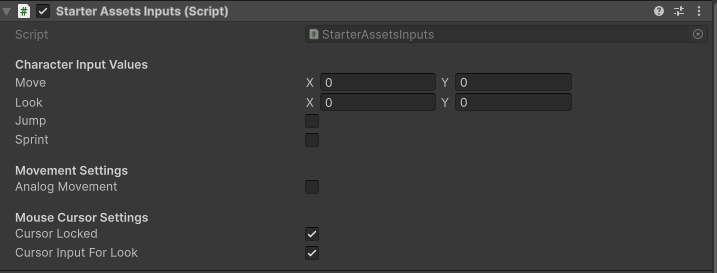
namespace StarterAssets
{
	public class StarterAssetsInputs : MonoBehaviour
	{
		[Header("Character Input Values")]
		public Vector2 move;
		public Vector2 look;
		public bool jump;
		public bool sprint;

		[Header("Movement Settings")]
		public bool analogMovement;

		[Header("Mouse Cursor Settings")]
		public bool cursorLocked = true;
		public bool cursorInputForLook = true;

#if ENABLE_INPUT_SYSTEM
		public void OnMove(InputValue value)
		{
			MoveInput(value.Get<Vector2>());
		}

		public void OnLook(InputValue value)
		{
			if(cursorInputForLook)
			{
				LookInput(value.Get<Vector2>());
			}
		}

		public void OnJump(InputValue value)
		{
			JumpInput(value.isPressed);
		}

		public void OnSprint(InputValue value)
		{
			SprintInput(value.isPressed);
		}
#endif


		public void MoveInput(Vector2 newMoveDirection)
		{
			move = newMoveDirection;
		}

		public void LookInput(Vector2 newLookDirection)
		{
			look = newLookDirection;
		}

		public void JumpInput(bool newJumpState)
		{
			jump = newJumpState;
		}

		public void SprintInput(bool newSprintState)
		{
			sprint = newSprintState;
		}

		private void OnApplicationFocus(bool hasFocus)
		{
			SetCursorState(cursorLocked);
		}

		private void SetCursorState(bool newState)
		{
			Cursor.lockState = newState ? CursorLockMode.Locked : CursorLockMode.None;
		}
	}

}
- 캐릭터의 입력을 처리하는 역할을 합니다.
- Input System을 사용하여 사용자 입력을 받아 캐릭터의 움직임, 시야 회전, 점프, 달리기 등의 동작을 위한 값을 저장합니다
Player Input
- 블로그에 설명한 글이 있어 링크로 대체합니다.
- New Input System : Link
Asset Test
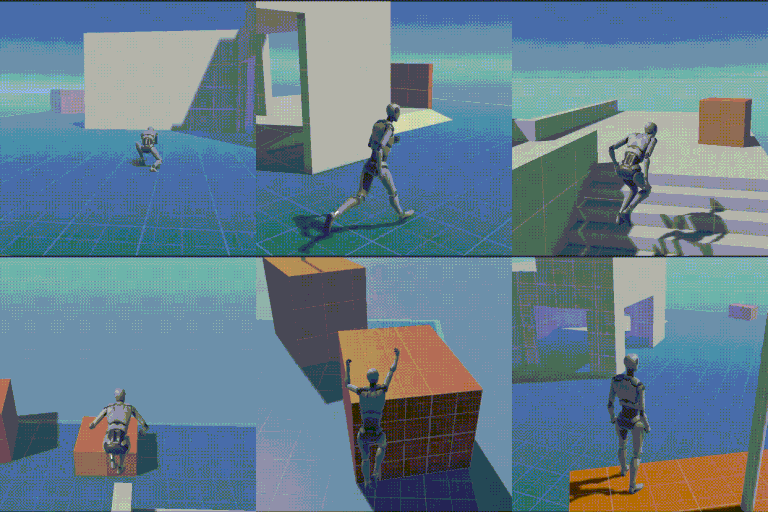
느낀 점
3D Project를 할 때 유용하게 사용할 에셋인 것 같습니다.
초기 이동 관련과 카메라의 이동이 구현되어 있어 따로 구현에 시간을 써도 되지 않는게 큰 장점인 것 같으며 확장성도 제가 느끼기엔 좋은 것 같아 추가하고 싶은 기능을 쉽게 추가가 가능한 것 같습니다.
실제로 다른 기능을 추가하였구요..
Asset을 Import하여 기능을 사용하는 건 AntiCheat 밖에 없던 것 같은데 실제로 사용해보니
굉장히 편리하다 느낍니다..

Unity 게임 개발자를 준비하는 취업준비생입니다..