
viewModeld은 화면(UI)에 보여지는 데이터를 관리하는 모델입니다. 기존에 view(Activity나Fragment)에서 처리했던 버튼 클릭시 데이터변경과 같은 로직을 viewModel로 보내고, view에서는
viewModel을 불러와서 사용하는 합니다.

깃허브저장소 fragment4에서 확인할 수 있습니다.
기존 구현
 val giftData : ArrayList<GiftData> = arrayListOf()

        val adapter = GiftAdapter(giftData)
        binding.recycler.adapter = adapter
        binding.recycler.layoutManager = LinearLayoutManager(this.context)

           binding.itemButton.setOnClickListener {
                val itemName : String = binding.itemName.text.toString()
                val itemPrice : Double = binding.itemPrice.text.toString().toDouble()
                //데이터 넣기
                giftData.add(GiftData(itemName, itemPrice))
                //recyclerview로 보여주기
                adapter.notifyItemInserted(giftData.size-1)
            }
viewModel 적용
1. viwModel
class Test4ViewModel : ViewModel() {
   var itemList = ArrayList<GiftData>()

    fun btnClicked(name: String, price: Double){
        itemList.add(GiftData(name, price))
    }
}
2. Fragment
class Test4Fragment : Fragment() {
   private lateinit var binding : FragmentTest4Binding
    private val viewModel by viewModels<Test4ViewModel>()

    override fun onCreate(savedInstanceState: Bundle?) {
        super.onCreate(savedInstanceState)
    }

    override fun onCreateView(
        inflater: LayoutInflater, container: ViewGroup?,
        savedInstanceState: Bundle?
    ): View? {
        // Inflate the layout for this fragment
        binding = DataBindingUtil.inflate(inflater, R.layout.fragment_test4, container, false)


   viewModel.itemList = arrayListOf()
val adapter = GiftAdapter(viewModel.itemList)
          binding.recycler.adapter = adapter
          binding.recycler.layoutManager = LinearLayoutManager(this.context)
        binding.itemButton.setOnClickListener {
            val itemName : String = binding.itemName.text.toString()
            val itemPrice : Double = binding.itemPrice.text.toString().toDouble()

           viewModel.btnClicked(itemName, itemPrice)
        adapter.notifyItemInserted(viewModel.itemList.size-1)
        }
변경사항
1. private val viewModel viewModels() 선언
2.viewModel.itemList = arrayListOf():viewModel의 itemList 선언
3. viewModel.btnClicked(itemName, itemPrice) viewModel의 btnClicked()메소드 실행
4. adapter.notifyItemInserted(viewModel.itemList.size-1)
어댑터에 연결하여 보여주기
문제점
- recyclerview에 아이템 띄우는 것은 여전히 fragment에서 처리해야 한다는 점
adapter.notifyItemInserted(viewModel.itemList.size-1)--> 이 부분 viewModel에 적용안됨 - adapter에 직접 접근해서 adapter.giftList.add()에는 입력받은 값을 표현할 수 없다는 점
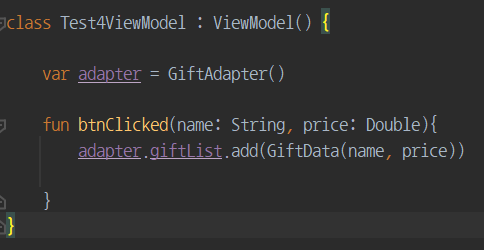
Livedata 추가하기
viewModel과 recyclerview 어떻게 연결할까 고민하는 중에 도움 받은 사이트
[Kotlin] RecyclerView에 LiveData/ViewModel 적용하기
1. viewMedel에 LiveData 추가
class Test4ViewModel : ViewModel() {

  private var _itemList = MutableLiveData<ArrayList<GiftData>>()  //mutable 변경하는 한 값
  val itemList : LiveData<ArrayList<GiftData>> //관찰가능
      get() = _itemList

  var item = arrayListOf<GiftData>()

  fun btnClicked(items :  GiftData){
    item.add(items)
      _itemList.value = item //live 데이터를 입력된 item 데이터로 변견

  }
}
private var _itemList = MutableLiveData<ArrayList<GiftData>>()
MutableLiveData에는 변경 가능 한 값이 들어갑니다. (그래서 var)
val itemList : LiveData<ArrayList<GiftData>>LiveData는 관찰만 가능합니다. (그래서 val) 직접 값을 변경할 수 없습니다.
-
그럼 LiveData통해 데이터 변화 감지한다는 말을 무슨말인가?
LiveData가 직접 변하는 것이 아니라 MutableLiveData의 값이 변하면 그 변한 값을 LiveData가 관찰해서(받아서) 보여주는 것 입니다.
val itemList : LiveData<ArrayList<GiftData>> get() = _itemList여기서 보면 Mutable인 _itemList값을 liveData인 itemList에 담씁니다.
이 LiveData를 View(Activity/Fragment)에서 관찰해서(observer패턴 이용해서) 값의 변화를 확인합니다.
-->
viewModel.itemList.observe(this, Observer {
adapter.set(it)
})2. Fragment : 버튼 클릭시 로직 수정
 binding.itemButton.setOnClickListener {
          val itemName : String = binding.itemName.text.toString()
          val itemPrice : Double = binding.itemPrice.text.toString().toDouble()

          val item = GiftData(itemName, itemPrice)

          viewModel.btnClicked(item)

          viewModel.itemList.observe(this, Observer {
             adapter.set(it)
          })

      }
viewModel.itemList.observe(this, Observer { adapter.setData(it) })
apater 내부에 있는 setData()함수에 파라미터값으로 자기자신(itmeList = it)을 받습니다.
사용자가 입력한 값(이 값이 itemList에 담기고) 변할때마다 관찰(observe)해여 변경된 값을 보여줍니다.
adapter에 setData를 추가해주어야 합니다.
3. Adapter에 setData() 추가하기
var giftList = ArrayList<GiftData>()

 fun set(newData : ArrayList<GiftData>){
      giftList = newData
      notifyDataSetChanged()
  }
이 함수로 LiveData를 recyclerview로 가져온 후 기존데이터를 새로운 데이터로 바꿔주는 기능을 만듭니다.
notifyItemInserted() 또는 notifyDataSetChanged() 메소드는 뷰모델에 적용이 안되므로, adapter에서 지정해줍니다.
