과거의 싸이월드를 추억하며 사용자들이 자신의 마이페이지를 자유롭게 꾸미고, 소통할 수 있는 플랫폼을 프로젝트로 시작하였다.
각 기능들 중 플레이리스트와 테마변경 기능을 맡아 진행하게되었다.
1. SPOTIFY API 연결 및 불러오기
1_1.env파일에 클라이언트 정보 넣기
환경변수로 클라이언트 아이디와 비밀번호를 저장해줍니다.
NEXT_PUBLIC_SPOTIFY_CLIENT_ID=스포티파이 API 클라이언트 아이디
NEXT_PUBLIC_SPOTIFY_CLIENT_SECRET=스포티파이 API 클라이언트 비밀번호
1_2.스포티파이 토큰요청하기(사용권한)
- fetch함수를 사용하여 Spotify API에 POST 요청
- headers에서 Content-Type 의 설정은 POST 요청 데이터를 URL로 변환을 요구
- URLSearchParams로 데이터를 key=value방식으로 변환
- client_credentials는 Spotify API에 접근하기 위해 사용되는 방식
- clientId 뒤에 ?? "" 은 해당값이 없을 경우 빈문자열을 출력한다는 뜻
const fetchSpotifyData = async () => {
    const tokenRes = await fetch("https://accounts.spotify.com/api/token", {
      method: "POST",
      headers: {  //POST 요청 데이터를 URL로 변환
        "Content-Type": "application/x-www-form-urlencoded"
      },
      body: new URLSearchParams({
        grant_type: "client_credentials",
        client_id: clientId ?? "",
        client_secret: clientSecret ?? ""
      })
    });

	// 요청실패시의 유효성검사
    if (!tokenRes.ok) throw new Error("토큰 가져오기 실패");

    const { access_token } = await tokenRes.json();
  };
headers - 서버에 추가 정보를 주는 역할
- Content-Type : 서버에 요청하여 데이터의 형식을 알려주는 역할
- Authentication(인증) : API 요청을 승인하거나 권한을 부여받기 위해 사용
- Authorization(허가) :
- Cookie : 클라이언트 서버에 쿠키를 보낼 때 활용, 사용자의 세션 정보를 유지용
- User-Agent(유저대리인) : 클라이언트의 브라우저나 환경을 서버에 알려주는 역할
1_3.스포티파이 데이터 요청
-
원하는 트랙의 아이디를 가져와서 데이터를 요청
-
전달받은 토큰으로 허가
-
응답실패시 에러
-
응답 데이터 JSON형식 으로 변환 후 변수에 저장
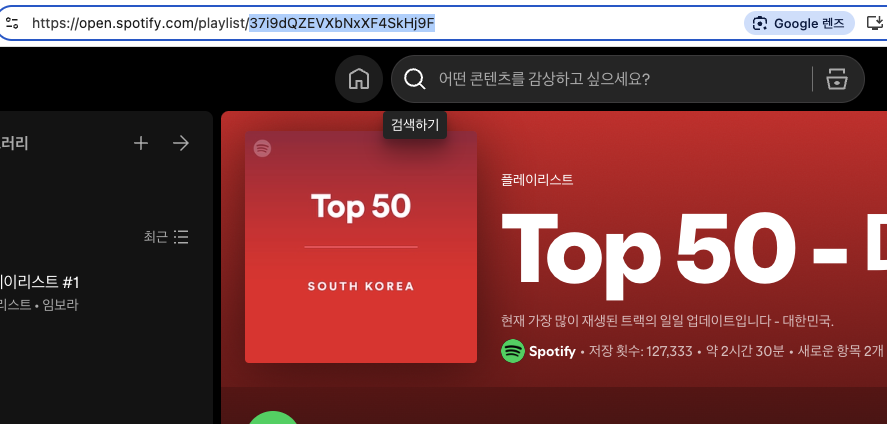
   const spotifyRes = await fetch("https://api.spotify.com/v1/playlists/37i9dQZEVXbNxXF4SkHj9F", {
     headers: { // 토큰을 사용해서 신원을 증명
       Authorization: `Bearer ${access_token}`
     }
   });

   if (!spotifyRes.ok) throw new Error("스포티파이 데이터 패치 실패");

   const data = await spotifyRes.json();
   return data.tracks.items;
2. SPOTIFY API 데이터 불러와서 웹에 노출시키기
- tanstack-query를 사용하여 스포티파이 특정 트랙 UI 상태를 처리
  const {
    data: spotifyList,
    isLoading: spotifyIsLoding,
    error: spotifyIsError
  } = useQuery({
    queryKey: ["spotifyData", clientId, clientSecret],
    queryFn: fetchSpotifyData
  });
3.특정아이디의 플리만 추출하기
- 비동기 함수로 supabase의 playlist테이블에서 userId(주소창의 아이디)와 같은값만 추출하여 play변수에 저장
- tanstack-query를 사용하여 플레이리스트 데이터값 UI 상태를 처리
//특정 사용자의 플레이리스트 데이터를 가져오기
  const fetchPlayList = async () => {
    const { data: play, error } = await browserClient.from("playlist").select("*").eq("user_id", userId);
    if (error) console.error("playlist 가져오기 오류:", error.message);
    return play;
  };

// 특정사용자의 플리 데이터로 UI 상태를 처리
  const {
    data: myPlayListData,
    isLoading: playListIsLoding,
    error: playListIsError
  } = useQuery({
    queryKey: ["myPlayList"], //고유키 지정
    queryFn: fetchPlayList,
    staleTime: 0 //관측할 때마다 새로운 요청
  });

  if (spotifyIsError || playListIsError) return <div>데이터 가져오기 오류...</div>;
  if (spotifyIsLoding || playListIsLoding) return <div>Loading...</div>;