통합 테스트
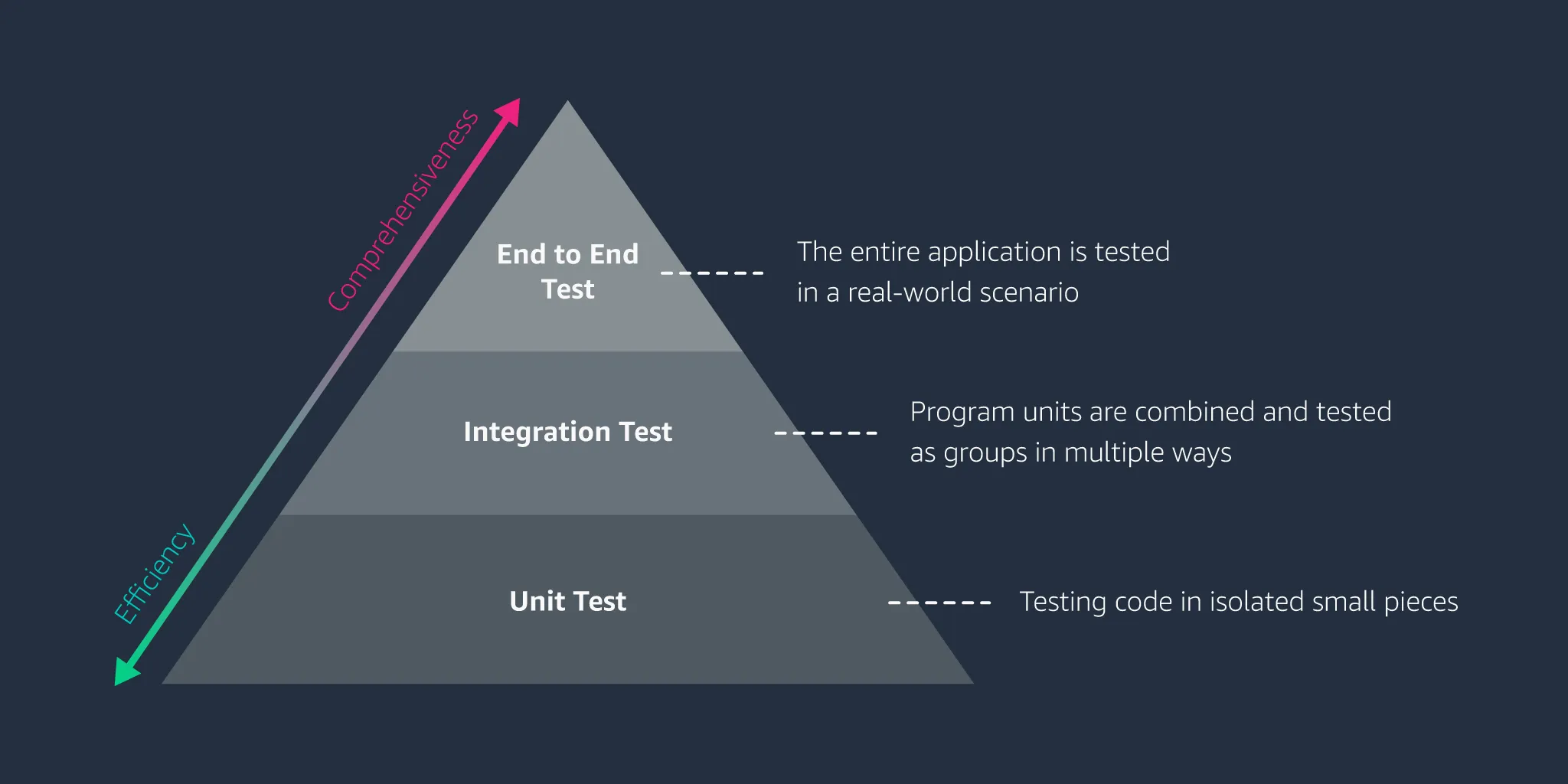
- 단위테스트의 경우 하나의 모듈 혹은 클래스의 대한 세세한 검증이 가능하지만 모듈간의 상호작용에서의 테스트는 불가능하다.
- 이를 테스트하는 방식을
통합테스트라고 한다. @SpringBootTest어노테이션을 사용하여 테스트 한다.
@SpringBootTest(
    webEnvironment = SpringBootTest.WebEnvironment.RANDOM_PORT) // 서버의 PORT 를 랜덤으로 설정합니다.
@TestInstance(TestInstance.Lifecycle.PER_CLASS) // 테스트 인스턴스의 생성 단위를 클래스로 변경합니다.
@TestMethodOrder(MethodOrderer.OrderAnnotation.class)
class ProductServiceIntegrationTest {

  @Autowired ProductService productService;
  @Autowired UserRepository userRepository;

  User user;
  ProductResponseDto createdProduct = null;
  int updatedMyPrice = -1;

  @Test
  @Order(1)
  @DisplayName("신규 관심상품 등록")
  void test1() {
    // given
    String title = "Apple <b>에어팟</b> 2세대 유선충전 모델 (MV7N2KH/A)";
    String imageUrl =
        "https://shopping-phinf.pstatic.net/main_1862208/18622086330.20200831140839.jpg";
    String linkUrl = "https://search.shopping.naver.com/gate.nhn?id=18622086330";
    int lPrice = 173900;
    ProductRequestDto requestDto = new ProductRequestDto(title, imageUrl, linkUrl, lPrice);
    user = userRepository.findById(1L).orElse(null);

    // when
    ProductResponseDto product = productService.createProduct(requestDto, user);

    // then
    assertNotNull(product.getId());
    assertEquals(title, product.getTitle());
    assertEquals(imageUrl, product.getImage());
    assertEquals(linkUrl, product.getLink());
    assertEquals(lPrice, product.getLprice());
    assertEquals(0, product.getMyprice());
    createdProduct = product;
  }

  @Test
  @Order(2)
  @DisplayName("신규 등록된 관심상품의 희망 최저가 변경")
  void test2() {
    // given
    Long productId = this.createdProduct.getId();
    int myPrice = 173000;
    ProductMypriceRequestDto requestDto = new ProductMypriceRequestDto();
    requestDto.setMyprice(myPrice);

    // when
    ProductResponseDto product = productService.updateProduct(productId, requestDto);

    // then
    assertNotNull(product.getId());
    assertEquals(this.createdProduct.getTitle(), product.getTitle());
    assertEquals(this.createdProduct.getImage(), product.getImage());
    assertEquals(this.createdProduct.getLink(), product.getLink());
    assertEquals(this.createdProduct.getLprice(), product.getLprice());
    assertEquals(myPrice, product.getMyprice());
    this.updatedMyPrice = myPrice;
  }

  @Test
  @Order(3)
  @DisplayName("회원이 등록한 모든 관심상품 조회")
  void test3() {
    // given
    // when
    Page<ProductResponseDto> productList = productService.getProducts(user, 0, 10, "id", false);

    // then
    // 1. 전체 상품에서 테스트에 의해 생성된 상품 찾아오기 (상품의 id 로 찾음)
    Long createdProductId = this.createdProduct.getId();
    ProductResponseDto foundProduct =
        productList.stream()
            .filter(product -> product.getId().equals(createdProductId))
            .findFirst()
            .orElse(null);

    // 2. Order(1) 테스트에 의해 생성된 상품과 일치하는지 검증
    assertNotNull(foundProduct);
    assertEquals(this.createdProduct.getId(), foundProduct.getId());
    assertEquals(this.createdProduct.getTitle(), foundProduct.getTitle());
    assertEquals(this.createdProduct.getImage(), foundProduct.getImage());
    assertEquals(this.createdProduct.getLink(), foundProduct.getLink());
    assertEquals(this.createdProduct.getLprice(), foundProduct.getLprice());

    // 3. Order(2) 테스트에 의해 myPrice 가격이 정상적으로 업데이트되었는지 검증
    assertEquals(this.updatedMyPrice, foundProduct.getMyprice());
  }
}@TestInstance(TestInstance.Lifecycle.PER_CLASS)- 기존의 테스트환경은 각 메소드별로 다른동작을하게 되어있기 때문에 일련의 테스트 메소드들에서 같은 필드값을 사용할 수 있도록 지정
  User user;
  ProductResponseDto createdProduct = null;
int updatedMyPrice = -1;- 해당 필드를 클래스 변수처럼 다룰수가 있다.
@TestMethodOrder(MethodOrderer.OrderAnnotation.class)- 해당 메소드들이 지정된 순서에따라 실행될수 있도록 선언.
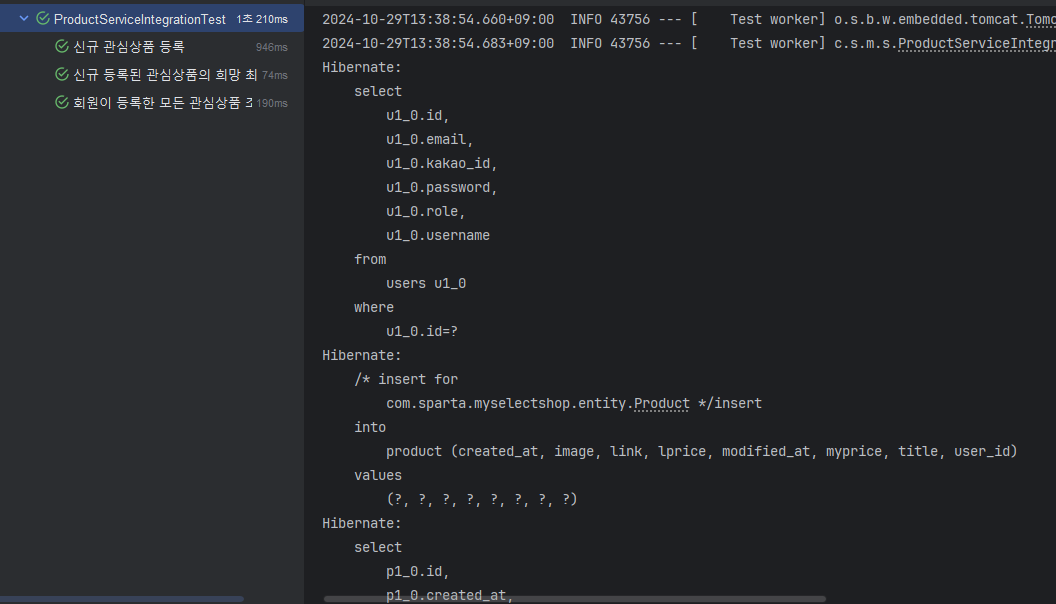
- 실제로 동일서버의 Spring Boot 환경이 실행되면서 IOC/DI 및 DB CRUD 가 일어나는것을 확인이 가능하다.
Controller는 어떻게 테스트할까?
- 현재 구현된 프로그램은 로그인 인증시스템 떄문에 컨트롤러를 테스트하기가 쉽지않다.
- 기존의 단위테스트에서 Mock 객체를 이용한건처럼 Mock Filter 또 한 구현이 가능하다.
package com.sparta.myselectshop.mvc;

import jakarta.servlet.*;
import jakarta.servlet.http.HttpServletRequest;
import org.springframework.security.core.Authentication;
import org.springframework.security.core.context.SecurityContextHolder;

import java.io.IOException;

public class MockSpringSecurityFilter implements Filter {
    @Override
    public void init(FilterConfig filterConfig) {}

    @Override
    public void doFilter(ServletRequest req, ServletResponse res, FilterChain chain) throws IOException, ServletException {
        SecurityContextHolder.getContext()
                .setAuthentication((Authentication) ((HttpServletRequest) req).getUserPrincipal());
        chain.doFilter(req, res);
    }

    @Override
    public void destroy() {
        SecurityContextHolder.clearContext();
    }
}
SecurityContextHolder.getContext() .setAuthentication((Authentication) ((HttpServletRequest) req).getUserPrincipal());
해당 구문이 제일 중요한것으로 SecurityContextHolder 내부에 인증이 완료된 가짜 인증객체를 넣어줄 수 있다.
@WebMvcTest(
    controllers = {UserController.class, ProductController.class},
    excludeFilters = {
      @ComponentScan.Filter(type = FilterType.ASSIGNABLE_TYPE, classes = WebSecurityConfig.class)
    })
class UserProductMvcTest {
  private MockMvc mvc;

  private Principal mockPrincipal;

  @Autowired private WebApplicationContext context;

  @Autowired private ObjectMapper objectMapper;

  @MockBean UserService userService;

  @MockBean KakaoService kakaoService;

  @MockBean ProductService productService;

  @MockBean FolderService folderService;

  @BeforeEach
  public void setup() {
    mvc =
        MockMvcBuilders.webAppContextSetup(context)
            .apply(springSecurity(new MockSpringSecurityFilter()))
            .build();
  }

  private void mockUserSetup() {
    // Mock 테스트 유져 생성
    String username = "sollertia4351";
    String password = "robbie1234";
    String email = "sollertia@sparta.com";
    UserRoleEnum role = UserRoleEnum.USER;
    User testUser = new User(username, password, email, role);
    UserDetailsImpl testUserDetails = new UserDetailsImpl(testUser);
    mockPrincipal =
        new UsernamePasswordAuthenticationToken(
            testUserDetails, "", testUserDetails.getAuthorities());
  }

  @Test
  @DisplayName("로그인 Page")
  void test1() throws Exception {
    // when - then
    mvc.perform(get("/api/user/login-page"))
        .andExpect(status().isOk())
        .andExpect(view().name("login"))
        .andDo(print());
  }

  @Test
  @DisplayName("회원 가입 요청 처리")
  void test2() throws Exception {
    // given
    MultiValueMap<String, String> signupRequestForm = new LinkedMultiValueMap<>();
    signupRequestForm.add("username", "sollertia4351");
    signupRequestForm.add("password", "robbie1234");
    signupRequestForm.add("email", "sollertia@sparta.com");
    signupRequestForm.add("admin", "false");

    // when - then
    mvc.perform(post("/api/user/signup").params(signupRequestForm))
        .andExpect(status().is3xxRedirection())
        .andExpect(view().name("redirect:/api/user/login-page"))
        .andDo(print());
  }

  @Test
  @DisplayName("신규 관심상품 등록")
  void test3() throws Exception {
    // given
    this.mockUserSetup();
    String title = "Apple <b>아이폰</b> 14 프로 256GB [자급제]";
    String imageUrl =
        "https://shopping-phinf.pstatic.net/main_3456175/34561756621.20220929142551.jpg";
    String linkUrl = "https://search.shopping.naver.com/gate.nhn?id=34561756621";
    int lPrice = 959000;
    ProductRequestDto requestDto = new ProductRequestDto(title, imageUrl, linkUrl, lPrice);

    String postInfo = objectMapper.writeValueAsString(requestDto);

    // when - then
    mvc.perform(
            post("/api/products")
                .content(postInfo)
                .contentType(MediaType.APPLICATION_JSON)
                .accept(MediaType.APPLICATION_JSON)
                .principal(mockPrincipal))
        .andExpect(status().isOk())
        .andDo(print());
  }
}@WebMvcTest(
controllers = {UserController.class, ProductController.class},
excludeFilters = {
@ComponentScan.Filter(type = FilterType.ASSIGNABLE_TYPE, classes = WebSecurityConfig.class)
})- 컨트롤러를 테스트 하기 위해서 어떤 컨틀로러의 테스트를 진행하는지 지정.
- 직접 만들어준 시큐리티를 사용하지 않고싶을때는 필터를 같이 지정해준다.
class UserProductMvcTest {
  private MockMvc mvc;

  private Principal mockPrincipal;

  @Autowired private WebApplicationContext context;

  @Autowired private ObjectMapper objectMapper;

  @MockBean UserService userService;

  @MockBean KakaoService kakaoService;

  @MockBean ProductService productService;

  @MockBean FolderService folderService;

    @BeforeEach
  public void setup() {
    mvc =
        MockMvcBuilders.webAppContextSetup(context)
            .apply(springSecurity(new MockSpringSecurityFilter()))
            .build();
}- 가짜 인증 객체인 Principal 이 들어갈 변수를 지정해준다.
- 기존의 인증필터가 아닌 현재 테스트를 위한 가짜 시큐리티필터를 mvc에게 지정해준다.
- HTTP 요청을 Test용으로 설정이 가능하다.
@MockBean의 경우 가짜 MockBean 객체를 주입 받기위해 사용
  private void mockUserSetup() {
    // Mock 테스트 유저 생성
    String username = "sollertia4351";
    String password = "robbie1234";
    String email = "sollertia@sparta.com";
    UserRoleEnum role = UserRoleEnum.USER;
    User testUser = new User(username, password, email, role);
    UserDetailsImpl testUserDetails = new UserDetailsImpl(testUser);
    mockPrincipal =
        new UsernamePasswordAuthenticationToken(
            testUserDetails, "", testUserDetails.getAuthorities());
}- 현재 컨트롤러들은 로그인된 유저의 정보를 Principal로 가져와서 로그인유저의 정보를 받는형태임
- 해당기능을 테스트하기위해 Test 유저 객체를 선언
  @Test
  @DisplayName("로그인 Page")
  void test1() throws Exception {
    // when - then
    mvc.perform(get("/api/user/login-page"))
        .andExpect(status().isOk())
        .andExpect(view().name("login"))
        .andDo(print());
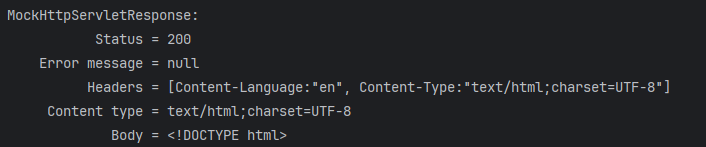
}- mvc 객체를 통해 어떤 URL을 적용시 HTTPStatus 와 view 의 이름을 예측하고 해당 view 의 내용을 볼 수 있다.
  @Test
  @DisplayName("회원 가입 요청 처리")
  void test2() throws Exception {
    // given
    MultiValueMap<String, String> signupRequestForm = new LinkedMultiValueMap<>();
    signupRequestForm.add("username", "sollertia4351");
    signupRequestForm.add("password", "robbie1234");
    signupRequestForm.add("email", "sollertia@sparta.com");
    signupRequestForm.add("admin", "false");

    // when - then
    mvc.perform(post("/api/user/signup").params(signupRequestForm))
        .andExpect(status().is3xxRedirection())
        .andExpect(view().name("redirect:/api/user/login-page"))
        .andDo(print());
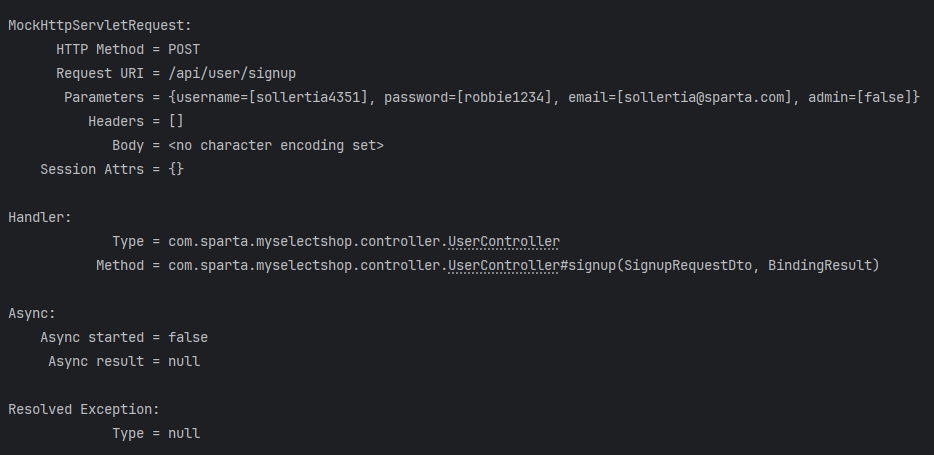
}- 회원가입시에는 Body의 값이 필요하기에
MultiValueMap을 사용하여 JSON과 비슷한형태의 Form을 만들어서 파라메터로 전달이 가능하다.
  @Test
  @DisplayName("신규 관심상품 등록")
  void test3() throws Exception {
    // given
    this.mockUserSetup();
    String title = "Apple <b>아이폰</b> 14 프로 256GB [자급제]";
    String imageUrl =
        "https://shopping-phinf.pstatic.net/main_3456175/34561756621.20220929142551.jpg";
    String linkUrl = "https://search.shopping.naver.com/gate.nhn?id=34561756621";
    int lPrice = 959000;
    ProductRequestDto requestDto = new ProductRequestDto(title, imageUrl, linkUrl, lPrice);

    String postInfo = objectMapper.writeValueAsString(requestDto);

    // when - then
    mvc.perform(
            post("/api/products")
                .content(postInfo)
                .contentType(MediaType.APPLICATION_JSON)
                .accept(MediaType.APPLICATION_JSON)
                .principal(mockPrincipal))
        .andExpect(status().isOk())
        .andDo(print());
  }
}- 상품을 추가하기 위해서 body의 값이 올 경우 클라이언트와 서버는 JSON의 형태로 통신을 하지만 JAVA 언어자체는 JSON을 인식하지 못한다.
- 이를 해결하기 위해
objectMapper를 사용하여 JSON ->String 형태로 지정하여 값을 주고받음. - .contentType(MediaType.APPLICATION_JSON)
.accept(MediaType.APPLICATION_JSON)
를 통해서 해당 형태가 JSON이라는 것을 공유한다.

70살까지 개발하고싶은 개발자