Level. 1
1-1
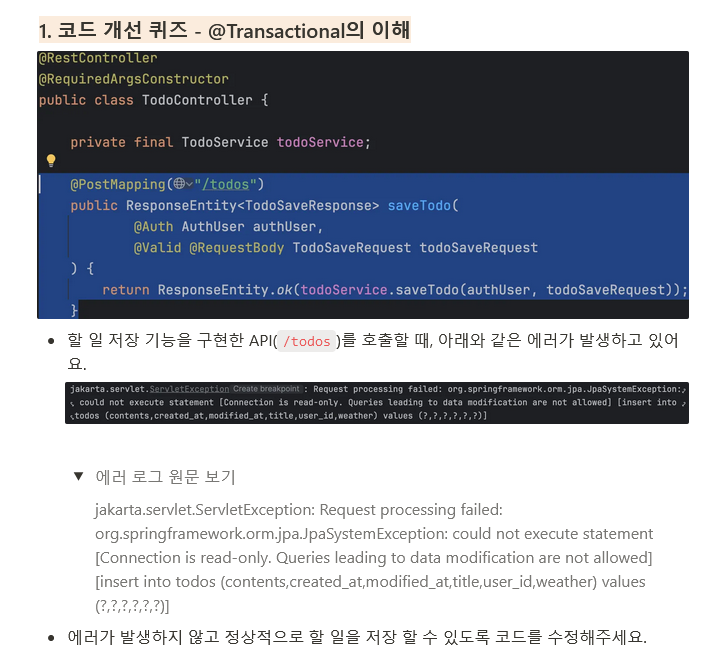
개선 전
    @PostMapping("/todos")
    public ResponseEntity<TodoSaveResponse> saveTodo(
            @Auth AuthUser authUser,
            @Valid @RequestBody TodoSaveRequest todoSaveRequest
    ) {
        return ResponseEntity.ok(todoService.saveTodo(authUser, todoSaveRequest));
    }
==================================================================================
@Service
@RequiredArgsConstructor
@Transactional(readOnly = true)
public class TodoService {

    private final TodoRepository todoRepository;
    private final WeatherClient weatherClient;

    public TodoSaveResponse saveTodo(AuthUser authUser, TodoSaveRequest todoSaveRequest) {
        User user = User.fromAuthUser(authUser);

        String weather = weatherClient.getTodayWeather();

        Todo newTodo = new Todo(
                todoSaveRequest.getTitle(),
                todoSaveRequest.getContents(),
                weather,
                user
        );
        Todo savedTodo = todoRepository.save(newTodo);

        return new TodoSaveResponse(
                savedTodo.getId(),
                savedTodo.getTitle(),
                savedTodo.getContents(),
                weather,
                new UserResponse(user.getId(), user.getEmail())
        );
    }
}
개선 후
    @Transactional
    public TodoSaveResponse saveTodo(AuthUser authUser, TodoSaveRequest todoSaveRequest) {
        User user = User.fromAuthUser(authUser);

        String weather = weatherClient.getTodayWeather();

        Todo newTodo = new Todo(
                todoSaveRequest.getTitle(),
                todoSaveRequest.getContents(),
                weather,
                user
        );
        Todo savedTodo = todoRepository.save(newTodo);

        return new TodoSaveResponse(
                savedTodo.getId(),
                savedTodo.getTitle(),
                savedTodo.getContents(),
                weather,
                new UserResponse(user.getId(), user.getEmail())
        );
    }
@Transactional(readOnly = true)설정이 되어져있어 읽기 전용 상태이지만 데이터 삽입 작업인saveTodo()가 데이터를 삽입하려 할때 오류가 발생하고 있다.saveTodo()에게@Transactional을 부여하면 문제 해결이 가능하다.
1-2
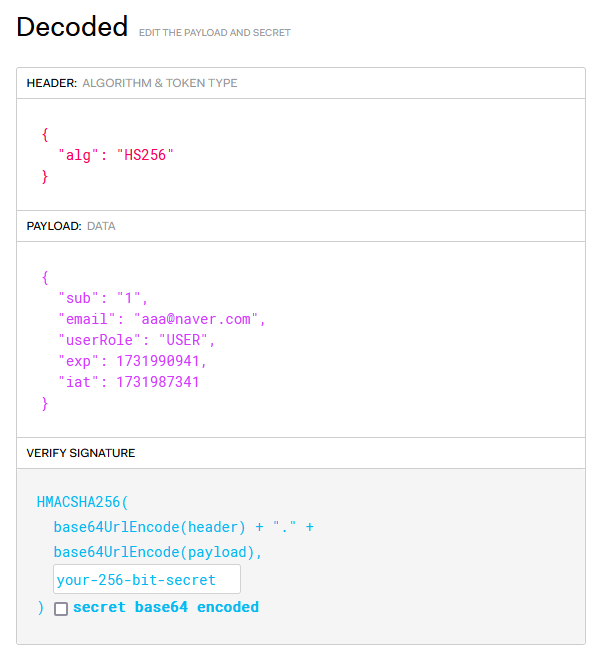
개선 전
@Getter
@Entity
@NoArgsConstructor
@Table(name = "users")
public class User extends Timestamped {

    @Id @GeneratedValue(strategy = GenerationType.IDENTITY)
    private Long id;
    @Column(unique = true)
    private String email;
    private String password;
    @Enumerated(EnumType.STRING)
    private UserRole userRole;

    ...
}
public String createToken(Long userId, String email, UserRole userRole) {
Date date = new Date();
return BEARER_PREFIX +
Jwts.builder()
.setSubject(String.valueOf(userId))
.claim("email", email)
.claim("userRole", userRole)
.setExpiration(new Date(date.getTime() + TOKEN_TIME))
.setIssuedAt(date) // 발급일
.signWith(key, signatureAlgorithm) // 암호화 알고리즘
.compact();
}
개선 후
@Getter
@Entity
@NoArgsConstructor
@Table(name = "users")
public class User extends Timestamped {

  @Id
  @GeneratedValue(strategy = GenerationType.IDENTITY)
  private Long id;

  @Column(unique = true)
  private String email;

  private String password;
  private String nickName;

  @Enumerated(EnumType.STRING)
  private UserRole userRole;

  ...
}
public String createToken(Long userId, String email, String nickName, UserRole userRole) {
Date date = new Date();
return BEARER_PREFIX
+ Jwts.builder()
.setSubject(String.valueOf(userId))
.claim("email", email)
.claim("nickName", nickName)
.claim("userRole", userRole)
.setExpiration(new Date(date.getTime() + TOKEN_TIME))
.setIssuedAt(date) // 발급일
.signWith(key, signatureAlgorithm) // 암호화 알고리즘
.compact();
}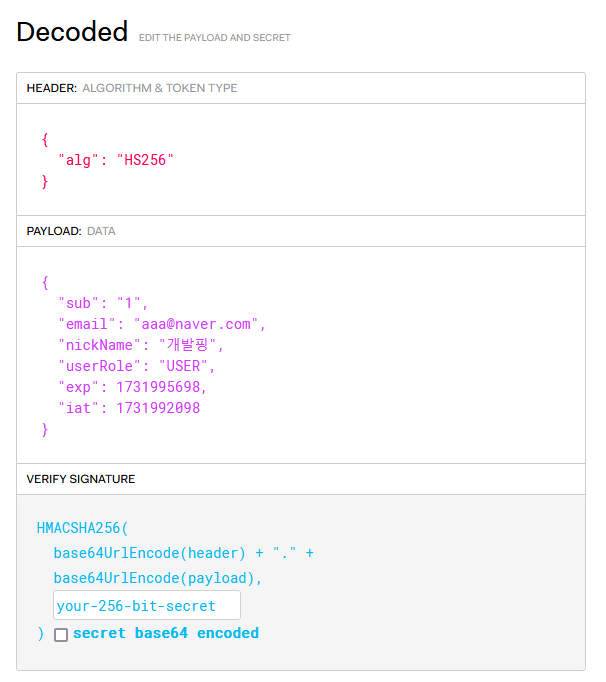
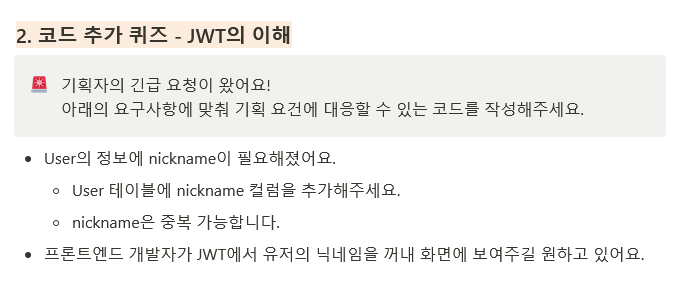
- User 테이블에 nickName 컬럼을 추가해주고 FE단에서 JWT를 이용해 nickName을 원하기에 토큰을 생성할때 nickName을 포함하도록 리팩토링하였다.
1-3
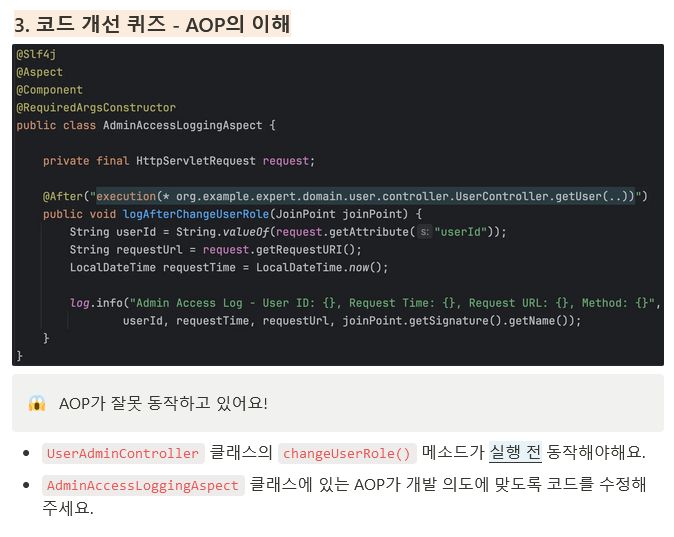
개선 전
@Slf4j
@Aspect
@Component
@RequiredArgsConstructor
public class AdminAccessLoggingAspect {

    private final HttpServletRequest request;

    @After("execution(* org.example.expert.domain.user.controller.UserController.getUser(..))")
    public void logAfterChangeUserRole(JoinPoint joinPoint) {
        String userId = String.valueOf(request.getAttribute("userId"));
        String requestUrl = request.getRequestURI();
        LocalDateTime requestTime = LocalDateTime.now();

        log.info("Admin Access Log - User ID: {}, Request Time: {}, Request URL: {}, Method: {}",
                userId, requestTime, requestUrl, joinPoint.getSignature().getName());
    }
}
개선 후
@Slf4j
@Aspect
@Component
@RequiredArgsConstructor
public class AdminAccessLoggingAspect {

    private final HttpServletRequest request;

    @Before("execution(* org.example.expert.domain.user.controller.UserAdminController.changeUserRole(..))")
    public void logAfterChangeUserRole(JoinPoint joinPoint) {
        String userId = String.valueOf(request.getAttribute("userId"));
        String requestUrl = request.getRequestURI();
        LocalDateTime requestTime = LocalDateTime.now();

        log.info("Admin Access Log - User ID: {}, Request Time: {}, Request URL: {}, Method: {}",
                userId, requestTime, requestUrl, joinPoint.getSignature().getName());
    }
}@After어노테이션을 통해 해당 메소드가실행 후로그가 찍히게 끔 설정이 되어져있다. 또한 경로가("execution(* org.example.expert.domain.user.controller.UserController.getUser(..))")으로 되어있기에 요구사항과 맞지않는 포인트컷을 소유하고있다.- 포인트컷을
("execution(* org.example.expert.domain.user.controller.UserAdminController.changeUserRole(..))")으로 수정하고@Before어노테이션을 통해 메소드실행 전로그가 찍히도록 수정하였다.
2024-11-19T17:43:55.310+09:00 INFO 28312 --- [expert] [io-8080-exec-10] o.e.expert.aop.AdminAccessLoggingAspect : Admin Access Log - User ID: 1, Request Time: 2024-11-19T17:43:55.309602800, Request URL: /admin/users/2, Method: changeUserRole1-4
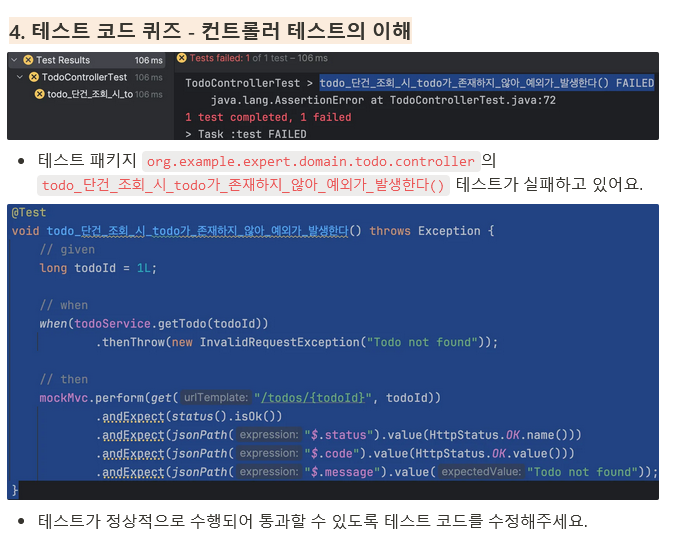
개선 전
    @Test
    void todo_단건_조회_시_todo가_존재하지_않아_예외가_발생한다() throws Exception {
        // given
        long todoId = 1L;

        // when
        when(todoService.getTodo(todoId))
                .thenThrow(new InvalidRequestException("Todo not found"));

        // then
        mockMvc.perform(get("/todos/{todoId}", todoId))
                .andExpect(status().isOk())
                .andExpect(jsonPath("$.status").value(HttpStatus.OK.name()))
                .andExpect(jsonPath("$.code").value(HttpStatus.OK.value()))
                .andExpect(jsonPath("$.message").value("Todo not found"));
    }
개선 후
    @Test
    void todo_단건_조회_시_todo가_존재하지_않아_예외가_발생한다() throws Exception {
        // given
        long todoId = 1L;

        // when
        when(todoService.getTodo(todoId))
                .thenThrow(new InvalidRequestException("Todo not found"));

        // then
        mockMvc.perform(get("/todos/{todoId}", todoId))
                .andExpect(status().isBadRequest())
                .andExpect(jsonPath("$.status").value(HttpStatus.BAD_REQUEST.name()))
                .andExpect(jsonPath("$.code").value(HttpStatus.BAD_REQUEST.value()))
                .andExpect(jsonPath("$.message").value("Todo not found"));
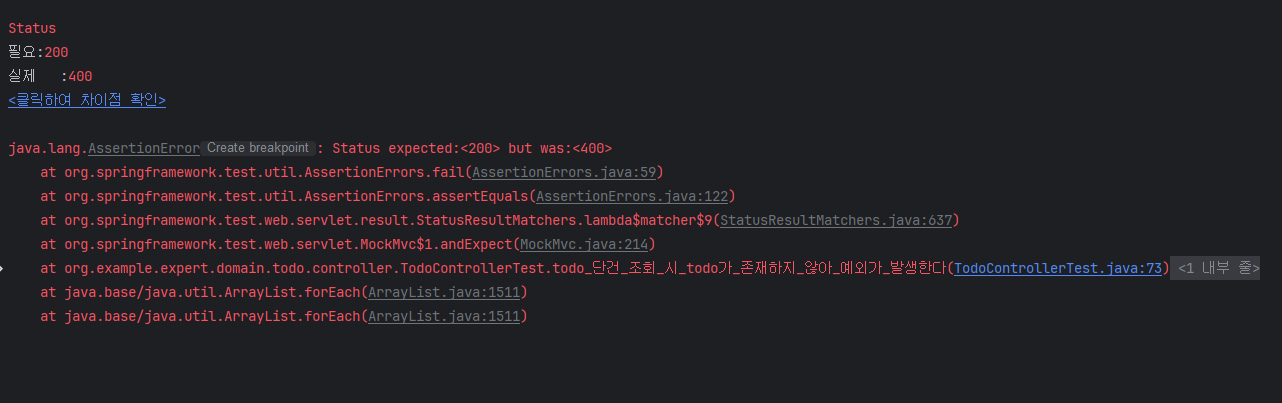
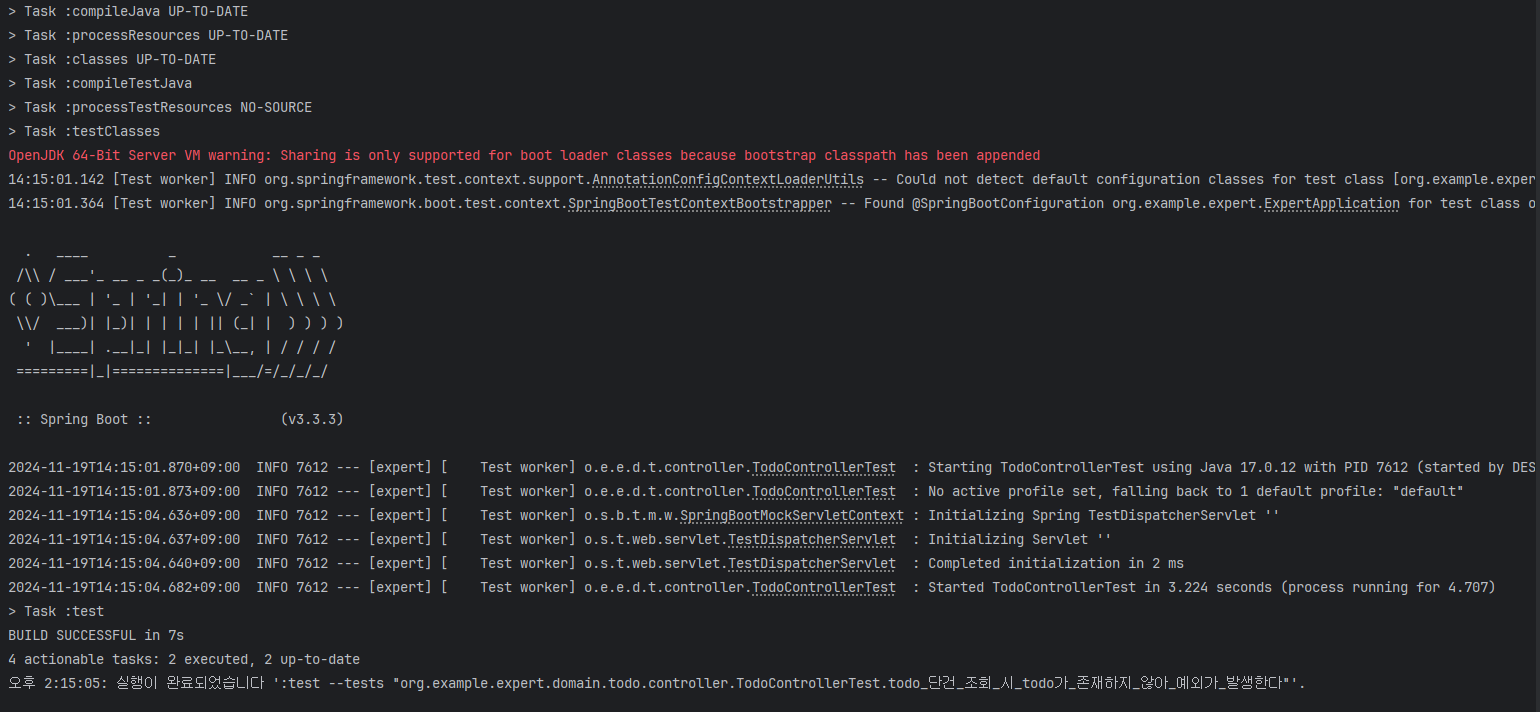
}- 조회하려는 todo 가 없기에 예외가 발생해야하지만, 테스트 코드에선
.andExpect(status().isOk())을 포함해서 모든 결과에서 OK 값인 200을 보내주고 있다. .andExpect(status().isBadRequest())및 하위 Path들을 잘못된 요청인 400 으로 수정하여 문제를 해결하였다.
1-5
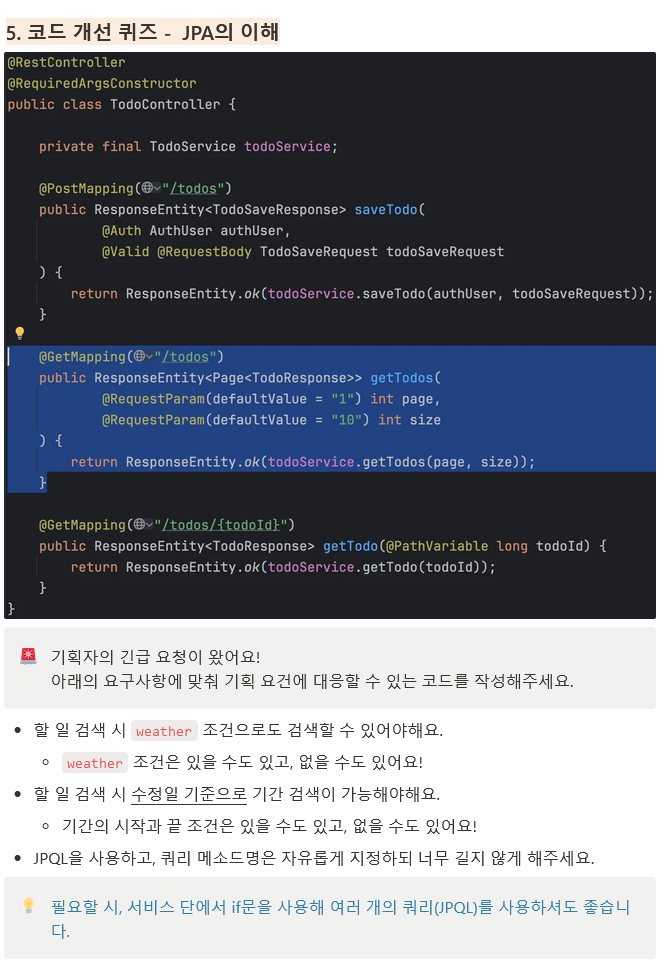
개선 전
    @GetMapping("/todos")
    public ResponseEntity<Page<TodoResponse>> getTodos(
            @RequestParam(defaultValue = "1") int page,
            @RequestParam(defaultValue = "10") int size
    ) {
        return ResponseEntity.ok(todoService.getTodos(page, size));
    }
개선 후
  @GetMapping("/todos")
  public ResponseEntity<Page<TodoResponse>> getTodos(
      @RequestParam(defaultValue = "1") int page,
      @RequestParam(defaultValue = "10") int size,
      @RequestParam(required = false) String weather,
      @RequestParam(required = false) @DateTimeFormat(iso = DateTimeFormat.ISO.DATE)
          LocalDate startDate,
      @RequestParam(required = false) @DateTimeFormat(iso = DateTimeFormat.ISO.DATE)
          LocalDate endDate) {
    return ResponseEntity.ok(todoService.getTodos(page, size, weather,startDate,endDate));
} @Query(
"SELECT t FROM Todo t "
+ "WHERE (:weather IS NULL OR t.weather = :weather) "
+ "AND (:startDate IS NULL OR :endDate IS NULL OR DATE(t.modifiedAt) BETWEEN :startDate AND :endDate) "
+ "ORDER BY t.modifiedAt DESC")
Page<Todo> findAllByOrderByModifiedAtWeatherORDate(
@Param("weather") String weather,
@Param("startDate") LocalDate startDate,
@Param("endDate") LocalDate endDate,
Pageable pageable);
}SELECT t.*
FROM todo t
WHERE (:weather IS NULL OR t.weather = :weather)
AND (:startDate IS NULL OR :endDate IS NULL OR DATE(t.modified_at) BETWEEN :startDate AND :endDate)
ORDER BY t.modified_at DESC
- 컨트롤러에서 날씨와 수정일 기준의 시작날짜 끝날짜를 추가해주고 존재여부가 확정이 아니기에
(required = false)을 사용해줬다. - JPQL 또한 날씨와 날짜는 NULL 일수 있기에 필터링해주어서 모든조건에서도 todo 를 조회할 수 있게 설정했다.

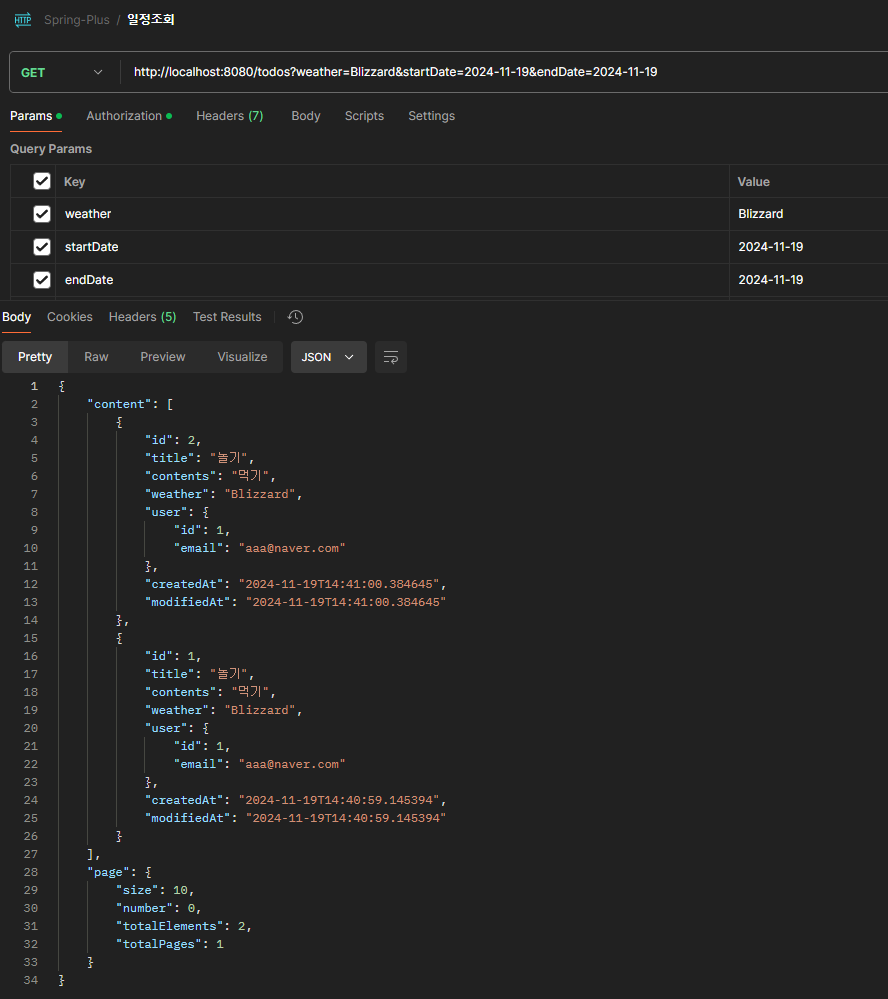
- 날짜 및 기간을 기준으로 검색하였기에 2개의 ROW만 조회됐다.
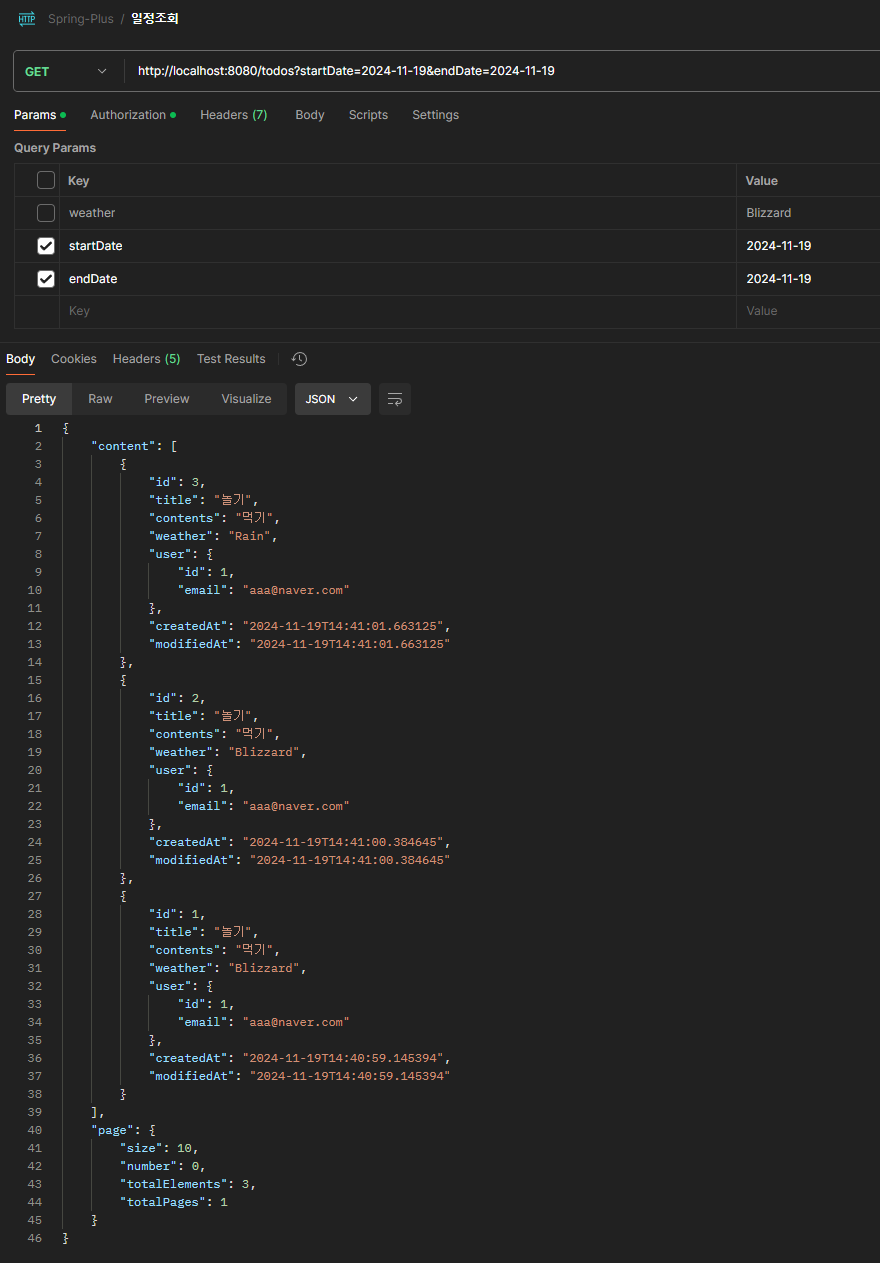
- 날짜를 기준으로만 조회하여 3개의 ROW 전부 조회.
Level. 2
2-1
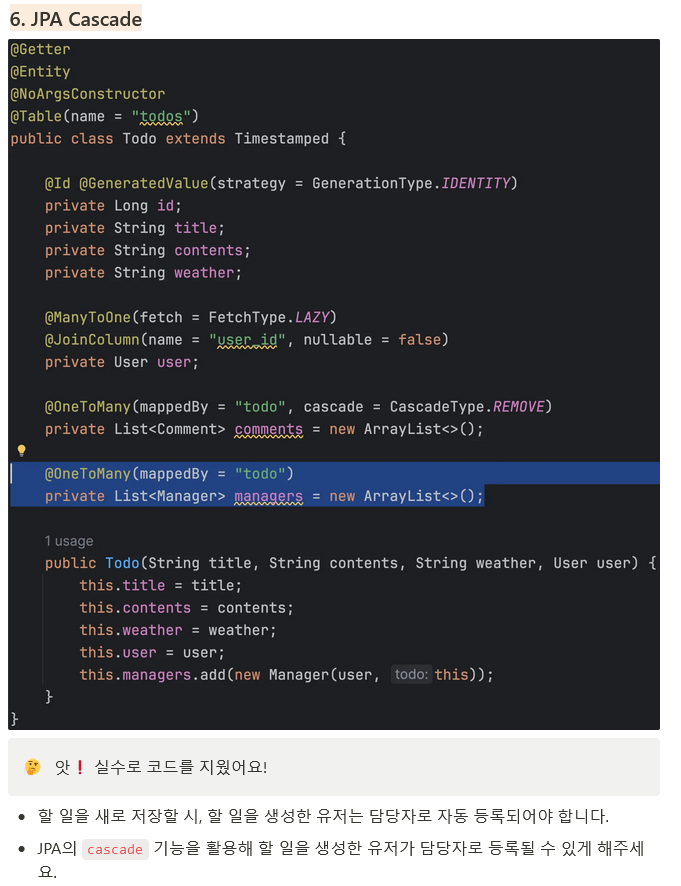
개선 전
@Getter
@Entity
@NoArgsConstructor
@Table(name = "todos")
public class Todo extends Timestamped {

    @Id @GeneratedValue(strategy = GenerationType.IDENTITY)
    private Long id;
    private String title;
    private String contents;
    private String weather;

    @ManyToOne(fetch = FetchType.LAZY)
    @JoinColumn(name = "user_id", nullable = false)
    private User user;

    @OneToMany(mappedBy = "todo", cascade = CascadeType.REMOVE)
    private List<Comment> comments = new ArrayList<>();

    @OneToMany(mappedBy = "todo")
    private List<Manager> managers = new ArrayList<>();

    public Todo(String title, String contents, String weather, User user) {
        this.title = title;
        this.contents = contents;
        this.weather = weather;
        this.user = user;
        this.managers.add(new Manager(user, this));
    }
}
개선 후
@Getter
@Entity
@NoArgsConstructor
@Table(name = "todos")
public class Todo extends Timestamped {

  @Id
  @GeneratedValue(strategy = GenerationType.IDENTITY)
  private Long id;

  private String title;
  private String contents;
  private String weather;

  @ManyToOne(fetch = FetchType.LAZY)
  @JoinColumn(name = "user_id", nullable = false)
  private User user;

  @OneToMany(mappedBy = "todo", cascade = CascadeType.REMOVE)
  private List<Comment> comments = new ArrayList<>();

  @OneToMany(mappedBy = "todo", cascade = CascadeType.PERSIST)
  private List<Manager> managers = new ArrayList<>();

  public Todo(String title, String contents, String weather, User user) {
    this.title = title;
    this.contents = contents;
    this.weather = weather;
    this.user = user;
    this.managers.add(new Manager(user, this));
  }
}- 개선 전 코드는 영속성에 대한 옵션이 없기에 부모 Entity가 저장되더라도 자식 Entity인 manager 는 따로 저장이 되지않고 있었다.
cascade = CascadeType.PERSIST옵션을 통해 부모 Entity가 저장될때 자식 Entity가 저장될수 있도록 지정해주었다.

Cascade 옵션PERSIST- 부모 Entity가 저장될 때, 자식 Entity도 함께 저장된다.
- 새로운 Entity를 저장할 때, 부모 Entity를 저장하면 자식 Entity도 함께 저장되도록 할 때 사용한다.
MERGE- 부모 Entity가 병합될 때, 자식 Entity도 함께 병합된다.
- 이미 존재하는 Entity를 병합할 때, 부모와 자식 Entity가 함께 병합되도록 할 때 사용한다.
REMOVE- 부모 Entity가 삭제될 때, 자식 Entity도 함께 삭제된다.
REFRESH- 부모 Entity를 새로 고칠 때, 자식 Entity도 함께 새로 고쳐진다.
DETACH- 부모 Entity가 영속성 컨텍스트에서 분리될 때, 자식 Entity도 함께 분리된다.
ALL- 모든 CascadeType을 한 번에 적용하는 옵션입니다. 즉, PERSIST, MERGE, REMOVE, REFRESH, DETACH 모두 적용된다.
2-2
개선 전
@Query("SELECT c FROM Comment c JOIN c.user WHERE c.todo.id = :todoId")
    List<Comment> findByTodoIdWithUser(@Param("todoId") Long todoId);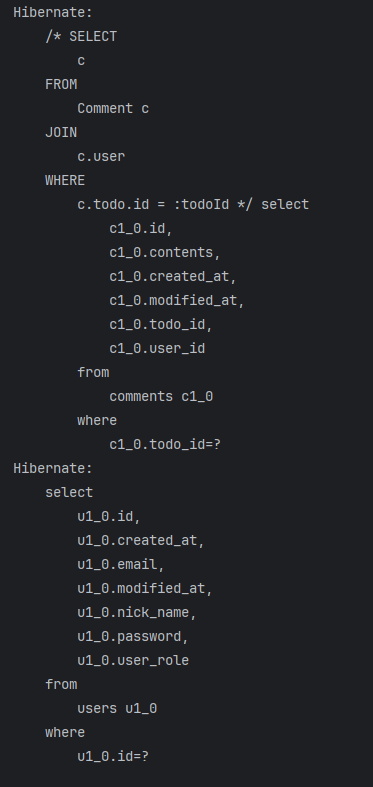
개선 후
  @Query("SELECT DISTINCT c FROM Comment c JOIN FETCH c.user WHERE c.todo.id = :todoId")
  List<Comment> findByTodoIdWithUser(@Param("todoId") Long todoId);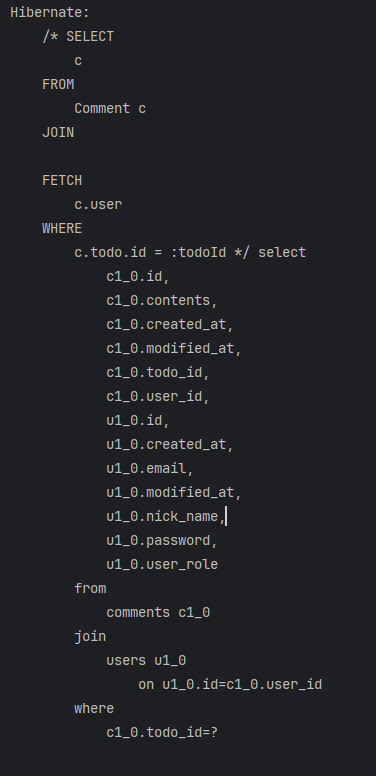
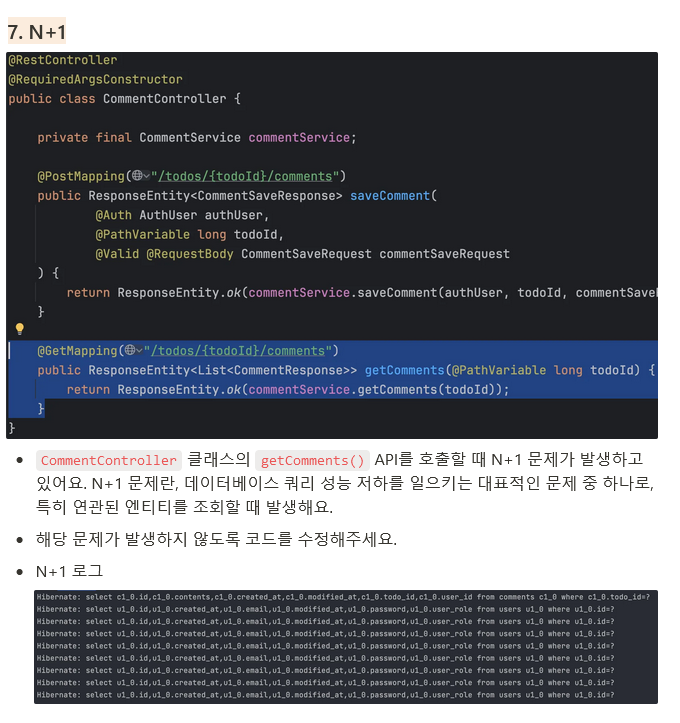
- 개선 전 코드는 JOIN은 하고있지만 지연로딩을 통해 USER를 받아오면서 추가적으로 USER 에 대한 쿼리문이 발생하고 있음, 즉 N+1 문제가 발생하고 있었다.
FETCH JOIN을 통해 코멘트를 조회할 때 해당 코멘트의 USER정보 또한 같이 한번에 조회할 수 있도록 변경 해주었다.FETCH JOIN은 결과를 중복적으로 가져와 In-Memory상에서 해결하기에 불필요한 자원이 추가발생 할 수 있다. 이를 해결하기위해DISTINCT를 사용하거나Set자료구조를 통해 중복을 원천차단이 가능하다.
2-3
개선 전
@Query("SELECT t FROM Todo t " +
            "LEFT JOIN t.user " +
            "WHERE t.id = :todoId")
    Optional<Todo> findByIdWithUser(@Param("todoId") Long todoId);
개선 후
public interface TodoRepository extends JpaRepository<Todo, Long>, TodoQueryDslRepository TodoService
Todo todo =
todoRepository
.findByIdWithUser(todoId)
.orElseThrow(() -> new InvalidRequestException("Todo not found")); @Override
public Optional<Todo> findByIdWithUser(Long todoId) {
return Optional.ofNullable(
queryFactory
.selectFrom(todo)
.leftJoin(todo.user)
.fetchJoin()
.where(todo.id.eq(todoId))
.fetchOne());
}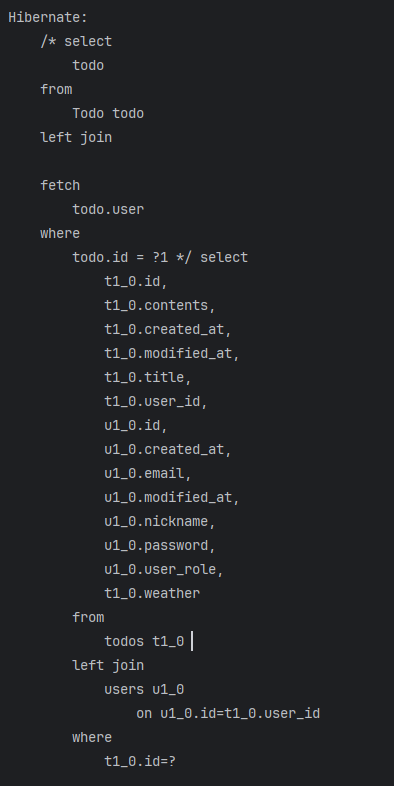
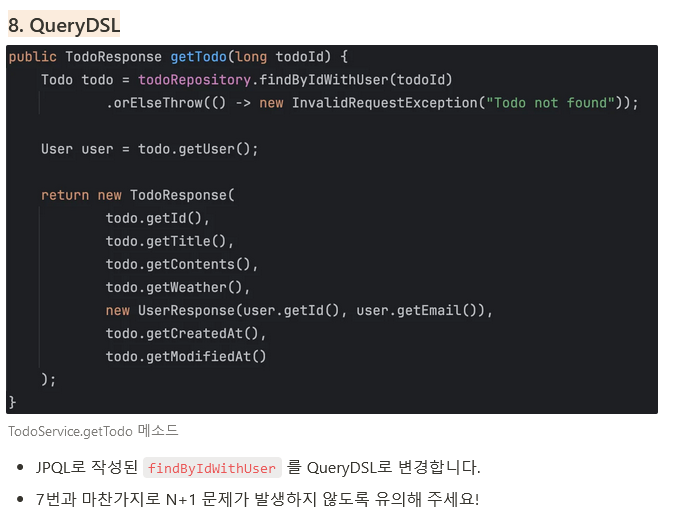
- 기존의
TodoRepository에서 구현되었던findByIdWithUser()메소드를 QueryDsl 로 구현하는 문제로 기존의 쿼리를 JAVA가 지원하는 문법형태로 작성하였다. - Service 는 기존의 TodoRepository 를 그대로 바라볼 수 있게 작성하여 Service가 DataJPA 로 작동하는지 QueryDsl로 작동하는지에 대한 의존성 문제를 해결하였다.
- 또한 기존의 N+1 문제 발생을 억제하기 위하여
.fetchOne()을 활용하였다.
2-4
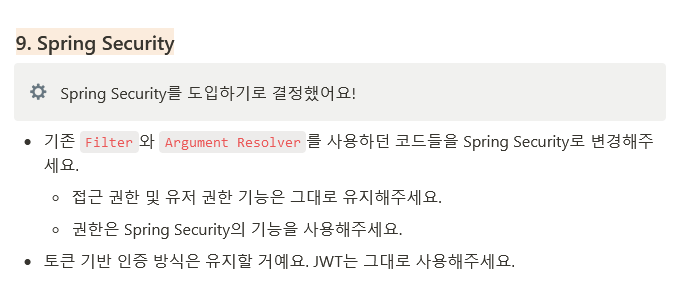
개선 전
            UserRole userRole = UserRole.valueOf(claims.get("userRole", String.class));

            httpRequest.setAttribute("userId", Long.parseLong(claims.getSubject()));
            httpRequest.setAttribute("email", claims.get("email"));
            httpRequest.setAttribute("userRole", claims.get("userRole"));

            if (url.startsWith("/admin")) {
                // 관리자 권한이 없는 경우 403을 반환합니다.
                if (!UserRole.ADMIN.equals(userRole)) {
                    httpResponse.sendError(HttpServletResponse.SC_FORBIDDEN, "관리자 권한이 없습니다.");
                    return;
                }
                chain.doFilter(request, response);
                return;
            }
@Override
public Object resolveArgument(
@Nullable MethodParameter parameter,
@Nullable ModelAndViewContainer mavContainer,
NativeWebRequest webRequest,
@Nullable WebDataBinderFactory binderFactory
) {
HttpServletRequest request = (HttpServletRequest) webRequest.getNativeRequest();
// JwtFilter 에서 set 한 userId, email, userRole 값을 가져옴
Long userId = (Long) request.getAttribute("userId");
String email = (String) request.getAttribute("email");
UserRole userRole = UserRole.of((String) request.getAttribute("userRole"));
return new AuthUser(userId, email, userRole);
}
} @PostMapping("/todos")
public ResponseEntity<TodoSaveResponse> saveTodo(
@Auth AuthUser authUser,
@Valid @RequestBody TodoSaveRequest todoSaveRequest
) {
return ResponseEntity.ok(todoService.saveTodo(authUser, todoSaveRequest));
}개선 후
@Configuration
@EnableWebSecurity
@RequiredArgsConstructor
public class WebSecurityConfig {
  private final JwtFilter jwtFilter;

  @Bean
  public SecurityFilterChain securityFilterChain(HttpSecurity http) throws Exception {
    http.csrf(csrf -> csrf.disable()) // CSRF 비활성화
        .formLogin(form -> form.disable()) // Form Login 비활성화
        .httpBasic(httpBasic -> httpBasic.disable()) // HTTP Basic 비활성화
        .authorizeRequests(
            (authorizeRequests) ->
                authorizeRequests
                    .requestMatchers("/auth/**")
                    .permitAll()
                    .requestMatchers("/admin/**")
                    .hasAuthority("ADMIN")
                    .anyRequest()
                    .authenticated());
    http.sessionManagement(
        sessionManagement ->
            sessionManagement.sessionCreationPolicy(SessionCreationPolicy.STATELESS));
    http.addFilterBefore(jwtFilter, UsernamePasswordAuthenticationFilter.class);
    return http.build();
  }
}
@Service
@RequiredArgsConstructor
public class CustomUserDetailsService implements UserDetailsService {
private final UserRepository userRepository;
@Override
@Transactional
public UserDetails loadUserByUsername(String username) throws UsernameNotFoundException {
User user =
userRepository
.findByNickName(username)
.orElseThrow(() -> new UsernameNotFoundException("Not Found " + username));
List<GrantedAuthority> authorities =
Collections.singletonList(new SimpleGrantedAuthority(user.getUserRole().toString()));
return new CustomUserDetails(
user.getNickName(),user.getId(), user.getEmail(), user.getPassword(), authorities);
}
}@NoArgsConstructor
@AllArgsConstructor
public class CustomUserDetails implements UserDetails {
private String username;
@Getter private Long id;
@Getter private String email;
private String password;
private List<GrantedAuthority> authorities;
@Override
public Collection<? extends GrantedAuthority> getAuthorities() {
return authorities;
}
@Override
public String getPassword() {
return password;
}
@Override
public String getUsername() {
return username;
}
@Override
public boolean isAccountNonExpired() {
return true;
}
@Override
public boolean isAccountNonLocked() {
return true;
}
@Override
public boolean isCredentialsNonExpired() {
return true;
}
@Override
public boolean isEnabled() {
return true;
}
}JWT Filter
public void setAuthentication(String username) {
SecurityContext context = SecurityContextHolder.createEmptyContext();
Authentication authentication = getAuthentication(username);
context.setAuthentication(authentication);
SecurityContextHolder.setContext(context);
}
private Authentication getAuthentication(String username) {
UserDetails userDetails = userDetailsService.loadUserByUsername(username);
return new UsernamePasswordAuthenticationToken(userDetails, null, userDetails.getAuthorities());
} @PostMapping("/todos")
public ResponseEntity<TodoSaveResponse> saveTodo(
@AuthenticationPrincipal CustomUserDetails customUserDetails, @Valid @RequestBody TodoSaveRequest todoSaveRequest) {
return ResponseEntity.ok(todoService.saveTodo(customUserDetails, todoSaveRequest));
}- 개선 전 코드는 JWT 토큰과
HandlerMethodArgumentResolver에 의존하여 인증 및 인가 처리를 진행하고 있었다. Spring Security를 도입하면서.hasAuthority설정을 통해 관리자가 아니면 접속하지 못하는 엔드포인트를 지정해 인가를 처리하며UserDetails와UserDetailsService의 구현체를 만들어 로그인유저에대한 인증객체를SecurityContextHolder담아 인증/인가를 처리할 수 있게 시큐리티를 도입하였다.- 또한
UserDetails를 통하여 인증객체를@AuthenticationPrincipal어노테이션으로 가져올수 있기에@Auth AuthUser authUser를 통해 인증객체를 따로 사용하는게 아닌 시큐리티를 통해 인증된 객체 재사용이 가능하다.
  @Test
  @WithMockUser(
      username = "user",
      roles = {"USER"})
  void todo_단건_조회에_성공한다() throws Exception {
    // given
    long todoId = 1L;
    String title = "title";
    UserResponse userResponse = new UserResponse(1L, "aaa@bbb.com");
    TodoResponse response =
        new TodoResponse(
            todoId,
            title,
            "contents",
            "Sunny",
            userResponse,
            LocalDateTime.now(),
            LocalDateTime.now());

    // when
    when(todoService.getTodo(todoId)).thenReturn(response);

    // then
    mockMvc
        .perform(get("/todos/{todoId}", todoId))
        .andExpect(status().isOk()) // 200 OK 상태 코드 기대
        .andExpect(jsonPath("$.id").value(todoId))
        .andExpect(jsonPath("$.title").value(title));
}- 기존의 테스트코드 역시 시큐리티 인증이 필요함으로
@WithMockUser(username = "user",roles = {"USER"})을 추가하여 테스트코드를 변경하였다.
Level. 3
3-1
개선 후
@Repository
@RequiredArgsConstructor
public class TodoQueryDslRepositoryImpl implements TodoQueryDslRepository {
  private final JPAQueryFactory queryFactory;

  @Override
  public Page<TodoSearchResponse> findAllByTodo(TodoSearchCondition condition, Pageable pageable) {
    QTodo todo = QTodo.todo;
    QComment comment = QComment.comment;
    QManager manager = QManager.manager;

    BooleanExpression conditionExpression = buildConditionExpression(condition);

    QueryResults<TodoSearchResponse> results =
        queryFactory
            .select(
                new QTodoSearchResponse(
                    todo.title,
                    manager.countDistinct().as("managerCount"),
                    comment.count().as("commentCount")))
            .from(todo)
            .leftJoin(todo.managers, manager)
            .leftJoin(todo.comments, comment)
            .where(conditionExpression)
            .groupBy(todo.id)
            .orderBy(todo.createdAt.desc())
            .offset(pageable.getOffset())
            .limit(pageable.getPageSize())
            .fetchResults();
    List<TodoSearchResponse> contents = results.getResults();
    long total = results.getTotal();
    return new PageImpl<>(contents, pageable, total);
  }

  private BooleanExpression buildConditionExpression(TodoSearchCondition condition) {
    return Objects.requireNonNull(hasKeyWord(condition.getKeyword()))
        .and(hasDateRange(condition.getStartDate(), condition.getEndDate()))
        .and(hasManagerNickName(condition.getManagerNickname()));
  }

  private BooleanExpression hasKeyWord(String keyword) {
    return hasText(keyword) ? QTodo.todo.title.containsIgnoreCase(keyword) : null;
  }

  private BooleanExpression hasDateRange(LocalDate start, LocalDate end) {
    // QueryDSL 에서 LocalDateTime -> LocalDate 로 변환
    DateExpression<LocalDate> createAtDate =
        Expressions.dateTemplate(
            // SQL 변환: LocalDateTime -> LocalDate
            LocalDate.class, "cast({0} as date)", QTodo.todo.createdAt);
    if (start != null && end != null) {
      return createAtDate.between(start, end);
    }
    // 시작일자 이후 일정들 검색
    else if (start != null) {
      return createAtDate.goe(start);
    }
    // 종료일자 이전 일정들 검색
    else if (end != null) {
      return createAtDate.loe(end);
    }
    return null;
  }

  private BooleanExpression hasManagerNickName(String managerNickName) {
    return hasText(managerNickName)
        ? QManager.manager.user.nickname.containsIgnoreCase(managerNickName)
        : null;
  }
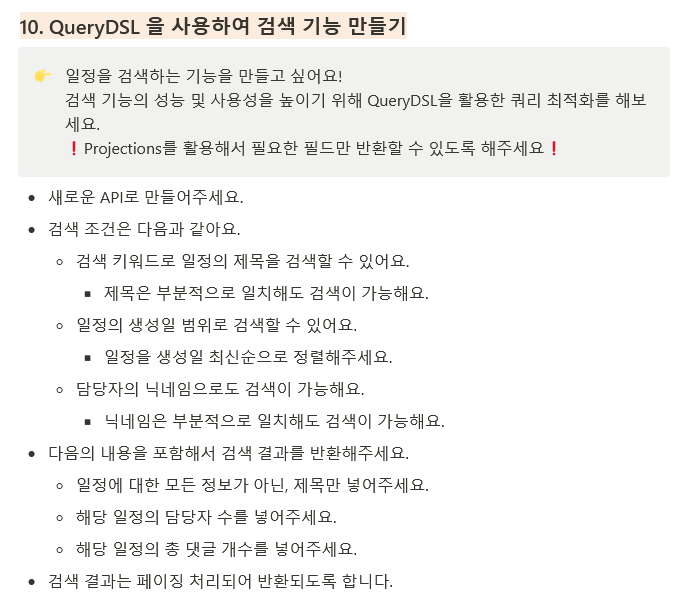
}- 각각의 검색조건을
BooleanExpression을 통해 명시해준 후buildConditionExpression을 사용해서 하나의 조건으로 추상화 해주었다. BooleanExpression 자체가 조건의 모듈화이기 때문에 필요한상황에서 묶어 사용이 가능하다. .containsIgnoreCase(String)메소드를 사용하여 SQL의%String%효과를 주어서 부분적으로 일치하더라도 검색이 허용된다.
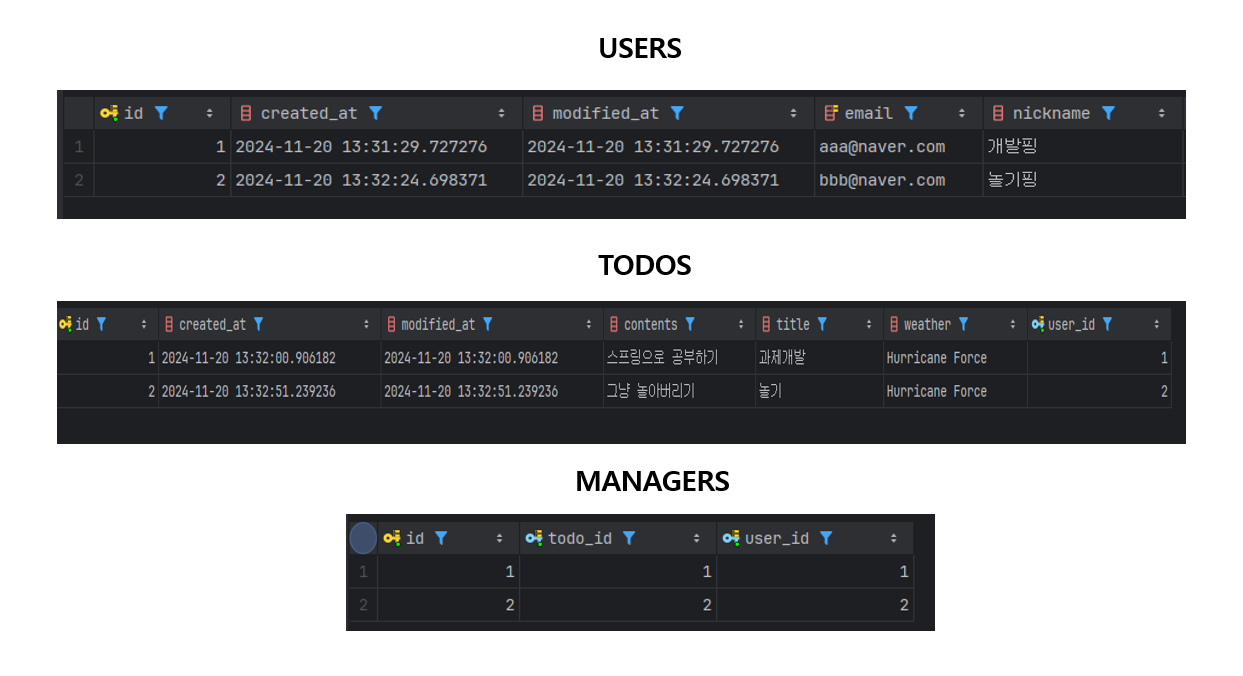
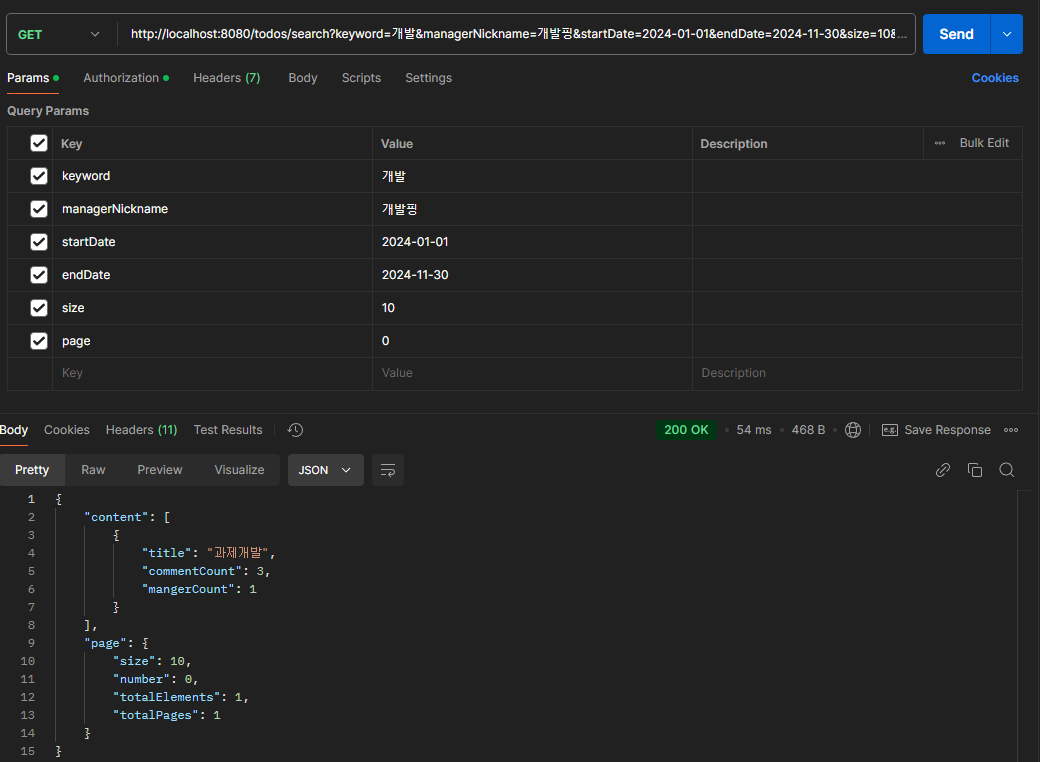
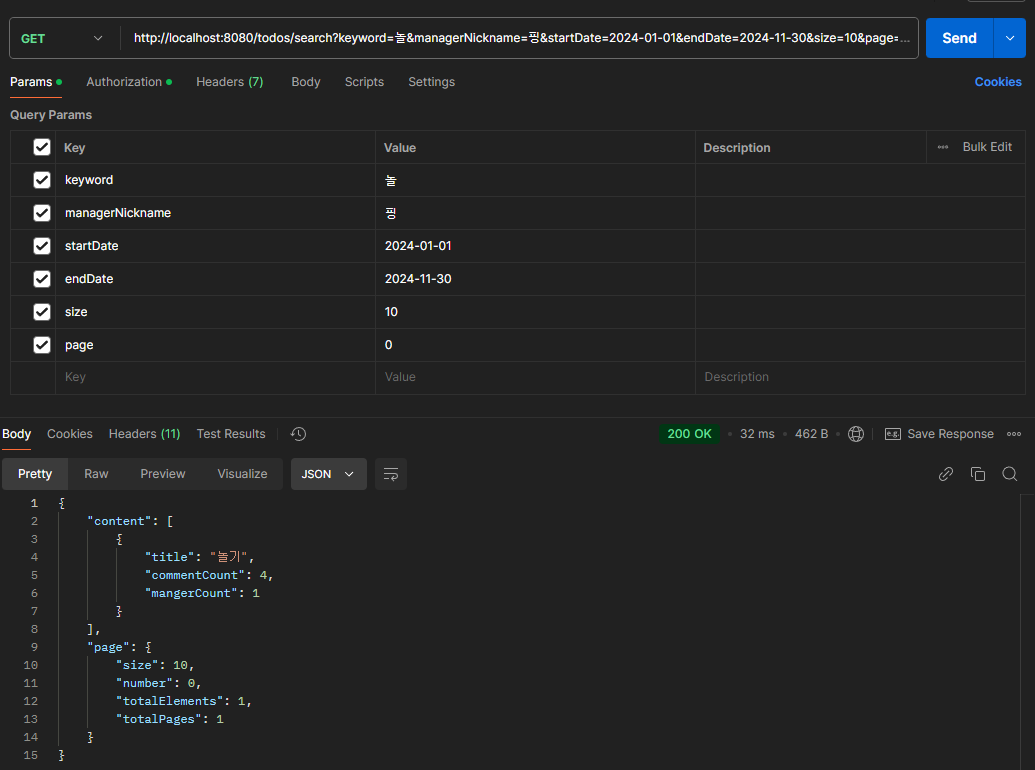
- 각 조건에 맞추어 일정 검색이 되는것을 확인 가능하다.
3-2
개선 전
ManagerService

    @Transactional
    public ManagerSaveResponse saveManager(AuthUser authUser, long todoId, ManagerSaveRequest managerSaveRequest) {
        // 일정을 만든 유저
        User user = User.fromAuthUser(authUser);
        Todo todo = todoRepository.findById(todoId)
                .orElseThrow(() -> new InvalidRequestException("Todo not found"));

        if (todo.getUser() == null || !ObjectUtils.nullSafeEquals(user.getId(), todo.getUser().getId())) {
            throw new InvalidRequestException("담당자를 등록하려고 하는 유저가 유효하지 않거나, 일정을 만든 유저가 아닙니다.");
        }

        User managerUser = userRepository.findById(managerSaveRequest.getManagerUserId())
                .orElseThrow(() -> new InvalidRequestException("등록하려고 하는 담당자 유저가 존재하지 않습니다."));

        if (ObjectUtils.nullSafeEquals(user.getId(), managerUser.getId())) {
            throw new InvalidRequestException("일정 작성자는 본인을 담당자로 등록할 수 없습니다.");
        }

        Manager newManagerUser = new Manager(managerUser, todo);
        Manager savedManagerUser = managerRepository.save(newManagerUser);

        return new ManagerSaveResponse(
                savedManagerUser.getId(),
                new UserResponse(managerUser.getId(), managerUser.getEmail())
        );
    }
개선 후
ManagerService

  @Transactional
  public ManagerSaveResponse saveManager(
      CustomUserDetails customUserDetails, long todoId, ManagerSaveRequest managerSaveRequest) {
    // 일정을 만든 유저
    User user = User.fromAuthUser(customUserDetails);
    Todo todo =
        todoRepository
            .findById(todoId)
            .orElseThrow(() -> new InvalidRequestException("Todo not found"));
    User managerUser = null;
    try {
      managerUser =
          userRepository
              .findById(managerSaveRequest.getManagerUserId())
              .orElseThrow(() -> new InvalidRequestException("등록하려고 하는 담당자 유저가 존재하지 않습니다."));
      if (todo.getUser() == null
          || !ObjectUtils.nullSafeEquals(user.getId(), todo.getUser().getId())) {
        throw new InvalidRequestException("담당자를 등록하려고 하는 유저가 유효하지 않거나, 일정을 만든 유저가 아닙니다.");
      }

      if (ObjectUtils.nullSafeEquals(user.getId(), managerUser.getId())) {
        throw new InvalidRequestException("일정 작성자는 본인을 담당자로 등록할 수 없습니다.");
      }

      Manager newManagerUser = new Manager(managerUser, todo);
      Manager savedManagerUser = managerRepository.save(newManagerUser);

      logService.saveLog(
          user.getId(),
          managerUser.getId(),
          ActionStatus.REGISTRATION_SUCCESS,
          "Registration successful");
      return new ManagerSaveResponse(
          savedManagerUser.getId(), new UserResponse(managerUser.getId(), managerUser.getEmail()));
    } catch (Exception e) {
      if (managerUser == null) {
        logService.saveLog(user.getId(), -1L, ActionStatus.REGISTRATION_FAILED, e.getMessage());
      } else {
        logService.saveLog(
            user.getId(), managerUser.getId(), ActionStatus.REGISTRATION_FAILED, e.getMessage());
      }
      throw e;
    }
  }
LogEntity
@Entity
@Getter
@Table(name = "log")
@NoArgsConstructor(access = AccessLevel.PROTECTED)
public class Log {
@Id
@GeneratedValue(strategy = GenerationType.IDENTITY)
private Long id;
private Long requesterId;
private Long targetId;
private String message;
@Enumerated(EnumType.STRING)
private ActionStatus status;
private final LocalDateTime createdAt = LocalDateTime.now();
@Builder
public Log(Long requesterId, Long targetId, ActionStatus status, String message) {
this.requesterId = requesterId;
this.targetId = targetId;
this.status = status;
this.message = message;
}
}@Service
@RequiredArgsConstructor
public class LogService {
private final LogRepository logRepository;
@Transactional(propagation = Propagation.REQUIRES_NEW)
public void saveLog(Long requesterId, Long targetId, ActionStatus status, String message) {
Log log = new Log(requesterId, targetId, status, message);
logRepository.save(log);
}
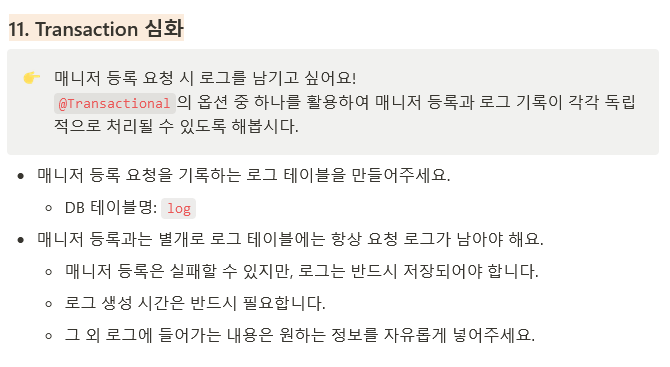
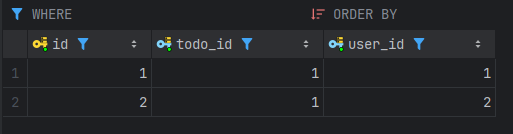
}- Log 생성을 위해 LogEntity와 Service를 생성하고
saveLog()메소드에 트랜잭션 옵션인@Transactional(propagation = Propagation.REQUIRES_NEW)을 활용하여 해당 메서드가 실행됄때 새로운 트랜잭션을 시작하며, 기존의 트랜잭션이 있다면 보류하도록 설정한다. - 이를 통해서
saveManager()메소드가 실패하더라도saveLog()의 트랜잭션은 보장됨으로 성공/실패에 대한 로그작업이 가능하다.

propagation 옵션REQUIRED: 트랜잭션의 기본값으로 트랜잭션이 존재하면 해당 트랜잭션을 사용하고 없다면 새로운 트랜잭션을 실행한다.SUPPORTS: 트랜잭션이 존재한다면 해당 트랜잭션을 사용하고, 없다면 트랜잭션없이 실행된다.NOT_SUPPORTED: 트랜잭션을 사용하지않으며, 기존 트랜잭션이 있다면 해당 트랜잭션을 보류시킨다.MANDATORY: 트랜잭션이 반드시 존재해야하며, 트랜잭션이 없다면 예외가 발생한다.REQUIRES_NEW: 항상 새로운 트랜잭션을 시작하고, 기존 트랜잭션이 있으면 그것을 잠시 보류한다.NEVER트랜잭션을 사용하지않으며, 기존 트랜잭션이 존재시 예외를 발생한다.
3-3
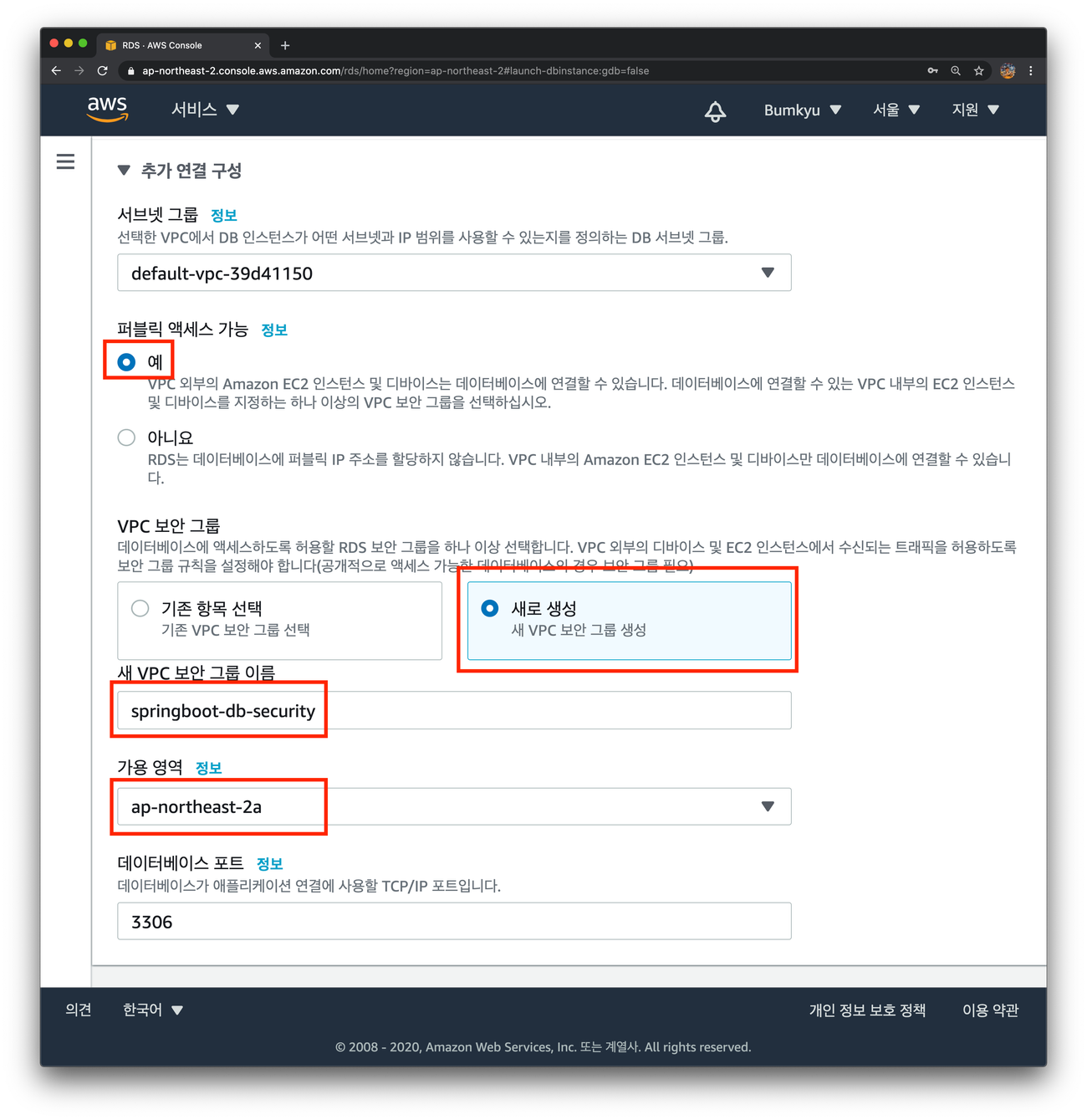
RDS 설정
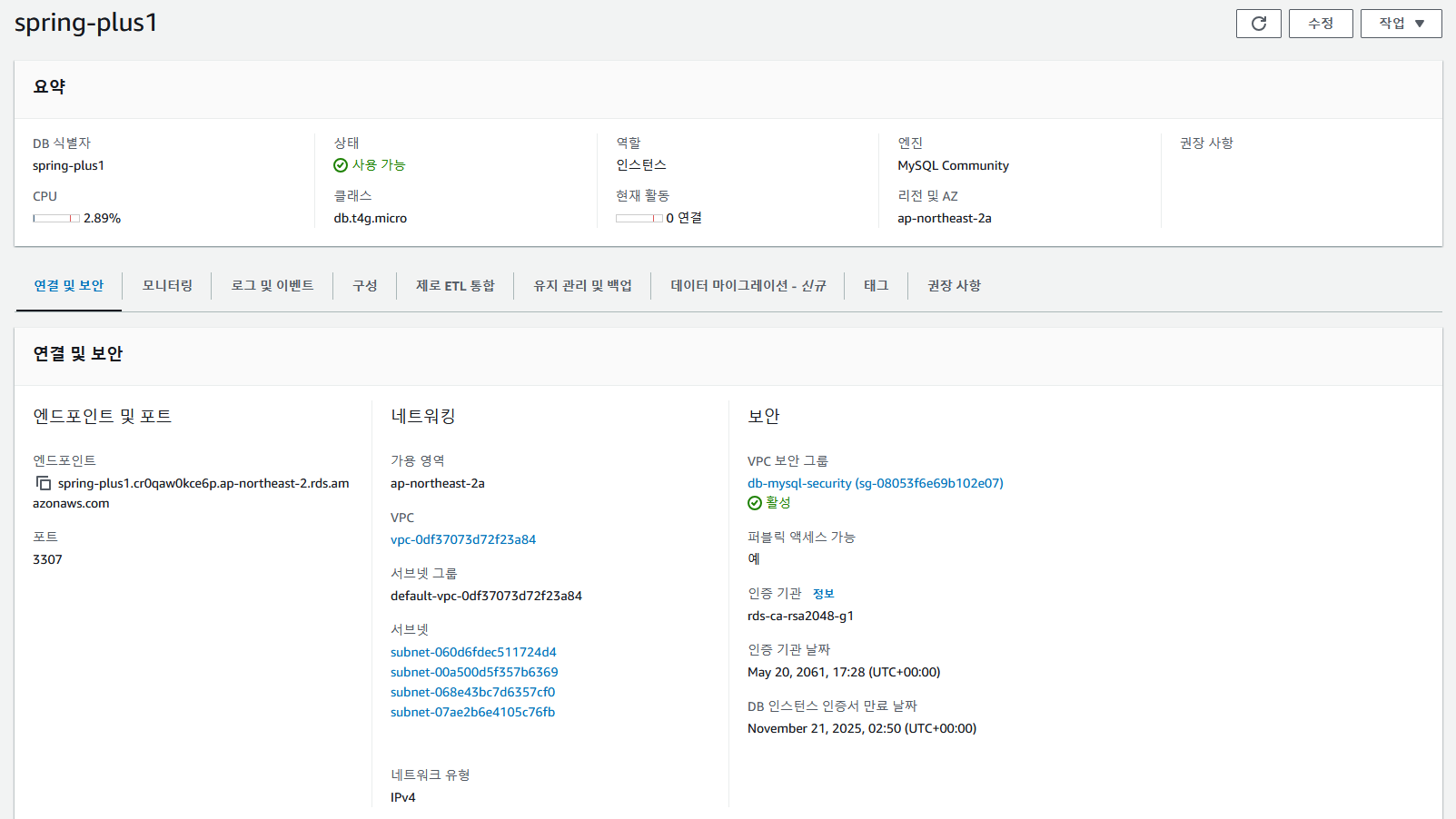
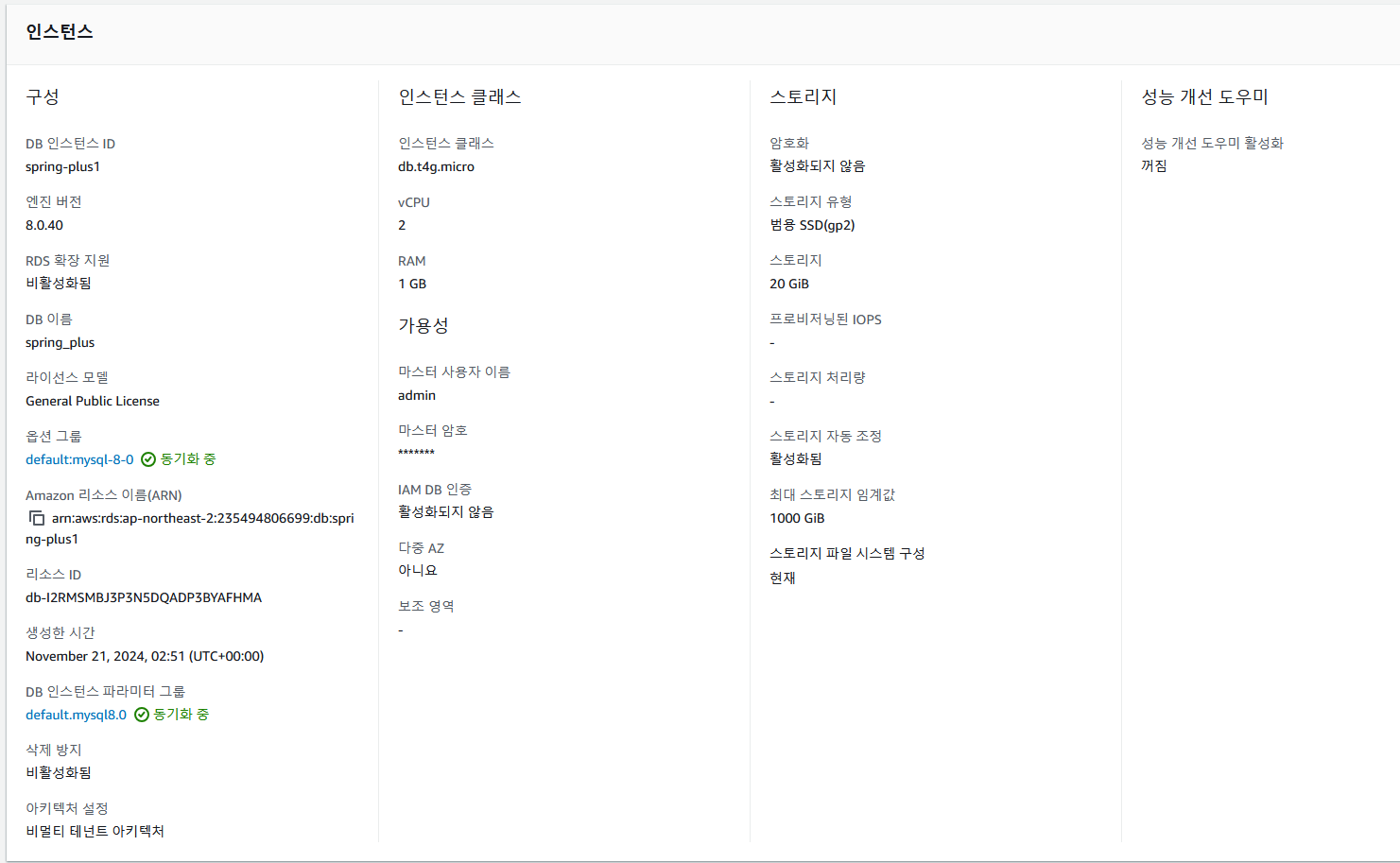
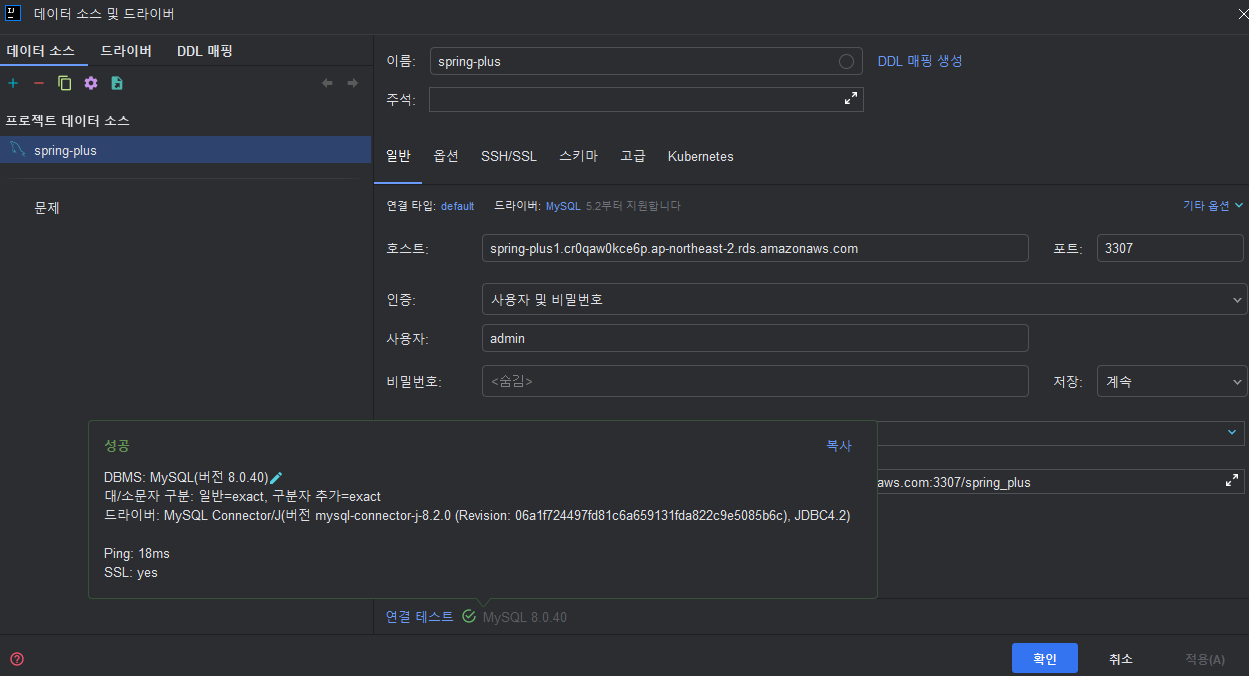
- RDS 와의 연결설정을 확인 가능하다.
- RDS 가 퍼블릭액세스가 거부되있을경우 접근이 불가능할 수 도 있으니 꼭 확인해보자!.
3-4
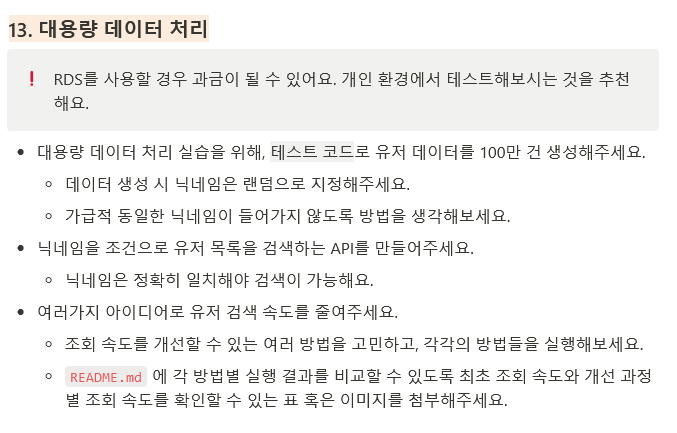
유저 데이터 추가 코드
@Repository
@RequiredArgsConstructor
public class UserBulkRepository {
  private final JdbcTemplate jdbcTemplate;

  @Transactional
  public void saveAll(List<User> Users) {
    jdbcTemplate.batchUpdate(
        "insert into users(email,password,nickname,user_role,created_at,modified_at) values (?, ?, ?, ?,?,?)",
        new BatchPreparedStatementSetter() {
          @Override
          public void setValues(PreparedStatement ps, int i) throws SQLException {
            User user = Users.get(i);
            ps.setString(1, user.getEmail());
            ps.setString(2, user.getPassword());
            ps.setString(3, user.getNickname());
            ps.setString(4, user.getUserRole().toString());
            ps.setString(5, LocalDateTime.now().toString());
            ps.setString(6, LocalDateTime.now().toString());
          }

          @Override
          public int getBatchSize() {
            return Users.size();
          }
        });
  }
}
@SpringBootTest
class AuthServiceTest {
private static final Random RANDOM = new Random();
@Autowired private UserBulkRepository userBulkRepository;
private static final char[] KOREAN_CHARACTERS =
("가나다라마바사아자차카타파하김이박최조장윤임강한오서권황안송류홍배진차원유심구노물철산별빛길불동고성준혁명호의완연시누리재현익수신희상원진윤주민기백욱금여승육헌은영도식창용환시우지수정도협훈인배옥로문손초일탁태제월린삼섬실")
.toCharArray();
@Test
@Rollback(false)
@Transactional
@DisplayName("더미유저데이터 생성")
void generateMillionUsers() {
long startTime = System.currentTimeMillis();
Set<String> nicknameSet = Collections.synchronizedSet(new HashSet<>());
List<User> users = new ArrayList<>();
for (long i = 0; i < 1000000; i++) {
String email = "user" + i + "@example.com";
String nickname = generateUniqueNickname(nicknameSet);
String password = "password" + i;
UserRole userRole = UserRole.USER;
User user = new User(email, password, nickname, userRole);
users.add(user);
if (users.size() == 100000) {
userBulkRepository.saveAll(users);
users.clear();
}
}
long endTime = System.currentTimeMillis();
System.out.println(endTime - startTime);
}
}- batchSize 를 통해 BulkInsert 방식을 사용하여 유저데이터 100만개를 삽입하였다.
- 실행속도 39376 ms (39초)
개선 전
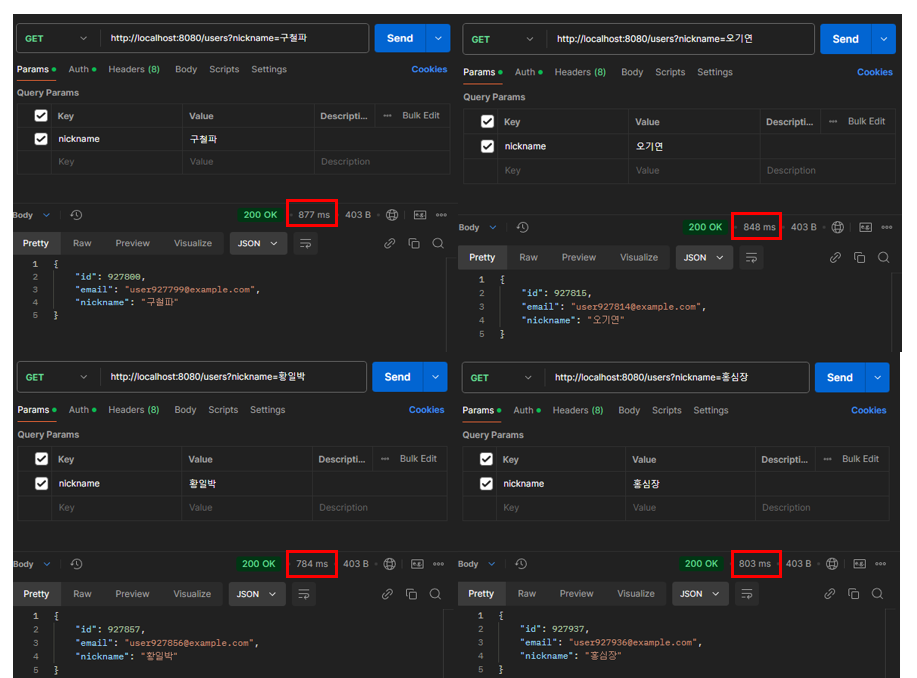
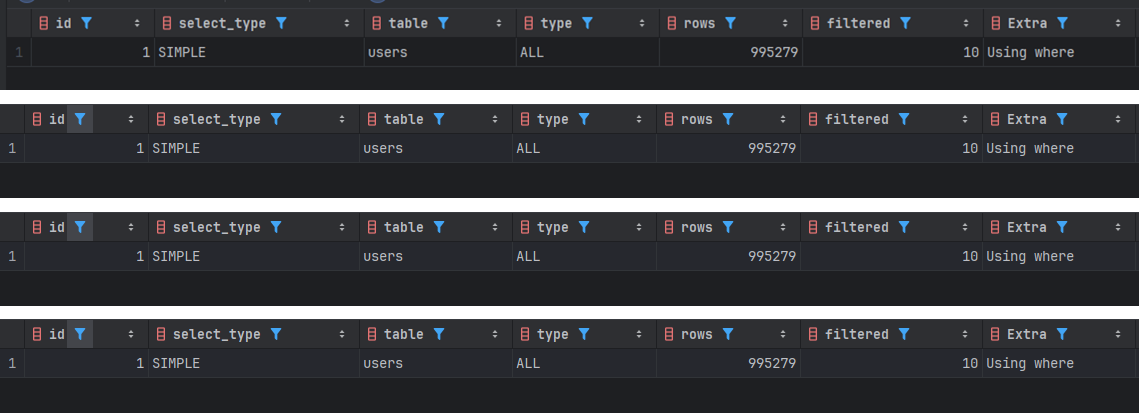
- 평균시간 : 약 828 ms
- 검색한 Row 수 : 995279 개
- 검색 타입 : Full Table Scan
개선 후
ALTER TABLE users ADD INDEX index_nickname (nickname);- 성능 개선을 위하여
INDEX기법을 사용하였다.
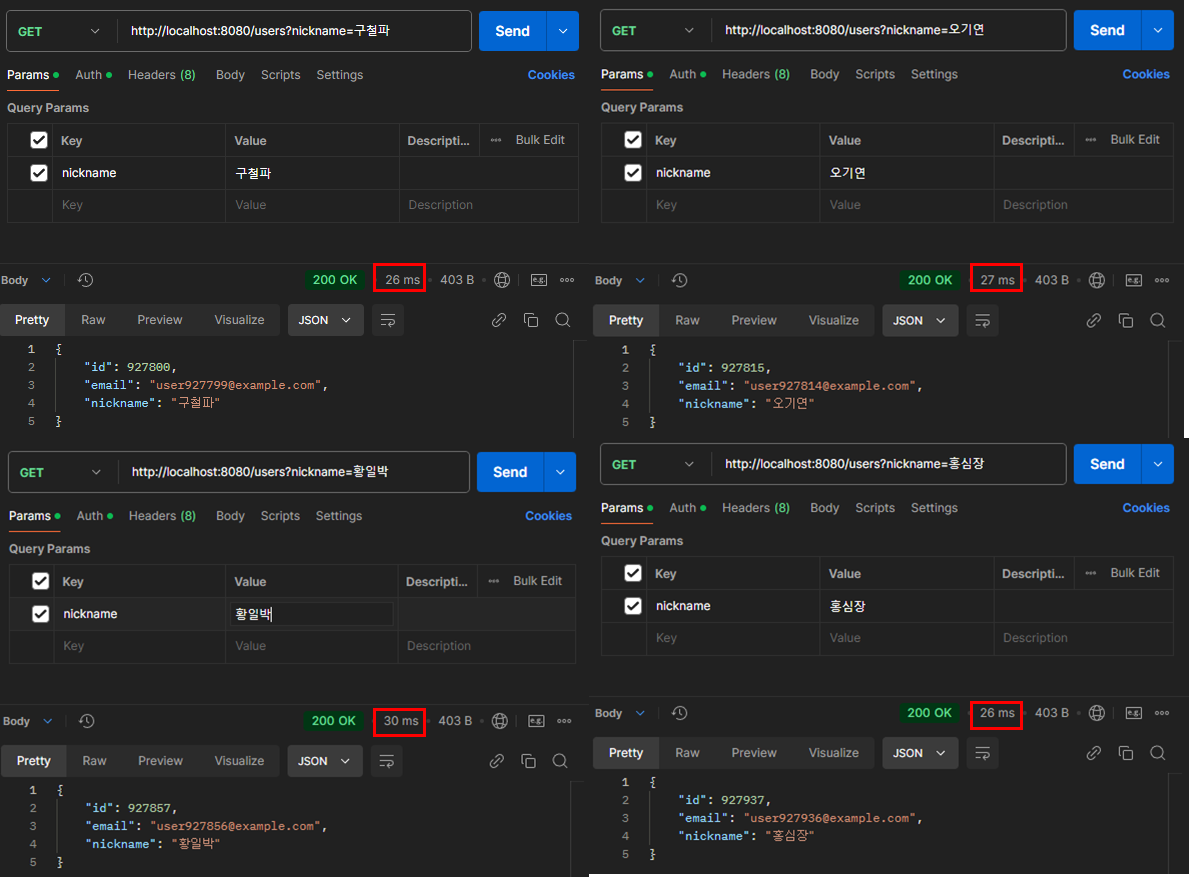
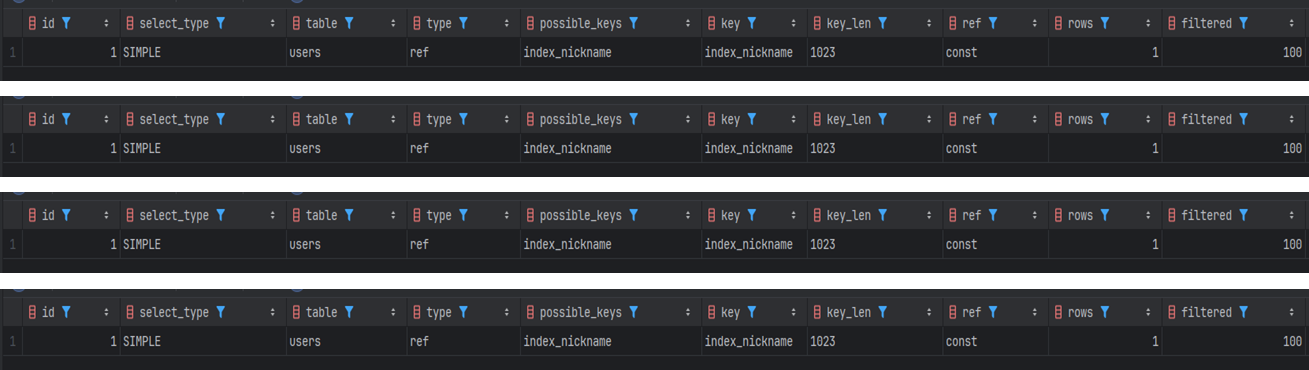
- 평균 : 약 27.25 ms
- 검색한 Row 수 : 1 개
- 검색 타입 : 비고유 인덱스 스캔
- 평균 실행시간을 API단위로 따졌을때
검색속도에 대한 변경사항(API 실행시간, 메모리 상태, 네트워크 딜레이 등) 이 너무많다 생각하여MySql EXPLAIN을 통해 DB 기준의검색 성능을 같이 측정하였다.
사용한 SQL 문
select SQL_NO_CACHE * from users where users.nickname ='구철파';
select SQL_NO_CACHE * from users where users.nickname ='오기연';
select SQL_NO_CACHE * from users where users.nickname ='황일박';
select SQL_NO_CACHE * from users where users.nickname ='홍심장';
EXPLAIN select * from users where nickname ='구철파';
EXPLAIN select * from users where nickname ='오기연';
EXPLAIN select * from users where nickname ='황일박';
EXPLAIN select * from users where nickname ='홍심장';
ALTER TABLE users ADD INDEX index_nickname (nickname);
Level. Custom
CI 적용
name: Run Test

# Event Trigger 특정 액션 (Push, Pull_Request)등이 명시한 Branch에서 일어나면 동작을 수행한다.
on:
  push:
    # 배열로 여러 브랜치를 넣을 수 있다.
    branches:
      - main
  # 실제 어떤 작업을 실행할지에 대한 명시
jobs:
  build:
    # 스크립트 실행 환경 (OS)
    # 배열로 선언시 개수 만큼 반복해서 실행한다. ( 예제 : 1번 실행)
    runs-on: [ ubuntu-latest ]

    # 실제 실행 스크립트
    steps:
      # uses는 github actions에서 제공하는 플러그인을 실행.(git checkout 실행)
      - name: checkout
        uses: actions/checkout@v4

      # with은 plugin 파라미터 입니다. (java 17버전 셋업)
      - name: java setup
        uses: actions/setup-java@v2
        with:
          distribution: 'adopt' # See 'Supported distributions' for available options
          java-version: '17'

      - name: make executable gradlew
        run: chmod +x ./gradlew

      # run은 사용자 지정 스크립트 실행
      - name: run unittest
        run: |
          ./gradlew clean test
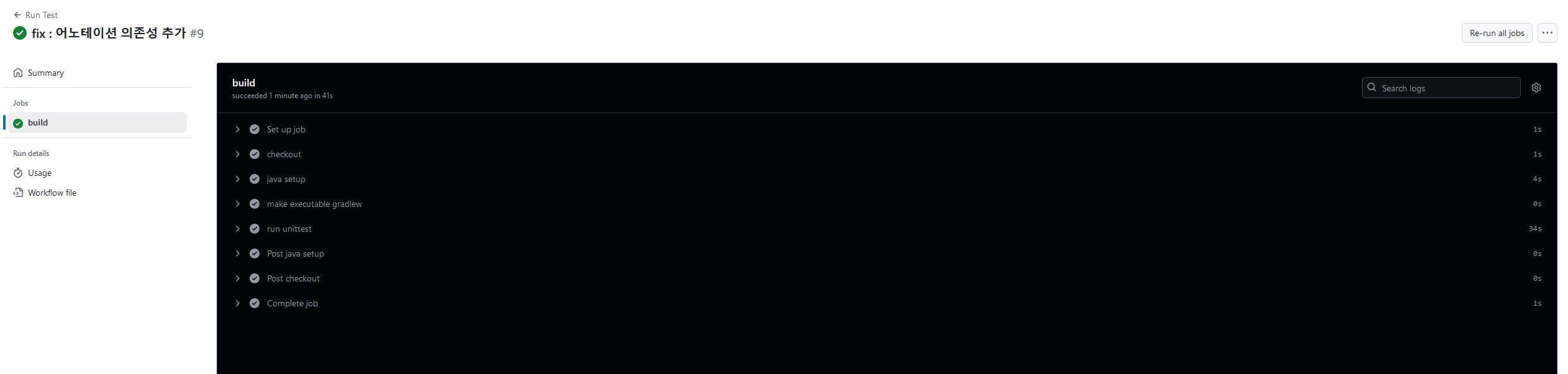
테스트 성공
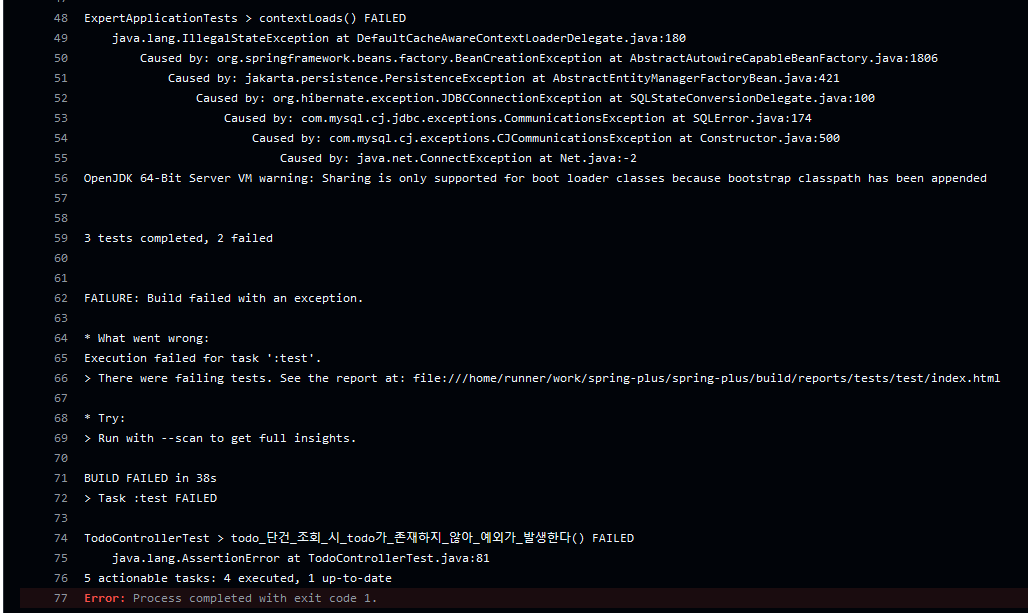
테스트 실패
- 현재
main브랜치에 최소한의 안전장치를 위하여gradle이 제대로 빌드되는지와 작성된 TestCode들이 제대로 동작하는지에 대한 CI를GithubAction을 통해 지정해두었다. - 사용자는 Push후 수행되는 CI 결과의 따라 어느부분의 문제가 있는지 혹은 테스트코드가 제대로 동작하지 않는지를 파악할 수 있다.
- 일반적으로 CI 뿐만 아니라 Main 브랜치에 PR이 되어 머지가 되었을때 배포자동화를 담당하는 CD 까지 작성하는게 일반적임으로 이후에 추가할 예정이다.
Docker-Compose 를 이용한 Local DB 공통화
services:
  mysql:
    image: mysql:8.0
    container_name: spring-plus
    environment:
      MYSQL_ROOT_PASSWORD: admin
      MYSQL_DATABASE: spring-plus
      MYSQL_USER: admin
      MYSQL_PASSWORD: admin
    ports:
      - "3307:3306"
    volumes:
      - db-data:/var/lib/mysql
    networks:
      - app-network
    healthcheck:
      test: [ "CMD", "mysqladmin", "ping", "-h", "localhost" ]
      timeout: 20s
      retries: 10
    restart: always

networks:
  app-network:
    driver: bridge
volumes:
  db-data: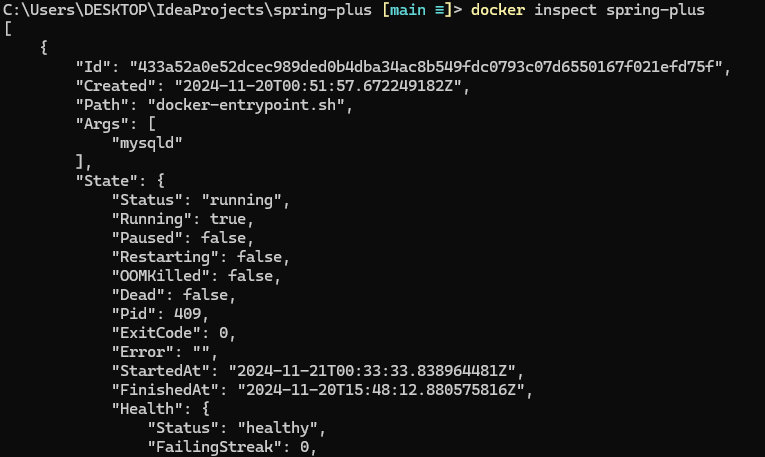
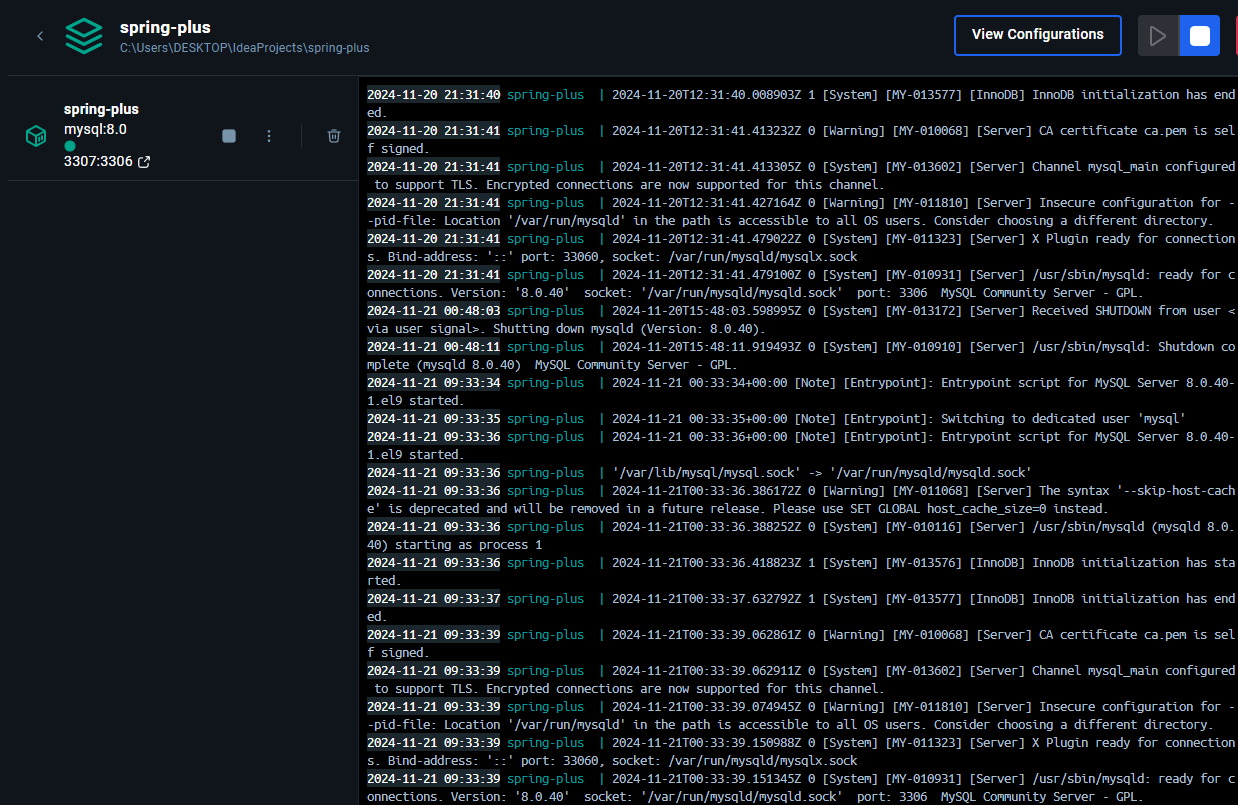
- 현재는 개인 프로젝트이기에 개발환경의 공통화가 필요가없을수도 있지만 후에 배포가되거나 다른 유저가 해당소스를 실행시킬 필요가 있을수도 있다.
- 자신의 MySql 로컬환경을 프로젝트에 맞추지않더라도 docker 를 통해서 실행이 가능하도록 설정하였다.

70살까지 개발하고싶은 개발자