들어가기에 앞서
사실 해당 API 는 문서에서 제공하는 데모코드 마저도
삭제된 메서드가 존재하는 만큼 불안정한 API라
언제 다루어 볼까 싶었는데
iOS 26.1 이 넘어가면서 부턴 괜찮아지는 것 도 같아서 다루어 볼까 합니다.
AlarmKit Docs
AlarmKit_LittleTale
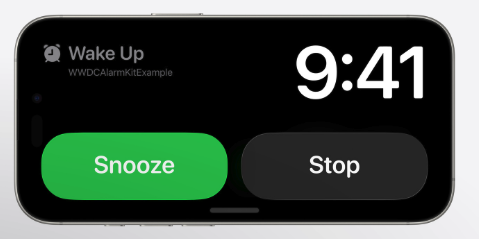
AlarmKit
알람킷 이름부터가 네. 알람을 울릴수 있는 도구이죠.
중요한 부분은 알람은 현재상태(예를들어 무음)를 무시하고 실행 된다는 점이 중요하죠
아이폰에서 전부터 사용하던 시계의 알람 생태계를 접근할 수 있다가
좀 더 맞는 표현인 것 같습니다.
NSAlarmKitUsageDescription
알람킷도 권한이 필요합니다.
알람 예약 기능이 필요한 이유에 대해서NSAlarmKitUsageDescription키를 추가해야 합니다.
Alarm Manager
모든 알림을 중앙에서 관리하는 객체입니다.
- 권한관리
- 알림관리 (stop, start)
// 스케줄 등록
let _ = try await AlarmManager.shared.schedule(id: id, configuration: config)

// 알람 관리
if (isCancelled) {
    try AlarmManager.shared.cancel(id: alarmID) // 취소
} else {
    if (isResumed) {
        try AlarmManager.shared.resume(id: alarmID) // 재게
   } else {
        try AlarmManager.shared.pause(id: alarmID) // 중단
   }
}

// 권한 관리
private func checkAndAuthorize() async throws -> Bool {
    var currentValue = false
    switch AlarmManager.shared.authorizationState {
    case .notDetermined:
        let status = try await AlarmManager.shared.requestAuthorization()
        currentValue = status == .authorized
    case .denied:
        currentValue = false
    case .authorized:
        currentValue = true
    @unknown default:
        fatalError()
    }

    return currentValue
}
AlarmConfiguration
알람의 스케줄, 속성, Intent 를 정의하는 하나의 구조체 입니다.
let attributed = AlarmAttributes<MyAlarmMetaData>(
    presentation: presentation,
    metadata: MyAlarmMetaData(method: .wakeUp),
    tintColor: .orange
)

let schedule = Alarm.Schedule.fixed(store.state.scheduleDate)

let config = AlarmManager.AlarmConfiguration(
    schedule: schedule,
    attributes: attributed,
    secondaryIntent: OpenAppIntents(id: id)
)
AlarmPresentation
알람의 상태에 따른 UI 구성을 제어합니다.
문서
let alert = AlarmPresentation.Alert(title: "Eggs are ready!",
stopButton: AlarmButton(text: "Stop", textColor: .blue, systemImageName: "stop.circle"),
secondaryButton: AlarmButton(text: "Repeat", textColor: .blue, systemImageName: "repeat"),
secondaryButtonBehavior: .countdown)

let countdown = AlarmPresentation.Countdown(title: "Eggs are cooking")

let paused = AlarmPresentation.Paused(title: "Timer paused",
resumeButton: AlarmButton(text: "Resume", textColor: .blue, systemImageName:"play.circle"))

let presentation = AlarmPresentation(alert: alert, countdown: countdown, paused: paused)
실사용시
/// The appearance of the stop button.
@available(*, deprecated, message: "This property is not used anymore and will be removed.")
public var stopButton: AlarmButton

/// Creates an alert for an alarm.
/// - Parameters:
///   - title: The title of the alert.
///   - stopButton: The end button for an alarm.
///   - secondaryButton: The customizable second button for an alarm.
///   - secondaryButtonBehavior: The defined behavior of the secondary button.
@available(iOS, deprecated: 26.1, message: "stopButton is deprecated and will no longer be used")
public init(title: LocalizedStringResource, stopButton: AlarmButton, secondaryButton: AlarmButton? = nil, secondaryButtonBehavior: AlarmPresentation.Alert.SecondaryButtonBehavior? = nil)
let alert = AlarmPresentation.Alert(
title: "일어나",
secondaryButton: AlarmButton(
text: "Go To App",
textColor: .blue,
systemImageName: "app.fill"
),
secondaryButtonBehavior: .custom
)
// 위는 UI 구성 요소
let presentation = AlarmPresentation(alert: alert)Alert
알림:
간단한 알림 기능을 제공합니다.
WWDC25 Code
func  scheduleAlertOnlyExample () {
   let alertContent =  AlarmPresentation.Alert ( title: "Wake Up" , stopButton: .stopButton)

   let attributes =  AlarmAttributes <CookingData> ( presentation : AlarmPresentation (alert: alertContent),
                                                 tintColor: Color.accentColor )

   let alarmConfiguration =  AlarmConfiguration (schedule: .twoMinsFromNow, attributes: attributes)

   scheduleAlarm(id: UUID (), label: "Wake Up" , alarmConfiguration: alarmConfiguration)
}
카운트 다운 알람의 경우
반복 알림 기능이 존재합니다.
// 시작값 10 초 -> 다시하기 하면 10
let countDownDuration = Alarm.CountdownDuration(preAlert: 10, postAlert: 10)

let countDownPresentation = AlarmPresentation.Countdown(
	title: "10Sec",
	pauseButton: AlarmButton(
		text: "pause",
		textColor: .red,
		systemImageName: "pause.fill"
	),
)

let pausedPresentation =  AlarmPresentation.Paused(
	title: "Paused",
	resumeButton: AlarmButton(
		text: "resume",
		textColor: .green,
		systemImageName: "Play.fill"
	)
)

let presentation = AlarmPresentation(alert: alert, countdown: countDownPresentation, paused: pausedPresentation)

// 위는 UI 구성 요소
let attributed = AlarmAttributes<MyAlarmMetaData>(presentation: presentation, metadata: MyAlarmMetaData(method: .wakeUp), tintColor: .orange)

let id = UUID()

let config = AlarmManager.AlarmConfiguration(
	countdownDuration: countDownDuration,
	attributes: attributed,
	secondaryIntent: OpenAppIntents(id: id)
)
MetaData
앱과 위젯 확장 간에 공유되는 활동 속성의 메타데이터
즉, 앱에서 특정 데이터를 실어 보내주고 싶을때 담아서 보내줄 수 있습니다.
import AlarmKit

// 앱과 위젯 확장 간에 공유되는 활동 속성의 메타데이터 구조.
struct MyAlarmMetaData: AlarmMetadata {

   let createdAt: Date
   let method: Method?

   init(method: Method? = nil) {
       self.createdAt = Date.now
       self.method = method
   }

   enum Method: String, Codable {
       case wakeUp

       var icon: String {
           switch self {
           case .wakeUp: "flame.fill"
           }
       }
   }
}

// 위젯에서
   func getIcon(attributes: AlarmAttributes<MyAlarmMetaData>) -> some View {
       Group {
           if let icon = attributes.metadata?.method?.icon {
               Image(systemName: icon)
           } else {
               EmptyView()
           }
       }
   }
현재 알람상황 추적
앱측에서 알람 상태를 감시할 수가 있습니다.
다만, 앱이 실행중 일 때만 알림을 받을 수가 있습니다.
    private func observeAlarms() {
        Task {
            for await incomingAlarms in alarmManager.alarmUpdates {
                updateAlarmState(with: incomingAlarms)
            }
        }
    }

    private func updateAlarmState(with remoteAlarms: [Alarm]) {
        Task { @MainActor in

            // Update existing alarm states.
            remoteAlarms.forEach { updated in
                alarmsMap[updated.id, default: (updated, "Alarm (Old Session)")].0 = updated
            }

            let knownAlarmIDs = Set(alarmsMap.keys)
            let incomingAlarmIDs = Set(remoteAlarms.map(\.id))

            // Clean-up removed alarms.
            let removedAlarmIDs = Set(knownAlarmIDs.subtracting(incomingAlarmIDs))
            removedAlarmIDs.forEach {
                alarmsMap[$0] = nil
            }
        }
}| Alarm Setting | Timer Setting |
|---|---|
 |  |
마무리 하며
핵심적인 부분을 정리 해 본 시간인 것 같습니다.
사실 말로만 쓱 보면 이해가 잘 안되는 스타일이라 저는
Git Hub에다가 어떻게 하면 커스텀 할 수 있는지
라이브 엑티비티 처음해보는데 어떻게 사용하는지 간단하게 다루어 놓았습니다.
한번 사용해보시길 바라면서
다음시간에 뵙겠습니다. 감사합니다. :)