LOGIN
index.html
<!DOCTYPE html>
<html lang="en">
<head>
  <meta charset="UTF-8">
  <meta http-equiv="X-UA-Compatible" content="IE=edge">
  <meta name="viewport" content="width=device-width, initial-scale=1.0">
  <link rel="stylesheet" href="style.css">
  <title>Momentum</title>
</head>
<body>
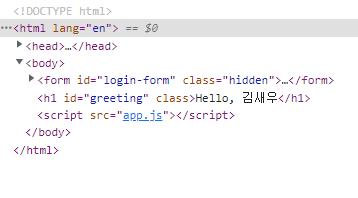
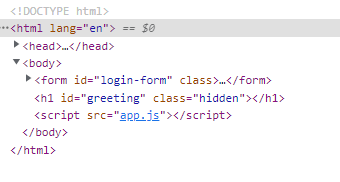
  <form id="login-form" class="hidden">
    <!-- html의 유효성 검사를 실행하기 위해서는 input이 form태그 안에 있어야함 -->
    <input required maxlength="15" type="text" placeholder="What is your name?">
    <button>Log In</button>
  </form>
  <h1 id="greeting" class="hidden"></h1>
  <script src="app.js"></script>
</body>
</html>
style.css
.hidden {
  display: none;
}
app.js
const loginForm = document.getElementById("login-form");
const loginInput = loginForm.querySelector("input");
const loginButton = loginForm.querySelector("button");

const loginInput2 = document.querySelector("#login-form input");
const loginButton2 = document.querySelector("#login-form button");
const greeting = document.querySelector("#greeting")

function onLoginBtnClick() {
  const username = loginInput.value;
  // if (username === "") {
  //   alert("please write your name");
  // } else if (username.length > 15) {
  //   alert("your name is too long.");
  // }
}
const HIDDEN_CLASSNAME = "hidden";
const USERNAME_KEY = "username";

function onLoginSubmit(event) { // argument에 방금 실행된 event에 대한 정보가 있음
  event.preventDefault();
  // 어떤 이벤트의 기본 동작을 막는 함수 --> submit하면 브라우저는 페이지를 자동으로 새로고침함.
  loginForm.classList.add(HIDDEN_CLASSNAME);
  const username = loginInput.value;
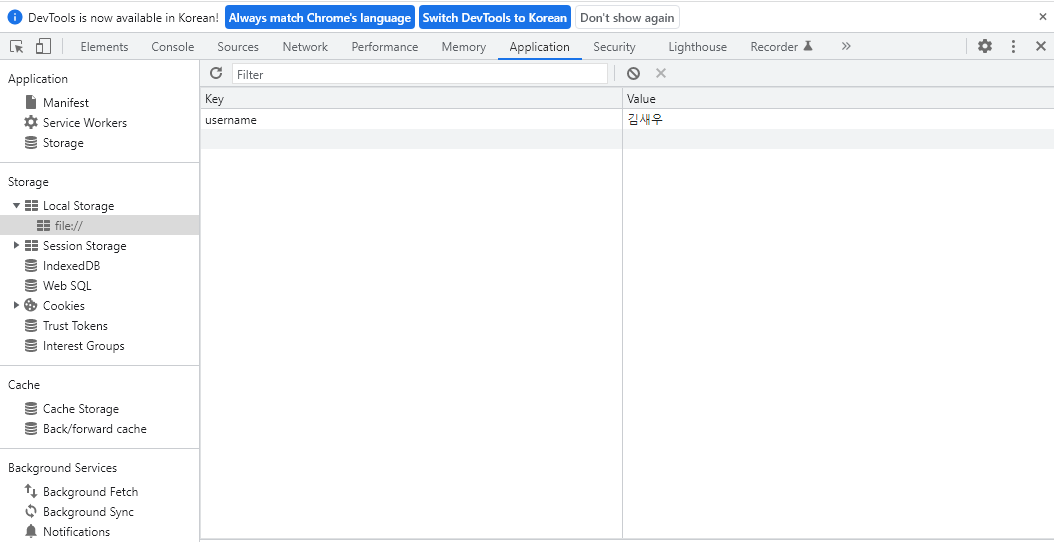
  localStorage.setItem(USERNAME_KEY, username); // localStorage API 사용해서 값을 저장
  // localStorage.getItem("username"); // 값을 꺼내옴
  // localStorage.removeItem("username"); // 값을 삭제
  paintGreetings(username);
}

function paintGreetings(username) {
// greeting.innerText = "Hello, " + username;
greeting.innerText = `Hello, ${username}`;
greeting.classList.remove(HIDDEN_CLASSNAME);
}
const savedUsername = localStorage.getItem(USERNAME_KEY);

if(savedUsername === null) {
  // show the form
  loginForm.classList.remove(HIDDEN_CLASSNAME);

  //loginButton.addEventListener("click", onLoginBtnClick);
  loginForm.addEventListener("submit", onLoginSubmit);
  // submit은 엔터를 하거나 버튼을 클릭할 때 발생
} else {
  // show the greeting
  paintGreetings(savedUsername);
}- form 출력

-
local storage API
-
h1 출력