이 글은 김영한 강의 - Spring MVC 1편 섹션3.서블릿 강의를 듣고 정리한 글입니다.
📍HttpServletRequest
서블릿은 개발자가 HTTP 요청 메시지를 편리하게 사용할 수 있도록 개발자 대신에 HTTP 요청 메시지를 파싱한다. 그리고 그 결과를 HttpServletRequest 객체에 담아서 제공한다.
🔑중요
HttpServletRequest, HttpServletResponse를 사용할 때 가장 중요한 점은 이 객체들이 HTTP 요청 메시지, HTTP 응답 메시지를 편리하게 사용하도록 도와주는 객체라는 점이다. 따라서 이 기능에 대해서 깊이있는 이해를 하려면 HTTP 스펙이 제공하는 요청, 응답 메시지 자체를 이해해야 한다.
HttpServletRequest를 사용하면 Http 요청 메세지를 편리하게 조회 가능하다.
POST /save HTTP/1.1
Host: localhost:8080
Content-Type: application/x-www-form-urlencoded

username=kim&age=20
START LINE(HTTP 메소드, URL, 쿼리스트링, 스키마, 프로토콜), 헤더, 바디
- 임시 저장소 기능
- 세션(로그인) 관리 기능
⭐ 주로 3가지 방법의 Http 요청
GET - 쿼리 피라미터
POST - HTML Form
HTTP message body
-
GET - 쿼리 피라미터
-
메세지 바디 없이 URL의 쿼리파라미터를 사용해서 데이터 전달
예) 검색, 필터, 페이징 등에서 많이 사용함 -
복수 파라미터에서 단일 파라미터 조회?
username=hello&username=kim과 같이 파라미터 이름은 하나, 값이 중복일 경우 -> 이렇게 거의 안쓰긴 함.
-> 쓴다면request.getParameterValues()를 사용해야 한다.
->request.getParameter()는 하나의 파라미터 이름에 단 하나의 값만 있을 때 사용 (여러개일 경우 첫번째 값만 반환한다)
-
-
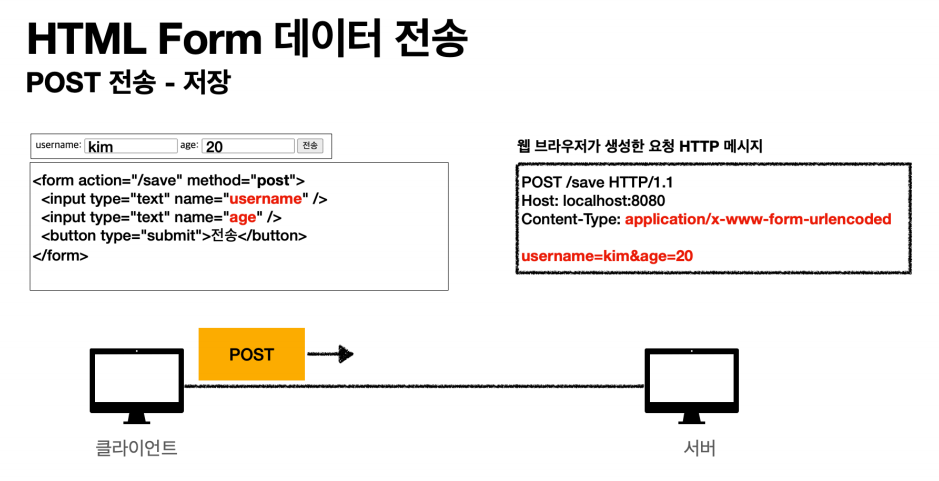
POST - HTML Form
- 메세지 바디에 쿼리 파라미터 형식으로 전달:
username=hello&age=20
- 예) 회원가입, 상품주문, HTML Form 사용 Content-Type은 HTTP message body가 어떤 형식의 데이터인지 알려준다(GET URL 쿼리 파라미터 형식은 content-type이 null이다.)Content-Type: application/x-www-form-urlencodedmessage body:username=kim&age=20
-
클라이언트 입장에서는 두 방식에 차이가 있지만, 서버 입장에서는 둘의 형식이 동일하므로, HTML Form 같은 경우도
request.getParameter()로 구분 없이 조회할 수 있다. -
Form 데이터를 Body로 전송할 때는 POST방식만 허용됨
- 메세지 바디에 쿼리 파라미터 형식으로 전달:
-
HTTP message body
-
Http API에서 주로 사용 (JSON,
XML, TEXT)
: HTTP message body에 데이터를 직접 담아서 요청
- POST, PUT PATCH -
JSON 형식으로 전송할 때 (실습)
- POST http://localhost:8080/request-body-json- content-type : application/json
- message body :
{"username": "hello", "age": 20}
-
📍HttpServletResponse
HttpServletResponse의 역할
응답은 크게 3가지
단순 text 보내는 것
html 보내는 것
body에 직접 json 보내는 것
HTTP 응답 메세지 생성
- HTTP 응답코드 지정 (200, 400, 404, 500...)
- 헤더 생성
- 바디 생성
+) 편의 기능 제공(Content-Type, 쿠키, Redirect)
@WebServlet(name = "responseHtmlServlet", urlPatterns = "/response-html")
public class ResponseHtmlServlet extends HttpServlet {

    @Override
    protected void service(HttpServletRequest request, HttpServletResponse response) throws ServletException, IOException {
        // Content-Type: text/html;charset=utf-8
        response.setContentType("text/html");
        response.setCharacterEncoding("UTF-8");

        PrintWriter write = response.getWriter();
        write.println("<html>");
        write.println("<body>");
        write.println("    <div> 안녕! </div>");
        write.println("</body>");
        write.println("</html>");
    }
}
http 응답으로 HTML을 반환할 때는 content-type을 text/html로 지정해야 한다.