[Terraform] State
Overview
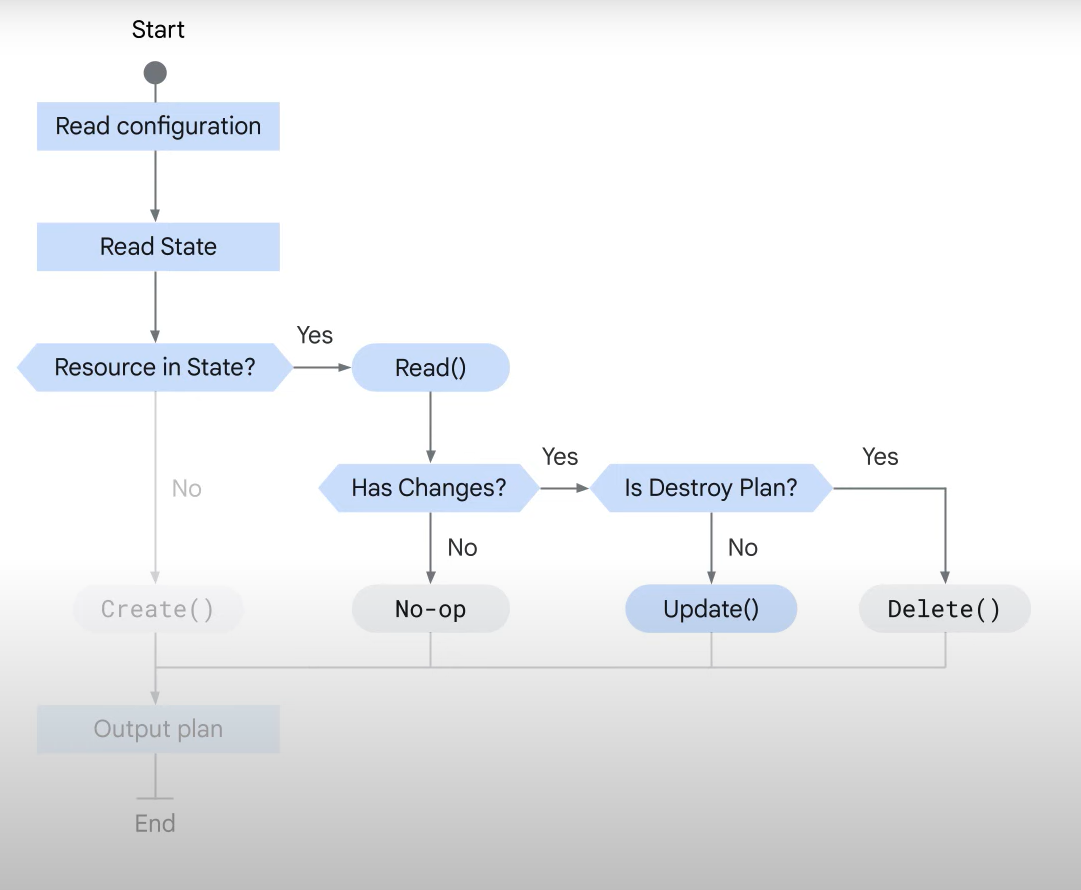
Introduction to Terraform State:
- Terraform state is a metadata repository of your infrastructure configuration.
- By default, state is stored locally in a file named
terraform.tfstate. - In team environments, it is recommended to store state remotely for better collaboration.
- By default, state is stored locally in a file named
- State File Usage:
- Terraform saves the state of resources it manages in the state file.
- It uses local state to create plans and change infrastructure.
- Before any operation, Terraform performs a refresh to update the state file with the real infrastructure.
- Purpose of Terraform State:
- Stores bindings between objects in a remote system and resource instances in your configuration.
- Tracks the identity of remote objects and updates or deletes them as needed based on future changes.
- State File & Resource Block:
- Every resource within a resource block is identified by its name within the state file.
- When a new configuration is applied, Terraform creates resources and automatically generates the state file.
- It compares the current configuration with the state file and generates a plan for changes.
- Terraform Plan & Apply:
- After applying the plan, Terraform updates the state file to reflect the current infrastructure state.
- If some arguments cannot be updated due to API limitations, Terraform will destroy and re-create the resource.
- When a resource is removed from the configuration, Terraform compares the state and destroys any no longer needed resources.
Store it in the bucket
State File Storage:
-
Local State Storage:
- By default, Terraform saves state files locally with a
.tfstateextension. - Local state is simple and requires no additional maintenance when only one developer is working.
- Issues with Local State in Team Environments:
- No shared access: Each team member needs access to the same state file for collaboration.
- No locking: Multiple developers running Terraform at the same time can cause RACE conditions, leading to state conflicts and corruption.
- Lack of confidentiality: Local state files store sensitive information in plain text.
- By default, Terraform saves state files locally with a
-
Remote State Storage Benefits:
- Automatic updates: Remote backends ensure state files are loaded before and stored after each
planorapplycommand. - State locking: Remote storage (e.g., Cloud Storage buckets) supports locking, preventing simultaneous updates that can cause corruption.
- Enhanced security: Cloud Storage buckets support encryption in transit and encryption on disk, and access permissions can be managed with IAM policies.
- Automatic updates: Remote backends ensure state files are loaded before and stored after each
-
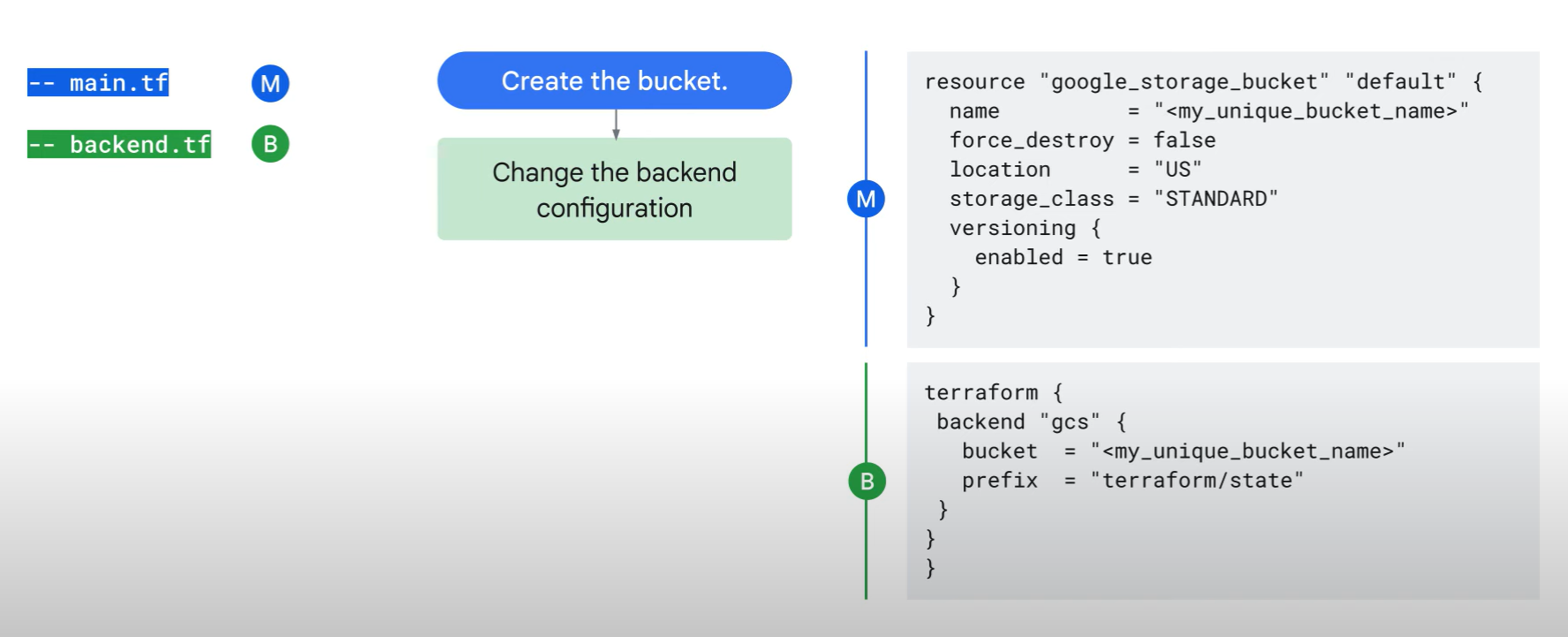
How to Store Terraform State Remotely in a Cloud Storage Bucket:
- Add the
google_storage_bucketresource to a Terraform configuration file (e.g.,main.tf).- Example: The location is hardcoded to
USfor a multi-region bucket. You can adjust the location as needed.
- Example: The location is hardcoded to
- Run
terraform applyto create the Cloud Storage bucket. - Create a new configuration file called
backend.tfand add the backend configuration, ensuring the bucket name matches your newly created bucket. - Run
terraform initto configure the backend. Terraform will detect the existing local state file and prompt you to copy it to the remote backend.- Enter
yeswhen prompted.
- Enter
- After running
terraform init, Terraform will pull the latest state from the Cloud Storage bucket and push updates after each command.
- Add the
-
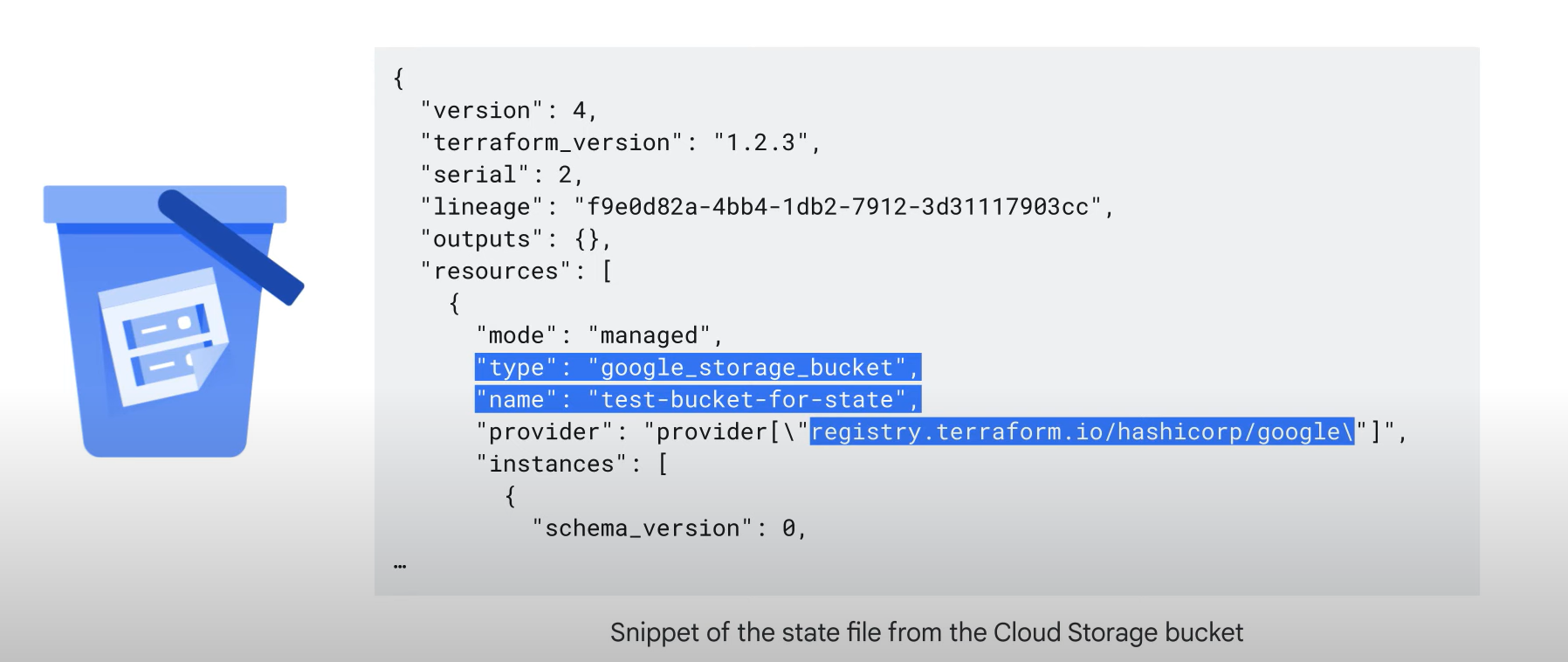
State File Example:
- The remote state file contains metadata such as the resource type, resource name, and provider name.
Best Practice
Best Practices for Terraform State Optimization and Security:
-
Use Remote State for Team Environments:
- Lock and version state files: For team environments, use Cloud Storage as the backend to lock state files and separate sensitive data from version control.
- Ensure that only build systems and highly privileged administrators have access to the remote state bucket.
-
Prevent State File Exposure:
- Use
.gitignore: To avoid committing state files to source control, add Terraform state files to.gitignore.
- Use
-
Avoid Storing Secrets in State Files:
- Many providers store secret values in plain text in the state file.
- Best practice: Avoid storing secrets in the state file to maintain security.
-
Encrypt State Files:
- Although Cloud Storage buckets are encrypted at rest, using customer-supplied encryption keys offers an added layer of protection.
-
Avoid Manual Modification of Terraform State:
- Modifying the state file can corrupt mappings between Terraform and Google Cloud resources, potentially leading to infrastructure issues.
Lab
Create a local state file
Write a main.tf file as below
json
provider "google" {
 project     = "<PROJECT ID>"
 region      = "us-west1"
}
resource "google_storage_bucket" "test-bucket-for-state" {
 name        = "<PROJECT ID>"
 location    = "US" # Replace with EU for Europe region
 uniform_bucket_level_access = true
}
terraform {
 backend "local" {
   path = "terraform/state/terraform.tfstate" # Add a local backend
 }
}
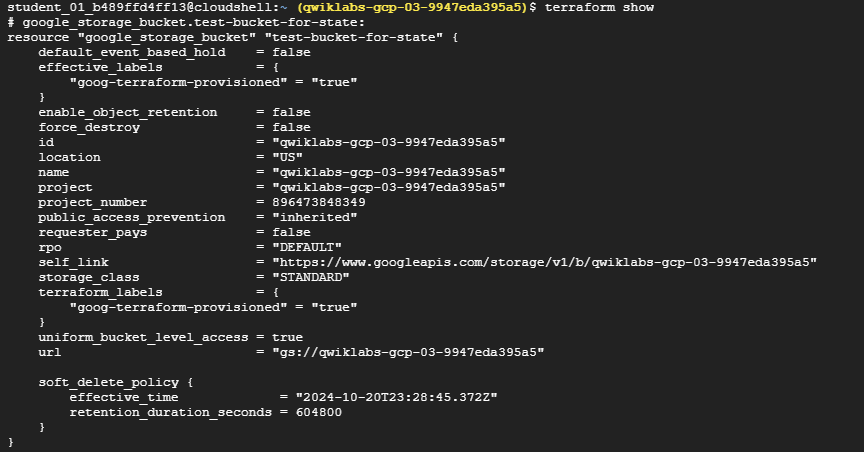
terraform show
Create a remote state file
update the main.tf as below
provider "google" {
  project     = "qwiklabs-gcp-03-9947eda395a5"
  region      = "us-west1"
}
resource "google_storage_bucket" "test-bucket-for-state" {
  name        = "qwiklabs-gcp-03-9947eda395a5"
  location    = "US" # Replace with EU for Europe region
  uniform_bucket_level_access = true
}
terraform {
  backend "gcs" { # Create a remote state file
    bucket  = "qwiklabs-gcp-03-9947eda395a5"
    prefix  = "terraform/state"
  }
}
Run terraform init -migrate-state
Now you can see your state file is uploaded on the bucket you made
tereraform refresh
The terraform refresh command is used to reconcile the state Terraform knows about (via its state file) with the real-world infrastructure. This can be used to detect any drift from the last-known state and to update the state file. This does not modify infrastructure, but does modify the state file. If the state is changed, this may cause changes to occur during the next plan or apply.
<- 수동으로 update 상황 가져오기.
Clean up
- update the main.tf
terraform {
  backend "local" {
    path = "terraform/state/terraform.tfstate"
  }
}-
run
terraform init -migrate-state -
update the main.tf
resource "google_storage_bucket" "test-bucket-for-state" {
  name        = "qwiklabs-gcp-03-9947eda395a5"
  location    = "US" # Replace with EU for Europe region
  uniform_bucket_level_access = true
  force_destroy = true
}
-
run
terraform apply -
run
terraform destroy