[gcp] docker로 push하기
https://www.youtube.com/watch?v=sqUuofLBfFw
- CLOUD BUILD API 활성화하기
GCP가서 CLOUD BUILD API 사용하기로 한다.
- cmd가서 프로젝트 셋팅
gcloud config set project {프로젝트명}
- registry 생성
Artifact Registry 사용셋팅
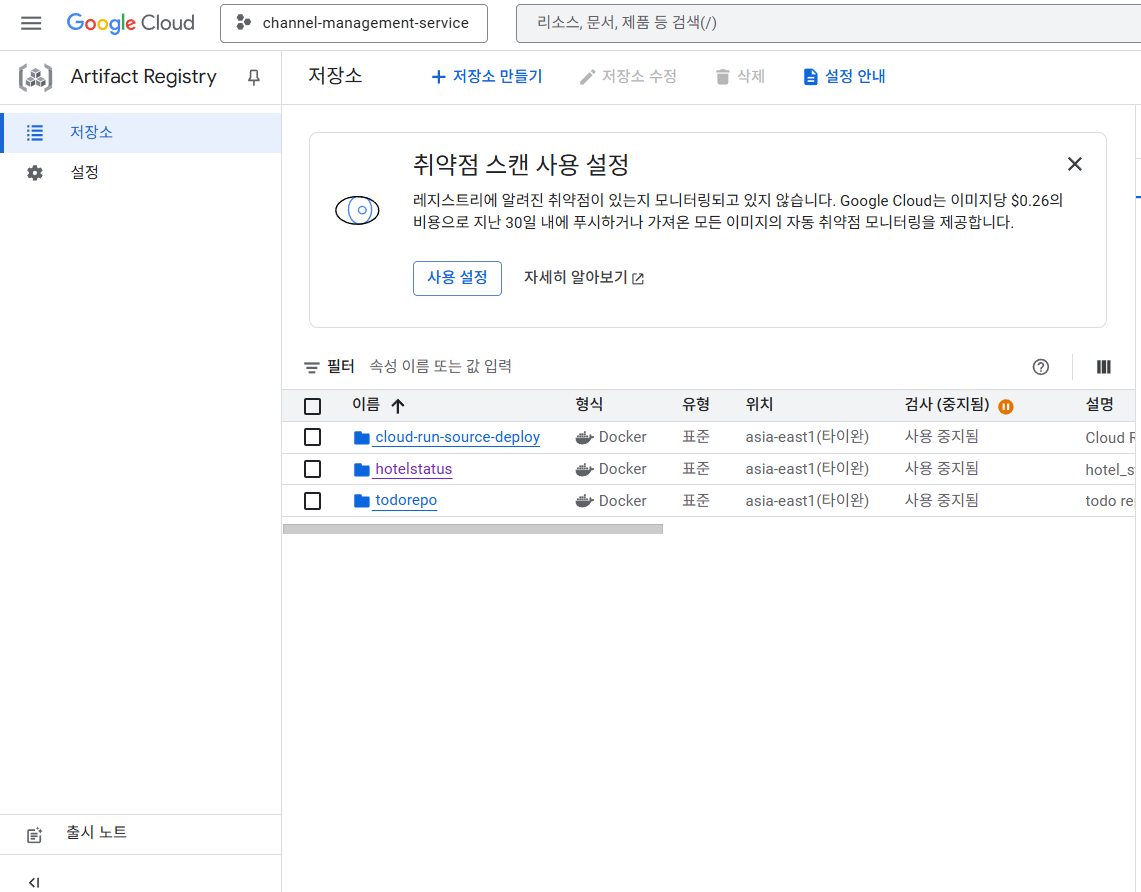
gcloud auth configure-docker asia-east1-docker.pkg.dev
gcloud builds submit --tag asia-east1-docker.pkg.dev/channel-management-service/hotelstatus/hotelstatus:1.0
에러가 나면 로그 가서 잘 살펴보자. pydantic[email] 같은 거 안 깔려있을 수도 있다.
에러날떄
-
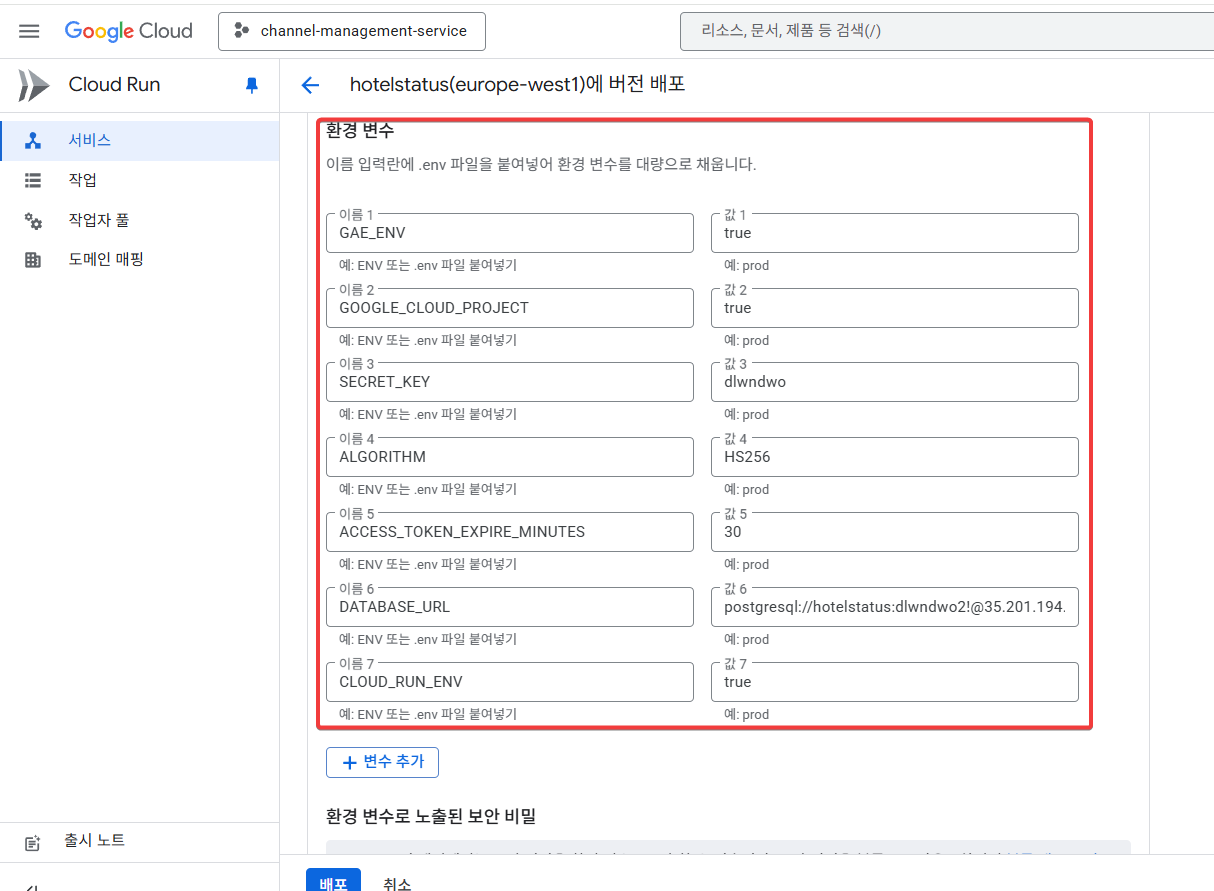
환경변수 잘보자
-
로컬과 CLOUD RUN 다르니 DB 다르게 불러오자
import psycopg2
from psycopg2.extras import RealDictCursor
from contextlib import contextmanager
import os
from dotenv import load_dotenv
from sqlalchemy import create_engine
from sqlalchemy.ext.declarative import declarative_base
from sqlalchemy.orm import sessionmaker

load_dotenv()

# SQLAlchemy Base 클래스 생성
Base = declarative_base()

# 환경 변수로부터 연결 정보 가져오기
def get_db_config():
    """환경에 따른 데이터베이스 연결 설정"""
    # Google Cloud Run 환경인지 확인
    if os.getenv('GAE_ENV'):
        # Cloud Run 환경에서는 Unix 소켓 사용
        return {
            "dbname": "postgres",
            "user": "hotelstatus",
            "password": "dlwndwo2!",
            "host": "/cloudsql/channel-management-service:asia-east1:hotelstatus"
        }
    else:
        # 로컬 환경에서는 Cloud SQL Proxy 사용 (localhost:5432)
        return {
            "dbname": "postgres",
            "user": "hotelstatus",
            "password": "dlwndwo2!",
            "host": "35.201.194.153",
            "port": "5432"
        }

def get_database_url():
    """SQLAlchemy용 데이터베이스 URL 생성"""
    config = get_db_config()
    print("config:", config)
    if 'port' in config:
        return f"postgresql://{config['user']}:{config['password']}@{config['host']}:{config['port']}/{config['dbname']}"
    else:
        # Unix 소켓 연결 (Cloud Run)
        return f"postgresql://{config['user']}:{config['password']}@/{config['dbname']}?host={config['host']}"

def get_connection():
    """데이터베이스 연결 생성 (psycopg2용)"""
    config = get_db_config()
    return psycopg2.connect(**config)

# SQLAlchemy 엔진 및 세션 생성
engine = create_engine(get_database_url())
SessionLocal = sessionmaker(autocommit=False, autoflush=False, bind=engine)

def get_db():
    """SQLAlchemy 세션을 반환하는 의존성 함수 (FastAPI용)"""
    session = SessionLocal()
    try:
        yield session
    finally:
        session.close()

@contextmanager
def get_db_connection():
    """데이터베이스 연결 컨텍스트 매니저 (psycopg2용)"""
    conn = None
    try:
        conn = get_connection()
        yield conn
    finally:
        if conn:
            conn.close()

@contextmanager
def get_db_cursor():
    """데이터베이스 커서 컨텍스트 매니저 (딕셔너리 형태로 결과 반환)"""
    conn = None
    cursor = None
    try:
        conn = get_connection()
        cursor = conn.cursor(cursor_factory=RealDictCursor)
        yield cursor
        conn.commit()
    except Exception as e:
        if conn:
            conn.rollback()
        raise e
    finally:
        if cursor:
            cursor.close()
        if conn:
            conn.close()


def create_tables():
    """SQLAlchemy 모델을 기반으로 테이블 생성"""
    Base.metadata.create_all(bind=engine)

def test_connection():
    """데이터베이스 연결 테스트"""
    try:
        with get_db_cursor() as cursor:
            cursor.execute("SELECT 1 as test")
            result = cursor.fetchone()
            print("데이터베이스 연결 성공:", result)
            return True
    except Exception as e:
        print(f"데이터베이스 연결 실패: {e}")
        return False ```

```docker
# Python 3.11 slim 이미지를 베이스로 사용
FROM python:3.11-slim

# 작업 디렉토리 설정
WORKDIR /app

# 시스템 의존성 설치 (Cloud SQL 연결을 위한 패키지 포함)
RUN apt-get update && apt-get install -y \
    gcc \
    libpq-dev \
    && rm -rf /var/lib/apt/lists/*

# requirements.txt 복사 및 의존성 설치
COPY requirements.txt .
RUN pip install --no-cache-dir -r requirements.txt

# 애플리케이션 코드 복사
COPY . .

# 포트 노출
EXPOSE 8080

# 환경변수 설정 (Cloud Run에서 덮어쓰기 됨)
ENV CLOUD_RUN_ENV=true

# 애플리케이션 실행
CMD ["uvicorn", "main:app", "--host", "0.0.0.0", "--port", "8080"]

CODE DIVE!