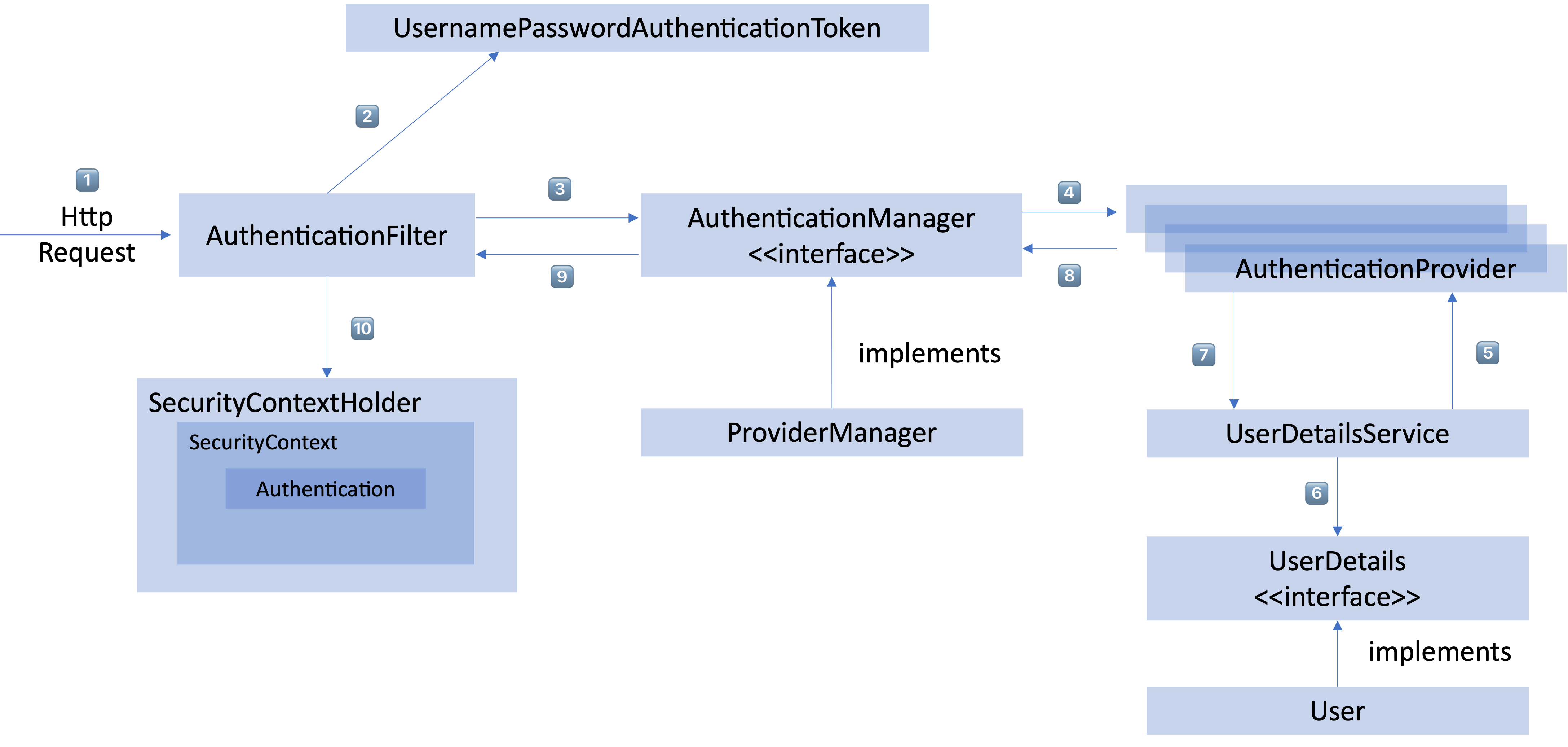
전체구조
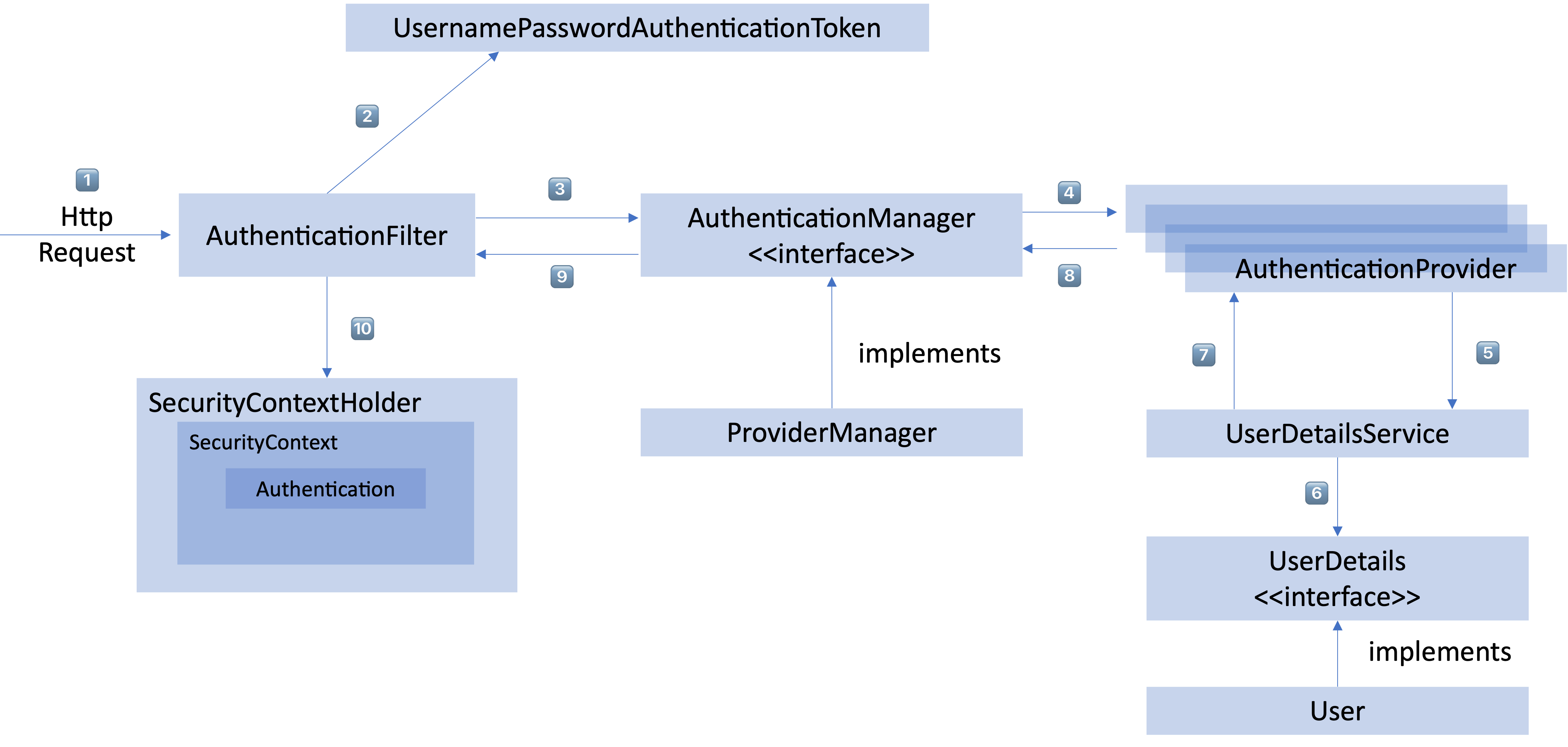
Flow
- 로그인 form을 통해서 username과 password를 받는다.
- AuthenticationFilter가 가로채서 UsernamePasswordAuthenticationToken의 인증용 객체를 생성한다.
- Filter를 통해서 AuthenticationToken을 AuthenticationManager로 위임한다.
AuthenticationManager를 구현한 ProviderManager클래스의 authenticate함수가 동작한다.
위 함수의 인자로 Authentication클래스 타입을 받는다.(UsernamePasswordAuthenticationToken클래스의 조상)
- authenticate함수내에서 AuthenticationProvider에게 인증을 요구한다.
@Override
	public Authentication authenticate(Authentication authentication) throws AuthenticationException {
		Class<? extends Authentication> toTest = authentication.getClass();
		AuthenticationException lastException = null;
		AuthenticationException parentException = null;
		Authentication result = null;
		Authentication parentResult = null;
		int currentPosition = 0;
		int size = this.providers.size();
		for (AuthenticationProvider provider : getProviders()) {
			if (!provider.supports(toTest)) {
				continue;
			}
			if (logger.isTraceEnabled()) {
				logger.trace(LogMessage.format("Authenticating request with %s (%d/%d)",
						provider.getClass().getSimpleName(), ++currentPosition, size));
			}
			try {
				result = provider.authenticate(authentication);
				if (result != null) {
					copyDetails(authentication, result);
					break;
				}
			}
			catch (AccountStatusException | InternalAuthenticationServiceException ex) {
				prepareException(ex, authentication);
				// SEC-546: Avoid polling additional providers if auth failure is due to
				// invalid account status
				throw ex;
			}
			catch (AuthenticationException ex) {
				lastException = ex;
			}
		}
		if (result == null && this.parent != null) {
			// Allow the parent to try.
			try {
				parentResult = this.parent.authenticate(authentication);
				result = parentResult;
			}
			catch (ProviderNotFoundException ex) {
				// ignore as we will throw below if no other exception occurred prior to
				// calling parent and the parent
				// may throw ProviderNotFound even though a provider in the child already
				// handled the request
			}
			catch (AuthenticationException ex) {
				parentException = ex;
				lastException = ex;
			}
		}
		if (result != null) {
			if (this.eraseCredentialsAfterAuthentication && (result instanceof CredentialsContainer)) {
				// Authentication is complete. Remove credentials and other secret data
				// from authentication
				((CredentialsContainer) result).eraseCredentials();
			}
			// If the parent AuthenticationManager was attempted and successful then it
			// will publish an AuthenticationSuccessEvent
			// This check prevents a duplicate AuthenticationSuccessEvent if the parent
			// AuthenticationManager already published it
			if (parentResult == null) {
				this.eventPublisher.publishAuthenticationSuccess(result);
			}

			return result;
		}

		// Parent was null, or didn't authenticate (or throw an exception).
		if (lastException == null) {
			lastException = new ProviderNotFoundException(this.messages.getMessage("ProviderManager.providerNotFound",
					new Object[] { toTest.getName() }, "No AuthenticationProvider found for {0}"));
		}
		// If the parent AuthenticationManager was attempted and failed then it will
		// publish an AbstractAuthenticationFailureEvent
		// This check prevents a duplicate AbstractAuthenticationFailureEvent if the
		// parent AuthenticationManager already published it
		if (parentException == null) {
			prepareException(lastException, authentication);
		}
		throw lastException;
	}
- UserDetailsService의 요구
위의 result = provider.authenticate(authentication); 코드에서 provider에게 인증을 요구하고 authentication을 반환받는다.
AuthenticationProvider에서는 authenticate함수를 통해서 Authentication타입의 클래스를 반환한다.
    @Override
    public Authentication authenticate(Authentication authentication) throws AuthenticationException {

        String username = authentication.getName();
        String password = (String) authentication.getCredentials();

        User user = (User) userDetailsService.loadUserByUsername(username);

        checkUserStatus(user);

        if (!passwordEncoder.matches(password, user.getPassword())) {
            throw new BadCredentialsException(username);
        }

        return new UsernamePasswordAuthenticationToken(user, user.getPassword(), user.getAuthorities());
    }
위 코드는 AuthenticationProvider를 구현한 클래스에서 authenticate함수를 재정의 하였다.
- UserDetails를 이용해 User객체에 대한 정보 탐색
위의 User user = (User) userDetailsService.loadUserByUsername(username); 코드를 통해서 db에서 사용자정보를 조회해서 가져온다.
    @Override
    public UserDetails loadUserByUsername(String loginId) throws UsernameNotFoundException {

        if (logger.isDebugEnabled()) {
            logger.debug(FmdpConstants.LOG_PARAM, this.getClass().getName(), "loadUserByUsername", loginId);
        }

        Map<String, Object> params = new HashMap<>();
        params.put("loginId",           loginId);
        params.put("passwordPeriod",    passwordPeriod);
        params.put("passwordRespite",   passwordPeriod + passwordRespite);
        params.put("defaultCss",        defaultCss);

        UserVO userVo = loginService.findByUsername(params);

        if (userVo == null) {
            throw new UsernameNotFoundException(loginId);
        }

        // set common role
        setCommonRole(userVo);

        return new securityUser(userVo);

    }
위 코드는 UserDetailsService클래스를 구현한 클래스에서 loadUserByUsername함수를 재정의 하였다.
- User 객체의 정보들을 UserDetails가 UserDetailsService(LoginService)로 전달
위 함수에서 반환되는 securityUser는 User클래스 타입을 구현한 클래스이다.
User클래스는 UserDetails클래스를 구현한 클래스이다.
- 인증 객체 or AuthenticationException
인증이 완료가되면 권한 등의 사용자 정보를 담은 Authentication 객체를 반환한다.
- 인증 끝
다시 최초의 AuthenticationFilter에 Authentication 객체가 반환된다.
- SecurityContext에 인증 객체를 설정
Authentication 객체를 Security Context에 저장한다.
최종적으로는 SecurityContextHolder는 세션 영역에 있는 SecurityContext에 Authentication 객체를 저장한다. 사용자 정보를 저장한다는 것은 스프링 시큐리티가 전통적인 세선-쿠키 기반의 인증 방식을 사용한다는 것을 의미한다.

끊임없이 노력하는 개발자